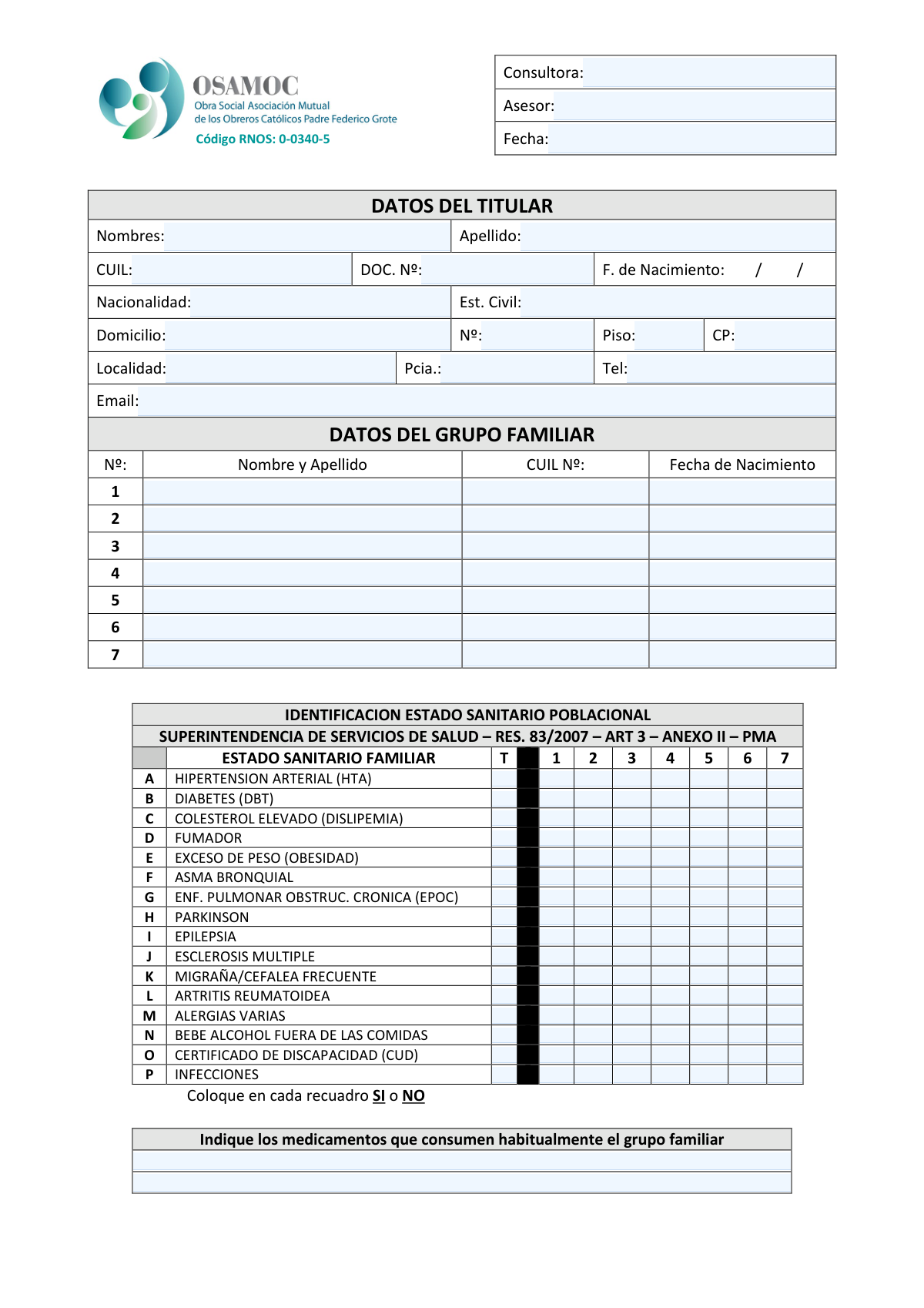
Yes! You can use AI to fill out Identificación Estado Sanitario Poblacional, Anexo II, Res. 83/2007 (Superintendencia de Servicios de Salud)
This form, known as Anexo II of Resolution 83/2007, is a mandatory health status declaration for Argentina's health services system (Superintendencia de Servicios de Salud). It is used to collect essential personal data and a detailed medical history for a primary policyholder and their family members, covering various conditions and lifestyle factors. Today, this form can be filled out quickly and accurately using AI-powered services like Instafill.ai, which can also convert non-fillable PDF versions into interactive fillable forms.
Our AI automatically handles information lookup, data retrieval, formatting, and form filling.
It takes less than a minute to fill out Res. 83/2007 Anexo II using our AI form filling.
Securely upload your data. Information is encrypted in transit and deleted immediately after the form is filled out.
Form specifications
| Form name: | Identificación Estado Sanitario Poblacional, Anexo II, Res. 83/2007 (Superintendencia de Servicios de Salud) |
| Number of pages: | 1 |
| Language: | English |
Instafill Demo: How to fill out PDF forms in seconds with AI
How to Fill Out Res. 83/2007 Anexo II Online for Free in 2026
Are you looking to fill out a RES. 83/2007 ANEXO II form online quickly and accurately? Instafill.ai offers the #1 AI-powered PDF filling software of 2026, allowing you to complete your RES. 83/2007 ANEXO II form in just 37 seconds or less.
Follow these steps to fill out your RES. 83/2007 ANEXO II form online using Instafill.ai:
- 1 Navigate to Instafill.ai and upload or select the 'Identificación Estado Sanitario Poblacional' form.
- 2 Use the AI assistant to automatically fill in the consultant, advisor, and date at the top of the form.
- 3 Enter the primary holder's personal information, including name, CUIL, address, and contact details.
- 4 List each family member's full name, CUIL number, and date of birth in the 'Datos del Grupo Familiar' section.
- 5 Complete the 'Estado Sanitario Familiar' grid by marking 'SI' or 'NO' for each listed health condition for the primary holder and each family member.
- 6 List all medications that are regularly consumed by any member of the family group in the designated space.
- 7 Review all the information for accuracy, then download, print, or submit the completed digital form as required.
Our AI-powered system ensures each field is filled out correctly, reducing errors and saving you time.
Why Choose Instafill.ai for Your Fillable Res. 83/2007 Anexo II Form?
Speed
Complete your Res. 83/2007 Anexo II in as little as 37 seconds.
Up-to-Date
Always use the latest 2026 Res. 83/2007 Anexo II form version.
Cost-effective
No need to hire expensive lawyers.
Accuracy
Our AI performs 10 compliance checks to ensure your form is error-free.
Security
Your personal information is protected with bank-level encryption.
Frequently Asked Questions About Form Res. 83/2007 Anexo II
This form, titled 'IDENTIFICACION ESTADO SANITARIO POBLACIONAL,' is a health declaration used to collect personal and medical information for a primary member (Titular) and their family. It helps health service providers understand the health profile of their members, as required by the Superintendencia de Servicios de Salud.
The 'Titular' is the primary holder of the health plan or service. The 'Grupo Familiar' section should include all dependents, such as a spouse and children, who are covered under the same plan.
A CUIL (Código Único de Identificación Laboral) is a unique identification number used in Argentina for social security and tax purposes. It is required to correctly identify each individual within the national health system.
For each health condition listed on the left, you must write 'SI' or 'NO' in the corresponding box for each person. The column 'T' is for the Titular, and columns 1-7 are for the family members you listed in the 'DATOS DEL GRUPO FAMILIAR' section.
This form is a general survey for common conditions. If there are other significant pre-existing conditions, you should declare them separately to your advisor ('Asesor') to ensure they are properly registered.
CUD stands for 'Certificado Único de Discapacidad,' which is the official Unique Disability Certificate in Argentina. You should answer 'SI' for any family member who has been issued a valid CUD.
In this section, you should list the names of all medications that the titular or any family member consumes on a regular basis. It is helpful to also note who takes each medication for clarity.
This form provides space for up to seven family members in addition to the titular. If your family group is larger, please contact your 'Asesor' or 'Consultora' for an additional form or guidance.
While the form doesn't explicitly state it, it's best to have copies of your DNI, CUIL, and any CUD certificates available. Your advisor may require them to verify the information provided.
Yes, services like Instafill.ai use AI to help you fill out forms faster and more accurately. You can use it to automatically populate fields with your personal and family information, saving time and reducing potential errors.
To fill this form online, you can upload the PDF to Instafill.ai. The platform's AI will make the fields interactive, allowing you to click and populate them with your securely stored information in just a few moments.
If you have a non-fillable PDF, you can use a tool like Instafill.ai to convert it into an interactive, fillable form. This allows you to type your answers directly into the document online, eliminating the need to print and fill it out by hand.
Compliance Res. 83/2007 Anexo II
Validation Checks by Instafill.ai
1
Validates CUIL Format and Checksum
This check verifies that the CUIL number for the titular and each family member consists of exactly 11 digits and follows the XX-DDDDDDDD-Y format. It should also validate the final digit using the official checksum algorithm to ensure the number is mathematically valid. This is critical for ensuring the ID is authentic and can be processed by Argentinian government and health systems, preventing record rejection due to invalid identification.
2
Ensures Date of Birth is a Valid and Logical Date
This validation confirms that the 'F. de Nacimiento' for the titular and all family members is a real date, formatted correctly (e.g., DD/MM/YYYY). It also checks that the date is in the past and corresponds to a reasonable human lifespan (e.g., not more than 120 years ago). This prevents data entry errors like future dates or typos, which are crucial for calculating age, determining eligibility for services, and maintaining data integrity.
3
Verifies Uniqueness of CUIL Across All Individuals
This check ensures that the CUIL number entered for the titular is not repeated for any family member, and that no two family members share the same CUIL. Since a CUIL is a unique national identifier, any duplication on the same form indicates a significant data entry error. This validation is essential to prevent creating duplicate profiles or incorrectly linking individuals within the system.
4
Checks for Completeness of Titular's Core Data
This validation ensures that the 'Nombres', 'Apellido', 'CUIL', 'DOC. Nº', and 'F. de Nacimiento' fields for the titular are all filled out. These fields are the minimum required information to uniquely identify an individual and create a primary record. A failure here means the submission is fundamentally incomplete and cannot be processed, as the main subject of the form is not properly identified.
5
Validates Family Member Record Consistency
For each row in the 'DATOS DEL GRUPO FAMILIAR' section, this validation ensures that if a 'Nombre y Apellido' is provided, the corresponding 'CUIL Nº' and 'Fecha de Nacimiento' fields are also completed. This rule prevents the creation of partial or orphaned records for dependents, which would cause data inconsistencies. An incomplete family member entry would be flagged for correction to ensure all declared members are fully documented.
6
Ensures Health Status is Only Provided for Declared Family Members
This validation cross-references the family member list with the health status grid. It confirms that a health status (e.g., 'Sí' for HTA) is only marked in a column (e.g., column '3') if a corresponding family member (e.g., family member '3') has been defined in the 'DATOS DEL GRUPO FAMILIAR' section. This prevents associating health data with non-existent individuals and maintains the logical integrity of the form.
7
Validates Health Status Grid Entry Format
This check verifies that all filled cells in the 'ESTADO SANITARIO FAMILIAR' grid contain one of the expected values, such as 'Sí' or 'No' as instructed on the form. It prevents ambiguous or free-text entries that cannot be processed automatically. Standardizing these inputs is crucial for accurate data aggregation and risk assessment based on the declared health conditions.
8
Validates the Titular's Email Address Format
This check ensures the 'Email' field for the titular contains a value that conforms to the standard email address structure (e.g., '[email protected]'). This is vital for ensuring that communications, notifications, and digital correspondence can be successfully delivered. An invalid email address would lead to communication failures and a poor customer experience.
9
Validates Argentinian Postal Code (CP) Format
This validation checks that the 'CP' field conforms to a valid Argentinian postal code format, which is typically a 4-digit number or an 8-character alphanumeric string (CPA). A correctly formatted postal code is essential for mail delivery, address verification, and geographic data analysis. An invalid code would be flagged to prevent logistical issues and ensure location accuracy.
10
Cross-Validates Form Date Against Birth Dates
This check compares the 'Fecha' (form completion date) with the 'F. de Nacimiento' of the titular and all family members. It ensures the form date is not earlier than any of the birth dates listed. This is a fundamental logic check to catch significant data entry errors and maintain a coherent timeline of events.
11
Ensures Completeness of Titular's Address
This validation verifies that the primary address fields for the titular ('Domicilio', 'Nº', 'Localidad', 'Pcia.', 'CP') are all filled in. A complete physical address is often a mandatory requirement for registration, legal notices, and service eligibility. Submissions with an incomplete address would be rejected until the required information is provided.
12
Checks for Medication Details if a Health Condition is Declared
This validation flags a potential omission if any health condition in the grid is marked 'Sí' but the 'Indique los medicamentos' field is empty. While not a hard failure, it serves as a warning to the user or operator that important medication information might be missing. This helps improve the overall quality and completeness of the collected health data for better assessment.
Common Mistakes in Completing Res. 83/2007 Anexo II
Users often make typos, transpose digits, or include dashes and spaces when entering their CUIL or Document Number (DOC. Nº). This happens due to manual entry carelessness and can lead to identity verification failures, delays in processing, and incorrect record linkage. To avoid this, double-check the numbers against your official ID card and enter them exactly as required, without extra characters unless specified. AI-powered tools like Instafill.ai can help by auto-populating and validating these numbers from saved profiles to ensure accuracy.
The form explicitly asks for 'SI' or 'NO' in the health grid, but users frequently use checkmarks (✓), 'X', or leave the box blank for 'NO'. This inconsistency makes the data difficult to process automatically and requires manual correction, leading to errors and delays. Always use the exact text requested ('SI' or 'NO') for every single box to ensure clarity. A fillable form version would enforce this with dropdowns, which tools like Instafill.ai can create from a flat PDF.
A frequent error is incorrectly mapping the family members from the 'DATOS DEL GRUPO FAMILIAR' list to the columns '1' through '7' in the health grid. For example, the health data for family member #2 might be accidentally entered into column #3. This critical mistake completely invalidates the health declaration for the affected individuals. To prevent this, carefully match the number next to each family member's name with the corresponding column number in the grid below before filling it out.
The date fields ('F. de Nacimiento') are formatted with slashes, implying a DD/MM/YYYY structure common in Latin America, but people from other regions might use MM/DD/YYYY out of habit. This leads to incorrect age calculations and potential rejection of the form. Always confirm the required format and enter the day, month, and year in the correct order. Using a tool like Instafill.ai can help by standardizing date formats automatically based on the form's requirements.
When a health condition does not apply, many people leave the corresponding box in the grid blank instead of writing 'NO'. This creates ambiguity, as a blank field could mean 'No', 'I don't know', or 'I missed this question'. This forces the processor to make an assumption, which could be incorrect and affect coverage or risk assessment. You must fill every box with either 'SI' or 'NO' to provide a complete and unambiguous declaration.
Users often provide a street name and number but omit crucial details like the floor ('Piso'), apartment number, or postal code ('CP'). This happens when people rush or assume the information isn't necessary. Incomplete addresses can lead to failed mail delivery of important documents or contracts. Always fill out every part of the address section, including floor, apartment, and the correct postal code for your specific locality.
In the section for medications, people often write generic descriptions like 'pastilla para la presión' (blood pressure pill) instead of the specific drug name and dosage (e.g., 'Enalapril 10mg'). This information is too vague to be clinically useful for the health assessment. To provide accurate data, list the exact name of the medication and its dosage, and if possible, note which family member takes it.
The health grid has a dedicated column 'T' for the 'Titular' (primary holder), which is separate from the numbered columns for other family members. It's common for the primary applicant to fill out the details for their family but forget to complete column 'T' for themselves. This results in an incomplete application, as the health status of the main applicant is missing. Remember to always start by filling out the 'T' column with your own health information.
This form appears to be a non-fillable PDF, meaning it would likely be printed and filled out by hand. Poor or rushed handwriting can make names, numbers, and 'SI'/'NO' answers impossible to read, leading to data entry errors and processing delays. To avoid this, write clearly in block capitals. Better yet, use a service like Instafill.ai, which can convert a flat PDF into an interactive, fillable form, eliminating handwriting issues entirely.
For the 'Est. Civil' (Marital Status) field, individuals may use informal or non-standard abbreviations that can be misinterpreted. For example, writing 'Sep.' for 'Separado' or 'Comp.' for 'Comprometido' (Engaged), which may not be an official category. This can cause data inconsistencies. It is best to write out the full, official status, such as 'Soltero/a', 'Casado/a', 'Divorciado/a', or 'Viudo/a', to ensure clarity.
Saved over 80 hours a year
“I was never sure if my IRS forms like W-9 were filled correctly. Now, I can complete the forms accurately without any external help.”
Kevin Martin Green
Your data stays secure with advanced protection from Instafill and our subprocessors

Robust compliance program
Transparent business model
You’re not the product. You always know where your data is and what it is processed for.
ISO 27001, HIPAA, and GDPR
Our subprocesses adhere to multiple compliance standards, including but not limited to ISO 27001, HIPAA, and GDPR.
Security & privacy by design
We consider security and privacy from the initial design phase of any new service or functionality. It’s not an afterthought, it’s built-in, including support for two-factor authentication (2FA) to further protect your account.
Fill out Res. 83/2007 Anexo II with Instafill.ai
Worried about filling PDFs wrong? Instafill securely fills identificacin-estado-sanitario-poblacional-anexo-ii-res-832007-superintendencia-de-servicios-de-salud forms, ensuring each field is accurate.