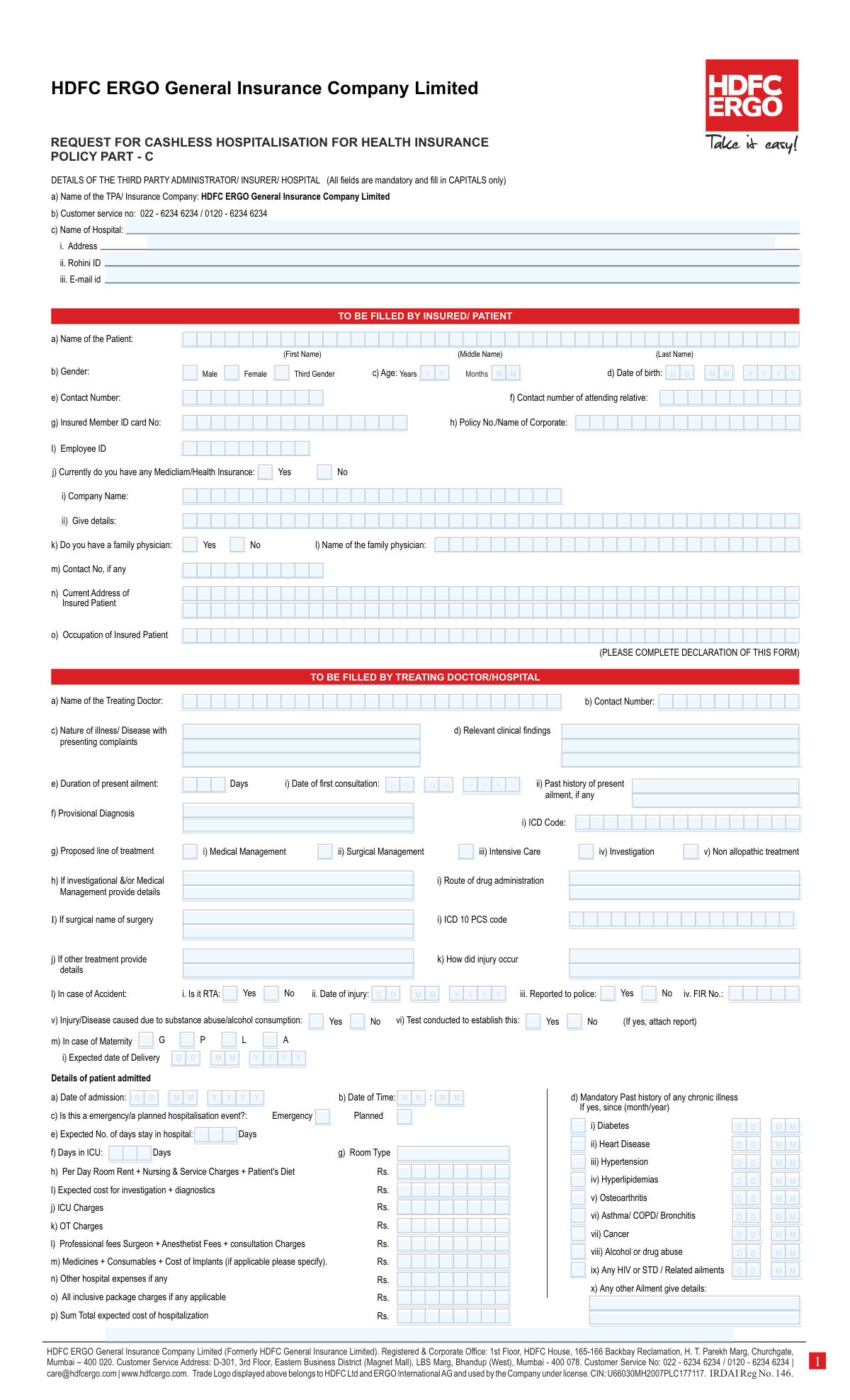
Yes! You can use AI to fill out HDFC ERGO General Insurance Company Limited – Request for Cashless Hospitalisation for Health Insurance (Policy Part – C)

The HDFC ERGO Request for Cashless Hospitalisation for Health Insurance (Policy Part – C) is a pre-authorization request form used to initiate and process a cashless claim at a network hospital through the insurer/TPA. It collects mandatory information from the insured/patient and the treating doctor/hospital, including diagnosis, proposed treatment, admission details, and estimated hospitalization expenses, along with patient and hospital declarations. This form is important because it supports eligibility verification and approval of cashless treatment, helping avoid out-of-pocket payments except for non-admissible expenses. Today, this form can be filled out quickly and accurately using AI-powered services like Instafill.ai, which can also convert non-fillable PDF versions into interactive fillable forms.
Our AI automatically handles information lookup, data retrieval, formatting, and form filling.
It takes less than a minute to fill out HDFC ERGO Cashless Hospitalisation Request (Policy Part C) using our AI form filling.
Securely upload your data. Information is encrypted in transit and deleted immediately after the form is filled out.

Form specifications

Form name: HDFC ERGO General Insurance Company Limited – Request for Cashless Hospitalisation for Health Insurance (Policy Part – C)
Number of pages: 2
Language: English
Categories: medical forms, insurance claim forms, health insurance forms, HDFC ERGO forms
main-image

Instafill Demo: filling out a legal form in seconds

How to Fill Out HDFC ERGO Cashless Hospitalisation Request (Policy Part C) Online for Free in 2026

Are you looking to fill out a HDFC ERGO CASHLESS HOSPITALISATION REQUEST (POLICY PART C) form online quickly and accurately? Instafill.ai offers the #1 AI-powered PDF filling software of 2026, allowing you to complete your HDFC ERGO CASHLESS HOSPITALISATION REQUEST (POLICY PART C) form in just 37 seconds or less.
Follow these steps to fill out your HDFC ERGO CASHLESS HOSPITALISATION REQUEST (POLICY PART C) form online using Instafill.ai:
  1. 1 Go to Instafill.ai and upload the HDFC ERGO “Request for Cashless Hospitalisation for Health Insurance (Policy Part – C)” form (or select it from the form library).
  2. 2 Enter insured/patient details: name, gender, age/DOB, contact numbers, address, occupation, policy/corporate details, member ID card number, and employee/company information (if applicable).
  3. 3 Provide insurance and medical background information, such as whether other mediclaim/health insurance exists, family physician details, and any chronic illness history (with since month/year).
  4. 4 Complete the treating doctor/hospital section: doctor name and contact, nature of illness, clinical findings, duration, first consultation date, provisional diagnosis with ICD code, and proposed line of treatment (medical/surgical/ICU/investigation, etc.).
  5. 5 Add accident/injury details if relevant (RTA, date of injury, police report/FIR, substance/alcohol involvement and tests) and patient admission details (date/time, emergency vs planned, room type, expected length of stay/ICU days).
  6. 6 Fill in the estimated cost breakdown (room rent, investigations/diagnostics, ICU/OT charges, medicines/consumables/implants, professional fees, package charges, other expenses) and confirm the total expected cost of hospitalization.
  7. 7 Review the patient/representative and hospital declarations, apply e-signatures where required, validate for missing mandatory fields, then download/share the completed form for submission to the hospital/TPA/insurer.

Our AI-powered system ensures each field is filled out correctly, reducing errors and saving you time.

Why Choose Instafill.ai for Your Fillable HDFC ERGO Cashless Hospitalisation Request (Policy Part C) Form?

Speed

Complete your HDFC ERGO Cashless Hospitalisation Request (Policy Part C) in as little as 37 seconds.

Up-to-Date

Always use the latest 2026 HDFC ERGO Cashless Hospitalisation Request (Policy Part C) form version.

Cost-effective

No need to hire expensive lawyers.

Accuracy

Our AI performs 10 compliance checks to ensure your form is error-free.

Security

Your personal information is protected with bank-level encryption.

Frequently Asked Questions About Form HDFC ERGO Cashless Hospitalisation Request (Policy Part C)

This form is used to request cashless approval for a planned or emergency hospital admission under an HDFC ERGO health insurance policy. It allows the insurer/TPA to assess the treatment details and authorize eligible expenses directly to the hospital.

It is a combined form: the insured/patient fills the patient section and signs the patient declaration, while the treating doctor/hospital fills the medical and hospitalization cost details and signs/stamps the hospital declarations.

Yes—this form states that all fields are mandatory and should be filled in CAPITALS only. Incomplete fields can delay cashless authorization.

You typically need the Policy No./Name of Corporate, Insured Member ID card number, and (if applicable) Employee ID and Company Name. These details help HDFC ERGO match the request to the correct coverage.

Customer service numbers listed are 022-6234 6234 and 0120-6234 6234, and the email is [email protected]. You can use these for claim/cashless status or form-related queries.

The insurer/TPA name is already indicated as HDFC ERGO General Insurance Company Limited, but the hospital must fill in its Name, Address, Rohini ID, and Email ID. These details are required for cashless processing and hospital identification.

The doctor/hospital must provide the nature of illness with complaints, clinical findings, duration of ailment, provisional diagnosis, ICD code, proposed treatment plan (medical/surgical/ICU/investigation), and surgery details if applicable. Accurate clinical information is essential for authorization.

If the case is an accident, the form asks whether it is an RTA (road traffic accident), the date of injury, whether it was reported to police, and the FIR number (if any). Provide complete details to avoid delays, especially for medico-legal cases.

The form specifically asks whether the condition was caused due to substance abuse/alcohol and whether any test was conducted to establish it. If “Yes,” attach the relevant test report, as it may affect admissibility under policy terms.

The hospital should fill expected costs for investigations/diagnostics, room rent and nursing/service charges, ICU charges (if any), OT charges, professional fees, medicines/consumables/implants, other hospital expenses, package charges (if applicable), and the total expected cost. This estimate is used to decide the authorization amount.

“Emergency” is an unplanned admission requiring immediate care, while “Planned” is a scheduled admission (e.g., elective surgery). Selecting the correct type helps the insurer/TPA apply the right process and timelines for authorization.

Yes—the form includes a mandatory past history section for chronic illnesses (e.g., diabetes, heart disease, hypertension, asthma/COPD, cancer, HIV/STD, alcohol/drug abuse) and asks since when (month/year). Non-disclosure can lead to queries, delays, or claim issues.

The patient declaration confirms document submission, responsibility for non-admissible expenses, and truthfulness of information; the hospital declaration confirms document sharing, package rate rules, and timely submission (within 7 days of discharge). Missing signatures/seals can hold up cashless approval or settlement.

Yes—AI form-filling tools can help organize your details and auto-fill fields to reduce errors and save time. Services like Instafill.ai can auto-fill form fields accurately based on your provided information.

You can upload the PDF to Instafill.ai, provide your policy/patient/hospital details, and let it map and auto-fill the fields for review before downloading. If the PDF is flat/non-fillable, Instafill.ai can convert it into an interactive fillable form so you can complete and sign it more easily.

Compliance HDFC ERGO Cashless Hospitalisation Request (Policy Part C)
Validation Checks by Instafill.ai

1
Mandatory Field Completeness (All Sections Marked Mandatory)
Validates that all fields indicated as mandatory in the form (TPA/Insurer/Hospital details, Insured/Patient details, Treating Doctor/Hospital details, admission and cost details, and declarations) are not left blank. This is important because cashless authorization decisions depend on complete clinical, identity, and policy information. If any mandatory field is missing, the submission should be rejected or routed to a “needs clarification” queue with a clear list of missing fields.
2
Capital Letters Enforcement for Mandatory Header Section
Checks that fields under “DETAILS OF THE THIRD PARTY ADMINISTRATOR/ INSURER/ HOSPITAL (All fields are mandatory and fill in CAPITALS only)” are entered in uppercase (e.g., hospital name, address, Rohini ID, email if required by the process). This ensures consistency for downstream matching, printing, and manual review. If lowercase characters are detected, the system should either auto-transform to uppercase (with audit logging) or fail validation and request correction.
3
Patient Name Structure and Valid Characters
Validates that the patient’s first name and last name are provided (middle name optional unless business rules require it) and that name fields contain only allowed characters (letters, spaces, hyphens, apostrophes) with reasonable length limits. Correct name capture is essential for identity verification and claim linkage to policy/member records. If invalid characters or missing required name parts are found, the form should be blocked and the user prompted to correct the name fields.
4
Gender Selection Must Be Exactly One Option
Ensures that exactly one gender option is selected among Male, Female, and Third Gender. This prevents ambiguous demographic data and supports correct policy/member matching and clinical reporting. If none or multiple options are selected, validation fails and the user must select a single option.
5
Date Format and Validity for All Date Fields (DD/MM/YYYY)
Validates that all date inputs (DOB, date of first consultation, date of injury, date of admission, expected date of delivery, declaration dates) follow a consistent DD/MM/YYYY format and represent real calendar dates. Date correctness is critical for eligibility checks, pre-existing disease evaluation, and timeline consistency. If a date is malformed or impossible (e.g., 31/02/2025), the submission should fail with a field-specific error.
6
Age vs Date of Birth Consistency
Checks that the entered age (years and months) is consistent with the provided date of birth within an acceptable tolerance (e.g., ±1 month). This reduces fraud risk and prevents mismatches with insurer/member records. If the computed age from DOB materially differs from the entered age, the system should flag the record for correction or manual review before proceeding.
7
Phone Number Format Validation (Patient, Relative, Doctor, Physician)
Validates that all contact numbers (patient contact, attending relative contact, treating doctor contact, family physician contact) contain only digits (optionally allowing leading +91) and meet length rules (typically 10 digits for India, or 10–15 for international). Accurate phone numbers are required for pre-authorization queries and claim updates. If a number is too short/long or contains invalid characters, the form should be rejected with a clear message indicating the affected field.
8
Email Address Format Validation (Hospital Email / Optional Email)
Checks that any provided email address (hospital email and optional email field) matches a standard email pattern ([email protected]) and does not contain spaces or invalid characters. Email is often used for document requests and authorization communication. If an email is present but invalid, validation should fail (or at minimum warn and require correction if the email is mandatory in the workflow).
9
Policy/Corporate Identification Completeness and Format
Validates that at least one valid policy identifier is provided: Policy No. and/or Name of Corporate, and that the Insured Member ID card number is present and meets expected format/length constraints configured for the insurer/corporate. This is essential to confirm coverage and route the request to the correct policy. If identifiers are missing or do not meet format rules, the submission should be blocked or flagged for eligibility verification.
10
Employee ID and Company Name Dependency Check
If an Employee ID is provided (or required for corporate policies), ensures Company Name is also provided and non-empty, and vice versa. This supports corporate policy validation and member lookup. If one is present without the other, validation fails and the user is prompted to complete the missing counterpart field.
11
Mediclaim/Health Insurance Yes/No Must Be Single-Select and Details Required When Yes
Ensures the “Currently do you have any Mediclaim/Health Insurance” question has exactly one selection (Yes or No). If “Yes” is selected, the “Give details” field must be completed with insurer/policy information to avoid coordination-of-benefits issues. If both/neither are selected or details are missing when Yes is selected, the submission should fail validation.
12
Family Physician Yes/No Must Be Single-Select and Physician Details Required When Yes
Validates that the “Do you have a family physician” question has exactly one selection. If “Yes” is selected, the physician name and contact number must be provided and the contact number must pass phone validation. If the dependency is not satisfied, the form should be rejected to prevent incomplete medical history capture.
13
Accident/Injury Section Conditional Requirements (RTA/Police/FIR/Substance Abuse)
If the case is marked as accident/injury (e.g., “In case of Accident” section is used or injury occurrence is described), validates that date of injury is provided and is a valid date. If “Reported to police” is Yes, FIR No. must be provided; if “Substance abuse/alcohol consumption” is Yes, then “Test conducted” must be Yes/No and if Yes, the system should require an attachment indicator/reference for the report. If these conditional fields are missing, the submission should be flagged because liability and admissibility decisions depend on them.
14
Admission Date/Time Validity and Chronological Consistency
Validates that date of admission is present and that time is in a valid 24-hour HH:MM format (hours 00–23, minutes 00–59). Also checks chronology: date of first consultation should not be after date of admission, and date of injury (if applicable) should not be after admission date. If time is invalid or dates are inconsistent, the request should be blocked or routed for manual review due to timeline ambiguity.
15
Hospitalization Type Selection (Emergency vs Planned) Must Be Exactly One
Ensures that exactly one option is selected for “Is this an emergency/a planned hospitalisation event?” (Emergency or Planned). This classification affects authorization handling and turnaround times. If both or neither are selected, validation fails and the user must choose one.
16
Expected Stay and ICU Days Must Be Non-Negative Integers and Logically Consistent
Validates that expected number of days stay in hospital and days in ICU are numeric whole numbers within reasonable bounds (e.g., 0–365) and that ICU days do not exceed total expected stay days. This prevents calculation errors and unrealistic estimates that can trigger incorrect authorization amounts. If values are non-numeric, negative, or inconsistent, the submission should fail with a targeted error.
17
Cost Fields Numeric Validation and Sum Total Consistency
Checks that all monetary fields (investigation/diagnostics, room rent, ICU charges, OT charges, professional fees, medicines/consumables/implants, other hospital expenses, package charges, and sum total expected cost) are valid numbers (no letters), non-negative, and within configured maximum thresholds. Also validates that “Sum Total expected cost of hospitalization” equals the sum of the provided line items (or equals package charges when an all-inclusive package is selected, per business rule). If totals do not reconcile, the system should flag the discrepancy and prevent submission until corrected or explicitly justified.

Common Mistakes in Completing HDFC ERGO Cashless Hospitalisation Request (Policy Part C)

Not using CAPITAL LETTERS where required

This form explicitly says “All fields are mandatory and fill in CAPITALS only,” but many people type in mixed case or cursive handwriting that’s hard to read. This can lead to data-entry errors at the TPA/insurer end (wrong name, wrong policy mapping) and delays in cashless authorization. Always enter patient, hospital, and policy details in clear BLOCK/CAPITAL letters; AI-powered tools like Instafill.ai can enforce capitalization automatically and reduce legibility issues.

Leaving “mandatory” hospital/TPA section incomplete (Hospital name, address, Rohini ID, email)

Applicants often assume the hospital will fill everything, but the form states all fields are mandatory and the hospital identifiers (especially Rohini ID) are frequently missed. Missing or incorrect hospital details can prevent network verification and stall cashless approval. Confirm the hospital’s full legal name, complete address, Rohini ID, and official email with the hospital desk before submission; Instafill.ai can help by validating required fields and flagging blanks.

Patient name entered inconsistently across First/Middle/Last name fields

People commonly put the full name in the “First Name” box, skip the last name, or use initials that don’t match the policy/ID card. Name mismatches can cause identity verification issues and may trigger additional document requests or rejection of cashless processing. Enter the name exactly as on the policy/insured member ID card and split it correctly into first/middle/last; Instafill.ai can map names into the right components consistently.

Incorrect date formatting for DOB, admission date, injury date, and first consultation date

The form expects dates in a strict D/M/YYYY style with separate boxes, but many users write 19-02-26, 02/19/2026, or incomplete years. Wrong or ambiguous dates can affect eligibility checks (age, waiting periods, pre-existing disease timelines) and delay authorization. Always use day-month-year with a 4-digit year and double-check each date field; Instafill.ai can auto-format dates correctly and prevent invalid entries.

Age filled incorrectly (Years/Months confusion) or not matching DOB

Because the form asks for both “Years” and “Months,” people often enter only one value, swap them, or provide an age that doesn’t match the date of birth. Inconsistencies can trigger manual review and slow down cashless approval. Calculate age from DOB as of the admission date and fill both years and months where applicable (especially for infants); Instafill.ai can compute and cross-check age vs DOB automatically.

Contact numbers missing, swapped, or entered without reachable format

This form asks for multiple numbers (patient contact, attending relative contact, family physician contact), and users often repeat the same number everywhere, omit the relative’s number, or enter unreachable digits. If the insurer/TPA cannot reach the patient/relative for verification, authorization and query resolution can be delayed. Provide active mobile numbers with correct digits (and include STD/ISD codes if relevant) and ensure the attending relative is reachable; Instafill.ai can validate phone number length/format and highlight duplicates or missing contacts.

Policy/Corporate details entered incorrectly (Policy No. vs Corporate name, Member ID card no., Employee ID)

In corporate policies, people frequently mix up “Policy No./Name of Corporate,” “Insured Member ID card No,” and “Employee ID,” or leave corporate fields blank assuming they’re optional. Incorrect identifiers can prevent the claim from being linked to the correct policy and member, causing immediate processing delays. Copy these values exactly from the e-card/policy document/HR records and keep formatting (hyphens, leading zeros) intact; Instafill.ai can standardize and validate these IDs to reduce mismatches.

Mediclaim/other health insurance question answered incorrectly or left blank

The “Currently do you have any Mediclaim/Health Insurance: Yes/No” field is often misunderstood, especially when the patient has another policy or employer coverage. Wrong disclosure can lead to coordination-of-benefits issues, additional scrutiny, or later disputes during settlement. Answer truthfully and, if “Yes,” provide the requested details in the “Give details” area (insurer, policy number, coverage); Instafill.ai can prompt for the dependent details when “Yes” is selected.

Treating doctor section incomplete (diagnosis, clinical findings, duration, ICD code, proposed treatment)

Hospitals sometimes submit the request with generic text (e.g., “fever,” “pain”) and omit key medical specifics like provisional diagnosis, relevant clinical findings, duration, and ICD code/ICD 10 PCS code. Insufficient clinical justification is a common reason for insurer queries and delayed or reduced authorization. Ensure the treating doctor provides a clear provisional diagnosis, supporting findings, duration, and appropriate ICD/PCS codes along with the proposed line of treatment; Instafill.ai can help ensure all mandatory medical fields are present before submission (though clinical accuracy must come from the doctor).

Accident/RTA and police/FIR details filled inconsistently

When the case is an accident, people often tick “RTA: Yes” but leave “Reported to police” or “FIR No.” blank, or enter an injury date that doesn’t align with admission/consultation dates. These inconsistencies can trigger fraud/verification checks and slow down cashless approval. If it’s an RTA, provide the injury date, whether it was reported, and the FIR number (or explain if not available yet) and keep timelines consistent; Instafill.ai can flag missing dependent fields when accident-related checkboxes are selected.

Expected cost breakup and totals don’t add up (room rent, ICU, OT, implants, package, sum total)

The form asks for multiple cost components plus “All inclusive package charges” and “Sum Total expected cost,” but hospitals/patients often leave some lines blank, double-count package vs itemized costs, or provide a total that doesn’t match the breakup. Incorrect estimates can lead to lower initial authorization, repeated revisions, and billing disputes at discharge. Provide either a clear package amount or a consistent itemized estimate and ensure the sum total matches the components; Instafill.ai can automatically calculate totals and validate arithmetic consistency.
Saved over 80 hours a year

“I was never sure if my IRS forms like W-9 were filled correctly. Now, I can complete the forms accurately without any external help.”

Kevin Martin Green

Your data stays secure with advanced protection from Instafill and our subprocessors

Robust compliance program

Transparent business model

You’re not the product. You always know where your data is and what it is processed for.

ISO 27001, HIPAA, and GDPR

Our subprocesses adhere to multiple compliance standards, including but not limited to ISO 27001, HIPAA, and GDPR.

Security & privacy by design

We consider security and privacy from the initial design phase of any new service or functionality. It’s not an afterthought, it’s built-in, including support for two-factor authentication (2FA) to further protect your account.

Fill out HDFC ERGO Cashless Hospitalisation Request (Policy Part C) with Instafill.ai

Worried about filling PDFs wrong? Instafill securely fills hdfc-ergo-general-insurance-company-limited-request-for-cashless-hospitalisation-for-health-insurance-policy-part-c forms, ensuring each field is accurate.