Yes! You can use AI to fill out Oscar Grievance and Appeal Form - Florida
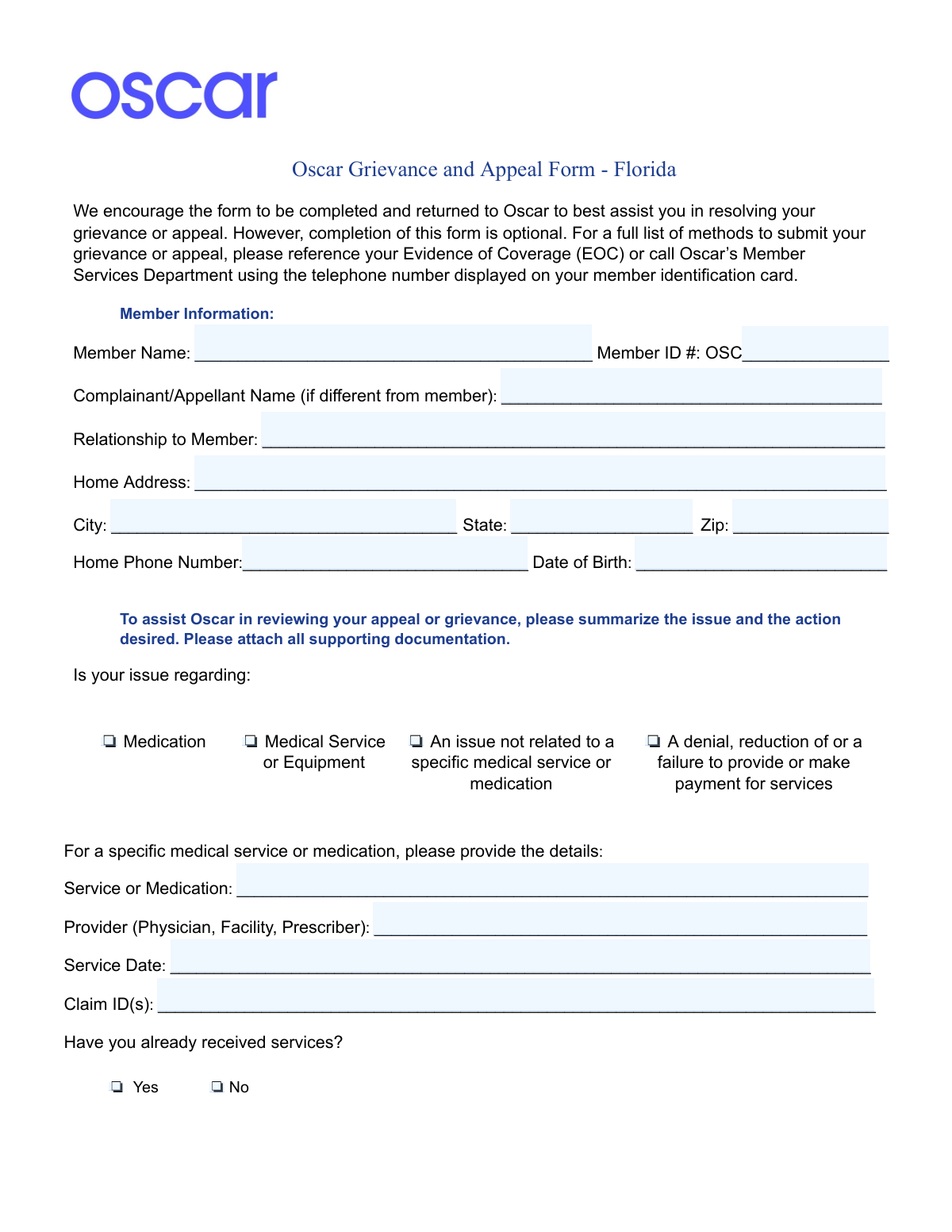
This form is a formal document for Oscar health insurance members in Florida to submit a grievance (a complaint about their care) or an appeal (a request to reconsider a decision to deny a service or payment). It is a critical tool for members to exercise their rights and seek resolution for issues related to their healthcare coverage. Today, this form can be filled out quickly and accurately using AI-powered services like Instafill.ai, which can also convert non-fillable PDF versions into interactive fillable forms.
Our AI automatically handles information lookup, data retrieval, formatting, and form filling.
It takes less than a minute to fill out Oscar Grievance and Appeal Form using our AI form filling.
Securely upload your data. Information is encrypted in transit and deleted immediately after the form is filled out.
Form specifications
| Form name: | Oscar Grievance and Appeal Form - Florida |
| Number of pages: | 4 |
| Language: | English |
| Categories: | CAR forms |
Instafill Demo: How to fill out PDF forms in seconds with AI
How to Fill Out Oscar Grievance and Appeal Form Online for Free in 2026
Are you looking to fill out a OSCAR GRIEVANCE AND APPEAL FORM form online quickly and accurately? Instafill.ai offers the #1 AI-powered PDF filling software of 2026, allowing you to complete your OSCAR GRIEVANCE AND APPEAL FORM form in just 37 seconds or less.
Follow these steps to fill out your OSCAR GRIEVANCE AND APPEAL FORM form online using Instafill.ai:
- 1 Navigate to Instafill.ai and upload or select the Oscar Grievance and Appeal Form.
- 2 Provide your personal details, including your member name, ID number, and contact information.
- 3 Specify the nature of your issue by checking the appropriate box, such as medication, medical service, or denial of payment.
- 4 Enter the details of the service or medication in question and write a clear, comprehensive description of your grievance or appeal.
- 5 If someone is acting on your behalf, complete the 'Appoint a Representative' section with their information.
- 6 Review all the information populated by the AI for accuracy, then electronically sign and date the form.
- 7 Download the completed form and submit it to Oscar via mail, fax, or email, attaching all necessary supporting documents.
Our AI-powered system ensures each field is filled out correctly, reducing errors and saving you time.
Why Choose Instafill.ai for Your Fillable Oscar Grievance and Appeal Form Form?
Speed
Complete your Oscar Grievance and Appeal Form in as little as 37 seconds.
Up-to-Date
Always use the latest 2026 Oscar Grievance and Appeal Form form version.
Cost-effective
No need to hire expensive lawyers.
Accuracy
Our AI performs 10 compliance checks to ensure your form is error-free.
Security
Your personal information is protected with bank-level encryption.
Frequently Asked Questions About Form Oscar Grievance and Appeal Form
This form is used to formally submit a complaint (grievance) or to request a review of a decision Oscar made about your benefits (appeal). It helps you clearly state your issue and the resolution you are seeking.
No, using this form is optional. You can find a complete list of methods for submitting a grievance or appeal in your Evidence of Coverage (EOC) or by calling Oscar's Member Services.
If your appeal or grievance is urgent and involves an imminent danger to your life or health, you must call 855-672-2755 immediately. Do not rely solely on submitting this form for urgent matters.
You should only complete this section if you are authorizing another person, such as a family member or advocate, to act on your behalf. If you are the member filing for yourself, you can skip this section.
The 'Member Name' is the person covered by the Oscar insurance plan. The 'Complainant/Appellant Name' is for the person filing the form if they are different from the member, such as a parent filing for their child.
You should attach any documents that support your case, such as denial letters from Oscar, medical records, letters of medical necessity from your doctor, or relevant bills.
The Claim ID number is typically found on the Explanation of Benefits (EOB) document that Oscar provides after processing a claim for a service you have already received.
You can submit the form by mail, fax, or email. The contact details are provided at the bottom of the form: P.O. Box 52146, Phoenix AZ, 85072; fax to 888-977-2062; or email to [email protected].
You need to attach a separate HIPAA authorization form if you are the member and want to allow someone else to speak with Oscar on your behalf about your protected health information related to the case.
A grievance is a general complaint about your experience or Oscar's services, while an appeal is a formal request to reconsider a decision to deny or limit payment for a service. This form can be used for both.
Yes, services like Instafill.ai use AI to accurately auto-fill form fields. This can help you complete the form more quickly and with fewer errors.
Simply upload the Oscar Grievance and Appeal Form PDF to the Instafill.ai platform. The service will make the document interactive, allowing you to type your information directly into the fields online.
If you have a non-fillable or 'flat' PDF, you can use a service like Instafill.ai. Upload the document, and it will be converted into an interactive, fillable form that you can complete on your computer.
Compliance Oscar Grievance and Appeal Form
Validation Checks by Instafill.ai
1
Validates Member ID Format
This check ensures the Member ID field begins with the 'OSC' prefix as indicated on the form. This format is critical for correctly identifying the member within Oscar's system. A failure in this validation would prevent the system from locating the member's record, halting the entire grievance process until the ID is corrected.
2
Ensures Member Date of Birth is a Valid Past Date
This validation confirms that the Member's Date of Birth is a complete, valid date (e.g., MM/DD/YYYY) and that the date occurs in the past. This is a fundamental data point for member verification and helps prevent data entry errors. An invalid or future date would cause a member identification failure and delay the processing of the appeal.
3
Conditional Requirement for Complainant Details
This check ensures that if a 'Complainant/Appellant Name' is provided and is different from the member's name, the 'Relationship to Member' field is also filled out. This is important for understanding who is filing the grievance and their authority to do so. Failure to provide the relationship can cause processing delays while the relationship is verified or the form is returned for completion.
4
Requires Selection of at least one Issue Type
Validates that at least one checkbox under 'Is your issue regarding:' is selected. This information is fundamental for routing the grievance or appeal to the correct internal department, such as pharmacy benefits or clinical review. Without this selection, the case cannot be categorized or assigned, halting the entire review process.
5
Ensures Service/Medication Details are Provided when Required
This check verifies that if the user selects 'Medication' or 'Medical Service or Equipment' as the issue type, the 'Service or Medication' and 'Provider' fields are filled in. These details are essential for investigating the specific claim or pre-authorization in question. Missing this information makes it impossible to research the case, forcing staff to contact the member for clarification and delaying resolution.
6
Validates Service Date is a Plausible Past Date
This validation ensures the 'Service Date' is a valid date and is not in the future. A grievance or appeal is typically filed for a service that has already occurred or been prescribed. An invalid or future date suggests a data entry error that must be corrected to accurately identify the service record for review.
7
Requires Claim ID if Services Were Received
This rule checks that if the 'Yes' box is checked for 'Have you already received services?', the 'Claim ID(s)' field is not empty. The Claim ID is the primary identifier for a processed service and is crucial for locating the exact transaction being appealed. Without it, the investigation is significantly hindered and may be impossible to complete accurately.
8
Ensures Grievance or Appeal Description is Provided
This validation confirms that the main text area for describing the grievance or appeal contains text. This narrative is the core of the submission, explaining the member's issue and desired outcome. An empty description means there is no issue to investigate, and the form submission would be considered incomplete and invalid.
9
Validates Completeness of Representative Appointment Section
This check ensures that if the 'Appoint a Representative' section is initiated (e.g., the representative's name is filled in), then the Member's ID, Representative's Relationship, and Representative's Address fields are also completed. This section grants legal authority, so incomplete information makes the appointment invalid. The form would be rejected pending completion to ensure the designated person is properly authorized.
10
Cross-Validates Member ID in Representative Section
This check ensures that the 'Member’s ID Number' entered in the 'Appoint a Representative' section matches the 'Member ID #' provided at the top of the form. This consistency is critical to confirm that the authorization is being granted for the correct member account. A mismatch would invalidate the representative appointment and halt processing until the discrepancy is resolved.
11
Verifies Printed Name Matches Member or Complainant
This validation checks that the 'Name (Printed)' in the signature section matches either the 'Member Name' or the 'Complainant/Appellant Name'. This confirms the identity of the person signing the form and attesting to the accuracy of the information. A mismatch could indicate an unauthorized submission and would require follow-up to verify the signer's identity.
12
Validates Standard Phone Number Format
This check verifies that the 'Home Phone Number' and 'Representative Phone Number' fields adhere to a standard 10-digit format. Correctly formatted phone numbers are essential for contacting the member or representative for additional information. An invalid format could prevent communication, leading to significant delays or the closure of the case due to an inability to make contact.
13
Ensures Valid State and ZIP Code Format
This validation confirms that the 'State' field contains a valid two-letter U.S. state abbreviation and that the 'Zip' code is a valid 5-digit or 9-digit (ZIP+4) number. Accurate address information is required for all official correspondence related to the grievance. Invalid data could result in mailed decisions being returned as undeliverable.
14
Requires a Valid and Recent Signature Date
This check ensures that the 'Date' field in the signature section is filled out with a valid date that is not in the future. The signature date establishes when the attestation was made and is a key piece of metadata for the submission's timeline. A missing or future date would render the signature invalid and require correction before the grievance can be formally accepted.
Common Mistakes in Completing Oscar Grievance and Appeal Form
Users often forget to enter the full Member ID number that follows the 'OSC' prefix. The Member ID is the primary identifier used to locate the member's records, and an incomplete or incorrect number will prevent Oscar from processing the grievance. To avoid this, double-check the number against the member's insurance card. AI-powered form filling tools like Instafill.ai can help by validating the format and ensuring the field is not left incomplete.
A common error is for a member filing on their own behalf to fill out the 'Complainant/Appellant Name' section. This section should only be completed if the person filing the form is not the patient (e.g., a parent, spouse, or legal guardian). Incorrectly filling this section can create confusion about who Oscar should contact regarding the case, potentially delaying communication. Always leave this section blank if you are the member.
In the 'Service or Medication' field, people frequently enter generic descriptions like 'my prescription' or 'doctor visit'. This ambiguity forces reviewers to guess or search through extensive records, causing delays. To ensure a swift review, provide the exact name of the medication (including dosage, e.g., 'Lisinopril 20mg') or the specific medical service (e.g., 'MRI of the left knee').
When a service has already been received, the associated Claim ID is the most direct link to the denial being appealed. Many people leave this field blank because they don't know where to find the number, which is typically on the Explanation of Benefits (EOB). Failing to provide the Claim ID forces the review team to manually search for the relevant claim, significantly slowing down the process. If the form is a non-fillable PDF, tools like Instafill.ai can convert it to a fillable version and highlight such conditionally required fields.
The form repeatedly advises attaching supporting documents, yet many submissions arrive without them. A grievance or appeal is significantly weaker without evidence like denial letters, medical records, or notes from a physician explaining medical necessity. Users often assume their written description is sufficient, but this oversight is a primary reason for appeals being upheld in the insurer's favor. Always gather and attach all relevant paperwork.
This is a critical and dangerous mistake. The form explicitly instructs members to call a specific phone number for urgent appeals involving 'imminent danger to your life, limb, or state of health.' Sending such a request by mail, fax, or email introduces a delay that could have severe health consequences. For any time-sensitive, urgent health matter, always use the designated phone number for an immediate response.
This section is a legal authorization that is often filled out incorrectly. Common errors include a representative filling it out on behalf of the member without their signature, or a member failing to complete it when they want a family member to handle the appeal. An improperly completed section means Oscar cannot legally speak with the representative due to HIPAA rules, halting the appeal until the proper authorization, which may include a separate HIPAA form, is received.
In the free-text description box, users may provide an emotional account that lacks a clear timeline, factual details, or a desired resolution. An effective narrative should concisely state what happened, when it happened, why it's incorrect, and what specific outcome is being requested (e.g., 'I request that the denial be overturned and the service be approved'). Without a clear 'ask,' the reviewer may not know what action to take, leading to an undesirable outcome.
An unsigned form is not legally valid and will be immediately rejected, forcing the entire submission process to start over. This simple oversight is one of the most common reasons for processing delays. The date is also crucial as it establishes the official start of the grievance timeline. Smart form-filling tools like Instafill.ai can prevent this by flagging mandatory signature and date fields before allowing submission.
The initial checkboxes (Medication, Medical Service, Denial, etc.) are used to route the form to the correct internal department. A user might check 'An issue not related to a specific medical service' for a claim denial, when they should have checked 'A denial... for services'. This misrouting can add days or even weeks to the review process as the form is passed between departments. Carefully read each option to select the one that most accurately describes your situation.
Saved over 80 hours a year
“I was never sure if my IRS forms like W-9 were filled correctly. Now, I can complete the forms accurately without any external help.”
Kevin Martin Green
Your data stays secure with advanced protection from Instafill and our subprocessors

Robust compliance program
Transparent business model
You’re not the product. You always know where your data is and what it is processed for.
ISO 27001, HIPAA, and GDPR
Our subprocesses adhere to multiple compliance standards, including but not limited to ISO 27001, HIPAA, and GDPR.
Security & privacy by design
We consider security and privacy from the initial design phase of any new service or functionality. It’s not an afterthought, it’s built-in, including support for two-factor authentication (2FA) to further protect your account.
Fill out Oscar Grievance and Appeal Form with Instafill.ai
Worried about filling PDFs wrong? Instafill securely fills oscar-grievance-and-appeal-form-florida forms, ensuring each field is accurate.