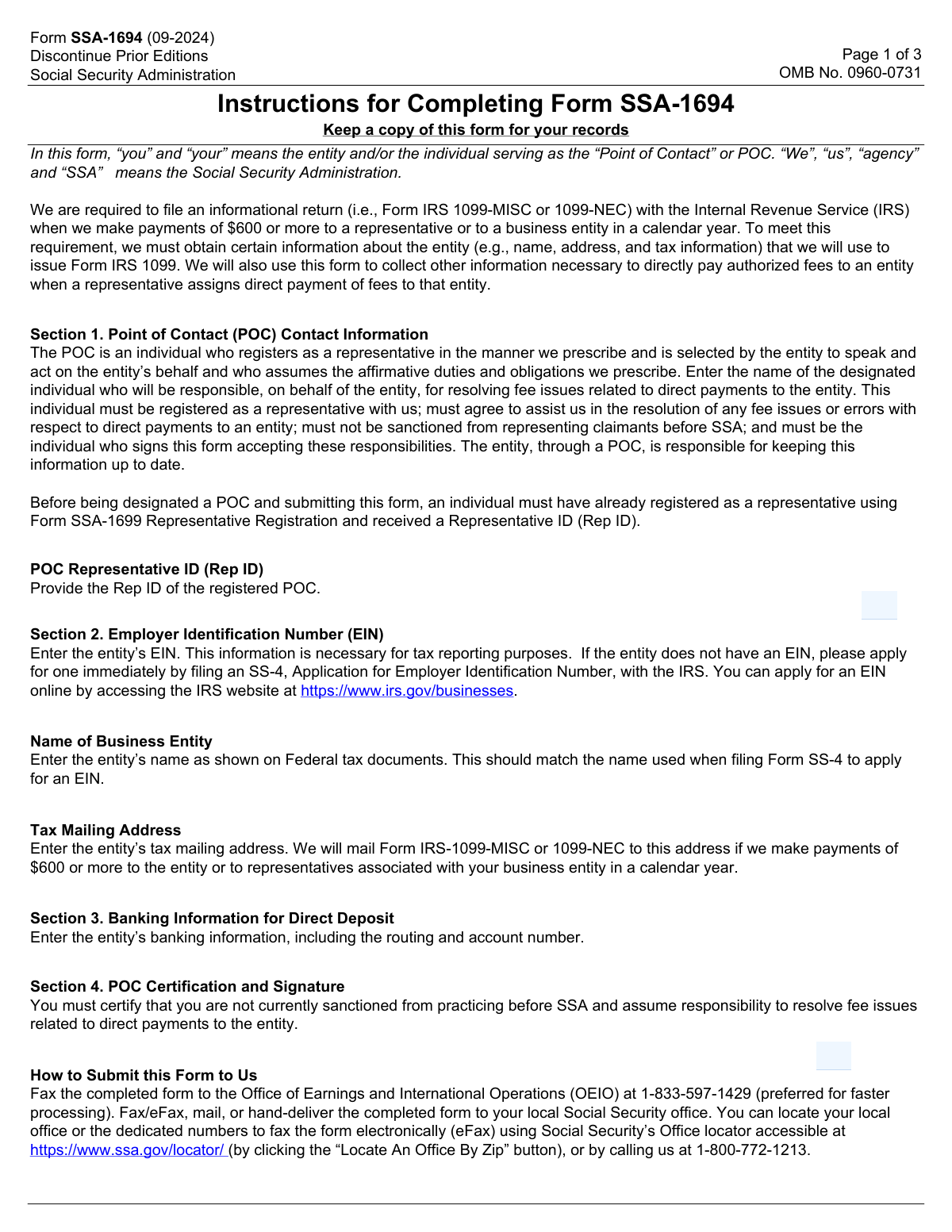
Yes! You can use AI to fill out Form SSA-1694, Entity Registration and Taxpayer Information
Form SSA-1694 is a Social Security Administration (SSA) document used by business entities to register their information for receiving direct payment of fees for claimant representation. It establishes a Point of Contact (POC) for the entity and provides the SSA with essential taxpayer and banking information, such as the Employer Identification Number (EIN) and direct deposit details. Today, this form can be filled out quickly and accurately using AI-powered services like Instafill.ai, which can also convert non-fillable PDF versions into interactive fillable forms.
Our AI automatically handles information lookup, data retrieval, formatting, and form filling.
It takes less than a minute to fill out SSA-1694 using our AI form filling.
Securely upload your data. Information is encrypted in transit and deleted immediately after the form is filled out.
Form specifications
| Form name: | Form SSA-1694, Entity Registration and Taxpayer Information |
| Number of pages: | 3 |
| Language: | English |
| Categories: | tax forms, SSA forms, entity tax forms |
Instafill Demo: How to fill out PDF forms in seconds with AI
How to Fill Out SSA-1694 Online for Free in 2026
Are you looking to fill out a SSA-1694 form online quickly and accurately? Instafill.ai offers the #1 AI-powered PDF filling software of 2026, allowing you to complete your SSA-1694 form in just 37 seconds or less.
Follow these steps to fill out your SSA-1694 form online using Instafill.ai:
- 1 Navigate to Instafill.ai and upload or select Form SSA-1694.
- 2 Use the AI assistant to accurately fill in Section 1 with the Point of Contact (POC) information, including their name and Representative ID.
- 3 Complete Section 2 by providing the business entity's details, such as its legal name, Employer Identification Number (EIN), and mailing address.
- 4 Enter the entity's banking information for direct deposit in Section 3, including the financial institution, routing number, and account number.
- 5 Proceed to Section 4 where the designated POC certifies the accuracy of the provided information.
- 6 Review the entire form with the AI's help to ensure all fields are correct and complete, then print the form.
- 7 The POC must physically sign the printed form with a wet signature and submit it to the Social Security Administration as required.
Our AI-powered system ensures each field is filled out correctly, reducing errors and saving you time.
Why Choose Instafill.ai for Your Fillable SSA-1694 Form?
Speed
Complete your SSA-1694 in as little as 37 seconds.
Up-to-Date
Always use the latest 2026 SSA-1694 form version.
Cost-effective
No need to hire expensive lawyers.
Accuracy
Our AI performs 10 compliance checks to ensure your form is error-free.
Security
Your personal information is protected with bank-level encryption.
Frequently Asked Questions About Form SSA-1694
Form SSA-1694 is used to register a business entity with the Social Security Administration (SSA) for the purpose of receiving direct payment of fees. It collects the entity's taxpayer, banking, and point of contact information.
This form is for business entities that represent claimants before the SSA and wish to receive direct payment for their services. It must be certified by a designated Point of Contact (POC) who is a registered representative with the SSA.
The POC must be an individual within the entity who is currently registered as a representative with the SSA. This person cannot be sanctioned by the SSA and must have the authority to act on the entity's behalf regarding fee payments.
The Representative ID (Rep ID) is a unique identifier issued by the SSA when an individual registers as a representative. You must enter the POC's Rep ID in Section 1 exactly as it was issued.
An Employer Identification Number (EIN) is a unique number assigned by the IRS to business entities for tax purposes. You must provide your entity's EIN in Section 2 for tax reporting, such as the issuance of Form 1099.
If you are submitting the form solely to update information that has changed, such as your address or bank account, you must check the 'This is an Update' box in Section 2.
Section 3 is required to set up direct deposit for the fees your entity earns for representing SSA claimants. Providing these details ensures your entity receives timely and secure electronic payments from the SSA.
A 'wet signature' means you must print the completed form and physically sign it with an ink pen. Digital, electronic, or typed signatures are not acceptable for the POC certification in Section 4.
After completing and signing the form, you should submit it according to the instructions provided by the Social Security Administration. Check the official SSA website or related correspondence for the correct submission address or procedure.
The form provides two lines for the business entity name, each with 35 characters. Use the first line and continue onto the second 'continued' line if your business name is too long for one line.
You should enter the mailing address where your entity wishes to receive tax documents, specifically Form IRS 1099-MISC or 1099-NEC. This is the official tax and payment address for your business.
Yes, services like Instafill.ai use AI to accurately auto-fill form fields, which can save you time and help prevent errors. However, you must still print the completed form to provide the required wet signature.
Simply upload the SSA-1694 PDF to Instafill.ai, and its AI will identify the fields and help you fill them in quickly. After reviewing the information for accuracy, you can download the completed form, print it, and sign it.
If you have a non-fillable or 'flat' PDF, you can use a service like Instafill.ai. It can convert the static document into an interactive, fillable form, making it much easier to complete on your computer before printing.
Compliance SSA-1694
Validation Checks by Instafill.ai
1
Validates Representative ID (Rep ID) against SSA Records
This check verifies that the 'Rep ID' entered in Section 1 exists in the Social Security Administration's database of registered representatives. It also confirms that the representative associated with the ID is not currently sanctioned or disqualified from practicing before the SSA. This is critical for ensuring the entity is represented by an authorized and active individual, and failure to validate will prevent form submission until a valid, non-sanctioned Rep ID is provided.
2
Ensures Employer Identification Number (EIN) Format is Correct
This validation ensures the 'Employer Identification Number (EIN)' in Section 2 is entered in the standard 9-digit format (XX-XXXXXXX). The system should strip any hyphens or spaces before validating the 9-digit numeric structure. This is essential for correct tax reporting and entity identification, and an invalid format will trigger an error message requiring the user to correct the entry.
3
Verifies Bank Routing Number Validity
This check confirms that the 9-digit 'Routing Number' in Section 3 is a valid ABA routing transit number. This is typically done using a checksum algorithm and comparison against a list of active routing numbers. This validation is crucial to prevent payment failures, and an invalid number will block the submission and require the user to enter a correct routing number for a US financial institution.
4
Confirms Certification Date is Logical and Not in the Future
This validation ensures the 'POC Certification Date' in Section 4 is a valid calendar date and is not set to a future date. The date must be today's date or a date in the recent past. This check prevents post-dating or erroneous entries, ensuring the signature's timeliness and legal validity. An invalid or future date will result in a validation error.
5
Checks for Consistency Between POC Name and Signature Name
This validation compares the 'First Name' and 'Last Name' in Section 1 with the 'POC Printed Name' in Section 4. While not requiring an exact match, it flags significant discrepancies to ensure the person filling out the form is the same person certifying it. This helps prevent unauthorized submissions, and a mismatch would trigger a warning asking the user to confirm the names are correct.
6
Validates State Field is a Two-Letter Abbreviation
This check ensures the 'State' field in the Section 2 address contains a valid, two-letter US state or territory abbreviation (e.g., CA, NY, TX). It prevents misspellings or incorrect entries that would make the address invalid for mailing tax forms like the 1099-MISC. An invalid entry will prompt the user to select from a predefined list or correct the abbreviation.
7
Ensures Standard 10-Digit Phone Number Format
This validation applies to both the 'Phone Number (POC direct line)' in Section 1 and the 'Phone Number (main line)' in Section 2. It verifies that the entry consists of exactly 10 numeric digits, ignoring any formatting like parentheses or hyphens. This ensures the contact numbers are complete and usable, and an incorrect format will require correction before proceeding.
8
Mandatory Field Completion Check
This is a comprehensive check to ensure all required fields across the form are filled out before submission. This includes the POC's name, Rep ID, entity name, full tax address, banking details, and all certification fields. This prevents the submission of incomplete forms that cannot be processed, and the system will highlight all missing required fields for the user to complete.
9
Verifies Presence of POC Signature
This check ensures that the 'POC Signature' field in Section 4 is not left blank. For a digital form, this means verifying that a typed signature has been entered or a digital signature image has been uploaded. Since the form requires a signature to be legally binding, a missing signature will halt the submission process entirely.
10
Validates ZIP Code is a 5-Digit Number
This validation confirms that the 'ZIP Code' in Section 2 consists of exactly five numeric digits. This is a fundamental requirement for the US Postal Service to correctly route mail, including critical tax documents. An entry with incorrect length or non-numeric characters will be flagged as an error.
11
Ensures a Single Financial Account Type is Selected
This check verifies that one, and only one, option is selected for the 'Type of Financial Account' in Section 3 (Checking, Savings, Money Market, or Other). This prevents ambiguity in setting up direct deposits. If zero or more than one option is selected, the user will be prompted to make a single, valid selection.
12
Validates Character Length Limits for Comb Fields
This validation ensures that the data entered into each 'comb' field does not exceed its specified character limit (e.g., 15 for First Name, 35 for Entity Name). This is important for data integrity, especially when the data is being entered into a backend system with fixed-length fields. If a user attempts to enter more characters than allowed, the input should be truncated or an error message should be displayed.
Common Mistakes in Completing SSA-1694
Applicants often mistype their Rep ID or enter an outdated one, which is a critical identifier for the Point of Contact (POC). Since the form requires the ID to be entered 'exactly as issued,' any error will cause the SSA to be unable to verify the POC's status, leading to form rejection. To prevent this, carefully double-check the Rep ID against your official SSA registration documents before entering it into the form.
The 14-character 'comb' field for the EIN can confuse applicants on how to enter the standard 9-digit number. People may omit the hyphen or misplace it, causing data validation failures and significant processing delays. The correct format is XX-XXXXXXX, and each digit and the hyphen must be placed in its own box. AI-powered tools like Instafill.ai can help by automatically formatting the EIN correctly.
The form instructions explicitly state that a 'wet signature' in ink is required after printing. A common mistake is to type a name in the signature field or apply a digital signature, both of which will invalidate the certification. This results in immediate rejection of the form. Always print the completed document and sign it by hand to meet this legal requirement.
A simple typo or transposition of digits in the bank routing or account number is a frequent and costly error. This can cause direct deposit payments to be rejected by the bank or, in a worst-case scenario, sent to an incorrect account. To avoid this, meticulously verify the numbers against a check or an official bank statement before submission.
When the form is used to modify existing entity information, applicants often forget to check the 'This is an Update' box. This causes the SSA to process the submission as a new registration, which can create duplicate records and prevent the intended updates from being made. Always review the form to ensure this box is checked if you are not submitting a first-time registration.
The form's fields have strict character limits (e.g., 15 for a first name, 35 for a business name), which can be problematic for those with longer names. Applicants may improperly abbreviate information or let it get cut off, leading to mismatches with official records at the IRS or SSA. Use the 'continued' line for the business name and use standard abbreviations where possible to ensure the full legal name is captured.
Because this form must be printed for a signature, some may be tempted to fill it out by hand, but the 'comb' fields require extreme clarity. Illegible handwriting, especially with numbers in the Rep ID, EIN, or bank account fields, can easily be misinterpreted during manual data entry by the SSA, causing rejections. To prevent this, type all information into a fillable version of the form before printing. If you only have a flat PDF, a tool like Instafill.ai can convert it into a fillable format.
The signature date in Section 4 is essential for validating the certification, but it is often left blank, post-dated, or entered in a non-standard format. An invalid or missing date can nullify the signature and cause the entire form to be returned for correction. Always enter the current date at the time of signing, typically in a MM/DD/YYYY format, to ensure the certification is valid.
In Section 4, the printed name of the POC must be their full legal name and must correspond to the signature provided. Using a nickname, an initial, or a different name than what is listed in Section 1 can create identity verification issues and delay processing. Ensure the printed name is clear, complete, and accurately reflects the identity of the person signing the form.
The form requests two distinct phone numbers: a direct line for the POC in Section 1 and a main business line in Section 2. A common error is entering the same number in both fields, which can impede communication if the SSA needs to contact the general office versus the specific representative. To avoid this, provide the POC's direct extension or cell number in Section 1 and the primary, publicly listed business number in Section 2.
Saved over 80 hours a year
“I was never sure if my IRS forms like W-9 were filled correctly. Now, I can complete the forms accurately without any external help.”
Kevin Martin Green
Your data stays secure with advanced protection from Instafill and our subprocessors

Robust compliance program
Transparent business model
You’re not the product. You always know where your data is and what it is processed for.
ISO 27001, HIPAA, and GDPR
Our subprocesses adhere to multiple compliance standards, including but not limited to ISO 27001, HIPAA, and GDPR.
Security & privacy by design
We consider security and privacy from the initial design phase of any new service or functionality. It’s not an afterthought, it’s built-in, including support for two-factor authentication (2FA) to further protect your account.
Fill out SSA-1694 with Instafill.ai
Worried about filling PDFs wrong? Instafill securely fills form-ssa-1694-entity-registration-and-taxpayer-information forms, ensuring each field is accurate.