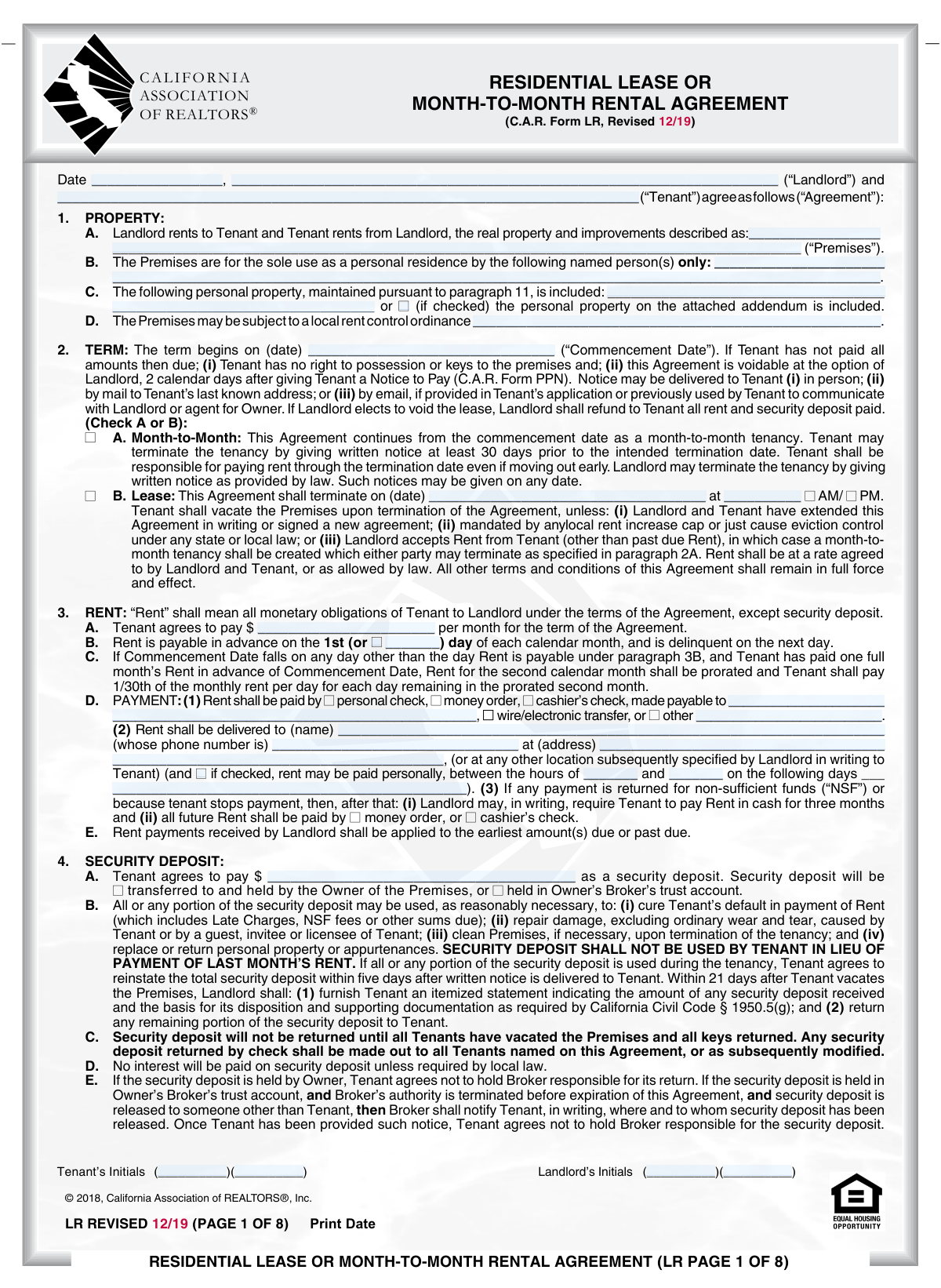
Yes! You can use AI to fill out California Association of REALTORS® (C.A.R.) Form LR, Residential Lease or Month-to-Month Rental Agreement (Revised 12/19)

C.A.R. Form LR (Residential Lease or Month-to-Month Rental Agreement) is a standardized California Association of REALTORSÂź contract that sets the legally important terms between a landlord and tenant for either a fixed-term lease or a month-to-month tenancy. It covers core deal points (premises, occupants, rent, security deposit, payment method, late fees) and operational/legal provisions (maintenance, entry, pets/smoking, HOA rules, notices, mediation/attorney fees, and statutory disclosures). Using a comprehensive written agreement like this helps prevent disputes by clearly defining responsibilities and timelines and by documenting required disclosures. Today, this form can be filled out quickly and accurately using AI-powered services like Instafill.ai, which can also convert non-fillable PDF versions into interactive fillable forms.
Our AI automatically handles information lookup, data retrieval, formatting, and form filling.
It takes less than a minute to fill out C.A.R. Form LR (12/19) using our AI form filling.
Securely upload your data. Information is encrypted in transit and deleted immediately after the form is filled out.

Form specifications

Form name: California Association of REALTORS® (C.A.R.) Form LR, Residential Lease or Month-to-Month Rental Agreement (Revised 12/19)
Number of pages: 8
Filled form examples: Form C.A.R. Form LR (12/19) Examples
Language: English
Categories: California realtor forms, California rental forms
main-image

Instafill Demo: filling out a legal form in seconds

How to Fill Out C.A.R. Form LR (12/19) Online for Free in 2026

Are you looking to fill out a C.A.R. FORM LR (12/19) form online quickly and accurately? Instafill.ai offers the #1 AI-powered PDF filling software of 2026, allowing you to complete your C.A.R. FORM LR (12/19) form in just 37 seconds or less.
Follow these steps to fill out your C.A.R. FORM LR (12/19) form online using Instafill.ai:
  1. 1 Go to Instafill.ai and upload the C.A.R. Form LR (Residential Lease or Month-to-Month Rental Agreement) PDF or select it from the form library.
  2. 2 Let the AI detect and map the form fields (landlord/tenant names, agreement date, premises address, term type, rent, deposit, and payment instructions), then confirm the field matches.
  3. 3 Enter the parties and property details: agreement date, landlord and tenant legal names, premises address, and the authorized resident/occupant names.
  4. 4 Complete the tenancy and money terms: choose month-to-month or lease, set commencement and (if lease) termination date/time, enter monthly rent, due date, payment method, delivery/payable-to details, and late/NSF fee terms if applicable.
  5. 5 Fill in deposits and move-in costs: security deposit amount/holding method, move-in cost table (rent period, amounts due/received/balances), and any additional fees (parking/storage) and included personal property.
  6. 6 Finish property-use and compliance sections: utilities responsibility and meter notes, condition/statement of condition (MIMO) timing, maintenance responsibilities, pets/smoking rules, HOA information (if applicable), notices addresses, and any attached addenda/disclosures.
  7. 7 Review with AI validation, generate a clean final copy, and route for e-signatures/initials (tenant, landlord, and guarantor if used), then download and store the executed agreement.

Our AI-powered system ensures each field is filled out correctly, reducing errors and saving you time.

Why Choose Instafill.ai for Your Fillable C.A.R. Form LR (12/19) Form?

Speed

Complete your C.A.R. Form LR (12/19) in as little as 37 seconds.

Up-to-Date

Always use the latest 2026 C.A.R. Form LR (12/19) form version.

Cost-effective

No need to hire expensive lawyers.

Accuracy

Our AI performs 10 compliance checks to ensure your form is error-free.

Security

Your personal information is protected with bank-level encryption.

Frequently Asked Questions About Form C.A.R. Form LR (12/19)

This form is a written agreement that sets the terms for renting a residential property in California, either as a fixed-term lease or a month-to-month tenancy. It covers rent, deposits, utilities, rules, maintenance responsibilities, and required disclosures.

All named tenants and the landlord (or the landlord’s authorized agent) must sign, and the parties typically initial where indicated on each page/section. If there are multiple tenants, each tenant is jointly and individually responsible for the obligations under the agreement.

Check “Month-to-Month” if the tenancy continues until either party gives proper written notice (tenant generally at least 30 days). Check “Lease” if the rental ends on a specific termination date and time listed in the form.

If all amounts due are not paid, the tenant may have no right to possession or keys, and the agreement can be voided by the landlord after giving a Notice to Pay (C.A.R. Form PPN) and waiting the required time. If the landlord voids the lease, rent and the security deposit paid must be refunded.

You’ll need the full property address (including unit number if applicable) and the full legal names of all persons authorized to live in the premises. Only the named residents are permitted to occupy the property unless the agreement is updated in writing.

List the items in the “Included Personal Property” lines (e.g., refrigerator, washer/dryer, patio furniture). If there are many items, check the box indicating an attached addendum and reference the addendum list.

Enter the monthly rent amount, select the due date (usually the 1st unless an alternative day is specified), and choose acceptable payment methods (check, money order, cashier’s check, wire/electronic transfer, or other). Then fill in who rent is payable to, who receives it, and the delivery address (and optional in-person hours/days if allowed).

If the commencement date is not the usual rent due day and a full month’s rent has been paid in advance, the second month may be prorated. The form states proration is calculated at 1/30th of the monthly rent per day for each day remaining in the prorated second month.

The security deposit amount is stated in the agreement and may be used for unpaid rent-related charges, damage beyond ordinary wear and tear, cleaning, and certain replacements/returns. The form states the landlord must provide an itemized statement and return any remaining deposit within 21 days after the tenant vacates, subject to California Civil Code § 1950.5.

If rent is not received within the stated grace period (default is 5 calendar days unless another number is filled in), a late charge may apply as either a fixed dollar amount or a percentage of rent (as completed in the form). NSF fees are listed as $25 for the first returned check and $35 for each additional returned check, and the landlord may require more secure payment methods after an NSF event.

The form lets the parties specify whether parking/storage is permitted and whether it is included in rent. If not included, an additional monthly fee can be entered, and the agreement restricts uses (e.g., operable registered vehicles only for parking; no hazardous/illegal items for storage).

The agreement lists which utilities/services the tenant must pay and which are paid by the landlord. If utilities are not separately metered, the tenant pays a proportional share as reasonably determined by the landlord; if separately metered, the tenant must place utilities in the tenant’s name as of the commencement date.

The MIMO (C.A.R. Form MIMO) documents the condition of the premises at move-in and may be attached or delivered shortly after signing/commencement as selected in the form. If the tenant does not return the completed MIMO within the stated deadline, the tenant may be deemed to have acknowledged the condition as stated in the MIMO.

Yes—AI tools can help reduce errors and save time by auto-filling fields from the information you provide. Services like Instafill.ai use AI to map your details into the correct form fields and help you review before signing.

Upload the lease PDF to Instafill.ai, provide your rental details (parties, rent, deposit, dates, utilities, etc.), and the AI will auto-fill the matching fields for you to review and export. If the PDF is flat/non-fillable, Instafill.ai can convert it into an interactive fillable form so you can complete and sign it more easily.

Compliance C.A.R. Form LR (12/19)
Validation Checks by Instafill.ai

1
Agreement Date is present and in valid date format
Validates that the Agreement Date field is completed and is a real calendar date (e.g., MM/DD/YYYY) that can be parsed by the system. This is important because many obligations (delivery timelines, commencement, notices) are calculated from the agreement date. If validation fails, the submission should be rejected or routed for correction because downstream date-based logic and compliance timelines may be incorrect.
2
Landlord and Tenant legal names are complete and not placeholders
Checks that Landlord Name and Tenant Name are provided as full legal names (not initials only, not 'N/A', not blank, and not generic placeholders like 'TBD'). Accurate party identification is essential for enforceability and for matching the agreement to applications, payments, and notices. If the check fails, the form should be flagged as incomplete and prevented from finalization/signature.
3
Premises address completeness and structure validation
Ensures Property Address Line 1 is present and contains a plausible street address, and that Property Address Line 2 (unit/apt) is required when the address indicates a multi-unit property (e.g., contains 'Apt', 'Unit', '#', or known multi-family street formats). The lease must clearly identify the premises to avoid disputes and to support service of notices. If validation fails, require correction before acceptance and optionally prompt for missing unit information.
4
Authorized Resident(s) list is provided and consistent with Tenant name(s)
Validates that Authorized Resident Name(s) is not blank and includes only named individuals, and that the Tenant Name appears among the authorized residents (or the system captures a clear reason if not, such as representative capacity). This matters because occupancy restrictions and liability depend on who is authorized to reside in the property. If validation fails, the submission should be flagged for review and the user prompted to reconcile the occupant list.
5
Tenancy type selection is mutually exclusive and complete
Checks that exactly one tenancy type is selected: Month-to-Month Tenancy OR Lease Tenancy, but not both and not neither. The term rules, termination requirements, and required fields differ depending on the selection. If validation fails, block submission and require the user to select one tenancy type.
6
Term dates are valid and logically consistent with tenancy type
For all submissions, validates Term Commencement Date is present and is a valid date. If Lease Tenancy is selected, Lease Termination Date must be present, valid, and after the commencement date; if Month-to-Month is selected, the termination date/time fields should be blank (or ignored) to avoid conflicting terms. If validation fails, the system should prevent finalization and request corrected dates or cleared fields.
7
Lease termination time and AM/PM are complete when a lease termination date is provided
When Lease Tenancy is selected, validates that Lease Termination Time is provided in a valid time format and that an AM/PM choice is selected. This is important because the agreement specifies a precise termination moment, which can affect possession, prorations, and notice timing. If validation fails, require the missing time/AM-PM selection before allowing execution.
8
Monthly rent amount is numeric, positive, and currency-formatted
Validates that Monthly Rent Amount is present, numeric, greater than zero, and within reasonable bounds (e.g., not $0, not negative, not containing letters). Rent is a core economic term and is referenced by other calculations (late fees, prorations, deposit caps). If validation fails, reject the submission and prompt for a corrected rent amount.
9
Rent due day is valid and consistent with 'Other Rent Due Day' selection
If Other Rent Due Day is checked, validates Alternative Rent Due Day is provided as an integer day of month between 1 and 28/29/30/31 (system should allow 1–31 but warn for 29–31 due to month variability). If Other Rent Due Day is not checked, Alternative Rent Due Day must be blank to prevent ambiguity. If validation fails, require correction to avoid conflicting rent due terms.
10
Rent payment method selection and 'Other Payment Method' details completeness
Ensures at least one rent payment method checkbox is selected (personal check, money order, cashier’s check, wire/electronic transfer, or other). If 'Other Payment Method' is selected, the Other Payment Method description must be filled with a clear method (e.g., 'Zelle', 'ACH portal') and not generic text like 'see instructions'. If validation fails, block submission because payment instructions would be incomplete or unenforceable.
11
Payable-to and delivery recipient information completeness
Validates that Payment Recipient (payable to) and Delivery Recipient Name are provided, and that Delivery Address is complete enough to deliver payment (street, city/state/zip if captured, or a validated full address string). This is important for proper tender of rent and to reduce disputes about where/how rent must be delivered. If validation fails, require completion before acceptance.
12
Delivery recipient phone number format validation
Checks that Delivery Recipient Phone Number is present when a delivery recipient is specified and matches an acceptable phone format (e.g., 10-digit US number with optional country code, allowing punctuation). A valid phone number supports operational issues (payment questions, access coordination) and reduces failed communications. If validation fails, prompt for a corrected phone number and prevent finalization if the field is required by workflow.
13
In-person rent payment hours are complete and logically ordered when enabled
If the in-person payment option checkbox is checked, validates that start hour and end hour are provided and that the end time is after the start time, and that the allowed day(s) field is populated in a usable format. This prevents contradictory instructions (e.g., end time earlier than start time) that could create disputes about payment availability. If validation fails, require corrected hours/days or uncheck the in-person option.
14
Security deposit amount is numeric, non-negative, and within California maximum cap
Validates Security Deposit Amount is numeric and not negative, and enforces the stated cap: no more than two months’ rent for unfurnished or three months’ rent for furnished (if the system captures furnished/unfurnished, apply the correct cap; otherwise default to the stricter two-month cap or require the furnished status). This is critical for statutory compliance and to avoid invalid or unlawful lease terms. If validation fails, block submission and require the deposit to be reduced or the furnished status clarified.
15
Security deposit holding selection is mutually exclusive
Checks that exactly one of 'Security Deposit Transferred to Owner' or 'Security Deposit Held in Broker's Trust Account' is selected, and not both. The holding location affects fiduciary handling, notices, and responsibility statements in the agreement. If validation fails, require the user to select only one option before proceeding.
16
Move-in cost ledger arithmetic consistency (Total Due/Received/Balance)
Validates that for each move-in cost line (Rent, Security Deposit, Other 1, Other 2), Balance Due equals Total Due minus Payment Received, and that the overall Total line equals the sum of the component lines. This prevents accounting errors that can cause disputes at move-in and misapplied funds. If validation fails, flag the submission and require corrected amounts before generating a final ledger.

Common Mistakes in Completing C.A.R. Form LR (12/19)

Using nicknames or incomplete legal names for Landlord/Tenant

People often enter a nickname, omit a middle initial/suffix, or list only one person when multiple tenants/owners are involved. This can create enforceability issues, problems with deposit refunds (checks must often be payable to all named tenants), and delays if the parties’ names don’t match IDs, applications, or ownership records. Always use full legal names exactly as they appear on government ID (tenants) and on title/ownership or authorized management documents (landlord/agent). AI-powered tools like Instafill.ai can standardize names across documents and flag mismatches before signing.

Incomplete premises address (missing unit number or inconsistent address fields)

A very common error is entering only the street address and forgetting the apartment/unit number, or putting the unit number in the wrong line (e.g., mixing it into Line 1 sometimes and Line 2 other times). This can cause confusion about which dwelling is being leased, misdirected notices, and issues with utilities setup and mail delivery. Enter the full address consistently: street address in Line 1 and unit/suite in Line 2, and ensure the “Premises” header address matches the property address fields. Instafill.ai can auto-format addresses and validate them against standardized address patterns to reduce these errors.

Not listing all authorized residents (or listing minors/occupants incorrectly)

Many tenants list only the lease signers and forget to include all occupants who will live there, or they include vague entries like “family” instead of full names. This can lead to lease violations, disputes over unauthorized occupants, and problems later when someone turns 18 and must apply per the agreement’s representation section. Avoid this by listing every person authorized to reside in the premises by full name, and update the landlord when an occupant reaches 18 as required. Instafill.ai can prompt for missing occupant names and ensure the authorized resident list aligns with the application.

Leaving tenancy type ambiguous (Month-to-Month vs. Lease) or checking both

The form requires selecting either month-to-month or a fixed-term lease, but people sometimes forget to check one, check both, or check one while still filling dates that imply the other. This creates uncertainty about termination rights, notice periods, and whether a specific end date applies. Choose exactly one tenancy type and complete only the fields that correspond to that choice (e.g., lease termination date/time only for a fixed-term lease). Instafill.ai can enforce mutually exclusive selections and prevent contradictory entries.

Incorrect or inconsistent dates (Agreement Date, Commencement Date, Rent period dates)

Users frequently mix up the agreement signing date with the commencement date, or they enter dates in inconsistent formats (MM/DD vs DD/MM) and create impossible timelines. This can affect when rent is due, when possession must be delivered, and the timing of notices and prorations. Use a single date format throughout (typically MM/DD/YYYY in California forms) and double-check that the commencement date aligns with move-in and utility start dates. Instafill.ai can normalize date formats and flag conflicts (e.g., termination date earlier than commencement).

Rent due day and proration misunderstandings

A common mistake is leaving the “other rent due day” blank when rent is not due on the 1st, or entering an invalid day (e.g., 31) without considering shorter months. People also misunderstand the proration clause and assume any partial month is prorated automatically, which can cause payment disputes. If rent is due on a day other than the 1st, check the “Other Rent Due Day” option and enter a valid day number; confirm in writing how the first/second month will be handled if commencement is mid-month. Instafill.ai can validate day-of-month entries and help calculate/confirm prorated amounts.

Payment instructions left incomplete (payable to, delivery recipient, delivery address, accepted methods)

Tenants often check a payment method but forget to fill in who the payment is made payable to, where it must be delivered, or the recipient’s phone number and delivery hours (if in-person payment is allowed). Missing or unclear payment instructions can lead to late fees, returned payments, and disputes about whether rent was properly tendered. Complete all related fields: payee name, delivery recipient name, phone number, and full delivery address; only check payment methods the landlord truly accepts. Instafill.ai can require dependent fields when a payment option is selected and format phone numbers/addresses correctly.

Security deposit errors (amount exceeds legal cap or conflicts with rent/furnishing status)

People frequently enter a deposit amount without checking the statutory maximum noted on the form (two months’ rent unfurnished, three months’ rent furnished, subject to current law and local rules). Overstating the deposit can create legal exposure for the landlord and delays while the amount is corrected; understating can cause move-in funding shortfalls. Confirm whether the unit is furnished or unfurnished and ensure the deposit amount complies with the stated cap and any applicable local ordinances. Instafill.ai can cross-check deposit vs. monthly rent and flag amounts that exceed the allowed threshold.

Move-in cost table math mistakes (Total Due/Received/Balance/Due Date mismatches)

The move-in cost grid is prone to arithmetic errors—people enter totals that don’t equal the sum of rent + deposit + other charges, or they forget to update “Balance Due” after recording “Payment Received.” These mistakes cause confusion at move-in, disputes over what was paid, and accounting problems for both parties. Recalculate each line item and ensure the “Total” row matches the sum of all categories, with consistent due dates and payee names. Instafill.ai can automatically compute totals and balances and prevent inconsistent entries.

Parking and storage selections inconsistent with fees and details

Users often check “Parking permitted” or “Storage permitted” but leave the details blank (space number, rules, location), or they indicate it’s not included in rent but forget to enter the monthly fee. This can lead to disputes over assigned spaces, towing, and unexpected charges. If parking/storage is permitted, specify exactly what is included (space numbers, restrictions) and clearly state whether it’s included in rent and the additional monthly fee if not. Instafill.ai can prompt for required details when an option is selected and ensure fee fields aren’t left empty.

Premises condition acknowledgments and MIMO timing left unchecked or not returned

Tenants commonly check that everything is “clean and operable” without listing exceptions, or they fail to complete/return the Statement of Condition (MIMO) within the required timeframe. The consequence is serious: unreported issues may be deemed accepted, making it harder to dispute damage claims at move-out and potentially reducing the security deposit return. Document exceptions in detail at move-in, attach the MIMO if used, and meet the stated return deadline (or the alternative days specified). Instafill.ai can remind users of deadlines, ensure exceptions are captured, and keep attachments organized.
Saved over 80 hours a year

“I was never sure if my IRS forms like W-9 were filled correctly. Now, I can complete the forms accurately without any external help.”

Kevin Martin Green

Your data stays secure with advanced protection from Instafill and our subprocessors

Robust compliance program

Transparent business model

You’re not the product. You always know where your data is and what it is processed for.

ISO 27001, HIPAA, and GDPR

Our subprocesses adhere to multiple compliance standards, including but not limited to ISO 27001, HIPAA, and GDPR.

Security & privacy by design

We consider security and privacy from the initial design phase of any new service or functionality. It’s not an afterthought, it’s built-in, including support for two-factor authentication (2FA) to further protect your account.

Fill out C.A.R. Form LR (12/19) with Instafill.ai

Worried about filling PDFs wrong? Instafill securely fills california-association-of-realtors-car-form-lr-residential-lease-or-month-to-month-rental-agreement-revised-1219 forms, ensuring each field is accurate.