
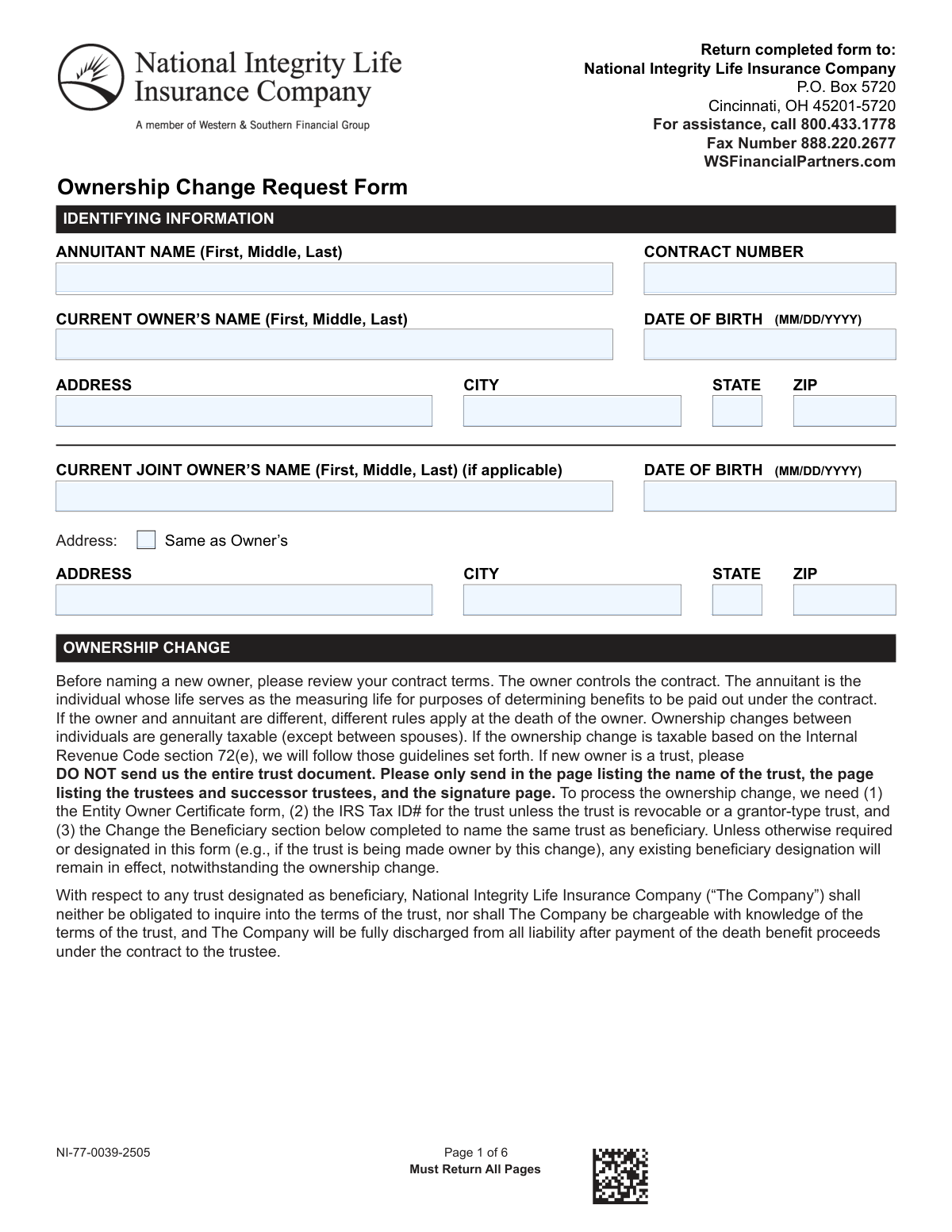
Yes! You can use AI to fill out National Integrity Life Insurance Company Ownership Change Request Form (NI-77-0039-2505)
Don't type 140 fields by hand. Tell our AI about yourself, or upload a document you already have, and it fills every field in seconds. You check it, then download, print or sign.
The AI does the filling. You just check it.
No typing into boxes, nothing to install.
What this form asks for
The AI fills all of it, from your answers or your documents.
The AI checks your answers before you download
17 checks built for this form, so a wrong date or a missing answer is caught before anyone else sees it.
Verify the submission includes all 6 pages and that the form identifier/version (NI-77-0039-2505) is consistent across pages. This matters because missing pages often contain required elections, beneficiary details, or signatures that determine processing and legal authorization. If any page is missing or the version is inconsistent, the request should be rejected as incomplete and returned for resubmission.
Ensure the contract number is provided and matches the expected contract number format (e.g., length, allowed characters) and/or exists in the administration system. The contract number is the primary key used to locate the policy/annuity and apply changes to the correct record. If invalid or not found, processing must stop to prevent misapplication of ownership/beneficiary changes.
Confirm required identifying fields are completed for the annuitant and current owner (full name, date of birth, and address fields as presented on the form). This is important for identity matching, fraud prevention, and ensuring the correct contract parties are being referenced. If required identifying information is missing, the submission should be marked deficient and not processed until corrected.
Validate all DOB fields (annuitant, current joint owner if applicable, new owner, new joint owner, beneficiaries) are in MM/DD/YYYY format and represent a real calendar date. Also check plausibility (e.g., not in the future, not unreasonably old/young for an adult owner) and consistency with system-of-record when available. If a DOB fails validation, the record cannot be reliably identified and the form should be pended for correction.
Ensure exactly one ownership action is selected: Change the owner, Add/Change the joint owner, or Remove the joint owner. The selected action determines which sections are mandatory (e.g., new owner details for “Change the owner,” new joint owner details for “Add/Change,” and prior joint owner signature requirements for “Remove”). If none or multiple are selected, or required dependent fields are missing, the request should be rejected as ambiguous.
If the “From Qualified Plan Direct Rollover to Traditional IRA/Roth IRA” or “Designate a participant owner of a nontransferable qualified plan distributed annuity” option is selected, validate that the selection is complete and consistent with the contract type and administrative rules. This matters because qualified plan ownership and rollover handling have strict tax reporting and ownership constraints. If the election is incomplete or incompatible, the request should be pended and routed for specialized review.
And 11 more checks
- New owner and new joint owner identity fields required and validated
- SSN/TIN format validation and TIN indicator logic
- Address completeness and USPS-style field validation
- Phone number format validation
- Trust-related tax certification selection when trust involved
- Required supporting documents for representative signatures and deceased prior owner
- Beneficiary entry completeness and beneficiary type validation
- Beneficiary allocation totals and primary/contingent rules
- Trust/entity owner must remain beneficiary rule enforcement
- Signature and date completeness for all required signers
- Spousal consent requirement determination and completion
Let AI fill out your NI-77-0039-2505
No typing. Every field filled in seconds, checked, ready to sign.
How to Fill Out NI-77-0039-2505 Online for Free in 2026
What the AI walks you through.
- Enter identifying information: annuitant name, current owner/joint owner, contract number, dates of birth, and current mailing address.
- Select the ownership change request type (change owner, add/change joint owner, or remove joint owner) and complete the new owner/new joint owner details (name, SSN/TIN, DOB, address, phone, and relationship).
- If the new owner is a trust, choose the applicable IRC 72(e) tax certification checkbox and prepare required supporting items (Entity Owner Certificate, trust Tax ID if applicable, and only the specified trust pages).
- Complete the beneficiary change section(s) as applicable (annuitant-driven and/or owner-driven), listing primary/contingent beneficiaries and allocation percentages, and ensure trust/entity beneficiary requirements are met when relevant.
- If required (ERISA or certain community property states), complete the spousal consent section with spouse’s printed name, signature, and date.
- Review the certification/authorization and backup withholding statements, then obtain all required signatures and printed names (new owner, new joint owner if applicable, prior owner, prior joint owner if applicable).
- Submit all pages of the completed form and any required attachments (e.g., death certificate, POA/letters of office, trust pages) to National Integrity Life Insurance Company via mail or fax as instructed on the form.
Common Mistakes in Completing NI-77-0039-2505
The ones the AI is built to catch.
Leaving the contract number blank or entering the wrong contract number
Confusing the roles of annuitant, owner, and joint owner
Not selecting the correct ownership change request type
Incorrect SSN/TIN entry or forgetting to mark 'Check if TIN'
Using the wrong date format or providing incomplete dates of birth
Providing incomplete addresses or misusing 'Same as Owner’s'
Trust ownership change errors (missing required trust items or sending the entire trust)
Not checking a trust taxation certification box (Section 72(e))
Beneficiary section mistakes: wrong section, missing type, or allocations not totaling 100%
Ignoring spousal consent requirements for certain states/ERISA situations
Missing required supporting documents (death certificate, POA/guardianship papers)
Signature and certification errors (wrong signer, missing dates, backup withholding certification not handled correctly)
Frequently Asked Questions About NI-77-0039-2505
Is it really free for 7 days?
Can I fill other forms too?
How do I cancel?
How does the AI fill out NI-77-0039-2505?
What happens to my information?
How complex is NI-77-0039-2505 to fill out?
What is the Ownership Change Request Form used for?
Who needs to complete and sign this form?
Do I have to return all pages of the form even if I only complete one section?
Where do I send the completed form?
What information is required to process an ownership change?
What is the difference between the owner and the annuitant, and why does it matter?
How do I indicate what type of ownership change I’m requesting?
What if the ownership change is due to the previous owner’s death?
Can I use this form if I’m signing as power of attorney (attorney-in-fact) or as a legal representative?
What if the new owner is a trust—what documents do I need to provide?
Do I have to change beneficiaries when I change ownership?
Which beneficiary section should I complete—Annuitant’s Beneficiary or Owner’s Beneficiary?
How do I list multiple beneficiaries and specify primary vs. contingent and allocation percentages?
When is spousal consent required, and what states are specifically mentioned?
What is the tax certification/backup withholding section, and do I need to check the box?
Get your NI-77-0039-2505 filled out by AI
$0 today. Cancel before Nov 1 and you pay nothing.
Other forms like this one
insurance forms: Form 1095-A, Health Insurance Marketplace Statement, Form SSA-4-BK, Application for Child's Insurance Benefits, Form SSA-10, Application for Widow's or Widower's Insurance Benefits, Form 1095-C, Employer-Provided Health Insurance Offer and Coverage, Record of Advice and Needs Analysis (Non-Life Insurance — Personal and Commercial Lines), Form 7206 (2025), Self-Employed Health Insurance Deduction, Continental American Insurance Company (CAIC) / Aflac Group Critical Illness Claim Form (with Attending Physician’s Statement, HIPAA Authorization to Obtain Information, and Electronic Funds Transaction Authorization), Prudential Group Disability Insurance – Education and Employment History Form (GL.2009.009, Ed. 06/2017), acord-25-201603-certificate-of-liability-insurance-1, Brotherhood Mutual Insurance Company Ministry Driver Screening Form (A99), Assurity Life Insurance Company Disability Claim Form — Attending Physician’s Statement, Amateur Sports / Activities Accident Insurance Quote Request Form (Philadelphia Insurance Companies), Martial Arts Studio General Liability and Property Application (Fitness and Wellness Insurance / Philadelphia Insurance Companies) (03/2011), The Prudential Insurance Company of America Group Disability Insurance – Education and Employment History Form (GL.2009.009, Ed. 06/2017), VA Form 29-357, Claim for Disability Insurance Benefits (Government Life Insurance), CMS-1500 (02-12), Health Insurance Claim Form (NUCC Approved) (OMB 0938-1197), Prudential Group Disability Insurance – Education and Employment History Form (GL.2009.009, Ed. 06/2017), HDFC ERGO General Insurance Company Limited – Request for Cashless Hospitalisation for Health Insurance (Policy Part – C), Beneficiary Designation/Change - Principal Life Insurance Company, Principal Life Insurance Company UCTIE INTERNATIONAL UNION 401(K) SAVINGS PLAN Enrollment Form
life insurance forms: Record of Advice and Needs Analysis (Non-Life Insurance — Personal and Commercial Lines), Assurity Life Insurance Company Disability Claim Form — Attending Physician’s Statement, VA Form 29-357, Claim for Disability Insurance Benefits (Government Life Insurance), Beneficiary Designation/Change - Principal Life Insurance Company, Principal Life Insurance Company UCTIE INTERNATIONAL UNION 401(K) SAVINGS PLAN Enrollment Form, Principal Life Insurance Company Death Notification Form, Principal Life Insurance Company Form PG4701, In-Plan Roth Conversion – No Spousal Consent Needed, Principal Life Insurance Company Administration Guide, Principal Life Insurance Company Small Amounts Benefit Election, Transamerica Life Insurance Company - New Business Cover Sheet, Transamerica Life Insurance Company Individual Whole Life Insurance Application, Transamerica Life Insurance Company Beneficiary Designation Form (TOB 306M-0809), Beneficiary Designation Form For Life Insurance Policies, Transamerica Life Insurance Company Beneficiary Designation Form, TIAA Life Insurance Beneficiary Designation Form, Fidelity Investments Beneficiaries — Term Life Insurance, American Fidelity Change of Beneficiary Form, PruLife Private Placement VUL and Private Placement Variable Annuity Purchaser Questionnaire and Agreement, Discovery Life Personal Life Insurance Application for the Classic, Essential and Purple Life Plans on Adviser 360, Assignment of Life Insurance Policy as Collateral
insurance request forms: Amateur Sports / Activities Accident Insurance Quote Request Form (Philadelphia Insurance Companies), HDFC ERGO General Insurance Company Limited – Request for Cashless Hospitalisation for Health Insurance (Policy Part – C), Form CMS-40B, Request for Enrollment in Medicare Part B (Medical Insurance), Form CMS-1763, Request for Termination of Premium Hospital and/or Supplementary Medical Insurance, Request for Investigation of Unemployment Insurance Fraud, ACORD 35, Cancellation Request / Policy Release, ACORD 175, Commercial Policy Change Request
company forms: Form S-1, Surety Company Annual Report, QBCC Licence Application Form – Company (Application made under section 33, Queensland Building and Construction Commission Act 1991), California Form 568 (2024), Limited Liability Company Return of Income, Continental American Insurance Company (CAIC) / Aflac Group Critical Illness Claim Form (with Attending Physician’s Statement, HIPAA Authorization to Obtain Information, and Electronic Funds Transaction Authorization), Brotherhood Mutual Insurance Company Ministry Driver Screening Form (A99), Assurity Life Insurance Company Disability Claim Form — Attending Physician’s Statement, Due Diligence Form (Australian Company) – The Perth Mint, The Prudential Insurance Company of America Group Disability Insurance – Education and Employment History Form (GL.2009.009, Ed. 06/2017), Pennsylvania Department of State — Certificate of Termination (Domestic Limited Liability Company) (15 Pa.C.S. § 8872(f)) (DSCB:15-8872(f)), Louisiana Secretary of State – Notice of Change of Registered Office and/or Change of Registered Agent (Domestic Limited Liability Company) (R.S. 12:1308) (Form SS983, Rev. 01/24), Form LLC1050, Articles of Cancellation of a Virginia Limited Liability Company, HDFC ERGO General Insurance Company Limited – Request for Cashless Hospitalisation for Health Insurance (Policy Part – C), Anmeldung zum R+V-Firmenportal Vorsorge (Registration for the R+V Company Portal for Pensions), Beneficiary Designation/Change - Principal Life Insurance Company, Principal Life Insurance Company UCTIE INTERNATIONAL UNION 401(K) SAVINGS PLAN Enrollment Form, Principal Life Insurance Company Death Notification Form, Principal Life Insurance Company Form PG4701, In-Plan Roth Conversion – No Spousal Consent Needed, Principal Life Insurance Company Administration Guide, Principal Life Insurance Company Small Amounts Benefit Election, SEC Application for an Order under Section 17(b) of the Investment Company Act of 1940 (File No. 812-11000)
Let AI fill out your NI-77-0039-2505
Your trial starts once a card is added. You pay nothing before Nov 1.
Our AI already knows this form, all 140 fields of it. Skip the typing: tell it about yourself, or upload what you have, and it fills the whole form in seconds.
- AI fills every field on all 6 pages, checkboxes included
- No typing into boxes: answer a few questions, or upload a document you already have, an old copy of this form, a photo of a document
- The AI checks the answers; you review and change anything before you download
- Download the finished PDF, print it, or sign it online
- Encrypted, and never used to train AI
Cancel before Nov 1 and you pay nothing.
A card is needed to start the trial. Cancel in two clicks from your account.
Terms · Privacy