Yes! You can use AI to fill out Assurity Life Insurance Company Disability Claim Form — Attending Physician’s Statement
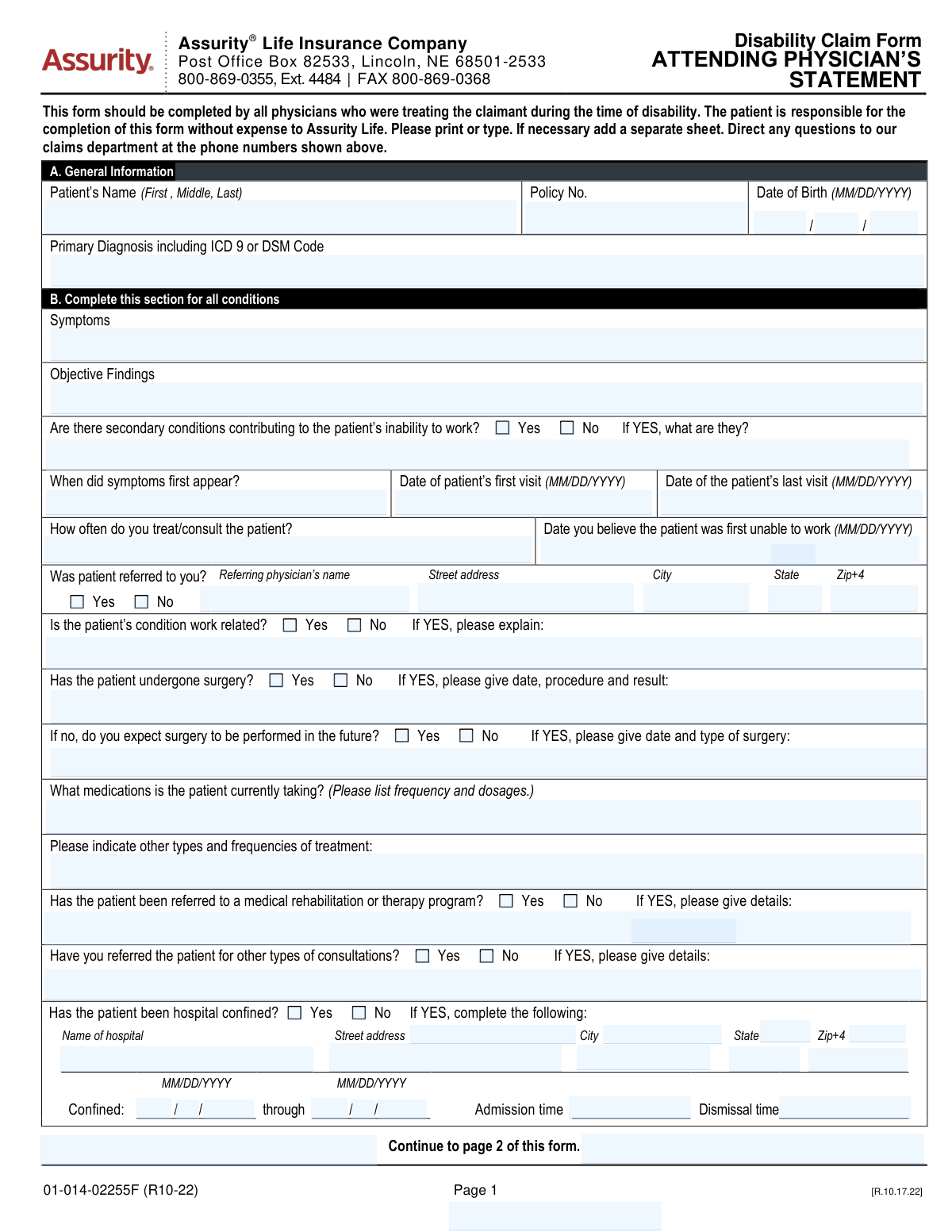
This is an Assurity Life Insurance Company disability claim medical statement completed by the attending/treating physician(s) who cared for the patient during the period of disability. It captures clinical details such as primary and secondary diagnoses (ICD-9/DSM), symptoms and objective findings, treatment history (medications, surgery, rehab referrals), hospital confinement, pregnancy details (if applicable), and the physicianâs assessment of work restrictions/limitations and return-to-work timing. The form is important because insurers use it to evaluate medical eligibility, duration, and severity of disability, and it includes required fraud notices and physician certification/signature. Today, this form can be filled out quickly and accurately using AI-powered services like Instafill.ai, which can also convert non-fillable PDF versions into interactive fillable forms.
Our AI automatically handles information lookup, data retrieval, formatting, and form filling.
It takes less than a minute to fill out Assurity Attending Physician’s Statement (01-014-02255F R10-22) using our AI form filling.
Securely upload your data. Information is encrypted in transit and deleted immediately after the form is filled out.
Form specifications
| Form name: | Assurity Life Insurance Company Disability Claim Form — Attending Physician’s Statement |
| Number of pages: | 3 |
| Filled form examples: | Form Assurity Attending Physician’s Statement (01-014-02255F R10-22) Examples |
| Language: | English |
| Categories: | insurance forms, disability forms |
Instafill Demo: filling out a legal form in seconds
How to Fill Out Assurity Attending Physician’s Statement (01-014-02255F R10-22) Online for Free in 2026
Are you looking to fill out a ASSURITY ATTENDING PHYSICIAN’S STATEMENT (01-014-02255F R10-22) form online quickly and accurately? Instafill.ai offers the #1 AI-powered PDF filling software of 2026, allowing you to complete your ASSURITY ATTENDING PHYSICIAN’S STATEMENT (01-014-02255F R10-22) form in just 37 seconds or less.
Follow these steps to fill out your ASSURITY ATTENDING PHYSICIAN’S STATEMENT (01-014-02255F R10-22) form online using Instafill.ai:
- 1 Go to Instafill.ai and upload the Assurity Disability Claim Form — Attending Physician’s Statement (or select it from the form library).
- 2 Let the AI detect and map the form fields (patient identifiers, policy/certificate numbers, diagnoses, dates of visits, and treatment sections).
- 3 Enter or import the patient and claim details (patient name, DOB, policy number, claimant name) and confirm accuracy.
- 4 Complete the medical sections with AI assistance: symptoms, objective findings, primary/secondary diagnoses (ICD-9/DSM), treatment frequency, medications, surgery history/future surgery, referrals, and hospital confinement details (if applicable).
- 5 Fill the work capacity section: restrictions (should not do), limitations (cannot do), first unable-to-work date, expected improvement timeline, and full-time/part-time return-to-work dates.
- 6 Review the fraud notice acknowledgments and physician information (name, degree, specialty, address, phone/fax), then add the physician signature/date and TIN/SSN as required.
- 7 Run a final validation check, download the completed PDF, and submit it to Assurity via the instructed claims channel (fax/mail) while saving a copy for records.
Our AI-powered system ensures each field is filled out correctly, reducing errors and saving you time.
Why Choose Instafill.ai for Your Fillable Assurity Attending Physician’s Statement (01-014-02255F R10-22) Form?
Speed
Complete your Assurity Attending Physician’s Statement (01-014-02255F R10-22) in as little as 37 seconds.
Up-to-Date
Always use the latest 2026 Assurity Attending Physician’s Statement (01-014-02255F R10-22) form version.
Cost-effective
No need to hire expensive lawyers.
Accuracy
Our AI performs 10 compliance checks to ensure your form is error-free.
Security
Your personal information is protected with bank-level encryption.
Frequently Asked Questions About Form Assurity Attending Physician’s Statement (01-014-02255F R10-22)
This form provides medical information Assurity needs to evaluate a disability claim, including diagnosis, treatment, and work restrictions/limitations. It must be completed by the physician(s) who treated the claimant during the period of disability.
Your attending physician (and any other treating physicians during the disability period) should complete it. The form notes that the patient is responsible for ensuring it is completed and that any physician fees are not paid by Assurity.
Yesâthis statement should be completed by all physicians who treated the claimant during the time of disability. If you saw multiple providers (e.g., primary care and specialist), each may need to submit their own statement.
Section A asks for the patientâs full name, policy number, date of birth, and the primary diagnosis including the ICD-9 or DSM code. Make sure the policy number matches the claimantâs insurance documents.
Symptoms should describe what the patient reports (onset, severity, frequency, and triggers). Objective findings should include exam findings and test results that support the diagnosis (e.g., imaging, labs, measurements, or observed clinical signs).
If other conditions (comorbidities) also limit the patientâs ability to work, check âYesâ and list them with a brief explanation of how they contribute. If none, check âNoâ and leave the details blank.
The form requests the date symptoms first appeared, the first and last visit dates for this condition, how often the physician treats/consults, and the date the physician believes the patient was first unable to work. Use MM/DD/YYYY format for all dates.
If it is work-related, check âYesâ and briefly explain how it relates to the job (e.g., duties, exposure, injury mechanism, and approximate timeframe). If it is not work-related, check âNoâ (or write âNot work-relatedâ if a narrative is requested).
If surgery occurred, include the date, procedure, and result; if no surgery but one is expected, provide the anticipated date and type. List all current medications with dosage and frequency, and describe other treatments (e.g., PT, injections) with how often they occur.
Complete it only if the patient was hospital confined for the condition. Youâll need the hospital name and address, confinement start and end dates, and admission/dismissal times.
This section is used when the disability involves a mental impairment. The physician selects a class (1â5) describing limitation severity and may provide DSM-IV-R Axis IâV diagnoses, including psychosocial factors (Axis IV) and overall functioning (Axis V).
NoâSection C is only for pregnancy-related disability claims. It asks for LMP, first treatment date, due date, delivery date/type, and any pregnancy/delivery/postpartum complications.
Restrictions are activities the patient should not do (e.g., no lifting over 10 lbs, no driving). Limitations are activities the patient cannot do at all due to the condition (e.g., cannot stand more than 10 minutes, cannot concentrate for sustained tasks).
The physician must sign and date on the signature line near the fraud notice acknowledgment and certification. The form specifies âPhysicianâs Signature (no stamp),â so a stamped signature should not be used.
YesâAI tools can help organize and auto-fill form fields accurately; services like Instafill.ai can save time by mapping your information into the correct fields. If the PDF is flat/non-fillable, Instafill.ai can convert it into an interactive fillable form and then guide you to upload the PDF, enter the patient/claim details, and export a completed version for the physician to review, sign, and submit.
Compliance Assurity Attending Physician’s Statement (01-014-02255F R10-22)
Validation Checks by Instafill.ai
1
Patient identity fields are present and plausibly formatted (Full Name + Date of Birth)
Validates that the patientâs full name is provided (at minimum first and last name) and that the date of birth is complete and in MM/DD/YYYY format (or month/day/year components all present). This is essential to correctly match the claim to the insured/claimant record and avoid misrouting medical information. If missing or malformed, the submission should be rejected or routed to manual review with a request for corrected demographics.
2
Policy/Certificate number is present and matches allowed policy number pattern
Checks that a policy number (and/or policy/certificate number(s) in the header) is provided and conforms to the insurerâs expected character set/length (e.g., alphanumeric, no illegal symbols, trimmed whitespace). This prevents claims from being created without a reliable key for downstream matching and adjudication. If validation fails, the form should not proceed to automated intake and should prompt for correction.
3
All date fields use valid calendar dates and consistent MM/DD/YYYY formatting
Validates that every date field (symptom onset, first/last visit, first unable to work, pregnancy dates, confinement dates, signature date) is a real calendar date (e.g., no 02/30, month 01â12, day 01â31) and uses the required format. Correct date parsing is critical for benefit calculations, eligibility windows, and medical timeline analysis. If any date is invalid, the system should flag the specific field and block submission until corrected (or route to exception handling).
4
Chronological consistency across medical timeline dates
Ensures the sequence of dates is logically consistent: symptoms first appeared should be on/before first visit; first visit should be on/before last visit; first unable to work should not be after last visit (unless clearly documented); and dates should not be in the far future except for expected return-to-work or expected due date. This reduces contradictory timelines that can cause incorrect disability start dates or denials. If inconsistencies are found, require correction or an explanatory note before acceptance.
5
Primary diagnosis includes a diagnosis text and a valid ICD-9 or DSM code format
Checks that the primary diagnosis field is not blank and includes either an ICD-9 code (commonly 3â5 digits with optional decimal, e.g., 296.3) or a DSM code/identifier consistent with the formâs instructions. Diagnosis coding is required for claim classification, medical necessity review, and analytics. If the code is missing or malformed, the submission should be flagged and the provider prompted to supply a valid code.
6
Symptoms and objective findings are both completed with clinically meaningful content
Validates that the Symptoms and Objective Findings fields are not empty and contain more than placeholder text (e.g., not just 'N/A' unless accompanied by an explanation). These fields support the medical basis for disability and are often required for claim approval. If either is missing or too short to be meaningful, the system should request additional detail or route to manual review.
7
Secondary conditions dependency: Yes requires details; No requires details to be blank or 'None'
If 'Are there secondary conditions contributing to inability to work?' is marked Yes, the 'If YES, what are they?' field must be populated with at least one condition. If marked No, the secondary conditions detail field should be empty or explicitly 'None' to avoid contradictory data. If the dependency fails, the submission should be blocked and the user prompted to reconcile the answer and details.
8
Work-related condition dependency: explanation required when marked Yes
If 'Is the patientâs condition work related?' is Yes, the explanation field must be completed with a description of the work relationship (mechanism/exposure/event and approximate timeframe). This is important for coordination with workersâ compensation and correct claim routing. If Yes is selected without an explanation, the system should flag the field as required and prevent completion until provided.
9
Surgery history logic: prior surgery details required if 'Has undergone surgery' = Yes; future surgery only allowed if prior surgery = No and future surgery = Yes
Validates that selecting 'Has the patient undergone surgery? â Yes' requires completion of date/procedure/result, and that the 'Expected future surgery' section is only completed when prior surgery is No and future surgery is Yes (as instructed). This prevents conflicting surgical histories and ensures the claim has accurate treatment information. If the logic is violated (e.g., future surgery filled while prior surgery is Yes), the system should require correction or an explicit clarification.
10
Hospital confinement dependency and completeness (facility + dates + times)
If 'Has the patient been hospital confined?' is Yes, validates that hospital name and address components are present, confinement start and through/end dates are complete, and admission/dismissal times are provided in a valid time format. Hospitalization details can materially affect severity assessment and benefit decisions. If any required confinement detail is missing or invalid, the submission should be flagged and held for completion.
11
Hospital confinement date/time consistency (start ≤ end; admission time precedes dismissal time when same day)
Checks that confinement start date is on/before confinement end date, and that admission/dismissal times are logically ordered when the dates are the same (or otherwise consistent with multi-day stays). This prevents impossible hospitalization records that can break downstream calculations and audits. If inconsistent, the system should prompt for corrected dates/times or an explanatory note.
12
Referring physician dependency: if referred = Yes, require referring physician name and full address
If 'Was patient referred to you?' is Yes, validates that the referring physicianâs name, street, city, state, and ZIP/ZIP+4 are completed and that state/ZIP follow valid formats. Referral information supports care coordination and can be required for network/authorization review. If referred is Yes but details are missing, the submission should be rejected until completed.
13
Physician contact information format (phone/fax) and required physician identity fields
Validates that physician name, degree, specialty, and address are present, and that phone and fax numbers (area code + local number) contain the correct number of digits (e.g., 3-digit area code and 7-digit local number) with only allowed separators. Accurate provider contact data is necessary for follow-up, medical record requests, and fraud prevention. If invalid, the system should flag the specific field(s) and require correction before submission.
14
Return-to-work dates and work incapacity date consistency
If full-time and/or part-time return-to-work dates are provided, validates they are on/after the 'date first unable to work' and are valid dates; also flags if both full-time and part-time are provided but part-time occurs after full-time without explanation. These dates drive benefit duration and partial disability handling. If inconsistent, the system should require correction or a clarifying remark in additional remarks.
15
Self-care prevention dependency: if 'Prevents self-care' = No, expected change timeline selection is required
When the physician indicates the condition does not prevent self-care (No), the form instructs completion of the expected change timeline (1â2, 3â4, 5â6, 6+ months) and related improvement/deterioration details. This information supports prognosis and claim management planning. If No is selected but no timeline is chosen (or multiple timelines are selected), the submission should be flagged and require a single valid selection and supporting details.
16
Signature, signature date, and TIN/SSN presence and format validation
Validates that the physician signature field is present (not a stamp indicator), the signature date is a valid MM/DD/YYYY date, and the TIN/SSN is provided in an acceptable format (e.g., 9 digits, optionally with hyphens). These elements are critical for attestation, legal enforceability, and provider identification for payment/tax reporting. If missing or malformed, the form should be considered incomplete and blocked from final submission.
Common Mistakes in Completing Assurity Attending Physician’s Statement (01-014-02255F R10-22)
People often leave the Policy No./Policy/Certificate no.(s) blank or copy a number from the wrong document (e.g., group certificate vs. individual policy). This can delay matching the Attending Physicianâs Statement to the correct claim file and may trigger follow-up requests from the claims department. Always copy the number exactly as shown on the claimantâs policy/certificate and include all digits/letters; AI tools like Instafill.ai can help by validating expected formats and preventing transposed characters.
A common issue is entering nicknames, omitting the middle name/initial, or misspelling the claimantâs name, and occasionally mixing up âclaimantâ vs. âpatientâ fields when someone else is completing the paperwork. Mismatches can cause processing delays, requests for clarification, or misfiling into the wrong claim. Use the patientâs legal name as it appears on the policy and ensure the same name is used consistently across all pages; Instafill.ai can standardize names and reduce inconsistencies.
This form requires MM/DD/YYYY in multiple places (DOB, symptom onset, first/last visit, first unable to work, pregnancy dates, hospital confinement dates), and people frequently enter DD/MM/YYYY, partial dates, or conflicting sequences (e.g., âlast visitâ earlier than âfirst visitâ). Inconsistent timelines can undermine medical credibility and lead to claim delays or additional documentation requests. Double-check that all dates are complete, in MM/DD/YYYY, and chronologically consistent; Instafill.ai can auto-format dates and flag impossible sequences.
Providers sometimes write only a narrative diagnosis (e.g., âback painâ or âdepressionâ) and omit the ICD-9 or DSM code, or they include an ICD-10 code even though the form asks for ICD-9/DSM. Missing or incorrect coding can slow adjudication because the insurer may need clarification to classify the condition and evaluate benefits. Include the primary diagnosis plus the corresponding ICD-9 or DSM code exactly as requested; Instafill.ai can help by prompting for the correct code type and formatting.
A frequent mistake is listing subjective complaints under âObjective Findingsâ (or leaving objective findings blank) and using generic phrases like âpainâ or âlimited ROMâ without measurements, test results, imaging, or exam findings. Weak or miscategorized clinical support can lead to follow-up requests, independent medical review, or delays in determining functional impairment. Separate subjective symptoms from objective evidence and include specifics (e.g., MRI findings, strength grades, ROM degrees, lab values); Instafill.ai can guide structured entry so each section contains the right type of information.
People often check âNoâ for secondary conditions but then mention comorbidities elsewhere (or check âYesâ and leave the âIf YES, what are they?â line blank). These inconsistencies create ambiguity about what is contributing to disability and can prompt insurer outreach for clarification. Ensure the Yes/No selection matches the narrative and list each contributing condition with a brief impact statement; Instafill.ai can flag missing conditional fields when âYesâ is selected.
When âIs the patientâs condition work related?â is checked âYes,â the explanation is often missing or too minimal (e.g., âwork injuryâ) without duties, exposure, event date/timeframe, or mechanism. Insufficient detail can delay coordination with workersâ compensation, subrogation review, or claim eligibility determinations. If work-related, describe the job tasks/exposures, what happened, and approximate dates; if not work-related, clearly state âNot work-related.â
A common error is checking âHas the patient undergone surgery? Yesâ but not providing date/procedure/result, or checking âNoâ and then forgetting to complete the âdo you expect surgery in the future?â follow-up (or entering future surgery details even when âNoâ is selected). This creates gaps in treatment history and can affect disability duration and prognosis assessment. Follow the conditional flow: past surgery requires date/procedure/result; no past surgery plus expected future surgery requires anticipated date/type; Instafill.ai can enforce these conditional requirements.
Providers often list only medication names (or âsee chartâ) and omit dose, route, and frequency, despite the form explicitly requesting frequency and dosages. Missing medication details can hinder evaluation of treatment intensity, side effects, and functional impact, leading to requests for records or clarification. List each medication with strength and schedule (e.g., âSertraline 50 mg PO dailyâ); Instafill.ai can format medication entries consistently and ensure required components are present.
Many forms contain generic statements (e.g., âno work,â âlimited activityâ) or mix up restrictions (what the patient should not do) with limitations (what the patient cannot do), without functional specifics like lifting limits, standing/walking tolerance, or cognitive constraints. Vague functional statements can delay benefit decisions because the insurer cannot map impairment to occupational duties. Provide measurable, task-based restrictions/limitations and align them with the condition; Instafill.ai can prompt for structured functional details and reduce ambiguity.
The form requires the physicianâs signature (no stamp), date (MM/DD/YYYY), and TIN or Social Security No., and these are frequently left blank, stamped, or dated incorrectly. Missing authentication can invalidate the statement and force rework, delaying claim processing. Ensure the attending physician signs by hand (or per accepted e-sign process if allowed), dates it in MM/DD/YYYY, and provides the correct TIN/SSN; Instafill.ai can remind users of required end-of-form fields and reduce omissions.
Saved over 80 hours a year
âI was never sure if my IRS forms like W-9 were filled correctly. Now, I can complete the forms accurately without any external help.â
Kevin Martin Green
Your data stays secure with advanced protection from Instafill and our subprocessors

Robust compliance program
Transparent business model
Youâre not the product. You always know where your data is and what it is processed for.
ISO 27001, HIPAA, and GDPR
Our subprocesses adhere to multiple compliance standards, including but not limited to ISO 27001, HIPAA, and GDPR.
Security & privacy by design
We consider security and privacy from the initial design phase of any new service or functionality. Itâs not an afterthought, itâs built-in, including support for two-factor authentication (2FA) to further protect your account.
Fill out Assurity Attending Physician’s Statement (01-014-02255F R10-22) with Instafill.ai
Worried about filling PDFs wrong? Instafill securely fills assurity-life-insurance-company-disability-claim-form-attending-physicians-statement forms, ensuring each field is accurate.



