Yes! You can use AI to fill out Tax Sheltered Annuity (TSA) IRC Section 403(b) Distribution Request
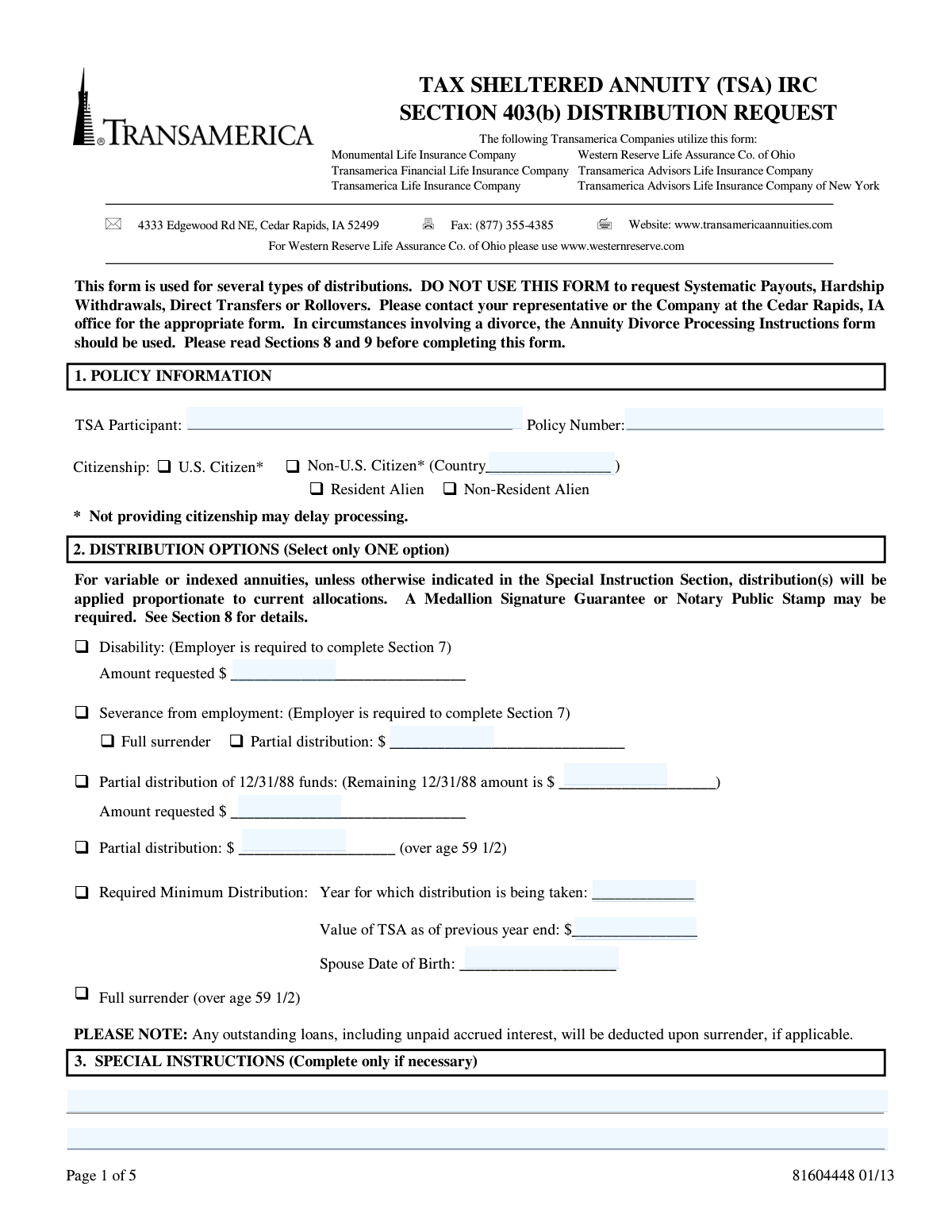
This form is a request for participants of a Tax Sheltered Annuity (TSA) plan under IRC Section 403(b), administered by Transamerica and its affiliates, to receive funds from their account. It covers distributions for reasons such as reaching age 59 1/2, severance from employment, disability, or taking a Required Minimum Distribution (RMD). Today, this form can be filled out quickly and accurately using AI-powered services like Instafill.ai, which can also convert non-fillable PDF versions into interactive fillable forms.
TSA 403(b) Distribution Request is part of the
Section 8 forms, annuity forms, distribution forms, SEC forms, 403(b) forms and distribution request forms categories on Instafill.
Rather not fill this in by hand? Instafill is an online form filler that completes PDF forms automatically — upload the blank form, answer a few questions, and the AI fills every field.
Form specifications
| Form name: | Tax Sheltered Annuity (TSA) IRC Section 403(b) Distribution Request |
| Number of pages: | 1 |
| Language: | English |
Our AI automatically handles information lookup, data retrieval, formatting, and form filling.
It takes less than a minute to fill out TSA 403(b) Distribution Request using our AI form filling.
Securely upload your data. Information is encrypted in transit and deleted immediately after the form is filled out.
Instafill Demo: How to fill out PDF forms in seconds with AI
How to Fill Out TSA 403(b) Distribution Request Online for Free in 2026
Are you looking to fill out a TSA 403(B) DISTRIBUTION REQUEST form online quickly and accurately? Instafill.ai offers the #1 AI-powered PDF filling software of 2026, allowing you to complete your TSA 403(B) DISTRIBUTION REQUEST form in just 37 seconds or less.
Follow these steps to fill out your TSA 403(B) DISTRIBUTION REQUEST form online using Instafill.ai:
- 1 Navigate to Instafill.ai and upload or select the TSA 403(b) Distribution Request form.
- 2 Provide your policy information in Section 1, including the policy number and your personal details.
- 3 In Section 2, choose your distribution option, such as a partial distribution or full surrender, and specify the requested amount.
- 4 Complete Section 5 to make your income tax withholding elections for both federal and state taxes.
- 5 Indicate your preferred method for receiving the funds in Section 6, whether by direct deposit or check.
- 6 If applicable, ensure your employer completes the authorization in Section 7.
- 7 Review all entered information for accuracy, then e-sign the form in Section 8. The AI will help determine if a Medallion Signature Guarantee or Notary is required for your transaction.
Our AI-powered system ensures each field is filled out correctly, reducing errors and saving you time.
Why Choose Instafill.ai for Your Fillable TSA 403(b) Distribution Request Form?
Speed
Complete your TSA 403(b) Distribution Request in as little as 37 seconds.
Up-to-Date
Always use the latest 2026 TSA 403(b) Distribution Request form version.
Cost-effective
No need to hire expensive lawyers.
Accuracy
Our AI performs 10 compliance checks to ensure your form is error-free.
Security
Your personal information is protected with bank-level encryption.
Frequently Asked Questions About TSA 403(b) Distribution Request
This form is used to request certain types of distributions from your Transamerica (or affiliated company) Tax Sheltered Annuity (TSA). This includes withdrawals after age 59 1/2, distributions due to severance from employment or disability, and Required Minimum Distributions (RMDs).
No, this form is specifically not for hardship withdrawals, direct transfers, or rollovers. You must contact your representative or the company's Cedar Rapids office to obtain the correct form for those transactions.
The TSA participant (policy owner) who wants to take a distribution must complete and sign this form. If the distribution is for severance from employment or disability, your employer must also complete and sign Section 7.
Your employer's signature is required in Section 7 if your distribution reason is 'Severance from employment' or 'Disability'. This signature serves as their authorization and confirms the request complies with the employer's plan rules.
You will need your policy number, Social Security Number, and personal details. If you request a direct deposit, you must attach a voided check to the form in the designated space on page 3.
A Medallion Signature Guarantee is a special certification to protect against fraud, which you can get from your bank or brokerage firm. It may be required for surrenders over $250,000, requests made shortly after an address change, or if the company does not have your signature on file.
You can elect not to have taxes withheld in Section 5, but if you make no choice, the company will automatically withhold 20% for federal taxes (10% for RMDs). Be aware that some states may require withholding regardless of your election.
In Section 6, you can choose to receive a check by mail or have the funds sent via direct deposit to your checking or savings account. You can also pay an additional fee to have the check sent via overnight express mail.
If you request a full surrender of your policy, any outstanding loan balance, including accrued interest, will be deducted from your distribution proceeds before the funds are sent to you.
You can submit the completed and signed form by faxing it to (877) 355-4385 or by mailing it to the service office at 4333 Edgewood Rd NE, Cedar Rapids, IA 52499.
Yes, services like Instafill.ai use AI to help you accurately auto-fill form fields from your saved profile, which can save time and help prevent common errors.
You can easily fill this form out online by uploading the PDF to Instafill.ai. The platform makes the document interactive, allowing you to type your information, add your digital signature, and download the completed form for submission.
If you have a non-fillable or 'flat' PDF, you can use a service like Instafill.ai to make it interactive. Simply upload the document, and the tool will automatically detect the fields so you can fill it out on your computer.
If your policy has this benefit rider, checking this box is a safeguard. It instructs the company to modify your withdrawal amount if your request would negatively impact your future guaranteed income benefits.
Compliance TSA 403(b) Distribution Request
Validation Checks by Instafill.ai
1
Exclusive Distribution Option Selection
This check verifies that only ONE distribution option is selected in Section 2. The form explicitly states to 'Select only ONE option', and selecting multiple options (e.g., 'Full surrender' and 'Partial distribution') creates ambiguity. If validation fails, the form submission should be rejected with an error message prompting the user to select a single distribution reason.
2
Conditional Employer Authorization Requirement
This validation ensures that Section 7, 'Employer Acknowledgement and Authorization', is fully completed if the distribution reason selected in Section 2 is either 'Severance from employment' or 'Disability'. These distribution events require employer verification to be compliant with plan rules. A failure to provide the employer's signature, name, title, and date will halt processing until the required authorization is obtained.
3
Required Minimum Distribution (RMD) Field Completeness
If 'Required Minimum Distribution' is selected in Section 2, this check confirms that the 'Year for which distribution is being taken', 'Value of TSA as of previous year end', and 'Spouse Date of Birth' fields are all populated. These data points are essential for calculating the correct RMD amount according to IRS rules. An incomplete submission will be flagged for correction as the calculation cannot proceed.
4
SSN/TIN Format and Presence
This check validates that the Social Security Number / Taxpayer Identification Number in Section 8 for the owner (and spouse, if applicable) is present and follows the standard 9-digit format (XXX-XX-XXXX or XXXXXXXXX). A valid SSN/TIN is mandatory for tax reporting purposes by the financial institution. If the number is missing or malformed, the form cannot be processed and may be subject to backup withholding.
5
Federal Tax Withholding Percentage Minimum
This validation applies if the user elects to specify a custom federal withholding percentage in Section 5. It checks that the entered percentage is at least 20%, or at least 10% if the distribution reason is an RMD. This is crucial for complying with IRS mandatory withholding rules for eligible rollover distributions. An entry below the minimum will be rejected, and the user will be prompted to correct the percentage or choose a different withholding option.
6
Non-Resident Alien Withholding and Country Specification
This check is triggered if the user identifies as a 'Non-Resident Alien' in Section 2. It verifies that the 'Country' of citizenship is specified and automatically applies the default 30% federal tax withholding unless a valid Form W-8BEN is on file. This is a critical compliance check for international tax law, and failure to provide the country will delay processing.
7
Conditional Spouse Consent and Signature
If the box 'I certify that the consent of the TSA participant's spouse is necessary' is checked in Section 8, this validation ensures the spouse's signature, SSN, and date fields are all completed. Spousal consent is a legal requirement in certain situations (e.g., community property states or specific plan rules) to protect spousal rights. An incomplete spousal section will render the request invalid until fully executed.
8
Alternate Mailing Address Completeness
This check ensures that if the 'To address indicated below' option is selected in Section 6, all associated address fields (Name, Address, City, State, Zip) are filled out. Sending a large financial distribution requires a complete and valid address to prevent loss or fraud. If these fields are empty while the option is selected, the submission will be flagged as incomplete.
9
Direct Deposit Information Selection
When 'Direct Deposit' is chosen in Section 6, this validation confirms that an account type ('Checking Account' or 'Savings Account') has been selected. It also serves as a prompt to ensure a voided check is attached, which is required to verify account details. Without the account type and routing/account numbers from the check, the electronic transfer cannot be initiated, and the request will be delayed or defaulted to a check sent to the address of record.
10
Partial Distribution of 12/31/88 Funds Limit
If a 'Partial distribution of 12/31/88 funds' is requested in Section 2, this check compares the 'Amount requested' against the 'Remaining 12/31/88 amount' listed on the form. The requested amount cannot exceed the available balance in this specific fund bucket. If the requested amount is greater, the form will be rejected, requiring the user to enter an amount less than or equal to the available funds.
11
Mandatory Owner Signature and Date
This is a fundamental check to verify that the 'Signature of Owner/Authorized Representative' and the 'Date' fields in Section 8 are completed. The owner's signature legally authorizes the transaction and acknowledges their understanding of the tax implications and potential penalties. A missing signature or date makes the entire request invalid and legally non-binding, preventing any processing.
12
Age Verification for 'Over 59 1/2' Distributions
This check validates that if a distribution option 'over age 59 1/2' is selected, the participant's date of birth on record confirms they have met this age requirement. This is important because distributions before age 59 1/2 are often subject to a 10% federal tax penalty unless another exception applies. If the participant is not over 59 1/2, the request may be rejected or flagged for review to determine if another penalty exception is met.
13
Citizenship Status Declaration
This validation ensures that one of the three citizenship options in Section 2 ('U.S. Citizen', 'Resident Alien', or 'Non-Resident Alien') has been selected. The form notes that not providing citizenship may delay processing, as this status directly impacts tax withholding rules and reporting requirements. An omission here will cause the form to be returned to the user for completion.
14
Exclusive Payment Instruction Selection
This check verifies that only one primary payment method is chosen in Section 6 ('Direct Deposit', 'To address of record', or 'To address indicated below'). Selecting multiple conflicting instructions would make it impossible to process the payment correctly. If more than one option is selected, the system should return an error and require the user to clarify their intent by choosing a single option.
Common Mistakes in Completing TSA 403(b) Distribution Request
The form header explicitly states it is NOT for Hardship Withdrawals, Direct Transfers, or Rollovers. Applicants often use the first distribution form they find, leading to an immediate rejection of their request. This forces them to start the entire process over with the correct paperwork, causing significant delays. Always read the form's title and introductory notes to confirm it matches your intended transaction.
In Section 2, applicants frequently select an option like 'Partial distribution' but forget to write in the specific dollar amount, or they mistakenly check multiple, conflicting boxes. This ambiguity requires the processing agent to halt the request and contact the applicant for clarification, delaying access to funds. Ensure you select only one option and fill in all associated fields completely.
Section 8 requires a Medallion Signature Guarantee or Notary Stamp for high-value transactions or when funds are sent to a non-verified address. Applicants often overlook this requirement because it requires an in-person visit to a bank or notary. Submitting the form without the required guarantee is a critical error that leads to the request being rejected and returned.
Section 5 is complex and a common source of errors, such as electing custom withholding but failing to enter a percentage, or entering a value below the legal minimum. If no election is made, the company defaults to withholding at a set rate (e.g., 20%), which can be an unwelcome surprise. AI-powered form fillers like Instafill.ai can help prevent this by validating entries against the form's rules and ensuring a valid choice is made.
When requesting a distribution for 'Severance from employment' or 'Disability', Section 7 must be completed and signed by an authorized employer representative. Applicants often submit the form without this signature, rendering the application incomplete. This stops the process entirely until a properly signed form is resubmitted, which can take days or weeks to coordinate.
When selecting 'Direct Deposit' in Section 6, applicants must provide complete account details and attach a voided check. Forgetting the voided check or providing account information that does not match the annuity owner's name are common oversights. This failure results in the direct deposit being rejected and a physical check being mailed, delaying payment.
If spousal consent is necessary, the applicant must check the box in Section 8 and obtain their spouse's signature, SSN, and contact information. Many people are unsure if this applies and skip the section, or they fail to get the signature when it is needed. This omission can cause legal and processing delays, requiring the form to be sent back for proper completion.
The policy number is the primary account identifier, yet it is often mistyped or incomplete in Section 1. A single incorrect digit can prevent the company from locating the policy or cause them to access the wrong account. This simple data entry error halts the entire process until the correct number is verified. Using a tool like Instafill.ai can help by auto-filling and validating such critical information.
This form is often a flat, non-fillable PDF, leading people to fill it out by hand. Illegible handwriting, especially for critical numbers in policy, SSN, or dollar amount fields, is a frequent cause of processing errors and delays. To avoid this, it is best to use a tool that can convert the document into a clear, typed format. AI-powered services like Instafill.ai can make any PDF fillable, ensuring all entries are legible and correctly placed.
Saved over 80 hours a year
“I was never sure if my IRS forms like W-9 were filled correctly. Now, I can complete the forms accurately without any external help.”
Kevin Martin Green
Your data stays secure with advanced protection from Instafill and our subprocessors




Robust compliance program
Transparent business model
You’re not the product. You always know where your data is and what it is processed for.
ISO 27001, HIPAA, and GDPR
Our subprocesses adhere to multiple compliance standards, including but not limited to ISO 27001, HIPAA, and GDPR.
Security & privacy by design
We consider security and privacy from the initial design phase of any new service or functionality. It’s not an afterthought, it’s built-in, including support for two-factor authentication (2FA) to further protect your account.
Fill out TSA 403(b) Distribution Request with Instafill.ai
Worried about filling PDFs wrong? Instafill securely fills tax-sheltered-annuity-tsa-irc-section-403b-distribution-request forms, ensuring each field is accurate.
