Yes! You can use AI to fill out Authorized Representative Designation for FSD Benefits (SNAP, Temporary Assistance, and MO HealthNet)
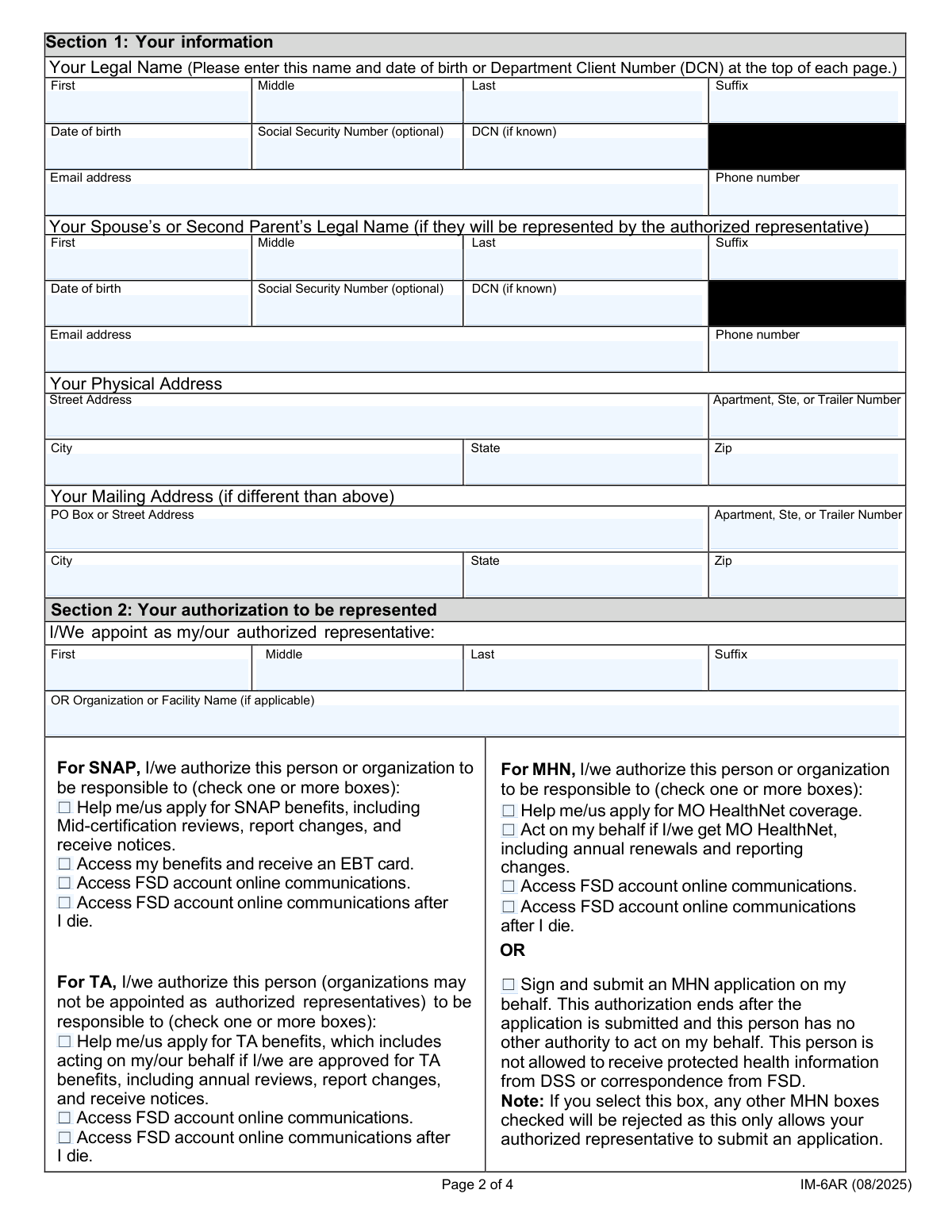
This is an authorization form that lets a primary applicant (and, if applicable, a spouse/second parent) designate an individual or an organization/facility as an authorized representative for public benefits administered through FSD, including SNAP, TA, and MO HealthNet. It captures identifying information, contact details, addresses, and specific permissions (such as applying for benefits, reporting changes, receiving notices, accessing an EBT card, and accessing online account communications during life and after death). The form is important because it defines the scope of the representativeās authority and documents the applicantās consent and signatures for privacy and program administration purposes. Today, this form can be filled out quickly and accurately using AI-powered services like Instafill.ai, which can also convert non-fillable PDF versions into interactive fillable forms.
Our AI automatically handles information lookup, data retrieval, formatting, and form filling.
It takes less than a minute to fill out FSD Authorized Representative Form using our AI form filling.
Securely upload your data. Information is encrypted in transit and deleted immediately after the form is filled out.
Form specifications
| Form name: | Authorized Representative Designation for FSD Benefits (SNAP, Temporary Assistance, and MO HealthNet) |
| Number of pages: | 4 |
| Language: | English |
| Categories: | social services forms, Health Net forms, Missouri FSD forms, public assistance forms, SNAP forms, representative forms |
Instafill Demo: filling out a legal form in seconds
How to Fill Out FSD Authorized Representative Form Online for Free in 2026
Are you looking to fill out a FSD AUTHORIZED REPRESENTATIVE FORM form online quickly and accurately? Instafill.ai offers the #1 AI-powered PDF filling software of 2026, allowing you to complete your FSD AUTHORIZED REPRESENTATIVE FORM form in just 37 seconds or less.
Follow these steps to fill out your FSD AUTHORIZED REPRESENTATIVE FORM form online using Instafill.ai:
- 1 Go to Instafill.ai and upload the Authorized Representative form (or select it from the form library).
- 2 Enter the primary applicant’s legal name, date of birth, and optional identifiers (SSN and/or Department Client Number), plus email and phone number.
- 3 If applicable, enter the spouse/second parent’s legal name, date of birth, optional identifiers, and contact information.
- 4 Provide the applicant’s physical address and, if different, complete the mailing address fields.
- 5 Add the authorized representative details—either an individual’s name and contact information or an organization/facility name and contact information—ensuring only the applicable section is completed.
- 6 Select the authorization checkboxes for the programs and permissions needed (SNAP, TA, MO HealthNet), including any limits such as “sign and submit an MHN application on my behalf.”
- 7 Review the consent/“I agree” section, apply electronic signatures for the applicant (and spouse/second parent if required), date the signatures, then download/print and submit as instructed.
Our AI-powered system ensures each field is filled out correctly, reducing errors and saving you time.
Why Choose Instafill.ai for Your Fillable FSD Authorized Representative Form Form?
Speed
Complete your FSD Authorized Representative Form in as little as 37 seconds.
Up-to-Date
Always use the latest 2026 FSD Authorized Representative Form form version.
Cost-effective
No need to hire expensive lawyers.
Accuracy
Our AI performs 10 compliance checks to ensure your form is error-free.
Security
Your personal information is protected with bank-level encryption.
Frequently Asked Questions About Form FSD Authorized Representative Form
This form is used to name an authorized representative (a person or an organization) who can help you manage benefits-related tasks such as applying for benefits, reporting changes, completing reviews, and receiving notices, depending on which boxes you check.
The primary applicant should complete this form if they want to give another person or an organization permission to act for them regarding SNAP, TA, and/or MO HealthNet (MHN). A spouse/second parent may also need to sign if they are included on the case or requested by the form.
No. The SSN fields for both the primary applicant and spouse/second parent are marked optional, so you may leave them blank if you do not wish to provide them.
A DCN is an agency client identifier used for your benefits case. If you donāt know it, you can leave the DCN field blank as instructed.
Only complete the spouse/second parent section if it applies to your household/case or the form requires it for your situation. If you do include them, provide their legal name and contact details as requested.
Your physical address is where you live. The mailing address section should be filled out only if your mailing address is different from your physical address (for example, you receive mail at a PO Box).
You can choose either one. If you appoint an individual, fill in the representativeās first/middle/last name fields; if you appoint an organization or facility, fill in the organization name and contact/address fields instead (and leave the individual name fields blank).
They can allow your representative to help apply for SNAP, handle mid-certification reviews, report changes, receive notices, access your benefits, and in some cases receive an EBT cardāonly for the permissions you select.
The TA checkboxes authorize an individual representative to help with Transient Assistance (TA) tasks like applying, reviews, reporting changes, and accessing online communications. If you are appointing an organization/facility instead, those specific TA checkbox fields may not apply as written, so follow the āfill only ifā instruction.
You can authorize broad MHN help (apply, act on your behalf, and access communications) or choose a limited option that only allows the representative to sign and submit an MHN application. The formās āfill only ifā rules indicate the limited āsign and submitā option is used when you are not granting the broader MHN permissions.
It allows your representative to view or receive online messages/notices in your FSD account, depending on what you select. The āafter I dieā option extends that access after your death, so only check it if you intend to grant that permission.
You must check the āI agreeā consent checkbox first. Once checked, you can enter your signature text/printed name and the signature date in the signature fields.
If the spouse/second parent section is completed or the form requires their consent for your case, they should sign and date in the spouse/second parent signature fields. If it does not apply, leave those fields blank.
Yes. AI form-filling tools like Instafill.ai can help auto-fill fields (names, addresses, contact info, and representative details) to save time and reduce typos, while you still review and approve everything before signing.
Upload the PDF to Instafill.ai, answer a few prompts or connect your data, and the AI will map your information into the correct fields for review before you download/sign. If the PDF is flat/non-fillable, Instafill.ai can convert it into an interactive fillable form so you can complete it digitally.
Compliance FSD Authorized Representative Form
Validation Checks by Instafill.ai
1
Primary Applicant Legal Name Required and Character Validation
Validates that the primary applicantās First and Last name fields are present and not just whitespace, and that they contain only reasonable name characters (letters, spaces, hyphens, apostrophes) with a sensible length limit. This is important for identity matching, notices, and downstream eligibility systems that often reject unexpected characters. If validation fails, block submission and prompt the user to correct missing/invalid name entries.
2
Middle Name / Initial and Suffix Format Validation (All Parties)
Checks that middle name fields, when provided, are either a full name or a single-letter initial (optionally followed by a period), and that suffix values are from an allowed set (e.g., Jr, Sr, II, III, IV) or match a controlled pattern. This prevents data quality issues and inconsistent formatting that can break matching and document generation. If validation fails, require correction or clearing of the field.
3
Date of Birth Format and Plausibility (Primary Applicant and Spouse/Second Parent)
Ensures each date of birth is a valid date in the expected format (e.g., MM/DD/YYYY) and is not in the future, and also falls within a plausible human age range (e.g., 0ā120 years). DOB is critical for eligibility rules and identity verification, and invalid dates can cause case creation failures. If validation fails, prevent submission and display a clear error indicating the invalid or implausible date.
4
SSN Optional Field Validation (Format + Disallowed Values)
If an SSN is provided for the applicant or spouse/second parent, validates it is exactly 9 digits (allowing common input formats like XXX-XX-XXXX) and rejects known invalid patterns (e.g., 000000000, 123456789, all same digits). This reduces fraud risk and prevents downstream verification errors. If validation fails, require correction or allow the user to leave the SSN blank since it is optional.
5
DCN Optional Field Validation (Length/Character Set)
If a Department Client Number (DCN) is entered, validates it matches the expected character set and length (commonly numeric-only and a fixed length, or a defined alphanumeric pattern if applicable). DCNs are used for record lookups; malformed values can cause mismatches or failed searches. If validation fails, prompt the user to correct the DCN or leave it blank if unknown.
6
Email Address Format Validation (Applicant, Spouse/Second Parent, Representative/Organization)
Validates that any provided email address conforms to a standard email format (local@domain), has no spaces, and uses a plausible domain structure. Email is used for correspondence and account communications; invalid emails lead to undeliverable notices and missed deadlines. If validation fails, require correction before submission for any email field that is marked/treated as required.
7
Phone Number Format Validation (Applicant, Spouse/Second Parent, Representative/Organization)
Checks that phone numbers contain a valid count of digits (e.g., 10 digits for US numbers), allow common formatting characters, and optionally validates area code rules if required. Phone numbers are essential for contact and case resolution; invalid numbers reduce the agencyās ability to reach the household. If validation fails, block submission for required phone fields and request a corrected number.
8
Physical Address Completeness and State/ZIP Format Validation
Ensures Physical Address fields required for a valid address are present: Street Address, City, State, and ZIP Code; and validates State is a two-letter code and ZIP is 5 digits (optionally ZIP+4 if allowed). Accurate physical address is needed for residency rules, service area routing, and mailed notices. If validation fails, prevent submission and highlight the missing/invalid address components.
9
Mailing Address Conditional Requirement and Completeness
Validates that mailing address fields are only filled when the mailing address is different from the physical address, and if any mailing address field is provided then the full required set (Street/PO Box, City, State, ZIP) is completed. This prevents partial mailing addresses that cause returned mail and ensures the conditional logic is respected. If validation fails, require the user to either complete the mailing address fully or clear it entirely.
10
Mutual Exclusivity: Authorized Representative Individual vs Organization
Enforces that the submission identifies the authorized representative as either an individual (Rep/Authorized Representative First/Last, etc.) or an organization/facility (Organization or Facility Name), but not both at the same time. This is important because downstream workflows, contact fields, and authorization scopes differ depending on representative type. If validation fails, block submission and instruct the user to choose one representative type and clear the other fields.
11
Authorized Representative Contact and Address Completeness (Based on Representative Type)
If an individual representative is provided, validates required representative contact fields (email/phone) and mailing address fields are complete and properly formatted; if an organization is provided, validates the organizationās address and contact fields instead. This ensures the agency can communicate with the authorized party and send required notices. If validation fails, prevent submission and indicate which representative contact/address fields are missing or invalid.
12
Authorization Checkbox Dependency Rules (SNAP/TA/MHN)
Validates the āFill only if ā¦ā logic for authorization checkboxes: TA authorization checkboxes must not be selected when an Organization/Facility Name is filled (per form rule), and MHN authorization options must follow the dependency on āSign and submit an MHN application on my behalfā (i.e., the broader MHN checkboxes only when that is No; the limited sign/submit option only when all other MHN options are No). These rules prevent contradictory authorizations and ensure the correct legal scope is captured. If validation fails, block submission and require the user to adjust selections to a consistent set.
13
Agreement Consent Gate for Signature Fields
Ensures that when the āI agreeā consent checkbox is not checked, signature text and signature date fields are empty; and when āI agreeā is checked, both signature and signature date are required. This is critical for legal enforceability and to avoid collecting signatures without consent. If validation fails, prevent submission and prompt the user to either provide the required signature/date or uncheck consent and clear signature fields.
14
Signature Date Validity and Timing Consistency
Validates that signature dates (applicant and spouse/second parent) are valid dates, not in the future, and are reasonably close to the submission date (e.g., not older than a configurable threshold if required by policy). This helps ensure the authorization is current and reduces disputes about stale consent. If validation fails, block submission and request a corrected signature date.
15
Spouse/Second Parent Section Completeness When Any Spouse Field Is Provided
If any spouse/second parent field is entered (name, DOB, contact, SSN/DCN, or signature), validates that the minimum identifying set is complete (at least First Name, Last Name, and Date of Birth) and that related fields follow format rules. This prevents partial spouse records that canāt be used for eligibility determination or identity matching. If validation fails, require completion of the spouseās core fields or clearing of the spouse section.
16
Duplicate/Conflicting Primary Applicant Fields Consistency Check
The form includes repeated Primary Applicant fields (First/Last/DOB appear multiple times); validates that all instances match exactly after normalization (trim spaces, consistent casing) or that only one set is used as the source of truth. This prevents internal contradictions that can cause case creation errors or misidentification. If validation fails, block submission and prompt the user to reconcile the mismatched entries.
Common Mistakes in Completing FSD Authorized Representative Form
People often enter a preferred name (e.g., āMikeā instead of āMichaelā) or omit parts of the legal name, especially when the form repeats name fields in multiple sections. This can cause identity mismatches with agency records, delays, or requests for verification. Always enter the name exactly as it appears on legal documents for the Primary Applicant and Spouse/Second Parent, and keep it consistent everywhere it appears. AI-powered form filling tools like Instafill.ai can help by reusing the same validated legal name across repeated fields to prevent inconsistencies.
A common error is putting a suffix (Jr., Sr., III) in the middle name field, adding punctuation inconsistently, or typing āN/Aā when the instructions say to leave the field blank if none. These mistakes can create record mismatches and may trigger manual review. Only enter a middle name/initial if the person has one, and only enter a suffix in the suffix field; otherwise leave the field empty. Instafill.ai can automatically format names and keep optional fields truly blank when appropriate.
Applicants frequently enter dates in different formats (MM/DD/YYYY vs DD/MM/YYYY), use text dates, or accidentally transpose digits. An incorrect DOB can prevent matching to existing case records and may invalidate authorizations tied to the wrong person. Use a consistent numeric format (typically MM/DD/YYYY in U.S. benefit forms) and double-check against an ID document. Instafill.ai can validate date formats and flag impossible dates (e.g., 13/40/2020).
Because SSN is optional and DCN is āif known,ā people sometimes put a DCN in the SSN field, enter only the last 4 digits, or add dashes/spaces inconsistently. This can lead to failed identity matching, privacy issues, or processing delays if the agency cannot reliably identify the correct record. Enter the full SSN only if you choose to provide it, and enter DCN only if you are sure it is correct; otherwise leave the field blank. Instafill.ai can help by recognizing identifier types and formatting them correctly (and leaving optional fields empty when you opt out).
People often omit the area code, include extensions in the main phone field, or mistype emails (missing ā@ā, extra spaces, or wrong domain). Another frequent issue is entering the authorized representativeās contact info in the applicantās fields (or vice versa), which can cause missed notices and communication failures. Use a 10-digit phone number with area code and a clean email address with no spaces; confirm whose contact info belongs in each section. Instafill.ai can validate phone/email formats and reduce copy/paste mix-ups between applicant, spouse, and representative.
The form instructs that mailing address fields should be filled only if the mailing address differs from the physical address, but many applicants fill both sections automatically or duplicate partial information. This can result in notices being sent to the wrong address or conflicting address records. Only complete the mailing address section when it is different, and ensure it is complete (street/PO box, city, state, ZIP). Instafill.ai can prompt conditional fields correctly and prevent unnecessary or conflicting address entries.
Applicants sometimes write the full state name instead of the two-letter code, enter an invalid ZIP (too short/too long), or include extra characters (e.g., āMO,ā with a comma). Incorrect state/ZIP formatting can break address validation and delay mail delivery of time-sensitive notices. Use the standard two-letter state abbreviation and a 5-digit ZIP (or ZIP+4 if allowed and accurate). Instafill.ai can standardize addresses and validate state/ZIP combinations.
This form has conditional logic: you typically provide either an individual authorized representativeās name OR an organization/facility name, not both. People often fill in a personās name and also the organization name, which can create ambiguity about who is authorized to act and receive information. Decide whether the representative is an individual or an organization and complete only the applicable section, leaving the other blank. Instafill.ai can enforce these āfill only ifā rules to prevent conflicting representative entries.
Applicants may check too many boxes without realizing the scope (e.g., allowing EBT access, online account access, or post-death access) or miss the special MHN rule where some boxes are only applicable depending on whether āSign and submit an MHN application on my behalfā is selected. Over-authorizing can create privacy/security risks, while under-authorizing can prevent the representative from completing needed tasks and cause missed deadlines. Read each checkbox carefully and select only what you intend; for MHN, follow the conditional instructions so you donāt select mutually exclusive options. Instafill.ai can guide selections and flag conflicting checkbox combinations.
A frequent submission error is signing without checking āI agree,ā leaving the signature date blank, or forgetting the spouse/second parent signature/date when required. This can make the authorization invalid and force resubmission, delaying benefits actions and communications. Ensure āI agreeā is checked before entering the signature text and date, and complete spouse/second parent signature fields when applicable. Instafill.ai can ensure required fields become complete in the correct order and prevent submission when signatures/dates are missing.
The form repeats Primary Applicant fields (first/last/DOB) in multiple places, and people often update one section but not the other (e.g., adding a hyphenated last name in one spot only). These inconsistencies can trigger manual review or cause the form to be treated as incomplete. After entering the applicantās details once, verify every repeated instance matches exactly. Instafill.ai can automatically propagate the same verified values to all duplicate fields to eliminate mismatch errors.
Saved over 80 hours a year
āI was never sure if my IRS forms like W-9 were filled correctly. Now, I can complete the forms accurately without any external help.ā
Kevin Martin Green
Your data stays secure with advanced protection from Instafill and our subprocessors

Robust compliance program
Transparent business model
Youāre not the product. You always know where your data is and what it is processed for.
ISO 27001, HIPAA, and GDPR
Our subprocesses adhere to multiple compliance standards, including but not limited to ISO 27001, HIPAA, and GDPR.
Security & privacy by design
We consider security and privacy from the initial design phase of any new service or functionality. Itās not an afterthought, itās built-in, including support for two-factor authentication (2FA) to further protect your account.
Fill out FSD Authorized Representative Form with Instafill.ai
Worried about filling PDFs wrong? Instafill securely fills authorized-representative-designation-for-fsd-benefits-snap-temporary-assistance-and-mo-healthnet forms, ensuring each field is accurate.