Yes! You can use AI to fill out Ontario Blue Cross Extended Health Care Benefit Claim Form

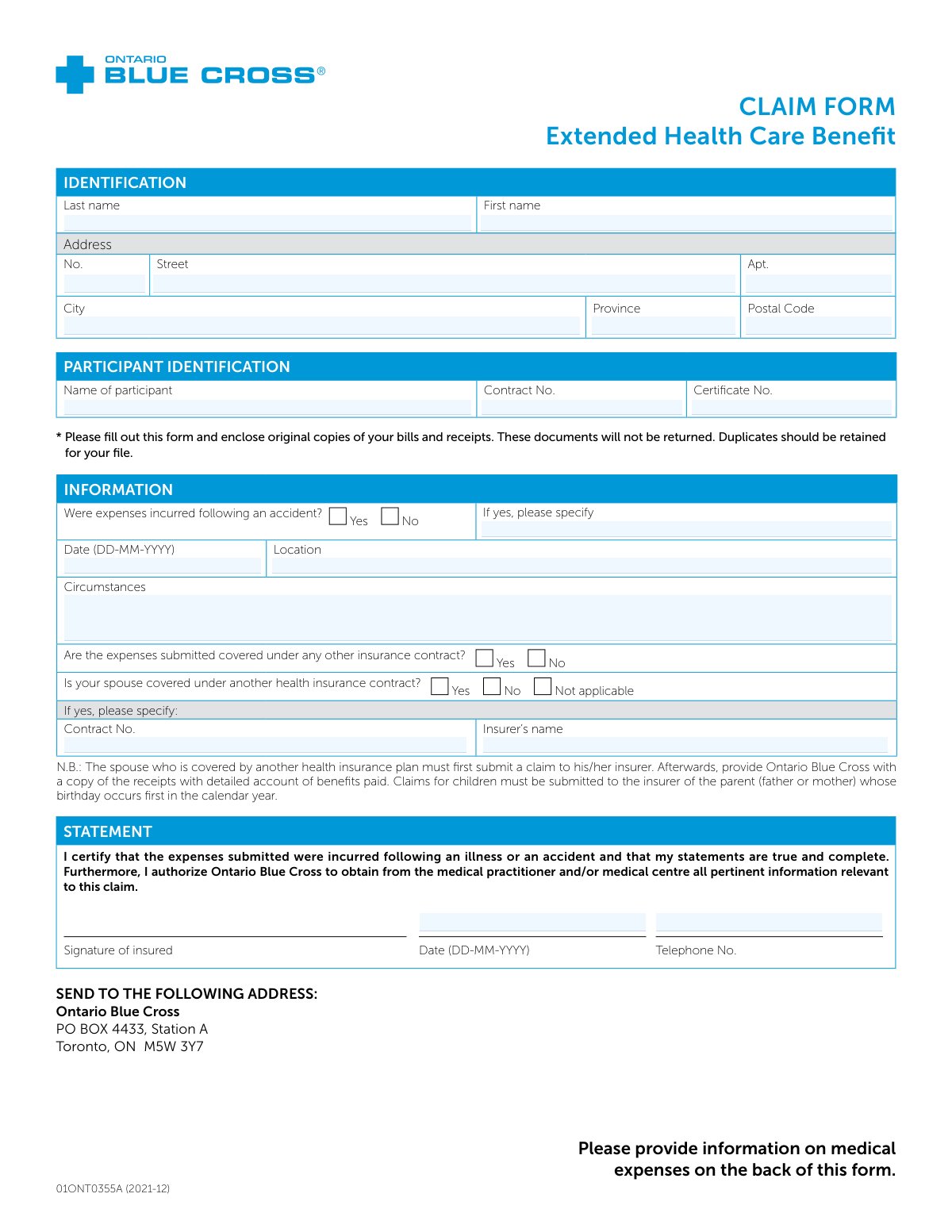
This form, officially known as the Extended Health Care Benefit Claim Form (01ONT0355A), is used by members of Ontario Blue Cross to submit claims for reimbursement of medical expenses. It is essential for policyholders to recover costs for services and products covered under their extended health care plan. Today, this form can be filled out quickly and accurately using AI-powered services like Instafill.ai, which can also convert non-fillable PDF versions into interactive fillable forms.
Our AI automatically handles information lookup, data retrieval, formatting, and form filling.
It takes less than a minute to fill out 01ONT0355A using our AI form filling.
Securely upload your data. Information is encrypted in transit and deleted immediately after the form is filled out.

Form specifications

Form name: Ontario Blue Cross Extended Health Care Benefit Claim Form
Number of fields: 127
Number of pages: 2
Language: English
main-image

Instafill Demo: How to fill out PDF forms in seconds with AI

How to Fill Out 01ONT0355A Online for Free in 2026

Are you looking to fill out a 01ONT0355A form online quickly and accurately? Instafill.ai offers the #1 AI-powered PDF filling software of 2026, allowing you to complete your 01ONT0355A form in just 37 seconds or less.
Follow these steps to fill out your 01ONT0355A form online using Instafill.ai:
  1. 1 Navigate to Instafill.ai and upload the Ontario Blue Cross Extended Health Care Benefit Claim Form or select it from the template library.
  2. 2 Provide your personal identification details, including your name, address, and participant contract and certificate numbers.
  3. 3 Answer the questions regarding the circumstances of the claim, such as whether it was due to an accident, and disclose any other insurance coverage you or your spouse may have.
  4. 4 If claiming for a dependent child over 18, complete the section to confirm their student status.
  5. 5 Carefully list each expense, providing the patient's name, date of birth, relationship to the insured, date of purchase, and the amount being claimed.
  6. 6 Review all the information populated by the AI for accuracy, then digitally sign and date the certification statement.
  7. 7 Download the completed form, attach all original receipts and bills, and mail it to the Ontario Blue Cross address provided.

Our AI-powered system ensures each field is filled out correctly, reducing errors and saving you time.

Why Choose Instafill.ai for Your Fillable 01ONT0355A Form?

Speed

Complete your 01ONT0355A in as little as 37 seconds.

Up-to-Date

Always use the latest 2026 01ONT0355A form version.

Cost-effective

No need to hire expensive lawyers.

Accuracy

Our AI performs 10 compliance checks to ensure your form is error-free.

Security

Your personal information is protected with bank-level encryption.

Frequently Asked Questions About Form 01ONT0355A

This form is used to submit a claim for reimbursement of Extended Health Care Benefit expenses to Ontario Blue Cross. It is for plan members who have incurred costs for medical services or supplies not covered by their provincial health plan.

You must enclose original copies of your bills and receipts with the completed form. These documents will not be returned, so you should keep duplicates for your own records.

If your spouse has another health plan, they must submit their claims to their own insurer first. Afterwards, you can submit a claim to Ontario Blue Cross with a copy of the receipts and the statement of benefits from the other insurer for any remaining balance.

Claims for children must first be submitted to the insurer of the parent whose birthday occurs earliest in the calendar year. This is known as the 'birthday rule' for coordinating benefits.

For a dependent child over 18 (or 21, per your contract) but under 25, you must provide their name, the name of the school they attend, the semester, and confirm if they are a full-time or part-time student.

If the expenses were incurred due to an accident, you must check the 'Yes' box and provide the date, location, and a brief description of the circumstances of the accident.

Mail the signed form and all original supporting documents to Ontario Blue Cross, PO BOX 4433, Station A, Toronto, ON M5W 3Y7.

Your Contract and Certificate numbers are typically found on your Ontario Blue Cross benefits card or in your policy documents. You must enter them in the 'Participant Identification' section.

The form asks you to list the total amount submitted for each patient. You should organize your receipts chronologically and ensure the total amount claimed for each person is entered correctly in the table.

Yes, you can use AI-powered services like Instafill.ai to help you fill out form fields accurately and efficiently, saving you time and reducing the chance of errors.

You can use a service like Instafill.ai to complete the form online. Simply upload the PDF, and the tool will guide you through filling out all the necessary fields before you print it for signing and submission.

If you have a non-fillable or 'flat' PDF, services like Instafill.ai can convert it into an interactive, fillable form. This allows you to type your information directly into the fields on your computer.

Your signature certifies that the information you provided is true and complete. It also authorizes Ontario Blue Cross to contact your medical provider to verify information relevant to your claim.

Compliance 01ONT0355A
Validation Checks by Instafill.ai

1
Conditional Requirement for Accident Details
This validation checks if the 'Date', 'Location', and 'Circumstances' fields are filled out when the user indicates that expenses were incurred following an accident. If the 'Yes' option for 'Were expenses incurred following an accident?' is selected, these subsequent fields become mandatory. This ensures that the insurer receives all necessary information to process an accident-related claim, preventing processing delays or claim rejection due to missing details.
2
Conditional Requirement for Spouse's Insurance Details
This check verifies that if the user answers 'Yes' to 'Is your spouse covered under another health insurance contract?', they must provide the spouse's 'Contract No.' and 'Insurer’s name'. This is crucial for coordination of benefits, as the spouse's plan is often the primary payer. Failure to provide this information would halt the claim, as the insurer cannot determine the correct payment hierarchy without it.
3
Claim Date Chronology
This validation ensures that the dates on the form follow a logical sequence. Specifically, it verifies that any 'Date of purchase' is on or before the 'Statement Date' and that neither date is in the future. It also confirms that a patient's 'Date of birth' is before their 'Date of purchase'. This prevents illogical or fraudulent claims and ensures the timeline of events is coherent for claim assessment.
4
Total Submitted Amount Calculation
This check automatically calculates the sum of all values entered in the 'Amount submitted' column for each patient and verifies that it matches the value entered in the 'TOTAL' field. This validation prevents simple mathematical errors that could lead to incorrect claim payouts or rejections. If the user-entered total does not match the calculated sum, the form will flag an error, prompting the user to correct the discrepancy before submission.
5
Patient Line Item Completeness
This validation ensures that if any information is entered in a patient row, all fields for that patient are completed. If a 'Given name' is provided, then the corresponding 'Date of birth', 'Sex', 'Relationship', 'Amount submitted', and 'Date of purchase' must also be filled. This prevents the submission of incomplete claim lines, which are impossible to process and would require follow-up. It ensures each claimed expense is fully documented.
6
Dependent Student Status Verification
This check cross-references patient information with the dependent child section. If a claim is for a patient with 'Relationship' as 'child' and their age (calculated from 'Date of birth') is over the standard dependent age (e.g., 18 or 21), the system verifies that their information is present in the 'Dependent Child Information' section. This confirms their eligibility as a student dependent, which is essential for coverage. If the student information is missing, the claim for that dependent may be denied.
7
Canadian Postal Code Format
This validation ensures that the 'Postal Code' field conforms to the standard Canadian format of 'A1A 1A1' (letter-number-letter, space, number-letter-number). Correct formatting is essential for mail delivery and for internal systems that use postal codes for regional analysis or address verification. An invalid format could lead to returned mail and significant delays in communication or payment.
8
At Least One Valid Claim Item
This check verifies that the form is not submitted without at least one complete patient claim line. A valid claim form must include details for at least one expense. This prevents the submission of empty or incomplete forms that have no actionable information, saving processing time and reducing administrative waste.
9
Date of Purchase vs. Statement Date
This validation specifically checks that every 'Date of purchase' listed in the patient expense table is on or before the 'Statement Date' where the insured signs the form. A purchase date cannot logically occur after the claimant has signed and dated the certification statement. This check helps prevent data entry errors and ensures the integrity of the claim's timeline.
10
Dependent Child Row Integrity
This validation ensures that if a dependent's name is entered in the 'Dependent Child Information' section, all associated fields for that row are also completed. This includes the 'Name of school', 'Semester', and a selection for either 'Full time' or 'Part time' status. Incomplete rows in this section would prevent the insurer from verifying the dependent's eligibility, potentially leading to the denial of their claims.
11
Exclusive Student Status Selection
For each row in the 'Dependent Child Information' section, this check ensures that either the 'Full time' or 'Part time' box is checked, but not both. A student cannot be simultaneously full-time and part-time for the same semester. This validation prevents ambiguous or contradictory data, ensuring the student's status is clearly defined for eligibility purposes.
12
Participant and Insured Name Consistency
This validation compares the name fields to ensure consistency. It checks that the 'Name of participant' in the Participant Identification section matches the 'First name' and 'Last name' provided in the main Identification section. This confirms that the person filling the form is the primary participant on the contract, reducing the risk of fraud or errors from third-party submissions.

Common Mistakes in Completing 01ONT0355A

Mishandling Coordination of Benefits (COB)

People often misunderstand or overlook the rules for claims involving other insurance plans. The form clearly states that if a spouse has other coverage, the claim must be sent to their insurer first. Similarly, claims for children must be submitted to the insurer of the parent whose birthday is earlier in the year. Failing to follow this order of submission will result in the claim being denied and returned, causing significant delays until it is submitted to the primary insurer and then resubmitted to Blue Cross with the primary's explanation of benefits.

Missing or Incorrect Supporting Documents

The form explicitly requires original copies of bills and receipts, stating they will not be returned. A common mistake is sending photocopies, forgetting to include the receipts for all listed expenses, or failing to keep personal copies. Without the original receipts, the claim cannot be processed and will be delayed or denied. Always gather all original documents, make duplicates for your own records, and clip them securely to the completed form before mailing.

Incorrect Date Formatting

The form specifies the DD-MM-YYYY format for all dates, but many people in North America habitually use MM-DD-YYYY. Entering a date like '04-05-2024' can be misinterpreted as either April 5th or May 4th, leading to data entry errors and processing delays while the insurer seeks clarification. To avoid this, carefully follow the specified format. AI-powered form filling tools like Instafill.ai can help by automatically validating and formatting dates correctly to match the form's requirements.

Forgetting to Sign and Date the Statement

It is a simple but frequent oversight to mail the form without signing and dating the statement section. An unsigned form is legally invalid and cannot be processed by the insurer. This results in the claim being immediately returned to the sender for completion, restarting the processing timeline. Always perform a final check of the entire form, paying special attention to the signature line, before sealing the envelope.

Incomplete Accident Information

When a claim is the result of an accident, checking 'Yes' is not enough; all follow-up fields for date, location, and circumstances must be completed. People often provide vague or incomplete details in the 'Circumstances' box, which can trigger a request for more information and delay the claim. To prevent this, provide a clear, concise, and factual description of the accident if you check the 'Yes' box.

Data Entry Errors in the Expense Table

The table for medical expenses is dense and prone to errors, such as mixing up the patient for a specific expense, entering an incorrect date of birth, or leaving the 'Relationship' field blank. Each line must correspond to a specific receipt and patient. These mistakes can lead to claim rejection for that line item or delays while the processor tries to match receipts to the information provided. It is crucial to review each row carefully against the corresponding receipt before submission.

Incorrect Total Submitted Amount

A simple mathematical error when adding the 'Amount submitted' column is a common mistake. If the 'TOTAL' at the bottom of the table does not match the sum of the individual line items, it creates a discrepancy that must be resolved by the claims processor. This will slow down your reimbursement. To avoid this, use a calculator to sum the amounts and then double-check your calculation before writing the final number.

Missing Proof of Student Status for Dependents

The form has a specific section to confirm the student status of dependent children over the age of 18 or 21. Many people either miss this section entirely or forget to fill it out when claiming for an eligible student. If this information is missing, any expenses for that adult dependent will be automatically denied. Ensure this section is completed accurately for any dependent student included in the claim to ensure their expenses are covered.

Illegible Handwriting

Since this is a paper-based form, entries are often handwritten, and illegible writing is a major cause of processing errors. If a claims processor cannot read a name, address, or policy number, they may enter it incorrectly or be forced to return the form. This can lead to misdirected payments, claim denials, and significant delays. To prevent this, print clearly in capital letters. Alternatively, a tool like Instafill.ai can convert this non-fillable PDF into a digital form, allowing you to type your answers for perfect clarity.

Confusing Participant vs. Insured Information

The form has separate sections for 'IDENTIFICATION' (the person filling the form) and 'PARTICIPANT IDENTIFICATION' (the primary policyholder). People can get these confused, especially when a spouse or dependent is submitting the claim. Entering the wrong name or policy number in the 'Participant Identification' section will make it difficult for the insurer to locate the correct policy. Always ensure the Contract and Certificate numbers match the primary policyholder's insurance card exactly.
Saved over 80 hours a year

“I was never sure if my IRS forms like W-9 were filled correctly. Now, I can complete the forms accurately without any external help.”

Kevin Martin Green

Your data stays secure with advanced protection from Instafill and our subprocessors

Robust compliance program

Transparent business model

You’re not the product. You always know where your data is and what it is processed for.

ISO 27001, HIPAA, and GDPR

Our subprocesses adhere to multiple compliance standards, including but not limited to ISO 27001, HIPAA, and GDPR.

Security & privacy by design

We consider security and privacy from the initial design phase of any new service or functionality. It’s not an afterthought, it’s built-in, including support for two-factor authentication (2FA) to further protect your account.

Fill out 01ONT0355A with Instafill.ai

Worried about filling PDFs wrong? Instafill securely fills ontario-blue-cross-extended-health-care-benefit-claim-form forms, ensuring each field is accurate.