
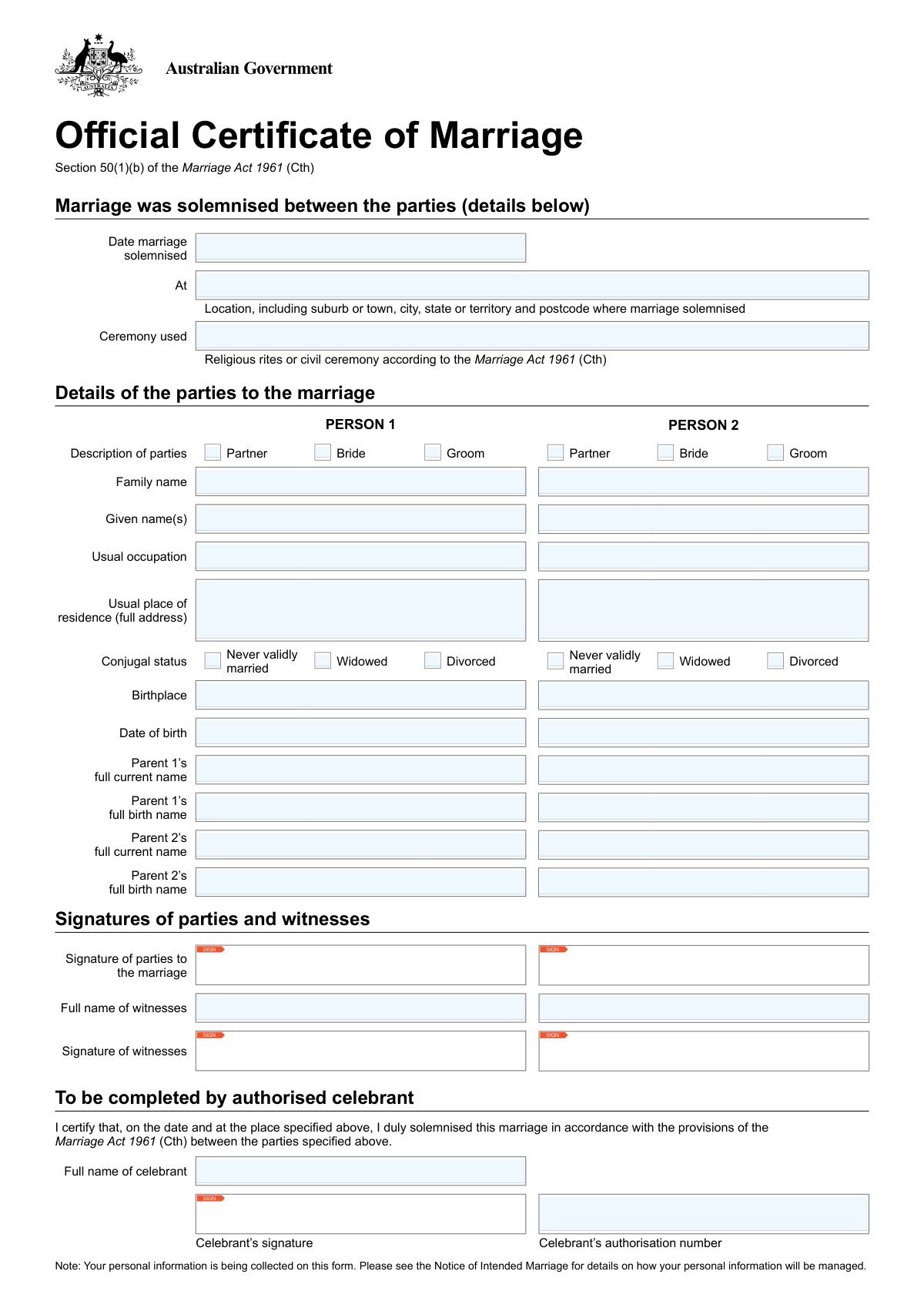
Yes! You can use AI to fill out Official Certificate of Marriage, Section 50(1)(b) of the Marriage Act 1961 (Cth)
Don't type 44 fields by hand. Tell our AI about yourself, or upload a document you already have, and it fills every field in seconds. You check it, then download, print or sign.
The AI does the filling. You just check it.
No typing into boxes, nothing to install.
What this form asks for
The AI fills all of it, from your answers or your documents.
The AI checks your answers before you download
14 checks built for this form, so a wrong date or a missing answer is caught before anyone else sees it.
This check ensures the 'Date marriage solemnised' is a valid date in the past or present, not a future date. It validates the date format (e.g., DD/MM/YYYY) and confirms the event has already occurred. A future date would render the certificate invalid, so this check prevents the creation of a legally nonsensical document.
This validation calculates the age of both Person 1 and Person 2 on the 'Date marriage solemnised' using their respective 'Date of birth'. It confirms that both parties meet the legal minimum age for marriage in Australia (typically 18 years). This is a critical legal requirement under the Marriage Act 1961, and failure to meet it would invalidate the marriage.
This check verifies that for Person 1, exactly one of the description checkboxes ('Partner', 'Bride', 'Groom') is selected. Selecting none would result in an incomplete record, while selecting multiple would create ambiguity. This ensures the role of each party in the marriage is clearly and uniquely defined on the official certificate.
This check verifies that for Person 2, exactly one of the description checkboxes ('Partner', 'Bride', 'Groom') is selected. This is essential for maintaining a clear and unambiguous legal record of the marriage. An invalid selection would require correction before the certificate can be officially registered.
This validation ensures that exactly one conjugal status ('Never validly married', 'Widowed', 'Divorced') is selected for Person 1. A person's prior marital status is a key legal declaration for a valid marriage. Failure to select one, or selecting multiple, would result in an incomplete or contradictory legal statement.
This validation ensures that exactly one conjugal status ('Never validly married', 'Widowed', 'Divorced') is selected for Person 2. This declaration is a fundamental legal requirement to ensure there are no existing legal impediments to the marriage. An incorrect or missing selection would halt the registration process until corrected.
And 8 more checks
- Celebrant Authorisation Number Validation
- Signature Completeness Check
- Marriage Location and Postcode Format
- Witness Name Completeness
- Parental Information Completeness
- Party Name Completeness
- Date Chronology Logic
- Ceremony Type Specification
Let AI fill out your Australian Official Certificate of Marriage
No typing. Every field filled in seconds, checked, ready to sign.
How to Fill Out Australian Official Certificate of Marriage Online for Free in 2026
What the AI walks you through.
- Navigate to Instafill.ai and upload or select the Australian Official Certificate of Marriage form.
- Use the AI assistant to automatically identify and label all fields, such as details for both parties, ceremony information, and witness sections.
- Enter the personal details for both individuals getting married, including full names, occupations, addresses, birthplaces, and parental information.
- Provide the specific details of the marriage ceremony, including the date, location, and whether it was a religious or civil ceremony.
- Input the full names of the two witnesses who will be present at the ceremony.
- The authorised celebrant will complete their section with their name, signature, and authorisation number to certify the marriage.
- Review all entered information for complete accuracy before the parties, witnesses, and celebrant sign the document on the wedding day.
Common Mistakes in Completing Australian Official Certificate of Marriage
The ones the AI is built to catch.
Confusing Parent's Current Name vs. Birth Name
Using Informal or Incomplete Names
Incomplete Ceremony Location Details
Vague 'Usual Occupation' Entry
Incorrect Conjugal Status Selection
Omitting Country or State in Birthplace
Illegible Handwriting on Paper Forms
Signing in the Incorrect Box
Inconsistent or Ambiguous Date Formatting
Incorrect Party Description Selection
Frequently Asked Questions About Australian Official Certificate of Marriage
Is it really free for 7 days?
Can I fill other forms too?
How do I cancel?
How does the AI fill out Australian Official Certificate of Marriage?
What happens to my information?
How complex is Australian Official Certificate of Marriage to fill out?
What is the purpose of the Official Certificate of Marriage form?
Is this the legal marriage certificate I need to change my name?
Who is responsible for completing and signing this form?
What does 'Conjugal Status' mean and what should I select?
What is the difference between 'full current name' and 'full birth name' for my parents?
Who can be a witness for my marriage?
What happens to this form after we sign it at the ceremony?
What if I don't know my parent's full birth name or other required details?
For 'Description of parties', what is the difference between Partner, Bride, and Groom?
Can I use an AI tool to help fill out the details for this form?
How can I use Instafill.ai to prepare my information for this certificate?
The PDF copy of this form I received is not fillable. What can I do?
What information do I need to provide for my witnesses?
Get your Australian Official Certificate of Marriage filled out by AI
$0 today. Cancel before Nov 5 and you pay nothing.
Other forms like this one
Section 8 forms: Form I-485 Supp A, Adjustment of Status Under Section 245(i), QBCC Licence Application Form – Mutual Recognition (Application under section 19 of the Mutual Recognition Act 1992 (Cwlth) and section 18 of the Trans-Tasman Mutual Recognition Act 1997 (Cwlth)), QBCC Licence Application Form – Company (Application made under section 33, Queensland Building and Construction Commission Act 1991), ACORD 140 (2014/12), Property Section (Attach to ACORD 125), Building Regulation 2021 (Queensland) – Section 143A(3) – Form 18 (Version 6, March 2023), Notice to the owner (where owner is not the client) that a private certifier has been engaged, Order Instituting Administrative and Cease-and-Desist Proceedings, Pursuant to Sections 15(b) and 21C of the Securities Exchange Act of 1934 and Sections 203(e) and 203(k) of the Investment Advisers Act of 1940, Making Findings, and Imposing Remedial Sanctions and a Cease-and-Desist Order, SEC Application for an Order under Section 17(b) of the Investment Company Act of 1940 (File No. 812-11000), Tax Sheltered Annuity (TSA) IRC Section 403(b) Distribution Request, Affidavit for Collection of Personal Property California Probate Code Section 13100, ACORD 131, Umbrella / Excess Liability Section, ACORD 125, Commercial Insurance Application and ACORD 143, Transportation Section, Form 1023, Application for Recognition of Exemption Under Section 501(c)(3) of the Internal Revenue Code, ACORD 125, Commercial Insurance Application, Applicant Information Section, Notice to Employee (Labor Code section 2810.5), ACORD 147 (2001/02), Installation/Builders Risk Section, ACORD 126 (2010/05), Commercial General Liability Section, ACORD 126 (2009/08), Commercial General Liability Section, Form CMS-1561, Health Insurance Benefit Agreement
SEC forms: Form 4137, Social Security and Medicare Tax on Unreported Tip Income, Form 8919, Uncollected Social Security and Medicare Tax, Form SS-5-FS, Application for a Social Security Card, Form SSA-4-BK, Application for Social Security Benefits, Form I-485 Supp A, Adjustment of Status Under Section 245(i), Form 104, List of Creditors 20 Largest Unsecured Claims, Form SSA-8000-BK, Application for Supplemental Security Income (SSI), Form SSA-1042S, Social Security Benefit Statement, QBCC Licence Application Form – Mutual Recognition (Application under section 19 of the Mutual Recognition Act 1992 (Cwlth) and section 18 of the Trans-Tasman Mutual Recognition Act 1997 (Cwlth)), QBCC Licence Application Form – Company (Application made under section 33, Queensland Building and Construction Commission Act 1991), ACORD 140 (2014/12), Property Section (Attach to ACORD 125), Form SSA-3369-BK, Work History Report (Social Security Administration), European Public Prosecutor’s Office (EPPO) Application Form, Washington Single-Family Property Term Lease & Security Deposit Receipt (WA Single-Family Lease) | Revised 10/08/2025, Form 8919, Uncollected Social Security and Medicare Tax on Wages, VA Form 21-0781a, Statement in Support of Claim for Service Connection for Post-Traumatic Stress Disorder (PTSD) Secondary to Personal Assault, Louisiana Secretary of State – Notice of Change of Registered Office and/or Change of Registered Agent (Domestic Limited Liability Company) (R.S. 12:1308) (Form SS983, Rev. 01/24), Building Regulation 2021 (Queensland) – Section 143A(3) – Form 18 (Version 6, March 2023), Notice to the owner (where owner is not the client) that a private certifier has been engaged, Form SSA-827 (06-2024), Authorization to Disclose Information to the Social Security Administration (SSA), Intra-Brokerage Securities Transfer
marriage forms: Form 12.901(a), Petition for Simplified Dissolution of Marriage, Form 12.901(b)(2), Petition for Dissolution of Marriage, Form 12.901(b)(1), Petition for Dissolution of Marriage, Form 12.901(b)(3), Petition for Dissolution of Marriage, Florida Supreme Court Approved Family Law Form 12.901(b)(3), Petition for Dissolution of Marriage with No Dependent or Minor Child(ren) or Property (02/18), Form FL-107, Petition—Marriage/Domestic Partnership, Form FL-100, Petition—Marriage/Domestic Partnership (Family Law), Diocese of Raleigh Information For Automated Marriage Forms and Application for Dispensations/Permissions, form-nc-120-petition-to-establish-fact-date-and-place-of-marriage, declaration-of-marriage-for-court-proceeding-california-family-law, Form FL-120, Response—Marriage/Domestic Partnership (Family Law), Supreme Court of Ohio Uniform Domestic Relations Form 17, Petition for Dissolution of Marriage and Waiver of Service of Summons
Let AI fill out your Australian Official Certificate of Marriage
Your trial starts once a card is added. You pay nothing before Nov 5.
Our AI already knows this form, all 44 fields of it. Skip the typing: tell it about yourself, or upload what you have, and it fills the whole form in seconds.
- AI fills every field on the form, tables and checkboxes included
- No typing into boxes: answer a few questions, or upload a document you already have, an old copy of this form, a photo of a document
- The AI checks the answers; you review and change anything before you download
- Download the finished PDF, print it, or sign it online
- Encrypted, and never used to train AI
Cancel before Nov 5 and you pay nothing.
A card is needed to start the trial. Cancel in two clicks from your account.
Terms · Privacy