Yes! You can use AI to fill out Form NC-120, Petition to Establish Fact, Date, and Place of Marriage
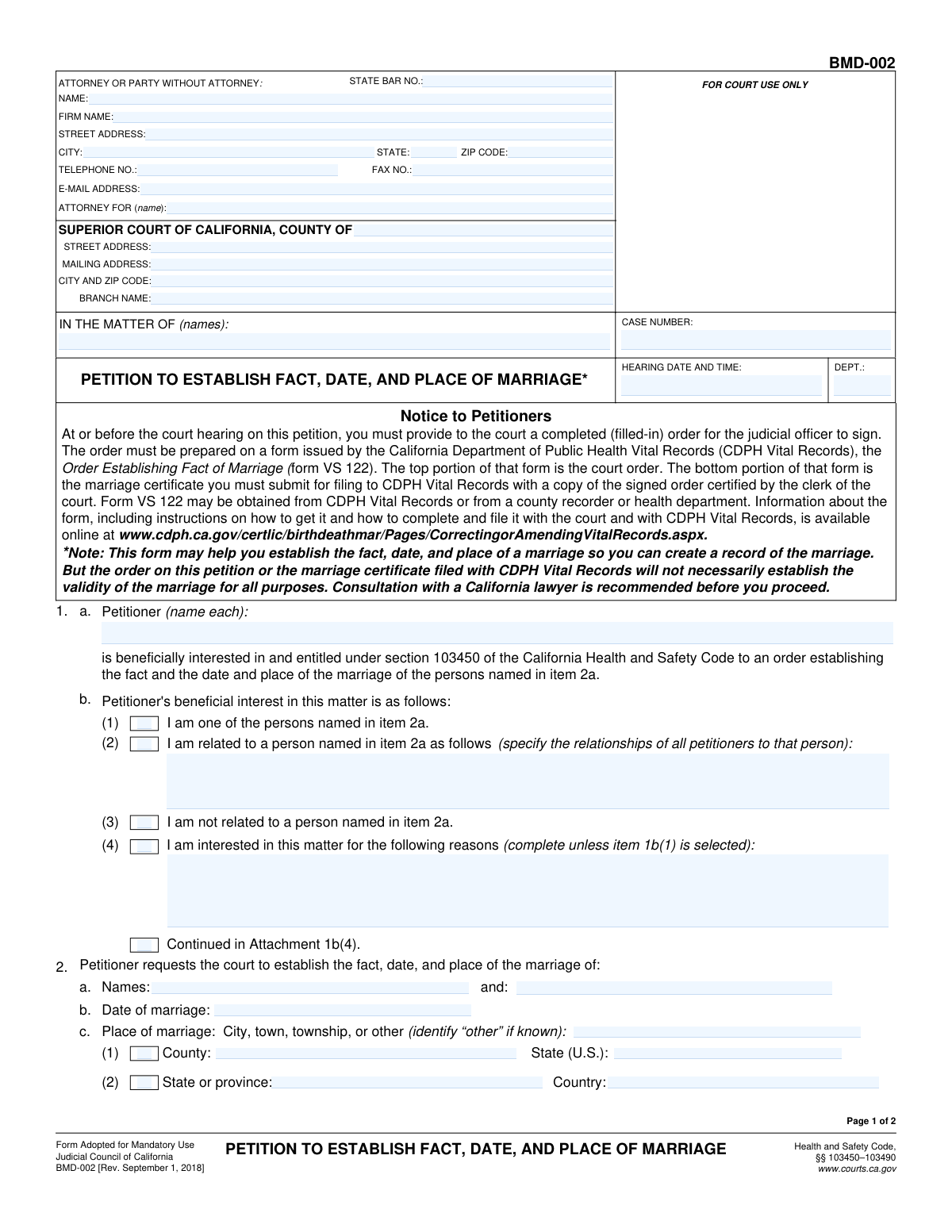
Form NC-120 is a petition filed with the Superior Court of California to obtain a court order that legally validates a marriage. This is essential when an official marriage certificate is unavailable, as the court order serves as a legal substitute for proving the marriage for inheritance, social security benefits, or other legal purposes. Today, this form can be filled out quickly and accurately using AI-powered services like Instafill.ai, which can also convert non-fillable PDF versions into interactive fillable forms.
NC-120 is part of the
marriage forms category on Instafill.
Our AI automatically handles information lookup, data retrieval, formatting, and form filling.
It takes less than a minute to fill out NC-120 using our AI form filling.
Securely upload your data. Information is encrypted in transit and deleted immediately after the form is filled out.
Form specifications
| Form name: | Form NC-120, Petition to Establish Fact, Date, and Place of Marriage |
| Number of fields: | 64 |
| Number of pages: | 2 |
| Language: | English |
Instafill Demo: How to fill out PDF forms in seconds with AI
How to Fill Out NC-120 Online for Free in 2026
Are you looking to fill out a NC-120 form online quickly and accurately? Instafill.ai offers the #1 AI-powered PDF filling software of 2026, allowing you to complete your NC-120 form in just 37 seconds or less.
Follow these steps to fill out your NC-120 form online using Instafill.ai:
- 1 Navigate to Instafill.ai and upload your Form NC-120, or use the platform's search function to find the correct version.
- 2 Provide the court and case details in the header section. The AI can assist in finding the correct court address for the specified county.
- 3 Fill in the petitioner's information, including your name, contact details, and your relationship or interest in the marriage being established.
- 4 Enter the full names of the parties to the marriage, along with the specific date and location (city, county, state/country) where the marriage took place.
- 5 Clearly state the reason an official marriage record is unavailable, either because one doesn't exist or because a certified copy cannot be obtained, providing a detailed explanation if required.
- 6 Carefully review all the information you've entered. Use the AI's validation checks to ensure all required fields are complete before dating and signing the petitioner's declaration.
- 7 Download the completed form to print and file with the court, attaching any necessary supporting documents as indicated on the form.
Our AI-powered system ensures each field is filled out correctly, reducing errors and saving you time.
Why Choose Instafill.ai for Your Fillable NC-120 Form?
Speed
Complete your NC-120 in as little as 37 seconds.
Up-to-Date
Always use the latest 2026 NC-120 form version.
Cost-effective
No need to hire expensive lawyers.
Accuracy
Our AI performs 10 compliance checks to ensure your form is error-free.
Security
Your personal information is protected with bank-level encryption.
Frequently Asked Questions About Form NC-120
This form is a petition to the Superior Court of California to legally establish the fact, date, and place of a marriage when an official record is either non-existent or cannot be obtained.
A petitioner is the person filing the form. This can be one of the spouses, a relative of the spouses, or another party who has a valid reason or 'beneficial interest' in having the marriage legally recognized.
A beneficial interest means you have a direct and valid reason for needing the marriage to be legally established. You must specify if you are one of the spouses, a relative, or explain your specific interest in the matter.
You must provide the full legal names of both parties to the marriage, the date of the marriage, and the place it occurred, including the city, county, and state or country.
The form has specific fields for international marriages. In the 'Place of Marriage' section, you can enter the city, the state or province, and the country where the marriage occurred.
You must justify to the court why this petition is necessary. You need to state whether no official record exists or provide a detailed explanation for why a certified copy cannot be obtained.
The form has checkboxes for attaching extra pages, such as 'Continued in Attachment 1b(4)'. Check the relevant box, provide the information on a separate sheet, and enter the total number of attached pages on the form.
Each petitioner listed on the form must sign and date their own declaration. If an attorney is representing the petitioner(s), the attorney must also complete and sign the attorney's declaration section.
You must file this form with the Superior Court of California in the county specified in the 'Court Information' section at the top of the form.
Yes, services like Instafill.ai use AI to accurately auto-fill form fields from your saved profile, which can save you significant time and help prevent errors.
To fill this form online, you can upload it to Instafill.ai. The platform will make the document interactive, allowing you to easily type your information into the fields and save your progress.
If you have a non-fillable or 'flat' PDF, you can upload it to a service like Instafill.ai. It can convert the document into an interactive, fillable form that you can complete and save digitally.
Compliance NC-120
Validation Checks by Instafill.ai
1
Ensures Case Number is Provided
This check verifies that the 'Case Number' field is not empty. The Case Number is a fundamental identifier for the entire legal proceeding, and without it, the form cannot be correctly filed or associated with the proper court case. Submission should be blocked until a valid case number is entered.
2
Validates Hearing Date and Time
This validation ensures the 'Hearing Date and Time' is entered in a correct format (e.g., MM/DD/YYYY HH:MM AM/PM) and represents a future date and time. A past or invalid date would make the hearing information nonsensical and could lead to missed court appearances. The system should reject dates that are in the past or improperly formatted.
3
Verifies State Bar Number Format
This check confirms that the 'State Bar Number' field contains a valid number, typically a sequence of digits as required by the specific state bar. This ensures the attorney can be uniquely and correctly identified within the bar association's records. An invalid number could prevent proper verification of the attorney's standing.
4
Validates State Abbreviation Format
This validation checks that the 'State' field for any address contains a valid two-letter U.S. state abbreviation. Using a standardized format is crucial for mail delivery and data consistency across legal documents. The system should provide a dropdown or reject any entry that is not a recognized two-letter code.
5
Ensures Correct Zip Code Format
This check verifies that the 'Zip Code' field contains either a 5-digit or 9-digit (ZIP+4) numerical value. A valid zip code is essential for accurate mail delivery of legal notices and correspondence. An incorrect format will cause the form to be rejected to prevent mailing errors.
6
Validates Email Address Structure
This validation ensures the 'Email Address' field contains a string that follows the standard email format (e.g., [email protected]). This is critical for electronic service and communication with the attorney or party. An invalid email address would lead to failed communication, potentially delaying the case.
7
Conditional Requirement for Relationship Specification
This check ensures that the 'Relationship to Person in 2a' text field is only enabled and required if the 'I am related to a person named in item 2a' checkbox is selected. This prevents users from providing unnecessary information and reduces data entry errors. If the box is checked, this field must be filled; otherwise, it should be empty and disabled.
8
Conditional Requirement for Reason for Interest
This validation enforces that the 'Reason for Interest' text area is filled out only when the 'I am interested in this matter for the following reasons' checkbox is marked. This logic ensures that the reason is provided when a specific interest is claimed, maintaining the integrity of the petition. The form should prompt the user to fill the text area if the box is checked but the reason is missing.
9
Logical Check for Date of Marriage
This validation compares the 'Date of Marriage' with the 'Declaration Date' fields. The date of marriage must logically occur before the date the declaration is signed. This check prevents chronological impossibilities in the legal record, which could call the entire petition into question.
10
Ensures Distinct Parties to Marriage
This check verifies that the names entered in 'First Party to Marriage' and 'Second Party to Marriage' are not identical. While name similarities can exist, identical full legal names for both parties in a marriage petition is highly improbable and likely a data entry error. This validation helps ensure the accuracy of the core information about the marriage being established.
11
Requires Explanation for Unobtainable Marriage Record
This check ensures that if the 'Certified Copy Cannot Be Obtained' checkbox is selected, the 'Reasons for Inability to Obtain Record' text field must be filled. The court requires a justification for why an official record is unavailable. Failure to provide this reason would render the petition incomplete and likely lead to its rejection.
12
Verifies Petitioner Name Consistency
This validation checks that the name entered in 'Petitioner Name' matches the name in 'Petitioner's Printed Name' in the declaration section. This consistency is vital for establishing the identity and standing of the person filing the petition. Inconsistencies could lead to the document being rejected for ambiguity.
13
Ensures Completeness of Court Information
This check verifies that all fields under the 'Court Information' section (County, Street Address, City and Zip Code, Branch Name) are completed. This information is mandatory for identifying the correct courthouse and jurisdiction. An incomplete address could result in the document being misfiled or rejected entirely.
14
Validates Declaration Dates are Not in the Future
This check ensures that all declaration dates ('Attorney's Declaration', 'First Petitioner's Declaration', etc.) are not set to a future date. A declaration is a statement of fact signed on a specific day, so a future date is logically impossible and would invalidate the document. The system should flag any future dates as errors before submission.
15
Ensures Mutually Exclusive Selection for Petitioner's Interest
This validation ensures that only one of the checkboxes under 'Petitioner's Beneficial Interest' ('I am one of the persons...', 'I am related...', 'I am not related...', 'I am interested...') can be selected at a time. These options represent distinct, mutually exclusive statuses for the petitioner's interest. Allowing multiple selections would create ambiguity and logical contradictions in the petition.
16
Conditional Requirement for Number of Pages Attached
This check validates that if the 'Continued in Attachment 1b(4)' checkbox is selected, the 'Number of Pages Attached' field must contain a numeric value greater than zero. This ensures that the court is properly notified of additional documentation. If the box is checked but the page count is missing or zero, the submission should be flagged as incomplete.
Common Mistakes in Completing NC-120
Filers often mistakenly enter their own personal or firm address in the 'Court Information' section at the top of the form. This section is reserved for the specific street address, mailing address, and branch name of the courthouse where the petition is being filed. This error can lead to the document being rejected by the clerk or misrouted, causing significant delays in the case. To avoid this, carefully read the section heading and enter the official address of the correct court branch, which can be found on the court's website.
Several sections, like 'Petitioner's Beneficial Interest', use checkboxes that require further explanation in a corresponding text box. People frequently check a box but then forget to fill in the required detail, leaving the form incomplete. This can lead to rejection or a request for more information from the court. Always double-check that checking a box has not unlocked a new field that also needs to be completed. AI-powered tools like Instafill.ai can help by highlighting required fields based on your previous selections.
When entering the names of the parties to the marriage or the petitioner(s), individuals sometimes use nicknames, initials, or incomplete names instead of the full legal name as it would appear on official documents. This can create ambiguity and issues with establishing the legal identity of the parties, potentially jeopardizing the outcome of the petition. Always use the full, complete legal name for all individuals mentioned on the form to ensure accuracy.
This field requires the name of the party being represented. Self-represented litigants (acting 'In Pro Per') often get confused and either leave this field blank or write 'self.' The correct procedure is to enter their own full name in this field, indicating they are representing themselves. Leaving it blank can cause the filing to be rejected for being incomplete.
In the section explaining why a certified copy of the marriage record cannot be obtained, filers often provide insufficient reasons like 'it was lost' or 'unavailable.' The court requires a detailed account of the specific steps taken to locate the record, such as which offices were contacted and what their response was. A lack of detail can lead the judge to deny the petition, assuming not enough effort was made. Be specific and thorough in your explanation.
Section 4, which asks for the residence of the parties to the marriage, is explicitly marked to be filled out only if the petitioner is *not* one of the persons whose marriage is being established. A frequent mistake is for a petitioner who *is* one of the parties to the marriage to fill out this section anyway. This provides redundant information and can confuse the court clerk reviewing the document. Read field instructions carefully and only fill out sections that apply to your specific situation.
The case number is the primary identifier for an existing case. People often make transposition errors (swapping digits), use incorrect formatting, or forget to enter it on subsequent pages or attachments. An incorrect or missing case number can result in the document not being associated with the correct file, causing it to be lost or significantly delayed. Always double-check the case number against official court documents for accuracy. Using a tool like Instafill.ai can help store and correctly populate this number across all related forms.
The form requires a separate, dated declaration for each petitioner listed at the beginning of the document. A common mistake is to list multiple petitioners but only complete the declaration section for the first petitioner. This inconsistency can invalidate the petition for the other parties and may require an amended filing. Ensure that every individual named as a petitioner also completes and dates their respective declaration section.
When explanations or additional information are included on separate attachments, the form requires the filer to state the total number of attached pages. It is easy to overlook this field or to miscount the pages. An incorrect page count can lead the court clerk to believe the filing is incomplete, potentially causing them to reject it or halt processing. Always count your attachments carefully and enter the total in the designated field before submitting.
The form specifically requests a two-letter abbreviation for the state in the address fields. Filers sometimes write out the full state name or use an incorrect abbreviation, which can cause data entry issues for the court's system. This simple mistake can lead to mail being returned or delays in processing. AI-powered form fillers like Instafill.ai can automatically format addresses correctly, preventing these errors. If the form is a non-fillable PDF, Instafill.ai can also make it fillable to ensure data is entered in the proper format.
Saved over 80 hours a year
“I was never sure if my IRS forms like W-9 were filled correctly. Now, I can complete the forms accurately without any external help.”
Kevin Martin Green
Your data stays secure with advanced protection from Instafill and our subprocessors




Robust compliance program
Transparent business model
You’re not the product. You always know where your data is and what it is processed for.
ISO 27001, HIPAA, and GDPR
Our subprocesses adhere to multiple compliance standards, including but not limited to ISO 27001, HIPAA, and GDPR.
Security & privacy by design
We consider security and privacy from the initial design phase of any new service or functionality. It’s not an afterthought, it’s built-in, including support for two-factor authentication (2FA) to further protect your account.
Fill out NC-120 with Instafill.ai
Worried about filling PDFs wrong? Instafill securely fills form-nc-120-petition-to-establish-fact-date-and-place-of-marriage forms, ensuring each field is accurate.
