
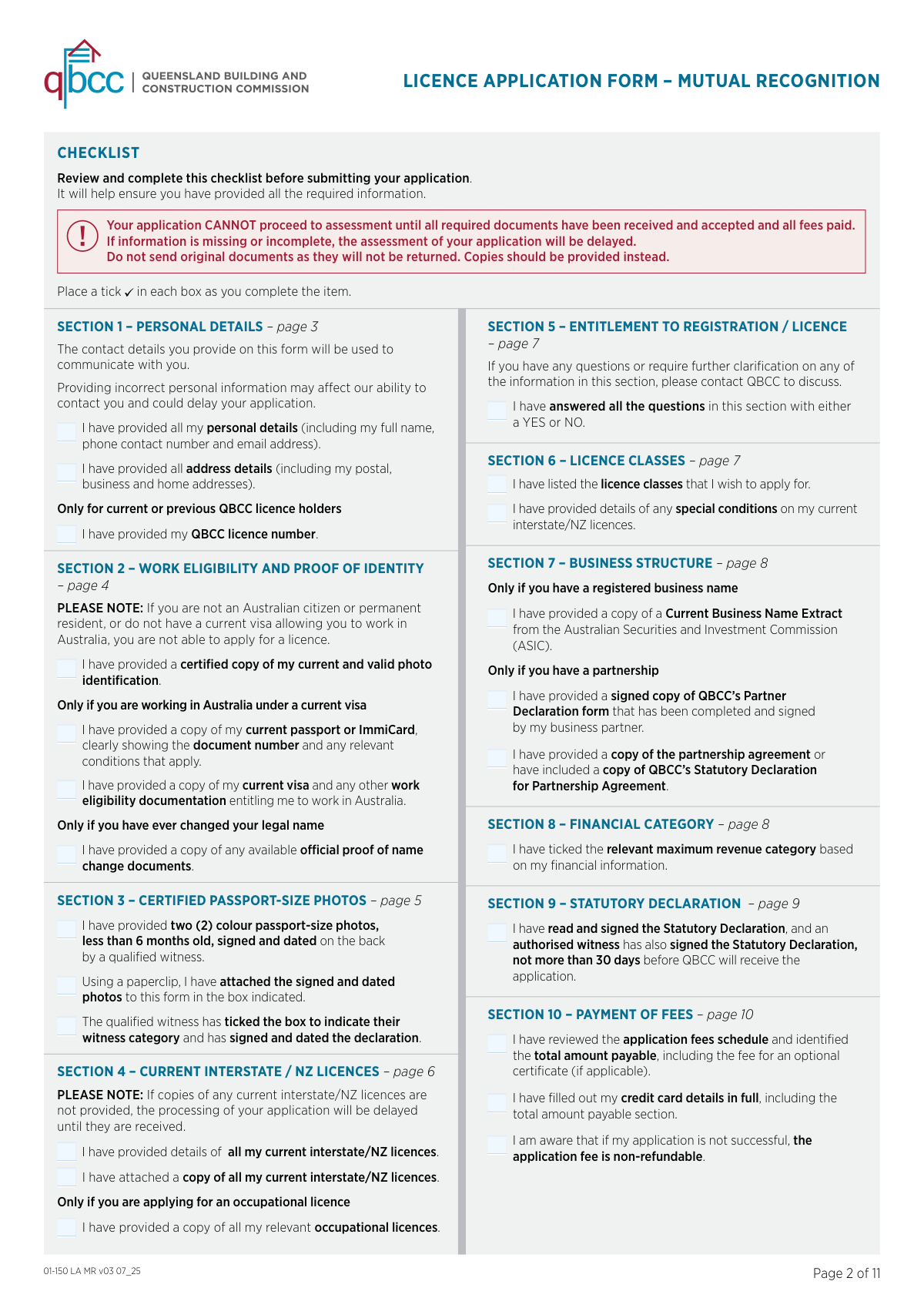
Yes! You can use AI to fill out QBCC Licence Application Form – Mutual Recognition (Application under section 19 of the Mutual Recognition Act 1992 (Cwlth) and section 18 of the Trans-Tasman Mutual Recognition Act 1997 (Cwlth))
Don't type 174 fields by hand. Tell our AI about yourself, or upload a document you already have, and it fills every field in seconds. You check it, then download, print or sign.
The AI does the filling. You just check it.
No typing into boxes, nothing to install.
What this form asks for
The AI fills all of it, from your answers or your documents.
The AI checks your answers before you download
16 checks built for this form, so a wrong date or a missing answer is caught before anyone else sees it.
Checks that Family name and Given names are both provided and contain only valid name characters (e.g., letters, spaces, hyphens, apostrophes) and are not placeholders such as “N/A”. This is important because the licence and public register are published under the applicant’s legal name and must match identity documents. If validation fails, the submission should be rejected or flagged for correction before assessment.
Ensures Date of birth is present and in the required DD/MM/YYYY format, represents a real calendar date, and is within a plausible range (e.g., not in the future and not implying an implausible age). This reduces identity mismatches and prevents downstream processing errors. If invalid, the form should be returned for correction and identity verification should not proceed.
If an ABN is entered, checks it is exactly 11 digits and passes the Australian ABN checksum algorithm. This is important for correctly linking the applicant to business records and avoiding incorrect public register entries. If validation fails, the ABN should be rejected and the applicant prompted to correct it or leave it blank if not held.
Validates that exactly one option is selected for ‘I have never held a QBCC licence’ vs ‘I currently hold or have previously held a QBCC licence’, and if the latter is selected a QBCC licence number is provided in an acceptable format. This prevents ambiguous applicant history and supports correct fee scenario selection and record matching. If inconsistent, the submission should be blocked until the selection and licence number are corrected.
Checks that Business phone, Home phone, Mobile phone, and Email are all present (the form states all phone number and email detail fields are required) and that each matches expected formats (e.g., Australian phone number patterns and a valid email syntax). Accurate contact details are essential for requests for further information and outcome notifications. If validation fails, the application should be marked incomplete and not accepted for processing.
Ensures the Business address fields are completed and that the address is not a PO Box/post office address (as explicitly disallowed), and that Suburb, State, and Postcode are present and valid. This is important because business addresses are published on the public QBCC licensee register and must be serviceable and compliant. If the business address is missing or non-physical, the system should require correction or an acceptable alternative address before submission.
And 10 more checks
- Validates home and postal addresses are complete and postcodes match state rules
- Validates work eligibility selection and blocks ineligible applicants
- Requires visa documentation fields when visa-holder option is selected
- Requires certified photo identification and enforces certification rules
- Validates legal name change disclosure and supporting documents when 'Yes' is selected
- Validates passport photo reuse decision and enforces photo/witness requirements when not reused
- Validates interstate/NZ licence entries (jurisdiction, licence number, expiry date) and requires at least one licence
- Validates interstate/NZ licence expiry dates indicate licences are currently active
- Validates entitlement/suitability questions are all answered and requires details when any answer is 'Yes'
- Validates payment method selection, credit card fields (if applicable), and total amount consistency with fee schedule
Let AI fill out your QBCC 01-150 LA MR
No typing. Every field filled in seconds, checked, ready to sign.
How to Fill Out QBCC 01-150 LA MR Online for Free in 2026
What the AI walks you through.
- Confirm you are eligible for mutual recognition (you are from an eligible state/territory or NZ, your current licence is active, and you have Australian work rights) and review QBCC mutual recognition requirements for your licence type/classes.
- Complete Section 1 (Personal Details): enter your full legal name, date of birth, ABN (if any), QBCC licence number (if previously held), phone/email, and business/home/postal addresses.
- Complete Section 2 (Work Eligibility & Proof of Identity): select your citizenship/visa status, attach required visa documents if applicable, provide certified photo ID copies, and include name-change evidence if you have used other legal names.
- Complete Section 3 (Passport Photos): if QBCC cannot reuse a recent photo, obtain two compliant passport photos and have a qualified witness certify/sign them and complete the witness declaration; attach photos as instructed (paperclip, not staple).
- Complete Sections 4–6: list all current interstate/NZ licences (and attach copies), include any relevant occupational licences if required, answer all entitlement/disciplinary questions (provide details if any “Yes”), and list the Queensland licence classes you are applying for plus any existing conditions/restrictions.
- Complete Sections 7–8: provide your business structure details (company/ACN, business name extract, partnership documents, trust info if applicable) and select your financial category/maximum revenue option.
- Sign Section 9 (Statutory Declaration) in ink with an authorised witness (within 30 days of QBCC receiving it), then complete Section 10 payment (in person or credit card by post), attach all supporting documents, and submit the application by post or at a QBCC service centre (do not email payment details).
Common Mistakes in Completing QBCC 01-150 LA MR
The ones the AI is built to catch.
Submitting the form without paying the full fee (or miscalculating the total)
Providing an unacceptable business address (PO Box instead of a physical address)
Leaving required contact fields blank (phone numbers and email)
Not supplying certified ID correctly (or forgetting front-and-back copies for driver licence)
Visa/work eligibility section completed incorrectly or missing supporting documents
Name change not disclosed or not supported with documents
Passport photos not compliant (age, size, certification wording, or attachment method)
Using digital signatures or not signing by hand where required
Statutory declaration witnessed by the wrong person or signed too early (over 30 days before receipt)
Incomplete interstate/NZ licence details or missing copies of all current licences
Answering entitlement questions incorrectly (not using YES/NO or failing to provide details for YES answers)
Frequently Asked Questions About QBCC 01-150 LA MR
Is it really free for 7 days?
Can I fill other forms too?
How do I cancel?
How does the AI fill out QBCC 01-150 LA MR?
What happens to my information?
How complex is QBCC 01-150 LA MR to fill out?
What is this Mutual Recognition licence application form for?
Who can apply using this form?
Can QBCC issue me a different or higher licence class than the one I hold interstate or in New Zealand?
What happens if my interstate/NZ licence has conditions or restrictions?
Do I need to keep my interstate or New Zealand licence active while applying?
What identification documents do I need to provide?
I’m on a visa—what extra documents do I need to attach?
Do I need to provide passport-size photos, and how do they need to be certified?
Who can certify my ID copies and passport photos?
Can I submit original documents?
What do I need to include about my current interstate/New Zealand licences?
I’m applying for an occupational licence (e.g., plumbing, gasfitting, fire protection). What else is required?
What is the Statutory Declaration section and when must it be signed?
How do I pay, and when will QBCC start processing my application?
How do I submit the form, and can I email it?
Get your QBCC 01-150 LA MR filled out by AI
$0 today. Cancel before Nov 2 and you pay nothing.
Other forms like this one
Section 8 forms: Form I-485 Supp A, Adjustment of Status Under Section 245(i), QBCC Licence Application Form – Company (Application made under section 33, Queensland Building and Construction Commission Act 1991), ACORD 140 (2014/12), Property Section (Attach to ACORD 125), Building Regulation 2021 (Queensland) – Section 143A(3) – Form 18 (Version 6, March 2023), Notice to the owner (where owner is not the client) that a private certifier has been engaged, Order Instituting Administrative and Cease-and-Desist Proceedings, Pursuant to Sections 15(b) and 21C of the Securities Exchange Act of 1934 and Sections 203(e) and 203(k) of the Investment Advisers Act of 1940, Making Findings, and Imposing Remedial Sanctions and a Cease-and-Desist Order, SEC Application for an Order under Section 17(b) of the Investment Company Act of 1940 (File No. 812-11000), Tax Sheltered Annuity (TSA) IRC Section 403(b) Distribution Request, Affidavit for Collection of Personal Property California Probate Code Section 13100, ACORD 131, Umbrella / Excess Liability Section, ACORD 125, Commercial Insurance Application and ACORD 143, Transportation Section, Official Certificate of Marriage, Section 50(1)(b) of the Marriage Act 1961 (Cth), Form 1023, Application for Recognition of Exemption Under Section 501(c)(3) of the Internal Revenue Code, ACORD 125, Commercial Insurance Application, Applicant Information Section, Notice to Employee (Labor Code section 2810.5), ACORD 147 (2001/02), Installation/Builders Risk Section, ACORD 126 (2010/05), Commercial General Liability Section, ACORD 126 (2009/08), Commercial General Liability Section, Form CMS-1561, Health Insurance Benefit Agreement
SEC forms: Form 4137, Social Security and Medicare Tax on Unreported Tip Income, Form 8919, Uncollected Social Security and Medicare Tax, Form SS-5-FS, Application for a Social Security Card, Form SSA-4-BK, Application for Social Security Benefits, Form I-485 Supp A, Adjustment of Status Under Section 245(i), Form 104, List of Creditors 20 Largest Unsecured Claims, Form SSA-8000-BK, Application for Supplemental Security Income (SSI), Form SSA-1042S, Social Security Benefit Statement, QBCC Licence Application Form – Company (Application made under section 33, Queensland Building and Construction Commission Act 1991), ACORD 140 (2014/12), Property Section (Attach to ACORD 125), Form SSA-3369-BK, Work History Report (Social Security Administration), European Public Prosecutor’s Office (EPPO) Application Form, Washington Single-Family Property Term Lease & Security Deposit Receipt (WA Single-Family Lease) | Revised 10/08/2025, Form 8919, Uncollected Social Security and Medicare Tax on Wages, VA Form 21-0781a, Statement in Support of Claim for Service Connection for Post-Traumatic Stress Disorder (PTSD) Secondary to Personal Assault, Louisiana Secretary of State – Notice of Change of Registered Office and/or Change of Registered Agent (Domestic Limited Liability Company) (R.S. 12:1308) (Form SS983, Rev. 01/24), Building Regulation 2021 (Queensland) – Section 143A(3) – Form 18 (Version 6, March 2023), Notice to the owner (where owner is not the client) that a private certifier has been engaged, Form SSA-827 (06-2024), Authorization to Disclose Information to the Social Security Administration (SSA), Intra-Brokerage Securities Transfer, Order Instituting Administrative and Cease-and-Desist Proceedings, Pursuant to Sections 15(b) and 21C of the Securities Exchange Act of 1934 and Sections 203(e) and 203(k) of the Investment Advisers Act of 1940, Making Findings, and Imposing Remedial Sanctions and a Cease-and-Desist Order
Let AI fill out your QBCC 01-150 LA MR
Your trial starts once a card is added. You pay nothing before Nov 2.
Our AI already knows this form, all 174 fields of it. Skip the typing: tell it about yourself, or upload what you have, and it fills the whole form in seconds.
- AI fills every field on all 10 pages, tables and checkboxes included
- No typing into boxes: answer a few questions, or upload a document you already have, an old copy of this form, a photo of a document
- The AI checks the answers; you review and change anything before you download
- Download the finished PDF, print it, or sign it online
- Encrypted, and never used to train AI
Cancel before Nov 2 and you pay nothing.
A card is needed to start the trial. Cancel in two clicks from your account.
Terms · Privacy