
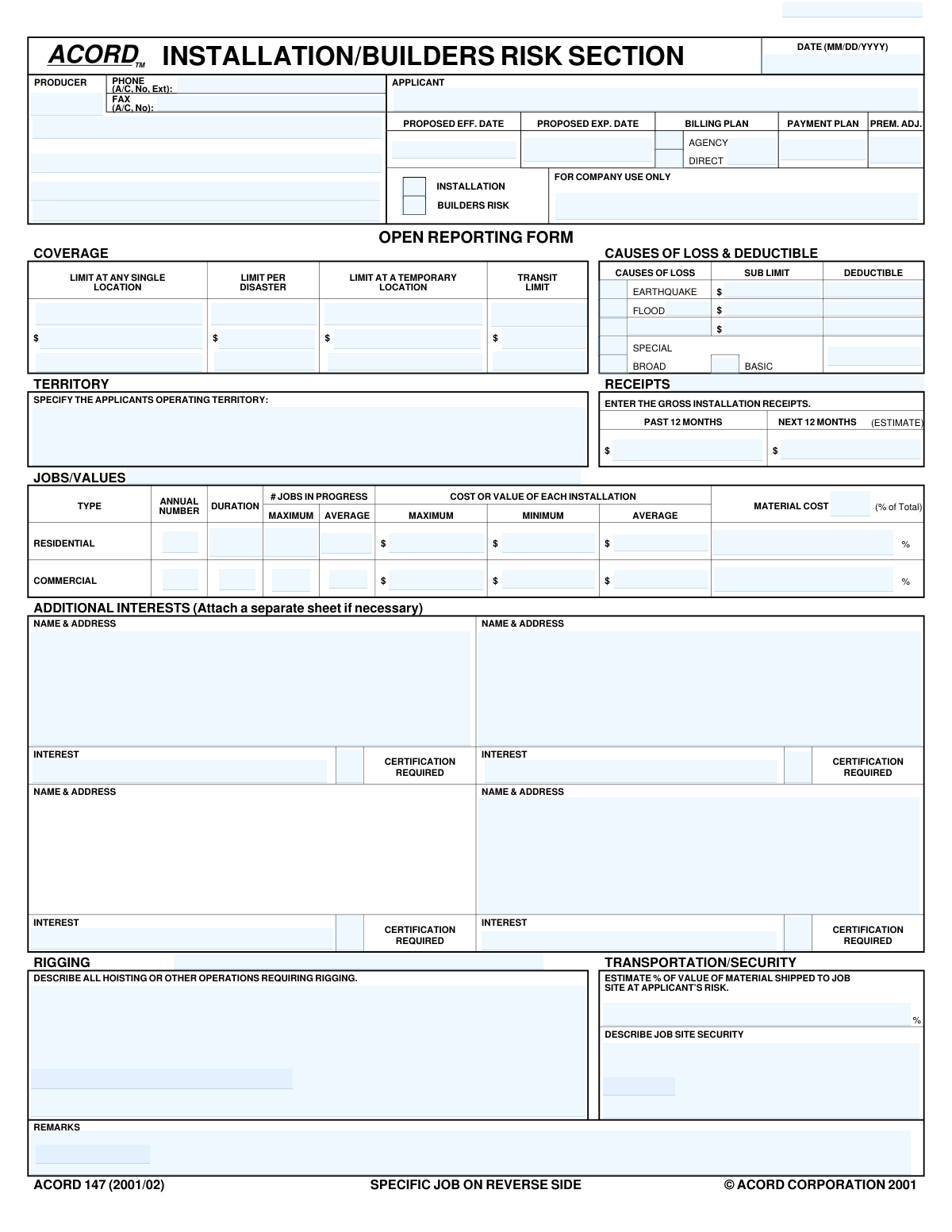
Yes! You can use AI to fill out ACORD 147 (2001/02), Installation/Builders Risk Section
Don't type 156 fields by hand. Tell our AI about yourself, or upload a document you already have, and it fills every field in seconds. You check it, then download, print or sign.
The AI does the filling. You just check it.
No typing into boxes, nothing to install.
What this form asks for
The AI fills all of it, from your answers or your documents.
The AI checks your answers before you download
14 checks built for this form, so a wrong date or a missing answer is caught before anyone else sees it.
This validation confirms that the 'Proposed Expiration Date' is chronologically later than the 'Proposed Effective Date'. A policy cannot expire before it begins, so this check ensures a valid and logical policy term. If this check fails, the policy term is invalid, which would lead to incorrect coverage periods and billing cycles, requiring manual correction.
This check ensures that all date fields, such as 'Form Date', 'Proposed Effective Date', and 'Completion Date', adhere to the MM/DD/YYYY format. Consistent and valid date formatting is crucial for accurate data processing, policy term calculation, and system integration. An invalid format would cause the submission to be rejected or require manual correction.
This validation checks that if the 'Earthquake' checkbox is selected as a cause of loss, then the corresponding 'Earthquake Deductible' and 'Earthquake Sub-Limit' fields must contain valid monetary values. This is important for defining the terms of the coverage accurately. Failure to provide these values would result in an incomplete and un-rateable policy submission for that specific peril.
This validation ensures that if the 'Flood' checkbox is selected, the 'Flood Deductible' and 'Flood Sub-Limit' fields are populated with monetary values. Similar to earthquake coverage, these values are essential for defining the policy's financial terms and risk exposure. An incomplete submission for this peril would prevent the policy from being issued correctly.
This rule verifies that if an 'Additional Interest - Certification Required' checkbox is ticked, the corresponding 'Name & Address' and 'Interest' fields for that party are also filled out. It is critical to know who the additional interest is and what their relationship to the policy is (e.g., mortgagee, lienholder) when a certificate is requested. Missing this information would prevent the generation of a valid certificate and could lead to compliance issues.
This check verifies that for both Residential and Commercial job types, the 'Average' cost or value is numerically between the 'Minimum' and 'Maximum' cost or value. This ensures the data provided is logical and internally consistent. An average value that is lower than the minimum or higher than the maximum indicates a data entry error that needs correction for accurate risk assessment.
And 8 more checks
- Ensures Transportation Method Percentages Sum to 100%
- Verifies Applicant Name is Provided
- Validates Producer Phone and Fax Number Format
- Ensures Job Completion Date is after Commencement Date
- Ensures Gross Installation Receipts are Provided
- Requires at least one Coverage Type Selection
- Requires at least one Cause of Loss Selection
- Validates all monetary fields contain valid currency values
Let AI fill out your ACORD 147
No typing. Every field filled in seconds, checked, ready to sign.
How to Fill Out ACORD 147 Online for Free in 2026
What the AI walks you through.
- Navigate to Instafill.ai and upload or select the ACORD 147 form.
- Provide applicant, producer, and policy information in the top section, including names, contact details, and proposed effective dates.
- Select the desired coverage (Installation or Builders Risk) and specify the Causes of Loss (e.g., Basic, Special, Flood) along with deductibles and coverage limits.
- Complete the 'Open Reporting Form' section with details about the applicant's general operations, including territory, receipts, and typical job values.
- If applicable, fill out the 'Specific Job' section on the reverse side with details about a particular project, including contract amount, job description, and timeline.
- List any Additional Interests, such as mortgagees or lienholders, and indicate if certification is required.
- Review all the information populated by the AI for accuracy, make any final adjustments, and then download, print, or submit the completed form.
Common Mistakes in Completing ACORD 147
The ones the AI is built to catch.
Incomplete 'Causes of Loss' Section
Vague Operational and Security Descriptions
Inconsistent Financial Data Across Sections
Missing 'Interest' for Additional Interests
Confusing 'Open Reporting' with 'Specific Job' Data
Incorrectly Estimating Gross Receipts
Ambiguous 'Operating Territory' Description
Forgetting Transportation Risk Details
Conditional Field Errors for Additional Interests
Leaving Key Coverage Limits Blank
Frequently Asked Questions About ACORD 147
Is it really free for 7 days?
Can I fill other forms too?
How do I cancel?
How does the AI fill out ACORD 147?
What happens to my information?
How complex is ACORD 147 to fill out?
What is the ACORD 147 form used for?
Who needs to fill out this form?
What is the difference between checking 'Installation' and 'Builders Risk'?
How do I fill out the 'Gross Installation Receipts' section?
What information is needed for the 'Jobs/Values' section?
What is an 'Additional Interest' and why is it required?
What should I include in the 'Describe all hoisting or other operations requiring rigging' section?
What is the difference between the 'Open Reporting Form' and 'Specific Job' sides of the form?
What are the 'Causes of Loss' options like Basic, Broad, and Special?
What kind of information is needed for 'Job Site Security'?
Can AI tools help me fill out the ACORD 147 form?
How can I fill out this form online if I have a PDF copy?
My ACORD 147 PDF is not fillable. What can I do?
Get your ACORD 147 filled out by AI
$0 today. Cancel before Nov 1 and you pay nothing.
Other forms like this one
Section 8 forms: Form I-485 Supp A, Adjustment of Status Under Section 245(i), QBCC Licence Application Form – Mutual Recognition (Application under section 19 of the Mutual Recognition Act 1992 (Cwlth) and section 18 of the Trans-Tasman Mutual Recognition Act 1997 (Cwlth)), QBCC Licence Application Form – Company (Application made under section 33, Queensland Building and Construction Commission Act 1991), ACORD 140 (2014/12), Property Section (Attach to ACORD 125), Building Regulation 2021 (Queensland) – Section 143A(3) – Form 18 (Version 6, March 2023), Notice to the owner (where owner is not the client) that a private certifier has been engaged, Order Instituting Administrative and Cease-and-Desist Proceedings, Pursuant to Sections 15(b) and 21C of the Securities Exchange Act of 1934 and Sections 203(e) and 203(k) of the Investment Advisers Act of 1940, Making Findings, and Imposing Remedial Sanctions and a Cease-and-Desist Order, SEC Application for an Order under Section 17(b) of the Investment Company Act of 1940 (File No. 812-11000), Tax Sheltered Annuity (TSA) IRC Section 403(b) Distribution Request, Affidavit for Collection of Personal Property California Probate Code Section 13100, ACORD 131, Umbrella / Excess Liability Section, ACORD 125, Commercial Insurance Application and ACORD 143, Transportation Section, Official Certificate of Marriage, Section 50(1)(b) of the Marriage Act 1961 (Cth), Form 1023, Application for Recognition of Exemption Under Section 501(c)(3) of the Internal Revenue Code, ACORD 125, Commercial Insurance Application, Applicant Information Section, Notice to Employee (Labor Code section 2810.5), ACORD 126 (2010/05), Commercial General Liability Section, ACORD 126 (2009/08), Commercial General Liability Section, Form CMS-1561, Health Insurance Benefit Agreement
ACORD forms: ACORD 84, Dwelling Fire Application (2013/09), ACORD 140 (2014/12), Property Section (Attach to ACORD 125), ACORD 36, Agent/Broker of Record Change, ACORD 131, Umbrella / Excess Liability Section, ACORD 125, Commercial Insurance Application and ACORD 143, Transportation Section, ACORD 125, Commercial Insurance Application, ACORD 125, Commercial Insurance Application, Applicant Information Section, ACORD 27, Evidence of Property Insurance, ACORD 24, Certificate of Property Insurance, ACORD 28, Evidence of Commercial Property Insurance, ACORD 141, Commercial Insurance Application - Crime Section, ACORD 140, Property Section, ACORD 80, Homeowner Application, ACORD 82, Watercraft Application, ACORD 85, Mobile Home Application, ACORD 160, Property Loss Notice, ACORD 75, Insurance Binder, ACORD 83, Personal Umbrella Application, ACORD 137 CA, Commercial Auto Application - California, ACORD 81, Personal Inland Marine Application (2012/02)
SEC forms: Form 4137, Social Security and Medicare Tax on Unreported Tip Income, Form 8919, Uncollected Social Security and Medicare Tax, Form SS-5-FS, Application for a Social Security Card, Form SSA-4-BK, Application for Social Security Benefits, Form I-485 Supp A, Adjustment of Status Under Section 245(i), Form 104, List of Creditors 20 Largest Unsecured Claims, Form SSA-8000-BK, Application for Supplemental Security Income (SSI), Form SSA-1042S, Social Security Benefit Statement, QBCC Licence Application Form – Mutual Recognition (Application under section 19 of the Mutual Recognition Act 1992 (Cwlth) and section 18 of the Trans-Tasman Mutual Recognition Act 1997 (Cwlth)), QBCC Licence Application Form – Company (Application made under section 33, Queensland Building and Construction Commission Act 1991), ACORD 140 (2014/12), Property Section (Attach to ACORD 125), Form SSA-3369-BK, Work History Report (Social Security Administration), European Public Prosecutor’s Office (EPPO) Application Form, Washington Single-Family Property Term Lease & Security Deposit Receipt (WA Single-Family Lease) | Revised 10/08/2025, Form 8919, Uncollected Social Security and Medicare Tax on Wages, VA Form 21-0781a, Statement in Support of Claim for Service Connection for Post-Traumatic Stress Disorder (PTSD) Secondary to Personal Assault, Louisiana Secretary of State – Notice of Change of Registered Office and/or Change of Registered Agent (Domestic Limited Liability Company) (R.S. 12:1308) (Form SS983, Rev. 01/24), Building Regulation 2021 (Queensland) – Section 143A(3) – Form 18 (Version 6, March 2023), Notice to the owner (where owner is not the client) that a private certifier has been engaged, Form SSA-827 (06-2024), Authorization to Disclose Information to the Social Security Administration (SSA), Intra-Brokerage Securities Transfer
builders risk forms: ACORD 144, Glass and Sign Section, ACORD 147, Installation / Builders Risk Section
construction insurance forms: ACORD 144, Glass and Sign Section, ACORD 147, Installation / Builders Risk Section, ACORD 145, Accounts Receivable / Valuable Papers, ACORD 146, Equipment Floater Section
installation risk forms: ACORD 147, Installation / Builders Risk Section
Let AI fill out your ACORD 147
Your trial starts once a card is added. You pay nothing before Nov 1.
Our AI already knows this form, all 156 fields of it. Skip the typing: tell it about yourself, or upload what you have, and it fills the whole form in seconds.
- AI fills every field on both pages, tables and checkboxes included
- No typing into boxes: answer a few questions, or upload a document you already have, an old copy of this form, a photo of a document
- The AI checks the answers; you review and change anything before you download
- Download the finished PDF, print it, or sign it online
- Encrypted, and never used to train AI
Cancel before Nov 1 and you pay nothing.
A card is needed to start the trial. Cancel in two clicks from your account.
Terms · Privacy