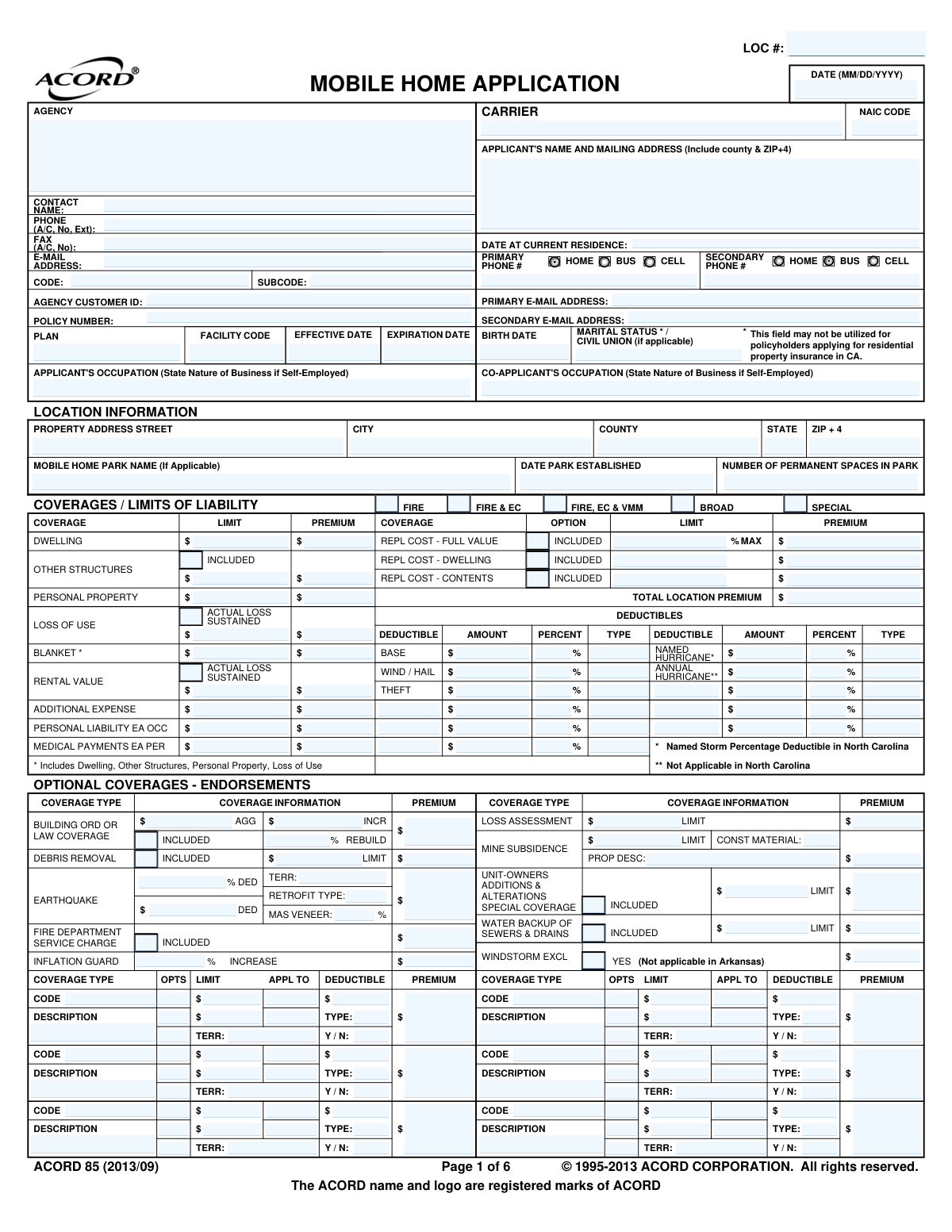
Yes! You can use AI to fill out ACORD 85, Mobile Home Application
The ACORD 85, Mobile Home Application, is a standardized insurance document used to gather comprehensive information about a mobile home and its owner for underwriting purposes. It details the applicant's information, property specifics, desired coverages, loss history, and other risk-related factors necessary for an insurer to issue a policy. Today, this form can be filled out quickly and accurately using AI-powered services like Instafill.ai, which can also convert non-fillable PDF versions into interactive fillable forms.
Our AI automatically handles information lookup, data retrieval, formatting, and form filling.
It takes less than a minute to fill out ACORD 85 using our AI form filling.
Securely upload your data. Information is encrypted in transit and deleted immediately after the form is filled out.
Form specifications
| Form name: | ACORD 85, Mobile Home Application |
| Number of fields: | 618 |
| Number of pages: | 1 |
| Language: | English |
More forms in ACORD forms
Instafill Demo: How to fill out PDF forms in seconds with AI
How to Fill Out ACORD 85 Online for Free in 2026
Are you looking to fill out a ACORD 85 form online quickly and accurately? Instafill.ai offers the #1 AI-powered PDF filling software of 2026, allowing you to complete your ACORD 85 form in just 37 seconds or less.
Follow these steps to fill out your ACORD 85 form online using Instafill.ai:
- 1 Navigate to Instafill.ai and upload your ACORD 85 form or select it from the template library.
- 2 Complete the applicant, co-applicant, and agency information sections with names, addresses, and contact details.
- 3 Provide detailed information about the mobile home in the 'Location Information' and 'Rating / Underwriting' sections, including its make, model, year, dimensions, and construction details.
- 4 Specify the desired 'Coverages / Limits of Liability', including dwelling, personal property, and liability amounts, and select any necessary deductibles or optional endorsements.
- 5 Accurately fill out the 'General Information' and 'Loss History' sections, providing explanations for all 'Yes' responses as required.
- 6 Review all sections for accuracy, including the tie-down certification and additional interest details.
- 7 Electronically sign and date the application in the designated signature fields to certify the information provided, then download or share the completed form.
Our AI-powered system ensures each field is filled out correctly, reducing errors and saving you time.
Why Choose Instafill.ai for Your Fillable ACORD 85 Form?
Speed
Complete your ACORD 85 in as little as 37 seconds.
Up-to-Date
Always use the latest 2026 ACORD 85 form version.
Cost-effective
No need to hire expensive lawyers.
Accuracy
Our AI performs 10 compliance checks to ensure your form is error-free.
Security
Your personal information is protected with bank-level encryption.
Frequently Asked Questions About Form ACORD 85
The ACORD 85 form is a Mobile Home Application used to apply for property and liability insurance. It gathers detailed information about the applicant, the mobile home itself, and the desired coverage levels to generate an insurance policy.
Any individual or entity that owns a mobile home and is seeking to purchase a new insurance policy needs to complete this form. It is submitted to an insurance agent or company for underwriting.
You should have your personal details, the mobile home's make, model, year, and ID number, its physical address, details of any prior insurance coverage or claims, and information about any lienholders or mortgagees.
This section is critical for insurers to assess the home's stability and risk of damage from high winds. Accurate information about the tie-down system, including straps, anchors, and blocking, directly impacts your eligibility and premium rates.
The 'Coverages' section lists standard protections for your dwelling, personal property, and liability. 'Optional Coverages' or endorsements are add-ons you can purchase for extra protection against specific risks like earthquakes or water backup.
Yes, the 'Loss History' section requires you to disclose all losses that have occurred at your properties within the last several years, regardless of whether an insurance claim was filed or paid.
Yes, in the 'General Information - Residential' section, you must disclose any animals kept on the premises. Insurers use this information to assess potential liability risks, especially concerning animal type and bite history.
If the 'Binder' box is completed by your agent, it means temporary insurance coverage is in effect as of the date listed. This binder serves as proof of coverage until the full policy is issued or the binder is cancelled.
An 'Additional Interest' is a person or company, such as a lender or finance company, that has a financial stake in your mobile home. They must be listed on the policy to ensure their financial interest is protected.
After you fill out and sign the form, you submit it to your insurance agent or broker. They will review it and forward it to the insurance carrier for final underwriting and to issue the policy.
Yes, services like Instafill.ai use AI to accurately auto-fill form fields, which can save you significant time and help prevent errors on complex applications like this one.
Simply upload the ACORD 85 PDF to the Instafill.ai platform. The AI will make the document interactive, allowing you to easily type your information into the correct fields and save your progress.
You can use a service like Instafill.ai, which is designed to convert flat, non-fillable PDFs into interactive, fillable forms. This allows you to easily type your information directly into the fields online without printing.
Compliance ACORD 85
Validation Checks by Instafill.ai
1
Policy Period Date Validation
This check ensures that the 'Effective Date' is before the 'Expiration Date'. A valid policy period is fundamental for an insurance contract to be enforceable and clearly defined. If the expiration date is not after the effective date, the submission will be rejected, and the user will be prompted to correct the dates before proceeding.
2
Applicant Age Verification
Validates that the applicant's 'Birth Date' indicates they are of legal age to enter into a contract (typically 18 years or older). This is crucial for the legal validity of the insurance policy. If the applicant is underage, the application cannot be processed and will be flagged for manual review or rejection.
3
Conditional Explanation for 'Yes' Responses
This validation verifies that for any question in the 'General Information' section marked 'Y' (Yes), the corresponding explanation field is not empty. These explanations are critical for underwriters to assess risks associated with prior cancellations, bankruptcies, or other residences. A failure will prevent submission and highlight the missing explanation fields.
4
ZIP Code Format and Structure
Ensures the 'ZIP' code in the 'Location Information' section is a valid 5-digit or 9-digit (ZIP+4) format. Accurate location data is essential for rating, determining territory, and ensuring mail delivery of policy documents. An invalid format will trigger an error, requiring the user to input a valid US ZIP code.
5
Mobile Home Tie-Down Conditional Logic
Checks if 'Is Mobile Home Tied Down?' is answered 'YES'. If so, it validates that the subsequent detailed questions about the tie-downs (e.g., 'Type of Straps', 'Number of Straps', 'Type of Anchors') are completed. This information is vital for assessing windstorm risk and determining policy eligibility, and failure to provide details will halt the application.
6
Business on Premises Detail Requirement
If 'Any business conducted on premises?' is marked 'YES', this check ensures that the type of business (e.g., 'Day Care', 'Farming', 'Home Office') is specified. Standard mobile home policies often exclude or limit coverage for business activities, so this information is necessary to determine if additional coverage or a different policy type is needed. Missing details will result in a validation error.
7
Animal on Premises Detail Requirement
Verifies that if 'Are there any animals or exotic pets kept on premises?' is answered 'YES', the corresponding fields for 'Animal Type', 'Breed', and 'Bite History' are filled out. This information is a major factor for liability underwriting, as certain animals or a history of aggression can significantly increase risk. The application will be considered incomplete without these details.
8
Prior Loss History Completeness
If the applicant answers 'YES' to having prior losses, this check ensures that at least one loss entry is fully completed with 'Loss Date', 'Description of Loss', and 'Amount Paid'. A complete loss history is fundamental for accurate risk assessment and premium calculation. An incomplete loss section will trigger an error and require the user to provide the necessary details.
9
Premium Summation Verification
This validation calculates the sum of all individual premium fields (e.g., 'Dwelling Premium', 'Personal Liability Premium', 'Endorsements Premium') and verifies that it matches the 'Total Location Premium' field. This serves as an integrity check to ensure there are no calculation errors in the premium breakdown. A mismatch would flag the application for review to correct the discrepancy.
10
State, County, and ZIP Code Consistency
This check validates that the provided 'City', 'State', 'County', and 'ZIP' code form a plausible geographical location. This is critical for assigning the correct rating territory, applying state-specific rules, and assessing location-based perils like hurricanes or earthquakes. If the combination is invalid, the system will prompt the user to review and correct the address information.
11
Owner Information Requirement
Validates that if the answer to 'IS THE NAMED INSURED THE OWNER OF THE PROPERTY?' is 'NO', then the 'OWNER'S NAME' field must be completed. It is legally necessary to identify the property owner to establish insurable interest and ensure the policy is correctly structured. The application will be blocked if this required information is missing.
12
Missouri Applicant Question Compliance
This check first identifies if the property 'State' is Missouri (MO). If it is, the validation ensures that question #2 in General Information ('Has any coverage been declined, cancelled or non-renewed...') is left unanswered, as per the form's explicit instruction. This ensures compliance with state-specific regulations, and answering the question for a Missouri applicant would result in a validation failure.
13
Phone Number Format Validation
This check ensures that the 'Primary Phone #' field contains a valid 10-digit phone number, potentially allowing for common formats like (XXX) XXX-XXXX or XXX-XXX-XXXX. A valid contact number is essential for the agent and carrier to communicate with the applicant regarding their policy. An invalid format will result in an error message prompting the user for correction.
Common Mistakes in Completing ACORD 85
Applicants often guess or provide incorrect information in the 'Certification of Mobile Home Tie-Downs' section because they lack the technical knowledge about strap types, anchors, and turnbuckles. This is a critical section for underwriting, especially in high-wind areas, and incorrect data can lead to policy denial or a claim being rejected. To avoid this, applicants should consult their mobile home's documentation or have a professional inspection; otherwise, the application will be delayed until the information is verified.
Applicants may intentionally or unintentionally fail to report significant liability hazards like swimming pools, trampolines, or certain animal breeds to avoid higher premiums. This omission constitutes misrepresentation and can lead to the insurer denying a liability claim, leaving the homeowner personally responsible for damages, or even voiding the entire policy. It is crucial to disclose all such items accurately to ensure proper coverage is in place.
A frequent error is providing an incomplete loss history, particularly by omitting losses that were not covered by insurance, as the form explicitly requests. Applicants may also forget dates or exact claim amounts. Inaccurate loss history can cause significant delays as the insurer verifies the information through industry databases, and discrepancies may lead to higher premiums or application rejection.
Applicants often forget to list the 'Additional Interest' or 'Loss Payee,' which is typically the financial institution holding the loan on the mobile home. This mistake can breach the terms of their loan agreement, as lenders require proof of insurance with their interest correctly noted. To prevent this, applicants should have their loan documents ready and accurately enter the lender's name, address, and loan number as required.
This form asks for highly specific details about the home's construction, such as wiring type (copper/aluminum), electrical amperage, and foundation type. Many applicants guess at these answers, leading to an inaccurate risk assessment. This can result in incorrect premiums or, more seriously, denial of a claim if the actual construction differs from what was stated on the application.
The form contains numerous 'Yes/No' questions that explicitly state 'EXPLAIN ALL "YES" RESPONSES'. A common oversight is checking 'Yes' to a question (e.g., regarding prior bankruptcies or business conducted on premises) but failing to provide the required detailed explanation in the designated remarks section. This incomplete information will always halt the underwriting process and require follow-up, delaying the issuance of the policy.
The 'Coverages / Limits of Liability' section is complex, with multiple options for limits and deductibles (e.g., base, wind/hail, hurricane). Applicants often misunderstand these terms, leading them to select inadequate coverage or financially burdensome deductibles. This can result in being underinsured in a disaster or facing an unexpectedly high out-of-pocket cost when making a claim.
Transcription errors when entering the mobile home's ID Number (similar to a vehicle's VIN) are frequent. This unique identifier is fundamental for rating and verifying the property, and an incorrect number will cause a data mismatch, halting the application. Carefully double-checking this number against official documentation is essential. AI-powered form fillers like Instafill.ai can help prevent such errors by validating data formats.
It is very common for applicants to miss signing the final page or overlooking the small box requiring their initials for the 'Notice of Information Practices'. An unsigned or incomplete application is legally invalid and cannot be processed. This simple mistake is a leading cause of unnecessary delays, requiring the agent to track down the applicant to complete the form.
When an applicant is self-employed, they often just write 'Self-Employed' in the occupation field. However, the form specifically requests the 'Nature of Business,' as this information is used to assess potential risks related to business activities on the premises. A vague entry will trigger a request for more information, delaying the application. For example, 'Self-Employed - Landscaping' is much better than just 'Self-Employed'.
Saved over 80 hours a year
“I was never sure if my IRS forms like W-9 were filled correctly. Now, I can complete the forms accurately without any external help.”
Kevin Martin Green
Your data stays secure with advanced protection from Instafill and our subprocessors

Robust compliance program
Transparent business model
You’re not the product. You always know where your data is and what it is processed for.
ISO 27001, HIPAA, and GDPR
Our subprocesses adhere to multiple compliance standards, including but not limited to ISO 27001, HIPAA, and GDPR.
Security & privacy by design
We consider security and privacy from the initial design phase of any new service or functionality. It’s not an afterthought, it’s built-in, including support for two-factor authentication (2FA) to further protect your account.
Fill out ACORD 85 with Instafill.ai
Worried about filling PDFs wrong? Instafill securely fills acord-85-mobile-home-application forms, ensuring each field is accurate.