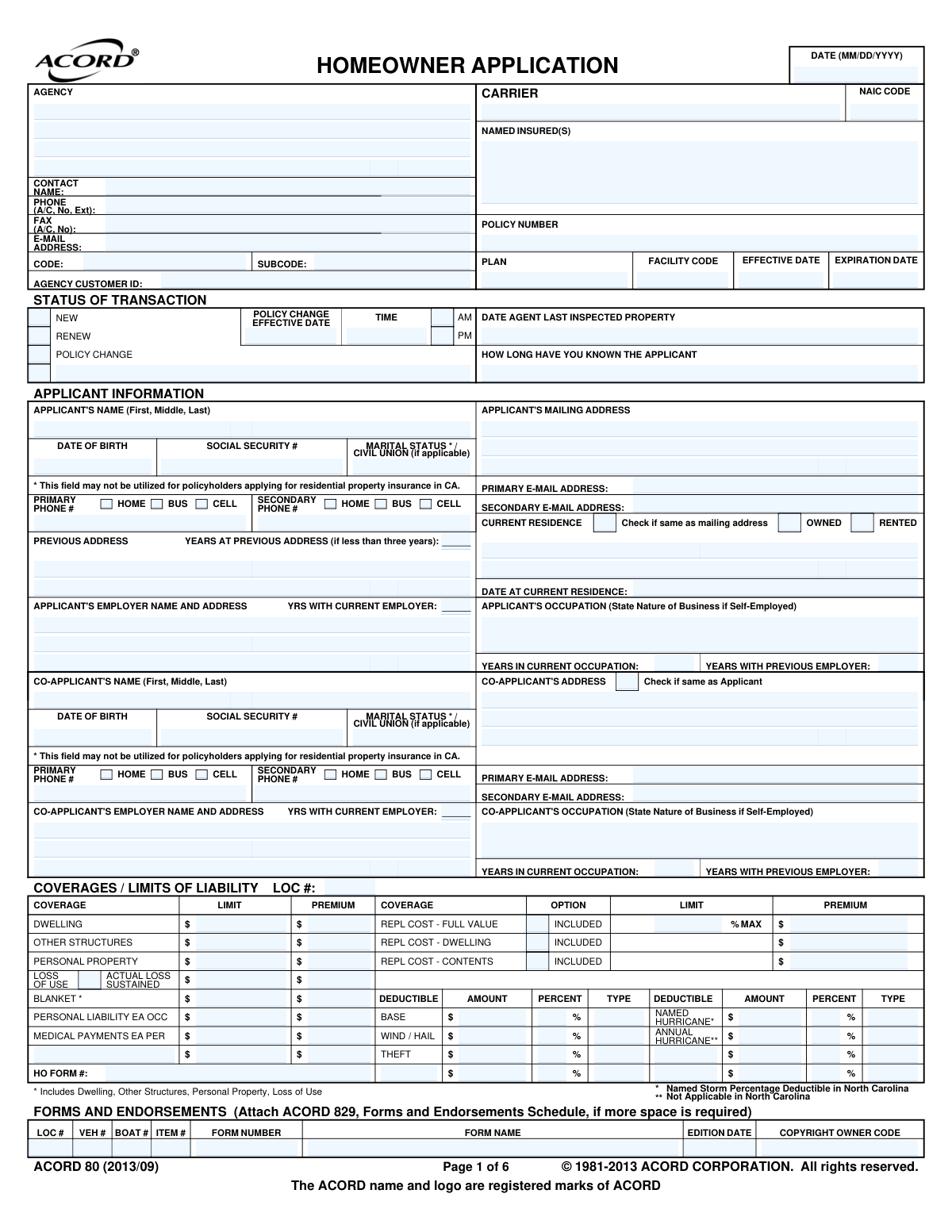
Yes! You can use AI to fill out ACORD 80, Homeowner Application

ACORD 80, the Homeowner Application, is a crucial document in the insurance industry for applying for homeowner's coverage. It standardizes the collection of detailed information about the applicant, the property, desired coverages, and any prior loss history, which insurers use to underwrite and price a policy. Today, this form can be filled out quickly and accurately using AI-powered services like Instafill.ai, which can also convert non-fillable PDF versions into interactive fillable forms.
ACORD 80 is part of the ACORD forms and insurance application forms categories on Instafill.
Our AI automatically handles information lookup, data retrieval, formatting, and form filling.
It takes less than a minute to fill out ACORD 80 using our AI form filling.
Securely upload your data. Information is encrypted in transit and deleted immediately after the form is filled out.

Form specifications

Form name: ACORD 80, Homeowner Application
Number of fields: 818
Number of pages: 1
Field instructions: ACORD 80 Instructions
Language: English
main-image

Instafill Demo: How to fill out PDF forms in seconds with AI

How to Fill Out ACORD 80 Online for Free in 2026

Are you looking to fill out a ACORD 80 form online quickly and accurately? Instafill.ai offers the #1 AI-powered PDF filling software of 2026, allowing you to complete your ACORD 80 form in just 37 seconds or less.
Follow these steps to fill out your ACORD 80 form online using Instafill.ai:
  1. 1 Navigate to Instafill.ai and upload or select the ACORD 80 form.
  2. 2 Use the AI assistant to automatically fill in applicant and co-applicant personal details, such as names, addresses, and contact information.
  3. 3 Provide detailed information about the property, including construction type, year built, security systems, and any renovations, letting the AI guide you through the sections.
  4. 4 Specify the desired coverage limits for the dwelling, personal property, liability, and select any optional coverages or endorsements.
  5. 5 Detail any prior insurance coverage and loss history for the past several years as requested on the form.
  6. 6 Review all the information pre-filled and entered by the AI for accuracy, make any necessary corrections, and then e-sign the application.
  7. 7 Securely download, print, or share the completed ACORD 80 form directly with your insurance agent or company.

Our AI-powered system ensures each field is filled out correctly, reducing errors and saving you time.

Why Choose Instafill.ai for Your Fillable ACORD 80 Form?

Speed

Complete your ACORD 80 in as little as 37 seconds.

Up-to-Date

Always use the latest 2026 ACORD 80 form version.

Cost-effective

No need to hire expensive lawyers.

Accuracy

Our AI performs 10 compliance checks to ensure your form is error-free.

Security

Your personal information is protected with bank-level encryption.

Frequently Asked Questions About Form ACORD 80

This is a standardized application used by insurance agents to collect necessary information from individuals applying for a homeowner's insurance policy. It covers details about the applicant, the property, desired coverages, and risk assessment factors.

Anyone applying for a new homeowner's insurance policy, requesting a policy change, or renewing their coverage will need to provide the information for this form. It is typically filled out with the assistance of an insurance agent.

Insurers use this information to verify your identity and obtain credit and loss history reports, which can influence your eligibility and premium rates. Note that some states, like California, have restrictions on the use of this data for residential property insurance.

This section requires detailed information about your property's physical characteristics, such as year built, construction type, square footage, roof material, and the condition of its heating and electrical systems. These details help the insurer determine the risk and calculate your premium.

You must report any losses that have occurred at your property within the specified time frame, typically the last 3-5 years. This includes losses for which you filed an insurance claim as well as those you did not.

Yes, the 'General Information - Residential' section specifically asks if there are any animals on the premises. You will need to provide the animal type, breed, and any bite history, as this is important for assessing liability risk.

'Dwelling' coverage protects the main structure of your house. 'Other Structures' coverage applies to separate structures on your property, such as a detached garage, fence, or shed.

An insurance binder is a temporary agreement that provides proof of insurance coverage until your formal policy is issued. If this section is completed by your agent, it confirms that your coverage is active as of the effective date shown.

These are additional protections you can add to a standard policy for specific risks, such as water backup, identity fraud, or earthquake damage. You should discuss these with your agent to determine if you need them.

Yes, services like Instafill.ai use AI to accurately auto-fill form fields from your existing documents or a simple Q&A, which saves time and helps reduce errors.

You can use a service like Instafill.ai to upload the form, and its AI will help you fill in the fields quickly and accurately. This simplifies the process of completing the application with your agent.

Tools like Instafill.ai can convert flat, non-fillable PDFs into interactive, fillable forms. Simply upload the document to the platform to make it easy to complete online.

You must answer all questions in the 'General Information' section truthfully, as this information is material to the underwriting process. Be prepared to provide an explanation for any 'YES' responses in the space provided.

Compliance ACORD 80
Validation Checks by Instafill.ai

1
Validates Social Security Number Format and State-Specific Usage
This check ensures the Social Security Number is provided in the standard XXX-XX-XXXX format. It also flags the submission for review if an SSN is entered for a California residential property application, as the form notes this field may not be utilized in CA. This validation is crucial for data integrity and compliance with state-specific guidelines. A failure would prevent processing until the number is corrected or removed as per state rules.
2
Ensures Logical Policy Term Dates
Validates that the policy 'EFFECTIVE DATE' and 'EXPIRATION DATE' are both valid dates. It also performs a critical logical check to ensure the 'EXPIRATION DATE' occurs after the 'EFFECTIVE DATE'. This is essential for defining the policy coverage period correctly. If the dates are invalid or illogical, the policy term is ambiguous, and the application must be rejected for correction.
3
Requires Detailed Loss Information When Applicable
This check verifies that if the applicant answers 'Y' to having 'ANY LOSSES... DURING THE LAST... YEARS', the corresponding details (Loss Date, Loss Type, Amount Paid, Description) are provided. This information is essential for underwriting and risk assessment. An incomplete loss history section prevents accurate quoting and policy issuance, requiring the applicant to provide the missing details.
4
Verifies Logical Consistency of Employment Duration
This validation checks that the 'YRS WITH CURRENT EMPLOYER' is not greater than the 'YEARS IN CURRENT OCCUPATION'. It also flags submissions where the years in occupation exceed the applicant's age minus a standard working start age (e.g., 16). This helps catch data entry errors and ensures the applicant's stability information is plausible. An inconsistency would trigger a request for clarification.
5
Validates Property Year Built and Purchase Date Logic
This check ensures the 'YEAR BUILT' is a valid 4-digit year that is not in the future. It also verifies that the 'PURCHASE DATE' is not earlier than the 'YEAR BUILT'. This logical check prevents impossible scenarios and ensures the property's timeline is accurate for underwriting purposes. An error here would require correction before the risk can be properly evaluated.
6
Enforces Explanation for 'Yes' Responses in General Information
The form requires explanations for most 'YES' responses in the General Information section (e.g., 'Any business conducted on premises?'). This validation ensures that if a question is answered 'Yes', the corresponding explanation or detail fields are not empty. This is crucial as these answers often indicate increased risk that must be documented and assessed by an underwriter.
7
Ensures Complete Applicant and Property Location Addresses
Verifies that both the applicant's mailing address and the insured property's location address (Street, City, State, ZIP) are fully completed. The property location is fundamental for rating, determining territory, and assessing location-based risks like fire protection or flood zones. An incomplete address makes the application non-actionable and must be corrected.
8
Validates Coverage Limits and Premiums are Numeric
This check ensures that all fields for coverage limits, deductibles, and premiums contain only valid numeric or currency values. Non-numeric data in these fields would cause calculation errors and prevent the system from determining the total premium or policy terms. This is a fundamental data integrity check for any insurance application.
9
Requires Full Details for Additional Interests
If an 'INTEREST' type is selected for an Additional Interest (e.g., Mortgagee, Loss Payee), this validation makes the Name and Address fields for that interest mandatory. This is legally and contractually necessary to protect the rights of lienholders or other parties with a financial stake in the property. Failure to provide this information can lead to significant contractual issues and requires completion.
10
Flags High-Risk Animal Disclosures
This check specifically analyzes the 'Are there any animals...' question. If 'Yes', it ensures the breed and type are specified. Critically, if 'Bite History' is marked 'Yes', the application is flagged for immediate underwriter review or potential automatic declination due to the high liability risk. This automates the identification of a key underwriting concern.
11
Validates Applicant's Date of Birth and Minimum Age
Ensures the 'DATE OF BIRTH' is a valid date and that the calculated age of the applicant meets the minimum requirement to enter into a legal contract (e.g., 18 years old). This is essential for ensuring the policyholder is legally able to be a party to the insurance contract. An invalid date or an underage applicant would halt the application process.
12
Verifies Primary Email Address Format
This check confirms that the entry in the 'PRIMARY E-MAIL ADDRESS' field follows a standard email format (e.g., [email protected]). A valid email address is crucial for digital communication, policy delivery, and billing notifications. An invalid format would prevent electronic correspondence and requires correction.
13
Ensures Prior Coverage Details are Provided if Applicable
If the 'NO PRIOR COVERAGE' box is unchecked, this validation ensures that the 'PRIOR CARRIER' and 'PRIOR POLICY NUMBER' fields are filled. This information is vital for underwriting to assess the applicant's insurance history and potential gaps in coverage. Missing information prevents a full risk assessment and may affect eligibility or pricing.
14
Requires Details for Properties Under Construction
If the 'USAGE TYPE' is 'Course of Construction' or 'Renovation', or if the 'Building under Construction' question is 'Yes', this check ensures related fields are completed. This includes details like 'START DATE', 'COMP DATE', and 'COST OF PROJECT'. Insuring a property under construction carries unique risks that must be fully documented before a policy can be issued.

Common Mistakes in Completing ACORD 80

Incomplete or Inaccurate Loss History

Applicants often forget to list small claims or losses that were not paid by insurance, despite the form asking for 'ANY LOSSES'. This happens because people tend to recall only major incidents or misunderstand the scope of the question. An insurer's discovery of undisclosed losses via a CLUE report can lead to application denial, higher premiums, or policy cancellation for material misrepresentation. To avoid this, carefully review your records and disclose all incidents, no matter how minor, from the specified period.

Misrepresenting Home-Based Business Activities

People with side-gigs, remote work arrangements, or home-based businesses often answer 'NO' to 'ANY BUSINESS CONDUCTED ON PREMISES?'. They may not consider their small-scale operation a formal 'business'. This is a critical error, as a standard homeowner's policy excludes business-related liability, meaning a claim from a visiting client's injury could be denied. Always disclose any and all income-generating activities so the agent can secure the proper coverage endorsement.

Omitting Pets or Animal Bite History

Applicants may fail to disclose pets, particularly those of breeds that insurers often consider high-risk, fearing higher rates or ineligibility. They might also forget to mention a past bite incident that they deemed insignificant. If an undisclosed animal causes injury, the insurance company can deny the liability claim and void the policy due to misrepresentation. It is crucial to be completely transparent about all animals and their history.

Guessing at Property Construction and Update Details

Fields like 'TOTAL LIVING AREA SQ FT', 'YEAR BUILT', and the year of 'ROOFING' or 'WIRING' updates are frequently filled with guesses. This leads to an inaccurate replacement cost calculation, potentially leaving the homeowner severely underinsured after a total loss. Disclosing incorrect information about critical systems like wiring (e.g., failing to mention 'Knob & Tube') can even make the property ineligible for coverage. Always refer to official appraisals, inspection reports, or public records for this data.

Incomplete Mortgagee or Additional Interest Information

When filling out the 'ADDITIONAL INTEREST' section for their mortgage lender, applicants often provide only the bank's name. They frequently omit the specific mortgagee clause address and the loan number, which are required fields. This oversight prevents the insurer from properly listing the lender on the policy, causing delays and potentially violating the terms of the mortgage agreement, which requires proof of insurance. Have your mortgage statement handy to provide the complete, correct information.

Forgetting to Explain 'Yes' Responses

The 'GENERAL INFORMATION' section contains numerous yes/no questions where a 'YES' answer requires a mandatory explanation. Applicants often rush and check the 'YES' box but forget to provide the corresponding details in the remarks section. This renders the application incomplete, forcing the underwriter to send it back for clarification and delaying the entire process of securing coverage.

Misunderstanding Protection Device Credits

Applicants may incorrectly claim discounts by checking boxes for protection devices they don't have or that don't meet the insurer's criteria, such as listing 'Central' monitoring for local, battery-powered smoke alarms. This results in unearned discounts that an insurer can claw back after an inspection or claim. In some cases, it could even jeopardize a claim if the device was a condition for the policy terms. Be sure to understand the difference between local and centrally-monitored systems.

Providing a Vague Occupation Description

For the 'OCCUPATION' field, many applicants enter generic terms like 'Consultant' or 'Self-Employed' without stating the 'Nature of Business' as requested. Underwriters need this specific information to accurately assess liability risk associated with the applicant's profession. A vague entry will halt the application process until more detailed information is provided. Instead of 'Sales,' specify 'Medical Device Sales Representative'.

Entering Incorrect Prior Coverage Information

Applicants often guess their prior insurance carrier, policy number, or coverage dates because they don't have their old documents available. This can cause delays as the new insurer attempts to verify coverage history and may lead to the loss of valuable 'continuous coverage' discounts. To prevent this, refer to your previous policy's declaration page. AI-powered form-filling tools like Instafill.ai can help by securely storing and auto-filling this data from previously completed forms.

Failing to Sign and Date the Application

It is a surprisingly common and basic error for an applicant to complete all six pages of this detailed form but forget to sign and date the final page. An unsigned application is not legally binding and cannot be processed by the insurance company. This simple oversight will cause the entire submission to be rejected, delaying the start of insurance coverage and leaving the property unprotected until a signed copy is received.
Saved over 80 hours a year

“I was never sure if my IRS forms like W-9 were filled correctly. Now, I can complete the forms accurately without any external help.”

Kevin Martin Green

Your data stays secure with advanced protection from Instafill and our subprocessors

Robust compliance program

Transparent business model

You’re not the product. You always know where your data is and what it is processed for.

ISO 27001, HIPAA, and GDPR

Our subprocesses adhere to multiple compliance standards, including but not limited to ISO 27001, HIPAA, and GDPR.

Security & privacy by design

We consider security and privacy from the initial design phase of any new service or functionality. It’s not an afterthought, it’s built-in, including support for two-factor authentication (2FA) to further protect your account.

Fill out ACORD 80 with Instafill.ai

Worried about filling PDFs wrong? Instafill securely fills acord-80-homeowner-application forms, ensuring each field is accurate.