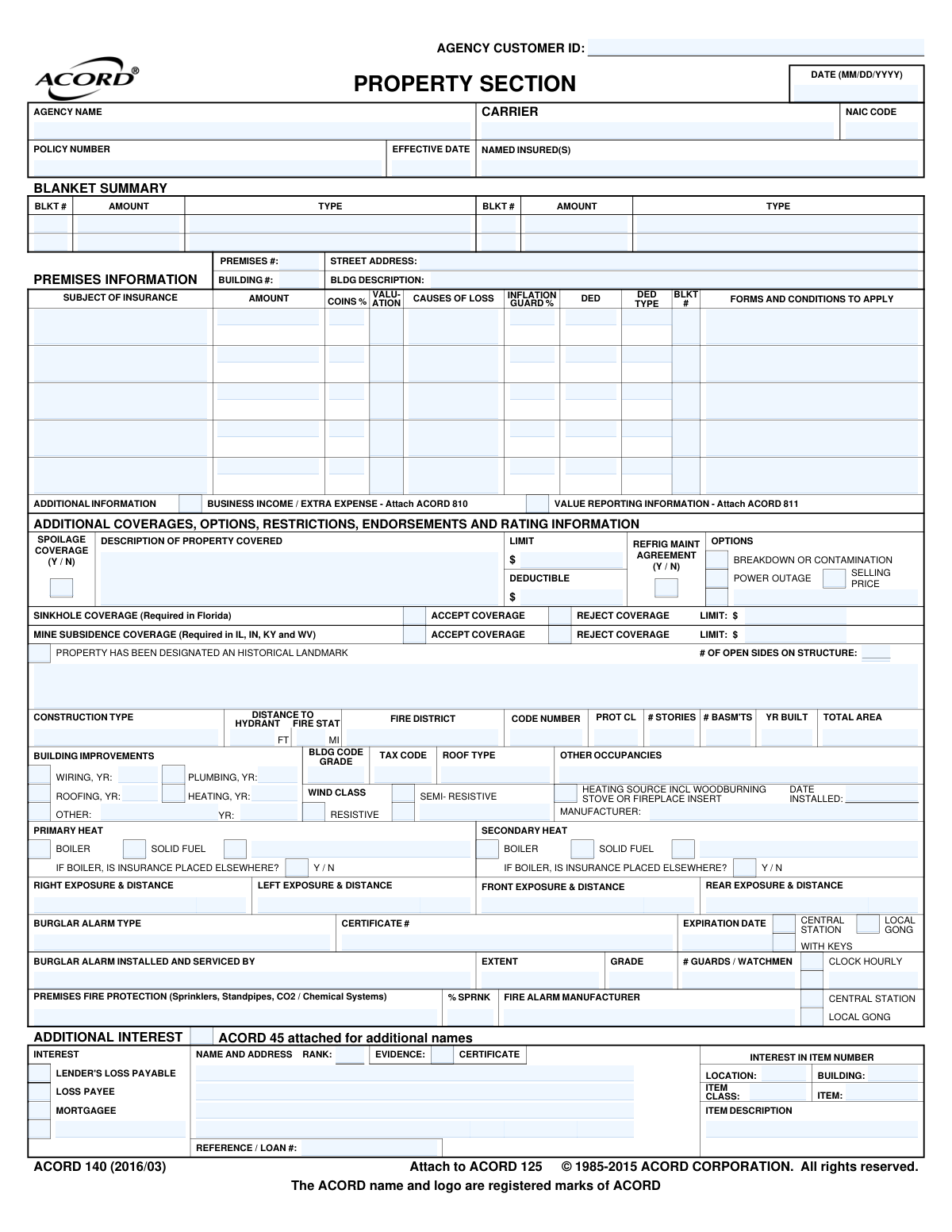
Yes! You can use AI to fill out ACORD 140, Property Section

ACORD Form 140, the Property Section, is a standardized document used in the insurance industry for commercial property insurance applications. It captures essential details about a property's physical characteristics, construction, occupancy, fire and theft protection, and the specific coverages and limits being requested. This information allows underwriters to accurately assess risk and calculate premiums for the policy. Today, this form can be filled out quickly and accurately using AI-powered services like Instafill.ai, which can also convert non-fillable PDF versions into interactive fillable forms.
ACORD 140 is part of the ACORD forms, commercial insurance forms and property insurance forms categories on Instafill.
Our AI automatically handles information lookup, data retrieval, formatting, and form filling.
It takes less than a minute to fill out ACORD 140 using our AI form filling.
Securely upload your data. Information is encrypted in transit and deleted immediately after the form is filled out.

Form specifications

Form name: ACORD 140, Property Section
Number of fields: 358
Number of pages: 1
Field instructions: ACORD 140 Instructions
Language: English
main-image

Instafill Demo: How to fill out PDF forms in seconds with AI

How to Fill Out ACORD 140 Online for Free in 2026

Are you looking to fill out a ACORD 140 form online quickly and accurately? Instafill.ai offers the #1 AI-powered PDF filling software of 2026, allowing you to complete your ACORD 140 form in just 37 seconds or less.
Follow these steps to fill out your ACORD 140 form online using Instafill.ai:
  1. 1 Navigate to Instafill.ai and upload or select the ACORD 140 form.
  2. 2 Enter the basic policy and agency information, including the named insured and policy effective date.
  3. 3 Provide detailed premises and building information, such as the address, construction type, year built, and total area.
  4. 4 Specify the property coverage details, including the subject of insurance, coverage limits, coinsurance percentage, and deductibles for each location.
  5. 5 Detail the property's protection systems, including information on fire alarms, sprinklers, and burglar alarms.
  6. 6 List any additional interests, such as mortgagees or loss payees, along with their contact information and loan numbers.
  7. 7 Review all the information populated by the AI for accuracy, then electronically sign and submit the completed application.

Our AI-powered system ensures each field is filled out correctly, reducing errors and saving you time.

Why Choose Instafill.ai for Your Fillable ACORD 140 Form?

Speed

Complete your ACORD 140 in as little as 37 seconds.

Up-to-Date

Always use the latest 2026 ACORD 140 form version.

Cost-effective

No need to hire expensive lawyers.

Accuracy

Our AI performs 10 compliance checks to ensure your form is error-free.

Security

Your personal information is protected with bank-level encryption.

Frequently Asked Questions About Form ACORD 140

The ACORD 140, also known as the Property Section, is an application for commercial property insurance. It must be completed by business owners or property managers who want to insure their buildings and business personal property.

This section requires detailed information about the building, including its construction type, year built, square footage, and number of stories. You'll also need to provide details on fire and burglar protection systems.

An 'Additional Interest' is a person or entity, other than you, who has a financial stake in the property. You should list parties like your mortgage lender (as a Mortgagee) or an equipment financing company (as a Loss Payee).

Insurers use this information to assess the risk of loss from things like electrical fires or water damage. Recently updated systems can indicate a lower risk and may result in more favorable premiums.

A 'Central Station' alarm sends a signal to a third-party monitoring company that contacts emergency services. A 'Local Gong' alarm only sounds on the premises to alert occupants.

These coverages are specific to certain geographic risks. The form notes that Sinkhole coverage is required in Florida, and Mine Subsidence coverage is required in states like IL, IN, KY, and WV.

The form is designed to handle multiple properties. You can complete a separate 'Premises Information' section for each building or location you wish to include on the policy.

Coinsurance is the percentage of the property's value that you agree to insure. Failing to insure your property for this percentage can lead to a penalty that reduces your claim payout.

ACORD 810 is used to provide details for Business Income and Extra Expense coverage, while ACORD 811 is for Value Reporting on fluctuating inventory. You only need to attach them if you are applying for these specific coverages.

Yes, services like Instafill.ai use AI to auto-fill form fields accurately from your existing documents, saving you time and helping to prevent errors.

Simply upload the ACORD 140 PDF to the Instafill.ai platform. The AI will make the form interactive, allowing you to fill it out directly or use the AI to populate information from your saved profile.

Instafill.ai can convert any flat, non-fillable PDF into an interactive form. Just upload your document, and the platform will automatically make the fields fillable online.

In these fields, you describe the properties or hazards adjacent to your building on all four sides (front, rear, left, right) and their distance from your property. This helps the insurer evaluate external risks.

Both the applicant (the person or entity seeking insurance) and the producer (the insurance agent) must sign the form. Their signatures certify that the information provided is accurate to the best of their knowledge.

Compliance ACORD 140
Validation Checks by Instafill.ai

1
Validates Building Year is in the Past
This check ensures that the 'YR BUILT' field (CommercialStructure_BuiltYear_A) contains a valid four-digit year that is not in the future. This is critical for accurate underwriting and rating, as the age of a building is a primary factor in risk assessment. A submission with a future year or an invalid format will be rejected for correction.
2
Ensures Building Improvement Year Consistency
This validation confirms that if any building improvement (Wiring, Roofing, Plumbing, Heating) is indicated, the corresponding 'YR' field is populated. It also checks that the improvement year is not earlier than the building's construction year ('YR BUILT'). This prevents logical impossibilities, like a roof being updated before the building was constructed, ensuring data integrity for risk evaluation.
3
Conditional Requirement for Sinkhole Coverage in Florida
This check verifies that if the property's address is in Florida, a selection has been made for Sinkhole Coverage (either 'ACCEPT' or 'REJECT'). Since this coverage is specifically called out as required in Florida, failing to make a selection can lead to compliance issues and coverage gaps. The form will be considered incomplete if no selection is made for a Florida property.
4
Validates Sinkhole Coverage Limit if Accepted
If the applicant accepts Sinkhole Coverage by checking 'ACCEPT COVERAGE' (CommercialPropertyCoverage_SinkHoleCollapse_YesIndicator_A), this validation ensures that a corresponding limit amount is entered. The limit must be a positive numerical value. This prevents a situation where coverage is accepted but has no defined benefit, which would make the policy unenforceable for that coverage.
5
Conditional Requirement for Mine Subsidence Coverage
This check ensures that if the property address is located in Illinois, Indiana, Kentucky, or West Virginia, a selection for Mine Subsidence Coverage ('ACCEPT' or 'REJECT') is made. This is a state-mandated offering, so the applicant must explicitly choose their option. An application for a property in these states without a selection will be flagged as incomplete.
6
Spoilage Coverage Completeness Check
This validation triggers if Spoilage Coverage is selected ('Y' for CommercialProperty_Spoilage_YesNoCode_A). It ensures that the 'DESCRIPTION OF PROPERTY COVERED' and 'LIMIT' fields are both populated. This is crucial because without a description of what is covered and a limit on the amount, the coverage is ambiguous and cannot be properly rated or administered in the event of a claim.
7
Validates Burglar Alarm Certificate Expiration Date
If a 'CERTIFICATE #' for a burglar alarm is provided, this check ensures that the 'EXPIRATION DATE' (Alarm_Burglar_CertificateExpirationDate_A) is also provided and is a date in the future. An expired certificate may mean the alarm system is no longer monitored or maintained to the standards required for a policy discount. This validation maintains the integrity of premium credits.
8
Additional Interest Completeness
This check verifies that if an Additional Interest is indicated, all necessary fields are completed. This includes the full name, a complete mailing address, and the specific type of interest (e.g., Mortgagee, Loss Payee). Incomplete information can delay certificate issuance or cause serious issues during a claim payout, so all fields must be present to properly identify the interested party.
9
Validates Coinsurance Percentage Range
This check ensures that the 'COINS %' field (CommercialProperty_Premises_CoinsurancePercent_A) contains a valid numerical percentage, typically between 0 and 100. An invalid value can drastically alter the policy's premium and claim payouts. This validation prevents data entry errors and ensures the policy reflects the intended coinsurance agreement.
10
Validates Sprinkler System Percentage
This validation checks that the '% SPRNK' field (BuildingFireProtection_Alarm_SprinklerPercent_A) contains a numerical value between 0 and 100. This value represents the percentage of the building protected by sprinklers and is a critical factor for fire risk rating. An out-of-range value would be nonsensical and would lead to incorrect premium calculations.
11
Ensures Boiler Insurance Status is Specified
If the Primary or Secondary Heat source is marked as 'BOILER', this validation ensures the corresponding 'IF BOILER, IS INSURANCE PLACED ELSEWHERE?' field is answered with 'Y' or 'N'. This information is vital to prevent duplication of coverage and to understand the full risk profile of the property. A missing answer creates ambiguity that must be resolved before binding.
12
Requires National Producer Number in Florida
Based on the form's instruction 'NATIONAL PRODUCER NUMBER (Required in Florida)', this check verifies that the 'Producer_NationalIdentifier_A' field is populated if the agency or property is based in Florida. This is a regulatory requirement for tracking and compliance purposes. A missing NPN for a Florida policy would result in a compliance failure.
13
Verifies Chronology of Application and Effective Dates
This check ensures the 'POLICY EFFECTIVE DATE' (Policy_EffectiveDate_A) is on or after the application 'DATE' (Form_CompletionDate_A). A policy cannot be effective before the application for it is signed and dated. This validation prevents logical errors and potential legal issues related to backdating coverage improperly.
14
Requires Description for 'Other' Selections
This validation rule applies to multiple sections, such as Building Improvements, Heat Source, and Wind Class. If an 'Other' checkbox is selected (e.g., BuildingImprovement_OtherIndicator_A), this check ensures the corresponding description field (e.g., BuildingImprovement_OtherDescription_A) is not empty. This is essential to understand the unspecified risk and prevent ambiguity in the policy contract.

Common Mistakes in Completing ACORD 140

Misidentifying or Incompletely Listing Additional Interests

Applicants frequently enter an incorrect legal name for the mortgagee or loss payee, use a general P.O. Box instead of the specific address required for insurance notices, or omit the loan number. These errors are a primary cause of rejected insurance certificates, leading to significant delays in loan closings and contract approvals. To avoid this, always verify the exact legal name, required address, and loan number from the lender's insurance requirements document. AI-powered tools like Instafill.ai can help by storing and accurately auto-filling previously verified lender information, preventing these manual entry errors.

Providing Vague or Inaccurate Building Construction Details

Applicants often guess or provide generalized information for fields like 'Construction Type', 'Roof Type', and 'Year Built', which are critical for risk assessment. Underwriters rely on this data to calculate premiums, so inaccuracies can lead to incorrect pricing or even denial of a claim if a material misrepresentation is discovered. Always refer to property records or appraisal reports for precise details. Since this form is often a non-fillable PDF, a tool like Instafill.ai can convert it into a fillable version, making it easier to input precise data without manual transcription errors.

Misstating Fire Protection Information

Errors in the fire protection section, such as guessing the distance to the nearest fire hydrant or fire station, are common and have a major impact on rates. Applicants often do not know the building's specific 'Protection Class' code, a critical rating factor. Incorrect information can result in overpaying for insurance or, conversely, being under-insured and facing complications during a claim. Using an AI form-filler like Instafill.ai can help flag these missing fields and ensure all parts of this critical section are addressed before submission.

Leaving the 'Subject of Insurance' Grid Incomplete

The grid for listing property values (Building, BPP, etc.) is complex and often filled out incorrectly, with common mistakes including omitting coverage limits, leaving the 'Coins %' (Coinsurance) blank, or using the wrong 'Cause of Loss' code. These omissions can lead to the carrier issuing a quote with unintended coverage gaps or incorrect limits, jeopardizing the business's financial safety. AI tools like Instafill.ai can help by using templates for common coverage packages, ensuring that standard fields like Coinsurance and Cause of Loss are not accidentally omitted.

Overlooking Mandatory State-Specific Coverage Selections

The form explicitly calls out Sinkhole Coverage (required in Florida) and Mine Subsidence Coverage (required in IL, IN, KY, WV), yet applicants often fail to check either 'Accept' or 'Reject'. This leaves their intent ambiguous, delaying policy issuance as the underwriter must seek clarification. This oversight could lead to a devastating, uninsured loss in a state where that peril is a significant risk. An intelligent form filler like Instafill.ai can use conditional logic to highlight these required fields based on the property's state, preventing such oversights.

Omitting 'Year Updated' for Building Systems

The 'Building Improvements' section asks for the year of updates to wiring, roofing, plumbing, and heating, which many applicants leave blank if they don't know the exact year. This is a missed opportunity, as recent updates can result in significant premium credits and are a key underwriting consideration. Leaving them blank forces the underwriter to assume the systems are old, potentially leading to higher rates or eligibility issues. AI-powered tools like Instafill.ai can prompt users to fill in these valuable fields, explaining the potential for premium credits.

Providing Inaccurate Alarm System Details

Applicants often confuse alarm types, for example, checking 'Central Station' for a system that only has a 'Local Gong' or is self-monitored. They may also fail to provide the alarm company's name or the correct certificate number required to receive premium discounts. These errors prevent the carrier from applying available credits, resulting in a higher premium than necessary. Tools like Instafill.ai can store this information, ensuring that the correct certificate numbers and provider details are applied accurately every time.

Failing to Attach Referenced Supplemental Forms

The form references other ACORD forms for specific coverages, such as ACORD 810 for Business Income / Extra Expense. A common mistake is to check the box indicating the coverage is desired but then forget to complete and attach the corresponding detailed form. This creates an incomplete submission, delaying the quoting process until the missing information is provided and potentially leading to a misquoted policy. Using a platform like Instafill.ai helps manage the entire submission package, ensuring all necessary supplemental forms are included.

Confusion Between Blanket and Specific Property Limits

This form allows for both specific limits per building and blanket limits covering multiple properties. Applicants frequently misapply these, either by incorrectly assigning a building to a blanket group (using the 'BLKT #') or by misunderstanding how a blanket limit applies across different values. This can result in some properties being dangerously underinsured while others have excessive, costly coverage. It is vital to create a clear schedule of values that specifies which properties belong to which blanket group.
Saved over 80 hours a year

“I was never sure if my IRS forms like W-9 were filled correctly. Now, I can complete the forms accurately without any external help.”

Kevin Martin Green

Your data stays secure with advanced protection from Instafill and our subprocessors

Robust compliance program

Transparent business model

You’re not the product. You always know where your data is and what it is processed for.

ISO 27001, HIPAA, and GDPR

Our subprocesses adhere to multiple compliance standards, including but not limited to ISO 27001, HIPAA, and GDPR.

Security & privacy by design

We consider security and privacy from the initial design phase of any new service or functionality. It’s not an afterthought, it’s built-in, including support for two-factor authentication (2FA) to further protect your account.

Fill out ACORD 140 with Instafill.ai

Worried about filling PDFs wrong? Instafill securely fills acord-140-property-section forms, ensuring each field is accurate.