Yes! You can use AI to fill out Uniform Mitigation Verification Inspection Form

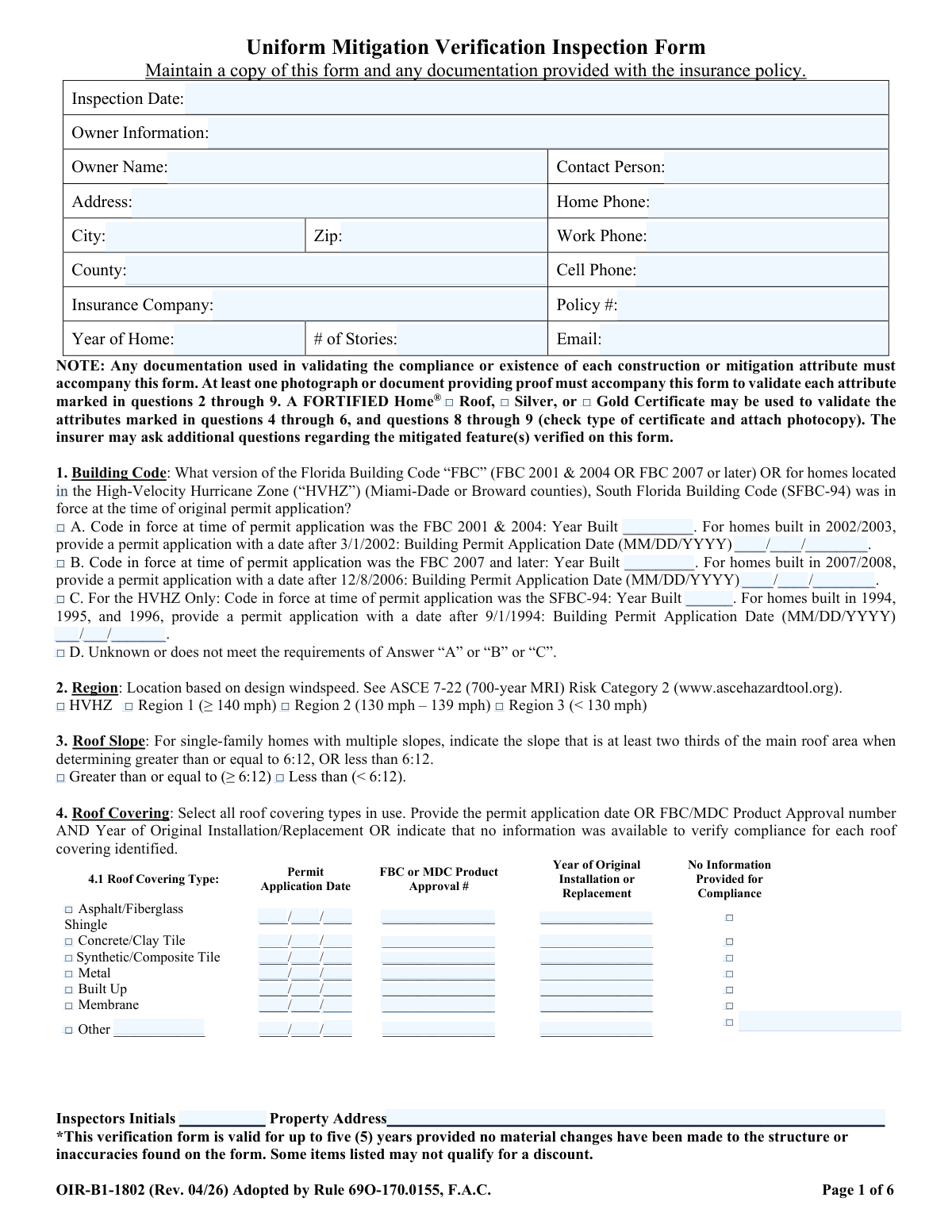
The Uniform Mitigation Verification Inspection Form (OIR-B1-1802) is a standardized document used by qualified inspectors in Florida to certify a property's wind mitigation features. This inspection is crucial for homeowners as it can lead to significant discounts on their windstorm insurance premiums by certifying construction elements that enhance hurricane resistance, such as roof shape, deck attachment, and opening protection. Today, this form can be filled out quickly and accurately using AI-powered services like Instafill.ai, which can also convert non-fillable PDF versions into interactive fillable forms.
Our AI automatically handles information lookup, data retrieval, formatting, and form filling.
It takes less than a minute to fill out OIR-B1-1802 using our AI form filling.
Securely upload your data. Information is encrypted in transit and deleted immediately after the form is filled out.

Form specifications

Form name: Uniform Mitigation Verification Inspection Form
Number of pages: 6
Language: English
main-image

Instafill Demo: How to fill out PDF forms in seconds with AI

How to Fill Out OIR-B1-1802 Online for Free in 2026

Are you looking to fill out a OIR-B1-1802 form online quickly and accurately? Instafill.ai offers the #1 AI-powered PDF filling software of 2026, allowing you to complete your OIR-B1-1802 form in just 37 seconds or less.
Follow these steps to fill out your OIR-B1-1802 form online using Instafill.ai:
  1. 1 Navigate to Instafill.ai and upload or select the Uniform Mitigation Verification Inspection Form.
  2. 2 Use the AI-powered tool to automatically populate owner information, property details, and inspection date from your records.
  3. 3 Proceed through the form's sections, allowing the AI to guide you in selecting the correct options for Building Code, Region, and Roof Slope based on inspection findings.
  4. 4 Detail the roof characteristics by completing the Roof Covering, Roof Deck Attachment, and Roof-to-Wall Attachment sections, uploading required photos or documentation as prompted.
  5. 5 Specify the Roof Geometry, Secondary Water Resistance (SWR), and the weakest form of Opening Protection using the guided checklists.
  6. 6 Complete the inspector's certification section with license details and provide a digital signature, then have the homeowner sign to certify the inspection.
  7. 7 Review all auto-filled and manually entered information for accuracy, then download, print, or securely share the completed OIR-B1-1802 form directly with the insurance company.

Our AI-powered system ensures each field is filled out correctly, reducing errors and saving you time.

Why Choose Instafill.ai for Your Fillable OIR-B1-1802 Form?

Speed

Complete your OIR-B1-1802 in as little as 37 seconds.

Up-to-Date

Always use the latest 2026 OIR-B1-1802 form version.

Cost-effective

No need to hire expensive lawyers.

Accuracy

Our AI performs 10 compliance checks to ensure your form is error-free.

Security

Your personal information is protected with bank-level encryption.

Frequently Asked Questions About Form OIR-B1-1802

This form is used to document a home's wind mitigation features, which can increase its resistance to hurricane damage. Florida homeowners can submit the completed form to their insurance company to potentially qualify for premium discounts.

Only a qualified inspector, such as a licensed home inspector, building code inspector, contractor, engineer, or architect, can perform the inspection and certify the form. The homeowner must also sign to confirm the inspection took place.

This verification form is valid for up to five years from the inspection date. However, it becomes invalid if any material changes are made to the structure or if inaccuracies are found on the form.

You must provide documentation to validate each mitigation feature, such as photographs, building permits, or product approval numbers. A FORTIFIED Home® certificate can also be used as proof for certain sections.

No, it does not guarantee a discount. The form documents your home's features, but eligibility for and the amount of any discount are determined by your insurance provider's specific underwriting guidelines.

The inspection must report the least protective feature present for a given category. For example, if your home has mostly hurricane-rated windows but one unprotected window, the entire home is rated based on that single unprotected opening.

If there is no attic access, the inspector cannot verify the roof deck attachment or roof-to-wall connections. They will mark 'No attic access' on the form, and you will not receive credit for these mitigation features.

The applicable building code is determined by the date of your home's original permit application. The form specifies date ranges to identify whether the home was built under the FBC 2001, FBC 2007 or later, or the SFBC-94 for homes in high-velocity hurricane zones.

SWR is a supplemental layer of protection, like a self-adhering membrane or spray foam, applied to the roof deck to prevent water intrusion if the primary roof covering is lost. Standard roofing felt does not qualify as SWR.

If any openings like windows, doors, or skylights are damaged and need repair, the property will not qualify for any wind mitigation discounts. All openings must be in good condition to be eligible.

Yes, services like Instafill.ai use AI to auto-fill form fields accurately and save time. While AI can assist with data entry, the physical inspection and final certification must be completed by a qualified inspector.

Simply upload the Uniform Mitigation Verification Inspection Form PDF to the Instafill.ai platform. Their AI will help you populate the owner and property information fields, which you can then provide to your inspector for completion.

You can use a service like Instafill.ai, which can convert flat, non-fillable PDFs into interactive forms. This allows you to easily type your information into the fields before printing the form for signatures.

Compliance OIR-B1-1802
Validation Checks by Instafill.ai

1
Inspection Date and Year of Home Chronology
This validation ensures the 'Inspection Date' is a valid date that is not in the future, and that the 'Year of Home' is a valid four-digit year that occurs before or on the inspection date. This is critical for establishing a correct timeline for all other date-related attributes on the form. A failure would indicate a data entry error that could invalidate the entire inspection's context.
2
Phone Number Formatting
Verifies that the 'Home Phone', 'Work Phone', and 'Cell Phone' fields adhere to a standard 10-digit phone number format (e.g., XXX-XXX-XXXX or (XXX) XXX-XXXX). This ensures that the contact information is valid and usable for any follow-up communication with the property owner. An invalid format would prevent successful contact and may require manual correction.
3
Building Code Conditional Logic
Checks that if Building Code option A, B, or C is selected in Question 1, the corresponding 'Year Built' and 'Building Permit Application Date' fields are populated. It also validates that the permit date meets the specific criteria for the selected option (e.g., after 3/1/2002 for option A). This is crucial for correctly classifying the home's construction standard, which directly impacts mitigation credits.
4
HVHZ Location Consistency
If 'C. SFBC-94 (HVHZ Only)' is selected in Question 1, this check verifies that the 'County' listed in the Owner Information section is 'Miami-Dade' or 'Broward'. This validation prevents the misapplication of HVHZ-specific building codes to properties outside the designated zone. An error would lead to incorrect code classification and potential insurance rating mistakes.
5
Mutually Exclusive Region Selection
Ensures that for Question 2, only one region (HVHZ, Region 1, Region 2, or Region 3) is selected. Since a property can only be in one windspeed region, selecting multiple options is a logical impossibility. This check prevents ambiguity and ensures a single, correct design windspeed classification is recorded for the property.
6
Roof Covering Data Integrity
For each roof covering type checked in Question 4, this validation ensures that either at least one data field ('Permit Application Date', 'FBC/MDC Product Approval #', 'Year of Original Installation') is filled, OR the 'No Information Provided' box is checked. It prevents a row from being submitted with conflicting information (e.g., data provided AND 'No Information' checked) or with no information at all, ensuring each selected roof type is properly accounted for.
7
Roof Installation Year Logic
Validates that the 'Year of Original Installation or Replacement' for any roof covering in Question 4 is greater than or equal to the 'Year of Home' and less than or equal to the 'Inspection Date'. This check ensures the roof replacement date is chronologically possible. A failure would indicate a significant data entry error, questioning the validity of the roof's age and compliance.
8
Weakest Link Selection Exclusivity
Verifies that only one option is selected in Question 5 (Roof Deck Attachment) and Question 6 (Roof to Wall Attachment). The form explicitly asks for the 'WEAKEST' form of attachment, implying a single choice. This validation prevents contradictory or ambiguous submissions where multiple 'weakest' points are identified, which would make it impossible to properly assess the structure's vulnerability.
9
Roof Geometry Calculation Verification
For Question 7, if 'A. Hip Roof' is selected, this check verifies that the 'Total length of non-hip features' is 10% or less of the 'Total roof system perimeter'. If 'B. Flat Roof' is selected, it verifies the flat area is 90% or more of the total roof area. This ensures the inspector's classification is supported by the entered measurements, which is critical for determining the correct roof geometry discount.
10
Opening Protection Chart and Summary Consistency
This validation ensures the final summary selection in Question 9 (A, B, C, N, X, or Z) is consistent with the weakest protection level marked in the 'Opening Protection Level Chart'. For example, if 'Z. Damaged openings' is checked for any opening in the chart, the final summary must be 'Z'. This complex check is vital to ensure the overall rating accurately reflects the single most vulnerable opening on the property.
11
Required Documentation Attachment Flag
This check identifies when an option requiring supporting documentation is selected, such as a 'FORTIFIED Home® Certificate' or specific product approvals. The system should flag that a photocopy or other proof must be attached to the form submission. This ensures the submission is complete and that all claims for mitigation credits are properly substantiated as required by the form.
12
Inspector Qualification Completeness
Verifies that the 'Qualified Inspector Name', 'License or Certificate #', and 'Phone' fields are all populated, and that one of the inspector license type checkboxes is selected. This is a mandatory completeness check to ensure the inspection was performed by a legally qualified individual. An incomplete section would render the form invalid and legally non-compliant.
13
Inspector Signature Date Logic
Ensures the 'Date' next to the 'Qualified Inspector Signature' is a valid date and is on or after the 'Inspection Date' listed on page 1. An inspector cannot certify the form before the inspection is complete. This validation confirms the logical sequence of events and the integrity of the certification process.

Common Mistakes in Completing OIR-B1-1802

Failing to Provide Required Supporting Documentation

The form explicitly requires at least one photograph or document to validate each attribute marked in questions 2 through 9. Inspectors or homeowners often forget to attach permits, product approval sheets, or clear photos of features like roof-to-wall connections and opening protection labels. Without this proof, an insurer can reject the form entirely, causing delays and forcing a re-inspection, thereby forfeiting any potential discounts.

Incorrectly Identifying the 'Weakest' Opening Protection

This error occurs when an inspector rates the home based on the most prominent protection (e.g., new hurricane shutters) while overlooking a single, less-protected opening like an old garage door or a small skylight. Because Question 9 requires rating the structure's weakest link, this mistake leads to an inaccurate report and incorrect insurance premiums. To avoid this, every single opening must be inspected and the lowest-rated feature determines the overall classification.

Misclassifying Roof-to-Wall Connections

Question 6 involves highly technical distinctions between clips, single wraps, and double wraps, based on nail counts and strap positioning. An inspector may misidentify the connection type, often selecting a stronger category than what is actually present, especially when viewing it from a difficult angle in an attic. This leads to an incorrect assessment of the home's structural integrity and unearned insurance credits that may be revoked upon review.

Confusing Standard Roof Underlayment with a Sealed Roof Deck (SWR)

A frequent mistake is identifying standard tar paper or felt as a Secondary Water Resistance (SWR) barrier in Question 8. The form specifies that only qualified systems like self-adhering modified bitumen or specific taped-seam systems qualify for this significant insurance discount. This misunderstanding results in an invalid claim for a credit, which will be denied by the insurance underwriter.

Inaccurate Roof Geometry Calculation

To qualify for the 'Hip Roof' discount in Question 7, the total length of all non-hip features must be less than 10% of the total roof system perimeter. People often estimate this measurement instead of performing the actual calculations, leading to an incorrect classification. Misclassifying a roof as 'Hip' when it is 'Other' can result in the loss of a substantial insurance discount upon underwriter review.

Incorrectly Matching Building Code to Permit Dates

In Question 1, it is common to select the building code option based on the 'Year of Home' without verifying the exact permit application date, especially for homes built near a code change year (e.g., 2002/2003). This error can place the home in the wrong code category, affecting the baseline for mitigation credits. Always obtain the original permit application to verify the date before completing this section.

Failing to Identify the 'Weakest' Roof Deck Attachment

Question 5 asks for the weakest form of roof deck attachment, but inspectors may document the most common method instead of the true weakest link. For example, an inspector might see 8d nails in the main attic but miss an area over an addition that uses weaker staples, resulting in an overstatement of the roof's uplift resistance. A thorough inspection of all accessible attic areas is required to correctly identify the weakest attachment.

Submitting Inconsistent or Incomplete Header Information

Simple data entry errors in the header and 'Owner Information' section, such as an incorrect policy number, a misspelled name, or a ZIP code that doesn't match the city, are very common. These mistakes cause significant processing delays, rejection of the form, or problems linking the report to the correct policy. AI-powered form filling tools like Instafill.ai can help prevent these mistakes by auto-filling and validating contact and policy information for accuracy.

Leaving the Roof Covering Table (Question 4) Incomplete

Users often check the box for the roof type in Question 4 but fail to provide any of the required verification data (Permit Date, Product Approval #, or Installation Year) in the corresponding columns. This lack of detail forces the underwriter to assume the roof does not meet code, resulting in the denial of valuable roof-related discounts. It is crucial to find and enter at least one piece of verification data for every roof covering listed.

Using an Unqualified or Improperly Licensed Inspector

Homeowners may inadvertently hire an inspector without the required hurricane mitigation training and licensure specified in the 'Qualified Inspector' section. This invalidates the entire form from a legal and insurance standpoint, meaning no discounts will be applied and the homeowner must pay for a second, valid inspection. Always verify the inspector's license number and qualifications against the list on the form before the inspection begins.
Saved over 80 hours a year

“I was never sure if my IRS forms like W-9 were filled correctly. Now, I can complete the forms accurately without any external help.”

Kevin Martin Green

Your data stays secure with advanced protection from Instafill and our subprocessors

Robust compliance program

Transparent business model

You’re not the product. You always know where your data is and what it is processed for.

ISO 27001, HIPAA, and GDPR

Our subprocesses adhere to multiple compliance standards, including but not limited to ISO 27001, HIPAA, and GDPR.

Security & privacy by design

We consider security and privacy from the initial design phase of any new service or functionality. It’s not an afterthought, it’s built-in, including support for two-factor authentication (2FA) to further protect your account.

Fill out OIR-B1-1802 with Instafill.ai

Worried about filling PDFs wrong? Instafill securely fills uniform-mitigation-verification-inspection-form forms, ensuring each field is accurate.