Yes! You can use AI to fill out ACORD 75, Insurance Binder

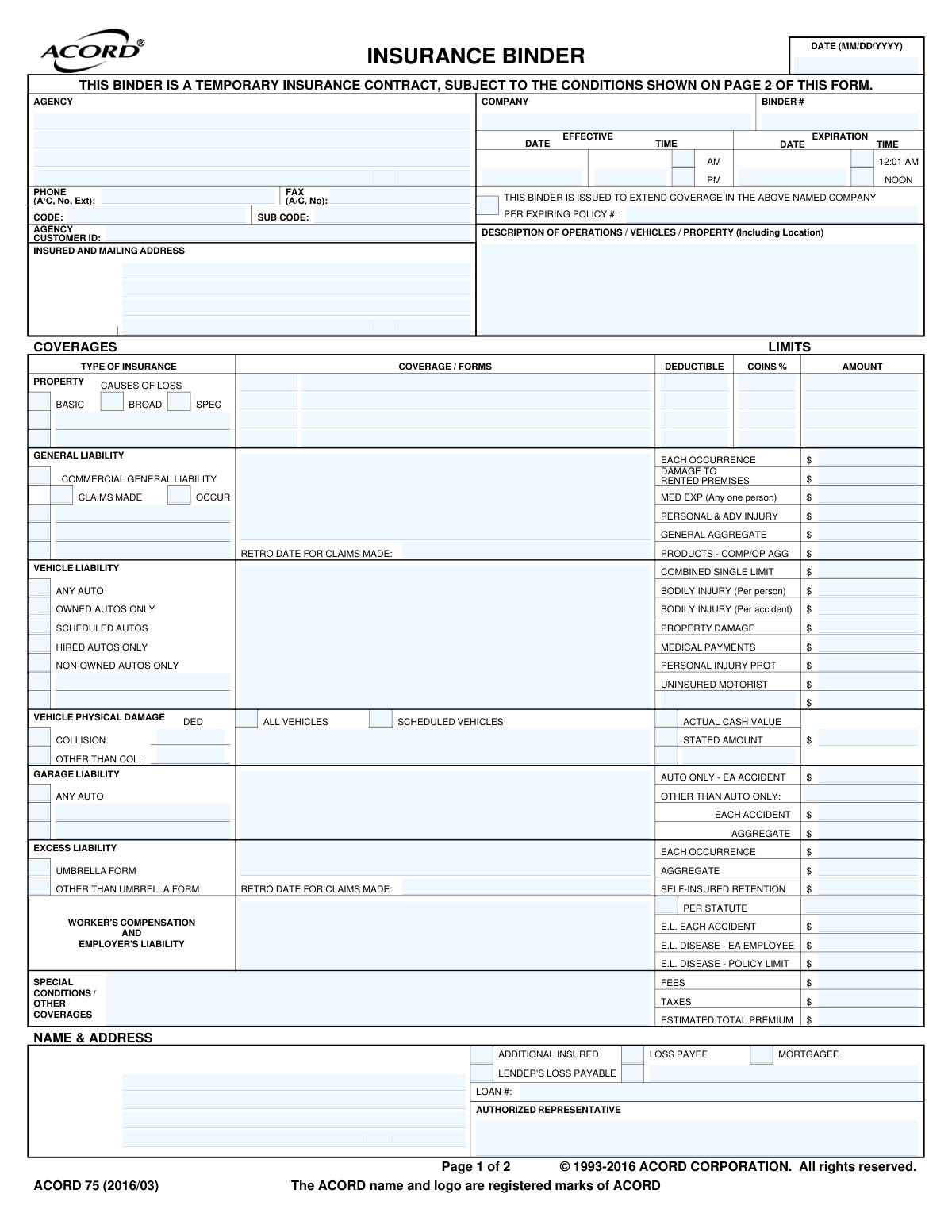
ACORD 75, also known as an Insurance Binder, is a legal document that serves as a temporary insurance contract, providing proof of coverage to an insured party while the formal insurance policy is being prepared. It outlines key details such as coverage types, limits, and effective dates, and is crucial for securing loans or meeting contractual obligations that require immediate proof of insurance. Today, this form can be filled out quickly and accurately using AI-powered services like Instafill.ai, which can also convert non-fillable PDF versions into interactive fillable forms.
ACORD 75 is part of the ACORD forms category on Instafill.
Our AI automatically handles information lookup, data retrieval, formatting, and form filling.
It takes less than a minute to fill out ACORD 75 using our AI form filling.
Securely upload your data. Information is encrypted in transit and deleted immediately after the form is filled out.

Form specifications

Form name: ACORD 75, Insurance Binder
Number of fields: 148
Number of pages: 1
Language: English
main-image

Instafill Demo: How to fill out PDF forms in seconds with AI

How to Fill Out ACORD 75 Online for Free in 2026

Are you looking to fill out a ACORD 75 form online quickly and accurately? Instafill.ai offers the #1 AI-powered PDF filling software of 2026, allowing you to complete your ACORD 75 form in just 37 seconds or less.
Follow these steps to fill out your ACORD 75 form online using Instafill.ai:
  1. 1 Navigate to Instafill.ai and upload or select the ACORD 75 Insurance Binder form.
  2. 2 Provide the producer (agency) and company information, including names, addresses, and contact details.
  3. 3 Enter the insured's full name, mailing address, and a detailed description of the operations, vehicles, or property being insured.
  4. 4 Specify the types of coverage required, such as General Liability, Vehicle, or Property, and input the corresponding limits, deductibles, and other policy details.
  5. 5 List any additional interests, such as a mortgagee or loss payee, providing their name, address, and interest type.
  6. 6 Review all the information auto-filled by the AI for accuracy, make any necessary corrections, and have the authorized representative sign the form.
  7. 7 Securely download, print, or share the completed ACORD 75 binder with the relevant parties.

Our AI-powered system ensures each field is filled out correctly, reducing errors and saving you time.

Why Choose Instafill.ai for Your Fillable ACORD 75 Form?

Speed

Complete your ACORD 75 in as little as 37 seconds.

Up-to-Date

Always use the latest 2026 ACORD 75 form version.

Cost-effective

No need to hire expensive lawyers.

Accuracy

Our AI performs 10 compliance checks to ensure your form is error-free.

Security

Your personal information is protected with bank-level encryption.

Frequently Asked Questions About Form ACORD 75

An ACORD 75 Insurance Binder is a temporary insurance contract that provides proof of coverage until a formal insurance policy is issued. It outlines the insured party, the coverage types, limits, and the effective dates of the temporary policy.

This form is typically completed by an insurance agent or agency to provide their client with immediate proof of insurance. The client (the insured) then uses this binder for transactions like closing on a home, leasing equipment, or registering a vehicle.

An insurance binder is a temporary document and is generally valid for no more than 90 days, as noted in the conditions for several states. The binder is cancelled once the official policy is issued or the term expires.

A binder is a temporary agreement providing immediate coverage, while a full policy is the final, detailed, long-term contract. The binder serves as a placeholder and is subject to the terms and conditions of the forthcoming policy.

In this section, you must provide specific details about what is being insured. This could include a description of your business operations, a list of vehicles with their VINs, or the address and description of the insured property.

A 'Loss Payee' is a third party entitled to insurance payments for losses to personal property, such as a lender for a vehicle loan. A 'Mortgagee' is a specific type of loss payee, typically a bank or lender with a financial interest in real estate.

Yes, but it often requires special approval from the insurance company. As noted for states like Oregon and Montana, extending a binder beyond 90 days may require written approval from the insurer or a state authority.

When a binder expires, it should be replaced by the formal insurance policy. If a policy is not issued, the binder is cancelled, and the insurance company is entitled to charge a premium for the temporary coverage period.

You must check the appropriate boxes and fill in the limits for the desired coverage types, such as General Liability, Vehicle Liability, or Property. Be sure to specify limits, deductibles, and any other required details in the corresponding sections.

You should list your lender in the section for 'Mortgagee', 'Loss Payee', or 'Additional Insured'. Provide their full name and address and check the box that correctly identifies their financial interest in the insured property.

Yes, services like Instafill.ai use AI to accurately auto-fill form fields from your data, which can save significant time and reduce errors. This is especially helpful for complex forms with many fields.

You can use a service like Instafill.ai to upload the ACORD 75 form and fill it out directly in your web browser. The platform allows you to easily type information, check boxes, and add an authorized signature electronically.

If you have a non-fillable or 'flat' PDF, you can use a tool like Instafill.ai to convert it into an interactive, fillable form. Simply upload the document, and the service will automatically make the fields editable online.

Compliance ACORD 75
Validation Checks by Instafill.ai

1
Binder Duration Exceeds 90 Days
This check verifies that the duration between the Binder Effective Date and the Binder Expiration Date does not exceed 90 days. Several states have regulations limiting a standard binder's validity to 90 days, as noted in the form's conditions. A failure indicates a potential compliance issue that may require special written approval to extend.
2
Binder Expiration Date Precedes Effective Date
Validates that the 'Binder_ExpirationDate_A' is on or after the 'Binder_EffectiveDate_A'. A binder's expiration must logically occur after its effective date to provide a valid period of coverage. If this validation fails, the binder represents an impossible time frame and the data is invalid.
3
Insured Name and Address Completeness
Ensures that the Insured's full name and mailing address fields ('NamedInsured_FullName_A', 'NamedInsured_MailingAddress_LineOne_A', etc.) are not empty. This information is fundamental for identifying the covered party and legally establishing the contract. A failure means the binder is not tied to a specific legal entity and is therefore invalid.
4
Mutually Exclusive General Liability Type
Verifies that for General Liability coverage, only one of 'Claims Made' or 'Occurrence' is selected. These are fundamentally different and mutually exclusive policy triggers. Selecting both (or neither, if limits are present) creates ambiguity about when and how a claim would be covered, making the binder terms unclear.
5
Conditional Requirement for Retroactive Date
Checks that if the 'GeneralLiability_ClaimsMadeIndicator_A' is selected, the 'GeneralLiability_ClaimsMade_ProposedRetroactiveDate_A' field is populated with a valid date. The retroactive date is a critical component of a claims-made policy, defining the starting point for covered events. A missing retro date on a claims-made binder leaves a crucial policy term undefined.
6
Mutually Exclusive Vehicle Liability Limits
Ensures that liability limits for vehicles are not defined as both a 'Combined Single Limit' and as separate split limits (Bodily Injury Per Person/Per Accident and Property Damage). These are two different methods for structuring limits, and providing both is contradictory. The system should enforce choosing one structure to avoid ambiguity in coverage.
7
Conditional Requirement for Physical Damage Deductible
Validates that if 'Vehicle_Collision_CoverageIndicator_A' or 'Vehicle_Comprehensive_CoverageIndicator_A' is checked, a corresponding deductible amount is entered. Physical damage coverage is almost always subject to a deductible, which is the amount the insured pays out-of-pocket. A missing deductible leaves the policy terms incomplete and un-ratable.
8
Additional Interest Information Completeness
This check ensures that if an interest type is indicated for an additional interest (e.g., 'Mortgagee', 'Loss Payee'), the corresponding name and address fields for that party are filled out. It is not possible to add an interested party to the policy without identifying who they are. A failure means a required party has not been properly added to the binder.
9
Date Format Validation
Verifies that all date fields, such as 'Form_CompletionDate_A', 'Binder_EffectiveDate_A', and 'Binder_ExpirationDate_A', are entered in a valid MM/DD/YYYY format. This ensures data consistency and allows for correct date-based calculations, such as determining the binder's term. An invalid format would cause processing errors and downstream system failures.
10
Phone Number Format Validation
Checks that the 'Producer_ContactPerson_PhoneNumber_A' field conforms to a standard phone number format (e.g., (###) ###-####). Proper formatting is essential for data integrity and ensures that communication systems can successfully use the data. An invalid format could prevent successful contact with the agency representative.
11
Coverage Specified Without Limit
Identifies instances where a coverage type is indicated but no corresponding limit amount is provided, such as selecting General Liability but leaving all limit fields blank. A coverage without a limit is meaningless and indicates an incomplete form. This validation prevents the issuance of a binder with undefined and ambiguous terms.
12
'Other' Description Field Requirement
Ensures that if an 'Other' checkbox is selected in any section (e.g., 'AdditionalInterest_Interest_OtherIndicator_A'), the corresponding text description field ('AdditionalInterest_Interest_OtherDescription_A') must be filled in. The 'Other' option is useless without an explanation. This check prevents incomplete data entry where the user's intent is not captured.
13
Mutually Exclusive Effective Time Indicator
Validates that for the binder's effective time, only one of the AM ('Binder_MorningEffectiveTimeIndicator_A') or PM ('Binder_AfternoonEffectiveTimeIndicator_A') indicators is selected. Selecting both is a logical contradiction and makes the exact start time of the policy ambiguous. The form must have a single, clear effective time.
14
Estimated Premium Summation Check
Verifies that the 'Policy_Payment_EstimatedTotalAmount_A' is greater than or equal to the sum of 'Policy_Payment_FeeAmount_A' and 'Policy_Payment_TaxAmount_A'. The total premium must account for all its listed components. A failure suggests a calculation error or missing premium data, which could lead to billing discrepancies.

Common Mistakes in Completing ACORD 75

Incorrect Effective/Expiration Dates and Times

Users often enter the wrong date or mix up the time indicators, such as selecting 'NOON' instead of '12:01 AM'. This mistake happens due to haste or misunderstanding the standard policy cycle. The consequence is a potential gap in coverage, where insurance might start or end 12 hours later than intended, leaving the insured exposed. To avoid this, always double-check the date and time, paying close attention to the AM/PM and specific time options provided. AI-powered tools like Instafill.ai can help by validating date ranges and ensuring logical consistency.

Vague 'Description of Operations / Vehicles / Property'

This free-text field is frequently filled with overly broad or incomplete information, such as 'Business operations' or 'Company vehicles'. This ambiguity can lead to disputes during a claim, as the insurer may argue the specific loss-causing activity, property, or vehicle was not explicitly covered. To prevent this, provide a precise description, including the full address of insured properties, VINs for scheduled vehicles, and a clear summary of business operations. If the form is a non-fillable PDF, a tool like Instafill.ai can convert it to a fillable version, making it easier to type in detailed descriptions.

Confusing General Liability Coverage Triggers

A critical error is incorrectly selecting between 'OCCUR' (Occurrence) and 'CLAIMS MADE' coverage types. This mistake often stems from a misunderstanding of the fundamental difference between the two. Choosing the wrong one can lead to denied claims, as coverage is triggered differently. For 'CLAIMS MADE' policies, users also frequently forget to enter the mandatory 'RETRO DATE'. Always confirm the required policy structure with the underwriter and ensure the correct box is checked and all related fields, like the retroactive date, are completed.

Improperly Identifying Additional Interests

Users often confuse the different types of additional interests, such as checking 'Loss Payee' when 'Additional Insured' or 'Mortgagee' is required by contract. Each designation carries different legal rights and obligations. This error can result in a breach of contract with a landlord or lender and can complicate or delay claim payments to the correct parties. Carefully review contractual requirements to select the correct interest type and ensure the legal name and address of the party are entered without typos.

Omitting or Incorrectly Stating Coverage Limits

Leaving limit fields blank or entering incorrect amounts (e.g., transposing digits like '$1,000,000' for '$100,000') is a common data entry error. This can lead to significant underinsurance, leaving the client exposed to massive out-of-pocket costs, or over-quoting, which might cause the client to lose a bid or contract. To avoid this, meticulously verify all limits against the client's requirements and the insurer's quote. Using a form-filling tool like Instafill.ai can help by auto-populating data from a source file, reducing the risk of manual entry errors.

Incorrect Vehicle Liability Symbol Selection

In the Vehicle Liability section, selecting the wrong symbol, such as 'ANY AUTO' (Symbol 1) when coverage is only for 'SCHEDULED AUTOS' (Symbol 7), is a frequent mistake. This happens when the user doesn't fully understand the implications of each symbol. The consequence is either creating a massive, unintended exposure for the insurer or failing to provide the broad coverage a client needs. Always verify the correct Business Auto Symbol with the underwriter to match the intended scope of coverage.

Using an Incomplete or Incorrect Insured Name

Entering a trade name or DBA (e.g., 'Main Street Cafe') instead of the full legal entity name (e.g., 'Main Street Hospitality, LLC') is a critical error. This can create legal challenges in identifying the covered party, potentially invalidating the binder or delaying claim payments. Always verify the insured's exact legal name as it appears on official business registration documents. AI tools can help maintain a database of client legal names to ensure consistency and accuracy across all forms.

Forgetting to Specify Coverage Forms

The blank lines under 'COVERAGE / FORMS' are often overlooked, yet they are essential. A binder's coverage is subject to the terms of specific policy forms and endorsements, which should be listed here by their unique number (e.g., 'CG 20 10 04 13'). Leaving this blank creates ambiguity and can lead to disputes over which endorsements, exclusions, or conditions apply. To avoid this, always list the key coverage forms and endorsements that will be included in the final policy.

Misstating Property Coinsurance and Valuation

In the Property section, users may enter an incorrect coinsurance percentage or fail to select the proper valuation method ('ACTUAL CASH VALUE' vs. 'STATED AMOUNT'). This often happens due to a lack of understanding of how these elements function. An incorrect coinsurance value can lead to significant financial penalties in the event of a partial loss, while the wrong valuation method can drastically alter the claim payout. Always confirm these details from the insurance quote to ensure the client is not exposed to unexpected claim reductions.

Ignoring State-Specific Binder Regulations

The form's second page lists specific rules for various states regarding binder duration (e.g., 'no more than ninety (90) days' in Arizona) and cancellation notices. Agents often overlook these state-specific requirements, especially if they work across multiple states. This can lead to issuing a non-compliant binder that may be invalid or create regulatory issues. It is crucial to read and adhere to the conditions applicable to the state where the insured risk is located to ensure the binder is legally sound.
Saved over 80 hours a year

“I was never sure if my IRS forms like W-9 were filled correctly. Now, I can complete the forms accurately without any external help.”

Kevin Martin Green

Your data stays secure with advanced protection from Instafill and our subprocessors

Robust compliance program

Transparent business model

You’re not the product. You always know where your data is and what it is processed for.

ISO 27001, HIPAA, and GDPR

Our subprocesses adhere to multiple compliance standards, including but not limited to ISO 27001, HIPAA, and GDPR.

Security & privacy by design

We consider security and privacy from the initial design phase of any new service or functionality. It’s not an afterthought, it’s built-in, including support for two-factor authentication (2FA) to further protect your account.

Fill out ACORD 75 with Instafill.ai

Worried about filling PDFs wrong? Instafill securely fills acord-75-insurance-binder forms, ensuring each field is accurate.