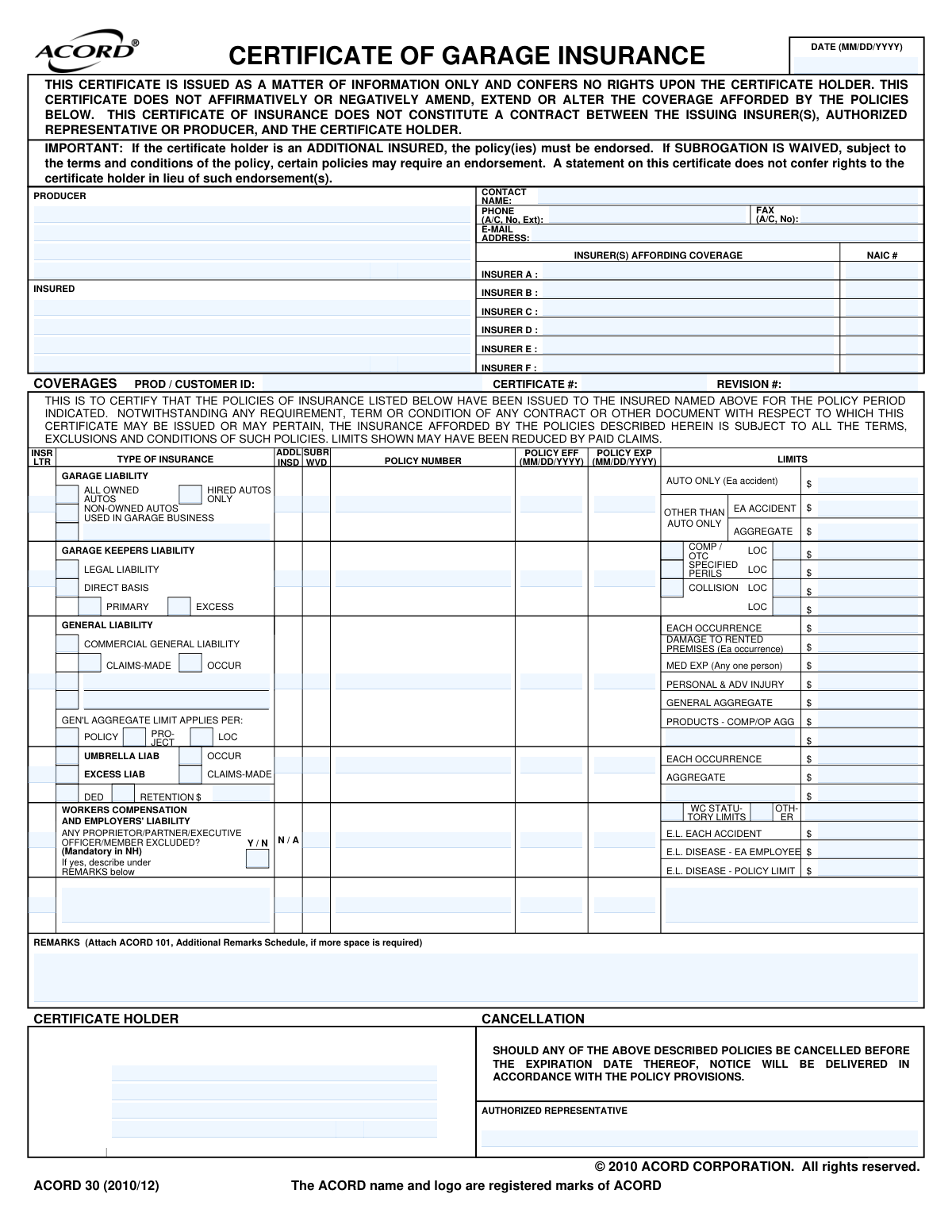
Yes! You can use AI to fill out ACORD 30, Certificate of Garage Insurance
The ACORD 30, Certificate of Garage Insurance, is a standardized form used by insurance agents and businesses to provide proof of specific insurance coverages related to garage operations, such as auto dealerships, repair shops, and service stations. It summarizes key policy information, including liability limits, policy numbers, and effective dates, for interested third parties like clients or regulatory bodies. Today, this form can be filled out quickly and accurately using AI-powered services like Instafill.ai, which can also convert non-fillable PDF versions into interactive fillable forms.
ACORD 30 is part of the
ACORD forms category on Instafill.
Our AI automatically handles information lookup, data retrieval, formatting, and form filling.
It takes less than a minute to fill out ACORD 30 using our AI form filling.
Securely upload your data. Information is encrypted in transit and deleted immediately after the form is filled out.
Form specifications
| Form name: | ACORD 30, Certificate of Garage Insurance |
| Number of fields: | 136 |
| Number of pages: | 1 |
| Language: | English |
More forms in ACORD forms
Instafill Demo: How to fill out PDF forms in seconds with AI
How to Fill Out ACORD 30 Online for Free in 2026
Are you looking to fill out a ACORD 30 form online quickly and accurately? Instafill.ai offers the #1 AI-powered PDF filling software of 2026, allowing you to complete your ACORD 30 form in just 37 seconds or less.
Follow these steps to fill out your ACORD 30 form online using Instafill.ai:
- 1 Navigate to Instafill.ai and upload your ACORD 30 form or select it from the template library.
- 2 Use the AI assistant to automatically populate the Producer (your agency) and Insured (your client) information.
- 3 Enter the policy numbers, effective dates, and expiration dates for each type of insurance coverage, such as Commercial General Liability, Garage Liability, and Workers' Compensation.
- 4 Specify the coverage limits for each policy, including per occurrence, aggregate, and any specific sub-limits for different perils.
- 5 Add the name and address of the Certificate Holder who is requesting the proof of insurance.
- 6 Indicate if the Certificate Holder is an Additional Insured or if Subrogation is Waived, and add any necessary details in the Remarks section.
- 7 Review all entered information for accuracy, then have the authorized representative sign and date the certificate before sharing it.
Our AI-powered system ensures each field is filled out correctly, reducing errors and saving you time.
Why Choose Instafill.ai for Your Fillable ACORD 30 Form?
Speed
Complete your ACORD 30 in as little as 37 seconds.
Up-to-Date
Always use the latest 2026 ACORD 30 form version.
Cost-effective
No need to hire expensive lawyers.
Accuracy
Our AI performs 10 compliance checks to ensure your form is error-free.
Security
Your personal information is protected with bank-level encryption.
Frequently Asked Questions About Form ACORD 30
This certificate, also known as ACORD 30, serves as proof of insurance for businesses in the automotive industry. It summarizes the types and limits of insurance policies held by a business like a repair shop, auto dealer, or service station.
The insurance producer (agent or broker) for the insured business is responsible for completing and issuing this certificate. The insured business requests it to provide to a third party.
You typically provide this form to a third party, known as the 'Certificate Holder,' to prove you have adequate insurance coverage. This is often required by landlords, clients, or regulatory bodies before entering into a contract or agreement.
No, this document is for informational purposes only and does not create a contract or confer any rights to the certificate holder. The actual insurance policy's terms, conditions, and exclusions always take precedence.
Garage Liability covers bodily injury and property damage caused by your business operations. Garage Keepers Liability specifically covers damage to your customers' vehicles while they are in your care, such as for service, repair, or storage.
This indicates the certificate holder has been granted coverage under your policy, which requires a formal endorsement to the policy itself. A checkmark on the certificate alone is not sufficient to grant this status.
To request this certificate from your agent, you must provide the full legal name and address of the person or company requesting proof of your insurance (the Certificate Holder).
This section verifies that the insured business has workers' compensation and employer's liability insurance for its employees. It lists the coverage limits and indicates if any proprietors, partners, or executives are excluded from coverage.
This statement clarifies that the total coverage amounts (aggregate limits) listed may be lower than shown if the policy has already paid out for other claims during the current policy period.
An insurance producer can typically issue a standard certificate within one to two business days. If the request requires special endorsements, such as adding an additional insured, it may take longer.
While your insurance agent must issue the official certificate, AI services like Instafill.ai can help you manage your insurance documents. They can accurately auto-fill your information when requesting a new certificate or extract data from existing ones for your records.
You can upload the Certificate of Garage Insurance to Instafill.ai to automatically read and organize the data. This helps you digitally track policy numbers, coverage limits, and expiration dates, simplifying your record-keeping.
If you have a flat, non-fillable PDF, you can use a tool like Instafill.ai to make it interactive. This allows you to easily extract data or add notes to the document for your own management purposes.
Compliance ACORD 30
Validation Checks by Instafill.ai
1
Valid Certificate Date
Ensures the 'DATE' field at the top right of the certificate is a valid date in MM/DD/YYYY format and is not a future date. This is critical because the certificate attests to coverage being in place as of a specific day. An invalid or future date would make the document misleading and unreliable for verifying current insurance.
2
Logical Policy Period
Verifies that for each policy listed in the coverages table, the 'POLICY EXP' (expiration) date is after the 'POLICY EFF' (effective) date. This check prevents data entry errors that would represent an impossible policy period. If this validation fails, it indicates a significant error that makes the policy information invalid.
3
Active Policy Verification
Cross-references the main 'DATE' of the certificate with the effective and expiration dates of each listed policy. The validation ensures the certificate date falls within the policy period for each coverage line. This is a crucial logical check to confirm that the policies listed were actually in force on the date the certificate was issued.
4
Insurer Information Completeness
Checks that for every policy line item that has an 'INSR LTR' (Insurer Letter) specified, there is a corresponding entry in the 'INSURER(S) AFFORDING COVERAGE' section with a name and NAIC number. This ensures that every listed policy can be traced back to a specific, identifiable insurance company. A missing insurer identity makes the certificate unverifiable.
5
NAIC Number Format
Validates that the 'NAIC #' for each listed insurer is a 5-digit numeric code. The National Association of Insurance Commissioners (NAIC) number is a standard identifier for insurance companies, and an incorrect format can prevent proper identification and regulatory verification. This check maintains data integrity and compliance with industry standards.
6
Required Party Identification
Ensures that the 'INSURED' and 'CERTIFICATE HOLDER' name and address fields are not empty. These fields identify the primary parties to the certificate: who is covered and who is being provided proof of coverage. A certificate is fundamentally useless if either of these parties is not clearly identified.
7
Producer Information Presence
Verifies that the 'PRODUCER' name and address fields are completed. The producer is the agent or broker who issued the certificate, and their information is essential for verification and contact purposes. If this information is missing, the certificate holder has no way to validate the certificate's authenticity or ask questions.
8
Valid Monetary Limit Format
Checks that all fields representing a monetary limit (e.g., 'EACH OCCURRENCE', 'AGGREGATE') contain valid, non-negative numerical values. This prevents non-numeric text or negative numbers from being entered as coverage limits, which would be nonsensical. This ensures the financial scope of the coverage is clearly and accurately represented.
9
Aggregate vs. Occurrence Limit Logic
Performs a sanity check to ensure that for any given liability coverage, the 'AGGREGATE' limit is greater than or equal to the 'EACH OCCURRENCE' limit. This reflects the standard structure of insurance policies where the aggregate is the total cap for a policy period. A failing check suggests a likely data entry error in the limits.
10
Policy Line Item Completeness
Validates that if any information is entered in a row of the coverages table (such as a limit or a checkbox), then the core fields ('INSR LTR', 'POLICY NUMBER', 'POLICY EFF', 'POLICY EXP') for that row must also be filled. This rule prevents incomplete policy entries that lack the necessary context to be understood. An incomplete row provides no meaningful information.
11
Workers Comp Exclusion Explanation
Verifies that if the 'ANY PROPRIETOR/PARTNER/EXECUTIVE OFFICER/MEMBER EXCLUDED?' field is marked 'Y' or 'Yes', the 'REMARKS' section is not empty. The form explicitly requires a description for any such exclusion. This check ensures compliance with the form's instructions and provides necessary clarity on who is not covered under the Workers Compensation policy.
12
General Liability Basis Check
Ensures that if limits are provided for 'COMMERCIAL GENERAL LIABILITY', either the 'CLAIMS-MADE' or 'OCCUR' box is checked, but not both. This is a fundamental aspect of a CGL policy that determines how claims are triggered and covered. Failing to specify one or specifying both creates ambiguity and invalidates the coverage description.
13
Producer Email Address Format
Validates that the producer's 'E-MAIL ADDRESS' field contains a string that conforms to a standard email format (e.g., '[email protected]'). This ensures that the provided contact information is usable for electronic communication. An invalid email address hinders the certificate holder's ability to contact the producer.
14
Authorized Representative Presence
Checks for the presence of a signature or name in the 'AUTHORIZED REPRESENTATIVE' field. The signature legally validates the certificate and confirms that it was issued by an authorized individual from the producer's office. A missing signature renders the document unofficial and potentially invalid.
Common Mistakes in Completing ACORD 30
Filers often enter a familiar trade name or 'Doing Business As' (DBA) name in the 'INSURED' field instead of the company's full legal entity name. This happens due to oversight or using the name that is more commonly known. This discrepancy can cause the certificate to be rejected by the certificate holder, as it fails to match the name on contracts, leading to payment or project delays. To avoid this, always verify the exact legal name from the policy declarations page before filling out the form.
The 'ADDL INSD' box is frequently checked without the corresponding endorsement being attached to the actual insurance policy. People do this assuming the certificate itself grants the status, but the form's legal text explicitly states it does not amend the policy. This creates a false sense of security for the certificate holder and can lead to significant legal disputes and uncovered claims. Always confirm that a policy endorsement exists before checking this box.
In the 'GARAGE KEEPERS LIABILITY' section, users often fail to correctly specify the coverage basis, confusing 'LEGAL LIABILITY' with 'DIRECT BASIS' or leaving it blank. This mistake stems from a misunderstanding of the coverage types. It has serious consequences, as 'Legal Liability' only pays if the garage is negligent, while 'Direct Basis' can offer coverage regardless of fault, impacting how a customer's damaged vehicle claim is handled.
This complex form has numerous fields for liability limits, such as 'Each Occurrence,' 'General Aggregate,' and 'Products - Comp/Op Agg.' It is very common for users to transpose these numbers or enter them in the wrong fields. This misrepresents the policy's coverage structure, potentially causing compliance issues with contracts that require specific minimum limits for each distinct category and leading to the certificate's rejection.
When filling out the 'WORKERS COMPENSATION' section, filers often check 'Y' for 'ANY PROPRIETOR/PARTNER/EXECUTIVE OFFICER/MEMBER EXCLUDED?' but then forget to provide the required explanation in the 'REMARKS' section. This omission makes the information incomplete and is a frequent reason for rejection, especially in states where such exclusions are highly regulated and require explicit documentation.
The certificate is issued for the benefit of the 'CERTIFICATE HOLDER,' but simple typos, misspellings of the legal name, or incomplete addresses are common mistakes. This can cause the certificate to be immediately rejected by the requesting party, delaying projects, payments, or access to job sites. The information must exactly match the requirements of the entity requesting proof of insurance.
Each insurer listed must have its unique National Association of Insurance Commissioners (NAIC) number entered. This field is often left blank or filled with an incorrect number, usually due to haste or not having the information readily available. Without the correct NAIC number, the certificate holder cannot easily validate the insurer's financial standing and licensing, which often leads to the rejection of the certificate pending verification.
Users sometimes add custom wording to the 'REMARKS' section attempting to grant rights or coverage not included in the policy, such as 'Certificate holder is an additional insured.' The form's legal disclaimers explicitly state the certificate cannot alter the policy. This practice is misleading, creates legal conflicts, and gives the certificate holder a false impression of their rights, which are only granted by a policy endorsement.
Simple data entry errors, using the wrong date format (e.g., DD/MM/YYYY vs. MM/DD/YYYY), or, most critically, listing a policy that has already expired are frequent mistakes. An incorrect or expired date renders the certificate invalid on its face. This can expose the insured to liability for breach of contract and immediately halt any business transaction that depends on proof of current insurance. Using an AI form-filling tool like Instafill.ai can help prevent this by validating date formats and flagging expired policies.
The 'INSR LTR' column is used to link a specific line of coverage (e.g., Garage Liability) to the correct insurer (A, B, C, etc.) listed at the top of the form. In a rush, it's easy to assign the wrong letter, implying coverage from a company that doesn't actually provide it. This critical error creates confusion and can lead to a claim being misdirected or initially denied. Since this form is often a non-fillable PDF, tools like Instafill.ai can convert it into an interactive, fillable version, which helps structure the data entry process and reduce such errors.
Saved over 80 hours a year
“I was never sure if my IRS forms like W-9 were filled correctly. Now, I can complete the forms accurately without any external help.”
Kevin Martin Green
Your data stays secure with advanced protection from Instafill and our subprocessors

Robust compliance program
Transparent business model
You’re not the product. You always know where your data is and what it is processed for.
ISO 27001, HIPAA, and GDPR
Our subprocesses adhere to multiple compliance standards, including but not limited to ISO 27001, HIPAA, and GDPR.
Security & privacy by design
We consider security and privacy from the initial design phase of any new service or functionality. It’s not an afterthought, it’s built-in, including support for two-factor authentication (2FA) to further protect your account.
Fill out ACORD 30 with Instafill.ai
Worried about filling PDFs wrong? Instafill securely fills acord-30-certificate-of-garage-insurance forms, ensuring each field is accurate.