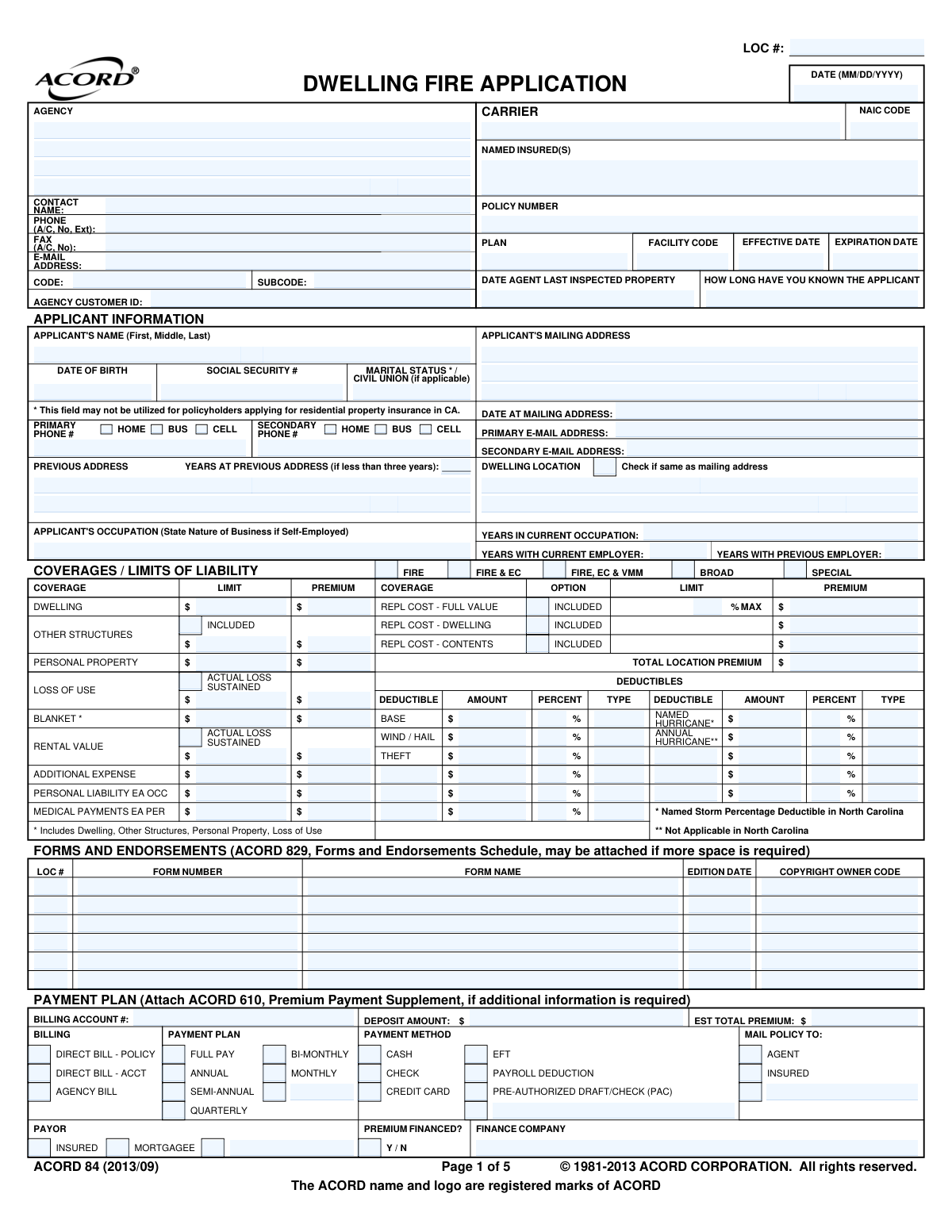
Yes! You can use AI to fill out ACORD 84, Dwelling Fire Application (2013/09)

The ACORD 84 Dwelling Fire Application (2013/09) is a standardized insurance industry form used to apply for dwelling fire policies, covering residential properties such as single-family homes, apartments, condominiums, and co-ops. It collects detailed information about the applicant, the insured property's construction and condition, coverage limits and deductibles, optional endorsements, loss history, and billing arrangements. The form is essential for underwriters to assess risk and issue appropriate dwelling fire coverage. Today, this form can be filled out quickly and accurately using AI-powered services like Instafill.ai, which can also convert non-fillable PDF versions into interactive fillable forms.
Our AI automatically handles information lookup, data retrieval, formatting, and form filling.
It takes less than a minute to fill out ACORD 84 using our AI form filling.
Securely upload your data. Information is encrypted in transit and deleted immediately after the form is filled out.

Form specifications

Form name: ACORD 84, Dwelling Fire Application (2013/09)
Number of pages: 5
Language: English
main-image

Instafill Demo: filling out a legal form in seconds

How to Fill Out ACORD 84 Online for Free in 2026

Are you looking to fill out a ACORD 84 form online quickly and accurately? Instafill.ai offers the #1 AI-powered PDF filling software of 2026, allowing you to complete your ACORD 84 form in just 37 seconds or less.
Follow these steps to fill out your ACORD 84 form online using Instafill.ai:
  1. 1 Navigate to Instafill.ai and upload the ACORD 84 Dwelling Fire Application PDF or select it from the available form library to begin filling it out online.
  2. 2 Complete the Agency and Carrier/Policy Header sections by entering the agency name, contact information, agency codes, carrier name, NAIC code, policy number, and effective and expiration dates.
  3. 3 Fill in the Applicant Information section with the applicant's full name, date of birth, Social Security number, marital status, mailing address, dwelling location, phone numbers, email addresses, and occupation details.
  4. 4 Enter the Coverages/Limits of Liability section by selecting the appropriate coverage options (Fire, Broad, Special, etc.) and entering limits and premiums for Dwelling, Other Structures, Personal Property, Loss of Use, Personal Liability, and Medical Payments, along with applicable deductibles.
  5. 5 Complete the Rating/Underwriting section on pages 2–3, including construction type, residence type, occupancy, protection devices, electrical and heating systems, building values, and any optional coverages or endorsements.
  6. 6 Answer all General Information and Residential General Information questions (questions 1–15) regarding prior insurance, loss history, property hazards, animals, business use, and other underwriting questions, providing explanations for any 'Yes' responses.
  7. 7 Review the completed form for accuracy, then sign and date the Applicant's Statement and Fraud Statement sections, have the producer sign, and attach any required supplements or supporting documents before submitting.

Our AI-powered system ensures each field is filled out correctly, reducing errors and saving you time.

Why Choose Instafill.ai for Your Fillable ACORD 84 Form?

Speed

Complete your ACORD 84 in as little as 37 seconds.

Up-to-Date

Always use the latest 2026 ACORD 84 form version.

Cost-effective

No need to hire expensive lawyers.

Accuracy

Our AI performs 10 compliance checks to ensure your form is error-free.

Security

Your personal information is protected with bank-level encryption.

Frequently Asked Questions About Form ACORD 84

The ACORD 84 (2013/09) is a standardized Dwelling Fire Application used to apply for fire and related insurance coverage on a residential property. It is completed by the property owner (applicant) and their insurance agent or broker when seeking coverage for a dwelling, including options for fire, liability, personal property, and other related coverages.

The applicant must provide their full legal name, date of birth, Social Security number (not required in California for residential property insurance), mailing address, dwelling location address, phone numbers, email addresses, occupation, and marital/civil union status. If the applicant has lived at their current address for less than three years, they must also provide their previous address.

You will need to provide the year the property was built, its market value and replacement cost, total living area in square feet, construction type (frame, masonry, masonry veneer, etc.), roof material and condition, plumbing and housekeeping condition, residence type (dwelling, condo, apartment, etc.), occupancy status, and details about electrical systems, heating, and any renovations made to the property.

The form offers several coverage tiers: Fire only, Fire & Extended Coverage (EC), Fire/EC/Vandalism & Malicious Mischief (VMM), Broad form, and Special (open-perils) form. Coverage lines include Dwelling, Other Structures, Personal Property, Loss of Use, Rental Value, Personal Liability, and Medical Payments, along with numerous optional endorsements such as earthquake, water backup, inflation guard, and ordinance or law coverage.

Applicants must answer yes/no questions about whether any coverage has been declined or cancelled in the last three years, whether there has been a foreclosure or bankruptcy in the last five years, whether there are judgments or liens, whether any other residences are owned or rented, whether insurance has been transferred within the agency, and whether any applicant has been convicted of fraud, bribery, or arson in the last five (or ten in Rhode Island) years. All 'Yes' answers must be explained.

The form asks about business conducted on the premises (farming, telecommuting, day care, home office), flooding or fire hazards nearby, animals or exotic pets on the premises (including bite history), whether the property is on more than one acre, uncorrected code violations, whether the dwelling is for sale, proximity to commercial properties, presence of a trampoline, lead paint, fuel tanks, whether the building was converted from non-residential use, and whether a carbon monoxide alarm is installed.

Deductibles can be expressed as a dollar amount or a percentage of the coverage limit, and multiple deductible types can apply to a single policy. Common deductible types include Base, Wind/Hail, Named Storm, Hurricane, Annual, and Named (storm-specific). In North Carolina, a Named Storm Percentage Deductible applies specifically. Each deductible row requires a type code, dollar amount, and/or percentage.

The form supports multiple payment plans including Full Pay, Annual, Semi-Annual, Quarterly, Bi-Monthly, and Monthly installments. Accepted payment methods include Cash, Check, Credit Card, Electronic Funds Transfer (EFT), Payroll Deduction, and Pre-Authorized Draft/Check (PAC). Premium financing is also an option, in which case the name of the finance company must be provided.

Applicants must disclose any losses at any location during the past specified number of years, whether or not they were paid by insurance. For each loss, you must provide the loss date, type of coverage involved, a description of the loss, the catastrophe number (if applicable), the amount paid, who entered the loss (agent or company), and whether the claim is in dispute. The applicant must initial the loss history section.

The Insurance Binder section provides temporary proof of coverage while the full policy is being processed. It specifies the effective and expiration dates and times of the binder, and notes that the binder can be cancelled by either the insurer or the insured. The binder is automatically cancelled when replaced by a formal policy, and the quoted premium is subject to verification and adjustment by the company.

Both the applicant (named insured) and the producer (agent/broker) must sign the form. The applicant's signature certifies that all information provided is true and complete. The producer must also print their name, provide their state producer license number, and in Florida, their National Producer Number (NPN). The date of signing must also be recorded.

Depending on the policy, you may need to attach forms such as an Earthquake Application, Flood Exclusion Notice, Lead-Free Paint Certification, Personal Inland Marine Section, Personal Umbrella Application, Replacement Cost Estimate, Protection Device Certificate, Solid Fuel Supplement, Windstorm Loss Mitigation form, Residence-Based Business Supplement, state-specific supplements, photographs of the property, and ACORD 45 for additional interests or ACORD 829 for additional forms and endorsements.

Yes — services like Instafill.ai use AI to auto-fill form fields accurately, saving significant time when completing complex forms like the ACORD 84. The AI can populate applicant information, coverage details, property data, and other fields based on the information you provide, reducing errors and speeding up the application process.

To fill out the ACORD 84 online, visit Instafill.ai and upload your copy of the form. The AI will guide you through each section, auto-filling fields such as applicant information, property details, coverage selections, and payment options. Once complete, you can review, download, and submit the filled form to your insurance agent or carrier.

Yes. If your ACORD 84 PDF is a flat, non-fillable document, Instafill.ai can convert it into an interactive fillable form so you can type directly into the fields digitally. This eliminates the need to print and handwrite the form, making the process faster and more accurate.

Compliance ACORD 84
Validation Checks by Instafill.ai

1
Applicant Date of Birth Format and Reasonableness Validation
Validates that the Applicant Date of Birth is entered in a valid date format (MM/DD/YYYY) and represents a plausible age for an insurance applicant (typically between 18 and 110 years old). The date must not be a future date and must be logically consistent with other age-related fields on the form. If the date of birth is missing, improperly formatted, or results in an implausible age, the application cannot be accurately underwritten and rated.
2
Applicant Social Security Number Format Validation
Validates that the Applicant Social Security Number (SSN) is entered in the standard nine-digit format (XXX-XX-XXXX or nine consecutive digits) and does not contain obviously invalid sequences such as all zeros, all nines, or known test/placeholder values. The SSN is critical for identity verification, credit scoring, and fraud detection purposes. Note that this field may not be utilized for policyholders applying for residential property insurance in California, so state-specific suppression logic must also be applied.
3
Policy Effective Date and Expiration Date Logical Consistency Check
Validates that the Policy Effective Date is a valid calendar date in MM/DD/YYYY format, that the Expiration Date is also a valid date, and that the Expiration Date is strictly after the Effective Date by a reasonable policy term (typically 6 months or 1 year). An expiration date that precedes or equals the effective date would result in a policy with no coverage period, rendering the application invalid. Both dates must also be present when a policy number is provided.
4
Previous Address Required When Years at Current Address Is Less Than Three
Validates that when the 'Years at Previous Address' field indicates fewer than three years at the current mailing address, all required previous address fields (Street Address, City, State, and ZIP Code) are populated. Underwriters require address history of at least three years to assess risk and verify applicant identity. If the applicant has been at their current address for less than three years but no previous address is provided, the application is incomplete and cannot be processed.
5
Dwelling Location Address Completeness When Different from Mailing Address
Validates that when the 'Dwelling Location — Same as Mailing Address' checkbox is not selected, all dwelling location address fields (Street Number, Street Name/Unit, City, State, and ZIP Code) are fully completed. The dwelling location is the insured property and is essential for risk assessment, territory assignment, and premium calculation. Failure to provide a complete dwelling address when it differs from the mailing address prevents accurate underwriting and policy issuance.
6
Year Built Reasonableness and Format Validation
Validates that the Year Built field contains a four-digit numeric year that is not in the future and is not earlier than a reasonable construction date (e.g., not before 1600). The year built is a critical underwriting factor that affects premium calculation, eligibility for certain coverages, and required inspections. An invalid or missing year built value will prevent accurate rating and may trigger mandatory inspection requirements.
7
Dwelling Coverage Limit Presence and Positive Value Check
Validates that the Dwelling Coverage Limit field contains a positive numeric dollar amount greater than zero when dwelling coverage is selected. The dwelling limit is the foundational coverage amount from which other coverage limits (such as Other Structures and Personal Property) may be derived, and it directly drives premium calculation. A missing or zero dwelling limit would result in an uninsured or improperly rated property, exposing both the insured and the carrier to significant risk.
8
Estimated Total Premium and Deposit Amount Numeric Format Validation
Validates that the Estimated Total Premium and Deposit Amount fields contain valid positive numeric dollar values formatted appropriately (e.g., no negative numbers, no non-numeric characters). The deposit amount must not exceed the estimated total premium, as collecting more than the full premium upfront is not permissible. Missing or invalid premium and deposit values prevent accurate billing setup and may cause payment processing failures.
9
Payment Method and Billing Plan Mutual Exclusivity and Completeness Check
Validates that exactly one payment method (Cash, Check, Credit Card, EFT, Payroll Deduction, or Pre-Authorized Draft/Check) is selected and that exactly one billing plan (Full Pay, Annual, Semi-Annual, Quarterly, Bi-Monthly, or Monthly) is chosen. Additionally, if 'Premium Financed' is marked Yes, the Finance Company name must be provided. Selecting multiple conflicting payment methods or leaving both fields blank creates ambiguity in billing setup and can result in failed or duplicate premium collections.
10
General Information Yes Response Explanation Completeness Check
Validates that for every Yes/No question in the General Information and General Information — Residential sections where a 'Yes' response is given, a corresponding explanation or detail field is populated (unless the form explicitly states 'no explanation needed'). Questions covering prior coverage cancellations, foreclosures, judgments, arson convictions, animals with bite history, business on premises, and code violations all require explanatory text when answered affirmatively. Unanswered explanations for 'Yes' responses constitute an incomplete application and may constitute a material misrepresentation.
11
Construction Type Percentage Fields Sum to 100% Validation
Validates that when multiple construction type percentages are entered (Frame, Masonry, Masonry Veneer, EIFS, and other types), the sum of all entered percentages equals exactly 100%. Similarly, siding type percentages should collectively account for the full exterior of the building. Percentages that do not sum to 100% indicate data entry errors that will result in incorrect construction type classification and inaccurate premium rating.
12
Loss History Date and Amount Format Validation
Validates that each loss history entry, when populated, contains a valid Loss Date in MM/DD/YYYY format that is not a future date, a valid positive numeric Amount Paid, and a Loss Type code. The loss date must fall within the number of years specified on the form (typically five years), and the amount paid must be a non-negative numeric value. Invalid or missing loss history data prevents accurate risk assessment and may result in incorrect pricing or eligibility determinations.
13
NAIC Code Format and Presence Validation
Validates that the NAIC Code field is populated and contains a valid five-digit numeric code assigned by the National Association of Insurance Commissioners. The NAIC code uniquely identifies the insurance carrier and is required for regulatory reporting, state filings, and carrier identification. A missing or incorrectly formatted NAIC code can cause the application to be rejected by the carrier's processing system or result in incorrect regulatory reporting.
14
Applicant Signature and Date Presence Validation
Validates that the Applicant's Signature field is signed and that the accompanying signature date is present and formatted as a valid date (MM/DD/YYYY) that is not in the future. The applicant's signature certifies that all information provided is true and complete and serves as the legal basis for the insurance contract. An unsigned application or one with a missing or invalid signature date is legally insufficient and cannot be bound or issued as a policy.
15
Producer Signature, License Number, and National Producer Number Completeness Check
Validates that the Producer's Signature is present, the Producer's Name is printed, the State Producer License Number is populated with a valid alphanumeric identifier, and — where required by state law (specifically Florida) — the National Producer Number (NPN) is provided. These fields establish the legal authority of the producer to submit the application and are required for regulatory compliance and commission processing. Missing producer credentials can result in the application being rejected or the producer facing regulatory penalties.
16
Binder Effective and Expiration Date Consistency When Binder Section Is Completed
Validates that when the Insurance Binder section is completed, both the Binder Effective Date and Binder Expiration Date are present, properly formatted (MM/DD/YYYY), and that the expiration date is after the effective date and within the maximum binder period allowed by the applicable state (e.g., 90 days in Arizona). The time of day indicator (12:01 AM or Noon) must also be selected. An incomplete or logically inconsistent binder section may result in a coverage gap or an unenforceable binder agreement.

Common Mistakes in Completing ACORD 84

Underestimating or incorrectly entering the dwelling replacement cost

Applicants frequently confuse market value with replacement cost, entering the property's sale price or assessed tax value instead of the actual cost to rebuild the structure from scratch. This leads to significant underinsurance — if a total loss occurs, the payout may not cover full reconstruction. To avoid this mistake, obtain a professional replacement cost estimate (and attach it as indicated on the form) based on current local construction costs, square footage, and materials. Tools like Instafill.ai can flag when the replacement cost field appears inconsistent with other property data entered on the form.

Failing to provide previous address when residency is less than three years

Many applicants leave the previous address section blank even when they have lived at their current mailing address for fewer than three years, not realizing the form requires this information in that scenario. Omitting the previous address can delay underwriting, trigger requests for additional information, or result in an incomplete application. Always check the 'Date at Mailing Address' field — if it indicates less than three years of residency, the previous address fields (street, city, state, ZIP) must be completed. AI-powered form tools like Instafill.ai can automatically prompt users to fill in the previous address when the residency duration triggers this requirement.

Leaving general information Yes/No questions unanswered or unexplained

Questions 1 through 7 in the General Information section (and questions 1 through 15 in the Residential section) require a Y or N response for every item, yet applicants frequently skip questions they consider inapplicable or answer 'Yes' without providing the required written explanation. Unanswered questions or unexplained 'Yes' responses can cause the application to be rejected or returned for correction, delaying coverage. Read every question carefully, enter Y or N for each, and provide a detailed written explanation in the adjacent field for every 'Yes' answer unless the form specifically states 'no explanation needed.' Instafill.ai can validate that all required Y/N fields are completed and flag missing explanations before submission.

Confusing deductible dollar amounts with deductible percentages

The deductibles section contains both dollar-amount fields and percentage fields for multiple coverage types (base, wind/hail, named storm, hurricane), and applicants often enter a percentage value in the dollar-amount field or vice versa. For example, entering '2' in the dollar-amount field when a 2% deductible is intended results in a $2 deductible rather than a percentage-based one. Always confirm with the carrier whether a flat dollar or percentage deductible applies to each peril, and enter the value in the correct field. Note that North Carolina has specific named storm percentage deductible rules that must be followed precisely.

Selecting an incorrect or inconsistent coverage form type

Applicants and agents sometimes select a coverage option (Fire, Fire & EC, Fire/EC/VMM, Broad, or Special) that is inconsistent with the carrier's underwriting guidelines for the property type, occupancy, or state. For example, selecting 'Special' form coverage for a tenant-occupied or vacant dwelling may not be permissible. Additionally, different coverage options may be selected for Dwelling versus Personal Property without recognizing the implications. Confirm the appropriate coverage form with the carrier before completing the form, and ensure the selected option is consistent across all applicable coverage lines.

Omitting or incorrectly reporting loss history

Applicants frequently fail to disclose all losses within the required look-back period (typically five years), either because they forgot minor claims, assumed small or denied claims don't count, or misunderstood that losses 'whether or not paid by insurance' must be reported. Omitting loss history is a material misrepresentation that can void coverage or result in policy cancellation. Report every loss — including those not paid by insurance — within the required number of years, provide the loss date, type, description, amount paid, and CAT number if applicable, and have the applicant initial the loss history section as required.

Incorrectly identifying or omitting additional interest information

When a mortgagee, lienholder, loss payee, or other additional interest exists, applicants often leave this section blank, select the wrong interest type (e.g., checking 'Mortgagee' when the party is actually a 'Loss Payee'), or fail to include the reference/loan number. Missing or incorrect additional interest information can result in the wrong party receiving claim payments or policy notices, creating legal and financial complications. Verify the exact interest type and full legal name and address of each additional interest with the lender or lienholder, and include the reference or loan number exactly as provided.

Entering an inaccurate or incomplete property construction description

The construction section requires detailed information including construction type (Frame, Masonry, Masonry Veneer), siding type and percentage, year built, EIFS installation year if applicable, and roof material and condition. Applicants commonly leave percentage fields blank, select only one construction type when the building has mixed construction, or fail to note EIFS (exterior insulation and finish system) which significantly affects underwriting. Inaccurate construction data can lead to incorrect premium calculation or coverage disputes at claim time. Inspect the property carefully or review inspection reports before completing these fields, and ensure all percentages across construction types add up to 100%.

Failing to complete the billing and payment plan section consistently

Applicants and agents often select a payment plan (e.g., Monthly) without selecting a corresponding payment method (e.g., EFT or Credit Card), or they check 'Premium Financed: Yes' without providing the finance company name. Similarly, the billing type (Agency Bill vs. Direct Bill) is sometimes left blank or conflicts with the payor selection. Incomplete or contradictory billing information delays policy issuance and can result in missed premium payments. Ensure that billing type, payment plan, payment method, payor, and finance company (if applicable) are all completed consistently and that the deposit amount and estimated total premium are entered.

Not disclosing animals with bite history or high-risk breeds

Question 3 in the Residential General Information section asks about animals or exotic pets on the premises, including breed and bite history. Applicants frequently omit animals they consider harmless, fail to disclose a prior bite incident, or do not list all animals present. Failure to disclose a dog with a bite history or a high-risk breed (such as a Doberman or German Shepherd) is a material misrepresentation that can void personal liability coverage at the time of a claim. List every animal on the premises, identify the breed accurately, and answer the bite history Y/N field honestly for each animal listed.

Missing required signatures, dates, and initials

The ACORD 84 requires the applicant's signature and date on the final page, the producer's signature, the producer's printed name, state license number, and — in Florida — the National Producer Number. Additionally, the loss history section requires the applicant's initials, and the privacy notice section requires the applicant's initials where applicable. Applicants and agents routinely overlook one or more of these signature/initial requirements, causing the application to be returned as incomplete. Before submitting, verify that all signature lines, date fields, and initial fields are completed by the appropriate parties. Instafill.ai can flag unsigned or undated signature fields before the form is finalized.

Incorrectly completing or omitting the binder section

When coverage is bound, the binder section must include an effective date, expiration date, and the correct time indicator (12:01 AM or Noon). Agents sometimes leave the binder section blank when coverage has been bound, fill in only the effective date without the expiration date, or fail to check the 'Coverage is Not Bound' box when no binder is being issued. State-specific binder rules (e.g., 90-day maximum in Arizona, 30 business days in Colorado, 45 business days in Maryland) must also be observed. Always confirm whether coverage is being bound, complete all binder fields if it is, and ensure the expiration date complies with the applicable state's binder duration rules.
Saved over 80 hours a year

“I was never sure if my IRS forms like W-9 were filled correctly. Now, I can complete the forms accurately without any external help.”

Kevin Martin Green

Your data stays secure with advanced protection from Instafill and our subprocessors

Robust compliance program

Transparent business model

You’re not the product. You always know where your data is and what it is processed for.

ISO 27001, HIPAA, and GDPR

Our subprocesses adhere to multiple compliance standards, including but not limited to ISO 27001, HIPAA, and GDPR.

Security & privacy by design

We consider security and privacy from the initial design phase of any new service or functionality. It’s not an afterthought, it’s built-in, including support for two-factor authentication (2FA) to further protect your account.

Fill out ACORD 84 with Instafill.ai

Worried about filling PDFs wrong? Instafill securely fills acord-84-dwelling-fire-application-201309 forms, ensuring each field is accurate.