Yes! You can use AI to fill out ACORD 160, Property Loss Notice

ACORD Form 160 is a comprehensive document used within the insurance industry to initiate a property loss claim. It standardizes the reporting process by collecting detailed information about the insured party, policy details, location of the loss, specific property coverages, and liability information. This ensures that the insurance carrier receives all the necessary data to begin processing the claim. Today, this form can be filled out quickly and accurately using AI-powered services like Instafill.ai, which can also convert non-fillable PDF versions into interactive fillable forms.
ACORD 160 is part of the ACORD forms, insurance claim forms and property insurance forms categories on Instafill.
Our AI automatically handles information lookup, data retrieval, formatting, and form filling.
It takes less than a minute to fill out ACORD 160 using our AI form filling.
Securely upload your data. Information is encrypted in transit and deleted immediately after the form is filled out.

Form specifications

Form name: ACORD 160, Property Loss Notice
Number of fields: 1144
Number of pages: 1
Language: English
main-image

Instafill Demo: How to fill out PDF forms in seconds with AI

How to Fill Out ACORD 160 Online for Free in 2026

Are you looking to fill out a ACORD 160 form online quickly and accurately? Instafill.ai offers the #1 AI-powered PDF filling software of 2026, allowing you to complete your ACORD 160 form in just 37 seconds or less.
Follow these steps to fill out your ACORD 160 form online using Instafill.ai:
  1. 1 Navigate to Instafill.ai and upload or select the ACORD 160, Property Loss Notice form.
  2. 2 Provide the agency, carrier, and policy information in the header section.
  3. 3 Use the AI assistant to accurately fill in the 'First Named Insured' details and the 'General Information' section, answering questions about business operations.
  4. 4 Detail the property and liability coverages, letting the AI guide you through the various sections for buildings, personal property, crime, and other specific coverages.
  5. 5 Complete the premises-specific information, including building descriptions, surrounding exposures, and security/alarm system details.
  6. 6 Review all the AI-populated data across the form for accuracy, make any necessary edits, and then e-sign the document in the designated producer and applicant signature fields.
  7. 7 Securely download, print, or share the completed ACORD 160 form directly with the insurance carrier or other relevant parties.

Our AI-powered system ensures each field is filled out correctly, reducing errors and saving you time.

Why Choose Instafill.ai for Your Fillable ACORD 160 Form?

Speed

Complete your ACORD 160 in as little as 37 seconds.

Up-to-Date

Always use the latest 2026 ACORD 160 form version.

Cost-effective

No need to hire expensive lawyers.

Accuracy

Our AI performs 10 compliance checks to ensure your form is error-free.

Security

Your personal information is protected with bank-level encryption.

Frequently Asked Questions About Form ACORD 160

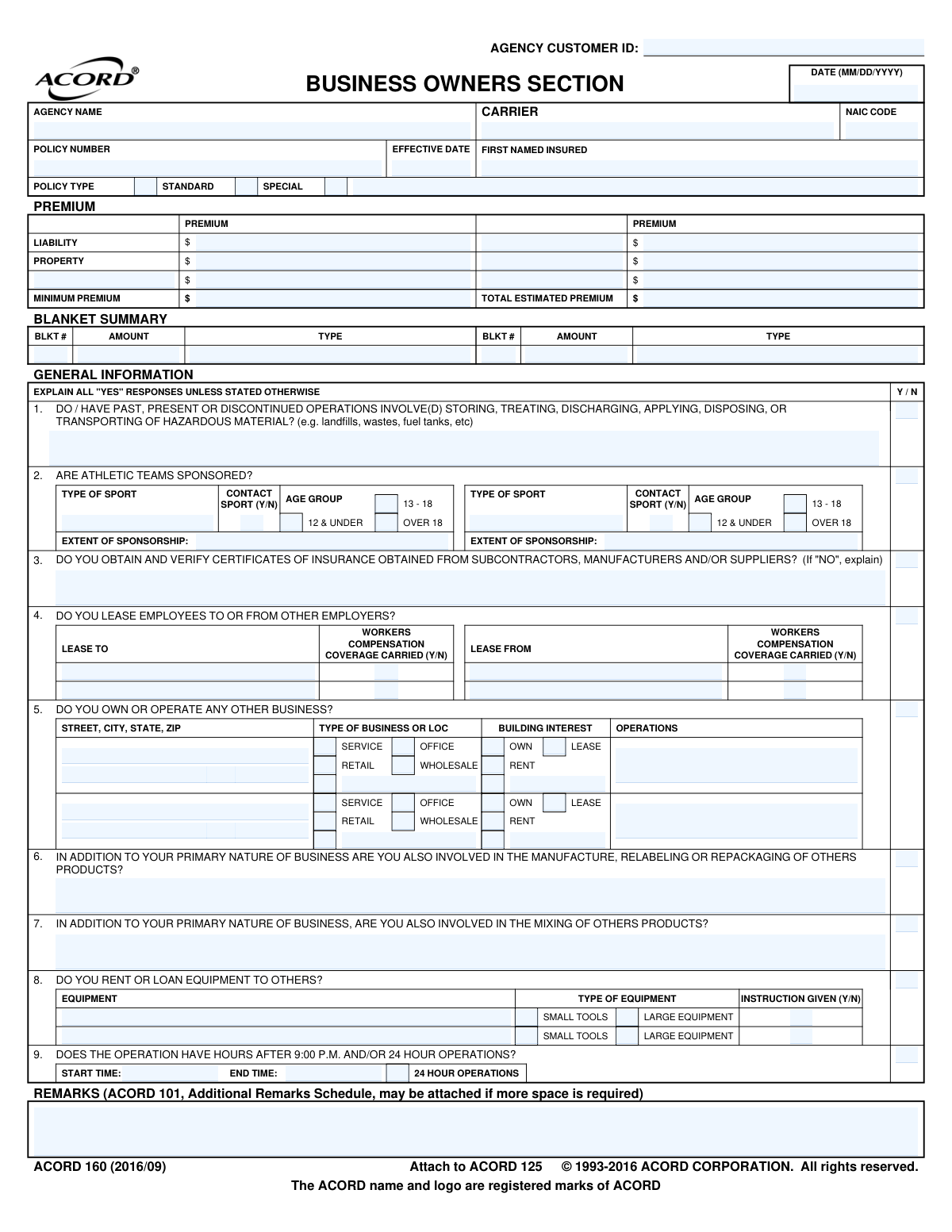
The ACORD 160, also known as the Businessowners Section, is an application used to gather detailed information for a Business Owners Policy (BOP). It is typically attached to the main ACORD 125 Commercial Insurance Application to provide specifics about a business's property and liability exposures.

This form should be completed by small to medium-sized business owners who are applying for or renewing a Business Owners Policy (BOP). Your insurance agent or producer will use the information to get an accurate quote for your property and liability insurance.

You will need to provide detailed information about your business premises, including the year built, construction type, square footage, and the age of the wiring, roofing, and plumbing. This data helps the insurer assess the risk and value of the property.

The form is designed to accommodate multiple locations. You should use the 'LOC #' and 'BLDG #' fields to provide separate, detailed information for each business premises you want to insure.

Many questions have a dedicated space for explanations directly below them. If you need more room, you can use the 'REMARKS' section on page 5 or attach an ACORD 101, Additional Remarks Schedule.

An 'Occurrence' limit is the maximum amount an insurer will pay for a single incident or claim. An 'Aggregate' limit is the total maximum amount the insurer will pay for all claims during the entire policy period.

This information helps the insurance carrier understand the specific risks associated with your business operations. These activities can increase potential liability, so disclosing them is crucial for obtaining the correct coverage and accurate pricing.

This section helps the insurer assess your business's risk of loss from criminal acts like theft or forgery. You'll provide details on security measures like alarms, safes, and cash handling procedures to determine your eligibility for crime-related coverage.

The form must be signed by both the applicant (an authorized representative of your business) and the insurance producer or agent. The signatures certify that the information provided is accurate and complete to the best of your knowledge.

The ACORD 160 is a supplemental application that should be attached to the ACORD 125 (Commercial Insurance Application). Both forms are then submitted together to the insurance carrier by your insurance producer.

Yes, services like Instafill.ai use AI to auto-fill form fields accurately, which can save you significant time and reduce manual errors. This is especially helpful for long and detailed forms like the ACORD 160.

You can use a service like Instafill.ai to complete the form digitally. Simply upload the PDF, and the platform will make it an interactive, fillable form that you can complete, sign, and download without needing to print it.

If you have a non-fillable or 'flat' PDF, you can use a tool like Instafill.ai to instantly convert it into a smart, fillable form. This allows you to type your information directly into the fields, making the process much easier and cleaner than filling it out by hand.

Compliance ACORD 160
Validation Checks by Instafill.ai

1
Valid and Logical Date Formatting
This check ensures that all date fields, such as 'Policy_EffectiveDate_A' and 'Form_CompletionDate_A', are in a valid MM/DD/YYYY format and represent a real calendar date. It also performs logical checks, such as verifying the 'Alarm_Burglar_CertificateExpirationDate_A' is in the future. This is critical for establishing correct coverage periods and ensuring data integrity, and failure can lead to incorrect policy binding or processing errors.
2
Conditional Explanation for 'YES' Responses
This validation verifies that whenever a question requiring an explanation for a 'YES' answer (e.g., 'Do / have past, present or discontinued operations involve...hazardous material?') is checked 'YES', the corresponding explanation field is filled. These explanations are critical for underwriters to assess non-standard risks. A missing explanation will halt the application process as the risk cannot be accurately evaluated.
3
Requires Description for 'Other' Selections
This check ensures that if an 'Other' checkbox is selected for a field like 'Policy_PolicyType_OtherIndicator_A' or 'BusinessInformation_BusinessType_OtherIndicator_A', the associated description field must be completed. This provides necessary context that is not covered by the standard options. Without this description, the selection is ambiguous and prevents proper classification and rating, causing the form to be returned for completion.
4
Full Postal Address Validation
This validation ensures that if any part of a location's address is provided, all required components (Street, City, State, ZIP) are present and valid. It should also check that the ZIP code is valid for the specified city and state. A complete and accurate address is fundamental for location-based risk assessment, rating, and legal notifications, and an error could lead to incorrect premiums.
5
Chronological Order of Building Construction and Improvements
This validation ensures that the years entered for building improvements (e.g., 'BuildingImprovement_WiringYear_A', 'BuildingImprovement_RoofingYear_A') are not earlier than the 'CommercialStructure_BuiltYear_A'. This is a logical check to catch data entry errors. This information is vital for assessing the property's condition and risk, directly impacting the premium, and an illogical date could lead to an inaccurate assessment.
6
Coverage Selection and Limit Entry
This check verifies that if a specific coverage is marked as 'Included' (INCL), then its corresponding Limit amount field contains a valid monetary value. This prevents situations where coverage is requested but the essential parameters for that coverage are missing. Failure to provide a limit makes it impossible to process the coverage request and will result in the application being flagged as incomplete.
7
Coinsurance Percentage Range
This validation ensures that the value entered in the 'CommercialProperty_Premises_CoinsurancePercent_A' field is a number between 0 and 100, inclusive. Coinsurance is a key factor in property insurance rating and claim payment calculations. An invalid percentage would make premium calculation impossible and could lead to significant disputes during a claim.
8
NAIC Code Format Validation
This check verifies that the 'Insurer_NAICCode_A' for the carrier is in the correct format, which is typically a 5-digit number. The NAIC code is a unique identifier for insurance companies used for regulatory and tracking purposes. An incorrect code can lead to processing errors, misidentification of the carrier, and compliance issues.
9
Athletic Team Sponsorship Detail Requirement
If the question 'ARE ATHLETIC TEAMS SPONSORED?' is answered 'YES', this validation ensures that details for at least one sponsored team (Type of Sport, Age Group, etc.) are provided. Sponsoring athletic teams represents a significant liability risk. Without these details, an underwriter cannot properly assess or price this exposure, making the application incomplete.
10
Leased Employee Detail Requirement
This check ensures that if the applicant indicates they lease employees ('BusinessOwnersLineOfBusiness_Question_AAHCode_A' is 'YES'), the details of the leasing employer and their workers' compensation status are provided. This is critical for determining workers' compensation and general liability exposures. Missing this information creates ambiguity about who is responsible for a leased employee, which can lead to coverage gaps.
11
Business Hours Logic Validation
This check validates the logic of the business operating hours. If the 'BusinessInformation_BusinessHours_TwentyFourHourIndicator_A' is checked, start and end times are not required. If it is not checked, the 'BusinessInformation_BusinessHours_CloseTime_A' must be later than the 'BusinessInformation_BusinessHours_StartTime_A'. This information is used to assess risk, so incorrect data can lead to mispriced policies.
12
Swimming Pool Feature Selection
If the applicant indicates there is a swimming pool on the premises ('CommercialStructure_Question_KACCode_A' is 'YES'), this validation ensures that at least one descriptive checkbox (e.g., In Ground, Diving Board, Slide) is selected. These features significantly impact the liability risk associated with the pool. Without these details, the underwriter cannot accurately assess the exposure, leading to an incomplete risk profile.
13
Alarm Certificate Expiration Date Validity
This check verifies that if an alarm certificate number ('Alarm_Burglar_CertificateIdentifier_A') is provided, the expiration date ('Alarm_Burglar_CertificateExpirationDate_A') is also present and is a future date. A valid, unexpired alarm certificate is often required to qualify for protective safeguards discounts. An expired or missing date would invalidate the discount and require follow-up, delaying policy issuance.
14
Hazardous Material Operations Explanation
This validation ensures that if the applicant answers 'YES' to having operations involving hazardous materials ('BusinessOwnersLineOfBusiness_Question_ACJCode_A'), the explanation field is mandatory. This exposure represents a major environmental and liability risk that must be fully understood by the underwriter. Failure to explain this risk will result in an immediate rejection or hold on the application pending more information.

Common Mistakes in Completing ACORD 160

Failing to Explain 'Yes' Answers

The form explicitly states 'EXPLAIN ALL "YES" RESPONSES' for critical questions regarding hazardous materials, sponsored athletic teams, and other high-risk operations. Applicants often check 'Yes' but neglect to provide the required detailed explanation in the remarks section. This omission forces the underwriter to halt the quoting process and request more information, causing significant delays and potentially leading to an inaccurate risk assessment.

Using Incorrect Legal Name for 'First Named Insured'

Applicants frequently enter their 'Doing Business As' (DBA) name instead of the full legal entity name (e.g., 'Main Street Cafe' instead of 'Main Street Hospitality, LLC'). This can create legal and contractual issues, as the policy must be issued to the correct legal entity to provide proper coverage. Always verify the legal name as it appears on business registration documents to ensure claims are not disputed or denied on a technicality.

Incorrectly Entering Retroactive Dates

For 'claims-made' coverages like Professional Liability, EPLI, or D&O, the 'Retroactive Date' is crucial as it sets the starting point for covered events. A common error is leaving this field blank or entering the new policy's effective date, which eliminates coverage for any past work or 'prior acts'. This can leave the business completely exposed to claims arising from incidents that occurred before the new policy began. The correct date should match the one on the expiring claims-made policy.

Providing Vague Building Construction Details

Applicants often provide generic information for fields like 'Construction Type' or 'Roof Type' instead of the specific details required for accurate rating. For example, writing 'Brick' is insufficient when the underwriter needs to know if it's 'Joisted Masonry' or 'Masonry Non-Combustible'. Similarly, failing to provide the years of updates for wiring, plumbing, and roofing can result in missed credits and higher premiums. Inaccurate construction details can lead to incorrect property valuation and rating.

Misunderstanding Coinsurance and Valuation

The 'Coinsurance %' and 'Valuation' (Replacement Cost vs. Actual Cash Value) fields are frequently misunderstood. Applicants may select a high coinsurance percentage (e.g., 90%) without insuring their property to that percentage of its value, leading to a significant penalty during a claim. Choosing the wrong valuation method can also result in a claim payout that is insufficient to rebuild or replace the damaged property. It is vital to have an accurate property appraisal to meet these requirements.

Omitting Specific Alarm and Protection Details

In the Crime and Premises sections, applicants may indicate they have an alarm system but fail to provide specifics like the alarm grade, certificate number, or whether it's a central station system. This lack of detail prevents the underwriter from applying valuable protective safeguard credits, resulting in a higher premium. To avoid this, provide all documentation for fire and security systems, including monitoring contracts and certificates.

Inaccurate Description of Business Operations

The 'Description of Operations' or 'Type of Business' is often filled with vague terms or may omit secondary operations, like renting equipment to others. An underwriter relies on this description to classify the business correctly for rating and to identify potential exclusions. An inaccurate description can lead to misclassification, incorrect premiums, or even the denial of a claim if the loss arises from an undisclosed operation.

Confusing Blanket vs. Specific Property Limits

When insuring multiple buildings or locations, applicants can be confused about whether to use 'Specific' limits for each property or a single 'Blanket' limit that covers all of them. Choosing incorrectly can impact premium and how coverage applies during a loss. A blanket limit is often preferred for its flexibility but may not be appropriate or available for all situations, and failing to structure it correctly can be a costly mistake.

Ignoring Fields for Additional Coverages

This comprehensive form includes dozens of optional coverages like 'Business Income', 'Spoilage', or 'EDP / Computer' coverage. Many business owners, overwhelmed by the form's length, skip these sections entirely, assuming their basic policy is sufficient. This oversight can leave them without critical protection for common loss scenarios, such as income lost during a shutdown or the cost of replacing spoiled goods after a power outage.

Incomplete Address and Location Information

A surprisingly common mistake is providing an incomplete or incorrect address for the business premises, such as omitting a suite number, using a P.O. Box instead of a physical address, or entering the wrong ZIP code. This simple error can delay the entire process, as underwriters use the precise address to assess geographic risks like flood zones, fire protection class, and coastal proximity. AI-powered tools like Instafill.ai can help prevent this by auto-completing and validating addresses against official databases.
Saved over 80 hours a year

“I was never sure if my IRS forms like W-9 were filled correctly. Now, I can complete the forms accurately without any external help.”

Kevin Martin Green

Your data stays secure with advanced protection from Instafill and our subprocessors

Robust compliance program

Transparent business model

You’re not the product. You always know where your data is and what it is processed for.

ISO 27001, HIPAA, and GDPR

Our subprocesses adhere to multiple compliance standards, including but not limited to ISO 27001, HIPAA, and GDPR.

Security & privacy by design

We consider security and privacy from the initial design phase of any new service or functionality. It’s not an afterthought, it’s built-in, including support for two-factor authentication (2FA) to further protect your account.

Fill out ACORD 160 with Instafill.ai

Worried about filling PDFs wrong? Instafill securely fills acord-160-property-loss-notice forms, ensuring each field is accurate.