Yes! You can use AI to fill out Habitational Risks Supplement Application Form
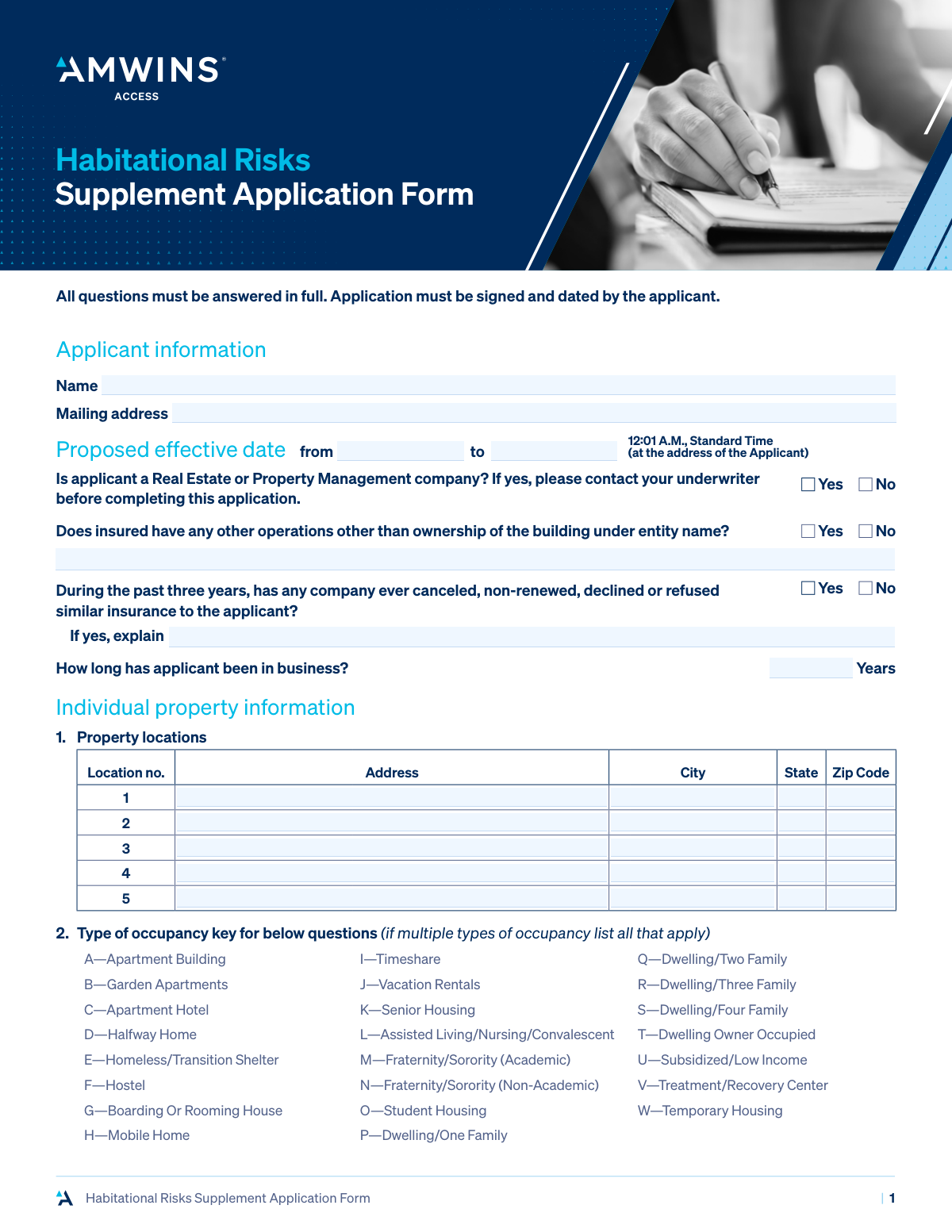
The Habitational Risks Supplement Application Form is a detailed questionnaire required by insurance companies to assess the risks associated with insuring residential properties like apartment buildings, student housing, or shelters. It collects specific data on property locations, occupancy, construction, safety features, and potential liabilities to help underwriters determine coverage eligibility and premiums. Today, this form can be filled out quickly and accurately using AI-powered services like Instafill.ai, which can also convert non-fillable PDF versions into interactive fillable forms.
Our AI automatically handles information lookup, data retrieval, formatting, and form filling.
It takes less than a minute to fill out Habitational Risks Supplement Application using our AI form filling.
Securely upload your data. Information is encrypted in transit and deleted immediately after the form is filled out.
Form specifications
| Form name: | Habitational Risks Supplement Application Form |
| Number of pages: | 7 |
| Language: | English |
Instafill Demo: How to fill out PDF forms in seconds with AI
How to Fill Out Habitational Risks Supplement Application Online for Free in 2026
Are you looking to fill out a HABITATIONAL RISKS SUPPLEMENT APPLICATION form online quickly and accurately? Instafill.ai offers the #1 AI-powered PDF filling software of 2026, allowing you to complete your HABITATIONAL RISKS SUPPLEMENT APPLICATION form in just 37 seconds or less.
Follow these steps to fill out your HABITATIONAL RISKS SUPPLEMENT APPLICATION form online using Instafill.ai:
- 1 Navigate to Instafill.ai and upload or select the Habitational Risks Supplement Application Form.
- 2 Provide the main applicant's information, including name, mailing address, and business history.
- 3 Enter detailed information for each individual property, covering its location, occupancy type, year built, and number of units.
- 4 Complete the sections on property updates and renovations, specifying details for the roof, wiring, and HVAC systems for each location.
- 5 Describe the fire protection and security measures in place, such as sprinklers, alarms, deadbolts, and any patrol services.
- 6 Disclose information about other exposures, including swimming pools, playgrounds, subcontractors, and loss history for the past five years.
- 7 Review all the information auto-populated by the AI for accuracy, then electronically sign and date the application to finalize it.
Our AI-powered system ensures each field is filled out correctly, reducing errors and saving you time.
Why Choose Instafill.ai for Your Fillable Habitational Risks Supplement Application Form?
Speed
Complete your Habitational Risks Supplement Application in as little as 37 seconds.
Up-to-Date
Always use the latest 2026 Habitational Risks Supplement Application form version.
Cost-effective
No need to hire expensive lawyers.
Accuracy
Our AI performs 10 compliance checks to ensure your form is error-free.
Security
Your personal information is protected with bank-level encryption.
Frequently Asked Questions About Form Habitational Risks Supplement Application
This form is a supplemental application used to gather detailed information about residential properties you own, such as apartment buildings or dwellings, when applying for insurance. It helps underwriters assess the risks associated with your properties.
Property owners seeking insurance for habitational risks like apartment buildings, student housing, or multi-family dwellings must complete this form. It is a required supplement to your main insurance application.
If you own more than five properties, you should fill out the information for the first five on this form. Then, attach a separate sheet with the identical information for each additional property or use a second copy of the form.
The form states that if you are a Real Estate or Property Management company, you must contact your underwriter for guidance before you complete the application. There may be a different form or additional requirements for your type of business.
Find the code in the key that best describes your property (e.g., 'A' for Apartment Building). You will then enter this code in the 'Type of occupancy' field for the corresponding location in Section 3.
You must list all claims, losses, or incidents that could lead to a claim from the past five years, regardless of fault or whether they were insured. If you have had no losses, simply check the box indicating 'no losses in the last five years'.
These specific brands of electrical panels are known to have higher failure rates and are considered a potential fire hazard by many insurers. Providing this information helps the insurance company accurately assess the fire risk of your property.
If you have renovations planned, you must check 'Yes' and provide a detailed description of the work. This includes the scope of the project, the timeline, and the estimated cost, as renovations can temporarily increase risk.
The application must be signed and dated by both the applicant (the property owner) and the retail agent. Your signature serves as a warranty that the information provided is true and correct.
Yes, you can use AI-powered services like Instafill.ai to help complete this form. These tools can accurately auto-fill many of the fields using your existing information, which saves time and reduces errors.
To fill this form using Instafill.ai, you would upload the PDF to their platform. The AI will identify the fields, and you can then provide your information once to have it automatically and accurately populated throughout the document.
If your PDF is not interactive, you can use a service like Instafill.ai to convert it into a smart, fillable form. This allows you to easily type your answers directly into the fields online instead of printing and filling it out by hand.
If you have been canceled, non-renewed, or declined for similar insurance in the past three years, you must check 'Yes' and provide a detailed explanation. Be honest and clear about the circumstances, as this information is material to your application.
Compliance Habitational Risks Supplement Application
Validation Checks by Instafill.ai
1
Proposed Effective Date Sequence
This validation ensures that the 'Proposed effective date to' is on or after the 'Proposed effective date from'. This is critical for defining a valid policy period and preventing logical errors in coverage dates. If the end date precedes the start date, the form will return an error and require the user to correct the dates before submission.
2
Conditional Explanation for Prior Cancellation
This check verifies that if the applicant answers 'Yes' to the question about having insurance canceled, non-renewed, or declined in the past, the corresponding explanation field is not empty. This information is material to the underwriting decision, as it highlights a potentially higher-risk applicant. A failure to provide an explanation will block submission and prompt the user to provide the required details.
3
Logical Consistency of Years Owned vs. Year Built
For each property location, this validation compares the 'Years owned' against the 'Year built'. The number of years owned cannot be greater than the building's age (calculated as current year minus 'Year built'). This check prevents data entry errors and ensures the timeline of ownership is logical. If an inconsistency is found, an error message will specify the issue for the relevant location.
4
Conditional Mobile Home Tie-Down Status
This validation is triggered based on the 'Type of occupancy' for a property. If the occupancy type is 'H—Mobile Home', the question 'is it tied down?' becomes mandatory. This is a critical safety and stability question for this specific risk type, and failing to answer it for a mobile home will prevent the form from being submitted.
5
Conditional Vacancy Percentage Requirement
If an applicant marks a property location as 'Vacant' by selecting 'Yes', this check ensures that the 'percent of vacancy' field is populated with a numerical value between 1 and 100. This detail is crucial for assessing the increased risks associated with vacant properties, such as vandalism or unmonitored disrepair. The form will not submit without this percentage if 'Yes' is selected.
6
Renovation Year Chronology
This check validates that any year entered for updates (Roof, Wiring, HVAC) is a valid 4-digit year that is not in the future. Furthermore, it cross-references that the update year is not before the property's 'Year built'. This ensures the chronological accuracy of the property's history, which is vital for assessing its current condition and risk level.
7
Conditional Aluminum Wiring Pigtail Status
This validation enforces a rule on the electrical systems section. If an applicant indicates 'Yes' to having 'Aluminum/fuses/knob & tube' wiring, the subsequent question 'If Aluminum is it pigtailed' becomes mandatory. Pigtailing is a critical safety remediation for aluminum wiring, and its status is material information for the underwriter.
8
Conditional Guard Contractor Insurance Details
If 'Independent Contractor' is selected as the guard type for any location, this validation ensures the two subsequent questions ('are certificates of insurance required?' and 'is applicant named as additional insured?') are answered. This is a critical liability check to confirm that risk is being properly transferred to the security vendor. The form will be considered incomplete if this information is missing for a contracted guard service.
9
Conditional Balcony Safety Details
This check is triggered if the applicant answers 'Yes' to the presence of 'Balconies'. It then makes the follow-up questions ('Do balconies meet current building codes?' and 'Railings regularly inspected?') mandatory. Balconies represent a significant liability exposure, and this information is essential for the underwriter to assess the risk and ensure safety standards are being considered.
10
Loss History Completeness Check
This validation ensures that if the 'Check if no losses in the last five years' box is left unchecked, at least one complete loss record is entered in the table. A complete record includes the date, description, amounts paid/reserved, and status. This prevents applicants from implicitly claiming no losses by simply leaving the section blank and forces disclosure of required claim history.
11
Loss History Date Range
This check validates that any 'Date of loss' entered in the loss history section falls within the five-year period prior to the application submission date. This enforces the specific timeframe requested by the form. Any date outside this range would be flagged as an error, ensuring the provided loss history is relevant and adheres to the question's parameters.
12
Mandatory Applicant Signature and Date
This is a final, critical validation to ensure the 'Signature of applicant' and 'Date' fields are not empty. The signature and date are required to attest to the truthfulness of the information provided and to make the application a legally binding document. The system will refuse to process an application that is missing either the signature or the signature date.
13
Real Estate Company Flag for Underwriter Review
This check implements a business rule directly from the form's instructions. If an applicant selects 'Yes' to being a 'Real Estate or Property Management company', the submission is flagged for mandatory underwriter review before proceeding. This is not a failure that stops submission, but an internal routing rule to handle a specific risk profile that requires specialized attention.
14
Conditional Pet Breed Restriction Explanation
This validation ensures that if an applicant answers 'Yes' to 'Are any pets allowed?' for a specific location, the 'what are restrictions on breeds?' field must be filled. Certain animal breeds can significantly increase liability risk, and underwriters need this information to accurately assess the exposure. An application will be considered incomplete if this detail is missing where pets are allowed.
Common Mistakes in Completing Habitational Risks Supplement Application
The form's columnar layout for multiple properties makes it easy to enter details like 'Year Built' or 'Number of Units' into the wrong location's column. This error leads to a completely inaccurate risk profile for the properties, potentially resulting in incorrect premiums or coverage gaps. To avoid this, carefully trace each row across to the correct location column before entering data. If the form is a non-fillable PDF, a tool like Instafill.ai can convert it into an intelligent, fillable version where data is clearly structured, reducing the chance of misalignment.
Applicants often write out the full name of the occupancy type (e.g., 'Apartment Building') instead of using the required single-letter code from the key in Section 2 (e.g., 'A'). This error, or selecting the wrong code, fundamentally misrepresents the risk and will cause processing delays or require correction. Always use the specific letter code provided in the key, and double-check that it accurately reflects the property's use. AI-powered form fillers can present these codes in a dropdown menu to ensure only valid entries are selected.
Many questions, such as those regarding prior insurance cancellations, housing violations, or criminal activity, require a mandatory written explanation if 'Yes' is selected. Applicants frequently check 'Yes' but forget to provide the necessary details in the corresponding text field. This renders the application incomplete and forces the underwriter to halt the process and request the missing information, causing significant delays in obtaining a quote.
When detailing prior losses, applicants may provide generic descriptions like 'Water damage' or 'Tenant injury' without the required context. The form requires a full description, dates, amounts paid/reserved, and status for all claims and occurrences that could lead to a claim. Incomplete disclosure can be considered material misrepresentation, potentially leading to a claim denial or policy cancellation. It is crucial to be thorough and transparent in this section.
Section 4 asks for the specific 'Year' of updates to the roof, wiring, and HVAC, but applicants often write vague terms like 'Recent' or leave it blank if unsure. This ambiguity leads underwriters to assume the worst-case scenario (older systems), which can increase premiums. Applicants should consult property records for accurate dates and use 'N/A' as instructed if no update was performed. Smart tools like Instafill.ai can validate that the entry is a year or 'N/A', preventing ambiguous submissions.
The application asks about specific, high-risk electrical components like Federal Pacific Electric (FPE) panels, which many property owners cannot identify. Guessing 'No' to the presence of these systems when they actually exist is a serious material misrepresentation of a known fire hazard. This could lead to the policy being voided after a loss. Applicants must consult a qualified electrician or a recent inspection report to answer these technical questions accurately.
A missing signature or date from either the applicant or the retail agent is one of the most common and easily avoidable mistakes. An unsigned application is not a legally binding document and will be immediately rejected, halting the process of securing insurance coverage. Always perform a final review to ensure all signature and date fields are completed before submission. Digital form-filling solutions can make these required fields mandatory, preventing submission until they are signed.
Applicants may check the 'no losses in the last five years' box because they haven't filed any formal claims, while ignoring the form's requirement to also report 'occurrences that may give rise to claims.' An example is a tenant who slipped and fell but has not yet sued. Failure to disclose such an occurrence is a misrepresentation that could jeopardize coverage if a claim is eventually filed from that incident.
On a long, complex application, it is easy to provide conflicting answers, such as stating 'No' to allowing pets in Section 3 but listing a 'Dog Park' as an amenity in Section 9. These contradictions create red flags for underwriters, require time-consuming clarification, and call the overall accuracy of the application into question. AI-powered tools can help prevent this by cross-referencing answers and flagging potential inconsistencies before submission.
The form asks if the insured has other operations under the same entity name, a question applicants sometimes overlook or misunderstand. An applicant might fail to disclose a small property management service they run for others, believing it to be insignificant. However, any undisclosed operation introduces unrated liability exposure, which can be grounds for a claim denial.
Saved over 80 hours a year
“I was never sure if my IRS forms like W-9 were filled correctly. Now, I can complete the forms accurately without any external help.”
Kevin Martin Green
Your data stays secure with advanced protection from Instafill and our subprocessors

Robust compliance program
Transparent business model
You’re not the product. You always know where your data is and what it is processed for.
ISO 27001, HIPAA, and GDPR
Our subprocesses adhere to multiple compliance standards, including but not limited to ISO 27001, HIPAA, and GDPR.
Security & privacy by design
We consider security and privacy from the initial design phase of any new service or functionality. It’s not an afterthought, it’s built-in, including support for two-factor authentication (2FA) to further protect your account.
Fill out Habitational Risks Supplement Application with Instafill.ai
Worried about filling PDFs wrong? Instafill securely fills habitational-risks-supplement-application-form forms, ensuring each field is accurate.