Yes! You can use AI to fill out Uniform Underwriting and Transmittal Summary (Fannie Mae Form 1008 / Freddie Mac Form 1077)

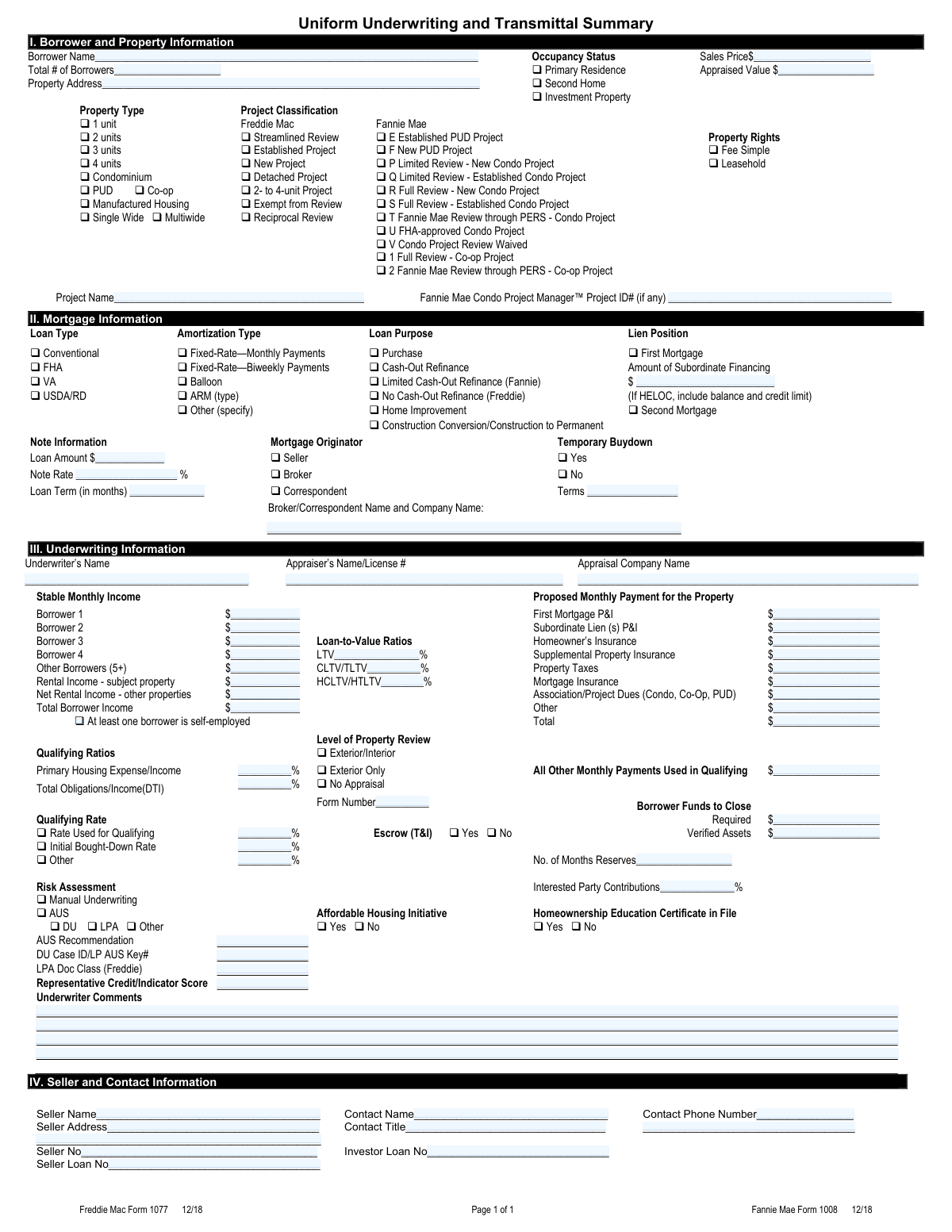
The Uniform Underwriting and Transmittal Summary, designated as Fannie Mae Form 1008 and Freddie Mac Form 1077, is a standardized mortgage industry document that consolidates critical loan data—including borrower income, property details, loan terms, qualifying ratios, risk assessment findings, and seller contact information—into a single transmittal package for secondary market delivery. It is required by both Fannie Mae and Freddie Mac when lenders sell or deliver conforming mortgage loans, ensuring that all underwriting decisions and loan characteristics are clearly documented and reviewable. The form serves as a cover sheet that accompanies the loan file, providing investors and agencies with a concise snapshot of the underwriting analysis. Today, this form can be filled out quickly and accurately using AI-powered services like Instafill.ai, which can also convert non-fillable PDF versions into interactive fillable forms.
Our AI automatically handles information lookup, data retrieval, formatting, and form filling.
It takes less than a minute to fill out Form 1008 / Form 1077 using our AI form filling.
Securely upload your data. Information is encrypted in transit and deleted immediately after the form is filled out.

Form specifications

Form name: Uniform Underwriting and Transmittal Summary (Fannie Mae Form 1008 / Freddie Mac Form 1077)
Number of pages: 1
Language: English
Categories: mortgage forms, Fannie Mae forms, Freddie Mac forms
main-image

Instafill Demo: filling out a legal form in seconds

How to Fill Out Form 1008 / Form 1077 Online for Free in 2026

Are you looking to fill out a FORM 1008 / FORM 1077 form online quickly and accurately? Instafill.ai offers the #1 AI-powered PDF filling software of 2026, allowing you to complete your FORM 1008 / FORM 1077 form in just 37 seconds or less.
Follow these steps to fill out your FORM 1008 / FORM 1077 form online using Instafill.ai:
  1. 1 Navigate to Instafill.ai, search for 'Fannie Mae Form 1008' or 'Freddie Mac Form 1077', and upload or select the Uniform Underwriting and Transmittal Summary form to begin filling it out online.
  2. 2 Complete Section I by entering the borrower name, total number of borrowers, property address, occupancy status, sales price, appraised value, property type, project classification, property rights, and project name as applicable.
  3. 3 Complete Section II by selecting the loan type, amortization type, loan purpose, and lien position, then enter the loan amount, note rate, loan term, mortgage originator details, subordinate financing amount, and temporary buydown information.
  4. 4 Complete Section III by entering the underwriter's name, appraiser's name and license number, and appraisal company name, then fill in all stable monthly income figures, proposed monthly payment line items, loan-to-value ratios, qualifying ratios, level of property review, qualifying rate fields, escrow selection, borrower funds to close, and risk assessment/AUS findings including any underwriter comments.
  5. 5 Complete Section IV by entering the seller name, seller address, seller number, seller loan number, contact name, contact title, contact phone number, and investor loan number.
  6. 6 Review all entered information for accuracy and completeness, ensuring that all checkboxes reflect the correct loan characteristics and that all dollar amounts, percentages, and identification numbers are correct.
  7. 7 Submit or download the completed form from Instafill.ai to include in the loan delivery package for Fannie Mae or Freddie Mac, retaining a copy for your records.

Our AI-powered system ensures each field is filled out correctly, reducing errors and saving you time.

Why Choose Instafill.ai for Your Fillable Form 1008 / Form 1077 Form?

Speed

Complete your Form 1008 / Form 1077 in as little as 37 seconds.

Up-to-Date

Always use the latest 2026 Form 1008 / Form 1077 form version.

Cost-effective

No need to hire expensive lawyers.

Accuracy

Our AI performs 10 compliance checks to ensure your form is error-free.

Security

Your personal information is protected with bank-level encryption.

Frequently Asked Questions About Form Form 1008 / Form 1077

This form (Fannie Mae Form 1008 / Freddie Mac Form 1077) is a standardized summary used by mortgage lenders and underwriters to compile key loan, borrower, property, and underwriting information when submitting a loan for purchase to Fannie Mae or Freddie Mac. It is typically completed by the underwriter or loan processor and must accompany the loan file when delivered to the investor.

Section I requires the borrower's full legal name, total number of borrowers, complete property address, occupancy status (Primary Residence, Second Home, or Investment Property), sales price, appraised value, property type (1–4 units, condo, PUD, co-op, or manufactured housing), property rights (fee simple or leasehold), and project classification for condominiums or PUDs under Fannie Mae or Freddie Mac guidelines.

The project classification depends on whether the loan is being sold to Fannie Mae or Freddie Mac and the type and status of the project. For Fannie Mae, options range from Limited Review (P or Q) to Full Review (R or S), PERS review (T), FHA-approved (U), or Review Waived (V). For Freddie Mac, options include Streamlined Review, Established Project, New Project, Detached Project, and others. Consult the applicable agency's selling guide to determine which classification applies to your specific project.

Section II allows you to identify the loan type as Conventional, FHA, VA, or USDA/RD. For amortization, you can select Fixed-Rate with Monthly or Biweekly Payments, Balloon, Adjustable-Rate Mortgage (ARM — specify the type), or Other. You must also indicate the loan purpose (Purchase, Cash-Out Refinance, Limited/No Cash-Out Refinance, Home Improvement, or Construction to Permanent) and lien position (First or Second Mortgage).

A temporary buydown is an arrangement where the borrower or seller pays upfront to temporarily reduce the interest rate for the first one to three years of the loan. On this form, check 'Yes' under Temporary Buydown and enter the buydown terms (for example, '2/1 buydown: Year 1 = -2.0%, Year 2 = -1.0%, then reverts to note rate'). If no buydown applies, check 'No' and leave the terms field blank.

LTV is the first mortgage amount divided by the lesser of the appraised value or sales price, expressed as a percentage. CLTV (Combined LTV) includes the first mortgage plus all subordinate financing divided by the property value. HCLTV (High Combined LTV) uses the maximum credit limit of any HELOC plus all other liens divided by the property value. Enter each ratio as a percentage in the corresponding fields in Section III.

You must enter the stable monthly income for each borrower (up to 4 individually, plus a combined total for 5 or more), rental income from the subject property, net rental income from other properties, and the total borrower income. On the payment side, you must itemize the proposed monthly costs including first mortgage P&I, subordinate lien P&I, homeowner's insurance, supplemental insurance, property taxes, mortgage insurance, HOA/condo dues, and any other charges, then enter the total.

Checking this box signals to the investor that one or more borrowers derive income from self-employment, which typically requires additional documentation such as two years of personal and business tax returns, a year-to-date profit and loss statement, and potentially a business license or CPA letter. This flag helps the investor and underwriter ensure the appropriate income analysis was performed.

Manual underwriting means the loan was evaluated by a human underwriter without an automated system, while AUS (Automated Underwriting System) means the loan was run through Fannie Mae's Desktop Underwriter (DU) or Freddie Mac's Loan Product Advisor (LPA). Check the appropriate box in the Risk Assessment section, then enter the AUS recommendation (e.g., Approve/Eligible), the DU Case ID or LP AUS Key number, and the representative credit score used.

Section IV requires the seller's full legal name, complete mailing address, seller identification number, and seller loan number. You must also provide the contact person's name, title, and phone number, as well as the investor-assigned loan number. If the loan was originated by a broker or correspondent, their name and company name should be entered in Section II.

The Fannie Mae Condo Project Manager™ (CPM) Project ID is a unique identifier assigned to a condominium project that has been reviewed and approved through Fannie Mae's CPM system. You can find this number by searching the project in Fannie Mae's CPM tool. If the project has not been submitted to CPM or no ID has been assigned, leave this field blank.

Yes — services like Instafill.ai use AI to auto-fill form fields accurately, saving significant time when completing complex forms like the Uniform Underwriting and Transmittal Summary. The AI can populate borrower details, loan information, income figures, and underwriting data quickly and consistently, reducing the risk of manual entry errors.

To fill out this form online, visit Instafill.ai and upload the Form 1008/1077 PDF. The AI will guide you through each section, auto-filling fields based on the loan data you provide. Once complete, you can review, edit, and download the finished form ready for submission to Fannie Mae or Freddie Mac.

If your PDF is not interactive (i.e., you cannot click and type into the fields), Instafill.ai can convert the flat non-fillable PDF into an interactive fillable form. Simply upload the document to Instafill.ai, and the platform will enable you to fill in all required fields digitally without needing to print and handwrite the information.

Interested Party Contributions (IPCs) are funds contributed toward the borrower's closing costs or prepaid items by parties with a financial interest in the transaction, such as the seller, builder, or real estate agent. Enter the total IPC amount as a percentage of the sales price or appraised value in the designated field under Borrower Funds to Close. Lenders must ensure IPCs do not exceed agency limits, which vary by LTV and loan type.

Compliance Form 1008 / Form 1077
Validation Checks by Instafill.ai

1
Ensures Exactly One Occupancy Status Is Selected
Validates that one and only one of the three occupancy status options — Primary Residence, Second Home, or Investment Property — is checked. Occupancy status is a critical underwriting factor that affects loan eligibility, interest rates, down payment requirements, and mortgage insurance rules. If no option is selected or multiple options are checked simultaneously, the loan cannot be properly evaluated and must be returned for correction.
2
Ensures Exactly One Property Type Is Selected
Validates that exactly one property type is selected from the available options: 1 unit, 2 units, 3 units, 4 units, Condominium, PUD, Co-op, or Manufactured Housing. The property type drives applicable guidelines, project classification requirements, and eligible loan programs. Selecting multiple conflicting property types or leaving the field blank renders the form incomplete and prevents accurate underwriting.
3
Ensures Manufactured Housing Sub-Type Is Selected When Applicable
Validates that when Manufactured Housing is selected as the property type, either Single Wide or Multiwide is also checked to specify the manufactured home configuration. The distinction between single wide and multiwide affects appraisal requirements, eligible loan programs, and investor guidelines. If Manufactured Housing is selected but neither sub-type is indicated, the form is incomplete and cannot be processed.
4
Ensures Project Classification Is Consistent With Property Type and Investor
Validates that the selected Project Classification (Freddie Mac or Fannie Mae) is logically consistent with the selected property type and loan type. For example, condominium-specific classifications (e.g., Full Review – New Condo Project, Limited Review – Established Condo Project) should only be selected when the property type is Condominium, and co-op classifications should only appear when Co-op is selected. Mismatches between property type and project classification indicate a data entry error that could result in incorrect review requirements being applied to the loan.
5
Ensures LTV, CLTV/TLTV, and HCLTV/HTLTV Ratios Are Mathematically Consistent
Validates that the LTV, CLTV/TLTV, and HCLTV/HTLTV percentages are internally consistent and correctly calculated relative to the loan amount, subordinate financing, and appraised value or sales price. The LTV should equal the loan amount divided by the lesser of the sales price or appraised value, and the CLTV/TLTV should be equal to or greater than the LTV when subordinate financing exists. Incorrect or inconsistent ratios can lead to improper risk assessment, incorrect mortgage insurance requirements, and potential investor repurchase demands.
6
Ensures Total Borrower Monthly Income Equals the Sum of All Income Lines
Validates that the Total Borrower Monthly Income field equals the arithmetic sum of Borrower 1 through Borrower 4 income, Other Borrowers (5+) income, Rental Income from the subject property, and Net Rental Income from other properties. An incorrect total directly affects the qualifying ratios (housing expense ratio and DTI), which are central to the underwriting decision. Any discrepancy between the sum of individual income lines and the stated total must be corrected before the form can be approved.
7
Ensures Total Proposed Monthly Payment Equals the Sum of All Payment Line Items
Validates that the Total Proposed Monthly Payment equals the sum of First Mortgage P&I, Subordinate Lien(s) P&I, Homeowner's Insurance, Supplemental Property Insurance, Property Taxes, Mortgage Insurance, Association/Project Dues, and Other monthly charges. This total is used to calculate the primary housing expense ratio and DTI, making accuracy essential to the underwriting decision. A mismatch between the sum of individual payment components and the stated total indicates a calculation error that must be resolved.
8
Ensures Primary Housing Expense Ratio and DTI Are Mathematically Consistent With Income and Payment Data
Validates that the Primary Housing Expense/Income ratio is consistent with the Total Proposed Monthly Payment divided by Total Borrower Monthly Income, and that the Total Obligations/Income (DTI) ratio reflects all monthly obligations (housing payment plus all other monthly payments used in qualifying) divided by total income. These ratios are the primary benchmarks used to determine loan eligibility under agency guidelines. Ratios that do not reconcile with the underlying income and payment figures indicate a calculation error that could result in an ineligible loan being approved.
9
Ensures Broker/Correspondent Name and Company Are Provided When Broker or Correspondent Is Selected
Validates that the Broker/Correspondent Name and Company Name field is populated whenever the Broker or Correspondent checkbox is selected as the Mortgage Originator. This information is required for regulatory compliance, loan traceability, and investor reporting purposes. If the originator type is Broker or Correspondent but the name and company fields are left blank, the form is incomplete and the origination chain cannot be properly documented.
10
Ensures Temporary Buydown Terms Are Provided When Temporary Buydown Is Marked Yes
Validates that the Temporary Buydown Terms field is completed whenever the Temporary Buydown 'Yes' checkbox is selected. The buydown terms (e.g., '2/1 buydown: year 1 = -2.0%, year 2 = -1.0%') are necessary to determine the qualifying rate, calculate the initial payment, and assess the cost of the buydown to the appropriate party. Selecting 'Yes' without providing the terms leaves critical loan structure information undefined and prevents accurate underwriting.
11
Ensures AUS System Is Specified When AUS Is Selected as the Risk Assessment Method
Validates that when the AUS checkbox is selected under Risk Assessment, at least one specific AUS system (DU, LPA, or Other) is also identified, and that the corresponding AUS Recommendation and DU Case ID/LP AUS Key fields are populated. The AUS findings are a foundational element of the underwriting decision and must be traceable to a specific system run. If AUS is indicated but no system or recommendation is provided, the risk assessment is incomplete and the loan cannot be properly evaluated.
12
Ensures Loan Amount, Note Rate, and Loan Term Are All Populated and Within Reasonable Ranges
Validates that the Loan Amount is a positive numeric value, the Note Rate is a percentage within a plausible range (e.g., greater than 0% and less than 30%), and the Loan Term is a positive integer expressed in months (e.g., 60, 120, 180, 240, 360). These three fields are foundational to calculating the monthly P&I payment and verifying the accuracy of the proposed payment schedule. Missing or implausible values in any of these fields will cause downstream calculation errors throughout the underwriting analysis.
13
Ensures Subordinate Financing Fields Are Consistent With Lien Position and CLTV
Validates that when a Second Mortgage is indicated or an Amount of Subordinate Financing is entered, the CLTV/TLTV and HCLTV/HTLTV ratios reflect the additional lien, and that the Subordinate Lien(s) P&I payment is populated in the proposed monthly payment section. If subordinate financing exists but is not reflected in the LTV ratios or monthly payment, the risk profile of the loan is understated. Conversely, if subordinate financing fields are populated but no second mortgage is indicated, the data is inconsistent and must be reconciled.
14
Ensures Verified Assets Are Sufficient to Cover Required Funds to Close
Validates that the Verified Assets for Closing amount is equal to or greater than the Required Funds to Close, ensuring the borrower has documented sufficient liquid assets to complete the transaction. This check is a fundamental safeguard against approving loans where the borrower lacks the resources to close. If verified assets fall short of required funds, the underwriter must identify additional acceptable asset sources or the loan cannot proceed to closing.
15
Ensures Contact Phone Number Is in a Valid Format
Validates that the Contact Phone Number field contains a properly formatted U.S. phone number, including a 10-digit number with area code (e.g., (555) 123-4567 or 555-123-4567), and that it does not consist of placeholder or invalid values such as all zeros or repeated digits. A valid contact phone number is essential for lender-investor communication, post-closing follow-up, and regulatory compliance. An improperly formatted or missing phone number can delay loan delivery and investor review.
16
Ensures Appraiser Name and License Number Are Both Present and Properly Formatted
Validates that the Appraiser's Name/License Number field contains both the appraiser's full name and a valid license number, and that neither component is left blank. Appraiser credentials are required for regulatory compliance under FIRREA and agency guidelines, and the license number must be verifiable against the applicable state licensing database. A missing or improperly formatted appraiser license number can render the appraisal unacceptable to the investor and trigger a repurchase request.

Common Mistakes in Completing Form 1008 / Form 1077

Using a nickname or informal name instead of the full legal borrower name

Many applicants enter a preferred name, nickname, or abbreviated version of their name (e.g., 'Bob Smith' instead of 'Robert James Smith') rather than the exact legal name as it appears on government-issued identification and loan documents. This creates discrepancies across the loan file that can trigger compliance flags, delay closing, or cause investor rejection. Always enter the borrower's full legal name exactly as it appears on their driver's license, passport, or Social Security card. AI-powered tools like Instafill.ai can cross-reference name fields to ensure consistency throughout the form.

Entering loan term in years instead of months

The Loan Term field explicitly requires the number of months, yet many filers enter the term in years (e.g., '30' instead of '360' for a 30-year loan). This error can cause automated systems to misread the loan structure, leading to incorrect amortization calculations and potential investor rejections. Always convert the loan term to months before entering it — a 15-year loan is 180 months, a 30-year loan is 360 months. Instafill.ai can automatically convert and validate this field to ensure the correct format is used.

Mismatching or incorrectly calculating LTV, CLTV, and HCLTV ratios

Filers frequently confuse LTV, CLTV/TLTV, and HCLTV/HTLTV, entering the same value in all three fields or calculating them incorrectly. LTV is the first mortgage divided by property value; CLTV includes all subordinate liens; HCLTV also accounts for the full credit limit of any HELOC, not just the drawn balance. Errors here can result in incorrect mortgage insurance requirements, guideline violations, or investor repurchase demands. Each ratio must be calculated separately and verified against the loan amount, subordinate financing, and appraised value fields on the same form.

Selecting the wrong project classification for condominiums or PUDs

The form offers a large number of project classification options split between Freddie Mac and Fannie Mae categories, and filers often select the wrong review type (e.g., choosing 'Limited Review - Established Condo Project' when a 'Full Review - New Condo Project' is required, or mixing up Freddie Mac and Fannie Mae classifications). Selecting the wrong classification can result in non-compliant loan submissions, investor rejection, or delays in project approval. Carefully determine whether the project is new or established, whether it is a condo, PUD, or co-op, and which investor (Fannie Mae or Freddie Mac) the loan is being delivered to before selecting the classification.

Omitting or incorrectly reporting subordinate financing and HELOC details

When subordinate financing exists, filers often leave the 'Amount of Subordinate Financing' field blank or enter only the drawn balance of a HELOC without including the full credit limit as required by the form's instructions. This understates the borrower's total obligations and leads to incorrect CLTV/HCLTV calculations, which can cause guideline violations or investor repurchase demands. Always include the full credit limit of any HELOC in addition to the outstanding balance, and ensure the subordinate lien P&I payment is reflected in the proposed monthly payment section. Instafill.ai can flag missing subordinate financing details and prompt for the required HELOC information.

Leaving the Broker/Correspondent Name field blank when Broker or Correspondent is selected

When 'Broker' or 'Correspondent' is checked as the mortgage originator, filers frequently forget to complete the 'Broker/Correspondent Name and Company Name' field, leaving it blank. This omission creates an incomplete record that can delay loan processing, cause compliance issues, and result in the file being returned for correction. The field is conditionally required whenever the originator is not the Seller — always complete it with both the individual's name and the company name when either of those boxes is checked.

Failing to complete Temporary Buydown Terms when 'Yes' is selected

Filers often check 'Yes' for Temporary Buydown but then leave the Terms field blank, failing to describe the buydown structure (e.g., '2/1 buydown: year 1 rate reduced by 2%, year 2 reduced by 1%, reverts to note rate thereafter'). Without this detail, the underwriter and investor cannot verify that the buydown is structured correctly or that the qualifying rate is appropriate. Whenever a temporary buydown is indicated, the terms must be fully described, including the duration and rate reduction for each period. Instafill.ai can prompt users to complete dependent fields automatically when conditional selections are made.

Incorrectly calculating or omitting the Total Proposed Monthly Payment

Many filers either leave individual payment line items blank (such as supplemental property insurance, association dues, or mortgage insurance) or fail to ensure the Total field equals the sum of all listed components. Understating the total monthly payment leads to an artificially low debt-to-income ratio, which can result in a loan being approved under false pretenses and later subject to repurchase. Every applicable line item — P&I, subordinate lien P&I, homeowner's insurance, supplemental insurance, taxes, mortgage insurance, and HOA dues — must be completed, and the total must be verified as the arithmetic sum of all components.

Entering the appraiser's name without including the license number

The 'Appraiser's Name/License #' field requires both the appraiser's full name and their professional license number, but filers frequently enter only the name and omit the license number. This is a compliance requirement for investor delivery and regulatory purposes; missing license information can cause the loan file to be flagged as incomplete or non-compliant. Always format this field to include both pieces of information (e.g., 'Jane Doe - License #12345') and verify the license number against the appraisal report before submission.

Selecting the wrong occupancy status relative to the loan purpose and income treatment

Filers sometimes check 'Primary Residence' when the property is actually a second home or investment property, or they check 'Investment Property' but then fail to include rental income in the income section. Misrepresenting occupancy status is a serious compliance and fraud risk that can result in loan repurchase, regulatory penalties, and legal liability. The occupancy status must match the borrower's stated intent, the rental income treatment, and the property type — and all three sections of the form must be internally consistent. Instafill.ai can cross-validate occupancy, income, and property type fields to flag inconsistencies before submission.

Providing an incomplete or missing property address

Filers often enter only a street address without including the unit number, city, state, or ZIP code, or they abbreviate the address in a way that does not match public records or the appraisal report. An incomplete or inconsistent property address can cause title search failures, appraisal mismatches, and investor delivery errors. The full property address — including unit or apartment number, city, state, and ZIP code — must be entered exactly as it appears on the appraisal report and purchase contract. Instafill.ai can validate address formats and flag incomplete entries to ensure the address is complete and standardized.

Omitting the self-employed checkbox when one or more borrowers have self-employment income

When a borrower's income includes self-employment earnings, filers frequently forget to check the 'At least one borrower is self-employed' checkbox, even though the income is reflected in the stable monthly income fields. This omission signals to the investor and underwriter that standard income documentation was used, when in fact self-employment documentation (such as two years of tax returns and a profit-and-loss statement) is required. Failing to flag self-employment can result in documentation deficiencies, investor repurchase demands, or audit findings. Always check this box whenever any borrower's qualifying income includes any amount derived from self-employment.
Saved over 80 hours a year

“I was never sure if my IRS forms like W-9 were filled correctly. Now, I can complete the forms accurately without any external help.”

Kevin Martin Green

Your data stays secure with advanced protection from Instafill and our subprocessors

Robust compliance program

Transparent business model

You’re not the product. You always know where your data is and what it is processed for.

ISO 27001, HIPAA, and GDPR

Our subprocesses adhere to multiple compliance standards, including but not limited to ISO 27001, HIPAA, and GDPR.

Security & privacy by design

We consider security and privacy from the initial design phase of any new service or functionality. It’s not an afterthought, it’s built-in, including support for two-factor authentication (2FA) to further protect your account.

Fill out Form 1008 / Form 1077 with Instafill.ai

Worried about filling PDFs wrong? Instafill securely fills uniform-underwriting-and-transmittal-summary-fannie-mae-form-1008-freddie-mac-form-1077 forms, ensuring each field is accurate.