Yes! You can use AI to fill out ACORD 126, Commercial General Liability Section

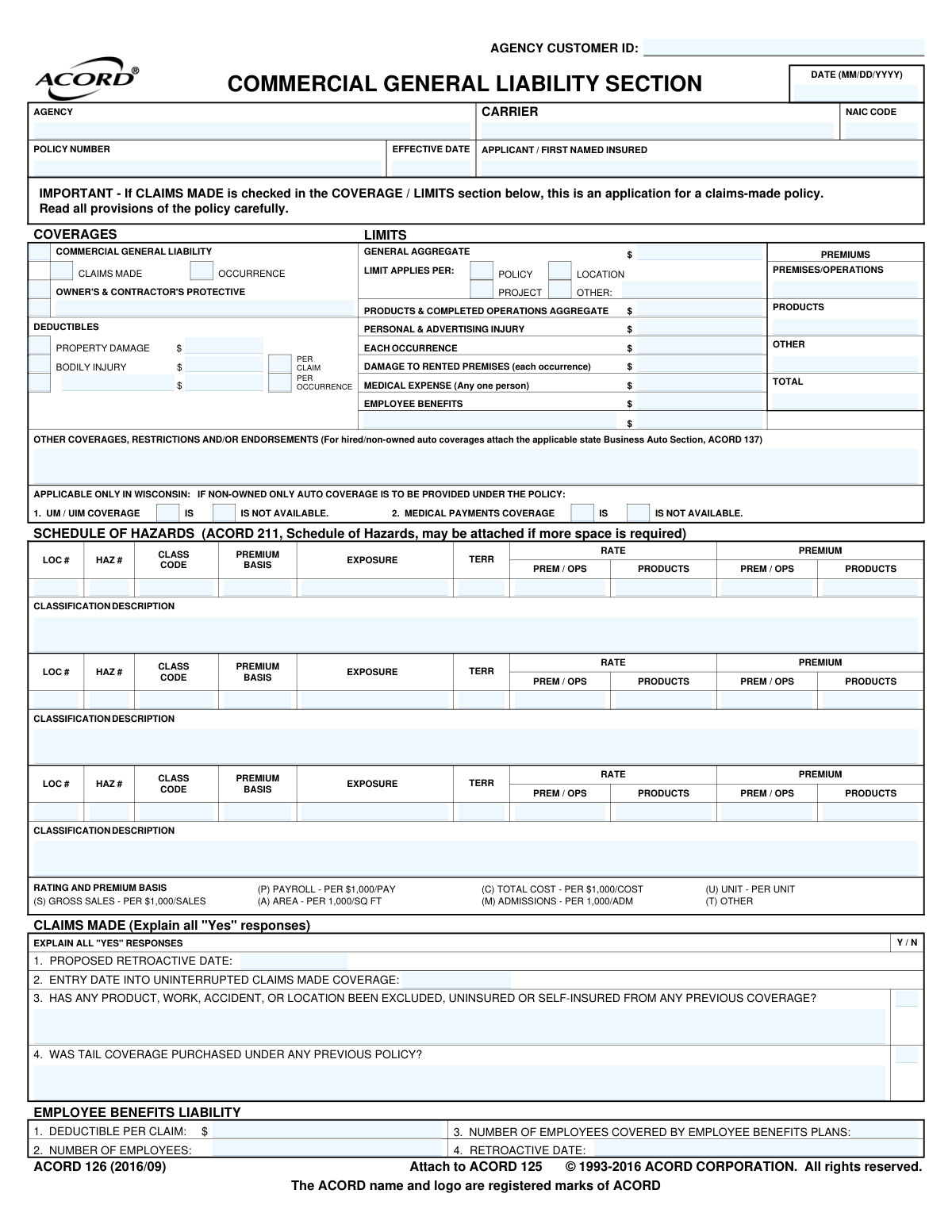
ACORD Form 126, known as the Commercial General Liability Section, is a supplemental application used by insurance agencies and carriers to collect detailed information about a business's operations, exposures, and risk factors. It is attached to the main commercial insurance application (ACORD 125) and is crucial for underwriting and pricing a general liability policy, which protects a business from claims of bodily injury, property damage, and personal injury. Today, this form can be filled out quickly and accurately using AI-powered services like Instafill.ai, which can also convert non-fillable PDF versions into interactive fillable forms.
ACORD 126 is part of the commercial insurance forms and liability insurance forms categories on Instafill.
Our AI automatically handles information lookup, data retrieval, formatting, and form filling.
It takes less than a minute to fill out ACORD 126 using our AI form filling.
Securely upload your data. Information is encrypted in transit and deleted immediately after the form is filled out.

Form specifications

Form name: ACORD 126, Commercial General Liability Section
Number of fields: 258
Number of pages: 1
Language: English
main-image

Instafill Demo: How to fill out PDF forms in seconds with AI

How to Fill Out ACORD 126 Online for Free in 2026

Are you looking to fill out a ACORD 126 form online quickly and accurately? Instafill.ai offers the #1 AI-powered PDF filling software of 2026, allowing you to complete your ACORD 126 form in just 37 seconds or less.
Follow these steps to fill out your ACORD 126 form online using Instafill.ai:
  1. 1 Navigate to Instafill.ai and upload your ACORD 126 form, or select it from their library of templates.
  2. 2 Provide your business's name, contact details, and desired policy effective date in the initial sections.
  3. 3 Specify the desired coverage limits for General Aggregate, Products & Completed Operations, Each Occurrence, and other liability categories.
  4. 4 Detail your business operations in the Schedule of Hazards, including classification codes, premium basis (e.g., payroll, sales), and exposure data.
  5. 5 Respond to the specific questions about your business operations, including products/completed operations, contractor information, and other general information regarding potential risks.
  6. 6 List any additional interests, such as lienholders or additional insureds, providing their details as required.
  7. 7 Carefully review all the information entered by the AI for accuracy, then electronically sign the application to certify its completeness and truthfulness.

Our AI-powered system ensures each field is filled out correctly, reducing errors and saving you time.

Why Choose Instafill.ai for Your Fillable ACORD 126 Form?

Speed

Complete your ACORD 126 in as little as 37 seconds.

Up-to-Date

Always use the latest 2026 ACORD 126 form version.

Cost-effective

No need to hire expensive lawyers.

Accuracy

Our AI performs 10 compliance checks to ensure your form is error-free.

Security

Your personal information is protected with bank-level encryption.

Frequently Asked Questions About Form ACORD 126

The ACORD 126 is a supplemental application for Commercial General Liability (CGL) insurance. It is used by businesses to provide insurers with detailed information about their operations and risks, and it must be attached to the main Commercial Insurance Application (ACORD 125).

Any business applying for or renewing a Commercial General Liability insurance policy needs to complete this form. It is typically filled out by the business owner or an authorized representative, often with the help of their insurance agent.

An 'Occurrence' policy covers incidents that happen during the policy period, no matter when the claim is filed. A 'Claims Made' policy covers claims that are filed during the policy period, provided the incident occurred after a specified retroactive date.

In this section, you must list the different parts of your business operations, assigning a classification code and premium basis (e.g., payroll, sales, area) for each. The insurer uses this information, along with the 'exposure' value you provide, to calculate your premium.

This section requires details about products you sell or services you've completed. You'll need to list products, their annual sales, intended use, and answer questions about warranties, product recalls, and other potential risks.

Insurers need to understand the risk associated with work you subcontract to others, as it can affect your own liability. You must disclose if you require subcontractors to have insurance and whether their coverage limits are adequate.

These are the maximum amounts the insurance company will pay for different types of claims. Key limits include 'Each Occurrence' (per incident), 'General Aggregate' (the total for the policy period), and 'Products & Completed Operations Aggregate'.

This section uses a series of yes/no questions to identify various liability risks not covered elsewhere. Topics include exposure to hazardous materials, sponsoring athletic teams, having a swimming pool on the premises, or leasing employees.

Depending on your operations, you may need to attach supporting documents. Common examples include product brochures, ACORD 815 for foreign products, or an ACORD 101 Additional Remarks schedule if you need more space to explain your answers.

This is an optional coverage that protects your business from claims of errors or omissions in the administration of your employee benefit plans. If you apply for it, you must state the number of employees covered by your plans.

An authorized representative of the applicant's business must sign to certify that the answers are true and correct. The insurance producer (agent) must also sign the application.

Yes, services like Instafill.ai use AI to auto-fill form fields accurately and save time. These tools can extract information from your existing business documents to populate many sections of the application automatically.

You can use a service like Instafill.ai to easily complete the form in your web browser. Simply upload the ACORD 126 PDF, and the platform will make it an interactive, fillable form that you can complete, sign, and share digitally.

If you have a flat, non-fillable PDF, you can use Instafill.ai to make it interactive. The service automatically converts the PDF into a fillable format online, so you don't have to print it and fill it out by hand.

Compliance ACORD 126
Validation Checks by Instafill.ai

1
Conditional Explanation for 'Yes' Responses
This check verifies that for any Yes/No question where the answer is 'Yes', the corresponding explanation text box is not empty, as instructed by 'EXPLAIN ALL "YES" RESPONSES'. This is critical as 'Yes' answers often indicate increased risk that requires detailed explanation for proper underwriting and rating. Failure to provide an explanation will result in a validation error prompting the user to complete the required information before submission.
2
Validates Policy Effective Date Format and Plausibility
This validation ensures the 'EFFECTIVE DATE' is entered in a valid MM/DD/YYYY format and represents a plausible date (e.g., not in the distant past or more than a year in the future). An accurate effective date is fundamental for defining the policy period and ensuring coverage begins when intended. An invalid format or an illogical date will prevent form submission until corrected.
3
Requires Retroactive Date for Claims-Made Policies
This check confirms that if the 'CLAIMS MADE' coverage box is checked, the 'PROPOSED RETROACTIVE DATE' field is populated. The retroactive date is a critical component of a claims-made policy, defining the starting point for which claims are covered. Submitting a claims-made application without this date would leave the policy terms incomplete and un-rateable.
4
Ensures Retroactive Date Precedes Effective Date
This logical check ensures that the 'PROPOSED RETROACTIVE DATE' for a claims-made policy is on or before the policy's 'EFFECTIVE DATE'. A retroactive date after the effective date is illogical and invalidates the intended coverage period. This validation prevents the creation of a policy with nonsensical terms and ensures the integrity of the coverage timeline.
5
Verifies Employee Benefits Coverage Count
This validation ensures that the 'NUMBER OF EMPLOYEES COVERED BY EMPLOYEE BENEFITS PLANS' is less than or equal to the total 'NUMBER OF EMPLOYEES'. It is logically impossible to cover more employees than the total number employed. This check prevents data entry errors that could lead to incorrect rating and premium calculation for Employee Benefits Liability coverage.
6
Confirms Total Premium Summation
This check verifies that the 'TOTAL' premium amount in the Premiums section is the correct sum of the 'PREMISES/OPERATIONS', 'PRODUCTS', and 'OTHER' premium fields. This ensures mathematical accuracy and internal consistency on the application. A mismatch would indicate a calculation error and must be corrected to ensure the final quoted premium is accurate.
7
Validates Hazard Premium Calculation
This check validates the premium calculation within the 'SCHEDULE OF HAZARDS' grid. It confirms that the 'PREMIUM' for both Prem/Ops and Products is correctly calculated based on the 'EXPOSURE', 'RATE', and 'PREMIUM BASIS' (e.g., per $1,000 of sales). This is crucial for ensuring the core rating of the policy is accurate and defensible, as this grid drives the main premium components.
8
Mandates Applicant/First Named Insured
This check ensures the 'APPLICANT / FIRST NAMED INSURED' field is not empty. The named insured is the primary entity covered by the policy, and their identity is the most fundamental piece of information on the application. The form cannot be processed or considered valid without this information.
9
Validates Subcontracted Work Percentage Range
This validation ensures the value entered for '% OF WORK SUBCONTRACTED' is a numeric value between 0 and 100, inclusive. This percentage is a key rating and underwriting factor, and values outside this logical range are impossible. This check prevents typos and ensures the data used for underwriting is valid.
10
Validates Applicant Signature Date
This check ensures that if the applicant's signature is present, the 'DATE' field next to it is also filled with a valid date. The signature date legally attests to when the applicant certified the information as true and complete. An application is considered incomplete without a valid signature date, which could cause legal and compliance issues.
11
Verifies NAIC Code Format
This validation ensures the 'NAIC CODE' is a 5-digit numeric value. The NAIC code is a standard identifier for insurance carriers, and an incorrect format can lead to processing errors and misidentification of the carrier. This check helps maintain data integrity for regulatory and internal reporting.
12
Enforces Mutually Exclusive Coverage Type Selection
This check validates that either 'OCCURRENCE' or 'CLAIMS MADE' is selected, but not both. These are two distinct types of liability coverage triggers, and a single policy section cannot be both simultaneously. This ensures the fundamental basis of the coverage being applied for is clear and unambiguous.
13
Flags Requirement for Foreign Products Attachment (ACORD 815)
This check verifies if the question 'FOREIGN PRODUCTS SOLD, DISTRIBUTED, USED AS COMPONENTS?' is answered 'YES'. If so, it flags the submission to ensure that the required ACORD 815 form has been attached, as explicitly instructed on the application. This is crucial because foreign products introduce unique liability risks that require additional underwriting information captured on the separate form.
14
Requires Explanation for 'Other' Aggregate Limit Application
This validation ensures that if the 'OTHER' checkbox is selected for how the 'GENERAL AGGREGATE' limit applies, the corresponding text field is filled out. This is necessary to define how the aggregate limit is applied, which is a critical policy term. Without this explanation, the policy contract would be ambiguous and could lead to disputes.

Common Mistakes in Completing ACORD 126

Failing to Explain 'Yes' Answers

The form repeatedly instructs the applicant to 'EXPLAIN ALL "YES" RESPONSES' for questions regarding high-risk operations, past claims, or specific business practices. Applicants frequently check 'Yes' but neglect to provide the required written explanation in the space provided. This forces the underwriter to halt the quoting process to request the missing information, causing significant delays. To avoid this, prepare detailed explanations for any 'Yes' answers before starting the form.

Incorrect Classification in the Schedule of Hazards

Applicants often misclassify their business operations or use the wrong premium basis (e.g., Payroll vs. Gross Sales) in the 'Schedule of Hazards' section. This can happen due to a misunderstanding of complex insurance codes or an attempt to find a lower-rated class. An incorrect classification can lead to policy cancellation, denial of claims for the misclassified operation, or significant premium adjustments after an audit. It is crucial to work with an agent to ensure all operations are classified correctly.

Providing Inaccurate Exposure Figures

The 'Exposure' field in the Schedule of Hazards, which is based on metrics like annual payroll, gross sales, or area, is fundamental to premium calculation. Applicants may provide outdated figures or rough estimates instead of precise, current data. This leads to an inaccurate initial premium and can result in a large, unexpected bill for additional premium after the insurer conducts a final audit. Always use the most current and accurate financial and operational data available.

Misrepresenting Subcontractor Insurance Practices

In the 'Contractors' section, applicants may inaccurately state that they always collect certificates of insurance from subcontractors or that all subcontractors carry limits equal to their own. This misrepresentation, whether intentional or not, creates a major exposure for the business. If an uninsured or underinsured subcontractor causes a loss, the applicant's policy and finances may be at risk. It is vital to honestly report the actual procedures for managing subcontractor risk.

Incomplete Product Descriptions and Missing Attachments

When filling out the 'Products / Completed Operations' section, applicants often provide vague descriptions like 'consumer goods' instead of detailing specific items. They also frequently forget to attach the requested literature, brochures, labels, or warnings. This lack of detail prevents the underwriter from accurately assessing product liability risk, leading to quoting delays or even a declination. To avoid this, provide specific product details and all requested supporting documents.

Incorrectly Stating the Claims-Made Retroactive Date

For a 'Claims-Made' policy, the retroactive date is critical as it defines the starting point for when a wrongful act must have occurred to be covered. Applicants who are unfamiliar with this concept may enter the wrong date or leave it blank. An incorrect retroactive date can create a dangerous gap in coverage, leaving the business uninsured for its prior work. This date must be carefully managed, typically by carrying it forward from an expiring policy to ensure continuous coverage.

Incorrectly Listing Additional Interests

Applicants often make errors when adding 'Additional Interest' entities, such as listing a landlord as a 'Mortgagee' instead of an 'Additional Insured'. Each status confers different rights and coverages under the policy. This mistake can mean the business fails to meet its contractual obligations, potentially resulting in a breach of a lease or loan agreement. Carefully review contracts to determine the exact name and required status for each entity.

Under-reporting Hazardous Material Exposure

The question about storing, treating, or transporting hazardous materials is often answered incorrectly. Businesses may not consider common items like cleaning solvents, fuel for equipment, or paints as 'hazardous' in an insurance context. Failing to disclose this exposure is a material misrepresentation that can lead to the denial of a claim if a loss arises from these materials. A thorough inventory of all chemicals and materials on-site is necessary to answer this question accurately.

Confusing 'Occurrence' and 'Claims-Made' Coverage

The form requires the applicant to select between 'Occurrence' and 'Claims-Made' coverage, which are fundamentally different policy types. Applicants often do not understand the distinction, which has major implications for how and when claims are covered. Choosing the wrong type can lead to coverage gaps or unexpected policy requirements, such as the need to purchase 'tail coverage' later. This choice should be discussed in detail with an insurance professional.

Illegible or Incomplete Submission Due to Non-Fillable Format

This ACORD form is often provided as a flat, non-fillable PDF, requiring applicants to print, handwrite, and scan the document. This manual process is a major source of errors, including illegible handwriting, missed fields, and data entry mistakes that delay processing. AI-powered tools like Instafill.ai can solve this by converting the non-fillable PDF into an interactive, fillable version, which helps ensure all fields are completed clearly and accurately, preventing submission errors.
Saved over 80 hours a year

“I was never sure if my IRS forms like W-9 were filled correctly. Now, I can complete the forms accurately without any external help.”

Kevin Martin Green

Your data stays secure with advanced protection from Instafill and our subprocessors

Robust compliance program

Transparent business model

You’re not the product. You always know where your data is and what it is processed for.

ISO 27001, HIPAA, and GDPR

Our subprocesses adhere to multiple compliance standards, including but not limited to ISO 27001, HIPAA, and GDPR.

Security & privacy by design

We consider security and privacy from the initial design phase of any new service or functionality. It’s not an afterthought, it’s built-in, including support for two-factor authentication (2FA) to further protect your account.

Fill out ACORD 126 with Instafill.ai

Worried about filling PDFs wrong? Instafill securely fills acord-126-commercial-general-liability-section-2 forms, ensuring each field is accurate.