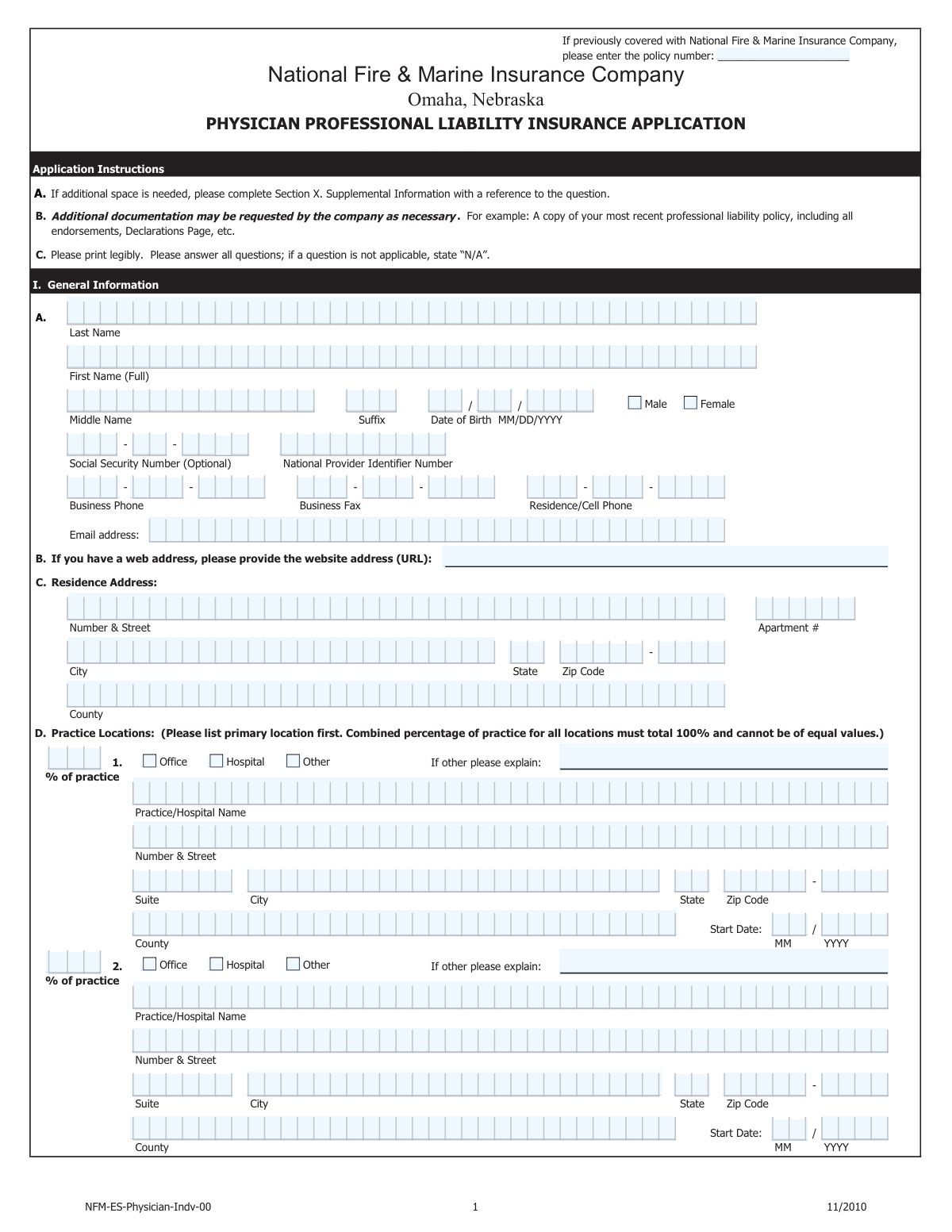
Yes! You can use AI to fill out National Fire & Marine Insurance Company Physicians Professional Liability Application
The National Fire & Marine Insurance Company Physicians Professional Liability Application is a comprehensive document required for medical doctors seeking malpractice insurance. It collects critical data on the applicant's personal information, medical training, practice details, procedural scope, and any prior claims history, which is essential for the underwriting process. Today, this form can be filled out quickly and accurately using AI-powered services like Instafill.ai, which can also convert non-fillable PDF versions into interactive fillable forms.
Our AI automatically handles information lookup, data retrieval, formatting, and form filling.
It takes less than a minute to fill out Physicians Professional Liability Application using our AI form filling.
Securely upload your data. Information is encrypted in transit and deleted immediately after the form is filled out.
Form specifications
| Form name: | National Fire & Marine Insurance Company Physicians Professional Liability Application |
| Number of pages: | 10 |
| Language: | English |
| Categories: | insurance forms, physician forms, insurance application forms, company forms |
Instafill Demo: How to fill out PDF forms in seconds with AI
How to Fill Out Physicians Professional Liability Application Online for Free in 2026
Are you looking to fill out a PHYSICIANS PROFESSIONAL LIABILITY APPLICATION form online quickly and accurately? Instafill.ai offers the #1 AI-powered PDF filling software of 2026, allowing you to complete your PHYSICIANS PROFESSIONAL LIABILITY APPLICATION form in just 37 seconds or less.
Follow these steps to fill out your PHYSICIANS PROFESSIONAL LIABILITY APPLICATION form online using Instafill.ai:
- 1 Navigate to Instafill.ai and upload the Physicians Professional Liability Application form.
- 2 Provide your personal and contact information, including your name, date of birth, SSN, and NPI number.
- 3 Detail your medical education, residency, fellowships, and any additional training, including dates and locations.
- 4 List all current and past practice locations, specifying the percentage of practice at each and your hospital admitting privileges.
- 5 Carefully document your practice scope, including specialties, weekly patient volume, and a detailed checklist of all medical and surgical procedures you perform.
- 6 Disclose your complete professional liability insurance history, including prior carriers, coverage types, and any past claims, lawsuits, or adverse outcomes using the Loss Information Supplement if necessary.
- 7 Review all entered information for accuracy, sign the application electronically, and submit it to complete your request for a coverage quote.
Our AI-powered system ensures each field is filled out correctly, reducing errors and saving you time.
Why Choose Instafill.ai for Your Fillable Physicians Professional Liability Application Form?
Speed
Complete your Physicians Professional Liability Application in as little as 37 seconds.
Up-to-Date
Always use the latest 2026 Physicians Professional Liability Application form version.
Cost-effective
No need to hire expensive lawyers.
Accuracy
Our AI performs 10 compliance checks to ensure your form is error-free.
Security
Your personal information is protected with bank-level encryption.
Frequently Asked Questions About Form Physicians Professional Liability Application
This is an application for professional liability (malpractice) insurance from National Fire & Marine Insurance Company. It must be completed by physicians and other medical professionals seeking new or renewal coverage for themselves or their practice.
To complete this application efficiently, you should gather your medical license numbers, NPI number, a detailed CV, and information on your prior professional liability policies, including retroactive dates. You will also need to provide a comprehensive history of your practice locations and any past claims.
You must disclose any past, present, or potential claims, including any instance where you've been involved in a suit, are aware of an adverse outcome that could lead to a suit, or have received a request for records from an attorney. It is crucial to be thorough and accurate in this section.
The percentages should be your best estimate based on either the time you spend on those activities or the revenue they generate for your practice over a typical year. The total of all your practice activities should add up to 100%.
The form includes a section titled 'Other Medical Techniques / Procedures List.' You should check the box for 'Other Medical Techniques' and then list any procedures you perform that are not already included in the provided checklist.
'Occurrence' coverage protects you from any incident that occurs during the policy period, regardless of when the claim is filed. 'Claims-Made' coverage protects you for claims that are made and reported during the policy period, which is why it often requires a 'retroactive date' to cover prior acts.
A retroactive date, used with Claims-Made policies, is the date from which your coverage begins for incidents that may have occurred in the past. It is vital to provide the correct date from your previous policy to avoid gaps in coverage for your past work.
The form provides a specific field, 'Gap Explanation (Between Practice Locations Gap > 6 Months),' to address this. You must provide a clear and concise explanation for any gap in your practice history that is longer than six months.
Not necessarily, but you must provide complete and honest details about the claim in the 'Loss Information Supplement' section. The insurance company will evaluate the circumstances and outcome as part of their underwriting process.
The form has a section for 'Telemedicine/Out-of-State Services.' If you practice telemedicine, you must check 'Yes' and then list all the states where you provide consultations or medical services in the fields provided.
Yes, services like Instafill.ai use AI to accurately auto-fill form fields, which can save you a significant amount of time and reduce errors on complex applications like this one. The AI can pull information from your saved profile to populate personal details, practice history, and more.
Simply upload the form to the Instafill.ai platform, and its AI will identify the fields and fill them with your stored information. You can then review, edit, and complete any remaining sections before signing and submitting.
If you have a non-fillable or 'flat' PDF, you can use a service like Instafill.ai. It can convert the non-fillable PDF into an interactive, fillable form, allowing you to easily type in your answers, check boxes, and sign electronically.
The form provides space for three locations. If you have more, fill out the provided sections and use the 'Supplemental Information' section at the end of the form to list the additional locations and their details.
The 'Loss Information Supplement' is a separate page that must be completed for each individual claim, suit, or potential claim you are reporting. If you have multiple incidents to report, you will need to fill out a copy of this page for each one.
Compliance Physicians Professional Liability Application
Validation Checks by Instafill.ai
1
Practice Location Percentages Sum to 100%
This check validates that the sum of percentages entered for 'First Practice Location % of Practice', 'Second Practice Location % of Practice', and 'Third Practice Location - Percent of Practice' equals exactly 100%. This is important for accurately understanding the distribution of the applicant's work and associated risk across different locations. If the sum is not 100%, the form submission will be rejected with an error asking the applicant to correct the values.
2
Social Security Number Assembly and Validation
This validation ensures that all nine individual digit fields for the Social Security Number are filled with numeric characters. The system will then assemble these digits into a single 9-digit number and verify its format. This is critical for proper applicant identification and background checks, and failure to provide a valid SSN will halt the application process.
3
Chronological Integrity of Education and Employment Dates
This check verifies that for all date ranges provided, the start year is before or equal to the end year. This applies to medical school attendance, residency programs, and all prior practice locations. This validation prevents logical errors in the applicant's timeline, ensuring the history is coherent and accurate for underwriting review. An invalid date range will trigger an error message requiring correction.
4
Conditional Requirement for 'Other' Explanations
This validation ensures that whenever a user selects an 'Other' checkbox, the corresponding explanation text field is filled out. This applies to practice location types, legal entity types, and other sections with this option. It is crucial for gathering complete information when standard options do not apply, and failure to provide an explanation will result in a completeness error.
5
Applicant Age Plausibility Check
This check calculates the applicant's approximate age based on the 'Date of Birth Year' provided. The system will flag entries that result in an age that is implausible for a practicing physician (e.g., under 25 or over 90). This serves as a basic sanity check to catch significant data entry errors. If an implausible age is detected, a warning will be displayed, prompting the user to confirm or correct the birth year.
6
Surgical Activity Percentages Sum to 100%
This validation confirms that the sum of all percentages entered in the 'Surgical Activity Percentages' section equals 100%. Accurately capturing the breakdown of an applicant's surgical activities is fundamental to assessing their risk profile. If the total does not equal 100%, the submission will fail, and the user will be required to adjust the percentages until they add up correctly.
7
Conditional Logic for Board Eligibility Status
This check enforces that the 'Board eligible (Yes/No)' question can only be answered if the applicant has already selected 'American Board Certified - No'. This prevents contradictory data where an applicant might claim to be both board certified and board eligible. The 'Board eligible' fields will be disabled until 'American Board Certified - No' is checked, ensuring a logical response flow.
8
Loss Information Claim Count Consistency
This validation checks that if an applicant does not check 'None' for any of the loss information questions (V.A, V.B, V.C), then the corresponding numeric entry field must contain a value greater than zero. For example, if 'V.A None' is unchecked, 'V.A Number of Claims or Suits' must be at least 1. This ensures that an indication of a claim is accompanied by a specific count, which is necessary for triggering the requirement for a detailed Loss Information Supplement.
9
Requirement for Hospital Admitting Privileges Explanation
This check ensures that if the applicant selects 'Admit patients to above hospital locations - No', the 'Hospital Admitting Privileges Protocol Explanation' field must be completed. Understanding the protocol for admissions when the applicant lacks direct privileges is a critical underwriting concern related to patient safety and continuity of care. An incomplete explanation will block form submission.
10
Retroactive Date Requirement for Prior Acts Coverage
This validation mandates that the 'Retroactive Date' fields must be filled if the applicant requests 'Claims-Made coverage with Prior Acts coverage'. The retroactive date is a fundamental component of a claims-made policy, defining the start of the coverage period for past events. Without this date, the policy cannot be correctly underwritten or issued, so the form will be considered incomplete.
11
Phone Number Assembly and Format
This check verifies that all three components of the phone number fields (e.g., 'Residence/Cell Phone - first 3 digits') are filled with the correct number of numeric digits (3, 3, and 4 respectively). The system then concatenates them to ensure a valid 10-digit phone number is formed. This is essential for ensuring contact information is accurate for communication, and an invalid format will trigger an error.
12
ZIP Code and ZIP+4 Format Validation
This validation ensures that all standard ZIP Code fields contain exactly 5 numeric digits and that any optional 'ZIP+4' fields, if filled, contain exactly 4 numeric digits. Correctly formatted ZIP codes are essential for address verification, mailing, and geographic risk analysis. The system will reject any non-numeric or incorrectly lengthed entries in these fields.
Common Mistakes in Completing Physicians Professional Liability Application
This form breaks down numbers like the Social Security Number, NPI, and phone numbers into individual digit or segment fields. Applicants often make transposition errors or misalign digits when entering data into these fragmented boxes. An incorrect SSN or NPI can halt the entire underwriting process, as identity and credential verification will fail. To avoid this, meticulously double-check each digit's placement before submission. AI-powered tools like Instafill.ai can prevent this by validating and correctly parsing numbers into the required segmented format.
The application is filled with conditional questions where checking 'Yes' (e.g., 'Discontinued medical activities in last 10 years – Yes') requires a mandatory detailed explanation in a subsequent field. Applicants frequently check the 'Yes' box but forget to provide the required narrative, rendering the application incomplete. This mistake guarantees a delay, as the insurer will have to send the form back for completion. Always treat the checkbox and its corresponding explanation field as a single, two-part question. If the form is a non-fillable PDF, tools like Instafill.ai can convert it to a smart, fillable version that can enforce these rules.
The form requires applicants to break down their practice by location, specialty, and even specific surgical activities using percentages. It is common for these percentages not to add up to 100%, or for the allocation to be a rough guess rather than a careful estimate. These figures are critical for risk assessment and premium calculation, so inaccuracies can lead to incorrect quoting or coverage issues. Before filling, calculate these percentages carefully, ensuring the total for each relevant section equals 100%.
Underwriters scrutinize an applicant's timeline for continuity, and this form specifically asks for explanations for gaps longer than six months between practice locations or one year in training. A common mistake is providing dates that create a gap but failing to fill out the corresponding 'Gap Explanation' field. This is a major red flag for insurers and will always trigger a request for more information, delaying the application. To prevent this, review your professional timeline before starting and be prepared to explain any significant breaks in practice or training.
Section V, the Loss Information section, is the most critical part of the application, and any ambiguity can have severe consequences. Applicants may be tempted to omit incidents that haven't become a formal claim, such as an adverse outcome or an attorney's request for records, but the form explicitly asks for these. Failure to disclose can be considered material misrepresentation, which could lead to the policy being voided retroactively, even years later. It is crucial to be overly transparent and disclose any event that could possibly lead to a claim.
The form asks applicants to choose between 'Claims-Made' and 'Occurrence' coverage and provide a 'Retroactive Date' if applicable. These are complex insurance terms with significant financial implications, and choosing incorrectly can lead to dangerous gaps in coverage. For instance, if switching from a Claims-Made policy, failing to secure 'tail coverage' from the old insurer or 'prior acts' coverage from the new one can leave all past work uninsured. Applicants should consult with their insurance agent to ensure they understand these concepts and select the appropriate coverage.
This long application requires a final signature and date, but also demands initials in specific sections, such as acknowledging the tail coverage selection or assigning the right to cancel coverage. These small initial boxes are easily overlooked, especially on a complex paper or PDF form. A missing signature or initial will invalidate the application or specific election, causing it to be returned for correction. Using an AI-powered form-filling tool like Instafill.ai can help by highlighting all required signature and initial fields and preventing submission until they are completed.
Throughout the form, options for 'Other (please explain)' are provided for fields like 'Type of Legal Entity' or 'First Practice Location Type'. A frequent error is for an applicant to check the 'Other' box but then neglect to type the required explanation in the corresponding text field. This leaves the underwriter with incomplete information and forces them to halt processing to request clarification. To avoid this, always complete the explanation immediately after selecting an 'Other' option.
On a form this extensive, it's easy to enter contradictory information, which raises red flags for underwriters. For example, an applicant might list several hospitals under 'Practice Location Details' but then check 'No' for 'Admit patients to above hospital locations' without providing the required protocol explanation. Another example is listing practice percentages for surgical activities that don't add up to the total surgical percentage listed elsewhere. These inconsistencies require manual review and clarification, slowing down the entire process. A thorough final review of the entire completed application is the best way to catch these errors.
The form contains a massive checklist of medical and surgical procedures, some of which require a 'Percent of Total Practice' if selected. Applicants may incorrectly check a procedure they don't perform or forget to provide the required percentage for a high-risk cosmetic procedure. Since premiums are heavily influenced by the risk level of procedures performed, these errors can lead to a significantly mispriced policy or questions about the applicant's scope of practice. It is vital to review this checklist carefully and ensure all selections and associated percentages are accurate.
Saved over 80 hours a year
“I was never sure if my IRS forms like W-9 were filled correctly. Now, I can complete the forms accurately without any external help.”
Kevin Martin Green
Your data stays secure with advanced protection from Instafill and our subprocessors

Robust compliance program
Transparent business model
You’re not the product. You always know where your data is and what it is processed for.
ISO 27001, HIPAA, and GDPR
Our subprocesses adhere to multiple compliance standards, including but not limited to ISO 27001, HIPAA, and GDPR.
Security & privacy by design
We consider security and privacy from the initial design phase of any new service or functionality. It’s not an afterthought, it’s built-in, including support for two-factor authentication (2FA) to further protect your account.
Fill out Physicians Professional Liability Application with Instafill.ai
Worried about filling PDFs wrong? Instafill securely fills national-fire-marine-insurance-company-physicians-professional-liability-application forms, ensuring each field is accurate.