
Yes! You can use AI to fill out AEIG Instructors and Trainers Liability Application
Don't type 187 fields by hand. Tell our AI about yourself, or upload a document you already have, and it fills every field in seconds. You check it, then download, print or sign.
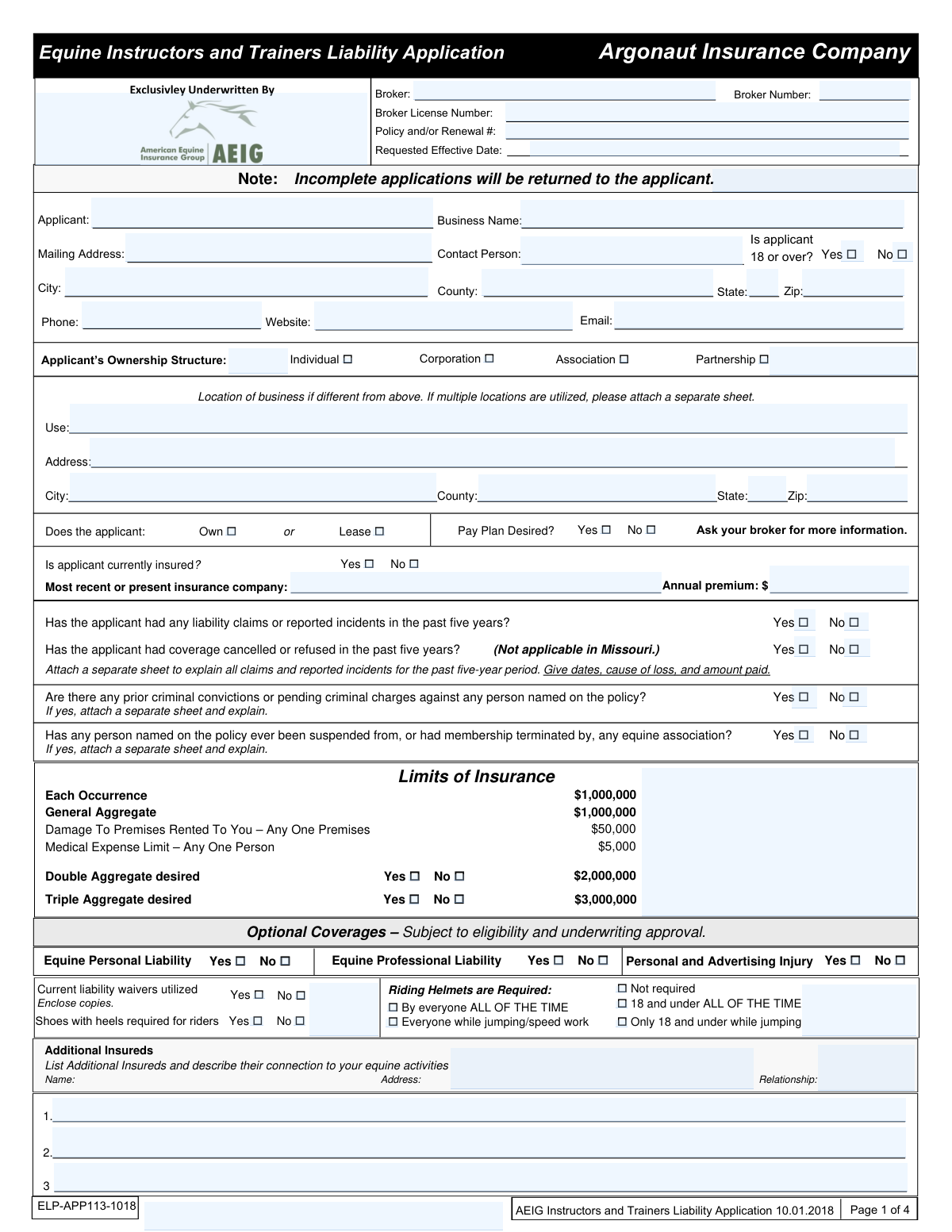
The AI does the filling. You just check it.
No typing into boxes, nothing to install.
What this form asks for
The AI fills all of it, from your answers or your documents.
The AI checks your answers before you download
14 checks built for this form, so a wrong date or a missing answer is caught before anyone else sees it.
This validation confirms that the 'Is applicant 18 or over?' checkbox is marked 'Yes'. This is a fundamental eligibility requirement for entering into a legal insurance contract. If 'No' is selected, the application should be immediately flagged for rejection as the applicant is not of legal age to be the primary insured.
If the applicant checks 'Yes' to 'Is applicant currently insured?', this validation ensures that the 'Most recent or present insurance company' and 'Annual premium' fields are filled. This information is crucial for underwriting to assess the applicant's insurance history and risk profile. Failure to provide these details when required will result in an incomplete application.
This check calculates the sum of the individual revenue fields (Training, Riding Instruction, Horse Sales, Riding Clinics, Officiating) and compares it to the value entered in 'Total Annual Gross Revenue'. This ensures the financial data is accurate and consistent, which is vital for calculating premiums and understanding the scope of the business. A mismatch would require the applicant to correct the figures before processing.
This validation checks if the applicant has selected 'Yes' for liability claims, criminal convictions, or equine association suspensions. If 'Yes' is selected for any of these, the system flags the application to ensure a separate explanatory document is attached or provided. This is critical for risk assessment, and failure to provide the required explanation will halt the underwriting process.
This check ensures the 'Requested Effective Date' is entered in a valid date format (e.g., MM/DD/YYYY) and is not a date in the past. An invalid or past date would cause processing errors and does not reflect a valid request for future coverage. The application cannot be processed until a valid future date is provided.
If the applicant selects 'Yes' for 'Is CARE, CUSTODY, OR CONTROL (CCC) coverage desired?', this validation confirms that at least one CCC limit option is selected and that the fields for average/maximum number and value of non-owned horses are completed. These details are essential for rating and issuing the correct CCC coverage. An incomplete CCC section will prevent the policy from being quoted correctly.
And 8 more checks
- Validates Logic of Experience Years
- Triggers Requirement for Day Camp Supplemental Application
- Verifies Applicant Signature and Date are Present
- Validates Horse Sales Figures Consistency
- Ensures All Required Applicant Contact Fields are Present
- Validates Email Address Format
- Compares Max Non-Owned Horse Value to Selected CCC Limit
- Checks for Revenue Entry when an Activity is Selected
Let AI fill out your ELP-APP113-1018
No typing. Every field filled in seconds, checked, ready to sign.
How to Fill Out ELP-APP113-1018 Online for Free in 2026
What the AI walks you through.
- Navigate to Instafill.ai and upload or select the AEIG Instructors and Trainers Liability Application.
- Use the AI assistant to accurately fill in applicant information, business details, and ownership structure.
- Provide a detailed summary of your equine activities, including years of experience, operational descriptions, and annual revenues for training, instruction, and sales.
- Select your desired liability limits and indicate if you require optional coverages like Care, Custody, or Control (CCC), choosing the appropriate limits for non-owned horses.
- Disclose any prior claims, incidents, or additional business activities not covered elsewhere in the application.
- Carefully read the fraud statements, then electronically sign and date the declaration to certify the accuracy of the information provided.
- Securely download, print, or share the completed and signed application with your broker or the insurance company.
Common Mistakes in Completing ELP-APP113-1018
The ones the AI is built to catch.
Failing to Attach Required Explanations for 'Yes' Answers
Inconsistent or Inaccurate Revenue Reporting
Not Disclosing All Equine Activities
Misunderstanding Care, Custody, or Control (CCC) Coverage
Forgetting to Enclose Supporting Documents
Providing Vague Operational Descriptions
Inconsistent Applicant vs. Business Name Information
Missing Applicant Signature and Date
Neglecting to Update Clinic Information
Incorrectly Filling Out Conditional Sections
Frequently Asked Questions About ELP-APP113-1018
Is it really free for 7 days?
Can I fill other forms too?
How do I cancel?
How does the AI fill out ELP-APP113-1018?
What happens to my information?
How complex is ELP-APP113-1018 to fill out?
What is the purpose of the Equine Instructors and Trainers Liability Application?
Who should fill out this form?
What happens if I don't fill out the entire application?
What is 'Care, Custody, or Control' (CCC) coverage?
I have had a liability claim in the past. Do I need to report it?
My business operates at multiple locations. How do I list them on the form?
What are 'Additional Insureds' and who should I list?
Are commercial trail riding activities covered by this policy?
I sometimes host riding clinics. Is that covered?
Do I need to send a copy of my liability waiver with the application?
Can I use an AI tool to help me fill out this application?
How can I fill out this form online?
The PDF version of this form I have is not fillable. What should I do?
Get your ELP-APP113-1018 filled out by AI
$0 today. Cancel before Oct 31 and you pay nothing.
Other forms like this one
insurance forms: Form 1095-A, Health Insurance Marketplace Statement, Form SSA-4-BK, Application for Child's Insurance Benefits, Form SSA-10, Application for Widow's or Widower's Insurance Benefits, Form 1095-C, Employer-Provided Health Insurance Offer and Coverage, National Integrity Life Insurance Company Ownership Change Request Form (NI-77-0039-2505), Record of Advice and Needs Analysis (Non-Life Insurance — Personal and Commercial Lines), Form 7206 (2025), Self-Employed Health Insurance Deduction, Continental American Insurance Company (CAIC) / Aflac Group Critical Illness Claim Form (with Attending Physician’s Statement, HIPAA Authorization to Obtain Information, and Electronic Funds Transaction Authorization), Prudential Group Disability Insurance – Education and Employment History Form (GL.2009.009, Ed. 06/2017), acord-25-201603-certificate-of-liability-insurance-1, Brotherhood Mutual Insurance Company Ministry Driver Screening Form (A99), Assurity Life Insurance Company Disability Claim Form — Attending Physician’s Statement, Amateur Sports / Activities Accident Insurance Quote Request Form (Philadelphia Insurance Companies), Martial Arts Studio General Liability and Property Application (Fitness and Wellness Insurance / Philadelphia Insurance Companies) (03/2011), The Prudential Insurance Company of America Group Disability Insurance – Education and Employment History Form (GL.2009.009, Ed. 06/2017), VA Form 29-357, Claim for Disability Insurance Benefits (Government Life Insurance), CMS-1500 (02-12), Health Insurance Claim Form (NUCC Approved) (OMB 0938-1197), Prudential Group Disability Insurance – Education and Employment History Form (GL.2009.009, Ed. 06/2017), HDFC ERGO General Insurance Company Limited – Request for Cashless Hospitalisation for Health Insurance (Policy Part – C), Beneficiary Designation/Change - Principal Life Insurance Company
instructor liability forms: Argonaut Insurance Company, AEIG Instructors and Trainers Liability Application, Argonaut Insurance Company, Equine Instructors and Trainers Liability Application
liability application forms: FARM LIABILITY / LIMITED PROPERTY - APPLICATION, Oregon Practitioner Credentialing Application (including Attachment A: Professional Liability Action Detail), Martial Arts Studio General Liability and Property Application (Fitness and Wellness Insurance / Philadelphia Insurance Companies) (03/2011), Argonaut Insurance Company, AEIG Instructors and Trainers Liability Application, National Fire & Marine Insurance Company Physicians Professional Liability Application, AXIS MEDIA/PROFESSIONAL INSURANCE® PRODUCERS LIABILITY NEW BUSINESS APPLICATION, Argonaut Insurance Company, Equine Instructors and Trainers Liability Application, Physician's Professional Liability Insurance Application, General Liability and Builder's Risk Insurance Application
Let AI fill out your ELP-APP113-1018
Your trial starts once a card is added. You pay nothing before Oct 31.
Our AI already knows this form, all 187 fields of it. Skip the typing: tell it about yourself, or upload what you have, and it fills the whole form in seconds.
- AI fills every field on all 4 pages, checkboxes included
- No typing into boxes: answer a few questions, or upload a document you already have, an old copy of this form, a photo of a document
- The AI checks the answers; you review and change anything before you download
- Download the finished PDF, print it, or sign it online
- Encrypted, and never used to train AI
Cancel before Oct 31 and you pay nothing.
A card is needed to start the trial. Cancel in two clicks from your account.
Terms · Privacy