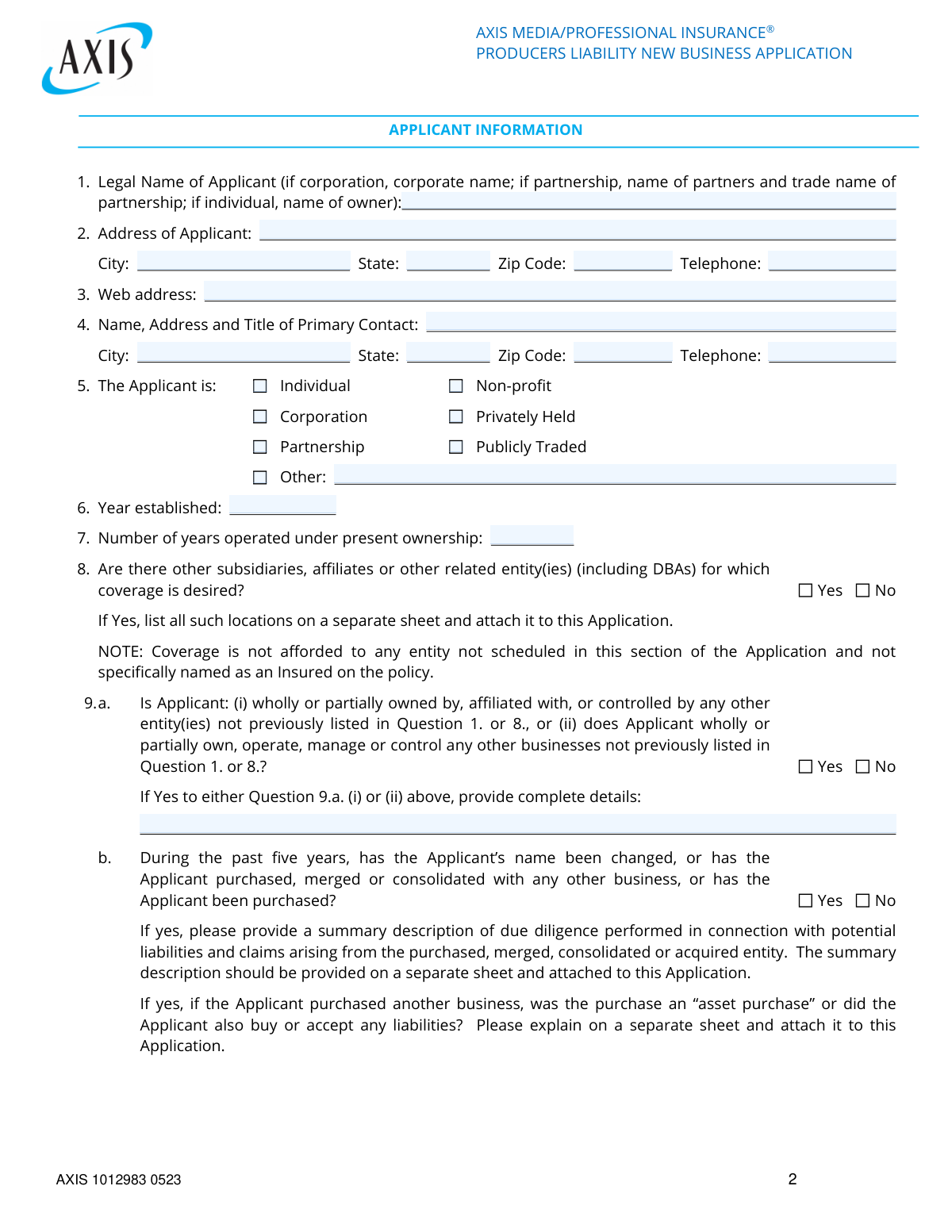
Yes! You can use AI to fill out AXIS MEDIA/PROFESSIONAL INSURANCE® PRODUCERS LIABILITY NEW BUSINESS APPLICATION

This form is a new business application for producers seeking liability insurance from AXIS for media productions such as films, TV shows, and documentaries. It collects detailed information about the applicant's business, the specific production, risk management procedures, and prior insurance and claims history to underwrite the policy. Today, this form can be filled out quickly and accurately using AI-powered services like Instafill.ai, which can also convert non-fillable PDF versions into interactive fillable forms.
Our AI automatically handles information lookup, data retrieval, formatting, and form filling.
It takes less than a minute to fill out AXIS 1012983 0523 using our AI form filling.
Securely upload your data. Information is encrypted in transit and deleted immediately after the form is filled out.

Form specifications

Form name: AXIS MEDIA/PROFESSIONAL INSURANCE® PRODUCERS LIABILITY NEW BUSINESS APPLICATION
Number of pages: 9
Language: English
Categories: insurance forms, business forms, insurance application forms
main-image

Instafill Demo: How to fill out PDF forms in seconds with AI

How to Fill Out AXIS 1012983 0523 Online for Free in 2026

Are you looking to fill out a AXIS 1012983 0523 form online quickly and accurately? Instafill.ai offers the #1 AI-powered PDF filling software of 2026, allowing you to complete your AXIS 1012983 0523 form in just 37 seconds or less.
Follow these steps to fill out your AXIS 1012983 0523 form online using Instafill.ai:
  1. 1 Navigate to Instafill.ai and upload or select the AXIS Producers Liability New Business Application.
  2. 2 Use the AI assistant to accurately fill in the Applicant Information section, including legal name, address, business structure, and contact details.
  3. 3 Provide specific policy and production details, such as requested liability limits, production budget, title, type, and distribution plans.
  4. 4 Complete the Risk Management Procedures section by detailing legal counsel, clearance processes for scripts, titles, music, and likeness rights.
  5. 5 Disclose information regarding prior insurance, loss history, and any knowledge of potential future claims as requested in Section IV.
  6. 6 Carefully review all entered information for accuracy and completeness before an authorized officer (CEO, CFO, etc.) signs and dates the application.

Our AI-powered system ensures each field is filled out correctly, reducing errors and saving you time.

Why Choose Instafill.ai for Your Fillable AXIS 1012983 0523 Form?

Speed

Complete your AXIS 1012983 0523 in as little as 37 seconds.

Up-to-Date

Always use the latest 2026 AXIS 1012983 0523 form version.

Cost-effective

No need to hire expensive lawyers.

Accuracy

Our AI performs 10 compliance checks to ensure your form is error-free.

Security

Your personal information is protected with bank-level encryption.

Frequently Asked Questions About Form AXIS 1012983 0523

This application is used by media producers to apply for new producers liability insurance. This type of insurance protects against claims arising from the production and distribution of content, such as libel, invasion of privacy, and copyright infringement.

Any individual or company producing media content—such as films, TV shows, documentaries, or podcasts—who is seeking liability insurance coverage for their production should complete this application.

You must attach several documents, including resumes for the Producer and Executive Producer, a copy of the script or a link to the production, and a Title Search and Report. Additional documents may be required depending on your answers.

For multiple productions or a series, you must attach a separate sheet with complete responses for each production or episode as indicated in questions like 5 and 6 in the 'Specific Information' section.

You can submit the completed application and all required attachments to Walterry Insurance Brokers via mail, fax, or email. The contact details are provided on the first page of the form.

Clearance procedures are the steps you take to ensure your production does not infringe on the rights of others, such as obtaining releases for actors, clearing music rights, and verifying the chain of title. Following these procedures is critical for managing risk and securing insurance coverage.

You must disclose this in the 'Risk Management Procedures' section and confirm whether you have obtained written releases from any living persons portrayed or identifiable in the production. If releases were not obtained, you must provide a detailed explanation.

A Title Report is required if you are seeking Title Coverage for your production. You must attach a copy of the report from a title clearance service with your application.

Yes, you must disclose any media liability claims, lawsuits, or threats of a suit from the past five years. Failure to disclose this information can result in the exclusion of claims arising from those circumstances.

The application must be signed by an authorized representative of the applicant, such as the Chief Executive Officer (CEO), Chief Financial Officer (CFO), Chief Operations Officer (COO), or General Counsel.

Yes, services like Instafill.ai use AI to accurately auto-fill form fields, which can save you significant time and help ensure accuracy on detailed applications like this one.

You can use a service like Instafill.ai to fill out the form online. Simply upload the PDF, and the platform will make it interactive, allowing you to type directly into the fields and save your progress.

If you have a non-fillable or 'flat' PDF, you can use a tool like Instafill.ai to convert it into an interactive, fillable form. This allows you to easily complete the application digitally without needing to print and write by hand.

Compliance AXIS 1012983 0523
Validation Checks by Instafill.ai

1
Policy Period Chronology
This check ensures that the 'Policy Period Requested' end date is after the start date. A policy period cannot end before it begins, so this validation is critical for defining a valid coverage term. If the end date is not after the start date, the form submission will be rejected, and the user will be prompted to correct the dates.
2
Conditional Requirement for 'Other' Applicant Type
This validation confirms that if the 'Other' checkbox is selected for the Applicant's type, the corresponding text field specifying the type is not empty. This is important for underwriting to understand the applicant's legal structure when it doesn't fit standard categories. Failure to provide this detail will result in an error message requiring the user to specify the applicant type.
3
Logical Date Sequence for Production Milestones
This check verifies that the 'Estimated date for first release' is on or after the 'Estimated start date of principal filming'. A production cannot be released before it is filmed, so this ensures logical consistency in the production timeline. An invalid sequence would trigger a validation error, asking the user to review and correct the production dates.
4
Aggregate Limit Must Exceed or Equal Occurrence Limit
This validation ensures the 'Aggregate for all Claims' limit is greater than or equal to the 'Occurrence for Each Claim' limit. The aggregate limit represents the total amount the policy will pay, which cannot be less than the amount for a single claim. If this condition is not met, the system will flag an error, as it represents a logically impossible coverage structure.
5
Conditional Field Completion for Production Type
This check ensures that if a specific 'Type of production' is selected, any associated required fields are completed. For example, if 'T.V. Series' is chosen, the 'Number of episodes' field must contain a valid number. This ensures all necessary details for a given production type are captured for accurate risk assessment, and missing data will block submission.
6
Completeness of Risk Management 'Yes' Answer Paths
This validation rule checks that if a 'Yes' answer is given to a primary risk management question (e.g., Q5, 'Is the name or likeness of any living person used?'), the subsequent follow-up questions must also be answered. For instance, if the follow-up is answered 'No' (e.g., 'clearances have not been obtained'), the explanation text box must be filled. This ensures that all identified risks are fully explained for underwriting review.
7
Completeness of Prior Insurance History
This validation is triggered if the applicant answers 'Yes' to having producer liability insurance currently in force. It checks that at least one complete entry is provided in the five-year history table, including insurer, policy period, limits, and deductible. This information is mandatory for underwriters to assess the applicant's insurance history and risk profile.
8
Exclusive Selection for Prior Claims Status
This check validates the response to Question 4 in the 'LOSS HISTORY' section regarding prior media liability claims. The user must either check the 'None' box or indicate that an attachment with claim details is being provided, but not both. The system will return an error if neither option is selected or if both are, ensuring a clear and unambiguous declaration of claim history.
9
Future Date Prevention for 'Year Established'
This validation ensures the 'Year established' entered for the applicant is not a future year. A business cannot be established in the future, and this check prevents simple data entry errors. If a future year is entered, the user will be prompted to enter a valid year that is less than or equal to the current year.
10
Logical Consistency of Ownership Years
This check verifies that the 'Number of years operated under present ownership' is not greater than the company's total age (calculated as the current year minus the 'Year established'). This maintains logical consistency between related data points on the application. An inconsistency would result in a validation error prompting the user to correct one of the values.
11
Required Attachment for Mergers and Acquisitions
This validation ensures that if the applicant answers 'Yes' to having been involved in a merger, acquisition, or name change in the past five years (Question 9.b), the system flags that supporting documentation is required. This is crucial because such events can introduce new liabilities. The system should prevent final submission or create a follow-up task until the required attachment is confirmed.
12
Conditional Fields for 'Based on another work'
This check confirms that if the production is 'Based on another work' (Question 11), the 'Name of other work' field is filled out and the question 'Have the necessary agreements...been obtained?' is answered. This information is critical for assessing copyright and intellectual property risks. Failure to provide these details will halt the submission process until the required information is supplied.
13
Signature Title Authorization
This validation checks that the 'Title' of the person signing the application is one of the authorized roles listed (e.g., CEO, CFO, COO, General Counsel) or a recognizable functional equivalent. This is essential to confirm that the application is being submitted by an individual with the legal authority to bind the company. An invalid title would trigger a warning or require manual review.
14
Web Address Format Validation
This check ensures that any field intended for a web address, such as the applicant's website or the online service URL, contains a value in a valid URL format (e.g., starts with 'http://' or 'https://' and includes a domain name). This maintains data quality and ensures that links provided for review are functional. An invalid format will result in an error message requesting the user to correct the entry.

Common Mistakes in Completing AXIS 1012983 0523

Incomplete Disclosure of Affiliated Entities

Applicants often forget or intentionally omit DBAs, subsidiaries, or other affiliated entities in Question 8, assuming they are covered under the primary applicant's name. The form explicitly states that coverage is not afforded to any entity not scheduled, which can lead to a catastrophic uninsured loss for a related company. To avoid this, carefully list every legal entity and DBA that requires coverage, even if they seem minor. AI-powered tools like Instafill.ai can help manage and pre-populate data for multiple related entities to ensure none are missed.

Failure to Attach All Required Documents

This application requires multiple attachments, including producer resumes, scripts, a Title Search and Report, and potentially clearance guidelines. Applicants frequently overlook these instructions, leading to an incomplete submission and significant delays in underwriting. An incomplete application cannot be processed, stalling the production's insurance and financing. Create a checklist of all required documents before starting the application and gather them in one place to ensure everything is attached before submission.

Vague or Incomplete Plot Summary

In Question 7 of the 'Specific Information' section, applicants may provide a one-sentence, generic plot summary. This is insufficient for an underwriter to assess risks related to defamation, invasion of privacy, or copyright infringement, especially for docudramas or stories 'inspired by real events'. A vague summary will trigger follow-up questions and delay quoting. Provide a detailed synopsis that includes the time frame, setting, and any sensitive themes or portrayals of real people or events.

Incorrectly Answering 'Yes' to Clearance Questions

The 'Risk Management Procedures' section contains complex legal questions about clearances (e.g., music, likeness, clips). Applicants may check 'Yes' assuming all rights have been secured without having the proper documentation or full understanding of the scope required (e.g., international vs. domestic rights). This misrepresentation can lead to a claim being denied. Before answering, consult with your production attorney to confirm that all necessary written releases, licenses, and reports are in hand and match the scope of your production's distribution.

Under-reporting Prior Claims and Incidents

Question 3 in the 'Loss History' section asks about suits, threats of suits, or any situation 'which might reasonably be expected to give rise to a future claim.' Applicants often only disclose formal lawsuits, ignoring written threats, cease-and-desist letters, or unresolved disputes. Failure to disclose this information is a material misrepresentation that could void the policy. It is crucial to disclose any and all such incidents, no matter how minor they may seem, to ensure coverage is secure.

Applying for Multiple Productions Incorrectly

The instructions clearly state that for multiple productions, applicants must attach a separate, complete response for each. A common mistake is to either average the budgets and revenues or provide details for only the largest production. This results in inaccurate rating and potential coverage gaps for the productions that were not detailed. To avoid this, complete a separate set of answers for each production's specific details (budget, title, dates, etc.) and attach it as a supplement to the main application.

Using an Unauthorized Signatory

The signature page explicitly requires the application to be signed by a Chief Executive Officer, Chief Financial Officer, Chief Operations Officer, or General Counsel. A line producer, office manager, or other employee signing the form is a frequent error. An unauthorized signature can invalidate the application, requiring it to be re-signed and re-submitted, thereby delaying the binding of coverage. Ensure the form is routed to and signed by one of the specified C-level executives or legal counsel.

Providing an Incorrect or Incomplete Legal Name

In Question 1, applicants sometimes enter a common trade name or DBA instead of the full, registered legal name of the entity (e.g., 'My Awesome Films' instead of 'My Awesome Films, LLC'). This can create ambiguity about which entity is insured, potentially leading to claim denials or legal complications. Always use the exact legal name as it appears on official corporate or partnership formation documents. Tools like Instafill.ai can help by storing and accurately populating the correct legal entity information across all forms.

Omitting Required Explanations for 'Yes' or 'No' Answers

Throughout the application, many questions require a detailed explanation if a specific answer is chosen (e.g., Question 9.b. regarding mergers, or Question 7 in Risk Management regarding identifiable persons without a release). Applicants often check the box but fail to provide the required narrative on an attached sheet. This renders the answer incomplete and forces the underwriter to request more information, delaying the quote. Always review your answers and attach a separate, clearly labeled document with all necessary explanations.

Failing to Attach the Title Report

Question 9 in the 'Risk Management' section asks if a title report has been obtained and instructs the applicant to attach a copy. The form's clearance procedures also state that Title Coverage will not be offered unless a report is submitted and approved. Applicants may answer 'Yes' but forget to include the actual report, which makes it impossible for the insurer to underwrite and grant this critical coverage. Always attach the full title report with the application if Title Coverage is needed.

Misinterpreting 'Gross Production Costs/Budget'

When asked for the 'Gross Production Costs/Budget' in Question 4.a, applicants might enter a net figure, excluding costs like insurance premiums, financing costs, or contingency funds. This can lead to being underinsured, as the premium and limits are based on the total risk exposure represented by the gross budget. To ensure proper coverage, calculate and enter the all-in, gross budget figure. Since this form is a non-fillable PDF, a tool like Instafill.ai can convert it to a fillable version, making data entry for complex figures easier and less prone to error.
Saved over 80 hours a year

“I was never sure if my IRS forms like W-9 were filled correctly. Now, I can complete the forms accurately without any external help.”

Kevin Martin Green

Your data stays secure with advanced protection from Instafill and our subprocessors

Robust compliance program

Transparent business model

You’re not the product. You always know where your data is and what it is processed for.

ISO 27001, HIPAA, and GDPR

Our subprocesses adhere to multiple compliance standards, including but not limited to ISO 27001, HIPAA, and GDPR.

Security & privacy by design

We consider security and privacy from the initial design phase of any new service or functionality. It’s not an afterthought, it’s built-in, including support for two-factor authentication (2FA) to further protect your account.

Fill out AXIS 1012983 0523 with Instafill.ai

Worried about filling PDFs wrong? Instafill securely fills axis-mediaprofessional-insurance-producers-liability-new-business-application forms, ensuring each field is accurate.