
Instafill.ai
7 days free
AI form filling · 100 fields · 4 pages · done in seconds

Yes! You can use AI to fill out Form 2553, Election by a Small Business Corporation

Don't type 100 fields by hand. Tell our AI about yourself, or upload a document you already have, and it fills every field in seconds. You check it, then download, print or sign.
7 days free, then $19.99/month · Cancel anytime
AI fills it, no typingEncrypted, never used to train AICancel in two clicks
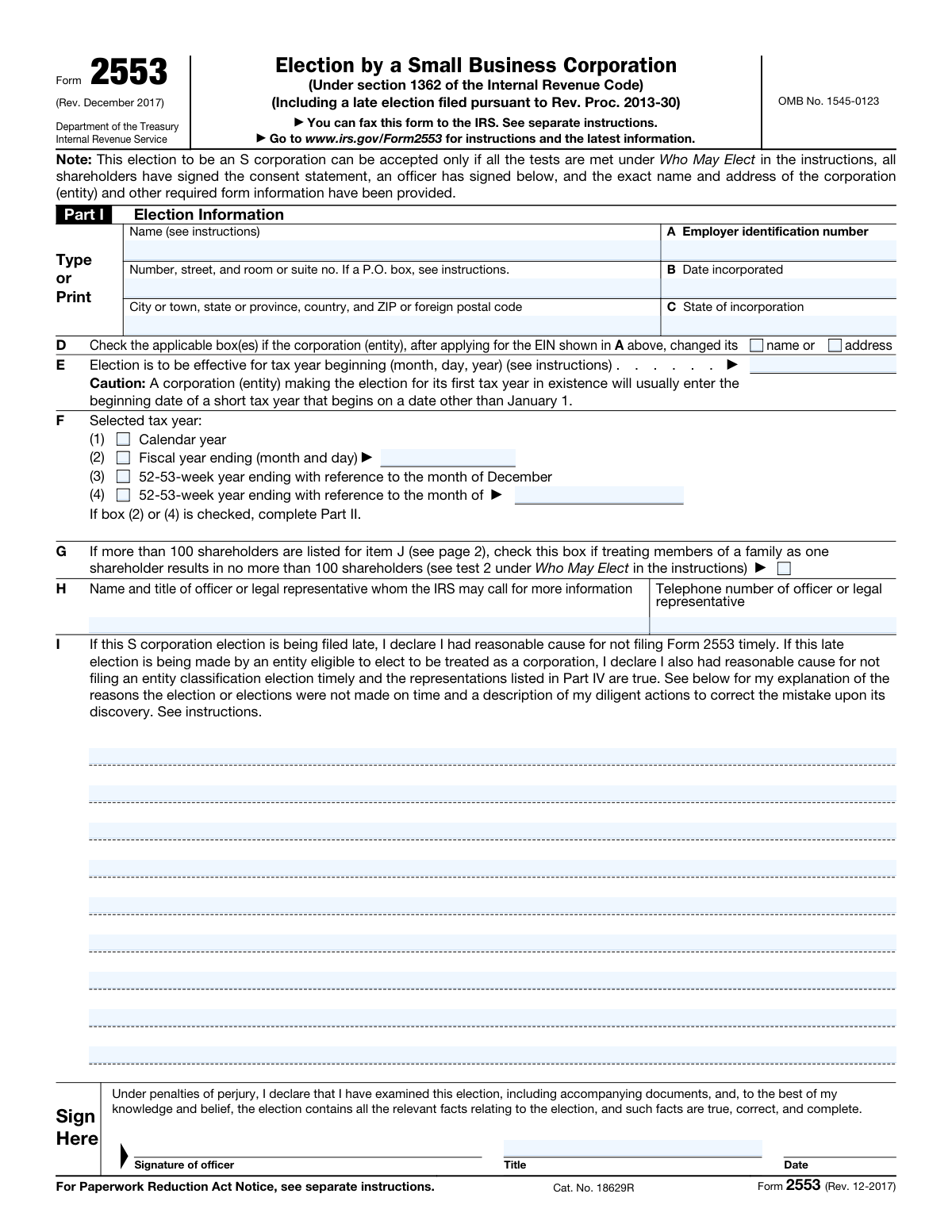
Form 2553, Election by a Small Business Corporation, page 1
Moderate · 48/100Form Complexity Index

The AI does the filling. You just check it.

No typing into boxes, nothing to install.

Tell the AI about youAnswer a few questions in plain words, or upload a document you already have. That is all the typing there is.
AI fills every field in secondsIt puts each answer in the right box on every page, checkboxes included.
Check it and downloadReview every field, change anything, then download, print or sign the PDF.

What this form asks for

The AI fills all of it, from your answers or your documents.

Form 2553, officially known as the Election by a Small Business Corporation, is used by eligible corporations to elect S corporation status under section 1362 of the Internal Revenue Code. This election allows the corporation to pass corporate income, losses, deductions, and credits through to their shareholders for federal tax purposes, avoiding double taxation on corporate income. It's important for small businesses seeking the tax benefits of S corporation status to file this form correctly and timely.
Fillable fields100
Pages4
Sections2
Form Complexity IndexModerate, 48/100

The AI checks your answers before you download

15 checks built for this form, so a wrong date or a missing answer is caught before anyone else sees it.

Verifies that the form is filed at the correct address or fax number based on the corporation's principal business location.

Ensures that the Form 2553 is submitted to the appropriate IRS address or fax number, which is determined by the corporation's principal business location. This validation is crucial for the timely processing of the form. It prevents delays or rejections due to incorrect submission channels. The AI software cross-references the corporation's location with the IRS's filing instructions to confirm accuracy.

Ensures that all tests under 'Who May Elect' are met, including the requirement that all shareholders have signed the consent statement and an officer has signed the form.

Confirms that the corporation meets all eligibility criteria outlined in the 'Who May Elect' section of Form 2553. This includes verifying that every shareholder has provided their consent to the election by signing the consent statement. Additionally, it checks that an authorized officer of the corporation has signed the form, affirming the corporation's intent to elect S corporation status. This step is vital for ensuring the election's validity and compliance with IRS regulations.

Confirms that the exact name and address of the corporation, along with the Employer Identification Number (EIN), date of incorporation, and state of incorporation, are accurately provided in Part I.

Validates the accuracy of the corporation's identifying information as entered in Part I of Form 2553. This includes the corporation's exact legal name, current address, Employer Identification Number (EIN), date of incorporation, and state of incorporation. Ensuring this information is correct is essential for the IRS to process the election without issues. The AI software cross-checks this data against the corporation's official records to prevent discrepancies.

Checks if the corporation has indicated any changes in name or address after applying for the EIN.

Verifies whether the corporation has experienced any changes in its name or address since obtaining its Employer Identification Number (EIN). If such changes have occurred, the AI software ensures that they are accurately reflected in Form 2553. This step is important for maintaining up-to-date records with the IRS and avoiding potential communication or processing errors. The software prompts for updates if discrepancies are detected.

Validates that the effective date of the election for the tax year is specified and the correct tax year type (calendar year, fiscal year, or 52-53-week year) is selected.

Ensures that the effective date of the S corporation election is clearly specified on Form 2553. It also confirms that the correct tax year type—whether calendar year, fiscal year, or 52-53-week year—is selected, based on the corporation's accounting practices. This validation is critical for determining the start of the S corporation status and ensuring accurate tax reporting. The AI software checks for consistency between the selected tax year type and the corporation's fiscal records.

Ensures that, if applicable, treating members of a family as one shareholder results in no more than 100 shareholders.

The validation ensures that when family members are treated as a single shareholder, the total number of shareholders does not exceed the limit of 100. This is crucial for maintaining the small business corporation status under the IRS regulations. It checks the shareholder count meticulously to prevent any discrepancies that could affect the corporation's eligibility. This step is vital for ensuring compliance with the S corporation requirements.

And 9 more checks
  • Verifies that the name and title of an officer or legal representative whom the IRS may contact for more information, along with their telephone number, are provided.
  • Confirms that, if filing a late election, a declaration of reasonable cause for not filing Form 2553 timely and an explanation are provided.
  • Ensures that the form is signed and dated under penalties of perjury.
  • Checks that Part II is completed if selecting a fiscal tax year, including any necessary representations or elections.
  • Verifies that the form is completed in its entirety, with no sections left blank unless explicitly allowed by the instructions.
  • Ensures that the form is submitted within the required timeframe, considering any extensions or special circumstances.
  • Confirms that all accompanying documents and statements required by the instructions are attached.
  • Validates that, if applicable, a Qualified Subchapter S Trust (QSST) election under section 1361(d)(2) is made in Part III.
  • Ensures that, if applicable, representations for a late corporate classification election are made in Part IV.

Let AI fill out your Form 2553

No typing. Every field filled in seconds, checked, ready to sign.

7 days free, then $19.99/month · Cancel anytime

How to Fill Out Form 2553 Online for Free in 2026

What the AI walks you through.

  1. Visit instafill.ai and select Form 2553.
  2. Enter corporation's name and address.
  3. Provide Employer Identification Number (EIN).
  4. Select tax year and fiscal year details.
  5. List all shareholders and obtain consents.
  6. Sign and date the form electronically.
  7. Check for accuracy and submit the form.

Common Mistakes in Completing Form 2553

The ones the AI is built to catch.

Incorrect or missing Employer Identification Number (EIN)
An incorrect or missing Employer Identification Number (EIN) is a frequent error when filling out Form 2553. The EIN is crucial for the IRS to identify the business entity making the election. To avoid this mistake, ensure that the EIN provided matches exactly with the one issued by the IRS. Double-check the EIN on any correspondence received from the IRS or on the EIN confirmation letter. If you're unsure about your EIN, contact the IRS directly for verification before submitting the form.
Failure to meet all 'Who May Elect' tests
Failing to meet all the 'Who May Elect' tests is a common oversight that can invalidate the S corporation election. These tests include requirements related to the number of shareholders, types of shareholders, and the type of stock issued. To prevent this mistake, thoroughly review the eligibility criteria outlined in the IRS instructions for Form 2553. Ensure your corporation meets all the specified conditions before proceeding with the election. Consulting with a tax professional can also help verify your corporation's eligibility.
Missing or incorrect shareholder consents
Missing or incorrect shareholder consents can lead to the rejection of the S corporation election. Each shareholder must consent to the election, and their consent must be accurately documented. To avoid this issue, ensure that all shareholders have provided their consent in writing and that these consents are correctly attached to the Form 2553. It's advisable to use the consent statement provided in the IRS instructions or consult with a tax advisor to ensure all consents are properly executed and documented.
Incorrect or missing corporation name and address
Providing an incorrect or missing corporation name and address is a mistake that can cause delays or rejection of the S corporation election. The name and address must match exactly with the information on file with the IRS. To avoid this error, verify the corporation's name and address using the EIN confirmation letter or any recent correspondence from the IRS. If there have been any changes, ensure that the IRS has been notified prior to submitting Form 2553.
Failure to indicate name or address change after EIN application
Failing to indicate a name or address change after the EIN application is a common mistake that can lead to processing issues. If the corporation's name or address has changed since the EIN was issued, this information must be updated with the IRS before submitting Form 2553. To prevent this oversight, review the corporation's current information with the IRS and file the necessary forms to update any changes. Ensuring the IRS has the most current information will facilitate a smoother election process.
Incorrect or missing effective date of election
A frequent error is not specifying the correct effective date of the election or omitting it entirely. The effective date is crucial as it determines when the S corporation election begins. To avoid this mistake, carefully review the instructions provided by the IRS for Form 2553, ensuring the date aligns with the intended start of the S corporation status. It's advisable to consult with a tax professional to confirm the appropriate effective date based on your specific circumstances.
Failure to specify tax year type correctly
Another common oversight is failing to accurately specify the type of tax year the corporation intends to adopt. This can lead to complications with the IRS and potential delays in processing the election. To prevent this, thoroughly understand the different tax year options available and select the one that best fits your business operations. Consulting with a tax advisor can provide clarity and ensure the correct tax year type is chosen.
Incorrect treatment of family members as one shareholder
Mistakenly treating family members as a single shareholder is a common error that can affect the eligibility and benefits of the S corporation election. Each family member must be considered an individual shareholder with their own shares and voting rights. To avoid this mistake, ensure that each family member's ownership is accurately represented and documented. Seeking guidance from a legal or tax professional can help navigate the complexities of shareholder classification.
Missing or incorrect officer/representative contact information
Omitting or providing incorrect contact information for the officer or representative can lead to communication issues with the IRS. This includes errors in phone numbers, addresses, or email addresses. To prevent this, double-check all contact information for accuracy before submitting Form 2553. It's also beneficial to include multiple forms of contact to ensure the IRS can reach the appropriate person if needed.
Failure to declare reasonable cause for late election
Not declaring a reasonable cause for a late S corporation election is a mistake that can result in the rejection of the election. The IRS requires a detailed explanation and evidence of reasonable cause for elections filed after the deadline. To avoid this, prepare a comprehensive statement explaining the circumstances that led to the late filing, supported by relevant documentation. Consulting with a tax professional can help articulate a compelling case for reasonable cause.
Missing or incorrect signatures and dates
A frequent oversight when completing Form 2553 is the omission of necessary signatures or the incorrect dating of the form. This can lead to the rejection of the election by the IRS. To avoid this, ensure that all required parties sign the form and that the date reflects when the form was actually signed. Double-check the instructions for specific signature requirements, as they can vary depending on the entity type. It's also advisable to review the form for any additional signature lines that may be overlooked.
Incomplete Part II for fiscal tax year selection
Part II of Form 2553 is crucial for selecting the fiscal tax year, yet it is often left incomplete or filled out incorrectly. This section must accurately reflect the corporation's desired fiscal year-end. To prevent errors, carefully review the IRS guidelines on fiscal year selection and consult with a tax professional if necessary. Ensure that the chosen fiscal year aligns with the corporation's accounting practices and business needs. Incorrectly completing this part can result in unintended tax consequences and delays in processing the election.
Incorrect or missing QSST election in Part III
Part III of Form 2553 pertains to the Qualified Subchapter S Trust (QSST) election, which is often either incorrectly completed or entirely omitted. This section is vital for trusts that are shareholders in the S corporation. To avoid mistakes, thoroughly understand the requirements for a QSST election and ensure that all necessary information is accurately provided. Consulting with a tax advisor or legal professional can help clarify any uncertainties and ensure compliance with IRS regulations. An incorrect or missing QSST election can jeopardize the S corporation status and lead to adverse tax implications.
Incomplete or incorrect Part IV for late corporate classification
Part IV of Form 2553 is designated for late corporate classification elections, but it is frequently filled out incompletely or inaccurately. This section requires detailed information about the corporation's history and the reasons for the late election. To ensure accuracy, provide a comprehensive explanation and all requested details regarding the late election. It's beneficial to seek guidance from a tax professional to navigate the complexities of late classification elections. Errors in this part can result in the denial of the late election request, affecting the corporation's tax status.
Failure to attach required documents and statements
A common mistake is the failure to attach all required documents and statements to Form 2553. This oversight can lead to the rejection of the S corporation election. To prevent this, carefully review the form instructions to identify all necessary attachments, such as shareholder consents and corporate resolutions. Ensure that each document is complete, accurate, and properly formatted according to IRS guidelines. Organizing and reviewing all attachments before submission can help avoid delays and ensure the successful processing of the election.

Frequently Asked Questions About Form 2553


Is it really free for 7 days?
Yes. You pay $0 today. Cancel before Nov 1 and you are never charged. Keep it, and it is $19.99 a month for 5 fills of your Form 2553.
Can I fill other forms too?
This plan is for your Form 2553: your own AI agent fills it as often as 5 times a month. To fill other forms and upload your own, choose a Professional plan from your account.
How do I cancel?
From your account, in two clicks, any time. No email, no call.
How does the AI fill out Form 2553?
You answer a few questions in plain words, or upload a document you already have. The AI reads what you give it and puts each answer into the right field of Form 2553, on every page, in seconds. It checks the answers against the form's own rules, and you review and change anything before you download, print or sign.
What happens to my information?
It is encrypted in transit and at rest, and it is never used to train AI.
How complex is Form 2553 to fill out?
Form 2553 has a Form Complexity Index of 48 out of 100, in the moderate tier: 100 fillable fields across 4 pages. Instafill.ai's AI fills it in under a minute, with every field there for you to review before you download.
What is Form 2553 and who needs to file it?
Form 2553, Election by a Small Business Corporation, is used by eligible domestic corporations to elect to be treated as an S corporation for federal tax purposes. This election allows the corporation to pass corporate income, losses, deductions, and credits through to their shareholders for federal tax purposes. Corporations that meet the eligibility criteria and wish to be treated as an S corporation must file Form 2553.
How do I determine where to file Form 2553 based on my corporation's location?
The location where you should file Form 2553 depends on the state in which your corporation is incorporated or conducts business. Generally, the form should be sent to the IRS service center that serves the corporation's principal place of business or legal address. The IRS provides specific instructions and addresses for filing based on the corporation's location in the Form 2553 instructions.
Can Form 2553 be faxed to the IRS, and what are the fax numbers?
Yes, Form 2553 can be faxed to the IRS. The IRS provides specific fax numbers for different types of entities and locations. It's important to refer to the most current Form 2553 instructions or the IRS website for the correct fax numbers, as they may change. Ensure that all required information is included and that the fax transmission is successful.
What are the requirements for a corporation to be eligible to elect S corporation status?
To be eligible to elect S corporation status, a corporation must meet several requirements: it must be a domestic corporation, have only allowable shareholders (including individuals, certain trusts, and estates but not partnerships, corporations, or non-resident alien shareholders), have no more than 100 shareholders, have only one class of stock, and not be an ineligible corporation (such as certain financial institutions, insurance companies, and domestic international sales corporations).
What information is required in Part I of Form 2553?
Part I of Form 2553 requires basic information about the corporation making the S corporation election, including the corporation's name, address, Employer Identification Number (EIN), date and state of incorporation, and the tax year the election is to take effect. Additionally, it requires the signature of a corporate officer authorized to sign on behalf of the corporation.
How do I indicate a change in the corporation's name or address on Form 2553?
To indicate a change in the corporation's name or address on Form 2553, you should complete the form with the updated information. Ensure that the new name or address is clearly stated in the appropriate sections of the form. It's also advisable to notify the IRS of the change separately if the form is being submitted for a reason other than the name or address change, to ensure all records are updated accordingly.
What is the significance of the effective date for the S corporation election?
The effective date for the S corporation election is crucial because it determines when the corporation's status as an S corporation begins. This date affects the corporation's tax obligations and benefits from that point forward. The election can be effective for the current tax year if Form 2553 is filed by the 15th day of the 3rd month of the tax year, or for the next tax year if filed after that date. It's important to choose the correct effective date to align with your tax planning strategies.
How do I select a tax year for the S corporation on Form 2553?
When selecting a tax year for the S corporation on Form 2553, you must choose a tax year that ends on December 31 unless the corporation can establish a business purpose for a different tax year. The selection is made in Part II of the form. If a different tax year is desired, the corporation must attach a statement explaining the business purpose for the requested tax year. The IRS must approve any tax year that does not end on December 31.
What should I do if my corporation has more than 100 shareholders?
If your corporation has more than 100 shareholders, it does not qualify for S corporation status, as one of the requirements for S corporation election is having 100 or fewer shareholders. In this case, you would need to consider other corporate structures or tax elections that accommodate a larger number of shareholders. It's important to consult with a tax professional to explore your options and ensure compliance with IRS regulations.
What is the process for making a late S corporation election on Form 2553?
To make a late S corporation election on Form 2553, you must file the form and include a statement explaining the reason for the late filing. The IRS may accept the late election if you can demonstrate that the failure to file on time was due to reasonable cause and not willful neglect. The statement should provide a detailed explanation of the circumstances that led to the late filing. It's advisable to consult with a tax professional to ensure that your explanation meets the IRS's requirements for reasonable cause.
What are the penalties for perjury related to Form 2553?
The penalties for perjury related to Form 2553 can be severe, including fines and imprisonment. Perjury involves knowingly making false statements under penalty of perjury on a tax form. It's crucial to ensure all information provided on Form 2553 is accurate and truthful to avoid these penalties.
How do shareholders consent to the S corporation election on Form 2553?
Shareholders consent to the S corporation election on Form 2553 by signing the form. Each shareholder must provide their consent, which can be done by signing directly on the form or by submitting a separate statement of consent. The consent must be filed with the IRS along with Form 2553.
What information is required for each shareholder in Part I of Form 2553?
In Part I of Form 2553, the following information is required for each shareholder: the shareholder's name, address, social security number (SSN) or employer identification number (EIN), the number of shares owned, and the date the shares were acquired. This information helps the IRS identify the shareholders and verify their eligibility for the S corporation election.
How do I complete Part II of Form 2553 for selecting a fiscal tax year?
To complete Part II of Form 2553 for selecting a fiscal tax year, you must specify the tax year the corporation wishes to adopt. This includes indicating whether the corporation is adopting a calendar year or a fiscal year. If a fiscal year is chosen, the specific month and day the fiscal year ends must be provided. This selection must comply with IRS regulations regarding permissible fiscal years for S corporations.
What is a Qualified Subchapter S Trust (QSST) election, and how is it made on Form 2553?
A Qualified Subchapter S Trust (QSST) election allows a trust to be treated as an S corporation shareholder. To make a QSST election on Form 2553, the beneficiary of the trust must complete and sign the QSST election statement, which is then attached to Form 2553 when it is filed with the IRS. The election must include the name and address of the trust, the name and address of the beneficiary, and a statement that the beneficiary elects to be treated as the owner of the trust under the QSST rules.
What are the representations required for a late corporate classification election in Part IV of Form 2553?
For a late corporate classification election in Part IV of Form 2553, the corporation must provide representations that it intended to be treated as an S corporation from the date specified, that the failure to file timely was due to reasonable cause, and that the corporation has filed all required federal tax returns consistently with its S corporation status for the period the election is to be effective.
Can I request a fiscal tax year based on a business purpose on Form 2553?
Yes, you can request a fiscal tax year based on a business purpose on Form 2553. The corporation must provide a statement explaining the business purpose for the requested fiscal year. The IRS will review the request and determine if the business purpose justifies the fiscal year.
What is a section 444 election, and how is it made on Form 2553?
A section 444 election allows an S corporation to elect a tax year that is not its required tax year, provided certain conditions are met. This election is made by completing Part II of Form 2553, where the corporation specifies the desired tax year end. The corporation must also meet the requirements for a section 444 election, including making required payments or distributions.
What should I do if I need more space to list shareholders on Form 2553?
If you need more space to list shareholders on Form 2553, you should attach a separate sheet with the additional shareholders' information. Ensure that the attached sheet includes all the required information for each shareholder, such as name, address, and number of shares, and clearly indicates that it is a continuation of the shareholder list from Form 2553.
Where can I find the latest instructions and information for Form 2553?
The latest instructions and information for Form 2553 can be found on the official IRS website. The IRS provides detailed instructions, updates, and guidance for completing Form 2553, including any recent changes to the form or the election process. It's recommended to review these instructions carefully before submitting the form.
Encrypted in transit and at restNever used to train AIDelete your forms any time

Get your Form 2553 filled out by AI

$0 today. Cancel before Nov 1 and you pay nothing.

Other forms like this one

business forms: Form 8829, Expenses for Business Use of Your Home, Form 990-T, Exempt Org Business Income Tax Return, Form 1415, Visitor Visa - Business Stream, Form 0896A, Report of Subcontracts to Small and Veteran-Owned Business, Lifestyle Protector – Risk New Business for Multiple Lives Assured (LPMLA 04/2024), Form 5472 (Rev. December 2023), Information Return of a 25% Foreign-Owned U.S. Corporation or a Foreign Corporation Engaged in a U.S. Trade or Business, DBPR CILB 6-B, Application for Certified Building Contractor Who is Qualifying a Business, Schedule C (Form 1040), Profit or Loss From Business (Sole Proprietorship) (2017), Form 8822-B, Change of Address or Responsible Party — Business, Form 8822-B (Rev. December 2019), Change of Address or Responsible Party — Business, DBPR CILB 6-A, Application for Certified General Contractor Who is Qualifying a Business, Schedule C (Form 1040), Profit or Loss From Business (Sole Proprietorship), American Express Business Travel Account Set-Up Form Hong Kong, American Express Business Travel Account Set-Up Form Hong Kong, Transamerica Life Insurance Company - New Business Cover Sheet, Fidelity® Brokerage Business Account Certification, Merrill Edge® Self‑Directed Business Investor Account (BIA Account) Account Application Booklet and Agreements, Merrill Business Investor Account (BIA) and Working Capital Management Account (WCMA) Account Application Booklet and Agreements, Application for business rates for self-catering properties in England, Los Angeles County Department of Consumer and Business Affairs Tenant Application for Adjustment

small business forms: Form 0896A, Report of Subcontracts to Small and Veteran-Owned Business, Form SC-103, Fictitious Business Name (Small Claims)

7 days free, then $19.99/month · Cancel anytime