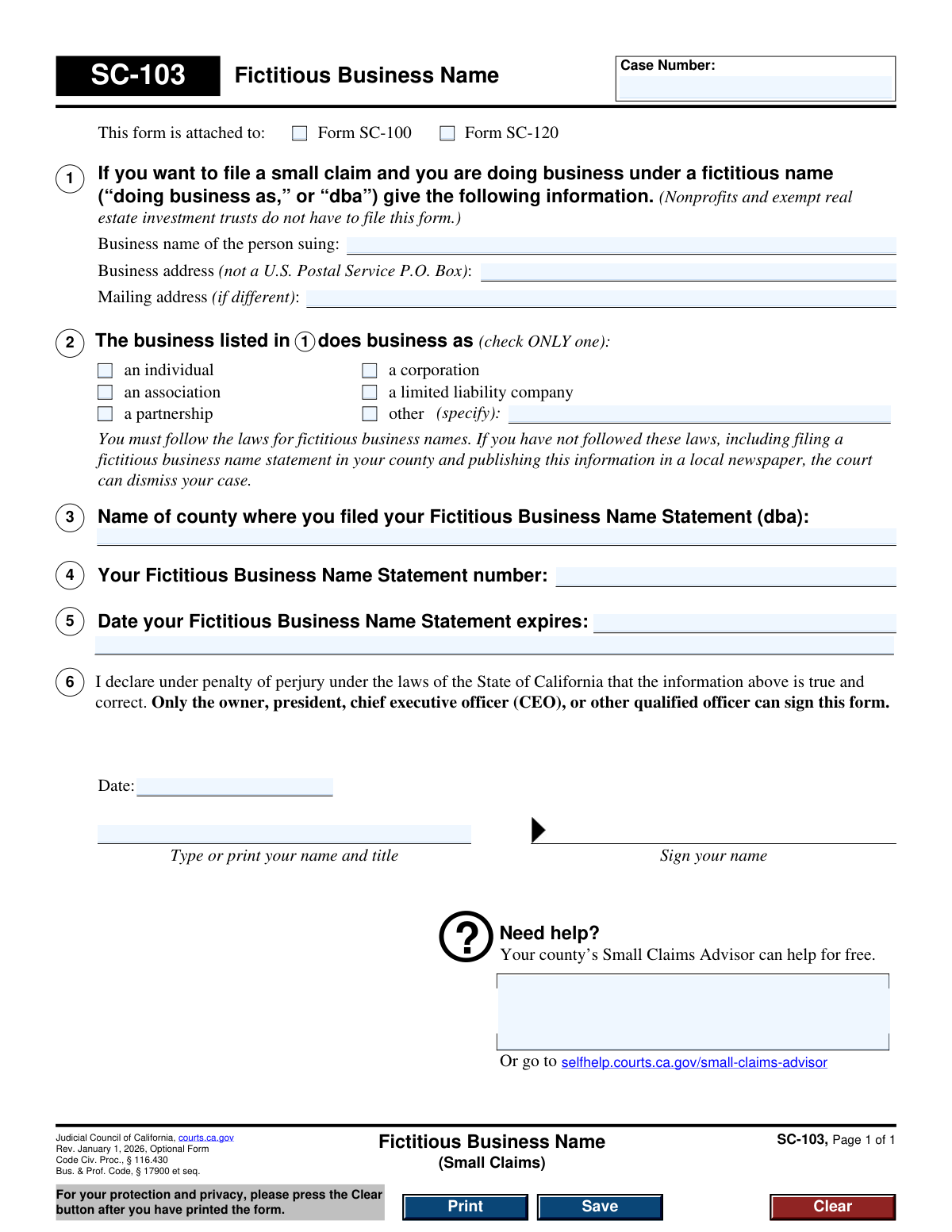
Yes! You can use AI to fill out Form SC-103, Fictitious Business Name (Small Claims)
Form SC-103, Fictitious Business Name (Small Claims), is a required document for businesses in California that operate under a 'doing business as' (DBA) name and wish to file a small claim. It certifies to the court that the business has complied with the state's fictitious business name registration laws, providing details of the filing. Today, this form can be filled out quickly and accurately using AI-powered services like Instafill.ai, which can also convert non-fillable PDF versions into interactive fillable forms.
SC-103 is part of the
California business forms, California court forms, court claim forms, small business forms and small claims forms categories on Instafill.
Our AI automatically handles information lookup, data retrieval, formatting, and form filling.
It takes less than a minute to fill out SC-103 using our AI form filling.
Securely upload your data. Information is encrypted in transit and deleted immediately after the form is filled out.
Form specifications
| Form name: | Form SC-103, Fictitious Business Name (Small Claims) |
| Number of fields: | 24 |
| Number of pages: | 1 |
| Language: | English |
Instafill Demo: How to fill out PDF forms in seconds with AI
How to Fill Out SC-103 Online for Free in 2026
Are you looking to fill out a SC-103 form online quickly and accurately? Instafill.ai offers the #1 AI-powered PDF filling software of 2026, allowing you to complete your SC-103 form in just 37 seconds or less.
Follow these steps to fill out your SC-103 form online using Instafill.ai:
- 1 Navigate to Instafill.ai and upload or select Form SC-103, Fictitious Business Name (Small Claims).
- 2 Provide your business name, business address, and mailing address as prompted by the AI assistant.
- 3 Select your business type (e.g., individual, corporation, partnership) from the provided options.
- 4 Enter the details of your Fictitious Business Name Statement, including the county of filing, statement number, and expiration date.
- 5 Review all the information populated by the AI for accuracy and make any necessary corrections.
- 6 Electronically sign the form by typing your name, title, and the date in the declaration section.
- 7 Download the completed Form SC-103 to attach to your small claims filing (Form SC-100 or SC-120).
Our AI-powered system ensures each field is filled out correctly, reducing errors and saving you time.
Why Choose Instafill.ai for Your Fillable SC-103 Form?
Speed
Complete your SC-103 in as little as 37 seconds.
Up-to-Date
Always use the latest 2026 SC-103 form version.
Cost-effective
No need to hire expensive lawyers.
Accuracy
Our AI performs 10 compliance checks to ensure your form is error-free.
Security
Your personal information is protected with bank-level encryption.
Frequently Asked Questions About Form SC-103
This form is used to provide the court with information about your business if you are operating under a fictitious name (also known as a 'dba' or 'doing business as') and are involved in a small claims case.
You must fill out this form if you are a business suing or being sued in small claims court under a name that is not your own legal name or the registered name of your corporation or LLC. Nonprofits and exempt real estate investment trusts do not need to file this form.
If you have not complied with the laws for fictitious business names, which include filing a statement and publishing it, the court has the authority to dismiss your small claims case.
No, this form is an attachment. You must attach it to either Form SC-100 (Plaintiff's Claim) if you are suing someone, or Form SC-120 (Defendant's Claim) if you are suing the person who sued you.
This information is on the Fictitious Business Name Statement you filed with your county clerk or recorder's office. You will need to refer to that document to complete sections 4 and 5 of this form.
No, you must provide a physical business address. The form specifically states that a U.S. Postal Service P.O. Box is not acceptable for the business address, though you may list one for your mailing address if it's different.
Only the owner, president, chief executive officer (CEO), or another qualified officer of the business is permitted to sign this form. You must also print your name and title.
In section 2, you must check only one box that accurately describes your business structure, such as an individual, corporation, partnership, or limited liability company. If none of the options fit, check 'other' and specify your business type.
Every county in California has a Small Claims Advisor who can provide free assistance with your small claims case, including help with understanding and filling out this form.
Yes, services like Instafill.ai use AI to accurately auto-fill form fields, which can save you time and help reduce errors when completing this and other official forms.
You can use a service like Instafill.ai to fill out this form online. Simply upload the form, and the AI will identify the fields, allowing you to type your information directly and then download or print the completed document.
If you have a non-fillable or 'flat' PDF, you can use a tool like Instafill.ai. It can convert the static PDF into an interactive, fillable form that you can easily complete on your computer.
Compliance SC-103
Validation Checks by Instafill.ai
1
Ensures Parent Form Is Indicated
This check verifies that at least one of the checkboxes, 'Form SC-100' or 'Form SC-120', is selected. This form (SC-103) is an attachment and must be associated with a primary small claims filing form. Failure to indicate the parent form will result in an incomplete submission, as the court will not know which case this declaration belongs to.
2
Requires Fictitious Business Name
Validates that the 'Business name of the person suing' field is not empty. This name is the legal identity under which the plaintiff is operating and is the primary subject of this form. If this field is left blank, the claim has no identifiable business plaintiff, and the form is invalid.
3
Prohibits P.O. Box for Business Address
This validation ensures that the 'Business address' field does not contain a P.O. Box, as explicitly stated on the form. A physical address is required for legal purposes, such as service of process. Submitting a P.O. Box will lead to rejection of the form as it fails to meet legal requirements for a principal place of business.
4
Requires Physical Business Address
Verifies that the 'Business address' field is completed with a full street address. This information is critical for court records and for the defendant to identify and serve legal documents to the plaintiff. An omission of this address will render the filing incomplete and subject to dismissal.
5
Ensures Exclusive Business Type Selection
This check confirms that exactly one business type (e.g., 'an individual', 'a corporation') is selected in section 2, as instructed by the form ('check ONLY one'). Selecting zero or multiple types creates ambiguity about the legal structure of the business. The submission will be rejected for clarification if this rule is violated.
6
Conditional Requirement for 'Other' Business Type
If the 'other' checkbox is selected as the business type in section 2, this validation ensures the adjacent 'specify' field is filled out. This clarification is necessary for the court to understand the plaintiff's legal structure. Failure to specify the 'other' type will result in an incomplete and ambiguous filing.
7
Validates County of Fictitious Business Name Filing
This check verifies that the county name entered in section 3 is a valid county within the State of California. This is essential for the court or opposing party to locate and verify the Fictitious Business Name Statement. An invalid county name would prevent verification and could lead to the case being dismissed.
8
Requires Fictitious Business Name Statement Number
Validates that the 'Fictitious Business Name Statement number' field in section 4 is not empty. This number is the unique identifier for the business's dba filing with the county. Without this number, the registration cannot be confirmed, which is a prerequisite for suing under a fictitious name.
9
Validates FBN Statement Expiration Date Format
Ensures that the value entered for the 'Date your Fictitious Business Name Statement expires' in section 5 is a valid, parseable date (e.g., MM/DD/YYYY). An incorrectly formatted date is ambiguous and prevents automated or manual verification of the statement's status. The form would be returned for correction.
10
Ensures FBN Statement is Not Expired
This logical check verifies that the expiration date of the Fictitious Business Name Statement (section 5) is in the future, relative to the filing date. A business cannot legally operate or file a lawsuit under an expired fictitious name. If the statement is expired, the court can dismiss the case.
11
Requires Declarant's Name and Title
Validates that the 'Type or print your name and title' field in the declaration section is completed. This identifies the individual making the declaration under penalty of perjury and confirms they are authorized to sign (e.g., owner, CEO). A missing name and title invalidates the declaration.
12
Validates Declaration Date
This check ensures the 'Date' field in the declaration section is a valid date and is not a future date. The date confirms when the signatory declared the information to be true and correct. An invalid or future date would call the validity of the declaration into question and may lead to rejection.
13
Verifies Signature Presence
Confirms that the signature field has been completed, either through a digital signature or by detecting an image in the signature box on a scanned form. The signature is a critical legal component that binds the declarant to the statements made under penalty of perjury. A form without a signature is legally void and will be rejected.
Common Mistakes in Completing SC-103
People often forget to enter the Case Number at the top of the form. This number links the SC-103 form to the main small claims case (either SC-100 or SC-120). Without it, the court clerk cannot properly file the document, leading to processing delays or rejection of the form. Always copy the Case Number exactly as it appears on the primary court document you are filing.
The form explicitly states that the business address cannot be a U.S. Postal Service P.O. Box. This is because a physical address is often required for legal purposes like establishing court jurisdiction and serving legal documents. Submitting a P.O. Box will result in the form being rejected, delaying your case. You must provide the actual street address where the business operates.
Filers sometimes provide details for a Fictitious Business Name Statement (FBNS) that has already expired. The court requires the business to be in full compliance with registration laws at the time of filing, which means the FBNS must be active. As the form warns, filing with an expired statement can be grounds for the court to dismiss your entire case.
The declaration in Section 6 must be signed by a person with specific legal authority, such as the owner, president, or CEO. A common error is having an administrative assistant or other employee without the proper title sign the form. This invalidates the legal declaration and can lead to the form being struck, jeopardizing the legal standing of the claim.
In Section 2, individuals may be confused about their exact legal structure and check the wrong box (e.g., an individual sole proprietor checking 'partnership'). The form clearly states to check 'ONLY one' box. This mistake can have significant legal consequences regarding liability and the legal standing of the plaintiff. You should confirm your official business structure before filling out this section.
Typos or errors when entering the county, statement number, or expiration date in Sections 3, 4, and 5 are frequent. The court uses this information to verify that you have complied with the law. Incorrect details can cast doubt on the validity of your filing and may lead to delays while the information is corrected or, in worse cases, dismissal if compliance cannot be verified.
The signature block in Section 6 requires the signer to print their name and title, as well as date their signature. People often forget to include their title (e.g., 'Owner', 'President') or the date. The title is essential for verifying the signer's authority, and the date is crucial for establishing when the declaration under penalty of perjury was made. Missing either piece of information can render the form incomplete and lead to its rejection.
This form is a supplement and must be attached to either a Plaintiff's Claim (SC-100) or a Defendant's Claim (SC-120). Filers often neglect to check the appropriate box at the top of the form. This creates ambiguity for the court clerk, who may not know which party's filing the fictitious business name applies to, causing potential delays in processing the case.
Section 1 asks for the 'Business name of the person suing,' which should be the legal name of the individual or entity (e.g., 'John Smith' or 'Smith Innovations, LLC'). A frequent mistake is to enter the fictitious 'doing business as' name in this field. The fictitious name is what the form is declaring, not the legal identity of the filer. Using AI-powered tools like Instafill.ai can help ensure the correct information is placed in the proper fields.
When a business's structure doesn't fit the provided checkboxes (e.g., a Limited Partnership or Trust), the filer correctly checks 'other' but then forgets to specify the entity type in the provided space. This leaves the form incomplete, as the court needs to know the precise legal structure of the entity involved in the lawsuit. This omission will require correction and can delay the case. If the form is a non-fillable PDF, a tool like Instafill.ai can make it fillable to prevent such omissions.
Saved over 80 hours a year
“I was never sure if my IRS forms like W-9 were filled correctly. Now, I can complete the forms accurately without any external help.”
Kevin Martin Green
Your data stays secure with advanced protection from Instafill and our subprocessors

Robust compliance program
Transparent business model
You’re not the product. You always know where your data is and what it is processed for.
ISO 27001, HIPAA, and GDPR
Our subprocesses adhere to multiple compliance standards, including but not limited to ISO 27001, HIPAA, and GDPR.
Security & privacy by design
We consider security and privacy from the initial design phase of any new service or functionality. It’s not an afterthought, it’s built-in, including support for two-factor authentication (2FA) to further protect your account.
Fill out SC-103 with Instafill.ai
Worried about filling PDFs wrong? Instafill securely fills form-sc-103-fictitious-business-name-small-claims forms, ensuring each field is accurate.