
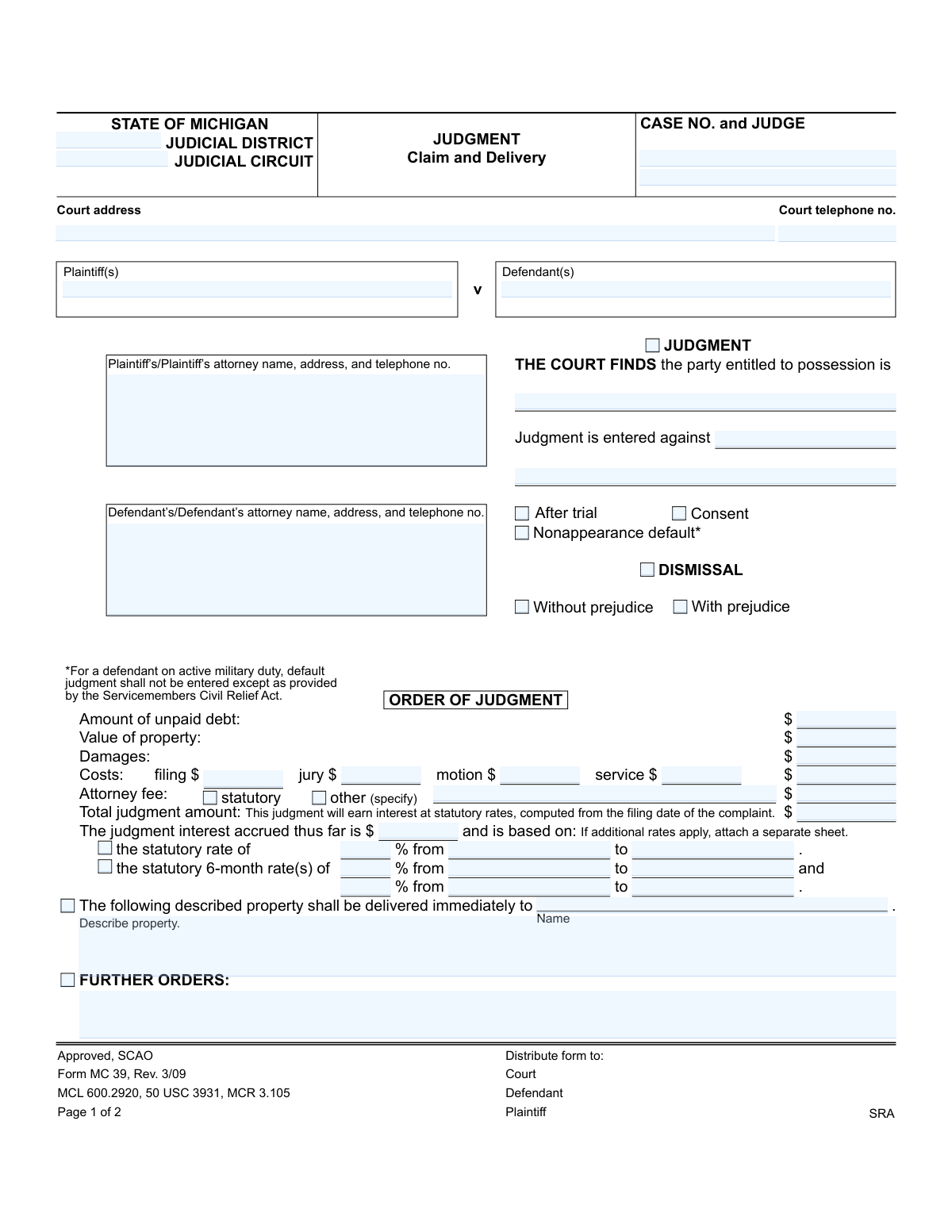
Yes! You can use AI to fill out Form MC 39, Judgment, Claim and Delivery
Don't type 55 fields by hand. Tell our AI about yourself, or upload a document you already have, and it fills every field in seconds. You check it, then download, print or sign.
The AI does the filling. You just check it.
No typing into boxes, nothing to install.
What this form asks for
The AI fills all of it, from your answers or your documents.
The AI checks your answers before you download
13 checks built for this form, so a wrong date or a missing answer is caught before anyone else sees it.
This validation confirms that the 'Total judgment amount' is the correct sum of all preceding financial fields: 'Amount of unpaid debt', 'Value of property', 'Damages', 'Costs', and 'Attorney fee'. This is a crucial integrity check to prevent mathematical errors that could lead to incorrect financial awards and subsequent legal challenges. An incorrect total would invalidate the financial portion of the judgment.
Validates that only one basis for the judgment is selected from the mutually exclusive options: 'After trial,' 'Consent,' or 'Nonappearance default.' A judgment can only have one legal basis, so selecting multiple options would create a legally ambiguous and invalid document. This check ensures the legal foundation of the judgment is clear and singular.
This check validates that if a name is entered in the 'delivery name' field, the 'property description' field must not be empty. An order to deliver property is unenforceable without a clear and unambiguous description of what is to be delivered. This prevents future disputes and ensures the order can be executed correctly by law enforcement or the parties.
Checks that the 'CASE NO.' field is not empty and follows the expected format for the State of Michigan judicial system. This number is the primary key for identifying the case in all court records and related systems. A missing or malformed case number would make the judgment impossible to file, track, or enforce correctly.
If 'Nonappearance default' is selected, this validation flags the submission for a mandatory check against the Servicemembers Civil Relief Act (SCRA). The form explicitly notes that default judgments against active military members have special requirements. This check ensures compliance with federal law and protects the rights of servicemembers, preventing the entry of an illegal judgment.
If the 'other' checkbox is selected for 'Attorney fee,' this validation ensures that the 'specify attorney fee' text field is filled out. This is necessary to provide a legal basis and explanation for any non-statutory attorney fee award. Failure to specify the reason would make the fee award legally questionable and likely voidable upon review.
And 7 more checks
- Ensures Judge's Signature and Date are Present
- Validates Logical Date Range for Interest Rates
- Ensures Case Number Consistency Across Pages
- Validates Monetary Field Formatting
- Requires Identification of Party Entitled to Possession
- Validates Certificate of Mailing Date Logic
- Ensures Single Dismissal Type Selection
Let AI fill out your MC 39
No typing. Every field filled in seconds, checked, ready to sign.
How to Fill Out MC 39 Online for Free in 2026
What the AI walks you through.
- Navigate to Instafill.ai and upload or select the Michigan Form MC 39.
- Provide the case information, including the judicial district/circuit, case number, judge, and court address.
- Enter the full names and contact details for the plaintiff(s), defendant(s), and their respective attorneys.
- Indicate the court's findings by checking the appropriate boxes for who is entitled to possession and the basis of the judgment (e.g., after trial, consent, default).
- Input the specific monetary amounts for unpaid debt, property value, damages, court costs, and attorney fees as ordered by the court.
- Clearly describe the property that is to be delivered and list any further orders from the judge.
- Review all the AI-populated fields for accuracy before the judgment is signed by the judge and certified by the court clerk.
Common Mistakes in Completing MC 39
The ones the AI is built to catch.
Incorrect or Incomplete Case Number
Calculation Errors in Monetary Awards
Vague or Ambiguous Property Description
Incorrect Statutory Interest Calculation
Incomplete or Inaccurate Party Information
Conflicting Basis for Judgment Selection
Failure to Specify 'Other' Attorney Fees
Omitting Information on the Certificate of Mailing
Inconsistent Information Between Pages
Submitting a Proposed Judgment Without All Necessary Figures
Frequently Asked Questions About MC 39
Is it really free for 7 days?
Can I fill other forms too?
How do I cancel?
How does the AI fill out MC 39?
What happens to my information?
How complex is MC 39 to fill out?
What is the purpose of the Judgment, Claim and Delivery form (MC 39)?
Who fills out this form?
What does 'Claim and Delivery' mean?
What is the difference between a judgment 'After trial,' by 'Consent,' or by 'Default'?
What financial information goes in the 'Order of Judgment' section?
The judgment says property should be delivered to me. How do I get it?
What does the 'Certificate of Mailing' on page 2 signify?
What does the 28-day execution limit mean?
What happens if I don't pay the total judgment amount?
Can I use an AI tool to help me with this form?
The PDF version of this form I have is not fillable. What can I do?
How can I use Instafill.ai to prepare this form for the court?
What information do I need to have ready to complete a proposed judgment on this form?
Get your MC 39 filled out by AI
$0 today. Cancel before Nov 10 and you pay nothing.
Other forms like this one
Michigan court forms: Form MC 03, Answer, Civil, Form MC 02, Appearance, Form MC 6, Notice to Appear, Form MC 01, Summons, State of Michigan, Form MC 01a, Complaint, Form MC 01b, Motion for Second Summons and Order, State of Michigan Blank Court Form, Form MC 07, Default Request and Entry, Form MC 07a, Default Request, Entry, and Judgment (Sum Certain), Form MC 09, Dismissal, Form MC 09a, Dismissal, Nonservice/No Progress, Form MC 10, Judgment, Civil, Form MC 11, Subpoena, Order to Appear and/or Produce, Request and Writ for Garnishment (Periodic), Form MC 13, Request and Writ for Garnishment (Nonperiodic), Form MC 14, Garnishee Disclosure, Form MC 15, Motion and Affidavit for Installment Payments/To Amend Order for Installment Payments, Form MC 15a, Order Regarding Installment Payments, Form MC 16, Motion to Set Aside Order for Installment Payments, State of Michigan, Form MC 16a, Order on Motion to Set Aside Order for Installment Payments
court claim forms: Form SC-100, Plaintiff's Claim and ORDER to Go to Small Claims Court, Judicial Council of California Form SC-105, Request for Court Order and Answer (Small Claims), SC-120, Defendant’s Claim and ORDER to Go to Small Claims Court (Small Claims), SC-105, Request for Court Order and Answer (Small Claims), Judicial Council of California Form SC-120, Defendant’s Claim and ORDER to Go to Small Claims Court (Small Claims), Form SC-100, Plaintiff’s Claim and ORDER to Go to Small Claims Court, Certificate of Service (Civil Court Claim), Form N161, Appellant’s notice (All appeals except small claims track appeals and appeals to the Family Division of the High Court), Plaintiff's Claim and ORDER to Go to Small Claims Court (SC-100), Form N161, Appellant's Notice (All appeals except small claims track appeals and appeals to the Family Division of the High Court), Form SC-100A, Other Plaintiffs or Defendants (Attachment to Plaintiff's Claim and ORDER to Go to Small Claims Court), Form N461: Claim for judicial review, Statement of Small Claim and Notice, Trial Court of Massachusetts, State of Michigan, Form MC 25, Notice of Intent to Escheat Unclaimed Personal Property, Form MC 35, Complaint, Claim and Delivery, Form MC 36, Motion for Possession Pending Judgment, Claim and Delivery, Order of Possession Pending Judgment, Claim and Delivery, Form MC 38, Bond, Claim and Delivery, Form MC 55, Claim of Appeal, Form MC 67, Claim of Interest on Vehicle Seized for Forfeiture
Let AI fill out your MC 39
Your trial starts once a card is added. You pay nothing before Nov 10.
Our AI already knows this form, all 55 fields of it. Skip the typing: tell it about yourself, or upload what you have, and it fills the whole form in seconds.
- AI fills every field on both pages, checkboxes included
- No typing into boxes: answer a few questions, or upload a document you already have, an old copy of this form, a photo of a document
- The AI checks the answers; you review and change anything before you download
- Download the finished PDF, print it, or sign it online
- Encrypted, and never used to train AI
Cancel before Nov 10 and you pay nothing.
A card is needed to start the trial. Cancel in two clicks from your account.
Terms · Privacy