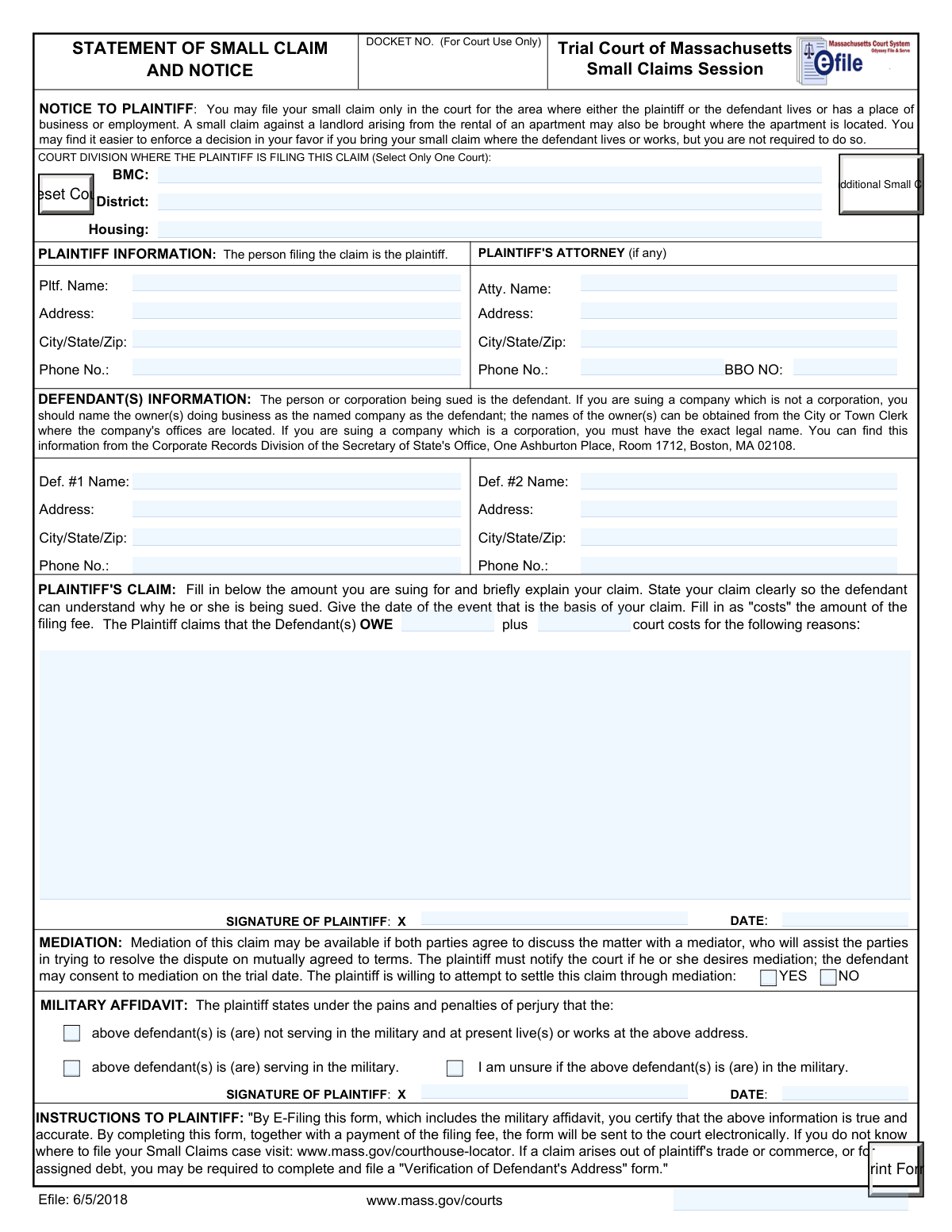
Yes! You can use AI to fill out Statement of Small Claim and Notice, Trial Court of Massachusetts

The Statement of Small Claim and Notice is a legal document used in Massachusetts to file a lawsuit in the Small Claims Session, allowing individuals and businesses to resolve monetary disputes. Filing this form correctly is the crucial first step in formally seeking to recover money you believe you are owed. Today, this form can be filled out quickly and accurately using AI-powered services like Instafill.ai, which can also convert non-fillable PDF versions into interactive fillable forms.
Massachusetts Statement of Small Claim is part of the ACH forms, court claim forms, court forms, Massachusetts state forms, NJ state forms, PA state forms, SSA forms, state ID forms, UK court forms and VA claim forms categories on Instafill.
Our AI automatically handles information lookup, data retrieval, formatting, and form filling.
It takes less than a minute to fill out Massachusetts Statement of Small Claim using our AI form filling.
Securely upload your data. Information is encrypted in transit and deleted immediately after the form is filled out.

Form specifications

Form name: Statement of Small Claim and Notice, Trial Court of Massachusetts
Number of fields: 36
Number of pages: 1
Language: English
main-image

Instafill Demo: How to fill out PDF forms in seconds with AI

How to Fill Out Massachusetts Statement of Small Claim Online for Free in 2026

Are you looking to fill out a MASSACHUSETTS STATEMENT OF SMALL CLAIM form online quickly and accurately? Instafill.ai offers the #1 AI-powered PDF filling software of 2026, allowing you to complete your MASSACHUSETTS STATEMENT OF SMALL CLAIM form in just 37 seconds or less.
Follow these steps to fill out your MASSACHUSETTS STATEMENT OF SMALL CLAIM form online using Instafill.ai:
  1. 1 Navigate to Instafill.ai and upload or select the Massachusetts Statement of Small Claim form.
  2. 2 Use the AI assistant to accurately input your information as the Plaintiff, including your name, address, and attorney details if applicable.
  3. 3 Enter the complete information for each Defendant you are suing, ensuring names and addresses are correct for proper service.
  4. 4 Clearly state the details of your claim, including the date of the incident, the reason the defendant owes you money, and the specific dollar amount plus court costs.
  5. 5 Complete the required sections for your Mediation preference and the Military Affidavit regarding the defendant's military status.
  6. 6 Review all the information populated by the AI for accuracy, then electronically sign and date the document in the designated signature fields.
  7. 7 Download the completed, signed form, ready for e-filing or printing to be filed with the appropriate Massachusetts court division.

Our AI-powered system ensures each field is filled out correctly, reducing errors and saving you time.

Why Choose Instafill.ai for Your Fillable Massachusetts Statement of Small Claim Form?

Speed

Complete your Massachusetts Statement of Small Claim in as little as 37 seconds.

Up-to-Date

Always use the latest 2026 Massachusetts Statement of Small Claim form version.

Cost-effective

No need to hire expensive lawyers.

Accuracy

Our AI performs 10 compliance checks to ensure your form is error-free.

Security

Your personal information is protected with bank-level encryption.

Frequently Asked Questions About Form Massachusetts Statement of Small Claim

This form is used to initiate a lawsuit in the Massachusetts Small Claims Session to recover money owed to you. The person filing is the plaintiff, and the person or business being sued is the defendant.

You must file your claim in the court division for the area where either you (the plaintiff) or the defendant lives, works, or has a place of business. The form provides a link to a courthouse locator to help you find the correct court.

You need the defendant's full legal name, current address, and a phone number. It is crucial to have the exact legal name, especially for businesses, to ensure your claim is processed correctly.

For a corporation, you can get the exact legal name from the Corporate Records Division of the Secretary of State's Office. For a non-incorporated business, you can find the owner's name at the City or Town Clerk's office where the company is located.

This section requires you to state, under penalty of perjury, whether you know if the defendant is currently serving in the military. This is a legal requirement for all small claims cases.

Mediation is a voluntary process where a neutral third party helps you and the defendant try to reach a settlement without a trial. Agreeing to it simply shows you are willing to try this option if the defendant also consents on the trial date.

State your claim clearly and concisely, including the date the event occurred and why the defendant owes you money. The goal is to provide enough detail for the defendant to understand why they are being sued.

In the 'court costs' field, you should enter the amount of the filing fee you paid to the court when submitting your claim. This is separate from the primary amount of money you are suing for.

The form can be submitted electronically by e-filing, which includes paying the filing fee online. The instructions note that e-filing the form certifies the information is true and accurate.

This form has space for two defendants. If you need to sue more than two parties, you should contact the court clerk's office for guidance on how to properly add additional defendants to your claim.

Yes, services like Instafill.ai use AI to accurately auto-fill form fields, which can save time and help prevent common errors. This is particularly useful for entering repetitive information like names and addresses.

You can upload the 'Statement of Small Claim' PDF to the Instafill.ai platform. The AI will make the form fillable online, allowing you to type your information directly into the fields and then download the completed document.

If you have a non-fillable or 'flat' PDF, you can use a service like Instafill.ai. It can convert the document into an interactive, fillable form online so you can easily type in your information.

Compliance Massachusetts Statement of Small Claim
Validation Checks by Instafill.ai

1
Exclusive Court Division Selection
This check ensures that data is entered into only one of the three court division fields: BMC, District, or Housing. The form explicitly states to select only one court, and filing in multiple divisions is not permitted. If more than one of these fields is populated, the submission should be blocked, and the user prompted to select a single court division.
2
Required Plaintiff Information
Validates that the Plaintiff Name, Address, and City/State/Zip fields are not empty. This information is fundamental for identifying the filing party and is legally required for all court communications and records. A submission without this core data is incomplete and cannot be processed by the court clerk.
3
Required Defendant #1 Information
Verifies that the Name, Address, and City/State/Zip fields for Defendant #1 are filled out completely. This information is legally essential to properly name the party being sued and to ensure legal service of the claim can be attempted. Failure to provide a complete name and address for the defendant will prevent the case from being initiated.
4
Mandatory Military Affidavit Selection
Confirms that exactly one of the three military affidavit options has been selected ('not serving', 'serving', or 'unsure'). This declaration is required under federal law (SCRA) and affects how the court case can proceed against the defendant. The form cannot be submitted until one, and only one, option is chosen.
5
Mandatory Mediation Consent Selection
Checks that the plaintiff has selected either 'YES' or 'NO' for their willingness to mediate the claim. This is a required choice that informs the court's case management and potential scheduling for alternative dispute resolution. The submission should be blocked if no selection is made, as it leaves the plaintiff's intent ambiguous.
6
Valid Claim Amount Format
Validates that the 'Amount Owed' field contains a valid numerical or currency value (e.g., 1250.50), and is not blank. This is the principal amount of the lawsuit and must be a clear, machine-readable number for docketing and judgment purposes. Non-numeric entries or a blank field would cause calculation errors and processing failure.
7
Standard Phone Number Format
Verifies that all phone number fields (Plaintiff, Attorney, Defendants) follow a standard 10-digit format, with or without common separators like parentheses or hyphens. This ensures the contact information is valid and usable by court staff for essential communication. An improperly formatted number could be invalid and prevent crucial contact.
8
Valid ZIP Code Format
Checks that all ZIP code fields contain a valid 5-digit (or 9-digit ZIP+4) numeric code. Accurate ZIP codes are critical for the mail delivery of official court notices, summons, and judgments. An invalid ZIP code could result in failed service or missed communications, jeopardizing the case.
9
Attorney Information Group Completeness
If the 'Plaintiff's Attorney Name' field is populated, this check ensures that the corresponding Address, City/State/Zip, Phone No., and BBO No. fields are also filled. When a party is represented by counsel, complete contact information for the attorney is required for all official communication. Incomplete attorney details would require manual follow-up and delay proceedings.
10
Massachusetts BBO Number Format
Validates that the 'BBO NO' field, if filled, contains a number that matches the format for a Massachusetts Board of Bar Overseers registration number (typically a 7-digit number). This helps confirm the attorney is registered and in good standing with the state bar. An invalid number could indicate a data entry error or an issue with the attorney's credentials.
11
Presence of Claim Explanation
Verifies that the 'Statement of Claim / Reasons' text area is not empty. The defendant has a constitutional right to due process, which includes knowing the specific reason they are being sued. A blank claim statement makes the filing invalid as it provides no legal basis for a lawsuit.
12
Logical Signature Date
Ensures the 'Signature Date' is a validly formatted date and is not a date set in the future. The signature date attests to when the plaintiff certified the information as true under penalty of perjury. A future date is logically impossible and would invalidate the attestation, requiring correction before the form can be accepted.
13
Defendant #2 Information Consistency
If the 'Defendant #2 Name' field is populated, this check validates that the corresponding 'Defendant #2 Address' and 'City/State/Zip' fields are also filled. To add a party to a lawsuit, their full name and address are required for proper service. A partial entry is insufficient for legal purposes and would be rejected by the court.
14
Two-Letter State Abbreviation
Validates that the state portion of all 'City/State/Zip' fields uses a standard two-letter abbreviation (e.g., MA, NY, CA). This standardization is crucial for address validation systems and ensuring mail is routed correctly by the postal service. It prevents ambiguity and reduces the risk of returned mail from the court.

Common Mistakes in Completing Massachusetts Statement of Small Claim

Incorrectly Identifying the Defendant

Plaintiffs often sue a business using its trade name (e.g., 'Citywide Movers') instead of its legal entity name. The form explicitly requires the exact legal name for a corporation or the owner's name for an unincorporated business. Filing against the wrong legal entity can lead to the case being dismissed, forcing you to start over and potentially miss the statute of limitations. To avoid this, use the Secretary of State's corporate database or the local Town Clerk's records to find the correct legal name before filing.

Filing in the Wrong Court Division or Location

The form requires selecting only one court division (BMC, District, or Housing) and filing in the correct location (venue). People make mistakes by either checking multiple boxes or choosing a court that lacks jurisdiction based on where the parties live or work. This error results in delays as the case may be dismissed or transferred. Always follow the venue rules described in the 'NOTICE TO PLAINTIFF' section to ensure you are filing in the proper courthouse.

Providing a Vague or Emotional Statement of Claim

The section explaining the claim is often filled with emotional language or missing key facts, rather than a clear, concise statement. A proper claim must include the date of the incident, a factual summary of what happened, and a logical reason why the defendant is financially responsible. A vague claim makes it difficult for the defendant to understand the lawsuit and for the court to rule, potentially weakening your case. Stick to the facts, dates, and amounts.

Improperly Completing the Military Affidavit

The Military Affidavit is a sworn statement with legal weight, not a simple checkbox. Plaintiffs may guess a defendant's military status or fail to perform due diligence, exposing them to penalties for perjury and violating the Servicemembers Civil Relief Act (SCRA). If you are not certain of the defendant's status, you must check the 'I am unsure' box. Never guess, as making a false declaration can have serious legal consequences.

Using an Incorrect or Incomplete Defendant Address

A complete and accurate address for the defendant is essential for the court to officially 'serve' them notice of the lawsuit. Using a bad address, a P.O. Box when a street address is needed, or omitting an apartment number will cause service to fail. If the defendant is not properly served, the case cannot proceed and will be dismissed, wasting your time and filing fee. Double-check the address and use a service like the post office to verify it if possible.

Confusing the 'Amount Owed' and 'Court Costs'

The form has separate fields for the principal amount of the claim ('OWE') and the 'court costs' (your filing fee). A common error is to lump these two figures together or to put the total in the wrong box. This creates confusion and may require the form to be amended. The 'OWE' field is for the money you are suing for, while the 'court costs' field is for reclaiming the fee you paid to file the case.

Missing Required Signatures or Dates

This form has at least two separate places for a signature and date: one for the main claim and one for the Military Affidavit. It is easy to overlook one, especially the second one. An unsigned or undated form is invalid and will be rejected by the court clerk, causing your filing to be delayed. Carefully review the entire document to ensure all required signature and date fields are completed before submission.

Failing to Name All Necessary Defendants

In some disputes, more than one person or entity may be legally responsible for the claim. For example, both a company and its owner might be liable. The form provides space for two defendants, but plaintiffs sometimes only name one party, potentially losing the ability to collect from another responsible party. Carefully consider who is liable and list all relevant parties as defendants to ensure you can enforce a potential judgment.

Leaving Attorney BBO Number Blank

If the plaintiff is represented by an attorney, the attorney's Massachusetts Board of Bar Overseers (BBO) number is required. This unique identifier is crucial for the court to verify the attorney's standing and for proper record-keeping. Forgetting to include the BBO number can cause administrative processing delays while the clerk's office looks it up or requests the information. This is a simple but often overlooked detail.

Submitting a Non-Fillable PDF without Conversion

Many court forms are only available online as flat, non-fillable PDFs, forcing users to print and fill them out by hand, which can lead to illegible entries and errors. People often try to edit these directly with inadequate tools, resulting in a messy, unprofessional submission. AI-powered tools like Instafill.ai can convert these non-fillable PDFs into interactive, fillable forms, which helps prevent data entry mistakes and ensures the final document is clean and easy for the court to read.
Saved over 80 hours a year

“I was never sure if my IRS forms like W-9 were filled correctly. Now, I can complete the forms accurately without any external help.”

Kevin Martin Green

Your data stays secure with advanced protection from Instafill and our subprocessors

Robust compliance program

Transparent business model

You’re not the product. You always know where your data is and what it is processed for.

ISO 27001, HIPAA, and GDPR

Our subprocesses adhere to multiple compliance standards, including but not limited to ISO 27001, HIPAA, and GDPR.

Security & privacy by design

We consider security and privacy from the initial design phase of any new service or functionality. It’s not an afterthought, it’s built-in, including support for two-factor authentication (2FA) to further protect your account.

Fill out Massachusetts Statement of Small Claim with Instafill.ai

Worried about filling PDFs wrong? Instafill securely fills statement-of-small-claim-and-notice-trial-court-of-massachusetts forms, ensuring each field is accurate.