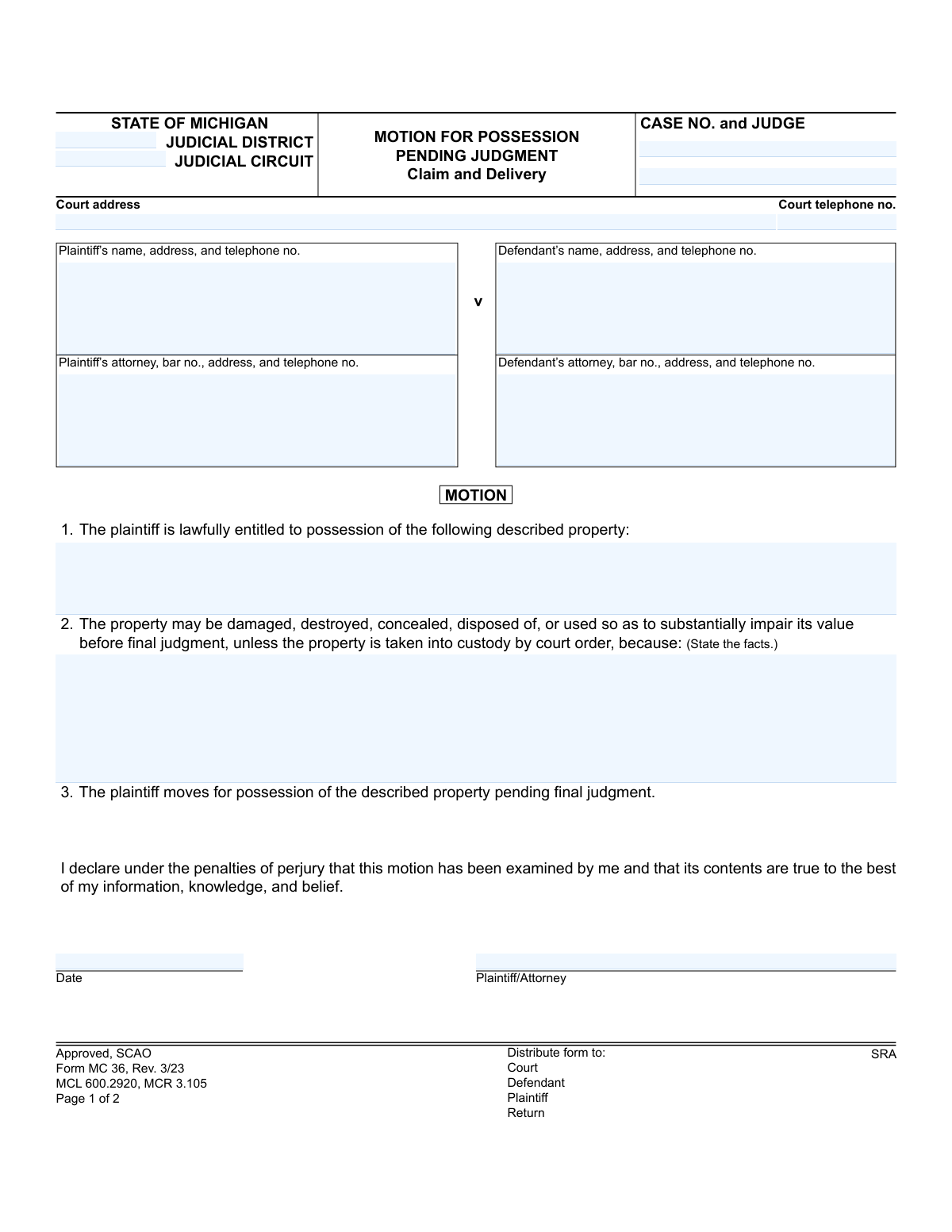
Yes! You can use AI to fill out Form MC 36, Motion for Possession Pending Judgment, Claim and Delivery

Form MC 36 is a legal document filed in Michigan courts as part of a 'Claim and Delivery' action. A plaintiff uses this motion to ask a judge for an order to take possession of specific property from a defendant before the case is finalized, arguing that the property is at risk of being damaged, destroyed, or concealed. Completing this form accurately is crucial for protecting the plaintiff's property rights during litigation. Today, this form can be filled out quickly and accurately using AI-powered services like Instafill.ai, which can also convert non-fillable PDF versions into interactive fillable forms.
MC 36 is part of the court claim forms and Michigan court forms categories on Instafill.
Our AI automatically handles information lookup, data retrieval, formatting, and form filling.
It takes less than a minute to fill out MC 36 using our AI form filling.
Securely upload your data. Information is encrypted in transit and deleted immediately after the form is filled out.

Form specifications

Form name: Form MC 36, Motion for Possession Pending Judgment, Claim and Delivery
Number of fields: 42
Number of pages: 1
Language: English
main-image

Instafill Demo: How to fill out PDF forms in seconds with AI

How to Fill Out MC 36 Online for Free in 2026

Are you looking to fill out a MC 36 form online quickly and accurately? Instafill.ai offers the #1 AI-powered PDF filling software of 2026, allowing you to complete your MC 36 form in just 37 seconds or less.
Follow these steps to fill out your MC 36 form online using Instafill.ai:
  1. 1 Navigate to Instafill.ai and upload or select the Michigan Form MC 36.
  2. 2 Provide the case information, including the court, case number, and judge's name.
  3. 3 Enter the full details for the plaintiff, defendant, and their respective attorneys if applicable.
  4. 4 Clearly describe the property that the plaintiff is lawfully entitled to possess in the designated section.
  5. 5 State the specific facts and reasons why the property may be damaged, destroyed, or otherwise impaired before a final judgment is reached.
  6. 6 Review all the information populated by the AI for accuracy, then e-sign and date the motion.
  7. 7 Download the completed form to file with the court and serve to the defendant as required.

Our AI-powered system ensures each field is filled out correctly, reducing errors and saving you time.

Why Choose Instafill.ai for Your Fillable MC 36 Form?

Speed

Complete your MC 36 in as little as 37 seconds.

Up-to-Date

Always use the latest 2026 MC 36 form version.

Cost-effective

No need to hire expensive lawyers.

Accuracy

Our AI performs 10 compliance checks to ensure your form is error-free.

Security

Your personal information is protected with bank-level encryption.

Frequently Asked Questions About Form MC 36

This form is used by a plaintiff in a 'Claim and Delivery' lawsuit to ask the court for temporary possession of property held by the defendant. It is filed to protect the property from being damaged, destroyed, or hidden before the case is officially decided.

The plaintiff (the person or entity who filed the lawsuit to recover property) or their attorney should complete and file this motion. It is used when you believe the property you are trying to recover is at risk before the final court judgment.

You must provide a detailed and specific description of the property you are trying to recover. Include details like make, model, serial numbers, color, size, or any other unique identifying features to ensure the correct item is identified.

You need to state specific facts showing the property is at risk. Examples include the defendant threatening to sell or destroy the item, a history of the defendant damaging property, or the property being used in a way that significantly lowers its value.

The Restraining Order legally prohibits the defendant from damaging, destroying, concealing, selling, or otherwise disposing of the property listed in the motion. This order is effective until the court makes a further ruling at the scheduled hearing.

After filing, the court will issue an 'Order to Appear,' scheduling a hearing date. You must then have the defendant formally served with a copy of the motion and the order at least 7 days before the hearing.

The form states that if the defendant does not appear at the hearing to answer the motion, the court may order that the property be taken from them and given to you pending the final judgment.

Proof of Service is a document that demonstrates to the court that the defendant was legally notified of the motion and hearing. It must be completed by the person who served the documents and filed with the court clerk to prove the defendant received proper notice.

While this form itself doesn't list required attachments, you will typically file it along with your initial complaint. You may also need to attach documents that prove your right to the property, such as a title, contract, or bill of sale.

Signing under the penalties of perjury means you are legally swearing that the information you have provided in the motion is true to the best of your knowledge. Intentionally providing false information can result in serious legal consequences.

Yes, services like Instafill.ai use AI to help you accurately auto-fill form fields, which can save time and reduce errors. However, AI cannot provide legal advice, so you should consult an attorney for help with the legal aspects of your case.

You can upload the 'Motion for Possession Pending Judgment' PDF to the Instafill.ai platform. The service will identify the form fields, allowing you to enter your information online and then download the completed, ready-to-file document.

If you have a non-fillable or 'flat' PDF, you can use a service like Instafill.ai. It can convert the static PDF into an interactive, fillable form, making it easy to type your information directly into the fields.

Compliance MC 36
Validation Checks by Instafill.ai

1
Case Number Consistency
This validation ensures that the 'case no' field is identical on all pages of the form where it appears. It is crucial for maintaining document integrity and ensuring all pages are correctly associated with the same court case. If the case numbers do not match, the filing could be rejected or cause confusion in court records.
2
Attorney Bar Number Format
Verifies that the 'bar no.' for both the plaintiff's and defendant's attorneys follows the specific format required by the State of Michigan (e.g., a 'P' followed by a series of digits). This ensures the attorney is properly identified and is licensed to practice in the jurisdiction. An invalid bar number could lead to the rejection of the motion.
3
Motion Justification Completeness
Checks that the 'property description' and 'custody need explanation' fields are not empty. These fields contain the core legal justification for the motion, explaining what property is at issue and why immediate court intervention is necessary. Failure to provide this information makes the motion incomplete and legally insufficient.
4
Valid Future Hearing Date
Ensures the 'hearing date time' is a valid date and time set in the future. A hearing cannot be scheduled for a past date. This validation prevents clerical errors that would make the order to appear invalid and unenforceable, requiring the court to issue a corrected notice.
5
Exclusive Hearing Location Selection
This check validates that for the hearing location, either the 'at the above address' checkbox is selected, OR the 'at Location' checkbox is selected and the corresponding location description is filled in. It prevents ambiguity by ensuring only one location is specified for the hearing. If both or neither are selected, the notice is defective.
6
Service Deadline Compliance
Verifies that the 'COS date and time' (Certificate of Service date) is at least 7 days prior to the scheduled 'hearing date time'. The form explicitly states this requirement to ensure the defendant has adequate notice of the hearing as required by procedural rules. A late service invalidates the notice and may require the hearing to be rescheduled.
7
Proof of Service Fee Calculation
This validation confirms that the 'TOTAL FEE' field is the correct sum of the individual fee components ('Service fee', 'Miles traveled Fee', 'Incorrect address fee'). This ensures accurate billing and reimbursement for the process server and maintains the financial integrity of the document. An incorrect total could lead to payment disputes or delays.
8
Motion Signature Date Validity
Checks that the 'motion date' is a valid date that is not in the future. This date represents when the plaintiff or their attorney signed the motion, attesting to its truthfulness. A future date is logically impossible and would invalidate the declaration.
9
Required Plaintiff Information
Ensures that the 'Plaintiff’s name, address, and telephone no.' field is fully completed. This is fundamental contact information required by the court to identify the moving party and communicate with them. Missing information can lead to the rejection of the filing.
10
Motion Signature Presence
Validates that the 'Plaintiff/Attorney' signature field is not empty. An unsigned motion is legally invalid as it lacks the required declaration under penalty of perjury. The court will not act on an unsigned motion, and it will be returned or dismissed.
11
Service Method Selection
This check ensures that one of the service status options in the 'Proof of Service' section (e.g., 'personally', 'by first-class mail', or 'I have attempted to serve') has been selected. This is critical for the court to understand whether the defendant was successfully notified or if service failed. The absence of this information leaves the status of service ambiguous.
12
Conditional Service Information
If service was successful ('personally' or 'by first-class mail' is checked), this validation ensures that the name of the person served ('Name') and the 'Date and time of service' are provided. This information is essential evidence for the court to confirm that service was properly executed. If this information is missing despite a claim of successful service, the proof of service is deficient.
13
Judicial Circuit/District Presence
Verifies that either the 'JUDICIAL DISTRICT' or 'JUDICIAL CIRCUIT' field is filled out. Court cases in Michigan are filed in one or the other, so at least one must be specified to correctly route the document. Leaving both blank would make it impossible to file the motion in the correct court.
14
Mutually Exclusive Service Proof
This validation checks for the presence of information in either the 'Proof of Service' section or the 'Acknowledgment of Service' section, but flags if both are completed in a conflicting manner. These sections serve the same purpose of proving service, so typically only one is completed. The system should ensure the proof of service is clear and not contradictory.

Common Mistakes in Completing MC 36

Vague or Incomplete Property Description

This occurs when the filer provides a generic description of the property in section 1, such as 'a vehicle' or 'tools,' without including specific identifiers like a VIN, serial number, or model number. A vague description can render the motion unenforceable, as the court and law enforcement cannot be certain which specific asset to seize. To avoid this, always list all unique identifying marks, numbers, and detailed characteristics of the property in question.

Insufficient Justification for Immediate Possession

Filers often fail to provide specific, factual reasons in section 2 why the property is at risk of being damaged, destroyed, or concealed. Simply stating a desire to have the property back is not enough; the court needs evidence of imminent risk. This mistake can lead to the judge denying the motion for a lack of urgency, delaying the recovery of the asset. To prevent this, clearly articulate concrete facts and circumstances that demonstrate the defendant's actions or potential actions will impair the property's value.

Forgetting to Sign or Date the Motion

Overlooking the signature and date line under the perjury declaration on page 1 is a simple but critical error. An unsigned or undated motion is legally invalid and will be rejected by the court clerk upon filing. This mistake halts the entire legal process, requiring the filer to resubmit the entire document and causing unnecessary delays. Always double-check that the motion is signed and dated before submission.

Incorrect or Incomplete Court Information

People often enter the wrong judicial district, circuit, or court address, especially if they are unfamiliar with the court system. This can happen due to a simple lookup error or confusion between different county or city courts. Filing a motion in the wrong jurisdiction will result in its rejection and significant delays, as the case must be refiled in the correct court. Using a tool like Instafill.ai can help by auto-populating correct court details based on the case information, preventing such errors.

Failure to File the Proof of Service

After the defendant has been served, the process server must complete the 'Proof of Service' section and the plaintiff must ensure it is filed with the court clerk. It's a common mistake to assume that successful service is the final step, but without the filed proof, the court has no official record that the defendant was notified. This failure will prevent the judge from proceeding with the hearing, causing it to be adjourned until the proof is properly filed.

Untimely Service of Documents

The form explicitly requires that the defendant be served 'not later than 7 days before the scheduled hearing date.' Miscalculating this deadline is a frequent error, often due to not accounting for weekends or holidays, or simply last-minute planning. Serving the documents late violates the defendant's due process rights and will almost certainly result in the judge adjourning the hearing to a later date to allow the defendant adequate time to respond.

Omitting the Case Number on Subsequent Pages

The form includes a field for the 'Case No.' at the top of page 2, which is often overlooked after filling out the first page. If this is left blank, page 2 could become separated and misfiled by the court clerk, especially in a busy courthouse. This can lead to confusion and delays, as the court may not be able to associate the Order to Appear or Proof of Service with the correct case file. AI-powered tools like Instafill.ai can prevent this by automatically carrying over consistent data like case numbers to all relevant pages of a form.

Improperly Completed Proof of Service Section

The process server may make errors when filling out the 'Proof of Service,' such as checking the wrong method of service (personal vs. mail), writing an incorrect date or time, or failing to list all attached documents. These inaccuracies can be challenged by the defendant and may invalidate the service, forcing a postponement of the hearing. The plaintiff should review the completed Proof of Service for accuracy before it is filed with the court to catch any potential issues.

Using an Outdated Version of the Form

Courts periodically update their forms to comply with new laws and rules, indicated by the revision date (e.g., 'Rev. 3/23'). Using an old version downloaded from an unofficial source or saved from a previous case is a common mistake. Submitting an outdated form can lead to immediate rejection by the court clerk, forcing you to start over and causing delays. Always obtain the latest version directly from the official court website.

Illegible Handwriting on a Non-Fillable Form

When a form is only available as a flat PDF and must be filled out by hand, illegible handwriting is a major problem. If the court clerk, judge, or opposing party cannot clearly read names, addresses, or the facts of the case, it can lead to processing errors, misdirected mail, or a negative perception of the filing. To avoid this, print clearly in block letters or use a tool like Instafill.ai, which can convert non-fillable PDFs into fillable versions, allowing you to type information for maximum clarity.
Saved over 80 hours a year

“I was never sure if my IRS forms like W-9 were filled correctly. Now, I can complete the forms accurately without any external help.”

Kevin Martin Green

Your data stays secure with advanced protection from Instafill and our subprocessors

Robust compliance program

Transparent business model

You’re not the product. You always know where your data is and what it is processed for.

ISO 27001, HIPAA, and GDPR

Our subprocesses adhere to multiple compliance standards, including but not limited to ISO 27001, HIPAA, and GDPR.

Security & privacy by design

We consider security and privacy from the initial design phase of any new service or functionality. It’s not an afterthought, it’s built-in, including support for two-factor authentication (2FA) to further protect your account.

Fill out MC 36 with Instafill.ai

Worried about filling PDFs wrong? Instafill securely fills form-mc-36-motion-for-possession-pending-judgment-claim-and-delivery forms, ensuring each field is accurate.