
Yes! You can use AI to fill out Form MC 35, Complaint, Claim and Delivery
Don't type 21 fields by hand. Tell our AI about yourself, or upload a document you already have, and it fills every field in seconds. You check it, then download, print or sign.
The AI does the filling. You just check it.
No typing into boxes, nothing to install.
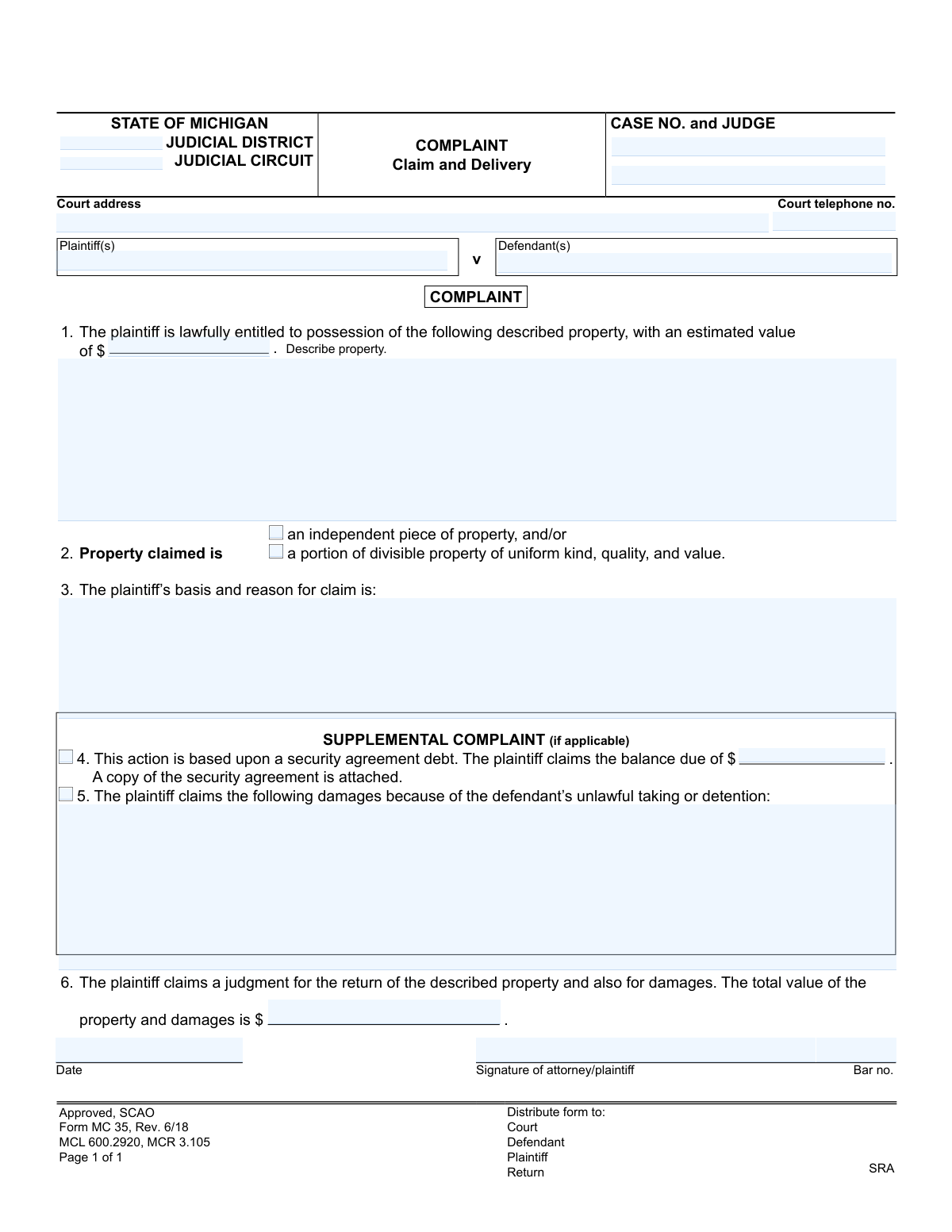
What this form asks for
The AI fills all of it, from your answers or your documents.
The AI checks your answers before you download
12 checks built for this form, so a wrong date or a missing answer is caught before anyone else sees it.
This validation checks that the Plaintiff(s) and Defendant(s) fields are not empty. These fields are fundamental to any legal action, as they identify the parties involved. A complaint that fails this check is legally deficient and cannot be filed, as the court would not know who is suing whom.
This check ensures the text area for describing the property is filled out. In a 'Claim and Delivery' action, the specific property to be recovered is the subject of the lawsuit. If the property is not adequately described, the complaint is ambiguous, and a court cannot issue a meaningful order for its return.
This validation ensures the 'estimated value' field contains a valid numerical currency value, allowing for numbers, commas, and a decimal point. This value is critical for determining the court's jurisdiction and potential bond amounts. An invalid format would cause calculation errors and prevent the form from being processed correctly.
This check verifies that exactly one of the two checkboxes, 'an independent piece of property' or 'a portion of divisible property', is selected. This selection clarifies the nature of the property for the court and affects how it may be seized or valued. If neither or both are selected, the form is ambiguous and should be rejected for clarification.
This validation confirms that the 'plaintiff’s basis and reason for claim' field is not empty. This section is the legal heart of the complaint, explaining why the plaintiff is lawfully entitled to the property. A submission without this information lacks a stated cause of action and would be dismissed by the court.
This check is triggered if the 'This action is based upon a security agreement debt' option is selected. It then validates that the 'balance due' field is filled with a valid, non-zero monetary amount. This ensures that when a secured debt is the basis for the claim, the specific amount owed is clearly stated as required for the court's record.
And 6 more checks
- Verifies Consistency of Total Value Calculation
- Validates Signature Date Format and Plausibility
- Conditional Validation of Attorney Bar Number
- Ensures Court and Case Identifiers are Present
- Validates Court Telephone Number Format
- Verifies Signature Field Completion
Let AI fill out your MC 35
No typing. Every field filled in seconds, checked, ready to sign.
How to Fill Out MC 35 Online for Free in 2026
What the AI walks you through.
- Navigate to Instafill.ai and upload or select the Michigan Complaint, Claim and Delivery (Form MC 35).
- Provide the court information, including the judicial district, circuit, case number, and judge's name.
- Enter the full names and addresses for both the plaintiff(s) and defendant(s) as prompted by the AI.
- Describe the property you are seeking to recover, its estimated value, and the legal basis for your claim.
- If the action is based on a security agreement debt, provide the balance due and attach a copy of the agreement.
- Detail any monetary damages you are claiming due to the defendant's unlawful taking or detention of the property.
- Review all entered information for accuracy, then use the platform to sign, date, and download the completed MC 35, ready for filing.
Common Mistakes in Completing MC 35
The ones the AI is built to catch.
Incorrect or Incomplete Court Information
Vague or Ambiguous Property Description
Unsubstantiated Property Valuation
Insufficient Explanation for Basis of Claim
Forgetting to Attach Required Security Agreement
Inconsistent or Incorrect Financial Calculations
Using an Outdated Version of the Form
Incorrectly Identifying Plaintiff and Defendant
Claiming Non-Recoverable Damages
Improperly Handling the 'Case No.' and 'Judge' Fields
Incorrectly Filling the Attorney/Signature Section
Misclassifying the Property Type
Frequently Asked Questions About MC 35
Is it really free for 7 days?
Can I fill other forms too?
How do I cancel?
How does the AI fill out MC 35?
What happens to my information?
How complex is MC 35 to fill out?
What is the purpose of the Complaint, Claim and Delivery form (MC 35)?
Who is the 'plaintiff' and who is the 'defendant' on this form?
What information do I need to provide about the property in Section 1?
What does 'basis and reason for claim' mean in Section 3?
When should I fill out the 'Supplemental Complaint' section?
Do I need to attach any documents when I file this form?
What kind of damages can I claim in Section 5?
What happens after I file this form with the court?
Can an AI tool help me fill out this Complaint, Claim and Delivery form?
How can I fill out the MC 35 form online?
The PDF version of this form I found isn't fillable. What can I do?
What is the difference between an 'independent piece of property' and a 'portion of divisible property' in Section 2?
Who needs to sign and date the complaint?
Get your MC 35 filled out by AI
$0 today. Cancel before Nov 10 and you pay nothing.
Other forms like this one
Michigan court forms: Form MC 03, Answer, Civil, Form MC 02, Appearance, Form MC 6, Notice to Appear, Form MC 01, Summons, State of Michigan, Form MC 01a, Complaint, Form MC 01b, Motion for Second Summons and Order, State of Michigan Blank Court Form, Form MC 07, Default Request and Entry, Form MC 07a, Default Request, Entry, and Judgment (Sum Certain), Form MC 09, Dismissal, Form MC 09a, Dismissal, Nonservice/No Progress, Form MC 10, Judgment, Civil, Form MC 11, Subpoena, Order to Appear and/or Produce, Request and Writ for Garnishment (Periodic), Form MC 13, Request and Writ for Garnishment (Nonperiodic), Form MC 14, Garnishee Disclosure, Form MC 15, Motion and Affidavit for Installment Payments/To Amend Order for Installment Payments, Form MC 15a, Order Regarding Installment Payments, Form MC 16, Motion to Set Aside Order for Installment Payments, State of Michigan, Form MC 16a, Order on Motion to Set Aside Order for Installment Payments
court claim forms: Form SC-100, Plaintiff's Claim and ORDER to Go to Small Claims Court, Judicial Council of California Form SC-105, Request for Court Order and Answer (Small Claims), SC-120, Defendant’s Claim and ORDER to Go to Small Claims Court (Small Claims), SC-105, Request for Court Order and Answer (Small Claims), Judicial Council of California Form SC-120, Defendant’s Claim and ORDER to Go to Small Claims Court (Small Claims), Form SC-100, Plaintiff’s Claim and ORDER to Go to Small Claims Court, Certificate of Service (Civil Court Claim), Form N161, Appellant’s notice (All appeals except small claims track appeals and appeals to the Family Division of the High Court), Plaintiff's Claim and ORDER to Go to Small Claims Court (SC-100), Form N161, Appellant's Notice (All appeals except small claims track appeals and appeals to the Family Division of the High Court), Form SC-100A, Other Plaintiffs or Defendants (Attachment to Plaintiff's Claim and ORDER to Go to Small Claims Court), Form N461: Claim for judicial review, Statement of Small Claim and Notice, Trial Court of Massachusetts, State of Michigan, Form MC 25, Notice of Intent to Escheat Unclaimed Personal Property, Form MC 36, Motion for Possession Pending Judgment, Claim and Delivery, Order of Possession Pending Judgment, Claim and Delivery, Form MC 38, Bond, Claim and Delivery, Form MC 39, Judgment, Claim and Delivery, Form MC 55, Claim of Appeal, Form MC 67, Claim of Interest on Vehicle Seized for Forfeiture
Let AI fill out your MC 35
Your trial starts once a card is added. You pay nothing before Nov 10.
Our AI already knows this form, all 21 fields of it. Skip the typing: tell it about yourself, or upload what you have, and it fills the whole form in seconds.
- AI fills every field on the form, checkboxes included
- No typing into boxes: answer a few questions, or upload a document you already have, an old copy of this form, a photo of a document
- The AI checks the answers; you review and change anything before you download
- Download the finished PDF, print it, or sign it online
- Encrypted, and never used to train AI
Cancel before Nov 10 and you pay nothing.
A card is needed to start the trial. Cancel in two clicks from your account.
Terms · Privacy