
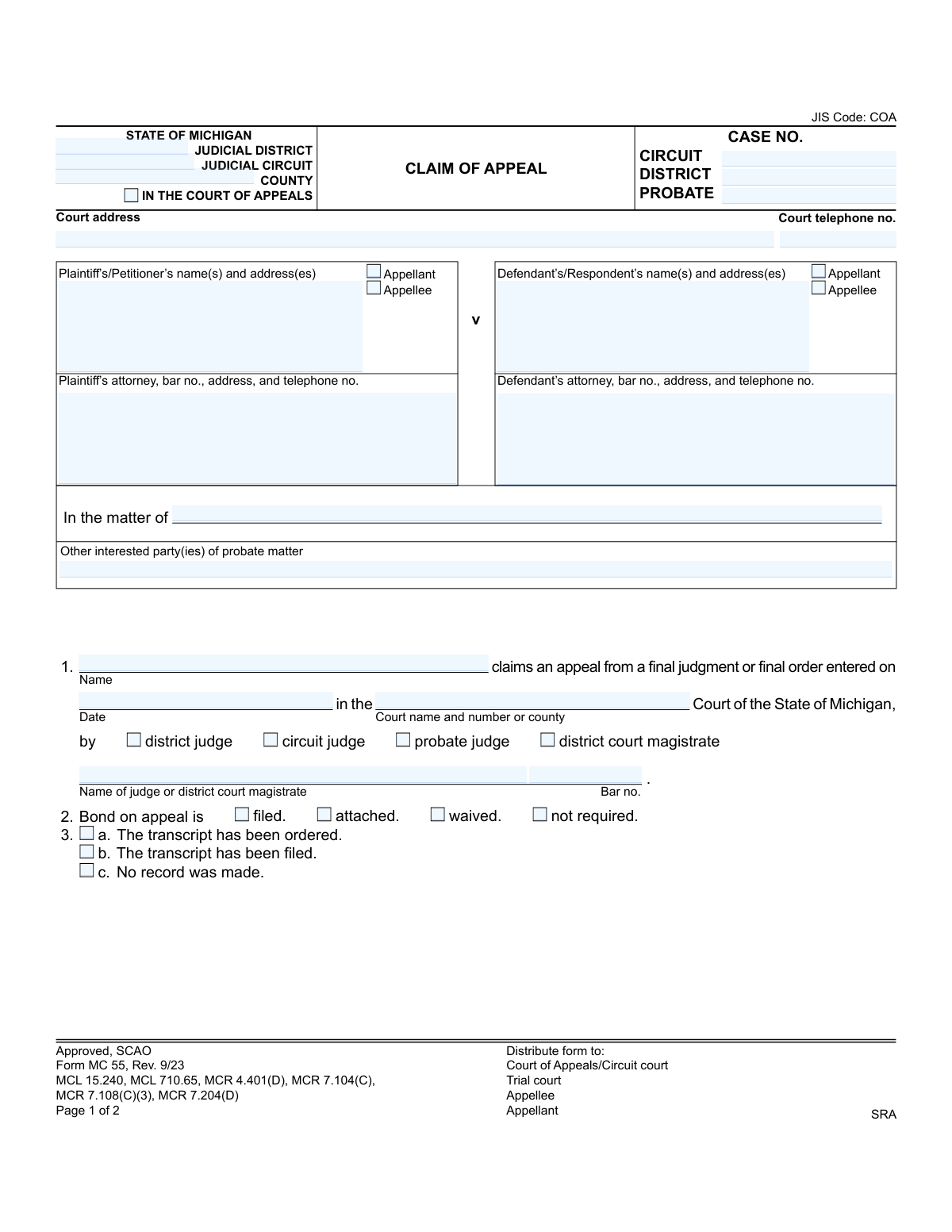
Yes! You can use AI to fill out Form MC 55, Claim of Appeal
Don't type 59 fields by hand. Tell our AI about yourself, or upload a document you already have, and it fills every field in seconds. You check it, then download, print or sign.
The AI does the filling. You just check it.
No typing into boxes, nothing to install.
What this form asks for
The AI fills all of it, from your answers or your documents.
The AI checks your answers before you download
13 checks built for this form, so a wrong date or a missing answer is caught before anyone else sees it.
This validation ensures that the 'Case No.' field on Page 2 is identical to one of the case number fields ('circuit', 'district', or 'probate') provided on Page 1. This is critical for maintaining document integrity and ensuring all pages of the filing are correctly associated with the same case. A mismatch could lead to the appeal being misfiled or rejected.
This check verifies that there is at least one party designated as 'Appellant' and at least one party designated as 'Appellee' across the plaintiff and defendant sections. It also ensures that no single party is marked as both. This is a fundamental requirement for an appeal, as it defines the opposing sides of the legal action.
This validation confirms that the 'final judgment or final order' date is not only present but is also a valid, correctly formatted date. Furthermore, it checks that the date is in the past and not a future date. An invalid or future date would make the claim nonsensical and legally void, as an appeal can only be filed against a judgment that has already occurred.
This check ensures that exactly one option from the 'Bond on appeal' section ('filed', 'attached', 'waived', 'not required') is selected. Selecting zero or multiple options creates ambiguity regarding the status of the appeal bond, which is a critical procedural step. The system should flag the submission for correction if this rule is violated.
This validation verifies that the user has selected exactly one option from the transcript status section ('The transcript has been ordered', 'The transcript has been filed', 'No record was made'). The status of the trial court transcript is essential for the appellate court to understand what records will be available for review. Failure to provide a clear, singular status will halt the processing of the appeal.
This check ensures that exactly one judge type ('district judge', 'circuit judge', 'probate judge', 'district court magistrate') is selected. This information is crucial for identifying the authority of the judicial officer who made the original ruling. Selecting more than one or none at all would create ambiguity and require manual clarification, delaying the case.
And 7 more checks
- Attorney Bar Number Format
- Proof of Service Completeness
- Proof of Service Date Logic
- Required Signatures Presence
- Lower Court Identification
- Party Identification Completeness
- Court Telephone Number Format
Let AI fill out your MC 55
No typing. Every field filled in seconds, checked, ready to sign.
How to Fill Out MC 55 Online for Free in 2026
What the AI walks you through.
- Navigate to Instafill.ai and upload or select the Michigan Claim of Appeal, Form MC 55.
- Provide the initial case information, including the judicial district/circuit, county, court address, and case number.
- Enter the names and addresses of the plaintiff/petitioner and defendant/respondent, indicating who is the appellant and who is the appellee, along with their attorney details.
- Specify the details of the final judgment or order being appealed, including the date of entry, the court name, and the name of the judge or magistrate who issued it.
- Indicate the status of the appeal bond (e.g., filed, waived) and the court transcript (e.g., ordered, filed, no record made).
- Check the appropriate boxes if the case involves specific matters such as child custody, guardianship, or a Freedom of Information Act (FOIA) issue.
- Review all the information populated by the AI for accuracy, then sign and date the claim. Complete the Proof of Service section after serving the document to the required parties.
Common Mistakes in Completing MC 55
The ones the AI is built to catch.
Incorrectly Identifying Appellant and Appellee
Using an Incorrect Final Judgment or Order Date
Failing to Complete the Proof of Service
Omitting Attorney Bar Numbers
Misrepresenting the Status of the Court Transcript
Overlooking Priority Case Designations in Section 4
Providing an Incomplete or Ambiguous Lower Court Name
Missing Required Signatures or Dates
Entering an Incorrect or Incomplete Case Number
Failing to Indicate Bond Status Correctly
Incomplete Party Information
Frequently Asked Questions About MC 55
Is it really free for 7 days?
Can I fill other forms too?
How do I cancel?
How does the AI fill out MC 55?
What happens to my information?
How complex is MC 55 to fill out?
What is the purpose of the Claim of Appeal form (MC 55)?
Who should fill out this form?
What is the difference between an 'Appellant' and an 'Appellee'?
What information do I need before I start filling out the form?
What is a 'bond on appeal' as mentioned in Section 2?
What do I need to do about the court transcript in Section 3?
Why do I need to check a box in Section 4 for the type of case?
What is the 'Proof of Service' section for?
Where do I file the completed Claim of Appeal form?
Can I file a Claim of Appeal without an attorney?
Can AI tools help me fill out this form?
How can I use Instafill.ai to fill this form out online?
The PDF of the form I downloaded is not fillable. What can I do?
Get your MC 55 filled out by AI
$0 today. Cancel before Nov 11 and you pay nothing.
Other forms like this one
Michigan court forms: Form MC 03, Answer, Civil, Form MC 02, Appearance, Form MC 6, Notice to Appear, Form MC 01, Summons, State of Michigan, Form MC 01a, Complaint, Form MC 01b, Motion for Second Summons and Order, State of Michigan Blank Court Form, Form MC 07, Default Request and Entry, Form MC 07a, Default Request, Entry, and Judgment (Sum Certain), Form MC 09, Dismissal, Form MC 09a, Dismissal, Nonservice/No Progress, Form MC 10, Judgment, Civil, Form MC 11, Subpoena, Order to Appear and/or Produce, Request and Writ for Garnishment (Periodic), Form MC 13, Request and Writ for Garnishment (Nonperiodic), Form MC 14, Garnishee Disclosure, Form MC 15, Motion and Affidavit for Installment Payments/To Amend Order for Installment Payments, Form MC 15a, Order Regarding Installment Payments, Form MC 16, Motion to Set Aside Order for Installment Payments, State of Michigan, Form MC 16a, Order on Motion to Set Aside Order for Installment Payments
court appeal forms: Form N161, Appellant's Notice (All appeals except small claims track appeals and appeals to the Family Division of the High Court), Designation of Record on Appeal (Civil) (Maricopa County Justice Courts, Arizona) (Form APP 8150-702), Form N161, Appellant’s notice (All appeals except small claims track appeals and appeals to the Family Division of the High Court), Declaration for Court of Appeal Proceedings, Form MC 56, Bond on Appeal, Form MC 57, Certificate of Records Transmitted for Appeal and Notice to Parties, Form MC 60, Notice of Record Return from Circuit Court/Court of Appeals, Form MC 501, Reporter/Recorder Certificate of Ordering Transcript on Appeal, Form MC 503, Motion to Change Time for Filing Transcript on Appeal, Civil Appeal Case Information Statement, Form APP-014, Appellant's Proposed Statement on Appeal (Unlimited Civil Case), Form CR-125, Notice of Appeal—Commitment (Penal Code or Welfare and Institutions Code), Form CR-134, Notice Regarding Record on Appeal (Misdemeanor), Form CR-135, Proposed Statement on Appeal (Misdemeanor), Form CR-136, Order Concerning Appellant's Proposed Statement on Appeal (Misdemeanor), Form CR-137, Abandonment of Appeal (Misdemeanor), Form CR-142, Notice of Appeal and Record on Appeal (Infraction), Form CR-143, Proposed Statement on Appeal (Infraction), Form CR-105, Defendant's Financial Statement on Eligibility for Appointment of Counsel and Reimbursement and Record on Appeal at Public Expense, Form CR-133, Request for Court-Appointed Lawyer in Misdemeanor Appeal
court claim forms: Form SC-100, Plaintiff's Claim and ORDER to Go to Small Claims Court, Judicial Council of California Form SC-105, Request for Court Order and Answer (Small Claims), SC-120, Defendant’s Claim and ORDER to Go to Small Claims Court (Small Claims), SC-105, Request for Court Order and Answer (Small Claims), Judicial Council of California Form SC-120, Defendant’s Claim and ORDER to Go to Small Claims Court (Small Claims), Form SC-100, Plaintiff’s Claim and ORDER to Go to Small Claims Court, Certificate of Service (Civil Court Claim), Form N161, Appellant’s notice (All appeals except small claims track appeals and appeals to the Family Division of the High Court), Plaintiff's Claim and ORDER to Go to Small Claims Court (SC-100), Form N161, Appellant's Notice (All appeals except small claims track appeals and appeals to the Family Division of the High Court), Form SC-100A, Other Plaintiffs or Defendants (Attachment to Plaintiff's Claim and ORDER to Go to Small Claims Court), Form N461: Claim for judicial review, Statement of Small Claim and Notice, Trial Court of Massachusetts, State of Michigan, Form MC 25, Notice of Intent to Escheat Unclaimed Personal Property, Form MC 35, Complaint, Claim and Delivery, Form MC 36, Motion for Possession Pending Judgment, Claim and Delivery, Order of Possession Pending Judgment, Claim and Delivery, Form MC 38, Bond, Claim and Delivery, Form MC 39, Judgment, Claim and Delivery, Form MC 67, Claim of Interest on Vehicle Seized for Forfeiture
Let AI fill out your MC 55
Your trial starts once a card is added. You pay nothing before Nov 11.
Our AI already knows this form, all 59 fields of it. Skip the typing: tell it about yourself, or upload what you have, and it fills the whole form in seconds.
- AI fills every field on both pages, checkboxes included
- No typing into boxes: answer a few questions, or upload a document you already have, an old copy of this form, a photo of a document
- The AI checks the answers; you review and change anything before you download
- Download the finished PDF, print it, or sign it online
- Encrypted, and never used to train AI
Cancel before Nov 11 and you pay nothing.
A card is needed to start the trial. Cancel in two clicks from your account.
Terms · Privacy