
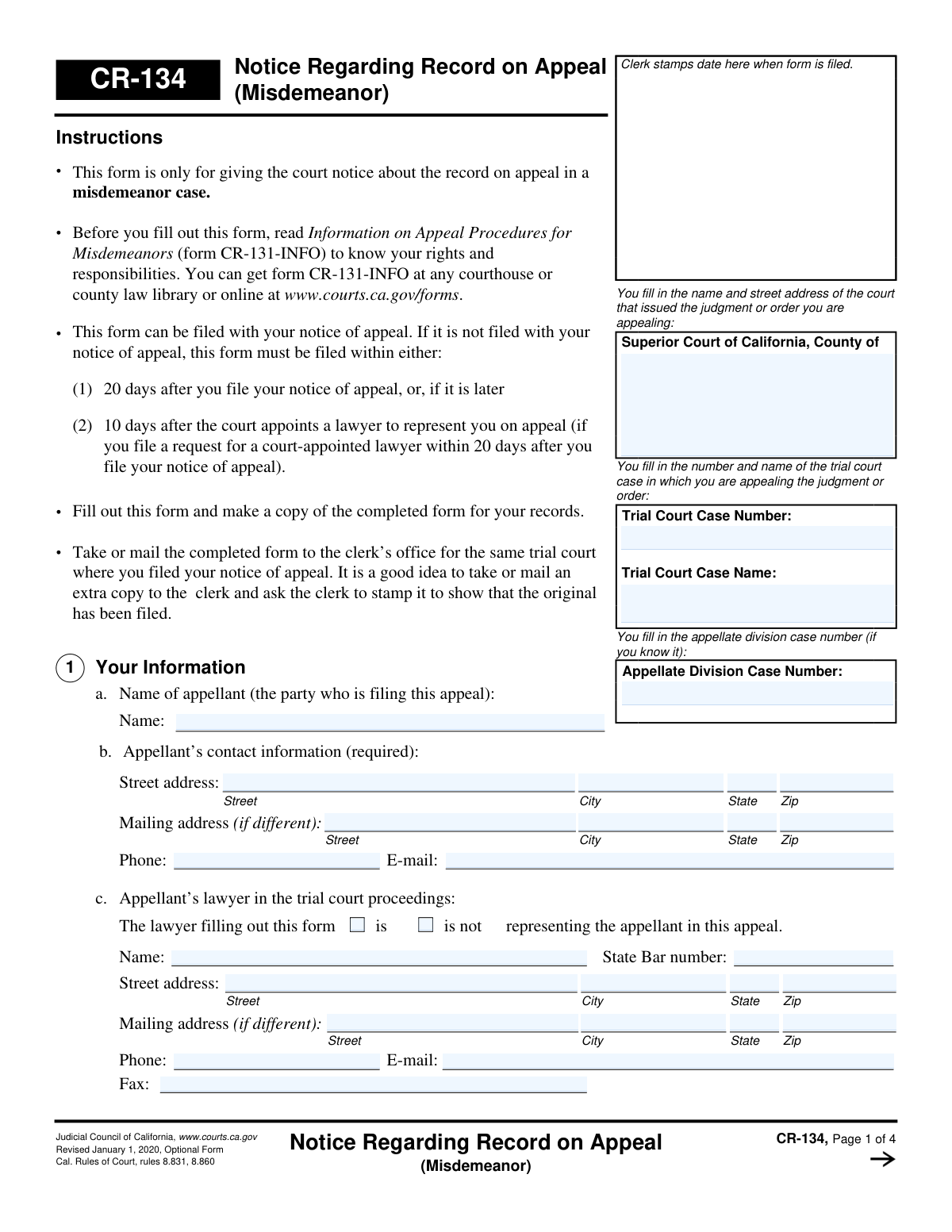
Yes! You can use AI to fill out Form CR-134, Notice Regarding Record on Appeal (Misdemeanor)
Don't type 65 fields by hand. Tell our AI about yourself, or upload a document you already have, and it fills every field in seconds. You check it, then download, print or sign.
The AI does the filling. You just check it.
No typing into boxes, nothing to install.
What this form asks for
The AI fills all of it, from your answers or your documents.
The AI checks your answers before you download
12 checks built for this form, so a wrong date or a missing answer is caught before anyone else sees it.
This check ensures that the 'Trial Court Case Number', 'Trial Court Case Name', and the 'County' of the Superior Court are all filled out on the first page. This information is fundamental for identifying and routing the appeal to the correct case file and jurisdiction. A failure to provide this complete information would make it impossible to process the notice, leading to its rejection.
Validates that the appellant's name, full street address, phone number, and email address in section 1b are all provided. This contact information is marked as required and is critical for the court to communicate with the appellant regarding deadlines, hearings, and other matters related to the appeal. Missing information could lead to the appellant not receiving crucial notices, potentially jeopardizing their appeal.
Verifies that the date entered in section 2, for when the notice of appeal was filed, is a valid calendar date and is not a future date. This date is the starting point for numerous legal deadlines, such as the deadline for filing this very form. An invalid or future date would make it impossible to calculate these deadlines correctly, likely resulting in the form being returned for correction.
Ensures that in section 4, the user has selected either to proceed 'WITH' or 'WITHOUT' a record of oral proceedings, but not both. This is a critical, mutually exclusive choice that determines the entire scope of the record on appeal. Selecting both or neither would create ambiguity and halt the processing of the record until the appellant clarifies their election.
This check confirms that if a choice is made in section 4 (to proceed with or without a record), the adjacent initials field has been filled out. The initials serve as a formal acknowledgment that the appellant understands the significant consequences of their choice, particularly the implications of proceeding without a record. A missing initial suggests the appellant may not have fully considered their choice, requiring clarification before proceeding.
This validation enforces a logical dependency, ensuring that section 5 ('Record of Oral Proceedings') is completed if, and only if, the user elected to proceed 'WITH a record' in section 4. If the user chose 'WITHOUT a record', section 5 must be left blank. This prevents unnecessary or contradictory information from being submitted and ensures the form accurately reflects the appellant's stated intention.
And 6 more checks
- Oral Proceeding Record Type Exclusivity
- Indigency Form (CR-105) Attachment Check
- Stipulation Attachment for Electronic Recording
- Proposed Statement on Appeal Attachment
- Signature Block Completeness
- Header Information Consistency
Let AI fill out your CR-134
No typing. Every field filled in seconds, checked, ready to sign.
How to Fill Out CR-134 Online for Free in 2026
What the AI walks you through.
- Navigate to Instafill.ai and upload or select the Form CR-134, Notice Regarding Record on Appeal (Misdemeanor).
- Provide the trial court case information, including the case number, case name, and the court's name and address.
- Enter the appellant's and/or their lawyer's contact information as required in section 1.
- In section 2, specify the date on which the notice of appeal was filed.
- In section 4, make the critical election to proceed with or without a record of the oral proceedings in the trial court.
- If proceeding with a record, complete section 5 by selecting the type of record (e.g., Reporter's Transcript, Statement on Appeal) and indicating how it will be paid for or if you are requesting it at no cost.
- Carefully review all entered information for accuracy, then use the platform to sign, date, and download the completed form for filing with the trial court clerk.
Common Mistakes in Completing CR-134
The ones the AI is built to catch.
Entering Incorrect Case Identifiers
Forgetting to Complete Headers on All Pages
Misunderstanding the 'Record of Oral Proceedings' Choice
Failing to Initial Key Acknowledgments
Requesting an Unavailable Type of Record
Failing to Arrange for Payment or Fee Waiver for Transcripts
Missing the Deadline for a 'Statement on Appeal'
Providing Incomplete or Outdated Contact Information
Forgetting to Sign and Date the Form
Incorrectly Citing a Stipulation
Incorrectly Entering the Notice of Appeal Filing Date
Frequently Asked Questions About CR-134
Is it really free for 7 days?
Can I fill other forms too?
How do I cancel?
How does the AI fill out CR-134?
What happens to my information?
How complex is CR-134 to fill out?
What is the purpose of the CR-134 form?
Who needs to fill out the Notice Regarding Record on Appeal form?
What is the deadline for filing form CR-134?
Where do I submit the completed form?
What should I do before filling out this form?
Do I have to provide a record of the oral proceedings?
What are my options for the record of oral proceedings?
What if I cannot afford to pay for a transcript or recording?
What is a 'Statement on Appeal'?
What happens if I don't file my proposed Statement on Appeal on time?
Can an AI tool help me complete this form?
How can I fill out the CR-134 form online?
The PDF of this form I have is not fillable. What can I do?
Get your CR-134 filled out by AI
$0 today. Cancel before Nov 1 and you pay nothing.
Other forms like this one
California court forms: Judicial Council of California Form SC-105, Request for Court Order and Answer (Small Claims), Judicial Council of California Form SC-120, Defendant’s Claim and ORDER to Go to Small Claims Court (Small Claims), Judicial Council of California Form SER-001, Request for Sheriff to Serve Court Papers, Judicial Council of California Form SER-001, Request for Sheriff to Serve Court Papers, Affidavit for Collection of Personal Property California Probate Code Section 13100, Form POS-040, Proof of Service—Civil, Declaration of Facts of Death (California Superior Court), declaration-of-marriage-for-court-proceeding-california-family-law, ADOPT-200, Adoption Request, ADOPT-200, Stepparent Adoption Request, ADOPT-210, Adoption Agreement, ADOPT-310, Contact After Adoption Agreement, Judicial Council of California Form ADOPT-200, Adoption Request, Form ADR-107, Mediation Attendance Sheet, Form ADR-110, Order Appointing Referee, Form ADR-109, Stipulation or Motion for Order Appointing Referee, Form ADR-102, Request for Trial De Novo After Judicial Arbitration, Form ADR-108, Referee's Report (Code Civ. Proc., §§ 638, 639), Form ADR-106, Petition to Confirm, Correct, or Vacate Contractual Arbitration Award, Form ADR-104, Rejection of Award and Request for Trial After Attorney-Client Fee Arbitration
court appeal forms: Form N161, Appellant's Notice (All appeals except small claims track appeals and appeals to the Family Division of the High Court), Designation of Record on Appeal (Civil) (Maricopa County Justice Courts, Arizona) (Form APP 8150-702), Form N161, Appellant’s notice (All appeals except small claims track appeals and appeals to the Family Division of the High Court), Declaration for Court of Appeal Proceedings, Form MC 55, Claim of Appeal, Form MC 56, Bond on Appeal, Form MC 57, Certificate of Records Transmitted for Appeal and Notice to Parties, Form MC 60, Notice of Record Return from Circuit Court/Court of Appeals, Form MC 501, Reporter/Recorder Certificate of Ordering Transcript on Appeal, Form MC 503, Motion to Change Time for Filing Transcript on Appeal, Civil Appeal Case Information Statement, Form APP-014, Appellant's Proposed Statement on Appeal (Unlimited Civil Case), Form CR-125, Notice of Appeal—Commitment (Penal Code or Welfare and Institutions Code), Form CR-135, Proposed Statement on Appeal (Misdemeanor), Form CR-136, Order Concerning Appellant's Proposed Statement on Appeal (Misdemeanor), Form CR-137, Abandonment of Appeal (Misdemeanor), Form CR-142, Notice of Appeal and Record on Appeal (Infraction), Form CR-143, Proposed Statement on Appeal (Infraction), Form CR-105, Defendant's Financial Statement on Eligibility for Appointment of Counsel and Reimbursement and Record on Appeal at Public Expense, Form CR-133, Request for Court-Appointed Lawyer in Misdemeanor Appeal
criminal record forms: Maryland Department of Public Safety and Correctional Services Application for Pardon, Resource Family Application - Criminal Record Statement, Form GEN 1331, Criminal Record and Child Abuse Registry Checklist, Form CR-142, Notice of Appeal and Record on Appeal (Infraction), Form CR-106, Proof of Service — Criminal Record Clearing, Form CR-105, Defendant's Financial Statement on Eligibility for Appointment of Counsel and Reimbursement and Record on Appeal at Public Expense, Form CR-409, Petition to Seal Arrest and Related Records, Judicial Council of California Form CR-410, Order to Seal Arrest and Related Records (Pen. Code, Sections 851.91, 851.92), Petition for Expunction of Criminal Records [Charges Not Filed] (Form CV-EXPU-100)
Let AI fill out your CR-134
Your trial starts once a card is added. You pay nothing before Nov 1.
Our AI already knows this form, all 65 fields of it. Skip the typing: tell it about yourself, or upload what you have, and it fills the whole form in seconds.
- AI fills every field on all 4 pages, checkboxes included
- No typing into boxes: answer a few questions, or upload a document you already have, an old copy of this form, a photo of a document
- The AI checks the answers; you review and change anything before you download
- Download the finished PDF, print it, or sign it online
- Encrypted, and never used to train AI
Cancel before Nov 1 and you pay nothing.
A card is needed to start the trial. Cancel in two clicks from your account.
Terms · Privacy