
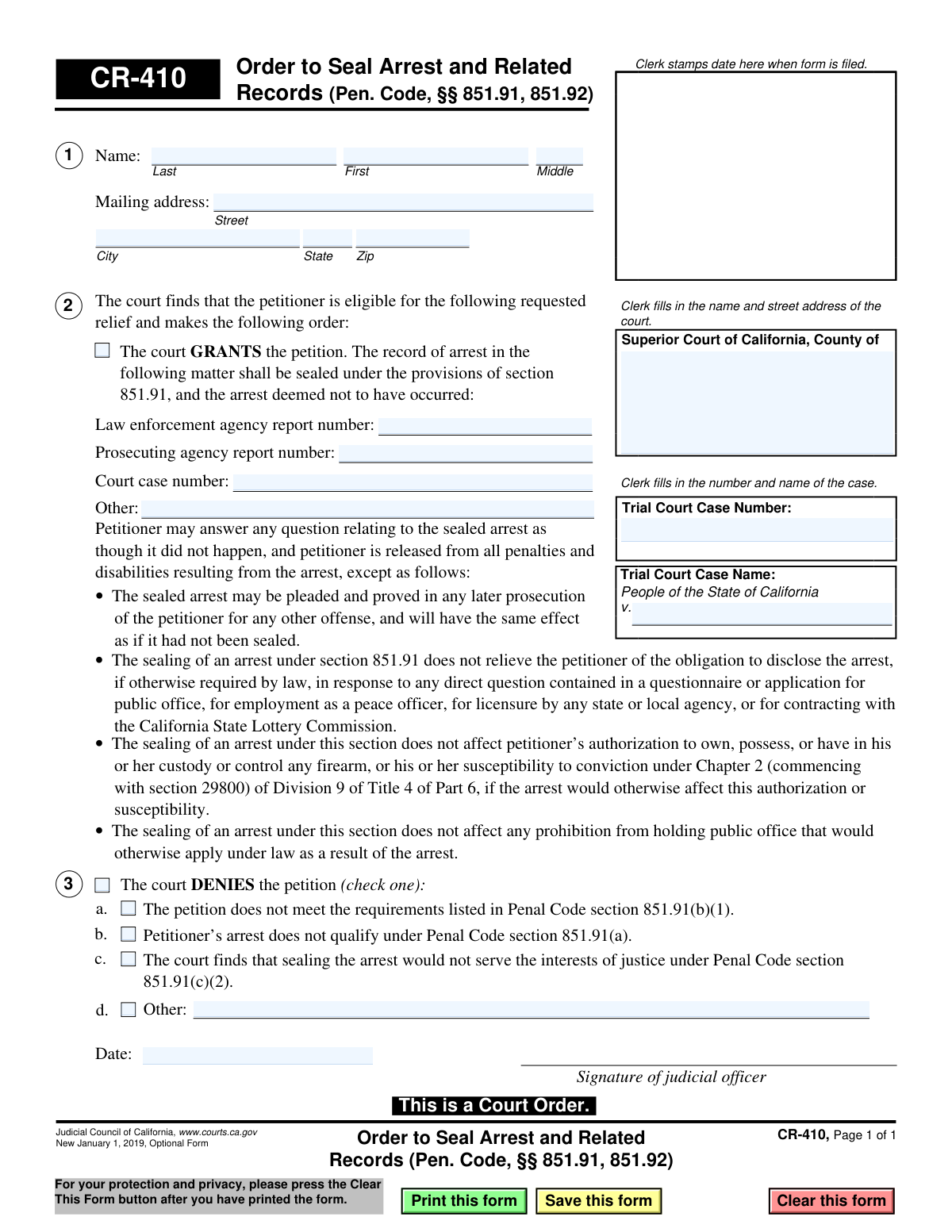
Yes! You can use AI to fill out Judicial Council of California Form CR-410, Order to Seal Arrest and Related Records (Pen. Code, Sections 851.91, 851.92)
Don't type 26 fields by hand. Tell our AI about yourself, or upload a document you already have, and it fills every field in seconds. You check it, then download, print or sign.
The AI does the filling. You just check it.
No typing into boxes, nothing to install.
What this form asks for
The AI fills all of it, from your answers or your documents.
The AI checks your answers before you download
14 checks built for this form, so a wrong date or a missing answer is caught before anyone else sees it.
This validation ensures that the order either grants or denies the petition, but not both. It checks that the 'GRANTS' checkbox and any of the 'DENIES' checkboxes are mutually exclusive. An order cannot be simultaneously granted and denied, as this would create a logical contradiction, making the court order unenforceable. If this check fails, the form is considered invalid due to conflicting instructions.
Verifies that the 'Trial Court Case Number' field is not empty and follows the standard format for the specified jurisdiction. The case number is the primary identifier for the legal proceeding in the court's system. Without a valid and correctly formatted case number, the order cannot be filed or linked to the correct case record, rendering it ineffective.
If the 'GRANTS' checkbox is selected, this check ensures that at least one of the identifying numbers (Law enforcement agency report number, Prosecuting agency report number, Court case number) is provided. Sealing an arrest requires specifying exactly which arrest record is to be sealed. Failure to provide this information makes the order ambiguous and impossible for law enforcement and other agencies to execute.
If the petition is denied, this check confirms that at least one of the reason checkboxes (a, b, c, or d) has been selected. A judicial order of denial must state the legal basis for the decision. This is crucial for the petitioner's understanding and for any potential appeal. An order of denial without a stated reason is incomplete and may be legally insufficient.
This validation ensures that if the 'Other' checkbox for denial (option d) is selected, the corresponding text field is filled with an explanation. The 'Other' option is a catch-all, and its meaning is entirely dependent on the written explanation. Without the text, the reason for denial is unknown, making the order incomplete and legally deficient.
This check compares the 'Trial Court Case Number' at the top of the form with the 'Court case number' listed in section 1 (if provided). These numbers should be identical as they refer to the same case. A mismatch could lead to confusion or the sealing of records for the wrong case, creating significant legal and administrative problems.
And 8 more checks
- Petitioner Name Requirement
- Petitioner Mailing Address Completeness
- State Abbreviation Format
- ZIP Code Format
- Judicial Order Date Presence
- Judicial Order Date Validity
- Superior Court County Presence
- Case Name Structure
Let AI fill out your CR-410
No typing. Every field filled in seconds, checked, ready to sign.
How to Fill Out CR-410 Online for Free in 2026
What the AI walks you through.
- Navigate to Instafill.ai and upload the CR-410 form or select it from the template library.
- Use the AI tool to populate the court information, including the Superior Court name, county, and address.
- Enter the Trial Court Case Number and the Case Name as it appears on your legal documents.
- In Section 1, provide the specific details of the arrest to be sealed, including the law enforcement agency report number and prosecuting agency report number.
- Leave the judicial decision sections (grant/deny checkboxes) and the judicial officer's signature line blank, as these are completed by the court.
- Carefully review all the information you have entered to ensure its accuracy before finalizing the document.
- Download and print the prepared form to submit to the court for the judge's review and signature.
Common Mistakes in Completing CR-410
The ones the AI is built to catch.
Filing the Order (CR-410) Instead of the Petition (CR-409)
Entering Incorrect or Incomplete Court Information
Omitting Law Enforcement and Prosecuting Agency Report Numbers
Confusing the Court Case Number With Other Report Numbers
Inconsistent or Incorrect Petitioner Name Formatting
Prematurely Checking the 'Grants' or 'Denies' Box
Signing in the Judicial Officer's Signature Box
Misunderstanding the Limitations of Record Sealing
Submitting an Illegible, Handwritten Form
Using an Obsolete Version of the Form
Frequently Asked Questions About CR-410
Is it really free for 7 days?
Can I fill other forms too?
How do I cancel?
How does the AI fill out CR-410?
What happens to my information?
How complex is CR-410 to fill out?
What is the purpose of Form CR-410?
Who fills out this form?
I want to seal my arrest record. Is this the form I need to submit?
What does it mean if the court grants the petition and seals my arrest?
If my arrest is sealed, do I ever have to disclose it?
What information is needed for the court to complete the order if my petition is granted?
Why might the court deny my petition to seal an arrest?
Will sealing my arrest restore my right to own a firearm?
What happens after the judge signs this order?
How long does it take to get this order from the court?
Can AI tools help me with sealing my arrest record?
How can I fill out the petition form online?
The PDF for my petition form isn't fillable. What should I do?
Get your CR-410 filled out by AI
$0 today. Cancel before Nov 1 and you pay nothing.
Other forms like this one
California court forms: Judicial Council of California Form SC-105, Request for Court Order and Answer (Small Claims), Judicial Council of California Form SC-120, Defendant’s Claim and ORDER to Go to Small Claims Court (Small Claims), Judicial Council of California Form SER-001, Request for Sheriff to Serve Court Papers, Judicial Council of California Form SER-001, Request for Sheriff to Serve Court Papers, Affidavit for Collection of Personal Property California Probate Code Section 13100, Form POS-040, Proof of Service—Civil, Declaration of Facts of Death (California Superior Court), declaration-of-marriage-for-court-proceeding-california-family-law, ADOPT-200, Adoption Request, ADOPT-200, Stepparent Adoption Request, ADOPT-210, Adoption Agreement, ADOPT-310, Contact After Adoption Agreement, Judicial Council of California Form ADOPT-200, Adoption Request, Form ADR-107, Mediation Attendance Sheet, Form ADR-110, Order Appointing Referee, Form ADR-109, Stipulation or Motion for Order Appointing Referee, Form ADR-102, Request for Trial De Novo After Judicial Arbitration, Form ADR-108, Referee's Report (Code Civ. Proc., §§ 638, 639), Form ADR-106, Petition to Confirm, Correct, or Vacate Contractual Arbitration Award, Form ADR-104, Rejection of Award and Request for Trial After Attorney-Client Fee Arbitration
Judicial Council forms: Judicial Council of California Form FL-300, Request for Order, Judicial Council of California Form FL-150, Income and Expense Declaration, Judicial Council of California Form SC-104, Proof of Service (Small Claims), Judicial Council of California Form SC-105, Request for Court Order and Answer (Small Claims), Judicial Council of California Form DE-111, Petition for Probate (Probate—Decedents Estates), Judicial Council of California Form SC-104, Proof of Service (Small Claims), Judicial Council of California Form SC-108, Request to Correct or Cancel Judgment and Answer (Small Claims), Judicial Council of California Form SC-120, Defendant’s Claim and ORDER to Go to Small Claims Court (Small Claims), Civil Case Cover Sheet (Judicial Council of California Form CM-010), Civil Case Cover Sheet (Judicial Council of California Form CM-010), Judicial Council of California Form TR-205, Request for Trial by Written Declaration (Trial by Written Declaration—Traffic), Judicial Council of California Form DE-120, Notice of Hearing—Decedent's Estate or Trust, Inventory and Appraisal Attachment (Judicial Council of California Form DE-161, GC-041), CLETS-001, Confidential Information for Law Enforcement (Judicial Council of California), Judicial Council of California Form SER-001, Request for Sheriff to Serve Court Papers, Judicial Council of California Form UD-105, Answer—Unlawful Detainer, CLETS-001, Confidential Information for Law Enforcement (Judicial Council of California), Judicial Council of California Form ADOPT-210, Adoption Agreement, Judicial Council of California Form DE-120, Notice of Hearing—Decedent's Estate or Trust, Inventory and Appraisal (Judicial Council of California) (Form DE-160/GC-040)
California judicial forms: Judicial Council of California Form FL-300, Request for Order, Judicial Council of California Form FL-150, Income and Expense Declaration, Judicial Council of California Form SC-104, Proof of Service (Small Claims), Judicial Council of California Form SC-105, Request for Court Order and Answer (Small Claims), Judicial Council of California Form DE-111, Petition for Probate (Probate—Decedents Estates), Judicial Council of California Form SC-104, Proof of Service (Small Claims), Judicial Council of California Form SC-108, Request to Correct or Cancel Judgment and Answer (Small Claims), Judicial Council of California Form SC-120, Defendant’s Claim and ORDER to Go to Small Claims Court (Small Claims), Civil Case Cover Sheet (Judicial Council of California Form CM-010), Civil Case Cover Sheet (Judicial Council of California Form CM-010), Judicial Council of California Form TR-205, Request for Trial by Written Declaration (Trial by Written Declaration—Traffic), Judicial Council of California Form DE-120, Notice of Hearing—Decedent's Estate or Trust, Inventory and Appraisal Attachment (Judicial Council of California Form DE-161, GC-041), CLETS-001, Confidential Information for Law Enforcement (Judicial Council of California), Judicial Council of California Form SER-001, Request for Sheriff to Serve Court Papers, Judicial Council of California Form UD-105, Answer—Unlawful Detainer, CLETS-001, Confidential Information for Law Enforcement (Judicial Council of California), Judicial Council of California Form ADOPT-210, Adoption Agreement, Judicial Council of California Form DE-120, Notice of Hearing—Decedent's Estate or Trust, Inventory and Appraisal (Judicial Council of California) (Form DE-160/GC-040)
criminal record forms: Maryland Department of Public Safety and Correctional Services Application for Pardon, Resource Family Application - Criminal Record Statement, Form GEN 1331, Criminal Record and Child Abuse Registry Checklist, Form CR-134, Notice Regarding Record on Appeal (Misdemeanor), Form CR-142, Notice of Appeal and Record on Appeal (Infraction), Form CR-106, Proof of Service — Criminal Record Clearing, Form CR-105, Defendant's Financial Statement on Eligibility for Appointment of Counsel and Reimbursement and Record on Appeal at Public Expense, Form CR-409, Petition to Seal Arrest and Related Records, Petition for Expunction of Criminal Records [Charges Not Filed] (Form CV-EXPU-100)
Let AI fill out your CR-410
Your trial starts once a card is added. You pay nothing before Nov 1.
Our AI already knows this form, all 26 fields of it. Skip the typing: tell it about yourself, or upload what you have, and it fills the whole form in seconds.
- AI fills every field on the form, checkboxes included
- No typing into boxes: answer a few questions, or upload a document you already have, an old copy of this form, a photo of a document
- The AI checks the answers; you review and change anything before you download
- Download the finished PDF, print it, or sign it online
- Encrypted, and never used to train AI
Cancel before Nov 1 and you pay nothing.
A card is needed to start the trial. Cancel in two clicks from your account.
Terms · Privacy