Yes! You can use AI to fill out Commonwealth of Massachusetts Department of Industrial Accidents (DIA) Form 110, Employee’s Claim
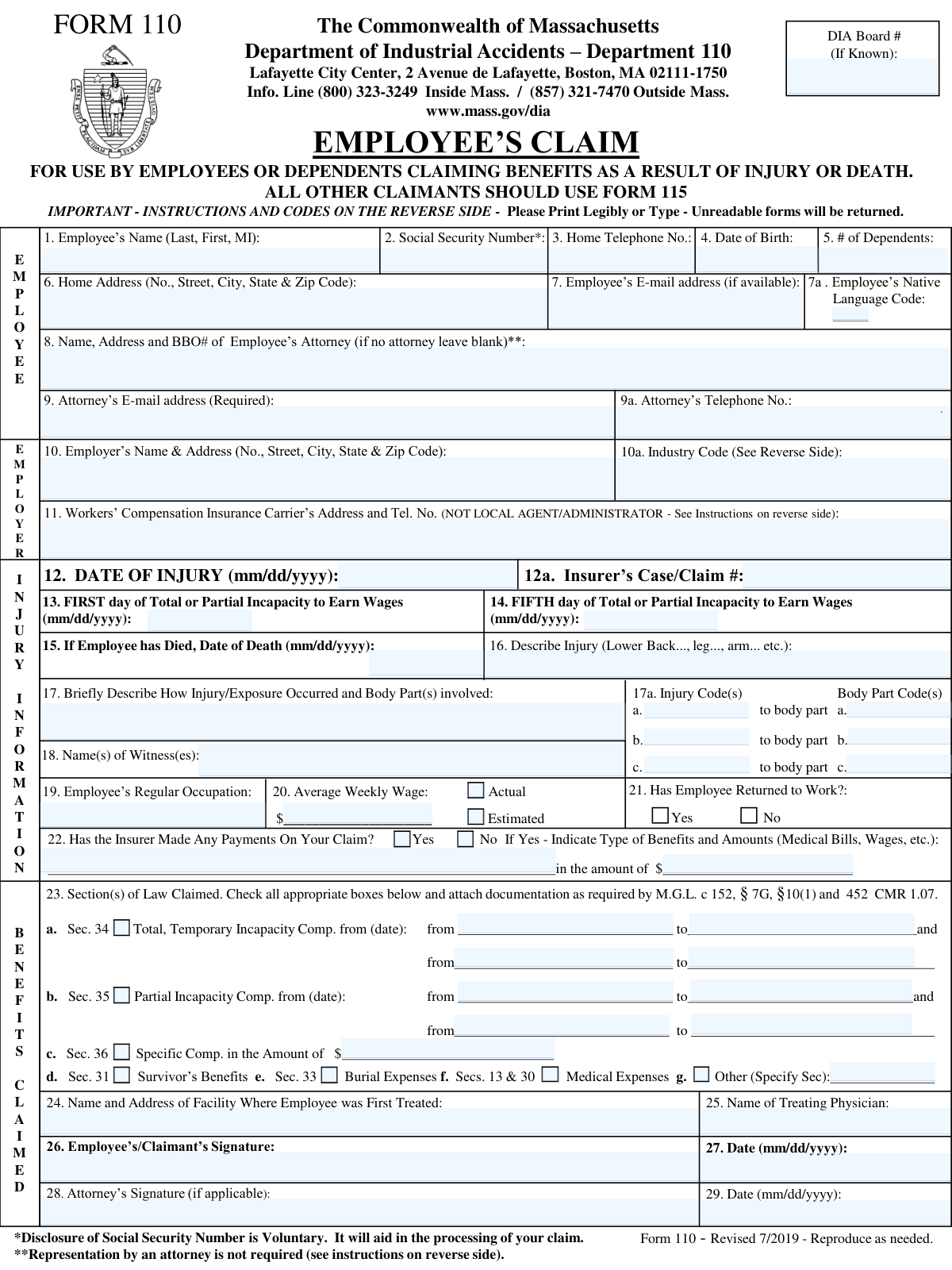
Massachusetts DIA Form 110, âEmployeeâs Claim,â is the official Department of Industrial Accidents form used to initiate a disputed workersâ compensation claim for benefits related to a workplace injury, occupational exposure, or death. It captures identifying information for the employee, employer, and insurer, details about the injury and incapacity dates, wage information, medical treatment details, and the specific statutory benefits being claimed (e.g., M.G.L. c. 152 §§ 34, 35, 36, 31, 33, 13 & 30). Filing it correctly is important because it formally starts the DIA dispute process and helps ensure the claim is processed with the required documentation and signatures. Today, this form can be filled out quickly and accurately using AI-powered services like Instafill.ai, which can also convert non-fillable PDF versions into interactive fillable forms.
Our AI automatically handles information lookup, data retrieval, formatting, and form filling.
It takes less than a minute to fill out MA DIA Form 110 using our AI form filling.
Securely upload your data. Information is encrypted in transit and deleted immediately after the form is filled out.
Form specifications
| Form name: | Commonwealth of Massachusetts Department of Industrial Accidents (DIA) Form 110, Employee’s Claim |
| Number of pages: | 1 |
| Filled form examples: | Form MA DIA Form 110 Examples |
| Language: | English |
| Categories: | workers compensation forms, Massachusetts DIA forms, Massachusetts state forms, employment claim forms, industrial accident forms, VA claim forms, SSA forms |
Instafill Demo: filling out a legal form in seconds
How to Fill Out MA DIA Form 110 Online for Free in 2026
Are you looking to fill out a MA DIA FORM 110 form online quickly and accurately? Instafill.ai offers the #1 AI-powered PDF filling software of 2026, allowing you to complete your MA DIA FORM 110 form in just 37 seconds or less.
Follow these steps to fill out your MA DIA FORM 110 form online using Instafill.ai:
- 1 Go to Instafill.ai and upload the Massachusetts DIA Form 110 PDF (or select it from the form library).
- 2 Enter or import the employee/claimant details (name, SSN if provided, DOB, contact info, address, dependents, native language code, and DIA Board # if known).
- 3 Add employer and insurer information (employer name/address, industry code, workers’ compensation insurance carrier address/phone, and insurer claim/case number if available).
- 4 Complete injury and incapacity details (date of injury, first and fifth day of incapacity, death date if applicable, occupation, average weekly wage, return-to-work status, witnesses, and narrative descriptions of injury and how it occurred).
- 5 Select and complete the benefits claimed section (check applicable M.G.L. c. 152 sections, enter date ranges for incapacity benefits, and amounts for specific compensation/other benefits as needed).
- 6 Provide medical information (first treatment facility name/address and treating physician) and indicate whether the insurer has made any payments, including types and amounts if yes.
- 7 Review for completeness and accuracy, then add required signatures/dates (employee signature is required; attorney signature if applicable) and download/print for mailing to DIA and providing copies to the employer and insurer as instructed.
Our AI-powered system ensures each field is filled out correctly, reducing errors and saving you time.
Why Choose Instafill.ai for Your Fillable MA DIA Form 110 Form?
Speed
Complete your MA DIA Form 110 in as little as 37 seconds.
Up-to-Date
Always use the latest 2026 MA DIA Form 110 form version.
Cost-effective
No need to hire expensive lawyers.
Accuracy
Our AI performs 10 compliance checks to ensure your form is error-free.
Security
Your personal information is protected with bank-level encryption.
Frequently Asked Questions About Form MA DIA Form 110
Form 110 is used by an employee (or eligible dependents) to file a disputed workersâ compensation claim with the Massachusetts Department of Industrial Accidents (DIA). It is typically filed when the workersâ compensation insurer has denied the claim or is disputing benefits you believe you are owed.
Form 110 is for employees or dependents claiming benefits due to an injury or death. The form states that all other claimants should use Form 115.
Noârepresentation by an attorney is not required, and you may file âpro seâ (self-represented). You can still hire an attorney later if you choose.
Mail the original to the DIA at the address on the form (Lafayette City Center, 2 Avenue de Lafayette, Boston, MA 02111-1750). You must also provide a copy to your employer and a copy to the insurer, and keep a third copy for your records.
If you are represented by an attorney, the form must be sent to the insurer via certified mail. If you are not represented, the form instructions still require that the insurer and employer receive copies, but certified mail is specifically required when counsel is involved.
The form instructions state that claims must be accompanied by proper documentation under M.G.L. c. 152, §7G and 452 CMR 1.07. Attach the documentation required for the benefit sections you check (for example, medical records/bills for medical expenses or proof supporting incapacity periods).
Noâdisclosure of your Social Security Number is voluntary. However, the form notes it will aid in processing your claim.
Enter the date the injury occurred in the âDate of Injuryâ field. Then list the first day you were totally or partially unable to earn wages and the fifth day of that incapacity (all in mm/dd/yyyy format).
Yes, dependents may file Form 110 for benefits resulting from a work-related death. Complete the âDate of Deathâ field and check the appropriate benefits claimed (such as Survivorâs Benefits under Sec. 31 and Burial Expenses under Sec. 33), with required documentation.
Use the code lists provided on the reverse side of the form: select the employerâs Industry Code, the Nature of Injury/Illness code(s), and the Body Part Affected code(s) that best match the situation. If multiple injuries/body parts apply, you can list up to three sets (a, b, c).
Enter your best estimate and check the âEstimatedâ box if you do not have the exact figure. If you know the exact amount, enter it and check âActual.â
This asks whether the insurer has paid anything related to your claim (such as medical bills or wage replacement). If yes, check âYesâ and list the type of benefits and the amounts paid, including the total amount if known.
Check all benefits you are claiming, such as Sec. 34 (total temporary incapacity), Sec. 35 (partial incapacity), Sec. 36 (specific compensation), Sec. 31 (survivorâs), Sec. 33 (burial), and Secs. 13 & 30 (medical). For Sec. 34 and Sec. 35, include the date ranges for the periods you are claiming.
The form warns that unreadable forms will be returned, so print legibly or type. If a field does not apply (for example, attorney information when you have no attorney), leave it blank as instructed.
YesâAI tools can help reduce errors and save time by auto-filling form fields from the information you provide; services like Instafill.ai can do this accurately. Typically, you upload the Form 110 PDF to Instafill.ai, answer a guided set of questions (injury details, employer/insurer info, dates, benefits claimed), and the system populates the correct fields for you to review before downloading and signing.
If the PDF is not fillable, you can still complete it by printing and handwriting, but that increases the risk of legibility issues. Instafill.ai can convert flat, non-fillable PDFs into interactive fillable forms so you can type directly into the fields and generate a clean, readable submission.
Compliance MA DIA Form 110
Validation Checks by Instafill.ai
1
Employee Name completeness and character validation
Validates that the Employeeâs Name includes at minimum a last name and first name, and that the middle initial (if provided) is a single alphabetic character. The check also rejects obviously invalid entries (e.g., all numbers, placeholder text like âN/Aâ, or excessive punctuation). This is important for identity matching and claim indexing; if it fails, the submission should be rejected or routed for manual review with a request for correction.
2
Social Security Number (SSN) format and plausibility check
Ensures the SSN is either blank (since disclosure is voluntary) or matches a valid SSN pattern (###-##-#### or #########), and is not an invalid sequence (e.g., 000-00-0000, 111-11-1111). This reduces misidentification and downstream matching errors with insurer/employer records. If validation fails, the system should flag the SSN field and require correction or allow submission only if SSN is omitted entirely.
3
Date fields format validation (mm/dd/yyyy) across the form
Checks that all date fields (Date of Birth, Date of Injury, First/Fifth Day of Incapacity, Date of Death, signature dates, and benefit period dates) are valid calendar dates in mm/dd/yyyy format. It should reject impossible dates (e.g., 02/30/2025) and non-date text. If this fails, the form should not be accepted because date-driven eligibility and timelines cannot be computed reliably.
4
Chronological consistency: Date of Birth vs. injury/incapacity/signature dates
Validates that Date of Birth occurs before Date of Injury, incapacity dates, and signature dates, and that the employee is not implausibly young/old (e.g., DOB after injury date). This prevents data entry mistakes that can invalidate the claim timeline and identity verification. If the check fails, the system should block submission and prompt the filer to correct the conflicting dates.
5
Injury and incapacity timeline logic (injury date, first day, fifth day)
Ensures the First Day of Total/Partial Incapacity is on or after the Date of Injury (or, if business rules allow, not unreasonably before it), and that the Fifth Day of Incapacity is on or after the First Day of Incapacity. This is critical for benefit calculations and statutory thresholds tied to incapacity duration. If validation fails, the system should require correction and highlight the specific inconsistent fields.
6
Death-related conditional requirements and date logic
If Date of Death is provided, validates it is on or after the Date of Injury and not in the future, and triggers additional consistency checks (e.g., survivor/burial benefits likely applicable). If Date of Death is blank, the system should not require death-related benefit selections. If this validation fails, the submission should be flagged for correction because death status materially changes claim handling.
7
Home address completeness and Massachusetts ZIP/State format
Validates that Home Address includes street number/name, city, state, and ZIP code, and that state is a valid two-letter abbreviation (e.g., MA). ZIP should be 5 digits or ZIP+4 (##### or #####-####). If it fails, the system should reject or hold the claim because notices and legal correspondence may not be deliverable.
8
Phone number format validation (employee and attorney/carrier)
Ensures telephone numbers contain 10 digits (optionally with country code +1) and acceptable separators (e.g., (###) ###-####). This should be applied to Home Telephone, Attorney Telephone, and Carrier Telephone. If validation fails, the system should flag the field and require correction to ensure the DIA/insurer can contact the parties.
9
Email address format and conditional requirement for attorney email
Validates that any provided email matches a standard email format ([email protected]). Additionally, if any attorney information is present (name/BBO/phone/signature), the Attorneyâs Email Address must be present and valid as the form indicates it is required. If validation fails, the system should block submission when attorney representation is indicated, or otherwise flag the invalid email for correction.
10
Attorney information consistency (BBO#, contact fields, and signatures)
If the filer provides an attorney name/address or attorney signature, the system should require a BBO# and attorney contact details (email and phone) to be present and plausibly formatted. Conversely, if no attorney is indicated, attorney signature/date should be blank. If this fails, the submission should be returned for correction because representation status affects service requirements and communications.
11
Employer and insurer/carrier identification completeness
Validates that Employerâs Name & Address is complete (name plus full mailing address) and that the Workersâ Compensation Insurance Carrierâs Address and Telephone are provided (not a local agent/administrator, per the form instruction). This is essential for proper notice and routing of the dispute. If validation fails, the system should flag missing/insufficient carrier details and prevent submission or route to manual review.
12
Industry Code validation against allowed code list
Ensures the Employer Industry Code is a valid code from the provided list (e.g., 01, 15, 20, 52, 91, 99) and is stored in the expected numeric/zero-padded format. This supports reporting, analytics, and may affect processing workflows. If validation fails, the system should reject the code and require selection/correction from the allowed set.
13
Native Language Code validation against allowed values
Validates that the Employeeâs Native Language Code is one of the allowed values (1, 2, 3, 04, 5, 6, 7, 9) and normalizes equivalent inputs (e.g., '4' vs '04') according to system rules. This ensures correct language assistance and correspondence preferences. If validation fails, the system should prompt for a valid code or allow blank if the field is optional in the implementation.
14
Injury/Body Part code pair validation and allowed ranges
For each entered Injury Code (up to three) and Body Part Code (up to three), validates that the codes are present as pairs (no injury code without a body part code and vice versa) and that each code exists in the provided code tables. This prevents unusable coding that breaks downstream classification and reporting. If validation fails, the system should require correction or removal of incomplete/invalid code entries.
15
Average Weekly Wage numeric validation and Actual/Estimated selection rule
Ensures Average Weekly Wage is a positive currency amount (numeric with up to two decimals) and that exactly one of Actual or Estimated is selected. This is required for benefit computation and auditability of wage basis. If validation fails, the system should block submission and request a corrected wage amount and a single wage-type selection.
16
Insurer payments conditional details requirement
If 'Has the Insurer Made Any Payments' is marked Yes, the Type of Benefits and Amounts description and the Amount of Payments must be provided, with the amount validated as a positive currency value. If marked No, those payment detail fields should be empty to avoid contradictory information. If validation fails, the system should flag the inconsistency and require correction because payment status affects dispute posture and offsets.
Common Mistakes in Completing MA DIA Form 110
People often file Form 110 without noticing it is specifically for employees or dependents claiming benefits due to injury or death, and that âall other claimants should use Form 115.â Using the wrong form can lead to the DIA returning the submission or delaying the start of the dispute process. Before completing anything, confirm you are the correct claimant type for Form 110 and switch to Form 115 if you are not. AI-powered tools like Instafill.ai can help route you to the correct form and prevent filing the wrong document.
This form warns that unreadable forms will be returned, and many submissions fail due to hard-to-read handwriting or missing basics like full legal name, complete address, phone number, or date of birth. Missing or unclear contact details can prevent the DIA/insurer from matching your claim to existing records and from contacting you for scheduling or documentation requests. Print clearly or type, and double-check that every identity field is complete and consistent with your official records. Instafill.ai can auto-format names, addresses, and phone numbers and flag missing required fields before you submit.
Applicants frequently enter dates in the wrong format (the form requires mm/dd/yyyy) or provide a âfirst day of incapacityâ that doesnât align logically with the date of injury. Inconsistent timelines can create disputes about eligibility, waiting periods, and benefit start dates, which can slow the claim or trigger requests for clarification. Use mm/dd/yyyy everywhere and verify the sequence: date of injury, first day of incapacity, and fifth day of incapacity should be coherent. Instafill.ai can validate date formats and flag timeline inconsistencies automatically.
Field 11 explicitly says âNOT LOCAL AGENT/ADMINISTRATOR,â but many people still enter the employerâs broker, TPA, or a local office rather than the workersâ compensation insurance carrierâs correct address and phone. This can cause misdelivery of notices, delays in service, and problems proving proper notice to the right party. Ask the employer for the official carrier information (as required by law) and copy the carrierâs full mailing address and phone number exactly. Instafill.ai can help standardize insurer details and reduce the chance of entering the wrong entity.
The form relies on specific numeric codes (industry code, injury code(s), body part code(s), and native language code), but people often write descriptions instead of codes or leave them empty. Missing/incorrect codes can slow processing, lead to data entry errors, or cause the DIA to request corrections. Use the reverse-side code lists and enter the numeric code(s) that best match the situation, adding multiple codes only when appropriate. Instafill.ai can suggest and validate code entries and ensure they match the required numeric format.
Many claimants write a very general description (e.g., âhurt my backâ) without explaining how it happened, what body parts were involved, and what the medical diagnosis/condition is, or they provide narratives that conflict with the injury/body-part codes selected. Vague or inconsistent descriptions can weaken the claim, invite disputes, and trigger follow-up requests for more detail. Provide a concise but specific account: mechanism of injury/exposure, date/time context, and clearly identified body parts and symptoms/diagnosis. Instafill.ai can prompt for missing narrative elements and cross-check that the narrative aligns with selected codes.
People often fill in a wage number but forget to check whether it is âActualâ or âEstimated,â or they enter a guess that doesnât reflect average weekly wage rules (e.g., using hourly rate only, or a single weekâs pay). Wage errors can lead to incorrect benefit calculations and later disputes or overpayment/underpayment corrections. Use pay stubs or payroll records to compute the average weekly wage and clearly mark whether the figure is actual or estimated. Instafill.ai can help format currency correctly and remind you to select the appropriate wage type.
Checkbox questions like âHas Employee Returned to Work?â and âHas the Insurer Made Any Payments?â are frequently left blank, or âYesâ is checked without providing the required follow-up details (types of benefits and amounts). Incomplete answers can create confusion about current disability status and what benefits are already in play, delaying conference/hearing preparation. Always select Yes/No and, if Yes, provide the requested details (benefit type, dates if known, and total amount paid). Instafill.ai can enforce conditional logic so follow-up fields are completed when âYesâ is selected.
Claimants often check Section 34/35/36/medical/survivor benefits but leave the âfrom/toâ date ranges blank, omit the Section 36 amount, or fail to attach documentation required by M.G.L. c. 152 §7G and 452 CMR 1.07. Missing dates and documentation can result in the claim being considered incomplete, returned, or delayed while the DIA requests supporting materials. Only check benefits you are actually claiming, complete all associated date ranges/amounts, and attach the required medical and wage documentation. Instafill.ai can prompt for missing attachments and ensure each selected benefit has its required supporting details.
People sometimes partially complete the attorney section (e.g., provide a name but no BBO#) or miss that the attorney email is marked âRequiredâ when an attorney is involved; others fill attorney fields even though they are self-represented. These mistakes can cause communication failures, misrouting of notices, or requests for correction. If you have an attorney, complete all attorney fields including BBO# and the required email; if you do not, leave the attorney section blank as instructed. Instafill.ai can detect whether attorney representation is indicated and ensure the correct attorney fields are completed (or left blank).
A very common rejection reason is failing to sign and date in Boxes 26 and 27 (the instructions state the employee must sign and date in all cases), or forgetting that the original must be mailed to the DIA and copies provided to the employer and insurer (and certified mail to the insurer when represented by counsel). Missing signatures invalidate the filing, and improper service can delay proceedings or create disputes about notice. Always sign and date the employee/claimant signature line, and follow the mailing/copy requirements exactly, keeping a copy for your records. If the form is only available as a flat non-fillable PDF in practice, Instafill.ai can convert it into a fillable version and help ensure signature/date fields and service steps arenât missed.
Saved over 80 hours a year
âI was never sure if my IRS forms like W-9 were filled correctly. Now, I can complete the forms accurately without any external help.â
Kevin Martin Green
Your data stays secure with advanced protection from Instafill and our subprocessors

Robust compliance program
Transparent business model
Youâre not the product. You always know where your data is and what it is processed for.
ISO 27001, HIPAA, and GDPR
Our subprocesses adhere to multiple compliance standards, including but not limited to ISO 27001, HIPAA, and GDPR.
Security & privacy by design
We consider security and privacy from the initial design phase of any new service or functionality. Itâs not an afterthought, itâs built-in, including support for two-factor authentication (2FA) to further protect your account.
Fill out MA DIA Form 110 with Instafill.ai
Worried about filling PDFs wrong? Instafill securely fills commonwealth-of-massachusetts-department-of-industrial-accidents-dia-form-110-employees-claim forms, ensuring each field is accurate.



