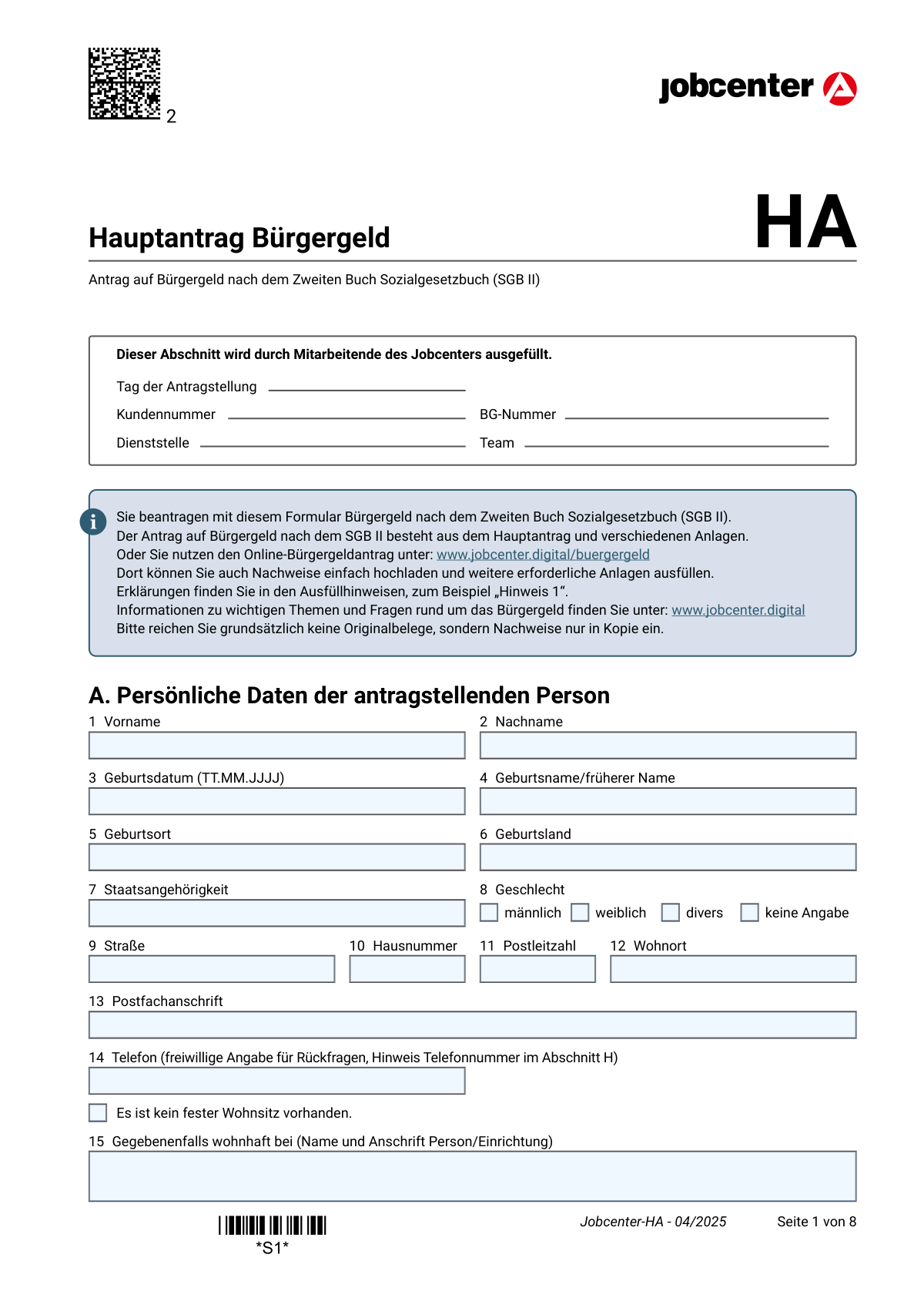
Yes! You can use AI to fill out Hauptantrag Bürgergeld (HA) – Antrag auf Bürgergeld nach dem Zweiten Buch Sozialgesetzbuch (SGB II)

Der „Hauptantrag BĂŒrgergeld (HA)“ ist der Basisantrag, mit dem eine Person BĂŒrgergeld nach dem Zweiten Buch Sozialgesetzbuch (SGB II) beim Jobcenter beantragt. Er bildet zusammen mit je nach Lebenslage erforderlichen Anlagen (z. B. zu Einkommen, Vermögen, Unterkunft/Heizung oder Haushalts-/Bedarfsgemeinschaft) den vollstĂ€ndigen Leistungsantrag. Das Formular ist wichtig, weil das Jobcenter anhand der Angaben Anspruch, Leistungsbeginn, Bedarfsgemeinschaft sowie Höhe der Leistungen prĂŒft und Nachweise anfordert. UnvollstĂ€ndige oder unzutreffende Angaben können zu Verzögerungen, RĂŒckforderungen oder LeistungskĂŒrzungen fĂŒhren.
Our AI automatically handles information lookup, data retrieval, formatting, and form filling.
It takes less than a minute to fill out Bürgergeld HA using our AI form filling.
Securely upload your data. Information is encrypted in transit and deleted immediately after the form is filled out.

Form specifications

Form name: Hauptantrag Bürgergeld (HA) – Antrag auf Bürgergeld nach dem Zweiten Buch Sozialgesetzbuch (SGB II)
Number of pages: 8
Filled form examples: Form Bürgergeld HA Examples
Language: English
main-image

Instafill Demo: filling out a legal form in seconds

How to Fill Out Bürgergeld HA Online for Free in 2026

Are you looking to fill out a BÜRGERGELD HA form online quickly and accurately? Instafill.ai offers the #1 AI-powered PDF filling software of 2026, allowing you to complete your BÜRGERGELD HA form in just 37 seconds or less.
Follow these steps to fill out your BÜRGERGELD HA form online using Instafill.ai:
  1. 1 Formulartyp und Leistungsbeginn festlegen: Prüfen, ob Sie den „Hauptantrag Bürgergeld HA“ benötigen, und in Abschnitt B angeben, ob der Antrag „ab sofort“ oder ab einem konkreten Datum gelten soll.
  2. 2 Persönliche Grunddaten eintragen (Abschnitt A): Name, Geburtsdaten, Staatsangehörigkeit, Anschrift/ggf. kein fester Wohnsitz, Kontaktdaten sowie Bankverbindung (oder angeben, dass keine vorhanden ist).
  3. 3 Versicherungs- und Aufenthaltsangaben ergänzen: Sozial-/Rentenversicherungsnummer, ggf. gesetzliche Betreuung/Vormundschaft, Einreisedatum, Aufenthaltstitel und ggf. Verpflichtungserklärung angeben und Nachweise vorbereiten.
  4. 4 Lebenssituation und bisherige Leistungen erfassen (Abschnitte C/D): Erwerbsfähigkeit, Schule/Studium/Ausbildung, Asylbewerberleistungen, frühere Bürgergeld-/Sozialhilfezeiten, Beschäftigung/Selbständigkeit, Entgeltersatzleistungen, besondere Bedarfe (z. B. Schwangerschaft, Behinderung, kostenaufwändige Ernährung, stationäre Einrichtung) ankreuzen und erläutern.
  5. 5 Kranken- und Pflegeversicherung angeben (Abschnitt E): Gesetzliche Familien-/Pflichtversicherung mit Krankenkasse/Nummer eintragen oder bei privater/freiwilliger/nicht vorhandener Versicherung die passende Anlage (z. B. SV) einplanen.
  6. 6 Wohn- und Haushaltsverhältnisse eintragen (Abschnitt F): Allein wohnen oder mit weiteren Personen (Bedarfsgemeinschaft/Haushaltsgemeinschaft) auswählen, ggf. erforderliche Anlagen (WEP, KI, HG, VE) bestimmen und Unterkunft/Heizung (KDU) sowie Warmwassererzeugung angeben.
  7. 7 Anlagen und Nachweise hochladen/beitreten und unterschreiben (Abschnitte G/H): Erforderliche Anlagen (z. B. VM, EK, EKS, KDU) und Kontoauszüge der letzten 3 Monate (Kopien) zusammenstellen, Mitwirkungshinweise beachten, Datum eintragen und unterschreiben (ggf. auch Betreuer/Vormund).

Our AI-powered system ensures each field is filled out correctly, reducing errors and saving you time.

Why Choose Instafill.ai for Your Fillable Bürgergeld HA Form?

Speed

Complete your Bürgergeld HA in as little as 37 seconds.

Up-to-Date

Always use the latest 2026 Bürgergeld HA form version.

Cost-effective

No need to hire expensive lawyers.

Accuracy

Our AI performs 10 compliance checks to ensure your form is error-free.

Security

Your personal information is protected with bank-level encryption.

Frequently Asked Questions About Form Bürgergeld HA

Mit dem Hauptantrag beantragen Sie BĂŒrgergeld nach dem SGB II beim Jobcenter. Er ist die Grundlage und wird je nach Lebenssituation durch weitere Anlagen (z. B. Einkommen, Vermögen, Unterkunft) ergĂ€nzt.

Die antragstellende Person fĂŒllt den Hauptantrag aus und unterschreibt ihn. Wenn ein gesetzlicher Betreuer/Vormund bestellt ist, muss dieser ebenfalls unterschreiben und einen Nachweis (Bestellungsurkunde/Betreuerausweis) beifĂŒgen.

Ja, Sie können den Online-Antrag unter www.jobcenter.digital/buergergeld nutzen. Dort können Sie Nachweise hochladen und erforderliche Anlagen direkt digital ausfĂŒllen.

In Abschnitt B (Frage 26) können Sie „ab sofort“ oder „ab einem spĂ€teren Zeitpunkt“ auswĂ€hlen und ein Datum eintragen. Das ist wichtig, weil der Leistungsbeginn vom Antragszeitpunkt bzw. dem gewĂŒnschten Beginn abhĂ€ngen kann.

Typischerweise werden u. a. KontoauszĂŒge der letzten 3 Monate (fĂŒr alle Konten aller Personen der Bedarfsgemeinschaft), die Vermögens-Selbstauskunft (Anlage VM) und Einkommensangaben (Anlage EK) benötigt. Je nach Situation kommen weitere Nachweise/Anlagen hinzu (z. B. KDU fĂŒr Miete, Aufenthaltsgenehmigung, Bescheide).

Nein, laut Formular sollen grundsÀtzlich keine Originalbelege eingereicht werden. Reichen Sie Nachweise bitte in Kopie ein.

In Abschnitt A können Sie ankreuzen, dass kein fester Wohnsitz vorhanden ist, und ggf. „wohnhaft bei“ (Person/Einrichtung) angeben. So kann das Jobcenter Sie trotzdem erreichen und die Wohnsituation prĂŒfen.

In Abschnitt A gibt es die Option „Es ist keine Bankverbindung vorhanden“. Kreuzen Sie das an; das Jobcenter klĂ€rt dann mit Ihnen, wie die Auszahlung erfolgen kann.

Wenn Sie die Nummer nicht haben, können Sie bei Frage 18 „Nein“ ankreuzen und mit Frage 20 weitermachen. Wenn Sie eine Nummer haben, tragen Sie sie bei Frage 19 ein.

Tragen Sie das Einreisedatum nach Deutschland ein (Frage 21) und geben Sie an, ob eine gĂŒltige Aufenthaltsgenehmigung vorliegt (Frage 22) – diese ist als Kopie beizufĂŒgen. Falls eine VerpflichtungserklĂ€rung abgegeben wurde, ist auch dazu ein Nachweis beizulegen (Frage 23).

UH1 ist erforderlich bei „dauernd getrennt lebend“, „geschieden“ oder aufgehobener Lebenspartnerschaft (Frage 24). UH2 ist bei Schwangerschaft relevant, wenn Sie nicht verheiratet sind (Hinweis bei Frage 67), und UH3, wenn Sie (unter 25 bzw. in den abgefragten Konstellationen) eine Schul-/Berufsausbildung machen oder beginnen (Frage 33).

Das hĂ€ngt davon ab, mit wem Sie zusammenwohnen (Abschnitt F, Frage 81): z. B. Anlage WEP fĂŒr Partner oder Kinder 15–24, Anlage KI fĂŒr Kinder unter 15, Anlage HG fĂŒr bestimmte Haushaltsangehörige, ggf. Anlage VE bei PrĂŒfung einer Verantwortungs- und Einstehensgemeinschaft. Das Jobcenter kann je nach Konstellation weitere Angaben anfordern.

Wenn Ihnen Kosten fĂŒr Unterkunft und Heizung entstehen, mĂŒssen Sie dies bei Frage 82 ankreuzen und die Anlage KDU ausfĂŒllen. Dort werden die Miet- und Heizkosten detailliert abgefragt.

Dezentrale Warmwassererzeugung bedeutet z. B. Warmwasser ĂŒber Durchlauferhitzer/Boiler (Frage 83). Das wird abgefragt, weil dafĂŒr ggf. ein Mehrbedarf berĂŒcksichtigt werden kann.

Sie mĂŒssen Änderungen unverzĂŒglich mitteilen, z. B. Arbeitsaufnahme, Einkommen/Vermögen, Umzug, Ein- oder Auszug von Personen, Nebenkostenabrechnungen oder Steuererstattungen. UnvollstĂ€ndige oder falsche Angaben können zu RĂŒckforderungen, LeistungskĂŒrzungen oder weiteren Verfahren fĂŒhren.

Compliance Bürgergeld HA
Validation Checks by Instafill.ai

1
Required personal identity fields are complete (Vorname, Nachname, Geburtsdatum, Geburtsort/-land, Staatsangehörigkeit, Geschlecht)
Validates that the applicant’s core identity fields in section A (1–8) are present and not left blank, because they are necessary for uniquely identifying the person and for eligibility/administrative processing. It also checks that values are plausible (e.g., not placeholder text, not only initials). If validation fails, the submission should be blocked or routed to manual review with a clear list of missing/invalid identity fields.
2
Date format validation for all date fields (TT.MM.JJJJ) and calendar plausibility
Checks that every date field in the form (e.g., 3, 21, 25, 26, 35, 40, 47, 57, 67, 74, 84/86) matches the required German format TT.MM.JJJJ and represents a real calendar date. It also validates plausibility (e.g., no 31.02, no far-future birthdate, no dates before 1900 if your business rules require). If validation fails, the system should reject the date entry and request correction to prevent downstream calculation and eligibility errors.
3
Address completeness and consistency (Straße, Hausnummer, PLZ, Wohnort) vs. 'kein fester Wohnsitz'
Ensures that either a full residential address (fields 9–12) is provided or the checkbox 'Es ist kein fester Wohnsitz vorhanden' is selected, but not both in a contradictory way. If no fixed residence is selected, the form should require field 15 (wohnhaft bei) or an alternative contact address (e.g., Postfachanschrift 13) to enable communication. If validation fails, the submission should be flagged because benefit administration and correspondence depend on a valid reachable address.
4
German postal code (PLZ) format validation
Validates that all postal codes entered (e.g., fields 11, 44, 52) are exactly 5 digits and do not contain letters or separators. This is important for correct jurisdiction assignment (zustÀndiges Jobcenter) and for mail delivery. If validation fails, the user should be prompted to correct the PLZ; otherwise, the case may be misrouted or correspondence may fail.
5
Phone number format validation (optional field) and consent handling
If a phone number is provided in field 14, checks that it is in a valid phone format (e.g., E.164 +49
 or a plausible German national format) and contains only allowed characters. Because the phone number is explicitly voluntary, the system must not block submission if it is empty, and must treat it as consent for internal contact as described in section H. If validation fails, the number should be rejected/cleaned while still allowing submission without a phone number.
6
Bank account section consistency: IBAN required unless 'keine Bankverbindung' is selected
Validates that either (a) a 22-character German IBAN is provided in field 17 along with an account holder name in field 16, or (b) the checkbox 'Es ist keine Bankverbindung vorhanden' is selected. This prevents payment failures and ensures the Jobcenter knows whether alternative payout methods are needed. If validation fails, the system should require correction or selection of the 'no bank account' option before submission.
7
IBAN validation (length, country, checksum) for field 17
Checks that the IBAN entered is structurally valid: correct length (22 for DE), starts with 'DE', contains only alphanumeric characters, and passes the IBAN checksum algorithm. This is critical to avoid misdirected payments and returned transfers. If validation fails, the IBAN must be rejected and the applicant prompted to re-enter it; optionally, warn if the account holder name appears inconsistent with the applicant name.
8
Social/Rentenversicherungsnummer dependency and format validation (fields 18–19)
If field 18 is answered 'Ja', field 19 must be provided and must match the expected German Rentenversicherungsnummer pattern (typically 12 characters with embedded date/initials/check digit rules, depending on your validation library). If field 18 is 'Nein', field 19 must be empty to avoid contradictory data. If validation fails, the system should block submission or route to manual review because the insurance number is used for data matching and entitlement checks.
9
Non-German nationality triggers immigration-related required fields (Einreise, Aufenthaltstitel)
If Staatsangehörigkeit (field 7) is not German, validates that field 21 (Einreisedatum) is provided when applicable and that field 22 (gĂŒltige Aufenthaltsgenehmigung) is answered. If field 22 is 'Ja', the submission should require an attachment indicator for the residence permit; if 'Nein', the case should be flagged for eligibility review. If validation fails, the application should not proceed without the missing immigration information because residence status can be decisive for SGB II eligibility.
10
Family status logic: UH1 requirement and separation/divorce date requirement (fields 24–25)
Validates that if family status (field 24) is 'dauernd getrennt lebend', 'geschieden', or 'aufgehobene Lebenspartnerschaft', then field 25 must contain a valid date and the required attachment/annex UH1 is indicated. If the status is 'ledig', 'verheiratet', 'verwitwet', or 'eingetragene Lebenspartnerschaft', field 25 should be empty to avoid inconsistent records. If validation fails, the system should request correction because household composition and maintenance claims can affect benefit calculation.
11
Requested benefit start date consistency (field 26) and not earlier than application date
Checks that the applicant selects exactly one option: 'ab sofort' or 'ab einem spÀteren Zeitpunkt' with a valid date. If a later date is provided, it must not be earlier than the recorded 'Tag der Antragstellung' (Jobcenter section) and should be within a reasonable future window per policy. If validation fails, the system should block submission or require clarification because the start date drives entitlement periods and payment scheduling.
12
Asylbewerberleistungsgesetz (AsylbLG) dependency: end date required when AsylbLG = Ja (fields 34–35)
If field 34 indicates the applicant is receiving AsylbLG benefits, field 35 must include the end date ('bis wann') in valid format, and an attachment indicator for the Bewilligungsbescheid should be present. If field 34 is 'Nein', field 35 should be empty. If validation fails, the case should be flagged because overlapping benefit systems and time periods must be clarified to prevent incorrect payments.
13
Prior benefits history completeness when indicated (fields 38–45)
If field 38 is 'Ja' (benefits applied/received in last 3 years), then fields 39–45 must be completed: type of benefit, period (from/to), and the benefit provider’s name and address. The date range must be logically ordered (from ≀ to) and not overlap impossibly with future dates. If validation fails, the system should require completion because prior benefit history supports data matching, avoidance of duplicate payments, and correct responsibility allocation.
14
Employment/earnings replacement history: conditional fields and date-range logic (fields 46–57)
Validates conditional completion: if employed (46=Ja), at least one employment period in 47 must be provided with from/to dates; if outstanding wage claims (48=Ja), employer address fields 49–53 must be completed. If earnings replacement benefits (55=Ja), then benefit type (56) and period (57) are required, with from ≀ to. If validation fails, the submission should be flagged because these items affect income assessment, potential claims, and reimbursement processes.
15
Special situation dependencies: pregnancy due date, disability support, stationäre Einrichtung period (fields 66–74)
Checks that if pregnancy is 'Ja' (66), the expected due date (67) is provided and is a plausible future date relative to the application date; if disability is 'Ja' (69), the follow-up question (70) must be answered and attachments indicated when benefits are received. If stationÀre Einrichtung is 'Ja' (72), then type (73) and stay period (74) must be completed with a valid date range. If validation fails, the system should require correction because these answers can create additional needs (Mehrbedarfe) or change eligibility/payment rules.
16
Health insurance section consistency and required details (fields 75–79)
If field 75 is 'Ja', the Krankenkasse name (76) must be provided and the insurance number (77) should be validated if entered; if the applicant wants to switch (78=Ja), an attachment indicator for current coverage proof should be required. If field 75 is 'Nein', then field 79 must be answered to indicate private/freely insured/uninsured status and trigger the SV annex when applicable. If validation fails, the case should be flagged because insurance status is required for correct contributions and coverage handling during benefit receipt.
17
Housing situation logic: living alone vs. cohabitants list and KDU annex requirement (fields 80–83)
Validates that if 'Wohnen Sie allein?' (80) is 'Ja', no cohabitant categories in 81 are selected; if 80 is 'Nein', at least one category in 81 must be selected and the corresponding annexes (WEP/KI/HG/VE) must be indicated. If accommodation/heating needs exist (82=Ja), the KDU annex must be required; if 82=Nein, KDU should not be requested. If validation fails, the system should stop submission or request corrections because household composition and housing costs are central to benefit calculation.
18
Signature and date presence (fields 84–87) including guardian/Betreuer conditional signature
Ensures the applicant date (84) and applicant signature (85) are present; for minors, the signature must be from a legal guardian as indicated by the form text. If a legal guardian/Betreuer/Vormund is indicated (20=Ja), then fields 86–87 must be completed and an attachment indicator for the appointment document must be present. If validation fails, the submission should be rejected because an unsigned application is not legally effective and cannot be processed.

Common Mistakes in Completing Bürgergeld HA

Dates not entered in the required format (TT.MM.JJJJ) or left incomplete

Many applicants write dates in another format (e.g., 1/5/25), omit leading zeros, or provide only month/year. This can cause delays because the Jobcenter cannot clearly determine start dates, periods of employment, separation dates, or benefit periods. Always use the exact format TT.MM.JJJJ (e.g., 05.02.2026) and ensure every “von/bis” period has both endpoints where requested.

Requesting the wrong start date for BĂŒrgergeld (Section B, Question 26)

Applicants often tick “ab sofort” even though they actually want a later start date, or they enter a future date without understanding how it affects entitlement. A wrong start date can lead to missing benefits for a period or trigger follow-up questions about why support is not needed earlier. Decide the intended start carefully and, if choosing “ab einem spĂ€teren Zeitpunkt,” enter the exact date and ensure it matches your situation (e.g., end of employment, end of other benefits).

Bank details errors: wrong IBAN length, mixed characters, or mismatched account holder (Questions 16–17)

A frequent issue is entering an IBAN with missing digits, spaces, or confusing “O” with “0,” and sometimes the account holder name does not match the bank account. Incorrect bank data can prevent payments or cause returned transfers, delaying benefits. Copy the IBAN directly from your banking app, keep it exactly as issued (DE
 with 22 characters for German IBAN), and ensure the Kontoinhaber/in is the person who owns the account used for payment.

Contradictory answers about having no fixed address or using a Postfach without a reachable address (Questions 9–15)

People sometimes tick “Es ist kein fester Wohnsitz vorhanden” but still provide a normal address, or they provide only a Postfach and forget the “wohnhaft bei” contact address. This can lead to missed letters, missed deadlines, and interrupted processing because the Jobcenter must be able to deliver official notices. If you have no fixed residence, complete the “wohnhaft bei” field with a reliable contact person/institution and keep the address information consistent across all fields.

Missing or incorrect Sozial-/Rentenversicherungsnummer handling (Questions 18–19)

Applicants often tick “Ja” but leave the number blank, or they tick “Nein” even though they have a number (e.g., on payslips or health insurance documents). Missing/incorrect numbers slow down identity and insurance checks and can trigger additional requests for documents. Check your payslips, Renteninformation, or health insurance documents and enter the number exactly; if you truly do not have one, follow the form’s instruction to continue with the next relevant question.

Foreign national sections left blank or documents not attached (Questions 21–23, 22 especially)

Non-German applicants frequently forget to enter the date of entry, do not answer the residence permit question, or fail to attach a copy of the Aufenthaltsgenehmigung/VerpflichtungserklÀrung when required. This can stop the application from being decided because residence status is essential for eligibility. If you are not a German citizen (or previously lived abroad), complete all related fields and attach clear copies of the relevant permits and declarations.

Family status misunderstandings and missing UH1/UH2 attachments (Questions 24–25, Section D note)

A common mistake is selecting “dauernd getrennt lebend” without providing the separation date, or selecting “geschieden/aufgehoben” but not completing Anlage UH1. Similarly, pregnant applicants who are not married often miss the instruction to also fill Anlage UH2. These omissions lead to follow-up letters and can affect how the Jobcenter calculates household composition and potential maintenance claims. Choose the correct status, provide the exact date in Question 25 when applicable, and attach the required UH forms based on your selection.

Education/training questions answered without the required proof or wrong follow-up forms (Questions 28–33)

Applicants often tick that they are in school/study/training but do not attach evidence (e.g., Immatrikulationsbescheinigung, Schulbescheinigung, Ausbildungsvertrag) or they miss the instruction to complete Anlage UH3 when starting/doing training. This can delay the decision and may lead to incorrect assumptions about eligibility (e.g., BAföG/BAB priority). Attach current proof for the education/training status and complete the specified additional forms when the form instructs you to do so.

Incomplete history of benefits, employment, or income replacement benefits (Questions 38–57)

People frequently answer “Ja” to prior BĂŒrgergeld/Sozialhilfe, employment, or Krankengeld/Elterngeld but leave the type, provider address, or exact periods blank. Missing periods create gaps the Jobcenter must clarify, which can slow processing and raise questions about how you financed your living costs. Provide complete “von/bis” ranges, name the benefit type precisely, and include the LeistungstrĂ€ger/Arbeitgeber details and any requested evidence.

Not explaining how living costs were covered when none of the last-5-years options apply (Question 60)

When applicants select “Nein” to the listed situations, they often leave Question 60 empty or write vague statements like “family helped” without amounts or context. This can trigger suspicion of undisclosed income/asset sources and leads to additional document requests. Clearly describe the source (e.g., savings, support from relatives, cash gifts), the approximate period, and—where possible—provide supporting evidence or a short written explanation.

Household composition errors: confusing “allein wohnen” with living in a shared flat or not adding WEP/KI/HG/VE (Questions 80–81)

Applicants often tick “Wohnen Sie allein?” incorrectly, or they list cohabitants but do not submit the required annexes (WEP for partner/older children/parents under 25 rules, KI for children under 15, HG for other relatives, possibly VE for shared households). Wrong household classification can lead to incorrect benefit calculation or delays while the Jobcenter clarifies Bedarfsgemeinschaft vs. Haushaltsgemeinschaft. Carefully select who lives with you, list every person, and attach the exact annexes named in the checkbox text for each category.

Missing mandatory attachments: VM, EK/EKS, and complete 3-month account statements for all accounts (Section G)

A very common reason for delays is submitting the main form without Anlage VM, without EK for each person, without EKS for self-employment, or with incomplete/lĂŒckenhafte KontoauszĂŒge (missing pages, missing accounts, or not covering the full last 3 months). The Jobcenter cannot assess need and eligibility without these documents, so processing is paused and deadlines may be set. Use the checklist in Section G, include copies (not originals), and ensure account statements are complete for every account and every person in the Bedarfsgemeinschaft for the full required period.
Saved over 80 hours a year

“I was never sure if my IRS forms like W-9 were filled correctly. Now, I can complete the forms accurately without any external help.”

Kevin Martin Green

Your data stays secure with advanced protection from Instafill and our subprocessors

Robust compliance program

Transparent business model

You’re not the product. You always know where your data is and what it is processed for.

ISO 27001, HIPAA, and GDPR

Our subprocesses adhere to multiple compliance standards, including but not limited to ISO 27001, HIPAA, and GDPR.

Security & privacy by design

We consider security and privacy from the initial design phase of any new service or functionality. It’s not an afterthought, it’s built-in, including support for two-factor authentication (2FA) to further protect your account.

Fill out Bürgergeld HA with Instafill.ai

Worried about filling PDFs wrong? Instafill securely fills hauptantrag-brgergeld-ha-antrag-auf-brgergeld-nach forms, ensuring each field is accurate.