Yes! You can use AI to fill out T-RENA Teilnahme- und Leistungsnachweis (Gruppenleistungen / Einzelleistungen) – Formular der Deutschen Rentenversicherung
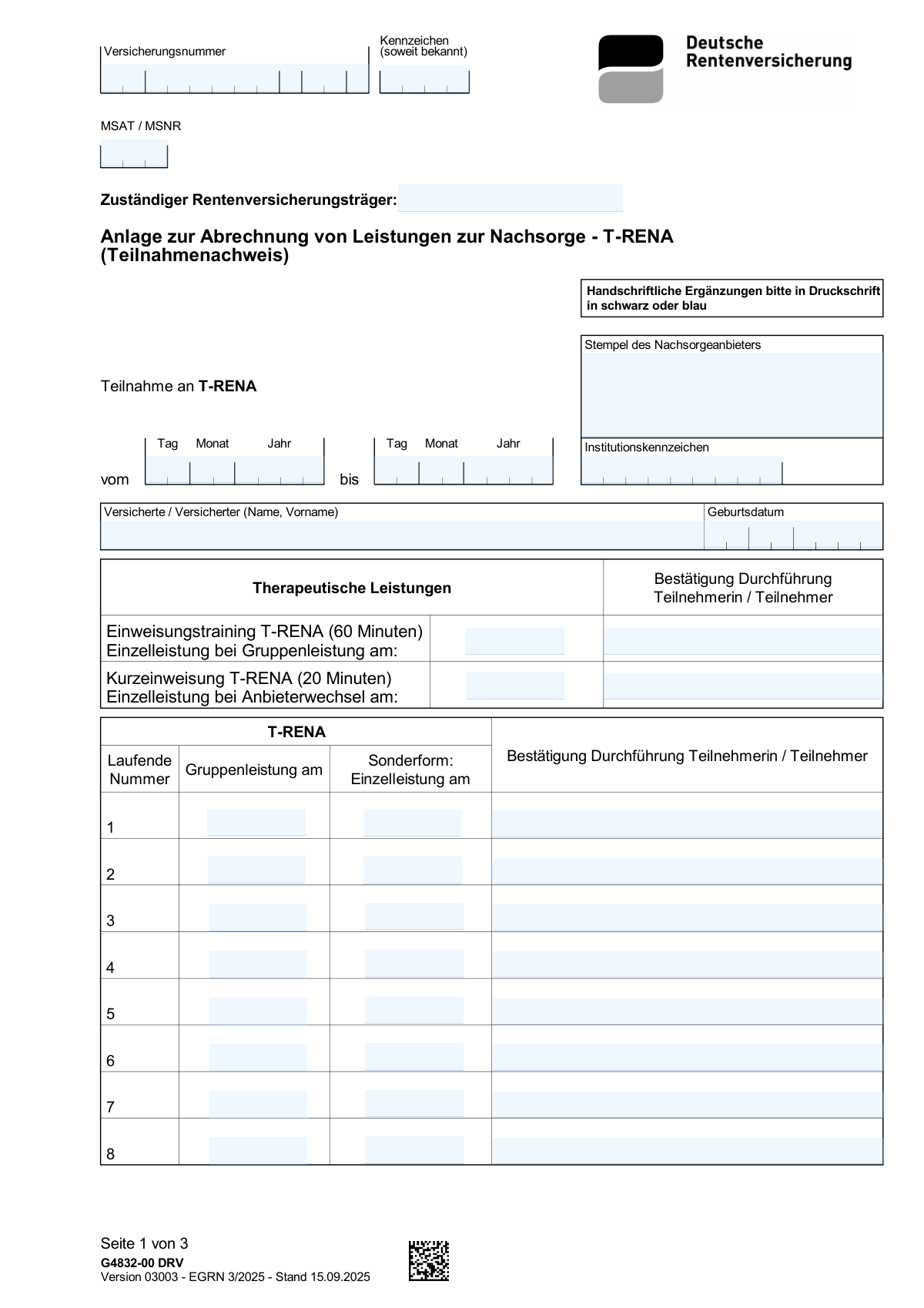
Der T-RENA Teilnahme- und Leistungsnachweis ist ein Formular zur Dokumentation der durchgefĂŒhrten Reha-Nachsorgeleistungen (T-RENA), inklusive Einweisung/Kurzeinweisung sowie fortlaufend nummerierter Termine als Gruppenleistung und ggf. Sonderform/Einzelleistung. Es erfasst auĂerdem Versicherungs- und TrĂ€gerdaten (z. B. Versicherungsnummer, MSAT/MSNR, zustĂ€ndiger RentenversicherungstrĂ€ger) sowie die BestĂ€tigung der DurchfĂŒhrung durch Teilnehmende und den Stempel/Unterschrift der Therapeutin bzw. des Therapeuten. Der Nachweis ist wichtig, damit die Rentenversicherung die Teilnahme und Abrechnung/PrĂŒfung der erbrachten Leistungen nachvollziehen kann. Heute kann dieses Formular schnell und korrekt mit KI-Services wie Instafill.ai ausgefĂŒllt werden, die auch nicht-ausfĂŒllbare PDFs in interaktive, ausfĂŒllbare Formulare umwandeln können.
Our AI automatically handles information lookup, data retrieval, formatting, and form filling.
It takes less than a minute to fill out T-RENA Leistungsnachweis using our AI form filling.
Securely upload your data. Information is encrypted in transit and deleted immediately after the form is filled out.
Form specifications
| Form name: | T-RENA Teilnahme- und Leistungsnachweis (Gruppenleistungen / Einzelleistungen) – Formular der Deutschen Rentenversicherung |
| Number of pages: | 3 |
| Filled form examples: | Form T-RENA Leistungsnachweis Examples |
| Language: | English |
Instafill Demo: filling out a legal form in seconds
How to Fill Out T-RENA Leistungsnachweis Online for Free in 2026
Are you looking to fill out a T-RENA LEISTUNGSNACHWEIS form online quickly and accurately? Instafill.ai offers the #1 AI-powered PDF filling software of 2026, allowing you to complete your T-RENA LEISTUNGSNACHWEIS form in just 37 seconds or less.
Follow these steps to fill out your T-RENA LEISTUNGSNACHWEIS form online using Instafill.ai:
- 1 Instafill.ai öffnen und das T-RENA Leistungsnachweis-Formular auswählen oder die PDF-Datei hochladen (auch wenn sie nicht ausfüllbar ist).
- 2 Versicherungs- und Identifikationsdaten eintragen bzw. per KI übernehmen lassen (Versicherungsnummer, Kennzeichen falls vorhanden, MSAT/MSNR, zuständiger Rentenversicherungsträger).
- 3 Angaben zur Nachsorgeeinrichtung ergänzen (Provider-Stempel/Adressdaten, Institutionskennzeichen/MSNR) und die Daten der versicherten Person (Name, Geburtsdatum) prüfen.
- 4 Teilnahmezeitraum erfassen (vom/bis) und die Einweisung/Kurzeinweisung T-RENA (60 Min / 20 Min) mit Datum und Teilnehmerbestätigung eintragen.
- 5 Für jede laufende Nummer die Leistung dokumentieren: Datum der Gruppenleistung und ggf. Datum der Sonderform/Einzelleistung sowie die jeweilige Bestätigung der Durchführung (Name/Unterschrift/Vermerk).
- 6 Summenfelder ausfüllen bzw. automatisch berechnen lassen (Summe der Gruppenleistungen, Summe der Einzelleistungen) und Ort/Datum ergänzen.
- 7 Abschluss: Unterschrift und Stempel der Therapeutin/des Therapeuten hinzufügen, alle Angaben per KI-Check validieren und das fertige Formular als PDF exportieren/versenden.
Our AI-powered system ensures each field is filled out correctly, reducing errors and saving you time.
Why Choose Instafill.ai for Your Fillable T-RENA Leistungsnachweis Form?
Speed
Complete your T-RENA Leistungsnachweis in as little as 37 seconds.
Up-to-Date
Always use the latest 2026 T-RENA Leistungsnachweis form version.
Cost-effective
No need to hire expensive lawyers.
Accuracy
Our AI performs 10 compliance checks to ensure your form is error-free.
Security
Your personal information is protected with bank-level encryption.
Frequently Asked Questions About Form T-RENA Leistungsnachweis
Dieses Formular dient als Teilnahme- und Leistungsnachweis fĂŒr T-RENA-Nachsorgeeinheiten gegenĂŒber dem zustĂ€ndigen RentenversicherungstrĂ€ger. Es dokumentiert Zeitraum, durchgefĂŒhrte Gruppen- und ggf. Einzelleistungen sowie BestĂ€tigungen.
In der Regel trĂ€gt die Nachsorgeeinrichtung/therapeutische Praxis die Leistungsdaten (Termine, Summen, Stempel/Unterschrift) ein. Teilnehmende bestĂ€tigen einzelne Termine hĂ€ufig mit Name/Unterschrift in den Zeilen âBestĂ€tigung DurchfĂŒhrungâ.
Wichtig sind vor allem die Versicherungsnummer, der zustĂ€ndige RentenversicherungstrĂ€ger sowie ggf. MSAT/MSNR. Das Feld âKennzeichenâ ist nur auszufĂŒllen, wenn Ihnen eine Akten-/Vorgangsnummer bekannt ist.
Die Versicherungsnummer steht auf Schreiben der Deutschen Rentenversicherung bzw. auf Ihrer Rentenversicherungsdokumentation. Tragen Sie sie exakt im gleichen Format ein (inkl. Buchstaben/Ziffern), wie sie auf dem Dokument angegeben ist.
MSAT/MSNR ist ein von der Rentenversicherung bzw. dem Reha-/Nachsorgesystem vergebener Code zur Zuordnung. Wenn Sie ihn nicht kennen, fragen Sie bei Ihrer Nachsorgeeinrichtung oder dem RentenversicherungstrÀger nach, statt zu raten.
Tragen Sie den Namen des fĂŒr Ihren Fall zustĂ€ndigen TrĂ€gers ein (z. B. âDeutsche Rentenversicherung Bundâ oder ein RegionaltrĂ€ger). Nutzen Sie die Bezeichnung aus Ihrem Bewilligungs- oder Reha-Schreiben.
Der âProvider stampâ ist der offizielle Stempel/Adressblock der Nachsorgeeinrichtung. Das âInstitutionskennzeichenâ ist die Institutions-ID (z. B. IK/MSNR), die die Einrichtung gegenĂŒber der Rentenversicherung eindeutig identifiziert.
Bei âvomâ tragen Sie das Startdatum der T-RENA-Teilnahme ein, bei âbisâ das Enddatum (jeweils Tag/Monat/Jahr). Wenn die MaĂnahme noch lĂ€uft, wird âbisâ meist erst nach Abschluss eingetragen.
âGruppenleistungâ ist der regulĂ€re Gruppentermin (Datum eintragen). âSonderform: Einzelleistungâ wird nur genutzt, wenn statt Gruppe eine Einzel-/Sonderleistung erbracht wurdeâdann tragen Sie dort das Datum ein und lassen die Gruppenleistung fĂŒr diese Zeile leer.
Nein, es werden nur die tatsĂ€chlich durchgefĂŒhrten Termine dokumentiert. Nicht genutzte Zeilen bleiben leer.
Ăblicherweise bestĂ€tigt die teilnehmende Person (oder je nach Vorgabe auch die verantwortliche Stelle) die DurchfĂŒhrung pro Termin, oft per Unterschrift oder Namenszeichen. Wenn Ihre Einrichtung KĂŒrzel erlaubt, sollte es eindeutig zuordenbar sein (im Zweifel vollstĂ€ndige Unterschrift verwenden).
ZĂ€hlen Sie die eingetragenen Gruppentermine und tragen Sie die Anzahl bei âSumme der Gruppenleistungenâ ein; analog zĂ€hlen Sie die Einzelleistungen fĂŒr âSumme der Einzelleistungenâ. Achten Sie darauf, dass pro Zeile nur eine Leistungsart gezĂ€hlt wird.
Dort wird der Ausstellungsort und das Ausstellungsdatum eingetragen. AnschlieĂend unterschreibt die verantwortliche Therapeutin/der Therapeut und setzt den Praxis-/Einrichtungsstempel, damit der Nachweis offiziell gĂŒltig ist.
Die Einreichung erfolgt ĂŒblicherweise bei dem zustĂ€ndigen RentenversicherungstrĂ€ger (oft per Post oder ĂŒber die Einrichtung, je nach Vorgabe). Die Bearbeitungszeit variiert je nach TrĂ€ger und Auslastungâbei RĂŒckfragen hilft es, Versicherungsnummer und ggf. Kennzeichen bereitzuhalten.
JaâTools wie Instafill.ai können Formulardaten per KI aus Ihren Angaben/Dokumenten ĂŒbernehmen und Felder automatisch korrekt befĂŒllen, was Zeit spart und Tippfehler reduziert. Laden Sie das PDF in Instafill.ai hoch, lassen Sie die Felder erkennen/zuordnen, prĂŒfen Sie die VorschlĂ€ge (z. B. Versicherungsnummer, Datumsfelder, Summen) und exportieren Sie anschlieĂend das ausgefĂŒllte Formular.
Wenn das PDF keine interaktiven Felder hat, kann Instafill.ai ein flaches, nicht-ausfĂŒllbares PDF in ein ausfĂŒllbares Formular umwandeln und die Felder anschlieĂend automatisch befĂŒllen. Alternativ können Sie es ausdrucken und handschriftlich ausfĂŒllen, sofern der TrĂ€ger das akzeptiert.
Compliance T-RENA Leistungsnachweis
Validation Checks by Instafill.ai
1
Validates Versicherungsnummer (VSNR) format and allowed characters
Checks that the insurance/pension number is present and matches the expected German Rentenversicherungsnummer pattern (fixed length, uppercase letters/digits only, no spaces or separators unless explicitly allowed). This is critical because the VSNR is the primary key for assigning the submission to the correct insured person record. If the format check fails, the submission should be rejected or routed to manual review with a clear error indicating the expected format.
2
Ensures Kennzeichen is optional but constrained when provided
Validates that the identifier/case reference (Kennzeichen) may be empty, but if filled in it must meet length and character constraints (e.g., no control characters, no excessive free text, and only permitted symbols). This prevents misrouting and reduces the risk of injecting irrelevant notes into a reference field used for matching. If invalid, the system should prompt the user to correct the value or clear the field.
3
Validates MSAT/MSNR code format and consistency with institution identifier
Checks that MSAT/MSNR is present when required by the workflow and matches the expected numeric/alphanumeric structure (often fixed-length numeric for MSNR) without whitespace. Also cross-checks that the entered MSAT/MSNR is not contradictory to the provided Institutionskennzeichen (e.g., both present but clearly different formats or lengths that indicate swapped fields). If validation fails, the submission should be blocked because payer/provider routing may be incorrect.
4
Requires and validates responsible pension carrier name (Zuständiger Rentenversicherungsträger)
Ensures the responsible pension carrier field is not empty and contains a plausible organization name (minimum length, not only numbers, not placeholder text like 'unknown'). This is important for correct billing and administrative assignment. If it fails, the form should be returned for completion because downstream processing cannot reliably determine responsibility.
5
Validates provider stamp content presence and plausibility
Checks that the provider stamp field is completed and includes sufficient identifying information (e.g., provider name and/or address text) rather than a single character or generic phrase. The stamp is often used as proof of the institution and for auditability. If missing or implausible, the submission should be flagged for manual review or rejected depending on policy.
6
Validates participation period dates (vom/bis) format and chronological order
Validates that both participation start date (vom) and end date (bis) are valid calendar dates in the expected format (e.g., DD.MM.YYYY) and that the end date is on or after the start date. This is essential to ensure services fall within the declared participation period and to prevent negative or impossible durations. If the check fails, the system should block submission and request corrected dates.
7
Validates insured person name completeness and structure
Ensures the insured person name is present and contains at least a family name and given name(s), not just initials or a single token, and does not contain invalid characters (e.g., only digits). Correct name capture supports identity matching and reduces claim rejections due to mismatched demographics. If invalid, the user should be prompted to enter the full legal name as shown on official documents.
8
Validates insured person birthdate format and plausibility
Checks that the birthdate is a valid date and falls within a plausible range (e.g., not in the future, not implying an unrealistic age such as under 0 or over 120). Birthdate is a key identifier used alongside VSNR for matching and fraud prevention. If it fails, the submission should be blocked and the user asked to correct the date.
9
Validates introductory session entries: date requires participant confirmation (60-min and 20-min)
For both Einweisungstraining (60 min) and Kurzeinweisung (20 min), verifies that if a session date is provided then the corresponding participant confirmation field is also provided (name/signature text), and vice versa. This ensures each recorded session has evidence of attendance and prevents partial entries that cannot be audited. If inconsistent, the system should require completion of the missing counterpart or removal of the incomplete record.
10
Validates each T-RENA row: exactly one service date type (group vs. individual) when a row is used
For rows that include both 'Gruppenleistung am' and 'Sonderform/Einzelleistung am', checks that at most one of these date fields is filled for the same running number, unless the business rules explicitly allow both. This prevents double-counting and ambiguity about the service type delivered for that entry. If both are filled (or neither is filled while confirmation exists), the row should be rejected and the user prompted to correct it.
11
Validates T-RENA row confirmation required when a service date is present
For each running number (1â29), verifies that if any service date is entered (group or individual), the corresponding 'BestĂ€tigung DurchfĂŒhrung' field is also present and non-trivial (not blank/placeholder). This is important for compliance and proof of service delivery. If missing, the system should block submission or flag the specific row as incomplete.
12
Validates all service dates fall within the participation period (vom/bis)
Checks that every entered session date (introductory sessions and all T-RENA rows) is on or after the participation start date and on or before the participation end date. This ensures the documented services align with the declared participation window and supports correct reimbursement. If any date is outside the range, the system should flag the offending entries and require correction or an updated participation period.
13
Detects duplicate or non-sequential service dates that indicate likely data entry errors
Checks for suspicious patterns such as the same date repeated across many different running numbers, or dates that go backwards in a way that contradicts typical session progression (configurable tolerance). While duplicates can be legitimate, large-scale repetition often indicates copy/paste or OCR mapping issues. If triggered, the submission should be flagged for manual review rather than automatically rejected.
14
Validates totals: Summe der Gruppenleistungen and Summe der Einzelleistungen match counted entries
Computes the number of filled group-session dates across all running numbers and compares it to 'Summe der Gruppenleistungen'; similarly counts individual-service dates and compares to 'Summe der Einzelleistungen'. This prevents billing discrepancies and ensures the summary reflects the detailed line items. If totals do not match, the system should block submission and show the calculated counts versus the entered totals.
15
Validates signature block: Ort, Datum and therapist signature/stamp presence and date plausibility
Ensures the final attestation section includes place and date (Ort, Datum) and the therapistâs signature/stamp field is completed, and that the attestation date is a valid date not earlier than the last recorded service date (or not unreasonably earlier than the participation period). This is important for legal validity and audit trails. If missing or inconsistent, the submission should be rejected or routed to manual review depending on compliance requirements.
Common Mistakes in Completing T-RENA Leistungsnachweis
People often copy the Versicherungsnummer from memory, omit characters, or enter it with extra spaces/slashes that donât match the official format. This can prevent the pension carrier from matching the form to the correct insured person, causing delays or rejection. Always copy the number exactly as shown on the insurance card/official letter and keep the original formatting (including leading zeros if present). AI-powered tools like Instafill.ai can help by validating length/format and preventing accidental truncation.
Because the field looks mandatory, many applicants enter placeholders like â-â, âunknownâ, or a random internal note. This can create confusion, lead to misfiling, or trigger follow-up questions if the identifier doesnât match the carrierâs records. If you truly donât know the Kennzeichen, leave it blank as instructed and only enter an official reference/case number from correspondence. Instafill.ai can flag âplaceholderâ entries and prompt you to leave the field empty when appropriate.
MSAT/MSNR codes and the institution identifier are easy to confuse because they are both numeric identifiers used in pension/rehab administration. Entering the providerâs Institutionskennzeichen where the insured personâs MSAT/MSNR belongs (or vice versa) can cause routing errors and delays in processing. Verify each code against the correct source document (pension authority letter vs. provider registration details) before entering it. Instafill.ai can reduce this risk by mapping known identifiers to the correct fields and warning when a code pattern doesnât match the expected field.
Applicants sometimes enter a generic term (e.g., âDeutsche Rentenversicherungâ) without the specific regional carrier, or they use abbreviations that donât match official naming. This can slow down assignment to the correct responsible carrier and may require manual clarification. Use the exact carrier name from the approval/rehab documents (including regional designation) and keep it consistent across pages. Instafill.ai can standardize carrier names and auto-suggest the correct official wording.
The âProvider stampâ area is often left blank, filled with a typed clinic name only, or replaced with an informal contact line rather than the official stamp/seal text. Missing or non-official stamp information can lead to questions about authenticity and may delay reimbursement/verification. Use the official stamp as it appears on letterhead (name + address and/or stamp text) and ensure itâs legible. If the form is a flat non-fillable PDF, Instafill.ai can convert it into a fillable version so stamp text and institution details are captured cleanly and consistently.
A very common issue is entering dates in the wrong format (e.g., MM/DD/YYYY instead of DD.MM.YYYY), using incomplete dates (month/year only), or mixing formats across the form. Incorrect date formats can cause misinterpretation of service timelines and may lead to rejected claims or requests for correction. Always use a consistent German date format (day-month-year) and include leading zeros where needed (e.g., 03.02.2026). Instafill.ai can automatically format dates correctly and validate that all required components are present.
People sometimes set the participation start/end dates that donât cover all the session dates entered in rows 1â29 (e.g., sessions outside the vom/bis range). This creates an internal inconsistency that can trigger audits, follow-up questions, or non-payment for out-of-range sessions. Before submitting, cross-check that every Gruppenleistung/Einzelleistung date falls within the participation period. Instafill.ai can detect out-of-range dates and prompt corrections before submission.
Because each row shows both options, some users fill in both fields even though typically only one applies per entry (group session OR special/individual service). This can inflate counts, confuse the service type, and lead to incorrect totals or reimbursement disputes. For each running number, enter the date in the correct column only, and leave the other blank unless the form instructions explicitly allow both. Instafill.ai can enforce mutually exclusive fields and prevent double-entry for a single row.
Confirmations are often left empty, replaced with a checkmark, or written in a way that is not identifiable (illegible initials without context). Missing/unclear confirmation can invalidate the proof of attendance/performance and may result in the carrier requesting re-documentation. Provide a clear signature or printed name (as required by the providerâs process) and ensure it corresponds to the correct row/date. Instafill.ai can prompt for required confirmations and help keep entries aligned with the correct session row.
Applicants sometimes enter nicknames, omit middle names, swap given/family name order, or enter the wrong birthdate (especially when copying from another system). Even small discrepancies can cause identity matching problems and delay processing. Enter the full legal name in the requested order (family name followed by given name(s)) and verify the birthdate against an official ID or insurance record. Instafill.ai can standardize name formatting and validate birthdate patterns to reduce avoidable mismatches.
When many rows are involved, people frequently miscount sessions, include blank rows, or double-count rows where both columns were filled. Incorrect totals can trigger manual review, payment delays, or requests for corrected documentation. Recount only the rows with valid dates in the relevant column and ensure the totals match the actual entries. Instafill.ai can automatically compute totals from the filled rows and prevent arithmetic/counting errors.
Saved over 80 hours a year
âI was never sure if my IRS forms like W-9 were filled correctly. Now, I can complete the forms accurately without any external help.â
Kevin Martin Green
Your data stays secure with advanced protection from Instafill and our subprocessors
Robust compliance program
Transparent business model
Youâre not the product. You always know where your data is and what it is processed for.
ISO 27001, HIPAA, and GDPR
Our subprocesses adhere to multiple compliance standards, including but not limited to ISO 27001, HIPAA, and GDPR.
Security & privacy by design
We consider security and privacy from the initial design phase of any new service or functionality. Itâs not an afterthought, itâs built-in, including support for two-factor authentication (2FA) to further protect your account.
Fill out T-RENA Leistungsnachweis with Instafill.ai
Worried about filling PDFs wrong? Instafill securely fills t-rena-teilnahme-und-leistungsnachweis-gruppenleistungen-einzelleistungen-formular-der-deutschen-rentenversicherung forms, ensuring each field is accurate.