Yes! You can use AI to fill out Form SC-109, Authorization to Appear (Small Claims)
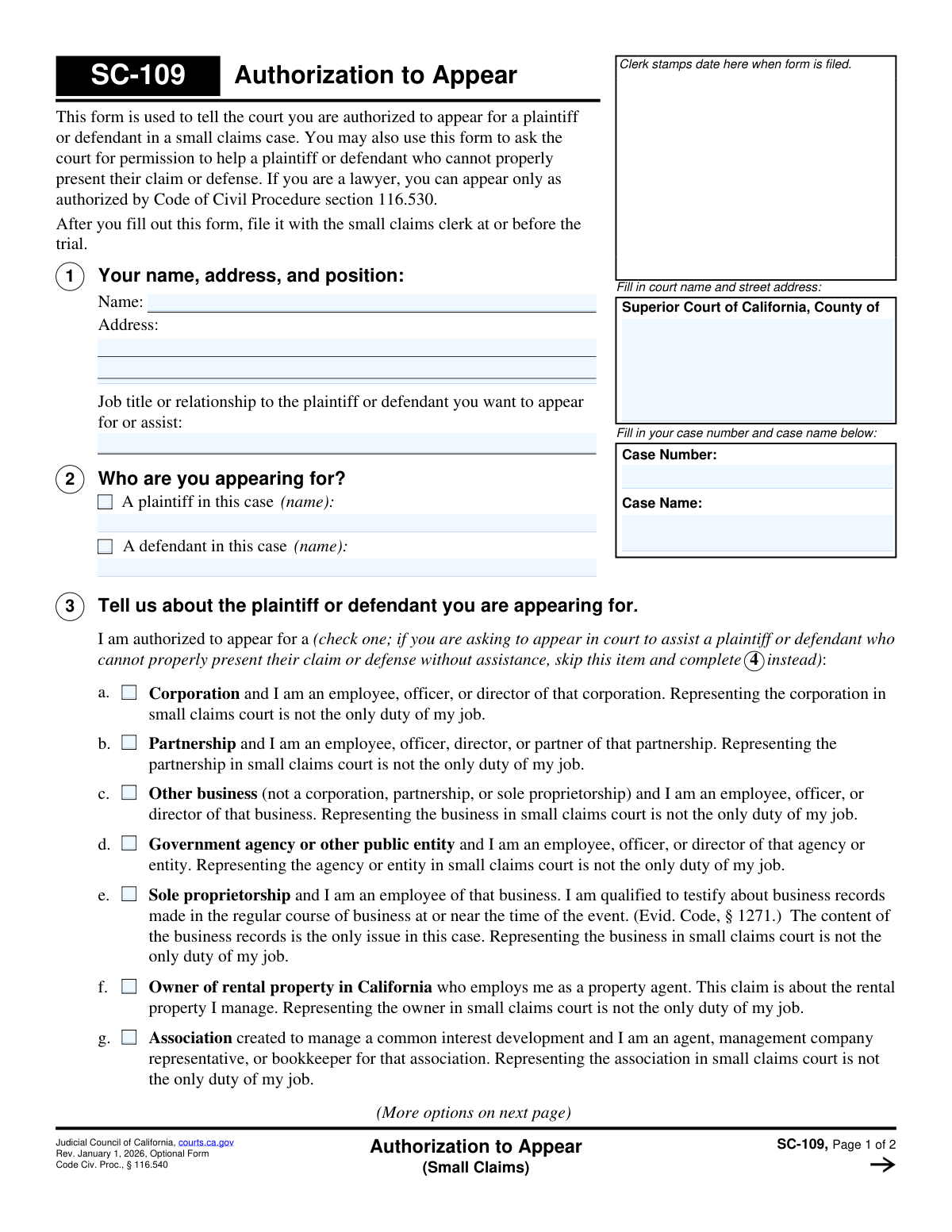
Form SC-109, Authorization to Appear, is a legal document filed in the Superior Court of California to formally notify the court that you are authorized to represent a party in a small claims action. This is necessary in specific situations, such as representing a corporation, a government entity, or assisting someone who cannot properly present their own case, as outlined in Code of Civil Procedure § 116.540. Today, this form can be filled out quickly and accurately using AI-powered services like Instafill.ai, which can also convert non-fillable PDF versions into interactive fillable forms.
SC-109 is part of the
California court forms, court claim forms and small claims forms categories on Instafill.
Our AI automatically handles information lookup, data retrieval, formatting, and form filling.
It takes less than a minute to fill out SC-109 using our AI form filling.
Securely upload your data. Information is encrypted in transit and deleted immediately after the form is filled out.
Form specifications
| Form name: | Form SC-109, Authorization to Appear (Small Claims) |
| Number of fields: | 32 |
| Number of pages: | 1 |
| Language: | English |
Instafill Demo: How to fill out PDF forms in seconds with AI
How to Fill Out SC-109 Online for Free in 2026
Are you looking to fill out a SC-109 form online quickly and accurately? Instafill.ai offers the #1 AI-powered PDF filling software of 2026, allowing you to complete your SC-109 form in just 37 seconds or less.
Follow these steps to fill out your SC-109 form online using Instafill.ai:
- 1 Navigate to Instafill.ai and upload your PDF or select Form SC-109 from the template library.
- 2 Provide the court name, address, case number, and case name in the designated fields at the top of the form.
- 3 Enter your full name, address, and your job title or relationship to the party you will be representing.
- 4 Indicate whether you are appearing for the plaintiff or the defendant and provide their name.
- 5 In Section 3 or 4, check the box that accurately describes the legal reason for your appearance, such as being an employee of a corporation or assisting a party who cannot present their own case.
- 6 Review all the information populated by the AI for accuracy, then date and e-sign the declaration under penalty of perjury.
- 7 Download the completed SC-109 and file it with the small claims clerk at or before the scheduled trial.
Our AI-powered system ensures each field is filled out correctly, reducing errors and saving you time.
Why Choose Instafill.ai for Your Fillable SC-109 Form?
Speed
Complete your SC-109 in as little as 37 seconds.
Up-to-Date
Always use the latest 2026 SC-109 form version.
Cost-effective
No need to hire expensive lawyers.
Accuracy
Our AI performs 10 compliance checks to ensure your form is error-free.
Security
Your personal information is protected with bank-level encryption.
Frequently Asked Questions About Form SC-109
This form is used to tell the court that you are legally authorized to appear in a small claims case on behalf of a plaintiff or defendant. It is also used to ask for permission to assist a party who cannot properly present their own case.
You should fill out this form if you are appearing in court for a plaintiff or defendant, but you are not that person yourself. This includes representatives for businesses, property agents, or someone assisting a person who is unable to appear or represent themselves.
You must file the completed and signed form with the small claims clerk at the courthouse where the case is being heard. This should be done at or before the trial date.
Section 3 is for when you have a specific legal authority to represent a party, such as being an employee of a corporation or a spouse. Section 4 is for when you are asking the court's permission to assist someone who is present but needs help presenting their case.
Yes, as an employee, officer, or director, you can use this form to appear for your business. You must certify that representing the business in small claims court is not the only duty of your job.
Generally, lawyers cannot represent parties in small claims court. A lawyer may only appear as authorized by specific laws (Code of Civil Procedure section 116.530), and this form would be used to state that specific authority.
Not necessarily. If you and your spouse or registered domestic partner agree, you can use this form to have one of you appear in court on behalf of both of you.
You will need the court name, the case number, and the case name from your court papers. You will also need to provide your own name, address, and your job title or relationship to the person you are appearing for.
This means your primary role is not just to act as a legal representative for the company in court. You must have other regular job duties, such as being a manager, bookkeeper, or officer.
The form has specific options for these situations. You must certify that you are not being paid to appear and have not appeared for others more than four times in the current calendar year.
Yes, services like Instafill.ai use AI to accurately auto-fill form fields with your information. This can save you time and help prevent common errors.
Simply upload the SC-109 PDF to the Instafill.ai platform. The AI will make the form fillable online, allowing you to enter your information once and have it automatically and accurately placed in all the correct fields.
You can use a service like Instafill.ai, which is designed to convert flat, non-fillable PDFs into interactive forms. This allows you to easily type your information directly into the fields before printing.
Compliance SC-109
Validation Checks by Instafill.ai
1
Ensures All Case Identification Fields Are Complete
Verifies that the 'Court Name and Street Address', 'Case Number', and 'Case Name' fields are all filled out on the first page. These fields are the primary identifiers for the case and court location. Incomplete information will prevent the clerk from accepting the form for filing.
2
Validates Case Number Presence and Format
Ensures the 'Case Number' field is not empty and conforms to the court's expected format. This is critical for associating the authorization form with the correct legal case file. A missing or malformed case number will result in filing rejection or misfiling, delaying the proceedings.
3
Validates Consistency of Case Information Across Pages
This check compares the 'Case Name' and 'Case Number' fields on Page 1 with the corresponding fields in the header of Page 2. The values must be identical to ensure the entire document is correctly associated and to prevent confusion if pages are separated. Mismatched information could lead to the form being considered invalid.
4
Ensures Filer's Name, Address, and Relationship Are Provided
Verifies that the 'Name', 'Address', and 'Job title or relationship' fields in Section 1 are all completed. This information is essential for the court to identify who is seeking authorization to appear and on what basis they are connected to the party. Failure to provide this information makes the authorization request incomplete and invalid.
5
Ensures Exactly One Party (Plaintiff or Defendant) Is Selected
This validation confirms that in Section 2, either the 'A plaintiff in this case' checkbox or the 'A defendant in this case' checkbox is selected, but not both and not neither. A person can only appear on behalf of one side in a specific case. An ambiguous or dual selection would make the authorization's intent unclear and legally void.
6
Validates That the Name of the Selected Party Is Entered
Checks that if the 'plaintiff' checkbox is selected in Section 2, the corresponding plaintiff name field is filled, and likewise for the 'defendant'. The name is required to explicitly link the authorization to a specific individual or entity in the case. Without the name, the authorization is meaningless as it's not clear who is being represented.
7
Ensures Authorization Basis (Section 3) or Assistance Request (Section 4) is Mutually Exclusive
This rule enforces the form's instruction to either select an authorization reason in Section 3 OR provide an explanation for assistance in Section 4, but not both. These sections represent two distinct types of requests. Selecting from both creates a logical conflict, making the filer's intent ambiguous and requiring clarification before the court can rule on the request.
8
Validates That Only One Authorization Reason is Checked in Section 3
Verifies that if Section 3 is used, only one checkbox from items 'a' through 'k' is selected. The form requires the filer to choose a single, specific legal basis for their appearance. Selecting multiple reasons could indicate confusion or an attempt to qualify under multiple conflicting statutes, invalidating the request.
9
Validates Sub-Option for Military Service Authorization (3h)
If the checkbox for item 3h (plaintiff on active military duty) is selected, this check ensures that one of its two sub-options is also selected. These sub-options clarify the filer's compensation status, which is a required element for this specific authorization type. Failure to select a sub-option leaves the authorization incomplete.
10
Ensures Explanation is Provided if Requesting to Assist (Section 4)
This check is triggered if no option is selected in Section 3. It verifies that the explanation text box in Section 4 is filled out, as this becomes the mandatory basis for the request. Without an explanation, the court has no information on which to grant permission for assistance, and the request will be denied.
11
Validates the Presence and Format of the Declaration Date
Ensures the 'Date' field in Section 5 is filled and follows a valid date format (e.g., MM/DD/YYYY). The date of signature is legally significant as it attests to the truthfulness of the information at that specific time. An invalid or missing date can render the declaration under penalty of perjury void.
12
Ensures Printed Name in Declaration Matches Filer's Name in Section 1
This validation compares the 'Type or print your name' field in Section 5 with the 'Name' field in Section 1. The names must match to confirm that the person making the declaration is the same person seeking authorization. A mismatch would raise questions about the identity of the declarant and the validity of the entire form.
13
Verifies the Form Revision Date is Current
This is a system-level check to ensure the submitted form has the expected revision date (e.g., 'Rev. January 1, 2026'). Courts periodically update forms to reflect changes in law or procedure. Submitting an outdated form can lead to rejection because it may lack required information or contain obsolete language, forcing the user to refile on the correct version.
Common Mistakes in Completing SC-109
Users often forget to fill in the complete court name, street address, case number, and case name at the top of the form. This can happen due to oversight or not having the information readily available. An incomplete or incorrect case identifier can lead to the form being rejected by the clerk, misfiled, or not associated with the correct court proceeding, causing significant delays.
A frequent error on multi-page legal forms is failing to re-enter the Case Name and Case Number in the header of the second page. If the pages get separated, the second page becomes unidentifiable, rendering the form incomplete. This can lead to the court disregarding information on the second page, including crucial declarations or the signature, potentially invalidating the entire authorization.
In Section 1, individuals may enter a vague relationship like 'Friend' or 'Assistant' instead of the specific legal or professional role required by the statute, such as 'Officer of the corporation' or 'Property agent'. The court needs to see a clear, statutorily-defined relationship to grant authorization. A vague description can lead to the judge questioning the basis for the appearance and denying the request.
Section 3 contains many specific checkboxes (a-k) detailing the legal reasons for appearing. People often misunderstand the nuances and check the wrong box, such as selecting 'Corporation' for an LLC or 'Partnership' for a sole proprietorship. This mistake invalidates the legal basis for the appearance, and the representative may be barred from speaking at the hearing.
The form directs users to complete Section 3 for authorization or to skip it and complete Section 4 to request to assist someone. Many people mistakenly fill out both sections, creating confusion about the nature of their request. This ambiguity can force the judge to seek clarification, delaying the hearing, or lead to the form being rejected for being filled out improperly.
Several options in Section 3 (a-g) require the representative to affirm that appearing in court is not the sole duty of their job. This clause is designed to prevent non-attorneys from acting as professional representatives. Overlooking or falsely agreeing to this statement can result in the authorization being denied and may have legal consequences if discovered by the court.
When requesting to assist a party under Section 4, users often provide a weak or generic explanation like 'They need help.' The court requires a specific reason why the party cannot properly present their own case, such as a language barrier, disability, or extreme distress. A vague explanation is unlikely to persuade the judge, resulting in the denial of the request to assist.
For certain categories (items h, i, and j in Section 3), a non-paid representative is limited to appearing no more than four times in a calendar year. Individuals may not be aware of this rule, may have lost track of their prior appearances, or may ignore it. Violating this rule can lead to disqualification from appearing and potential penalties for making a false declaration.
Forgetting to sign and date the form in Section 5 is a critical and common error. The signature under penalty of perjury is what makes the document a sworn declaration to the court. An unsigned or undated form is legally invalid and will be rejected by the court clerk, preventing the representative from being authorized to appear.
In Section 2, the person filling out the form must check whether they are appearing for the plaintiff or the defendant and write in the correct name. It's easy to get confused and check the wrong party, especially in complex cases. This error creates confusion on the court record and must be corrected, which can delay the proceedings while the judge clarifies the representative's role.
Saved over 80 hours a year
“I was never sure if my IRS forms like W-9 were filled correctly. Now, I can complete the forms accurately without any external help.”
Kevin Martin Green
Your data stays secure with advanced protection from Instafill and our subprocessors

Robust compliance program
Transparent business model
You’re not the product. You always know where your data is and what it is processed for.
ISO 27001, HIPAA, and GDPR
Our subprocesses adhere to multiple compliance standards, including but not limited to ISO 27001, HIPAA, and GDPR.
Security & privacy by design
We consider security and privacy from the initial design phase of any new service or functionality. It’s not an afterthought, it’s built-in, including support for two-factor authentication (2FA) to further protect your account.
Fill out SC-109 with Instafill.ai
Worried about filling PDFs wrong? Instafill securely fills form-sc-109-authorization-to-appear-small-claims forms, ensuring each field is accurate.