Yes! You can use AI to fill out Form SC-112A, Proof of Service by Mail (Small Claims)
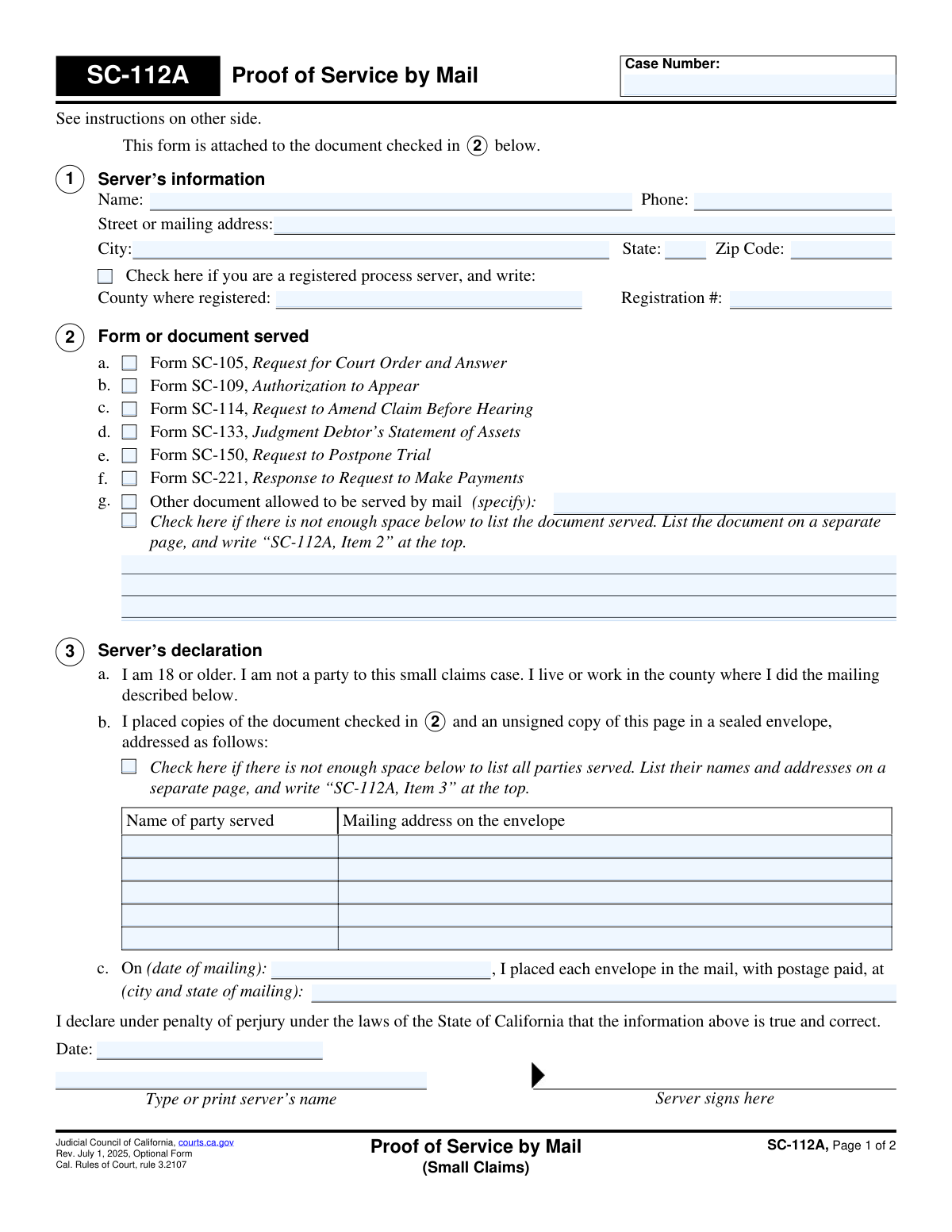
Form SC-112A is a legal document used in California small claims court to provide the court with proof that certain case-related documents were officially delivered (served) to the involved parties by mail. This declaration is completed by a non-party server who is at least 18 years old and confirms the date, location, and details of the mailing. Today, this form can be filled out quickly and accurately using AI-powered services like Instafill.ai, which can also convert non-fillable PDF versions into interactive fillable forms.
SC-112A is part of the
California court forms, court claim forms, proof of service forms and small claims forms categories on Instafill.
Our AI automatically handles information lookup, data retrieval, formatting, and form filling.
It takes less than a minute to fill out SC-112A using our AI form filling.
Securely upload your data. Information is encrypted in transit and deleted immediately after the form is filled out.
Form specifications
| Form name: | Form SC-112A, Proof of Service by Mail (Small Claims) |
| Number of fields: | 40 |
| Number of pages: | 1 |
| Language: | English |
Instafill Demo: How to fill out PDF forms in seconds with AI
How to Fill Out SC-112A Online for Free in 2026
Are you looking to fill out a SC-112A form online quickly and accurately? Instafill.ai offers the #1 AI-powered PDF filling software of 2026, allowing you to complete your SC-112A form in just 37 seconds or less.
Follow these steps to fill out your SC-112A form online using Instafill.ai:
- 1 Navigate to Instafill.ai and upload or select the SC-112A, Proof of Service by Mail form.
- 2 Use the AI assistant to input the case number and the server's personal information, including name and address.
- 3 In Section 2, check the box that corresponds to the specific court form or document you are serving by mail.
- 4 In Section 3, list the full name and complete mailing address for each party that was served.
- 5 Enter the date and the city and state from which the documents were mailed.
- 6 Review all entered information for accuracy, then download the completed form. The server must then print and sign the declaration.
- 7 File the signed, original SC-112A form with the small claims court clerk, attached to the original document that was served.
Our AI-powered system ensures each field is filled out correctly, reducing errors and saving you time.
Why Choose Instafill.ai for Your Fillable SC-112A Form?
Speed
Complete your SC-112A in as little as 37 seconds.
Up-to-Date
Always use the latest 2026 SC-112A form version.
Cost-effective
No need to hire expensive lawyers.
Accuracy
Our AI performs 10 compliance checks to ensure your form is error-free.
Security
Your personal information is protected with bank-level encryption.
Frequently Asked Questions About Form SC-112A
This form is used to prove to the court that you have legally delivered specific small claims documents to another party in your case by mail. It serves as a sworn statement from the person who did the mailing.
The server must be at least 18 years old and not a party (plaintiff or defendant) in the case. It can be a friend, relative, or co-worker who lives or works in the county where the mailing takes place.
No, if you are a party to the case, you cannot be the server. You must have a neutral third party who meets the requirements mail the documents and sign this form.
You can use this form for documents like SC-105 (Request for Court Order), SC-150 (Request to Postpone Trial), and SC-133 (Judgment Debtor’s Statement of Assets), among others listed in Section 2.
Yes, you cannot use this form to serve the initial Plaintiff's Claim (SC-100) or the Defendant's Claim (SC-120). Those forms have different service requirements.
The server fills in the names and addresses of the parties they mailed documents to, the date and city of mailing, and then signs and dates the form, declaring under penalty of perjury that the information is true.
You must file the original, signed Proof of Service (SC-112A) with the small claims court clerk. It should be attached to the original of the document that was served.
No, you can list all parties served on a single form. However, you must use a separate SC-112A form for each different type of document you are serving.
If you run out of space in Section 3, check the box indicating there is not enough space. Then, list the additional names and addresses on a separate page and label it 'SC-112A, Item 3' at the top.
The server must place a copy of the document being served (e.g., Form SC-150) and an unsigned copy of the completed Form SC-112A into the envelope for each party being served.
Yes, services like Instafill.ai use AI to accurately auto-fill form fields. This can save you time and help you avoid common errors when completing the form.
You can use a service like Instafill.ai to easily fill out this form online. It allows you to type your information directly into the fields and then save or print the completed document.
If you have a flat, non-fillable PDF, you can use a tool like Instafill.ai. It can convert the document into an interactive, fillable form that you can complete on your computer.
Compliance SC-112A
Validation Checks by Instafill.ai
1
Case Number Presence
This check ensures that the 'Case Number' field is not empty. The case number is a critical identifier that links this proof of service to the correct small claims case in the court's system. A missing case number would make the document impossible to file correctly, leading to rejection by the court clerk.
2
Server Information Completeness
Validates that the server's full name, street or mailing address, city, state, and zip code in Section 1 are all provided. Complete and accurate server information is a legal requirement to identify the person making the declaration and to verify they are eligible to serve documents. Incomplete information can invalidate the proof of service.
3
Server Phone Number Format
Ensures the phone number provided in Section 1 is in a valid format (e.g., 10 digits, possibly with parentheses, spaces, or hyphens). This allows the court or other parties to contact the server if there are questions about the service. An invalid format could hinder communication and cause delays.
4
Conditional Registered Process Server Fields
If the 'registered process server' checkbox in Section 1 is checked, this validation ensures that the 'County where registered' and 'Registration #' fields are also filled out. This information is mandatory for registered servers to confirm their status and jurisdiction. Failure to provide these details when required would make the server's registration claim unverifiable.
5
Single Document Served Selection
This check verifies that exactly one checkbox is selected in Section 2, which lists the documents served. The form instructions specify that a separate Proof of Service (SC-112A) must be used for each document served. Selecting zero or more than one option would contradict the form's rules and could lead to confusion or rejection of the filing.
6
Specification for 'Other Document'
If the checkbox for 'g. Other document' in Section 2 is selected, this validation confirms that the corresponding text field specifying the document is not empty. It is crucial to explicitly name any document not listed in options a-f to maintain a clear record of what was served. An empty description would render the proof of service meaningless for that item.
7
Party Served Information Completeness
Verifies that for each party being served, both their name and full mailing address are entered in the table in Section 3b. At least one complete party entry is required. This information is the core of the proof of service, as it details who was served and where the documents were sent. Missing names or addresses would invalidate the service for that party.
8
Mailing Date Validity
This check ensures the 'date of mailing' in Section 3c is a valid, properly formatted date that is not in the future. The date of mailing establishes the official timeline for the legal service and subsequent response deadlines. An invalid or future date would make the declaration logically and legally unsound.
9
Mailing Location Completeness
Validates that the 'city and state of mailing' field in Section 3c is filled out. This detail is required as part of the server's declaration and helps confirm that the server lives or works in the county where the mailing occurred, as required by rule. Omitting this information creates an incomplete declaration.
10
Signature Date Validity
Ensures the 'Date' field in the signature block is a valid, properly formatted date that is not in the future. The signature date authenticates when the server made the declaration under penalty of perjury. A missing or future date would invalidate the signature and the entire document.
11
Logical Date Consistency: Mailing vs. Signature
This validation confirms that the signature date is on or after the 'date of mailing' from Section 3c. A server cannot legally declare they mailed something before the mailing actually occurred. This logical check is critical for the declaration's credibility and legal standing.
12
Printed Server Name Requirement
This check ensures that the 'Type or print server’s name' field is filled out below the signature line. This printed name clarifies the identity of the signatory, especially if the signature itself is difficult to read. A missing printed name can create ambiguity about who signed the document.
13
Server Is Not a Party to the Case
This validation cross-references the server's name from Section 1 against the known plaintiff and defendant names for the case. The law requires the server to be a neutral third party who is not involved in the case. If the server's name matches a party's name, the service is invalid and the form should be rejected.
Common Mistakes in Completing SC-112A
A plaintiff or defendant in the case incorrectly serves the documents themselves. The law requires a neutral third party, who is 18 or older and not involved in the case, to perform the service to ensure impartiality. If a party to the case acts as the server, the service is invalid, the court will reject the proof, and it will cause significant delays.
This form (SC-112A) is often mistakenly used to serve the initial lawsuit papers (Form SC-100 or SC-120). The instructions explicitly forbid this, as initial claims require stricter service methods like personal delivery. Using this form for an initial claim results in improper service, and the case may be dismissed.
The server signs and dates the form before they have actually mailed the documents. This form is a declaration under penalty of perjury that the mailing has already been completed. Signing prematurely makes the declaration false and can invalidate the service if challenged.
The filer enters a wrong or incomplete mailing address for the person being served, including typos in the street, city, or ZIP code. This can cause the documents to be returned as undeliverable, meaning service was never legally completed. To avoid this, meticulously verify the address; AI-powered tools like Instafill.ai can also help by validating address formats to reduce errors.
The server mails the court document but forgets to include an unsigned copy of the SC-112A form itself in the envelope. The instructions require including a copy of the proof of service so the receiving party knows how and when they were served. Omitting it can make the service defective and open to legal challenges.
The case number at the top of the form is left blank, is illegible, or contains a typo. The case number is the primary identifier that links your document to the correct court file. An error here will cause the court clerk to reject the filing or misfile the document, leading to processing delays and potentially missed deadlines.
The date of mailing listed in section 3c does not match the signature date, or the city and state of mailing are incorrect. For example, the server signs the form a day before they list the mailing date. These inconsistencies damage the credibility of the declaration and can be used by the opposing party to argue the service was improper.
After the server signs the form, the party files a photocopy with the court instead of the original document bearing the 'wet' or original signature. Courts require the original signed declaration for it to be legally valid. Filing a copy will likely result in the clerk rejecting the document.
Key information such as the server's name, the address of the party served, or dates are handwritten so poorly they cannot be read. This can lead to the court clerk being unable to process the form or the post office being unable to deliver the mail. To prevent this, it is best to type the information; if you only have a flat PDF, a service like Instafill.ai can convert it into a fillable form to ensure perfect legibility.
The person chosen to mail the documents is under the age of 18. The law is very clear that any person serving court documents must be at least 18 years old. Using a minor as a server automatically invalidates the service, and the proof of service will be rejected by the court.
The form is filed without the server's signature at the bottom. The signature is the most critical part of the declaration, as it confirms the server is swearing to the truth of the information under penalty of perjury. An unsigned form has no legal weight and is completely invalid as proof of service.
In Section 2, the filer checks the wrong box or writes a vague, non-specific description under 'Other document'. This creates ambiguity about what document the other party actually received. This can lead to disputes where the opposing party claims they were not properly served with the intended motion or filing, causing hearings to be postponed.
Saved over 80 hours a year
“I was never sure if my IRS forms like W-9 were filled correctly. Now, I can complete the forms accurately without any external help.”
Kevin Martin Green
Your data stays secure with advanced protection from Instafill and our subprocessors

Robust compliance program
Transparent business model
You’re not the product. You always know where your data is and what it is processed for.
ISO 27001, HIPAA, and GDPR
Our subprocesses adhere to multiple compliance standards, including but not limited to ISO 27001, HIPAA, and GDPR.
Security & privacy by design
We consider security and privacy from the initial design phase of any new service or functionality. It’s not an afterthought, it’s built-in, including support for two-factor authentication (2FA) to further protect your account.
Fill out SC-112A with Instafill.ai
Worried about filling PDFs wrong? Instafill securely fills form-sc-112a-proof-of-service-by-mail-small-claims forms, ensuring each field is accurate.