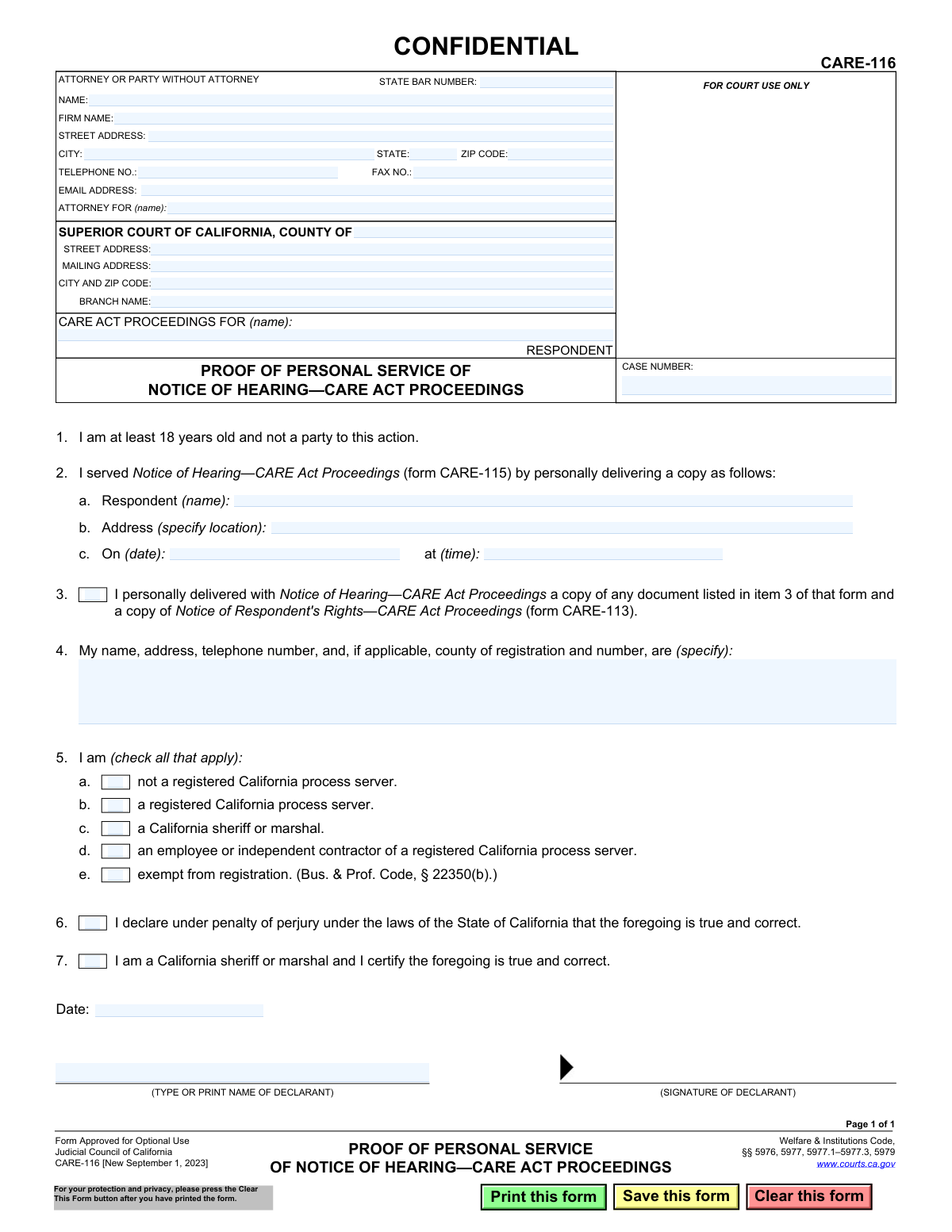
Yes! You can use AI to fill out Form CARE-116, Proof of Personal Service of Notice of Hearing—CARE Act Proceedings
Form CARE-116 is a legal document used in the Superior Court of California to provide proof that a respondent in a CARE (Community Assistance, Recovery, and Empowerment) Act case has been personally served with a Notice of Hearing. It is a sworn statement by the process server detailing when, where, and to whom the legal documents were delivered, which is a critical step in ensuring due process. Today, this form can be filled out quickly and accurately using AI-powered services like Instafill.ai, which can also convert non-fillable PDF versions into interactive fillable forms.
Our AI automatically handles information lookup, data retrieval, formatting, and form filling.
It takes less than a minute to fill out CARE-116 using our AI form filling.
Securely upload your data. Information is encrypted in transit and deleted immediately after the form is filled out.
Form specifications
| Form name: | Form CARE-116, Proof of Personal Service of Notice of Hearing—CARE Act Proceedings |
| Number of fields: | 37 |
| Number of pages: | 1 |
| Language: | English |
Instafill Demo: How to fill out PDF forms in seconds with AI
How to Fill Out CARE-116 Online for Free in 2026
Are you looking to fill out a CARE-116 form online quickly and accurately? Instafill.ai offers the #1 AI-powered PDF filling software of 2026, allowing you to complete your CARE-116 form in just 37 seconds or less.
Follow these steps to fill out your CARE-116 form online using Instafill.ai:
- 1 Navigate to Instafill.ai and upload or select Form CARE-116, Proof of Personal Service of Notice of Hearing—CARE Act Proceedings.
- 2 Enter the court information, including the county, court address, and the specific case number for the CARE Act proceeding.
- 3 Provide the personal and professional information of the process server, including name, address, and status (e.g., registered California process server, sheriff).
- 4 Detail the specifics of the service, including the full name of the respondent served, the physical address where service occurred, and the exact date and time of delivery.
- 5 Confirm that the Notice of Hearing (form CARE-115) and the Notice of Respondent's Rights (form CARE-113) were delivered along with any other required documents.
- 6 Review all auto-filled information for accuracy, then date and electronically sign the declaration under penalty of perjury to certify the information is true and correct.
- 7 Download or print the completed CARE-116 to file with the court handling the proceeding.
Our AI-powered system ensures each field is filled out correctly, reducing errors and saving you time.
Why Choose Instafill.ai for Your Fillable CARE-116 Form?
Speed
Complete your CARE-116 in as little as 37 seconds.
Up-to-Date
Always use the latest 2026 CARE-116 form version.
Cost-effective
No need to hire expensive lawyers.
Accuracy
Our AI performs 10 compliance checks to ensure your form is error-free.
Security
Your personal information is protected with bank-level encryption.
Frequently Asked Questions About Form CARE-116
This form, titled 'Proof of Personal Service of Notice of Hearing—CARE Act Proceedings,' is used to officially prove to the court that the respondent in a CARE Act case was personally hand-delivered the notice of their court hearing and other required documents.
The person who personally delivered the documents must fill out and sign this form. This individual must be at least 18 years old and cannot be a party to the case, such as the petitioner or the respondent.
No, as a party to the action, you are not permitted to serve the legal documents. You must have a neutral third party, such as a professional process server, the sheriff's department, or another adult who is not involved in the case, perform the service.
Personal service means physically handing a copy of the legal documents directly to the person being served, who is the respondent named on the form. This ensures they have received the notice.
According to item 3 on the form, you must also deliver a copy of 'Notice of Respondent's Rights—CARE Act Proceedings' (form CARE-113) and any other documents listed in item 3 of the CARE-115 form.
Yes, as long as you are at least 18 and not a party to the case, you can serve the papers. On the form, you would simply check box 5a, indicating you are 'not a registered California process server'.
You must provide the full name of the respondent who was served, the complete address where the service took place, and the exact date and time the documents were delivered.
Most individuals who serve papers will check box 6 and sign the declaration under penalty of perjury. Box 7 is reserved specifically for a California sheriff or marshal to use when they are certifying the service.
After the form is completed and signed by the person who served the documents, it must be filed with the Superior Court handling the CARE Act case, at the address listed at the top of the form.
CARE Act proceedings involve sensitive personal health information. The 'CONFIDENTIAL' label ensures the form is handled with the privacy and care required by law to protect the respondent's information.
Yes, you can use AI-powered services like Instafill.ai to help fill out this form. These tools can auto-fill fields with your saved information, which saves time and helps ensure accuracy.
To fill out this form online, you can upload it to a platform like Instafill.ai. The service will make the document interactive, allowing you to type your information directly into the fields and sign it electronically.
If you have a non-fillable or 'flat' PDF, you can use a service like Instafill.ai to convert it into an interactive, fillable form. Simply upload the document, and the platform will make the fields editable online.
Compliance CARE-116
Validation Checks by Instafill.ai
1
Case Number Presence and Format
This check verifies that the 'CASE NUMBER' field is not empty and conforms to the standard format for California court case numbers. A valid case number is essential for the court clerk to associate this proof of service with the correct legal proceeding. If the case number is missing or malformed, the document may be rejected or misfiled, causing significant delays.
2
Respondent Name Consistency
This validation ensures the respondent's name in the case caption ('CARE ACT PROCEEDINGS FOR (name)') matches the name of the person served in item 2a. This is a critical consistency check to confirm that the proof of service pertains to the correct individual named in the case. A mismatch could invalidate the service and require the process to be repeated.
3
Valid Service Date
This check ensures the 'On (date)' field in item 2c contains a valid date that is not in the future. It is logically impossible to serve a notice on a future date, so this validation prevents data entry errors. An invalid or future date would render the proof of service legally deficient.
4
Valid Service Time
This validation confirms that the 'at (time)' field in item 2c is populated with a valid time format (e.g., HH:MM AM/PM). A precise time of service can be legally significant and is a required component of a complete proof of service. Failure to provide a valid time may lead to the court questioning the validity of the service.
5
Completeness of Service Details
This check verifies that all parts of item 2 (name of person served, address of service, date, and time) are completed. These details are the core of the proof of service, documenting the who, where, and when of the delivery. Incomplete information would make the proof of service invalid and unenforceable.
6
Server Status Selection
This validation ensures that at least one checkbox in item 5 is selected to identify the status of the person who performed the service (e.g., registered process server, sheriff). The legal validity of the service depends on the authority of the server. Failing to declare this status makes it impossible to verify if the service was performed by a legally authorized individual.
7
Mutually Exclusive Declaration Type
This check ensures that only one of the checkboxes for item 6 ('I declare under penalty of perjury...') or item 7 ('I am a California sheriff or marshal and I certify...') is selected. A declarant is either a private party/server making a declaration under perjury or a sheriff certifying the service, but not both simultaneously. Selecting both would create a logical contradiction on the legal form.
8
Signature Date After Service Date
This is a logical check to ensure the 'Date' in the signature block is on or after the service date specified in item 2c. A person cannot legally declare that they have completed a service before it has actually occurred. This validation prevents chronological impossibilities and ensures the declaration is credible.
9
Mandatory Signature Date
This validation confirms that the 'Date' field in the signature block is filled out. An undated signature on a legal declaration is typically considered incomplete and may be rejected by the court. The date establishes when the declaration was made.
10
Mandatory Declarant Name
This check ensures the 'TYPE OR PRINT NAME OF DECLARANT' field is completed. This field clearly identifies the individual signing the document and taking responsibility for the truthfulness of its contents. Without a printed name, the signature may be illegible and the declarant's identity ambiguous, potentially invalidating the form.
11
Server Information Completeness
This validation verifies that the server's name, address, and telephone number are specified in item 4. This information is required to identify the person who performed the service. It is essential for accountability and allows parties or the court to contact the server if questions about the service arise.
12
Mandatory Court County
This check ensures that the 'COUNTY OF' field at the top of the form is filled in. This specifies which Superior Court of California the case is filed in, which is fundamental information for routing and filing the document correctly. A submission without a county would be un-fileable.
13
Confirmation of Additional Documents
This validation checks that the box in item 3 is checked, confirming that other required documents (like form CARE-113) were delivered along with the Notice of Hearing. The law requires these additional documents to be served to inform the respondent of their rights. Failing to check this box implies an incomplete and legally deficient service.
14
State Bar Number Format
This check validates that if a 'STATE BAR NUMBER' is entered, it consists of numbers. While not all filers are attorneys, if a bar number is provided, it should be in the correct format to properly identify the attorney of record. This helps maintain data integrity for court records.
Common Mistakes in Completing CARE-116
A common and critical error is for a party in the case (the petitioner or respondent) to fill out and sign this form. Item 1 explicitly states the server must be at least 18 and 'not a party to this action.' This mistake happens when a self-represented litigant misunderstands the rules of service and thinks they can deliver the documents themselves. A proof of service completed by a party is invalid and can lead to the court rejecting the filing, delaying the hearing, and requiring the documents to be served again by a neutral third party.
Filers often omit crucial details about the service itself, such as the specific time of delivery in item 2c or providing a vague address in 2b. People may forget the exact time or think the date alone is sufficient. An incomplete or ambiguous description of the service location and time can be challenged in court, potentially invalidating the service. Always record the exact time and the full, specific physical address where service was completed immediately after it occurs.
The respondent's name entered in the main case caption must exactly match the name of the person served listed in item 2a. Even minor misspellings or using a nickname can create legal issues. This error occurs due to typos or carelessness when transcribing the name. A name mismatch can be grounds for the respondent to claim they were not properly served, leading to case delays. Using a tool like Instafill.ai can help prevent this by auto-populating consistent information across all relevant fields.
This form has two separate signature declarations: Item 6 for most servers and Item 7 exclusively for a California sheriff or marshal. A frequent mistake is for a private process server or individual to check or sign Item 7, or for a sheriff to use Item 6. This happens when the filer doesn't read both options carefully. Signing the wrong declaration invalidates the proof of service, as it constitutes a false statement about the declarant's official capacity.
Forgetting to physically sign the form or write the date of signing is one of the most common and fatal errors. An unsigned declaration is legally worthless. This often happens when filers are in a hurry or overlook the signature line at the bottom. An unsigned or undated Proof of Service will be rejected by the court clerk, halting case progress until a properly executed form is filed. Always perform a final review of the form, paying special attention to the signature and date fields.
In Item 5, the server must check a box to identify their legal status (e.g., registered process server, sheriff, exempt individual). People often get confused and check the wrong box, multiple conflicting boxes (like 'registered' and 'not registered'), or leave it blank entirely. This can call the server's credibility and the validity of the service into question. It is crucial to understand your status under the Business & Professions Code and select only the single, correct option.
Item 3 requires the server to confirm that they delivered not only the Notice of Hearing (CARE-115) but also the Notice of Respondent's Rights (CARE-113) and any other required attachments. Forgetting to check this box, or checking it without actually serving all the documents, makes the service defective. This oversight can lead to a hearing being postponed because the respondent was not given legally adequate notice of their rights and the proceedings. The server must be diligent in delivering the complete packet of documents.
The server must provide their full name, address, and telephone number in Item 4, and registration information if applicable. This information is often left incomplete or is illegible. This happens because the server may feel their information is redundant if they are also the declarant. However, this section is required for the court and other parties to be able to identify and contact the person who performed the service. Incomplete information can lead to the form being rejected.
The top section for 'ATTORNEY OR PARTY WITHOUT ATTORNEY' is for the person filing the document with the court, not necessarily the server. A private process server might mistakenly put their own information here instead of the information for the attorney or self-represented party who hired them. This can cause confusion in the court record about who is representing the petitioner. This section should always reflect the party initiating the CARE Act proceedings or their legal counsel. AI-powered tools like Instafill.ai can help manage and correctly place contact information for different roles in a case.
In Item 2b, the server must specify the location where service occurred. A common mistake is to list a P.O. Box. 'Personal service' requires physically handing the documents to the person, which cannot happen at a post office box. This error invalidates the service, as it fails to prove the respondent actually received the documents in person. The address must be a physical location like a home, workplace, or public place where the server made contact.
Saved over 80 hours a year
“I was never sure if my IRS forms like W-9 were filled correctly. Now, I can complete the forms accurately without any external help.”
Kevin Martin Green
Your data stays secure with advanced protection from Instafill and our subprocessors

Robust compliance program
Transparent business model
You’re not the product. You always know where your data is and what it is processed for.
ISO 27001, HIPAA, and GDPR
Our subprocesses adhere to multiple compliance standards, including but not limited to ISO 27001, HIPAA, and GDPR.
Security & privacy by design
We consider security and privacy from the initial design phase of any new service or functionality. It’s not an afterthought, it’s built-in, including support for two-factor authentication (2FA) to further protect your account.
Fill out CARE-116 with Instafill.ai
Worried about filling PDFs wrong? Instafill securely fills form-care-116-proof-of-personal-service-of-notice-of-hearingcare-act-proceedings forms, ensuring each field is accurate.