Yes! You can use AI to fill out Form APP-109E, Proof of Electronic Service (Appellate Division)
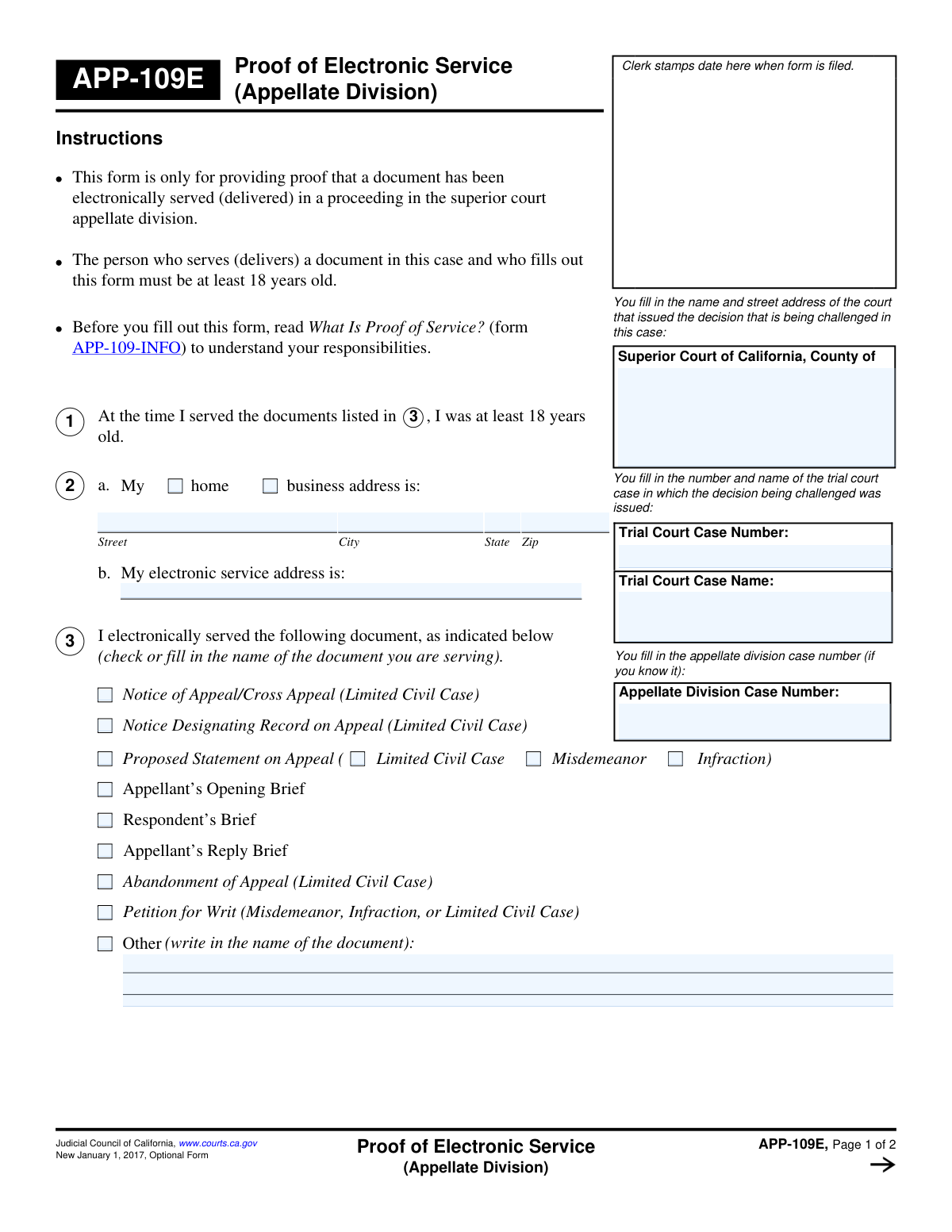
Form APP-109E, Proof of Electronic Service (Appellate Division), is a legal document used in California to provide the court with official proof that documents related to an appeal have been electronically served to the other parties involved. This declaration, made under penalty of perjury, is a critical step in the legal process to ensure all parties have received necessary information. Today, this form can be filled out quickly and accurately using AI-powered services like Instafill.ai, which can also convert non-fillable PDF versions into interactive fillable forms.
Our AI automatically handles information lookup, data retrieval, formatting, and form filling.
It takes less than a minute to fill out APP-109E using our AI form filling.
Securely upload your data. Information is encrypted in transit and deleted immediately after the form is filled out.
Form specifications
| Form name: | Form APP-109E, Proof of Electronic Service (Appellate Division) |
| Number of fields: | 40 |
| Number of pages: | 1 |
| Language: | English |
Instafill Demo: How to fill out PDF forms in seconds with AI
How to Fill Out APP-109E Online for Free in 2026
Are you looking to fill out a APP-109E form online quickly and accurately? Instafill.ai offers the #1 AI-powered PDF filling software of 2026, allowing you to complete your APP-109E form in just 37 seconds or less.
Follow these steps to fill out your APP-109E form online using Instafill.ai:
- 1 Navigate to Instafill.ai and upload or select Form APP-109E.
- 2 Provide the court and case information, including the Superior Court, trial court case number, and appellate division case number.
- 3 Enter your personal details as the server, including your address and electronic service address.
- 4 Indicate which legal documents you served by checking the appropriate boxes from the provided list.
- 5 List the name, representative capacity, electronic service address, and date of service for each person you served.
- 6 Review all the information auto-filled by the AI for accuracy and make any necessary corrections.
- 7 Electronically sign and date the declaration under penalty of perjury to finalize the form before filing.
Our AI-powered system ensures each field is filled out correctly, reducing errors and saving you time.
Why Choose Instafill.ai for Your Fillable APP-109E Form?
Speed
Complete your APP-109E in as little as 37 seconds.
Up-to-Date
Always use the latest 2026 APP-109E form version.
Cost-effective
No need to hire expensive lawyers.
Accuracy
Our AI performs 10 compliance checks to ensure your form is error-free.
Security
Your personal information is protected with bank-level encryption.
Frequently Asked Questions About Form APP-109E
This form is used to provide official proof to the court that you have legally delivered case documents to other parties electronically in a superior court appellate division proceeding.
The person who electronically serves (delivers) the documents, known as the 'server,' must complete and sign this form. The server must be at least 18 years old.
The 'Trial Court Case Number' is the case number from the original superior court case being appealed. The 'Appellate Division Case Number' is the new number assigned specifically for the appeal.
You should enter the email address from which you sent the court documents. This is the address used to prove that service was completed.
If your document is not listed, check the box next to 'Other'. Then, write in the full and correct title of the document you served on the line provided.
Use the spaces provided in section 4 for the first two people. For additional individuals, check the box indicating you served more people and attach a separate page with their service details, labeling it 'APP-109E, Item 4'.
The server should sign and date the declaration in section 5 only after they have successfully completed the electronic service of all the documents listed.
No, the form is designated as 'Optional.' However, you are legally required to provide proof of service, and this form provides a standardized, court-approved method for doing so.
Form APP-109-INFO explains the rules and responsibilities for serving court documents. It is highly recommended that you read it before serving documents to ensure you are following the correct legal procedure.
The completed and signed APP-109E form should be filed with the clerk of the superior court appellate division that is handling your appeal. Always keep a copy for your own records.
Yes, services like Instafill.ai use AI to help you auto-fill form fields accurately and save time. This can help reduce errors when entering repetitive information like case numbers and addresses.
You can upload the APP-109E PDF to the Instafill.ai platform. Their AI will make the form interactive, allowing you to easily click and type in your information or use auto-fill features to complete it quickly.
If you have a non-fillable or 'flat' PDF, you can use a service like Instafill.ai. It can convert the static document into an interactive, fillable form that you can complete on your computer.
Compliance APP-109E
Validation Checks by Instafill.ai
1
Mandatory Document Selection
This validation ensures that at least one checkbox is selected in section 3, 'I electronically served the following document...'. This is critical to identify which legal document the proof of service applies to. If no document is selected, the form is incomplete and cannot be processed, as the subject of the service is unknown.
2
Conditional 'Other' Document Description
This check verifies that if the 'Other' checkbox is selected in section 3, the corresponding text field ('write in the name of the document') is not empty. This is important for clarity and legal sufficiency, as it specifies a document not listed in the standard options. A failure means the form is ambiguous and would be rejected.
3
Server's Electronic Address Format
Validates that the value entered in section 2b, 'My electronic service address is', is a properly formatted email address (e.g., [email protected]). This is essential because this address may be used for subsequent communications or challenges to the service itself. An invalid address would prevent communication and could invalidate the proof of service.
4
Recipient Information Completeness
Ensures that for at least one person served (starting with section 4a), all required fields are completed: 'Name of person served', 'Electronic service address of person served', and 'On (date)'. A proof of service is invalid without identifying who was served, their service address, and when the service occurred. Incomplete entries would render the service declaration for that person void.
5
Recipient Electronic Address Format
This check confirms that the 'Electronic service address of person served' in section 4 is a valid email format. This is the most critical piece of information for electronic service, as it is the legal destination of the document. An invalid email address means service was not properly effected, and the entire proof of service could be challenged and dismissed.
6
Service Date vs. Declaration Date Consistency
This is a logical validation that compares the service date(s) in section 4 with the declaration date in section 5. The declaration date must be on or after all listed service dates. A person cannot legally declare under penalty of perjury that they have served a document before the service has actually taken place. A failure indicates a logical impossibility and would invalidate the declaration.
7
Declaration Date and Name Requirement
Verifies that both the 'Date' and 'Type or print server’s name' fields in section 5 are filled out. These fields are fundamental to the legal declaration, establishing when the declaration was made and by whom. Missing either of these fields makes the perjury declaration incomplete and legally ineffective.
8
Service Date Validity
This validation ensures the 'On (date)' field in section 4 contains a valid date that is not in the future. Service must have already occurred to be proven. Allowing a future date would enable the creation of a fraudulent or premature proof of service, which is legally impermissible.
9
Trial Court Case Identification
Ensures that the 'Trial Court Case Number' and 'Trial Court Case Name' fields on page 1 are not empty. This information is essential for the court clerk to correctly associate the proof of service with the underlying case file. Without this information, the document cannot be filed correctly and has no legal context.
10
Server's Address Type Selection
Verifies that in section 2a, either the 'home' or 'business' checkbox is selected to classify the server's address. This provides necessary context for the provided address, which is a required part of the server's identification. Failure to select an address type makes the server's information incomplete.
11
Case Number Consistency Across Pages
This check ensures that the 'Appellate Division Case Number' entered in the header of page 2 matches the corresponding number entered on page 1. This maintains document integrity and prevents confusion, ensuring that all pages of the form clearly relate to the same case. A mismatch could lead to filing errors or rejection of the form.
12
Proposed Statement on Appeal Specificity
If the 'Proposed Statement on Appeal' checkbox is selected in section 3, this validation ensures that one of the three sub-options ('Limited Civil Case', 'Misdemeanor', or 'Infraction') is also checked. This level of detail is required to correctly categorize the appeal type. Failure to specify the case type makes the filing ambiguous and potentially incorrect.
Common Mistakes in Completing APP-109E
Users often mistakenly enter the name of the Appellate Division court at the top of the form. The instructions clearly state to enter the name of the 'Superior Court...that issued the decision that is being challenged.' This error occurs due to confusion between the trial and appellate courts and can lead to filing errors and delays. To avoid this, carefully read the instructions for each field and enter the name of the original trial court.
This form requires both the 'Trial Court Case Number' and the 'Appellate Division Case Number.' A frequent mistake is transposing these numbers, entering one in the field for the other, or omitting the mandatory trial court number. This can cause significant delays in associating the proof of service with the correct case files. Always double-check court documents to ensure the correct numbers are entered in their respective fields.
In Section 4, when serving an attorney, it is crucial to fill in the 'On behalf of' line, specifying the party or parties the attorney represents. Filers often leave this blank, especially in cases with only one plaintiff and one defendant. Omitting this information creates an incomplete record and can be grounds for challenging the validity of the service, particularly in multi-party litigation. Always specify which client the served attorney is representing.
The 'Appellate Division Case Name' and 'Case Number' fields appear on both page 1 and page 2. A common oversight is failing to fill out these fields on the second page, or entering information that is inconsistent with page 1. This can lead to administrative confusion if the pages are separated. Using a tool like Instafill.ai can prevent this by auto-populating recurring information consistently across all pages of a form.
The declaration in Section 5 must be signed and dated *after* the electronic service is completed. A frequent and serious error is signing the form before the documents have actually been sent. This constitutes a false declaration under penalty of perjury, as the date of signature must be on or after the date of service listed in Section 4. Always complete the service first, then sign and date the form.
In Section 3, filers must specify which document was served by checking a box or writing in a title under 'Other.' Mistakes include checking the wrong box (e.g., 'Appellant's Opening Brief' instead of 'Respondent's Brief') or providing a vague description like 'Pleading' in the 'Other' field. This ambiguity can invalidate the proof of service. Always use the exact, full title of the document being served.
The 'Electronic service address' in Section 4 must be the official address designated for service by the recipient, not just any known email address. People often use a general email they have on file, which may not be the one registered with the court or agreed upon by the parties. Serving to an incorrect address can render the service invalid. Always verify the correct, designated electronic service address for each party before sending the document.
The declaration in Section 5 is incomplete without both a signature and a date. Filers sometimes print their name but forget to sign, or they sign but forget to enter the date. An unsigned or undated declaration is legally invalid and will cause the court clerk to reject the filing. This simple oversight can derail a timely filing, so always double-check that you have both signed and dated the form after serving.
The form provides space to document service for two parties. If more than two parties are served, the filer must check the box in Section 4 and attach a separate page with the required information. Common mistakes include trying to squeeze extra names into the margins or forgetting to attach the required page, leading to incomplete proof of service. The attachment must be clearly labeled 'APP-109E, Item 4' as instructed.
Section 1 contains the legally required statement, 'At the time I served the documents... I was at least 18 years old.' Although it's not a fillable field but part of the text, the entire declaration in Section 5 affirms this statement. The person filling out and signing the form must meet this requirement. Misunderstanding this can lead to an invalid proof of service if the server is under 18. Ensure the person serving and signing is of legal age.
Saved over 80 hours a year
“I was never sure if my IRS forms like W-9 were filled correctly. Now, I can complete the forms accurately without any external help.”
Kevin Martin Green
Your data stays secure with advanced protection from Instafill and our subprocessors

Robust compliance program
Transparent business model
You’re not the product. You always know where your data is and what it is processed for.
ISO 27001, HIPAA, and GDPR
Our subprocesses adhere to multiple compliance standards, including but not limited to ISO 27001, HIPAA, and GDPR.
Security & privacy by design
We consider security and privacy from the initial design phase of any new service or functionality. It’s not an afterthought, it’s built-in, including support for two-factor authentication (2FA) to further protect your account.
Fill out APP-109E with Instafill.ai
Worried about filling PDFs wrong? Instafill securely fills form-app-109e-proof-of-electronic-service-appellate-division forms, ensuring each field is accurate.