Yes! You can use AI to fill out Proof of Electronic Service (Appellate)
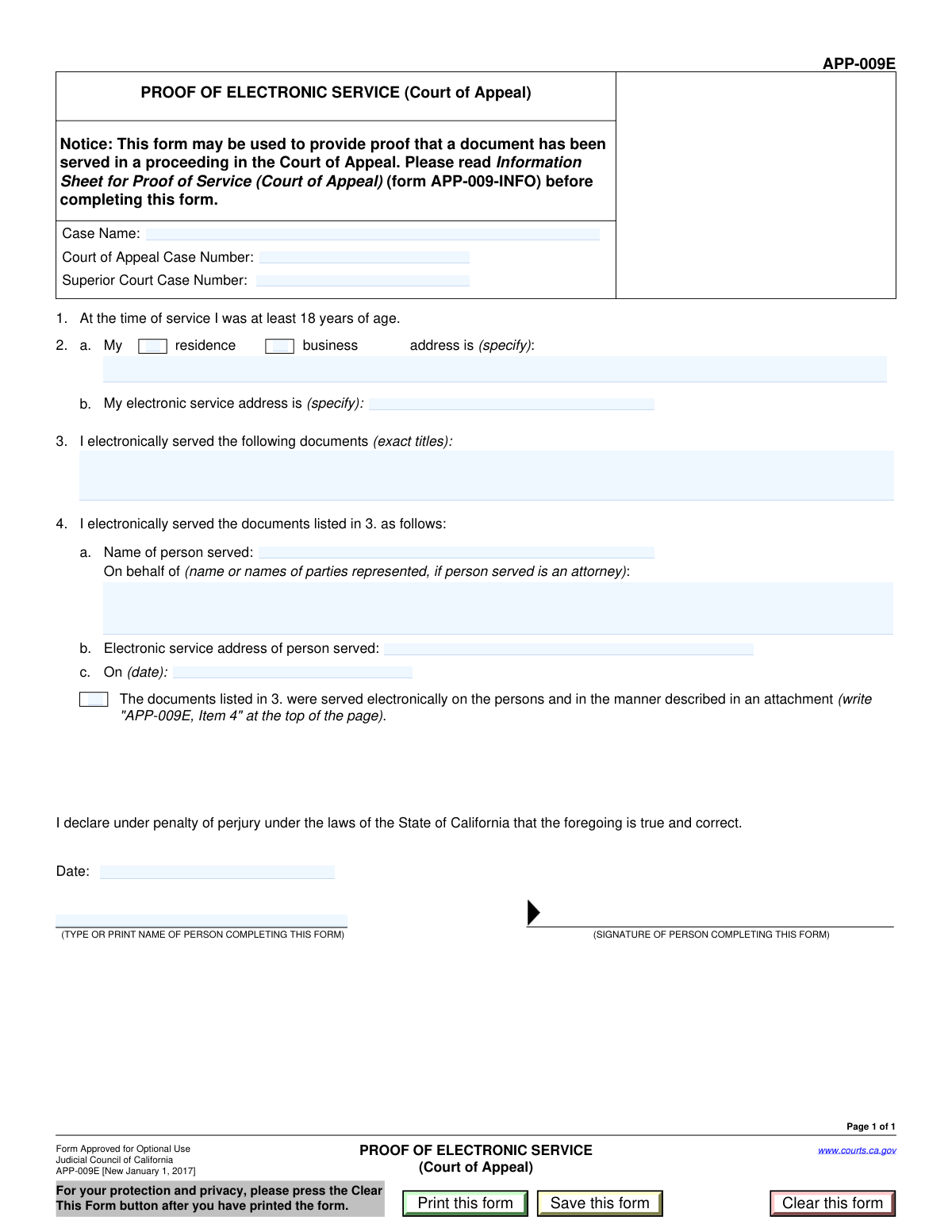
This form is a sworn declaration filed with an appellate court to certify that specific legal documents were delivered to the opposing party or their counsel through electronic means, such as email or a dedicated e-filing system. It serves as official proof of service, which is a critical procedural step to ensure all parties are properly notified and to maintain the integrity of the court record. Today, this form can be filled out quickly and accurately using AI-powered services like Instafill.ai, which can also convert non-fillable PDF versions into interactive fillable forms.
Proof of Electronic Service is part of the
proof of service forms category on Instafill.
Our AI automatically handles information lookup, data retrieval, formatting, and form filling.
It takes less than a minute to fill out Proof of Electronic Service using our AI form filling.
Securely upload your data. Information is encrypted in transit and deleted immediately after the form is filled out.
Form specifications
| Form name: | Proof of Electronic Service (Appellate) |
| Number of fields: | 18 |
| Number of pages: | 1 |
| Language: | English |
More forms in Proof of service forms
Instafill Demo: How to fill out PDF forms in seconds with AI
How to Fill Out Proof of Electronic Service Online for Free in 2026
Are you looking to fill out a PROOF OF ELECTRONIC SERVICE form online quickly and accurately? Instafill.ai offers the #1 AI-powered PDF filling software of 2026, allowing you to complete your PROOF OF ELECTRONIC SERVICE form in just 37 seconds or less.
Follow these steps to fill out your PROOF OF ELECTRONIC SERVICE form online using Instafill.ai:
- 1 Navigate to Instafill.ai and upload or select the Proof of Electronic Service form.
- 2 Enter the case name and the corresponding Court of Appeal and Superior Court case numbers.
- 3 Provide the server's information, including their physical address and electronic service address.
- 4 List the exact titles of all documents that were served electronically.
- 5 Identify the recipient by entering their name, the party they represent (if an attorney), and their electronic service address.
- 6 Enter the date the service was performed and complete the declaration section with the current date and your name.
- 7 Carefully review all the information you've entered for accuracy before saving, printing, or e-filing the completed form.
Our AI-powered system ensures each field is filled out correctly, reducing errors and saving you time.
Why Choose Instafill.ai for Your Fillable Proof of Electronic Service Form?
Speed
Complete your Proof of Electronic Service in as little as 37 seconds.
Up-to-Date
Always use the latest 2026 Proof of Electronic Service form version.
Cost-effective
No need to hire expensive lawyers.
Accuracy
Our AI performs 10 compliance checks to ensure your form is error-free.
Security
Your personal information is protected with bank-level encryption.
Frequently Asked Questions About Form Proof of Electronic Service
This form is a Proof of Electronic Service, used to officially declare to the court that you have sent legal documents to another party in a case electronically. It serves as legal proof that service was completed on a specific date.
The person who electronically sent the court documents (the 'server') must complete and sign this form. This individual is also the 'declarant' who signs the form.
An electronic service address is typically the email address that a party has agreed to use for receiving official court documents. You must provide your own electronic service address and the one for the person you served.
The 'Service Date' is the exact date you transmitted the electronic documents to the other party. The 'Declaration Date' is the date you are signing this proof of service form, which may be the same day or a later day.
You should only fill in this field if the person you served is an attorney. In that case, you would list the name of the client(s) the attorney is representing in the case.
You should provide all case numbers relevant to the documents being served. If your case is only in one court, you only need to fill in that court's specific case number.
You must list the exact and complete titles of every document you served electronically. This ensures there is a clear record of what the other party received.
Check this box if you served many different people or if the service details are too complex to fit on the main form. You would then attach a separate document listing all the people served and how they were served.
If you have a non-fillable or 'flat' PDF, you can use a service like Instafill.ai. It can convert the PDF into an interactive, fillable form that you can easily complete online.
Yes, services like Instafill.ai use AI to help you accurately auto-fill form fields, which can save time and reduce the chance of errors. You can upload the form and let the tool guide you through the process.
To fill this form online, you can upload it to a platform like Instafill.ai. The platform will make the form interactive, allowing you to type your information directly into the fields, then save or print the completed document.
After you complete and sign the Proof of Electronic Service, you must file it with the court handling your case. Be sure to keep a copy for your own records.
Compliance Proof of Electronic Service
Validation Checks by Instafill.ai
Common Mistakes in Completing Proof of Electronic Service
Users often list generic descriptions like 'motion' or 'brief' instead of the exact titles of the documents served. This creates ambiguity and can lead to disputes over whether a party received proper notice of a specific filing. To avoid this, copy the complete and exact title from the first page of each document being served.
People frequently transpose the Superior Court and Court of Appeal case numbers or enter one number in both fields. This error can cause the proof of service to be misfiled or rejected by the court clerk, leading to significant delays. Always double-check these numbers against official court notices and correspondence to ensure they are in the correct fields.
When serving an attorney, it is crucial to list the specific party or parties they represent in the 'Represented Parties' field. A common mistake is to only enter the attorney's name, leaving it unclear which client the service applies to in cases with multiple parties. This omission can render the service ineffective for the intended party, so always specify the client's name.
A simple typo in the 'Served Person Email' or the server's 'Electronic Service Address' is a critical failure. This mistake means the documents were not delivered to the correct address, invalidating the service and potentially leading to motions to set aside defaults. Carefully proofread all email addresses before finalizing the form; AI-powered tools like Instafill.ai can help validate email formats to catch common errors.
Filers often confuse the date the documents were electronically sent ('Service Date') with the date they signed the form ('Declaration Date'). Entering the declaration date before the service date is a logical impossibility that will invalidate the form. The 'Declaration Date' must be on or after the 'Service Date,' so be sure to record the exact date of transmission and sign on or after that day.
Users may fail to provide a complete physical address for the server, omitting the city, state, or zip code, or they might check 'Residence' but list a business address. An incomplete or inconsistent address can call the declarant's identity into question and may be grounds for challenging the validity of the service. Ensure you check the correct box (Residence or Business) and provide the full, corresponding physical street address.
A frequent error is checking the 'Documents served per attachment' box but forgetting to include the referenced attachment with the filing, or vice-versa. This creates an incomplete record, as the court will not know who was served or may overlook the attached list. Always ensure the checkbox status matches the physical presence of an attachment detailing service on additional parties.
Instead of providing the full case name as it appears on court documents (e.g., 'John Smith, Plaintiff v. Jane Jones, Defendant'), people often use informal shorthand like 'Smith v. Jones'. This can cause filing issues or rejection by a court clerk who cannot immediately match it to the official case record. Always transcribe the full, official case name to ensure proper identification.
When a form is only available as a non-fillable PDF, users often print it and fill it out by hand, leading to illegible entries. Poor handwriting for names, case numbers, or email addresses can cause the court clerk to make data entry errors, resulting in misfiling or defective notice. To prevent this, use a tool like Instafill.ai, which can convert flat PDFs into electronically fillable forms for clean, legible, and accurate data entry.
The 'Declarant Name' must be the full legal name of the person who actually performed the electronic service. A mistake occurs when an assistant or another individual fills out the form and enters their own name instead of the server's. This makes the declaration factually incorrect and legally void, as the person attesting to the service is not the one who performed it.
Saved over 80 hours a year
“I was never sure if my IRS forms like W-9 were filled correctly. Now, I can complete the forms accurately without any external help.”
Kevin Martin Green
Your data stays secure with advanced protection from Instafill and our subprocessors




Robust compliance program
Transparent business model
You’re not the product. You always know where your data is and what it is processed for.
ISO 27001, HIPAA, and GDPR
Our subprocesses adhere to multiple compliance standards, including but not limited to ISO 27001, HIPAA, and GDPR.
Security & privacy by design
We consider security and privacy from the initial design phase of any new service or functionality. It’s not an afterthought, it’s built-in, including support for two-factor authentication (2FA) to further protect your account.
Fill out Proof of Electronic Service with Instafill.ai
Worried about filling PDFs wrong? Instafill securely fills proof-of-electronic-service-appellate forms, ensuring each field is accurate.
