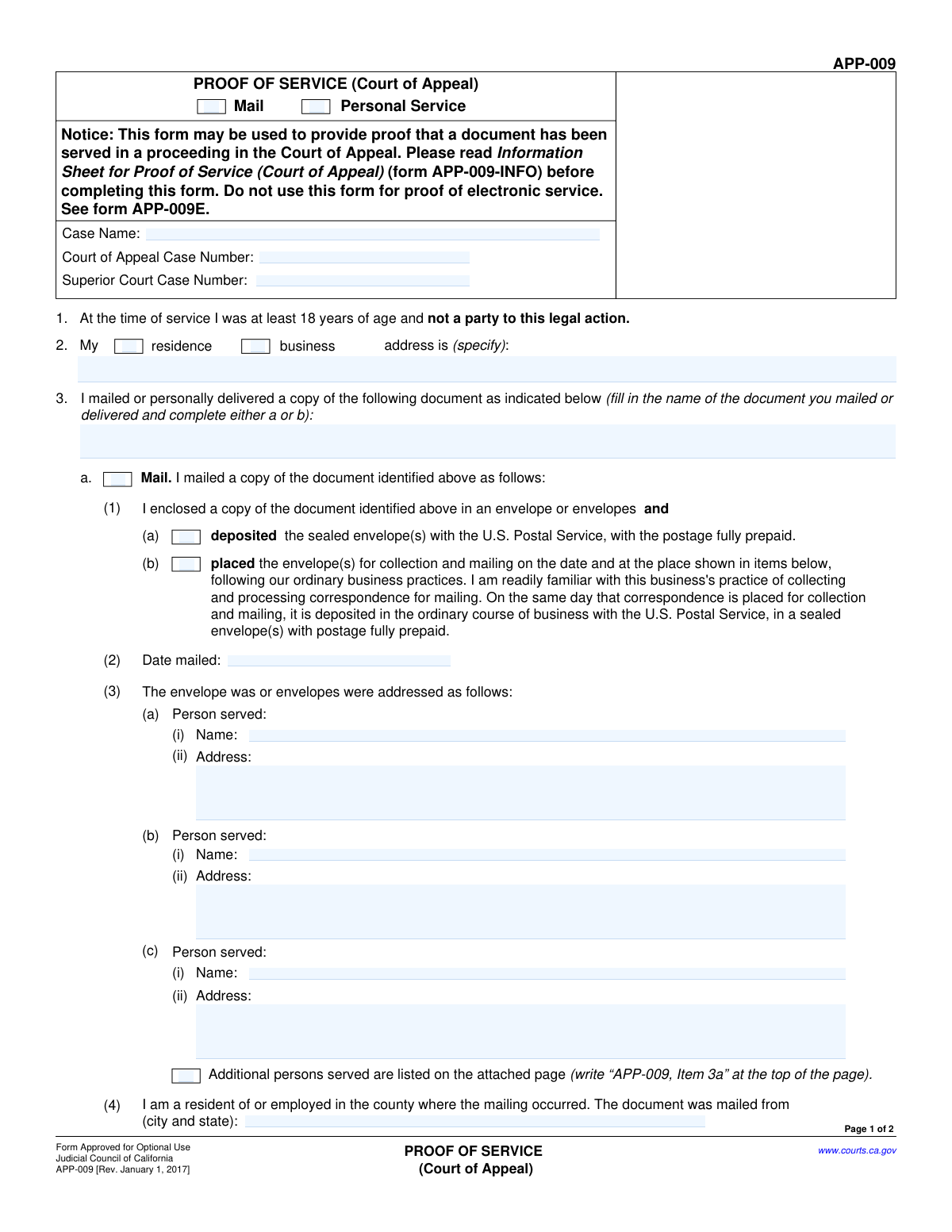
Yes! You can use AI to fill out Form APP-009, Proof of Service (Appellate Division)

Form APP-009, Proof of Service (Appellate Division), is a crucial legal document used in California's appellate courts. It serves as a sworn declaration, informing the court and all parties that specific legal documents have been officially delivered, either by mail or personal service, which is a required step in the legal process. Today, this form can be filled out quickly and accurately using AI-powered services like Instafill.ai, which can also convert non-fillable PDF versions into interactive fillable forms.
Our AI automatically handles information lookup, data retrieval, formatting, and form filling.
It takes less than a minute to fill out APP-009 using our AI form filling.
Securely upload your data. Information is encrypted in transit and deleted immediately after the form is filled out.

Form specifications

Form name: Form APP-009, Proof of Service (Appellate Division)
Number of fields: 43
Number of pages: 2
Language: English
main-image

Instafill Demo: How to fill out PDF forms in seconds with AI

How to Fill Out APP-009 Online for Free in 2026

Are you looking to fill out a APP-009 form online quickly and accurately? Instafill.ai offers the #1 AI-powered PDF filling software of 2026, allowing you to complete your APP-009 form in just 37 seconds or less.
Follow these steps to fill out your APP-009 form online using Instafill.ai:
  1. 1 Navigate to Instafill.ai and upload or select Form APP-009, Proof of Service (Appellate Division).
  2. 2 Use the AI assistant to accurately input the Case Name, Court of Appeal Case Number, and Superior Court Case Number.
  3. 3 Indicate the method of service by selecting either 'Mail' or 'Personal Service' and provide the name of the document that was served.
  4. 4 Fill in the specific details for the chosen service method, such as the date and place of mailing or the date, time, and address of personal delivery.
  5. 5 List the full name and address for each person or party who was served. If there are more than three, note that an attachment will be used.
  6. 6 Complete the final declaration section by entering the date and typing your name as the declarant.
  7. 7 Review all the information auto-filled by the AI for accuracy, then download, save, or print the completed Form APP-009 for filing.

Our AI-powered system ensures each field is filled out correctly, reducing errors and saving you time.

Why Choose Instafill.ai for Your Fillable APP-009 Form?

Speed

Complete your APP-009 in as little as 37 seconds.

Up-to-Date

Always use the latest 2026 APP-009 form version.

Cost-effective

No need to hire expensive lawyers.

Accuracy

Our AI performs 10 compliance checks to ensure your form is error-free.

Security

Your personal information is protected with bank-level encryption.

Frequently Asked Questions About Form APP-009

This form, known as a Proof of Service, is used to declare to the court that you have officially delivered a copy of a legal document to the other parties involved in a case.

The person who actually performed the delivery, either by mailing the document or by personally handing it to the recipient, must complete and sign this form.

You only need to complete one section based on your delivery method. Use the 'Mail' section if you sent the document through the postal service, and use the 'Personal Service' section if you hand-delivered it.

Yes, you must provide both the Court of Appeal and Superior Court case numbers in the 'Case Information' section to ensure your document is filed with the correct case.

The form provides space to list three individuals. If you served more people, check the box for 'Additional Persons Served' and attach a separate page listing the names, addresses, and service details for everyone else.

This option is for when you place the envelope in your business's outgoing mail system for collection, following its ordinary practices for sending mail through the U.S. Postal Service.

The 'Declarant' is the person filling out the form who is swearing that the service was completed as described. You must print your name and enter the date you are signing the declaration.

No, you only complete the section that applies to how you delivered the document. Check the box for either 'Mail' or 'Personal Service' at the top and fill in the corresponding fields only.

Yes, for personal delivery, you must provide the full address, the date, and the specific time the document was delivered to each person listed.

You should enter the official title of the legal document that you served, such as 'Appellant's Opening Brief' or 'Petition for Rehearing'.

Yes, services like Instafill.ai use AI to help you accurately auto-fill form fields with your saved information, which saves time and helps prevent common errors.

Simply upload the form to the Instafill.ai platform. It will make the form fillable online, allowing you to type in your information, save your progress, and reuse your details for other forms.

If you have a non-fillable or 'flat' PDF, you can use a service like Instafill.ai. It can convert the document into an interactive, fillable form that you can easily complete on your computer.

Compliance APP-009
Validation Checks by Instafill.ai

1
Mutually Exclusive Service Method Selection
This validation ensures that the user selects either 'Mail' or 'Personal Service', but not both. The form's logic is divided into two distinct paths based on the service method. Allowing both to be selected would create conflicting and ambiguous data, making the proof of service invalid. If neither or both are selected, the form should display an error and prevent submission.
2
Case Information Completeness
Verifies that the 'Case Name' field is filled and that at least one of the two case number fields ('Court of Appeal Case Number' or 'Superior Court Case Number') is provided. This information is essential for associating the proof of service with the correct legal proceeding. A failure to provide this basic information would make it impossible to file the document correctly.
3
Declaration Date Validity and Logic
Ensures the 'Declaration Date' is a valid, non-future date. A person makes a declaration about an action that has already happened, so the date cannot be in the future. This check preserves the logical and legal integrity of the sworn statement. An invalid or future date would block submission.
4
Service Date vs. Declaration Date Consistency
Confirms that the 'Date Mailed' or any 'Date Delivered' entered on the form is on or before the 'Declaration Date'. It is logically impossible to declare that you performed an action on a future date. This check is critical for the credibility of the declaration, and a failure indicates a significant data entry error.
5
Mail Service Mandatory Fields
If the 'Mail' service method is selected, this check ensures that 'Served Document Name', 'Date Mailed', 'Mailing Origin City and State', and the name/address for the 'First Person Served' are all completed. These fields represent the minimum information required to constitute a valid proof of service by mail. Missing data would render the submission incomplete.
6
Personal Delivery Mandatory Fields
If 'Personal Service' is selected, this validation verifies that the 'Person Served Name', 'Delivery Address', 'Date Delivered', and 'Time Delivered' are all filled out for the first person served. Personal service requires precise details about who was served and when/where it occurred. Omitting any of this information makes the proof of service deficient.
7
Exclusive Mailing Method Choice
When service by 'Mail' is indicated, this check ensures that exactly one of the two specific mailing methods ('Deposited with USPS' or 'Placed for business collection') is selected. The user must specify the precise manner of mailing for it to be legally sufficient. Selecting both or neither creates ambiguity and should trigger a validation error.
8
At Least One Person Served
Verifies that for the chosen service method (Mail or Personal Delivery), the details for at least the 'First Person Served' are fully provided. A proof of service form is fundamentally useless if it does not identify at least one party who was served. This check ensures the core purpose of the form is met before submission is allowed.
9
Time Delivered Format Validation
When personal delivery is used, this check validates that any 'Time Delivered' field is entered in a valid time format (e.g., HH:MM AM/PM). This ensures data consistency and provides a precise, unambiguous record of when service occurred. An invalid format would prompt the user for correction to prevent data corruption.
10
Paired Information for Persons Served
For any 'person served' entry (First, Second, or Third), this check ensures that if a name is provided, the corresponding address is also provided (and date/time for personal service). This prevents incomplete records where a person is named but the essential details of how they were served are missing. The system should flag the specific entry that is incomplete.
11
Declarant Name Presence
Ensures the 'Declarant Name' field at the end of the form is not empty. The declaration is a formal statement made under penalty of perjury, and it must be attributed to a specific individual. An anonymous declaration is invalid, making this a mandatory field for submission.
12
Mailing Origin Format
Validates that the 'Mailing Origin City and State' field contains both a city and a state, preferably in a 'City, ST' format. This provides a clear and complete record of where the mailing originated, which can be a legally significant detail. The check would flag entries that appear to be missing either a city or a state.
13
Conditional Address Field Requirement
This validation ensures that if either the 'Residence Address' or 'Business Address' checkbox is checked, the main 'Address' text field is also filled out. This maintains logical consistency in the address section. An error should be triggered if a box is checked but the corresponding address is left blank.

Common Mistakes in Completing APP-009

Confusing Superior Court and Court of Appeal Case Numbers

Users often transpose or incorrectly enter the case numbers for the Superior Court and the Court of Appeal. These are distinct numbers from different stages of the legal process, and mixing them up can lead to the document being misfiled, delayed, or rejected by the court clerk. To avoid this, carefully double-check the numbers against official court documents for both the trial court and the appellate court before entering them.

Failing to Select a Primary Service Method

The form requires the user to choose between 'Mail' and 'Personal Service' at the very beginning. A common error is to fill out the detailed sections for mailing or delivery without checking the corresponding primary box. This omission can invalidate the entire proof of service, as it fails to clearly state the method used. Always ensure one of the top-level checkboxes is selected to define the type of service being declared.

Entering an Ambiguous Served Document Name

The 'Served Document Name' field is frequently filled with generic terms like 'Motion' or 'Pleading'. This is insufficient, as it does not precisely identify the document for the court and opposing parties. The full, exact title of the document, such as 'Appellant's Opening Brief' or 'Respondent's Motion to Dismiss Appeal,' must be used. Failure to be specific can lead to legal challenges regarding the sufficiency of notice.

Incorrectly Describing the Mailing Method

When service is by mail, the form provides specific options: 'Deposited with USPS' or 'Placed for business collection'. Users may not understand the distinction or may select the wrong one. This misrepresents the facts of service under penalty of perjury and can be grounds for challenging the service's validity. It is crucial to select the option that accurately reflects how the mail was processed on the date specified.

Forgetting the Attachment for Additional Persons Served

When serving more than three parties, users must check the 'Additional Persons Served' box and attach a separate page with the required information. A frequent mistake is checking the box but failing to include the physical attachment with the filing. This results in an incomplete record, meaning there is no valid proof of service for the individuals listed on the missing page, which can severely impact the case.

Using an Illogical Declaration Date

The 'Declaration Date' is the date the filer signs the form, attesting that the service was completed as described. This date cannot be earlier than the 'Date Mailed' or 'Date Delivered'. Entering a declaration date that precedes the service date is a logical contradiction that invalidates the declaration, as one cannot swear that an act was completed before it has happened.

Providing an Incomplete Address for a Served Party

Users sometimes omit crucial parts of an address, such as the apartment number, ZIP code, or even the city. A legally valid service requires a complete and accurate address to ensure the document is reasonably calculated to reach the intended recipient. An incomplete address can be grounds for a motion to quash service, causing significant delays. AI-powered tools like Instafill.ai can help prevent this by validating address formats.

Filling Out Both Mail and Personal Service Sections

Confused users may enter information into fields within both the 'Mail' and 'Personal Service' sections of the form. This creates a contradictory and ambiguous record, making it unclear which method of service was actually used. The form is designed to document a single method of service; if different parties were served by different methods, separate proof of service forms should be completed for each method.

Omitting the Time of Personal Delivery

For personal service, the form explicitly requires the 'Time Delivered' in addition to the date. This detail is often overlooked but is a critical element for establishing precisely when service was perfected. Leaving this field blank creates a defective proof of service that could be challenged and potentially invalidated by the court. If the form is a non-fillable PDF, a tool like Instafill.ai can convert it into a smart, fillable version with prompts for required fields like this.

Listing the Incorrect Declarant

The 'Declarant Name' must be the name of the individual who actually performed the service (i.e., mailed the letter or handed over the document) and is signing the form. It is a mistake to list the attorney of record or the party to the case unless they personally executed the service. The declaration is made under penalty of perjury, so the person attesting to the act must be the one who performed it.
Saved over 80 hours a year

“I was never sure if my IRS forms like W-9 were filled correctly. Now, I can complete the forms accurately without any external help.”

Kevin Martin Green

Your data stays secure with advanced protection from Instafill and our subprocessors

Robust compliance program

Transparent business model

You’re not the product. You always know where your data is and what it is processed for.

ISO 27001, HIPAA, and GDPR

Our subprocesses adhere to multiple compliance standards, including but not limited to ISO 27001, HIPAA, and GDPR.

Security & privacy by design

We consider security and privacy from the initial design phase of any new service or functionality. It’s not an afterthought, it’s built-in, including support for two-factor authentication (2FA) to further protect your account.

Fill out APP-009 with Instafill.ai

Worried about filling PDFs wrong? Instafill securely fills form-app-009-proof-of-service-appellate-division forms, ensuring each field is accurate.