
Yes! You can use AI to fill out Form 0896A, Report of Subcontracts to Small and Veteran-Owned Business
Don't type 162 fields by hand. Tell our AI about yourself, or upload a document you already have, and it fills every field in seconds. You check it, then download, print or sign.
The AI does the filling. You just check it.
No typing into boxes, nothing to install.
What this form asks for
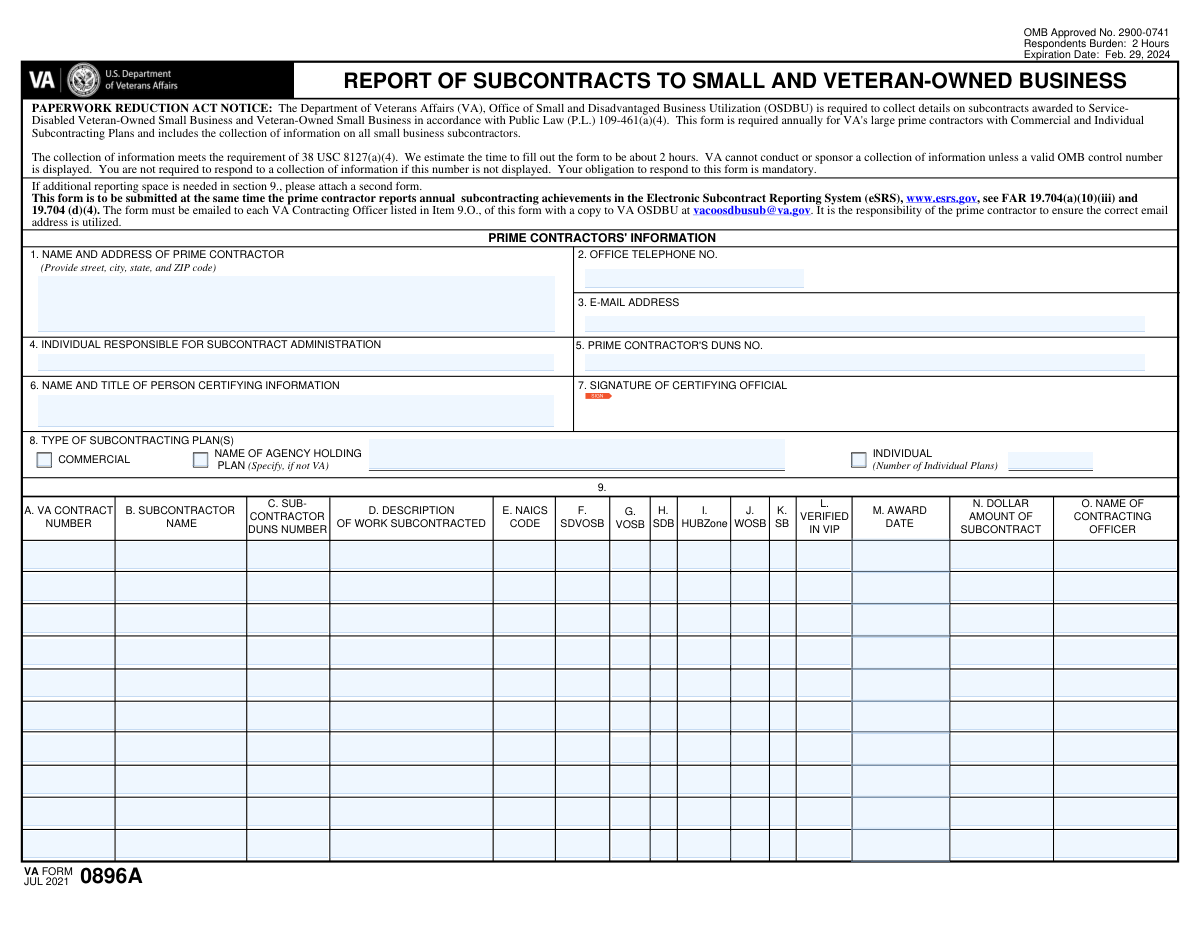
The AI fills all of it, from your answers or your documents.
The AI checks your answers before you download
20 checks built for this form, so a wrong date or a missing answer is caught before anyone else sees it.
This validation check ensures that the full name and address of the prime contractor are accurately captured in Item 1. It confirms that all required fields are filled out completely, including street address, city, state, and zip code. The check also verifies that the formatting adheres to standard conventions, preventing any potential errors in the submission. By validating this information, the software helps maintain the integrity of the data provided.
This validation check confirms that the office telephone number for the prime contractor's subcontract administrator is included in Item 2. It verifies that the number is formatted correctly, adhering to standard telephone number conventions. This ensures that the contact information is reliable and can be used for communication purposes. By performing this check, the software helps to eliminate any potential issues related to incorrect or missing contact details.
This validation check ensures that the email address of the prime contractor's subcontract administrator is provided in Item 3. It verifies that the email follows standard formatting rules, such as the presence of an '@' symbol and a valid domain. This check is crucial for ensuring effective communication between parties involved in the subcontracting process. By validating the email format, the software helps to prevent any miscommunication that could arise from incorrect email addresses.
This validation check checks that the name of the individual responsible for subcontract administration is clearly specified in Item 4. It ensures that this critical information is not omitted, as it is essential for accountability and communication. By confirming the presence of this name, the software helps to establish a clear point of contact for any inquiries related to subcontract administration. This validation contributes to the overall clarity and completeness of the form.
This validation check validates that the DUNS number of the prime contractor is included in Item 5 and adheres to the correct DUNS format. It ensures that the number is a valid nine-digit identifier, which is crucial for identifying business entities. By performing this check, the software helps to ensure compliance with reporting requirements and facilitates accurate tracking of subcontractors. This validation is essential for maintaining the integrity of the data submitted in the form.
This validation check ensures that the name and title of the individual certifying the information are accurately entered in Item 6. It confirms that the person responsible for the certification is clearly identified, which is crucial for accountability. The check verifies that both fields are filled out completely, preventing any ambiguity regarding who is certifying the information. By enforcing this requirement, the software helps maintain the integrity of the certification process.
And 14 more checks
- Confirms that the form is signed in the designated area in Item 7 to certify the information provided.
- Verifies that the type of subcontracting plan(s) applicable is selected in Item 8 and that additional information is provided as required.
- Ensures that the VA contract number associated with the subcontract is entered in Item 9A.
- Checks that the name of the subcontractor is provided in Item 9B.
- Validates that the DUNS number of the subcontractor is entered in Item 9C and is in a valid format.
- Ensures that a brief description of the work subcontracted is provided in Item 9D.
- Confirms that the NAICS code used for the subcontract is entered in Item 9E and is valid.
- Verifies that all applicable socio-economic status boxes for the subcontractor are checked in Item 9F-K.
- Ensures that the verification status of the subcontractor is indicated as 'Yes' or 'No' in Item 9L.
- Checks that the date of the subcontract award is provided in Item 9M and is in a valid date format.
- Validates that the dollar amount of the subcontract is entered in Item 9N and is a valid monetary format.
- Ensures that the name of the VA contracting officer for the prime contract is provided in Item 9O.
- Confirms that the completed form is submitted at the same time as the prime contractor's annual subcontracting achievements in the eSRS.
- Verifies that the correct email addresses are used for submission to the VA Contracting Officers and VA OSDBU.
Let AI fill out your Form 0896A
No typing. Every field filled in seconds, checked, ready to sign.
Common Mistakes in Completing Form 0896A
The ones the AI is built to catch.
Incomplete prime contractor name and address
Missing office telephone number for subcontract administrator
Omitting email address of subcontract administrator
Not specifying the name of the individual responsible for administration
Failure to provide the DUNS number of the prime contractor
Not entering the name and title of the certifying person
Missing signature in the designated area
Incorrect selection of subcontracting plan type
Failure to specify the federal agency for 'Commercial' plans
Not indicating the number of individual plans for 'Individual' plans
Omitting VA contract number for each subcontractor
Missing subcontractor name
Not providing DUNS number for the subcontractor
Failure to describe the work subcontracted
Omitting NAICS code for the subcontract
Not checking applicable socio-economic status boxes
Incorrect verification status for the subcontractor
Missing date of subcontract award
Omitting dollar amount of the subcontract
Not providing the name of the VA contracting officer
Failure to submit the form with annual subcontracting achievements
Incorrect email addresses used for submission
Not attaching a second form when additional space is needed
Frequently Asked Questions About Form 0896A
Is it really free for 7 days?
Can I fill other forms too?
How do I cancel?
How does the AI fill out Form 0896A?
What happens to my information?
How complex is Form 0896A to fill out?
What is Form 0896A and what is its purpose?
Who is required to submit Form 0896A?
What information is collected on Form 0896A?
How long does it take to complete Form 0896A?
What is the expiration date for Form 0896A?
Where should Form 0896A be submitted?
What is the significance of the OMB control number on Form 0896A?
What should I do if I need more space to report subcontractors?
What are the types of subcontracting plans that can be reported on Form 0896A?
What is the role of the individual responsible for subcontract administration?
What information is required for the prime contractor's details on Form 0896A?
How do I verify if a subcontractor is listed in the VA OSDBU's Vendor Information Pages?
What socio-economic statuses can be indicated for subcontractors on Form 0896A?
What is the NAICS code and why is it important for Form 0896A?
What should I include in the description of work subcontracted?
What happens if the OMB control number is not displayed on Form 0896A?
What is the deadline for submitting Form 0896A?
What are the consequences of failing to submit Form 0896A?
What is the significance of the dollar amount of the subcontract on Form 0896A?
How do I find the correct email address for submitting Form 0896A?
Get your Form 0896A filled out by AI
$0 today. Cancel before Oct 31 and you pay nothing.
Other forms like this one
veteran forms: Form SF-15, Application for 10-Point Veteran Preference, Standard Form 15 (SF 15), Application for 10-Point Veteran Preference, VA Form 10-320, Veteran Reimbursement Claim Form, State of California Department of Veterans Affairs COMMERCIALLY USEFUL FUNCTION (CUF) CERTIFICATION FORM, Form MV-145V, Application for Severely Disabled Veteran, Severely Disabled Veteran Motorcycle Plate Decal or Disabled Veteran Registration Plate
business forms: Form 8829, Expenses for Business Use of Your Home, Form 990-T, Exempt Org Business Income Tax Return, Form 1415, Visitor Visa - Business Stream, Form 2553, Election by a Small Business Corporation, Lifestyle Protector – Risk New Business for Multiple Lives Assured (LPMLA 04/2024), Form 5472 (Rev. December 2023), Information Return of a 25% Foreign-Owned U.S. Corporation or a Foreign Corporation Engaged in a U.S. Trade or Business, DBPR CILB 6-B, Application for Certified Building Contractor Who is Qualifying a Business, Schedule C (Form 1040), Profit or Loss From Business (Sole Proprietorship) (2017), Form 8822-B, Change of Address or Responsible Party — Business, Form 8822-B (Rev. December 2019), Change of Address or Responsible Party — Business, DBPR CILB 6-A, Application for Certified General Contractor Who is Qualifying a Business, Schedule C (Form 1040), Profit or Loss From Business (Sole Proprietorship), American Express Business Travel Account Set-Up Form Hong Kong, American Express Business Travel Account Set-Up Form Hong Kong, Transamerica Life Insurance Company - New Business Cover Sheet, Fidelity® Brokerage Business Account Certification, Merrill Edge® Self‑Directed Business Investor Account (BIA Account) Account Application Booklet and Agreements, Merrill Business Investor Account (BIA) and Working Capital Management Account (WCMA) Account Application Booklet and Agreements, Application for business rates for self-catering properties in England, Los Angeles County Department of Consumer and Business Affairs Tenant Application for Adjustment
small business forms: Form 2553, Election by a Small Business Corporation, Form SC-103, Fictitious Business Name (Small Claims)
contract forms: Memorandum of Contract, Form WH-347, Payroll for Contractors, Form 1449, Solicitation/Contract/Order for Commercial Products and Services, application-and-contract-for-electric-facilities-w, Texas Real Estate Commission (TREC) One to Four Family Residential Contract (Resale) (TREC No. 20-18), DBPR CILB 6-B, Application for Certified Building Contractor Who is Qualifying a Business, State of Hawaii Department of Commerce and Consumer Affairs (DCCA) Contractors License Board – Application for Contractor's License (Sole Proprietor) (CT-36) with supporting forms (Experience Certificate CT-03, Contractors Financial Statement CT-02, and Chronological History of Projects/Project List), NJ Department of Labor & Workforce Development Form MW-562, Payroll Certification for Public Works Projects (Contractor and Subcontractor’s Weekly and Final Certification), DBPR CILB 6-A, Application for Certified General Contractor Who is Qualifying a Business, Proposal Form 3, Attestation Regarding County Contract, TIAA Trust, N.A. Private Asset Management, Request for a Direct Transfer From IRA Contracts, Contrato de Trabajo en Prácticas (Código 420), Professional Practice Employment Contract, State of California Department of Transportation Darfur Contracting Act Certification, Form DOT ADM-0077, State of California Department of Transportation, Contract Requirements, State of California Department of Transportation Subcontractor List, DCMA Guidebook for Government Contract Property Administration, Official Form 106G, Schedule G: Executory Contracts and Unexpired Leases, Form ADR-106, Petition to Confirm, Correct, or Vacate Contractual Arbitration Award, Newly Contracted Provider Training Attestation Form, State of Florida Department of Business and Professional Regulation Form DBPR CILB 6-B, Application for Certified Building Contractor Who is Qualifying a Business
Let AI fill out your Form 0896A
Your trial starts once a card is added. You pay nothing before Oct 31.
Our AI already knows this form, all 162 fields of it. Skip the typing: tell it about yourself, or upload what you have, and it fills the whole form in seconds.
- AI fills every field on the form, checkboxes included
- No typing into boxes: answer a few questions, or upload a document you already have, an old copy of this form, a photo of a document
- The AI checks the answers; you review and change anything before you download
- Download the finished PDF, print it, or sign it online
- Encrypted, and never used to train AI
Cancel before Oct 31 and you pay nothing.
A card is needed to start the trial. Cancel in two clicks from your account.
Terms · Privacy