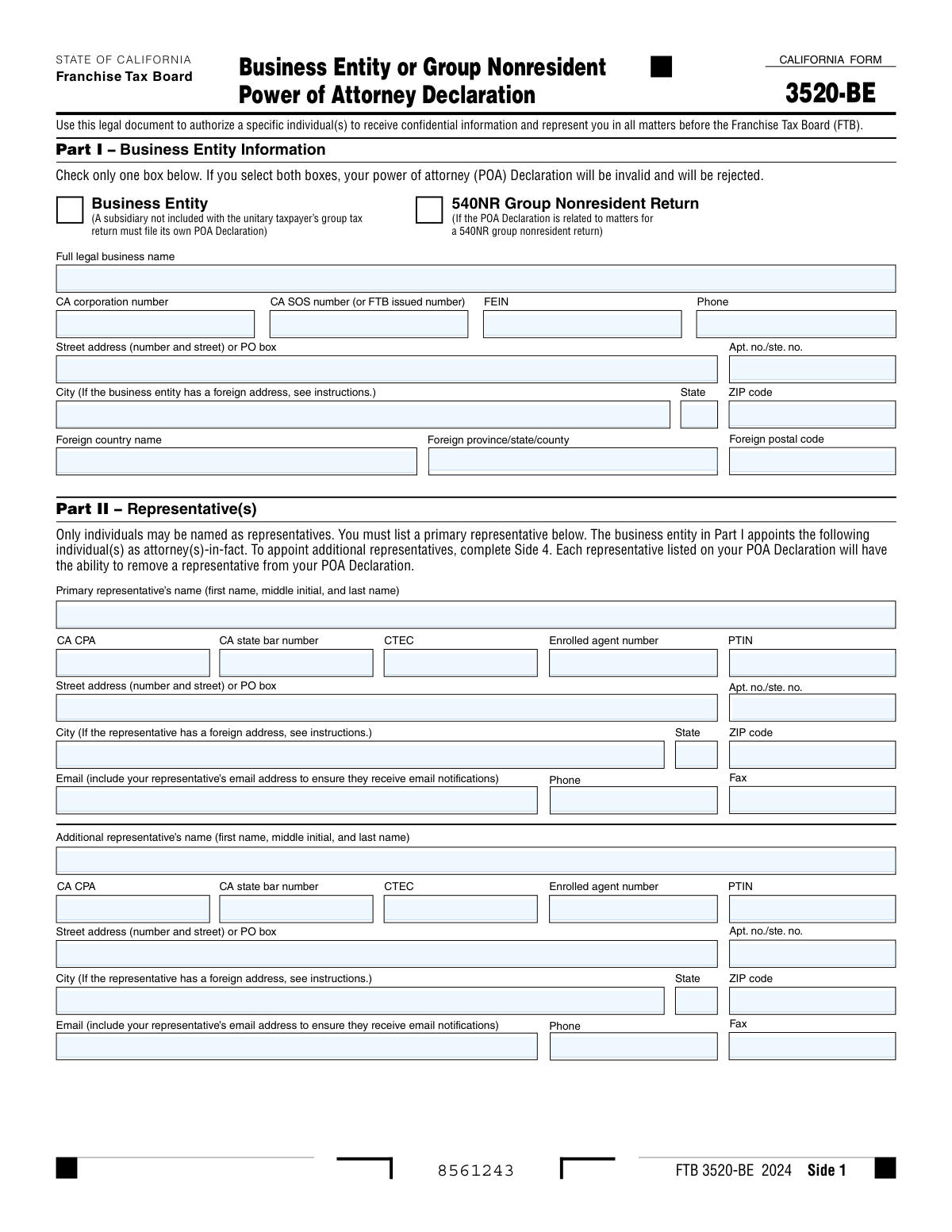
Yes! You can use AI to fill out CALIFORNIA FORM 3520-BE, Business Entity or Group Nonresident Power of Attorney Declaration
Form FTB 3520-BE is a legal document used by business entities and 540NR group nonresident filers to grant an individual (like a CPA or attorney) the authority to represent them before the California Franchise Tax Board (FTB). This power of attorney allows the designated representative to receive confidential tax information and act on the business's behalf in various tax matters. Today, this form can be filled out quickly and accurately using AI-powered services like Instafill.ai, which can also convert non-fillable PDF versions into interactive fillable forms.
FTB 3520-BE is part of the
business forms, California business forms and power of attorney forms categories on Instafill.
Our AI automatically handles information lookup, data retrieval, formatting, and form filling.
It takes less than a minute to fill out FTB 3520-BE using our AI form filling.
Securely upload your data. Information is encrypted in transit and deleted immediately after the form is filled out.
Form specifications
| Form name: | CALIFORNIA FORM 3520-BE, Business Entity or Group Nonresident Power of Attorney Declaration |
| Number of fields: | 127 |
| Number of pages: | 5 |
| Language: | English |
More forms in Business forms
Instafill Demo: How to fill out PDF forms in seconds with AI
How to Fill Out FTB 3520-BE Online for Free in 2026
Are you looking to fill out a FTB 3520-BE form online quickly and accurately? Instafill.ai offers the #1 AI-powered PDF filling software of 2026, allowing you to complete your FTB 3520-BE form in just 37 seconds or less.
Follow these steps to fill out your FTB 3520-BE form online using Instafill.ai:
- 1 Navigate to Instafill.ai and upload your FTB 3520-BE form or select it from the template library.
- 2 Provide the required business entity details in Part I, including the legal name, address, FEIN, and CA corporation or SOS number.
- 3 Enter the full name, contact information, and professional credentials (if any) for your primary and any additional representatives in Part II.
- 4 In Part III and Part IV, specify the scope of the authorization by selecting the tax years covered and granting or denying additional powers like waiving statutes of limitations or receiving refund checks.
- 5 Use Part V to request or retain full or limited MyFTB online account access for your designated tax professional(s).
- 6 Carefully review all entered information for accuracy, then have an authorized individual (e.g., corporate officer, partner) print their name, title, date, and sign the declaration in Part VI.
- 7 Download the completed, signed form from Instafill.ai and submit it to the California Franchise Tax Board as instructed.
Our AI-powered system ensures each field is filled out correctly, reducing errors and saving you time.
Why Choose Instafill.ai for Your Fillable FTB 3520-BE Form?
Speed
Complete your FTB 3520-BE in as little as 37 seconds.
Up-to-Date
Always use the latest 2026 FTB 3520-BE form version.
Cost-effective
No need to hire expensive lawyers.
Accuracy
Our AI performs 10 compliance checks to ensure your form is error-free.
Security
Your personal information is protected with bank-level encryption.
Frequently Asked Questions About Form FTB 3520-BE
This form is a legal document used by a business entity or 540NR group to authorize a specific individual, like a CPA or attorney, to receive confidential information and represent the business in matters before the California Franchise Tax Board (FTB).
A corporate officer, general partner, authorized managing member, or tax matter partner must sign the declaration. The FTB will reject the form if it is not signed and dated by an individual with the proper authority.
No, you must name specific individuals as representatives. The form requires the full name and contact information for each person you wish to appoint as an attorney-in-fact.
Authorizing 'All Years' grants your representative access for all past, current, and future tax periods up to the form's expiration. 'Specific Income Periods' limits their authority to only the years you list on the form.
If you check both 'Yes' and 'No' boxes for an authorization, or if you leave both blank, the FTB will process the authorization as a 'No'. This could potentially cause your POA Declaration to be invalid and rejected.
Checking 'Yes' in Part V allows your tax professional to view your tax returns online and take available actions on your behalf for the authorized years. If you check 'No', they will only have limited access to view notices and correspondence.
No, submitting this POA Declaration does not revoke any previously submitted POAs. You must take separate action to revoke any prior declarations you no longer want to be active.
The authority granted by Form FTB 3520-BE will generally expire six years from the date the form is signed, or on the date it is officially revoked, whichever occurs first.
This section allows you to grant your representative specific extra powers, such as the ability to receive your refund check, waive statutes of limitations, or add other representatives. You must explicitly check 'Yes' for each power you wish to grant.
You should provide all identification numbers that apply to your business entity. The Federal Employer Identification Number (FEIN) is required for business entities, while the CA Corporation and SOS numbers should be filled in if they have been assigned to your business.
Yes, services like Instafill.ai use AI to accurately auto-fill form fields with your information, which saves time and helps reduce the risk of errors.
You can use a service like Instafill.ai to upload the form, which makes it interactive and allows you to fill it out on your computer. The platform can also auto-fill your information to complete the form more quickly.
If you have a non-fillable or 'flat' PDF, you can upload it to a platform like Instafill.ai. It can convert the static PDF into an interactive, fillable form that you can complete and sign electronically.
Compliance FTB 3520-BE
Validation Checks by Instafill.ai
1
Exclusive Declaration Type Selection
Checks that only one of the two checkboxes in Part I ('Business Entity' or '540NR Group Nonresident Return') is selected. The form instructions state that selecting both boxes will invalidate and reject the Power of Attorney (POA) declaration. This validation prevents submission of an ambiguous and invalid form, requiring the user to clarify the entity type before processing.
2
FEIN Format and Conditional Requirement
Validates that the Federal Employer Identification Number (FEIN) is provided and correctly formatted as XX-XXXXXXX. This check is crucial for accurately identifying the business entity with the IRS and FTB. The validation triggers if the 'Business Entity' box is checked in Part I but the FEIN is missing or does not follow the nine-digit, hyphenated format.
3
Primary Representative Mandatory Fields
Ensures that the primary representative's full name, street address, city, and phone number are all provided in Part II. The form designates this individual as the main point of contact, making their information essential for the POA to be functional. Failure to provide this complete information would render the POA declaration incomplete and likely lead to its rejection by the FTB.
4
US vs. Foreign Address Logic
This validation checks for logical consistency between domestic and foreign address fields for both the business entity and representatives. If a 'Foreign country name' is entered, the 'State' and 'ZIP code' fields must be empty. Conversely, if 'State' and 'ZIP code' are filled, the foreign address fields must be empty, preventing contradictory address information and ensuring proper mail handling.
5
Authorization Period Selection Logic
Verifies that if 'Authorize Specific Income Periods – Yes' is checked in Part III, then at least one 'Year Begins' and 'Year Ends' date pair is provided in boxes 2a through 2d. This check ensures that the user's intent to limit the POA to specific periods is properly captured with the necessary data. If this condition is not met, the authorization is ambiguous and the form would be rejected.
6
Specific Income Period Date Validity
For each specific income period entered in Part III, this check validates that the 'Year Ends' date is on or after the 'Year Begins' date. It also confirms that both dates are in a valid MM/DD/YYYY format. This prevents the submission of illogical or impossible date ranges, which would make the authorization for that period invalid.
7
Signature Block Completeness
Confirms that the 'Print name,' 'Title,' and 'Date' fields in Part VI are all filled out by the authorizing individual. The form explicitly states it will be rejected if not signed and dated, and the title is required for business entities. This validation is critical as it verifies that an authorized person has legally executed the document on a specific date.
8
'Other Acts' Authorization Consistency
This check ensures that if the 'Yes' box for 'Other acts (describe on Side 5)' is selected in Part IV, then the corresponding description field on Side 5 is not empty. This prevents a situation where the user grants an open-ended, undefined authorization. If the box is checked, a description is required to make the authorization specific and valid.
9
Preparer Tax Identification Number (PTIN) Format
Validates that any entered Preparer Tax Identification Number (PTIN) follows the required IRS format, which is a capital 'P' followed by eight numeric digits (e.g., P12345678). This ensures that the representative's credentialing information is accurate for verification purposes. An incorrectly formatted PTIN could cause processing delays or issues in identifying the tax professional.
10
Exclusive Yes/No Checkbox Selection
For each authorization question in Parts IV and V, this validation ensures that the user has selected either 'Yes' or 'No', but not both. The form instructions state that selecting both or neither defaults to 'No,' but flagging this ambiguity for the user prevents unintended consequences. This check promotes clarity and ensures the user's choices are deliberate.
11
Phone Number Format Validation
This check verifies that all phone number fields entered on the form adhere to the specified 10-digit format with hyphens (e.g., 415-555-1234). Consistent formatting is important for data integrity and ensures that the contact numbers are correctly stored and usable by the FTB system. An invalid format could lead to communication failures with the business or its representatives.
12
Future Year Limitation for Specific Periods
Validates that any 'Year Ends' date entered in the 'Specific Income Periods' section of Part III is no more than five years from the POA Declaration's signature date. This rule is explicitly mentioned in the form's instructions to limit the scope of future authorizations. This check prevents the creation of an overly extended or non-compliant POA.
13
Conditional Requirement for Additional Representative Data
This validation ensures that if a name is entered for an additional representative, then their corresponding required contact information (such as street address, city, and phone number) is also provided. Appointing a representative without contact details is not useful and would make the form incomplete. This check guarantees that every listed representative is fully and properly identified.
14
Email Address Structure Validation
Verifies that all email address fields contain a value that conforms to the standard email format (e.g., [email protected]). The form states email is used to ensure representatives receive notifications, making a valid address critical for communication. This check helps prevent data entry errors and ensures that important correspondence is successfully delivered electronically.
Common Mistakes in Completing FTB 3520-BE
Filers often enter a trade name (DBA) or an abbreviation instead of the full legal business name as registered with the Secretary of State. They also frequently misformat or omit required identifiers like the FEIN, CA corporation number, or CA SOS number. These errors lead to a mismatch with FTB records, causing the Power of Attorney (POA) declaration to be rejected and delaying the representative's authorization.
The form requires checking only one box: either 'Business Entity' or '540NR Group Nonresident Return'. A common mistake is checking both boxes or neither, which automatically invalidates and rejects the entire POA declaration. This happens due to rushing or misunderstanding the distinction, requiring the filer to correct and resubmit the form, causing significant delays.
Users create ambiguity by checking 'Yes' for both 'Authorize All Years' and 'Authorize Specific Income Periods', or by leaving the entire section blank. While the form has rules for these cases, it can lead to unintended limitations on the representative's authority. Forgetting to enter 'NA' in unused date fields can also cause processing issues. This mistake can prevent a representative from acting on tax years the business intended to cover.
A POA is a legal document that is invalid without a proper signature, the date of signing, and the signer's official title (e.g., President, Managing Member). This is one of the most frequent reasons for rejection, often because the signer is in a hurry or assumes the information is not critical. An unsigned form provides no authorization, completely halting the process until a new, correctly executed form is submitted.
In Part II, businesses sometimes list the name of an accounting or law firm instead of a specific person. The form explicitly states that only individuals may be named as representatives. This error guarantees rejection, as the FTB cannot grant POA authority to a business entity. To avoid this, always enter the full name of the individual tax professional who will be representing the business.
When granting additional authorities (Part IV) or MyFTB online access (Part V), filers often skip the checkboxes. The form defaults any blank or conflicting selection to 'No'. This can inadvertently prevent a representative from receiving refund checks or revoking a tax professional's existing full online account access, creating significant operational hurdles that require a new POA to fix.
The form requires specific formats for professional credentials, such as including the 'P' prefix for a PTIN or entering only numeric digits for a CPA or State Bar number. Users often omit the prefix or add spaces and hyphens, which can cause validation failures. This may not always cause rejection but can delay processing or linking the representative in the FTB's system.
If a filer checks 'Yes' for 'Other acts' in Part IV, they must describe those acts on Side 5 and submit it with the form. Similarly, if more representatives are appointed than fit on Side 2, Side 4 must be completed and included. Forgetting to attach these necessary pages results in an incomplete submission, meaning the extra representatives or special authorizations are not granted.
The POA declaration must be signed by a person with legal authority to bind the business, such as a corporate officer, general partner, or authorized managing member. Sometimes, an office manager or another employee without this authority signs the form. This invalidates the declaration, as the signature does not legally grant the stated powers, leading to rejection by the FTB.
When filling out an address for a business or representative located outside the US, people often make mistakes by putting information in the wrong fields. Common errors include entering a US state abbreviation in the 'Foreign province/state/county' field or a US ZIP code instead of using the 'Foreign postal code' field. This can lead to mail being returned and critical notices not being received. AI-powered form filling tools like Instafill.ai can help prevent these errors by using smart field recognition and data validation to ensure address components are entered correctly.
Saved over 80 hours a year
“I was never sure if my IRS forms like W-9 were filled correctly. Now, I can complete the forms accurately without any external help.”
Kevin Martin Green
Your data stays secure with advanced protection from Instafill and our subprocessors

Robust compliance program
Transparent business model
You’re not the product. You always know where your data is and what it is processed for.
ISO 27001, HIPAA, and GDPR
Our subprocesses adhere to multiple compliance standards, including but not limited to ISO 27001, HIPAA, and GDPR.
Security & privacy by design
We consider security and privacy from the initial design phase of any new service or functionality. It’s not an afterthought, it’s built-in, including support for two-factor authentication (2FA) to further protect your account.
Fill out FTB 3520-BE with Instafill.ai
Worried about filling PDFs wrong? Instafill securely fills california-form-3520-be-business-entity-or-group-nonresident-power-of-attorney-declaration forms, ensuring each field is accurate.