
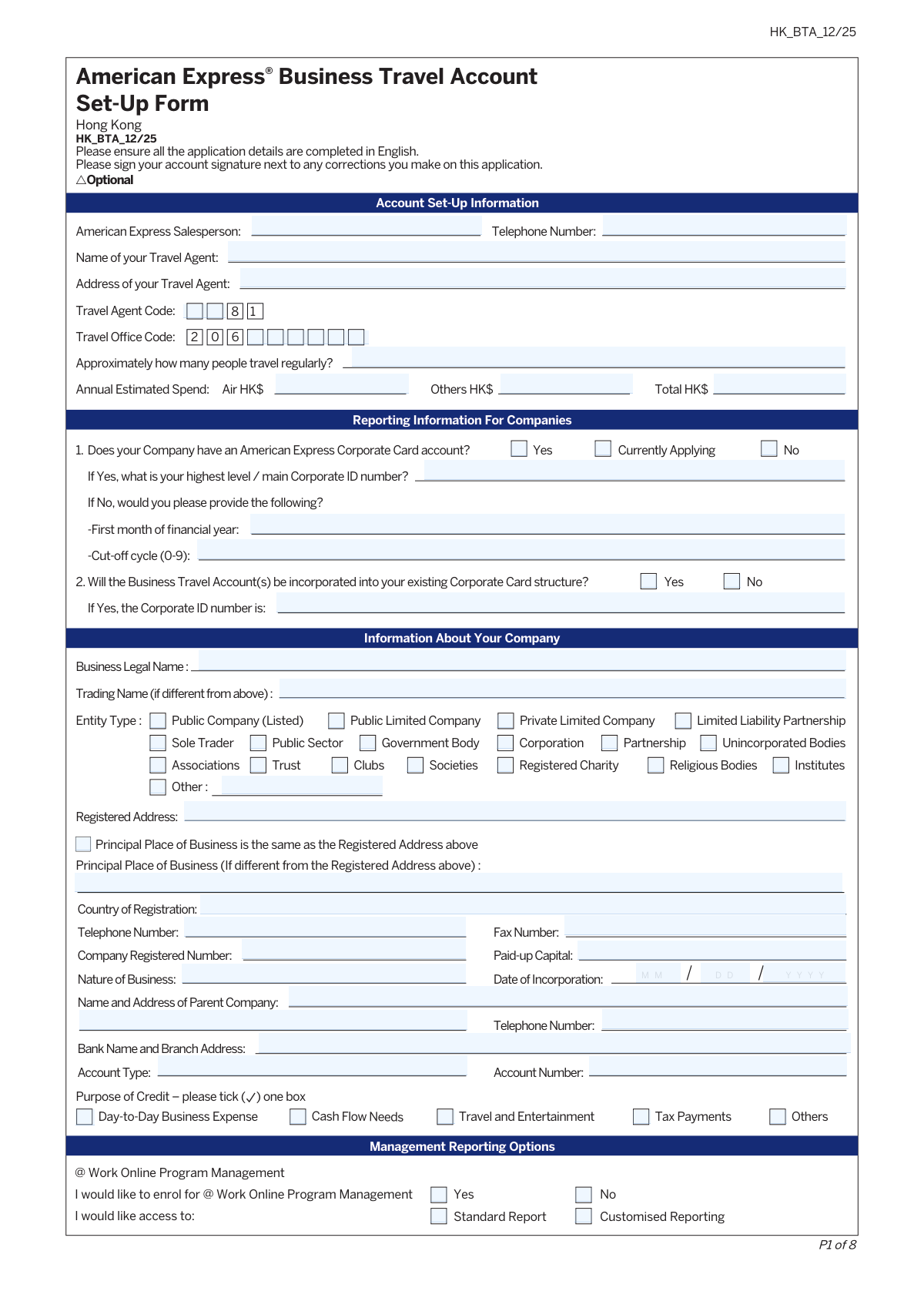
Yes! You can use AI to fill out American Express Business Travel Account Set-Up Form Hong Kong
Don't type 134 fields by hand. Tell our AI about yourself, or upload a document you already have, and it fills every field in seconds. You check it, then download, print or sign.
The AI does the filling. You just check it.
No typing into boxes, nothing to install.
What this form asks for
The AI fills all of it, from your answers or your documents.
The AI checks your answers before you download
14 checks built for this form, so a wrong date or a missing answer is caught before anyone else sees it.
This check ensures that the 'Total HK$' spend is the sum of the 'Air HK$' and 'Others HK$' fields. This is a logical validation to maintain data integrity and prevent simple arithmetic errors during form completion. If the values do not add up, the submission should be flagged for user correction to ensure accurate financial forecasting for the account.
This validation checks the logic related to the 'Does your Company have an American Express Corporate Card account?' question. If the user selects 'Yes', the 'main Corporate ID number' field must be populated. Conversely, if 'No' is selected, the 'First month of financial year' and 'Cut-of cycle' fields become mandatory. This ensures that all necessary follow-up information is captured based on the user's initial response.
This check validates the relationship between the 'Principal Place of Business is the same as the Registered Address' checkbox and the corresponding text field. If the checkbox is ticked, the 'Principal Place of Business' text field must be empty or disabled. If the checkbox is not ticked, the 'Principal Place of Business' text field becomes a required field, ensuring the company's primary operating address is always captured.
This validation enforces the specific format for the 'verification word' for new @Work users. The input must be between 4 and 20 characters, contain only lowercase alphanumeric characters, and have no spaces or special characters. This is critical for security and system compatibility, and failure to meet the criteria will prevent the user from successfully registering for the online service.
This check ensures the 'Verification pin' strictly adheres to the required format of exactly 4 numeric characters. This rule is essential for the security and authentication process for the @Work online portal. Any input that is not four digits will be rejected to prevent weak or invalid PINs from being set.
This validation confirms that the 'Date of Incorporation' is a valid calendar date entered in DD/MM/YYYY format. It also checks that the date is not in the future, as a company cannot be incorporated on a future date. This ensures the legal and historical accuracy of the company's information, which is fundamental for account setup and compliance.
And 8 more checks
- Authorising Officer Mandatory Fields
- Email Address Standard Format
- Cut-off Cycle Numeric Range
- BTA Field Character Limits
- Conditional 'Other Entity Type' Specification
- @Work User ID Conditional Fields
- Purpose of Credit Single Selection
- Signature Date Logical Check
Let AI fill out your HK_BTA_12/25
No typing. Every field filled in seconds, checked, ready to sign.
How to Fill Out HK_BTA_12/25 Online for Free in 2026
What the AI walks you through.
- Navigate to Instafill.ai and upload the American Express BTA Set-Up Form (HK_BTA_12/25) or select it from the template library.
- Use the AI assistant to automatically fill in your company's legal and business information, including registered address, entity type, and registration details.
- Provide details about your existing American Express accounts, estimated annual travel spend, and designated travel agent information.
- Select your desired management reporting options, such as @Work Online Program Management, and enter the details for the Program Administrator.
- Configure the BTA statement setup, including recipient details, report types, and custom reference fields for internal tracking.
- Review all entered information for accuracy before the designated Authorising Officer electronically signs and dates the application within the platform.
- Download the completed and signed form, gather the required supporting documents like the Authorising Officer's ID, and submit the package to American Express.
Common Mistakes in Completing HK_BTA_12/25
The ones the AI is built to catch.
Having an Unauthorised Person Sign the Application
Omitting the Mandatory Company Stamp
Forgetting to Attach the Authorising Officer's ID
Creating a Non-Compliant @Work Verification Word or PIN
Confusing 'Business Legal Name' with 'Trading Name'
Exceeding Character Limits on Reporting Fields
Leaving Mandatory Officer Details Blank
Incorrectly Filling Out Conditional Sections
Providing Incomplete Bank Details
Misunderstanding the Purpose of Custom Reference Fields
Frequently Asked Questions About HK_BTA_12/25
Is it really free for 7 days?
Can I fill other forms too?
How do I cancel?
How does the AI fill out HK_BTA_12/25?
What happens to my information?
How complex is HK_BTA_12/25 to fill out?
What is the purpose of the American Express Business Travel Account (BTA) Set-Up Form?
Who needs to fill out this form?
What documents are required with the application?
Who can be the 'Authorising Officer'?
My company already has an Amex Corporate Card. Do I need to fill out everything?
What is the '@ Work Online Program Management'?
What should I enter in the 'Customer Reference' and 'Trip Requisition' fields?
Will I receive paper statements for my BTA?
What happens if I make a mistake on the paper form?
Can I fill out this form in a language other than English?
Can AI tools help me fill out this form?
How can I fill this form out online?
What if the PDF form I have is not fillable?
Where do I submit the completed application?
Get your HK_BTA_12/25 filled out by AI
$0 today. Cancel before Nov 1 and you pay nothing.
Other forms like this one
business forms: Form 8829, Expenses for Business Use of Your Home, Form 990-T, Exempt Org Business Income Tax Return, Form 1415, Visitor Visa - Business Stream, Form 2553, Election by a Small Business Corporation, Form 0896A, Report of Subcontracts to Small and Veteran-Owned Business, Lifestyle Protector – Risk New Business for Multiple Lives Assured (LPMLA 04/2024), Form 5472 (Rev. December 2023), Information Return of a 25% Foreign-Owned U.S. Corporation or a Foreign Corporation Engaged in a U.S. Trade or Business, DBPR CILB 6-B, Application for Certified Building Contractor Who is Qualifying a Business, Schedule C (Form 1040), Profit or Loss From Business (Sole Proprietorship) (2017), Form 8822-B, Change of Address or Responsible Party — Business, Form 8822-B (Rev. December 2019), Change of Address or Responsible Party — Business, DBPR CILB 6-A, Application for Certified General Contractor Who is Qualifying a Business, Schedule C (Form 1040), Profit or Loss From Business (Sole Proprietorship), American Express Business Travel Account Set-Up Form Hong Kong, Transamerica Life Insurance Company - New Business Cover Sheet, Fidelity® Brokerage Business Account Certification, Merrill Edge® Self‑Directed Business Investor Account (BIA Account) Account Application Booklet and Agreements, Merrill Business Investor Account (BIA) and Working Capital Management Account (WCMA) Account Application Booklet and Agreements, Application for business rates for self-catering properties in England, Los Angeles County Department of Consumer and Business Affairs Tenant Application for Adjustment
American Express forms: American Express Business Travel Account Set-Up Form Hong Kong
business travel forms: American Express Business Travel Account Set-Up Form Hong Kong
business account forms: American Express Business Travel Account Set-Up Form Hong Kong, Fidelity® Brokerage Business Account Certification, Merrill Edge® Self‑Directed Business Investor Account (BIA Account) Account Application Booklet and Agreements, Merrill Business Investor Account (BIA) and Working Capital Management Account (WCMA) Account Application Booklet and Agreements, Schwab One® Account Application for Incorporated Organizations, Atlanta Commercial Tire Business Account Credit Application v2.6
Let AI fill out your HK_BTA_12/25
Your trial starts once a card is added. You pay nothing before Nov 1.
Our AI already knows this form, all 134 fields of it. Skip the typing: tell it about yourself, or upload what you have, and it fills the whole form in seconds.
- AI fills every field on all 3 pages, checkboxes included
- No typing into boxes: answer a few questions, or upload a document you already have, an old copy of this form, a photo of a document
- The AI checks the answers; you review and change anything before you download
- Download the finished PDF, print it, or sign it online
- Encrypted, and never used to train AI
Cancel before Nov 1 and you pay nothing.
A card is needed to start the trial. Cancel in two clicks from your account.
Terms · Privacy