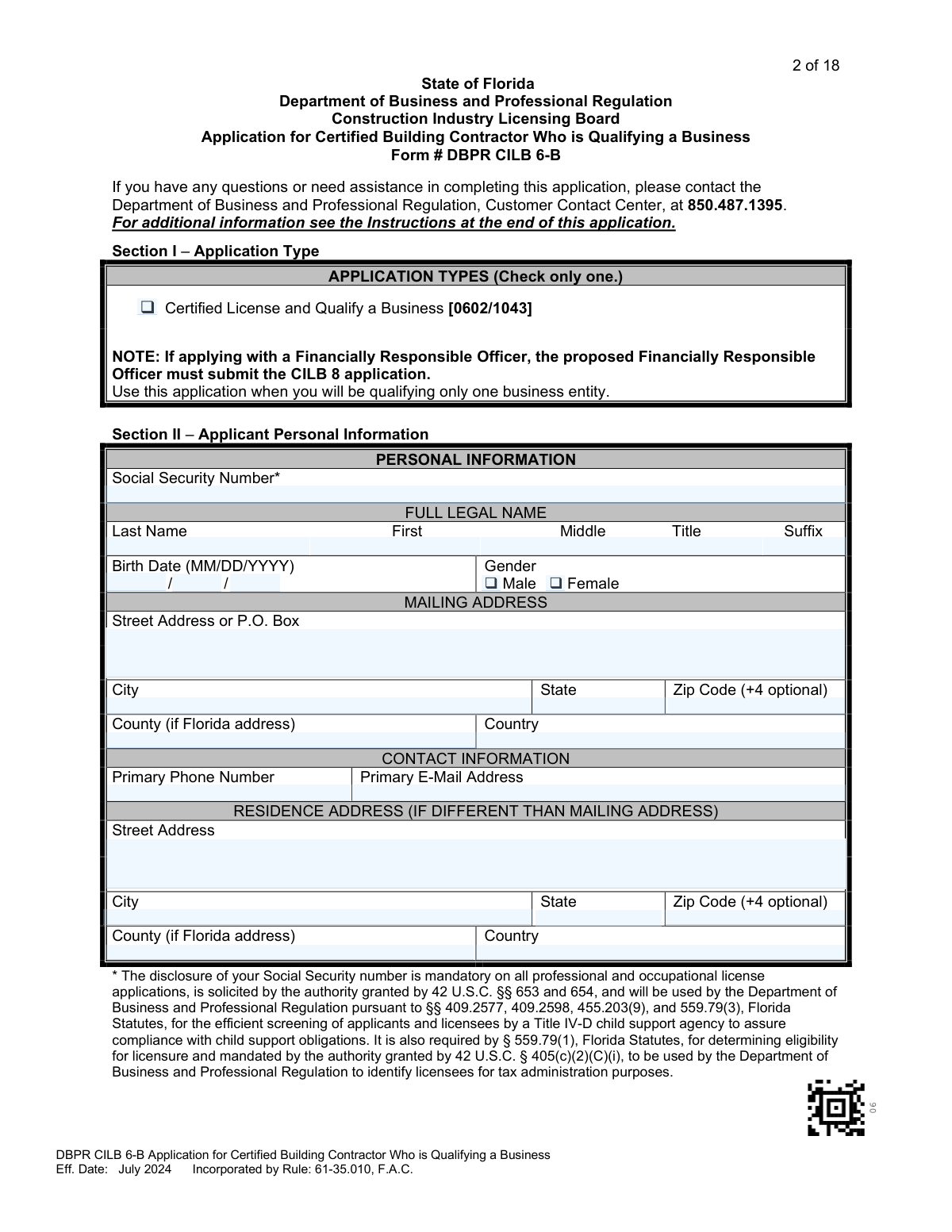
Yes! You can use AI to fill out DBPR CILB 6-B, Application for Certified Building Contractor Who is Qualifying a Business

DBPR CILB 6-B is an official State of Florida Department of Business and Professional Regulation (DBPR) Construction Industry Licensing Board application used by an individual seeking initial certification as a Certified Building Contractor and to qualify one business entity. It documents the applicant’s eligibility method (education/experience or upgrade/military pathways), employment history and project experience, and the business details to be qualified (entity type, FEID, ownership, qualifiers). The form also verifies compliance items such as electronic fingerprinting, required insurance coverage, financial responsibility (including credit report/FICO and liens/judgments), and background/disciplinary history disclosures. Submitting a complete and accurate application with required supporting documents and fees is important to avoid deficiencies, delays, or denial/revocation for misstatements.
Our AI automatically handles information lookup, data retrieval, formatting, and form filling.
It takes less than a minute to fill out DBPR CILB 6-B using our AI form filling.
Securely upload your data. Information is encrypted in transit and deleted immediately after the form is filled out.

Form specifications

Form name: DBPR CILB 6-B, Application for Certified Building Contractor Who is Qualifying a Business
Number of pages: 18
Filled form examples: Form DBPR CILB 6-B Examples
Language: English
Categories: insurance forms, DBPR forms, contractor licensing forms, CILB forms
main-image

Instafill Demo: filling out a legal form in seconds

How to Fill Out DBPR CILB 6-B Online for Free in 2026

Are you looking to fill out a DBPR CILB 6-B form online quickly and accurately? Instafill.ai offers the #1 AI-powered PDF filling software of 2026, allowing you to complete your DBPR CILB 6-B form in just 37 seconds or less.
Follow these steps to fill out your DBPR CILB 6-B form online using Instafill.ai:
  1. 1 Confirm you are using DBPR CILB 6-B for the correct application type (Certified License and Qualify a Business) and gather prerequisites: required fee, electronic fingerprinting, applicant and business credit reports (with FICO and public records check), and any legal/financial supporting documents (liens, judgments, bankruptcy discharge).
  2. 2 Complete Section II with applicant personal information (SSN, full legal name as on Social Security card, birth date, contact details, mailing/physical address), plus prior names/aliases and current/prior license history (attach extra pages if needed).
  3. 3 Complete Section III qualifications by selecting one method of qualification in Part A, then document the required employment history in Part B (employers, dates, worker/foreman role, project dates, experience areas, project details) and total your worker/foreman experience time.
  4. 4 Enter the business-to-be-qualified information in Section IV (legal business name as registered, DBA if applicable, FEID, entity type, qualification status and existing qualifiers, and business mailing/location/contact information).
  5. 5 Complete qualifier and ownership sections: Section V (primary qualifier and whether a Financially Responsible Officer is in place/will be appointed/none), Section VI if a secondary qualifier applies, and Section VII listing all owners with SSN/FEID and ownership percentages totaling 100%.
  6. 6 Answer compliance sections: Section VIII insurance attestations (general liability and workers’ comp/exemption) and Section IX financial responsibility (confirm 660+ credit score or provide approved 14-hour financial responsibility course details if below 660).
  7. 7 Complete Section X background questions for the applicant and all authorized representatives; if any “Yes” answers, fill out Section XI (questions 1–2) and/or Section XII (questions 3–4) with detailed explanations and attach required supporting documents, then sign and date Section XIII and submit the full packet and fee to DBPR at the listed mailing address.

Our AI-powered system ensures each field is filled out correctly, reducing errors and saving you time.

Why Choose Instafill.ai for Your Fillable DBPR CILB 6-B Form?

Speed

Complete your DBPR CILB 6-B in as little as 37 seconds.

Up-to-Date

Always use the latest 2026 DBPR CILB 6-B form version.

Cost-effective

No need to hire expensive lawyers.

Accuracy

Our AI performs 10 compliance checks to ensure your form is error-free.

Security

Your personal information is protected with bank-level encryption.

Frequently Asked Questions About Form DBPR CILB 6-B

This application is used to apply for a Florida Certified Building Contractor license while also qualifying (linking your license to) one specific business entity. It is for applicants who will act as the qualifier for that business.

Use DBPR CILB 6-B when you are applying for a certified building contractor license and you will be qualifying only one business entity. If a Financially Responsible Officer (FRO) will be used, that person must file a separate CILB 8 application.

Mail the completed application, supporting documentation, and required fee(s) to: Department of Business and Professional Regulation, 2601 Blair Stone Road, Tallahassee, FL 32399-0783.

The fee is $245 if applying between May 1 of an even year and August 31 of an odd year, or $145 if applying between September 1 of an odd year and April 30 of an even year. Make the check payable to the Florida Department of Business and Professional Regulation.

Yes. The form states that disclosure of your Social Security number is mandatory for all professional and occupational license applications and is used for child support compliance and tax administration purposes.

You must submit a credit report on the applicant that includes a FICO-derived credit score and a public records statement showing checks at local, state, and federal levels. You must also submit a credit report on the business being qualified from a nationally recognized credit reporting agency.

If your FICO-derived credit score is below 660, you must provide proof of completion of a 14-hour financial responsibility course approved by the Construction Industry Licensing Board. You should also complete the course information fields in Section IX if applicable.

Yes, if applicable. The checklist and instructions require proof of satisfaction of liens and judgments and discharge of bankruptcy when these appear on the credit report or when you answer “Yes” to the related background question.

Yes, electronic fingerprints are mandatory for initial construction license applications. You must follow the instructions for electronic fingerprinting and submit them through an approved process/site as described in the instructions.

You must check only one method of qualification and your employment history must match the experience/education required for that method. Options include combinations of accredited education and worker/foreman experience, or the “Upgrade Method” for eligible certified residential contractors.

The Upgrade Method applies if you are a certified residential contractor with an active current license for at least 3 years in the classification in which you are certified. If you qualify under this method, you are exempt from completing the Employment History section, but you must provide your license number for verification.

The form notes that applicants must have experience in four or more of the listed experience areas in Part B (e.g., foundation/slabs, masonry walls, steel erection, column erection, formwork for structural reinforced concrete, elevated slabs). Your employment history entries should demonstrate these areas.

List each employer/project with dates, role (worker or foreman), the qualifying contractor’s name and license number, and detailed project descriptions and specifics. Attach additional copies of the employment history page as needed to show enough experience for your selected qualification method.

You must provide the business name as registered (e.g., with the Florida Division of Corporations), any D/B/A name if used, the FEID, business type, and addresses. You must also indicate whether the business is already qualified and list any existing qualifiers and license numbers if applicable.

Both the applicant and the business’s authorized representatives (such as officers/directors, LLC members/managers, or partners) must answer the background questions. Any “Yes” answer requires completing the appropriate explanation section (XI for questions 1–2, XII for questions 3–4) and submitting supporting legal documentation as instructed.

Compliance DBPR CILB 6-B
Validation Checks by Instafill.ai

1
Application Type Selection (Exactly One)
Validates that exactly one option is selected in Section I (e.g., “Certified License and Qualify a Business [0602/1043]”). This prevents ambiguous routing and ensures the correct fee rules, requirements, and workflow are applied. If none or multiple are selected, the submission should be rejected as incomplete and returned for correction.
2
Applicant SSN Presence and 9-Digit Format
Ensures the applicant Social Security Number is provided (mandatory) and is exactly 9 digits (optionally allowing standard formatting like XXX-XX-XXXX). This is required for identity matching, child support compliance checks, and tax administration purposes as stated on the form. If missing or malformed, the application should be marked deficient and not processed until corrected.
3
Applicant Full Legal Name Completeness and No Initials
Checks that the applicant’s full legal name fields (last, first, middle) are completed and do not contain initials-only entries or nicknames (per instructions: must match Social Security card). This reduces identity mismatches with fingerprints, credit reports, and background checks. If the name appears abbreviated (e.g., “J.”) or incomplete, the system should flag it and require correction or supporting documentation.
4
Birth Date Validity (MM/DD/YYYY) and Reasonable Range
Validates that the birth date is present, follows MM/DD/YYYY, and represents a real calendar date within a reasonable range (e.g., not in the future). Accurate DOB is critical for identity verification and background screening. If invalid, the submission should be blocked until a valid date is provided.
5
Mailing Address Completeness and ZIP Code Format
Ensures the mailing address includes street/PO box, city, state, and a valid ZIP (5 digits, with optional ZIP+4). This is required for official correspondence and deficiency notices. If incomplete or ZIP is invalid, the application should be flagged because DBPR communications may fail.
6
Physical Address Requirement (At Least One Non-PO Box Address)
Checks that at least one provided address (mailing or residence) is a physical location and not solely a P.O. Box, per instructions requiring at least one physical address. This supports compliance, auditing, and verification activities. If both addresses are P.O. Boxes or otherwise non-physical, the application should be marked deficient and require a physical address.
7
Primary Contact Information Format (Phone and Email)
Validates that the primary phone number is present and matches an acceptable phone format (10 digits with optional country code) and that the primary email address is syntactically valid. Reliable contact data is needed to resolve application questions quickly and reduce processing delays. If missing or invalid, the system should flag the record and request corrected contact information.
8
Prior Name/Alias Conditional Requirement
If the applicant answers “Yes” to having used another name, validates that at least one prior name entry is completed with a last and first name. This is important for matching supporting documents, criminal history, and credit records that may be under different names. If “Yes” is selected but no prior name is provided, the application should be considered incomplete.
9
Qualification Method Selection (Exactly One) and Upgrade License Number
Ensures exactly one qualification method is selected in Section III Part A (including the separate Military Veterans options, if used). If the “Upgrade Method” is selected, a license number must be provided and must follow expected license-number formatting rules for DBPR verification. If multiple/none are selected or the upgrade license number is missing, the application should be rejected as deficient.
10
Employment History Required Unless Upgrade Method Selected
Validates that Section III Part B employment history is provided when the selected qualification method requires experience documentation, and allows it to be omitted only when the Upgrade Method is selected (as stated). This ensures the Board can verify the required experience timeframes. If employment history is missing when required, the application should be flagged and not advanced to review.
11
Employment/Project Date Ranges (MM/YYYY) and Logical Order
Checks that employment dates and project dates are in MM/YYYY format, represent valid months, and that “to” dates are not earlier than “from” dates. It also flags overlapping or impossible timelines if they create inconsistencies with claimed experience totals. If date ranges are invalid or reversed, the system should require correction before experience can be credited.
12
Experience Area Coverage Requirement (At Least Four Areas)
Validates that the applicant’s employment history demonstrates experience in four or more of the listed experience areas (foundation/slabs, masonry walls, steel erection, column erection, formwork, elevated slabs), as required for Certified Building Contractor applicants. This is a core eligibility rule referenced in the form note. If fewer than four areas are selected across all submitted projects, the application should be flagged as not meeting minimum experience criteria.
13
Business FEID Presence and Format
Ensures the business Federal Employer Identification Number (FEID) is provided and is a valid 9-digit FEIN format (optionally XX-XXXXXXX). FEID is required to identify the business entity and to associate credit reports and ownership records correctly. If missing or malformed, the application should be marked deficient and held for correction.
14
Business Already Qualified Logic (License/Qualifier Details Required When YES)
If the business is marked as already qualified, validates that at least one existing qualifier name and license number (and/or the business qualification license number field, if used) is provided. This is necessary to determine whether the applicant is becoming an additional primary qualifier or a secondary qualifier and to verify the business’s current status. If “YES” is selected without the required license/qualifier details, the submission should be flagged for missing critical information.
15
Business Ownership Percentages Sum to 100% and Owner Identifiers Present
Validates that each listed owner has a name, address, and an identifier (SSN for individuals or FEID for entity owners) and that the ownership percentages are numeric and sum to exactly 100%. This is required by Section VII and supports background screening of authorized representatives and ownership verification. If totals do not equal 100% or identifiers are missing, the application should be rejected as incomplete.
16
Background Questions Matrix Completeness and Explanation Linkage
Ensures that the applicant and each listed authorized representative has a Yes/No response recorded for each of the four background questions, and that any “Yes” answer triggers a corresponding completed explanation in Section XI (for Q1–Q2) or Section XII (for Q3–Q4). This prevents undisclosed issues and enforces the form’s rule that the number of “Yes” boxes must match the number of explanations provided. If any required response is blank or explanations are missing for a “Yes,” the application should be marked deficient and not processed.

Common Mistakes in Completing DBPR CILB 6-B

Paying the wrong application fee (wrong cycle or amount)

Applicants often submit $245 vs. $145 based on the wrong date window (May 1 of an even year–Aug 31 of an odd year vs. Sept 1 of an odd year–Apr 30 of an even year). This typically happens because people use the date they started the form rather than the date DBPR receives/processes it, or they don’t notice the biennial cycle language. The consequence is a deficiency notice and processing delays (or the application being held until correct fees are received). Avoid this by confirming today’s date falls in the correct window, enclosing the exact amount, and making the check payable to the Florida Department of Business and Professional Regulation.

Submitting an unacceptable credit report (missing FICO score or public records statement)

A very common issue is providing a consumer credit report that does not include a FICO-derived score and/or does not include the required public records statement showing local, state, and federal checks. Applicants also sometimes use a credit agency not on the DBPR list. This leads to an automatic deficiency because DBPR cannot evaluate financial responsibility and stability without the required elements. Avoid it by ordering from a DBPR-approved agency and verifying the report explicitly shows a FICO-derived score and the public records statement before mailing.

Forgetting the separate business credit report for the entity being qualified

Many applicants submit only their personal credit report and overlook that the business to be qualified must also have a credit report from a nationally recognized agency with the public records statement. This happens because the checklist mentions both, but applicants assume the personal report covers the business. The consequence is a delay while DBPR requests the missing business report. Avoid this by ordering two reports (individual and business) and ensuring the business report matches the exact legal business name/FEID used in Section IV.

Not completing electronic fingerprints (or using the wrong process)

Applicants frequently mail the application without completing electronic fingerprinting, or they complete fingerprints but do not follow the instructions for DBPR/CILB submission. This happens because fingerprinting is handled outside the form and can be mistaken as optional or “later.” The result is that the background screening cannot be completed and the application stalls. Avoid this by completing electronic fingerprints through the approved process in the instructions and keeping proof/receipt in case DBPR needs to match your prints to your application.

Using a name that does not match the Social Security card (and not listing prior/alias names)

Applicants often enter nicknames, initials, or a shortened version of their name, or they forget to list maiden names/aliases used on transcripts, court records, or prior licenses. DBPR specifically requires the full legal name as it appears on the Social Security card and requires prior/alias names to reconcile supporting documents. Mismatches commonly trigger deficiencies because DBPR cannot verify identity, education, or legal records. Avoid this by entering your full legal name exactly as on the SS card and listing every prior/alternate name that appears on any supporting documentation.

Providing only a P.O. Box and omitting a physical address

The instructions require at least one physical address (not a P.O. Box), but applicants often provide only a mailing P.O. Box and leave the residence/physical address blank. This happens because people want mail privacy or assume the mailing address is sufficient. The consequence is a deficiency request and delays, since DBPR needs a physical address on file. Avoid it by providing a physical residence address (or other physical address) whenever the mailing address is a P.O. Box.

Selecting the wrong method of qualification or checking more than one box in Part A

Applicants sometimes check multiple qualification methods, or choose a method that their employment history and education do not actually support (e.g., claiming foreman time without enough months/years, or claiming degree equivalency without an eligible construction-related degree). This usually happens because the options look similar and applicants try to “cover all bases.” The consequence is that DBPR cannot determine eligibility and will request clarification or deny based on insufficient proof. Avoid this by selecting exactly one method and ensuring your Part B employment history and any education documentation clearly match that method’s required timeframes.

Employment history entries missing verification details (qualifying contractor license #, employer contact, dates in mm/yyyy)

Part B is frequently incomplete: applicants omit the qualifying contractor’s name/license number, provide no employer phone/email, or use inconsistent date formats (the form requires mm/yyyy for employment and project dates). This happens because applicants focus on describing work but overlook the verification fields DBPR uses to confirm experience. The consequence is delays while DBPR requests missing data or cannot verify experience at all. Avoid it by completing every line item for each employer/project, using mm/yyyy consistently, and ensuring the qualifying contractor license number is included for the supervisor who can verify your work.

Not demonstrating experience in at least four required experience areas for Certified Building Contractor

Applicants often list projects but fail to check enough experience areas (foundation/slabs, masonry walls, steel erection, column erection, formwork, elevated slabs) or provide descriptions too vague to prove the areas. This happens because applicants assume “general construction” descriptions are sufficient. The consequence is that DBPR may determine the experience does not meet Rule 61G4-15.001(2)(a) and request additional projects or deny for insufficient qualifying experience. Avoid this by selecting and clearly describing at least four experience areas across your projects and including measurable project specifics (stories, square footage, materials, scope).

Business information not matching Sunbiz records (legal name, DBA, business type, FEID)

A common error is entering a business name/DBA that differs from the Florida Division of Corporations (Sunbiz) registration, selecting the wrong business type (LLC vs corporation), or leaving the FEID blank. This happens when applicants use a marketing name, an unregistered fictitious name, or outdated formation details. The consequence is verification problems and deficiencies because DBPR checks authorized representatives and entity details against Sunbiz. Avoid it by copying the exact legal entity name and DBA as registered, confirming the entity type, and entering the correct FEID for the business being qualified.

Background questions completed only for the applicant (not for all authorized representatives) or missing required explanations

Applicants often answer Section X only for themselves and forget that all authorized representatives (officers/directors, LLC members/managers, partners, etc.) must also be listed with SSNs and Yes/No answers. Another frequent mistake is checking “Yes” but not completing Section XI/XII explanations and attaching required legal/disciplinary documents, or not matching the number of “Yes” answers to the number of explanations. This leads to major delays and can create denial/revocation risk if answers are incomplete or inaccurate. Avoid it by identifying every authorized representative per the entity type, completing the grid for each person, and providing a separate, detailed Section XI/XII explanation (with supporting documents) for every “Yes” response.
Saved over 80 hours a year

“I was never sure if my IRS forms like W-9 were filled correctly. Now, I can complete the forms accurately without any external help.”

Kevin Martin Green

Your data stays secure with advanced protection from Instafill and our subprocessors

Robust compliance program

Transparent business model

You’re not the product. You always know where your data is and what it is processed for.

ISO 27001, HIPAA, and GDPR

Our subprocesses adhere to multiple compliance standards, including but not limited to ISO 27001, HIPAA, and GDPR.

Security & privacy by design

We consider security and privacy from the initial design phase of any new service or functionality. It’s not an afterthought, it’s built-in, including support for two-factor authentication (2FA) to further protect your account.

Fill out DBPR CILB 6-B with Instafill.ai

Worried about filling PDFs wrong? Instafill securely fills dbpr-cilb-6-b-application-for-certified-building-c forms, ensuring each field is accurate.